On This Page8 sections
Key Takeaways
- AI coding agents are replacing simple autocomplete as the center of AI-assisted development. The winning products now read repositories, plan changes, edit files, run commands, open pull requests, and verify results.
- The best AI coding agent depends on workflow, not only model quality. Terminal-first developers, IDE users, enterprise teams, open-source builders, and cloud-agent teams need different tools.
- The 2026 market has split into five categories: AI IDEs, CLI agents, cloud agents, GitHub-native agents, and open-source/local-first agents.
- Codex, Claude Code, Cursor, Devin, GitHub Copilot, Jules, Gemini CLI, Qwen Code, Kimi Code, Aider, and OpenCode now represent different approaches to agentic software engineering.
- The biggest risk is not bad code generation. The bigger risk is out-of-scope edits, weak permission boundaries, hidden token cost, unreviewed database migrations, unsafe shell commands, and over-trusting generated pull requests.
The Quick Ranking
| Rank | AI Coding Agent | Best For | Main Advantage | Main Risk |
|---|---|---|---|---|
| 1 | Claude Code | Terminal-first professional developers | Strong repo reasoning and command-line workflow | Requires careful permission control |
| 2 | Codex CLI | OpenAI-native coding workflows | Local repo access plus Codex app/cloud ecosystem | Best results need specs and tests |
| 3 | Cursor | AI-native IDE users | Excellent editor workflow and codebase context | Can become expensive for heavy agent use |
| 4 | Devin | Parallel cloud agents | Good for delegated tickets and background PR work | Expensive if tasks are vague |
| 5 | GitHub Copilot | GitHub-first teams | Easy enterprise rollout and PR workflow | Less AI-native than Cursor-style editors |
| 6 | Jules | GitHub repo tasks in cloud VMs | Strong async coding-agent model | Less mature ecosystem than GitHub/Codex/Claude |
| 7 | Gemini CLI | Google/Gemini terminal workflows | Open-source terminal agent with MCP support | Migration path matters as Google tooling evolves |
| 8 | Google Antigravity | Gemini-native agent-first development | Coordinates editor, terminal, browser, cloud, and review artifacts | Strong Google ecosystem coupling |
| 9 | Kiro | Spec-driven development | Turns prompts into specs, tasks, code, and PRs | More structured than casual vibe coding |
| 10 | Windsurf | Agentic IDE workflows | Visual review-oriented coding experience | Transition into Devin ecosystem changes positioning |
| 11 | OpenCode | Open-source terminal workflows | Model-flexible and terminal-native | Requires setup discipline |
| 12 | Aider | Git-based pair programming | Simple, open-source, repo-aware CLI | Less full-agent orchestration than newer tools |
| 13 | Qwen Code | Qwen/Alibaba ecosystem users | Open-source CLI optimized for Qwen Coder models | Provider setup and model routing matter |
| 14 | Kimi Code | Kimi model users and long-context coding | Fast CLI workflow with MCP and provider flexibility | Paid access and privacy review matter |
| 15 | Continue | Open-source IDE extension teams | Strong model control and source-controlled AI workflows | More configuration work than managed tools |
| 16 | Kilo Code | Open-source editor/CLI agent workflows | Flexible VS Code, JetBrains, CLI, and cloud support | Young ecosystem compared with Cursor/Claude/Codex |
| 17 | Cline | VS Code agent workflows | Human-approved edits, terminal, browser, MCP | Can be noisy and expensive without limits |
| 18 | Roo Code | Custom agent modes in VS Code | Highly configurable agent workflows | Configuration complexity |
| 19 | Zed AI | Fast native AI editor workflows | Open-source editor with agentic direction | Smaller ecosystem than VS Code-based tools |
| 20 | Augment Code | Enterprise codebase understanding | Managed platform with review and team controls | Less suited to solo low-cost workflows |
What Is an AI Coding Agent?
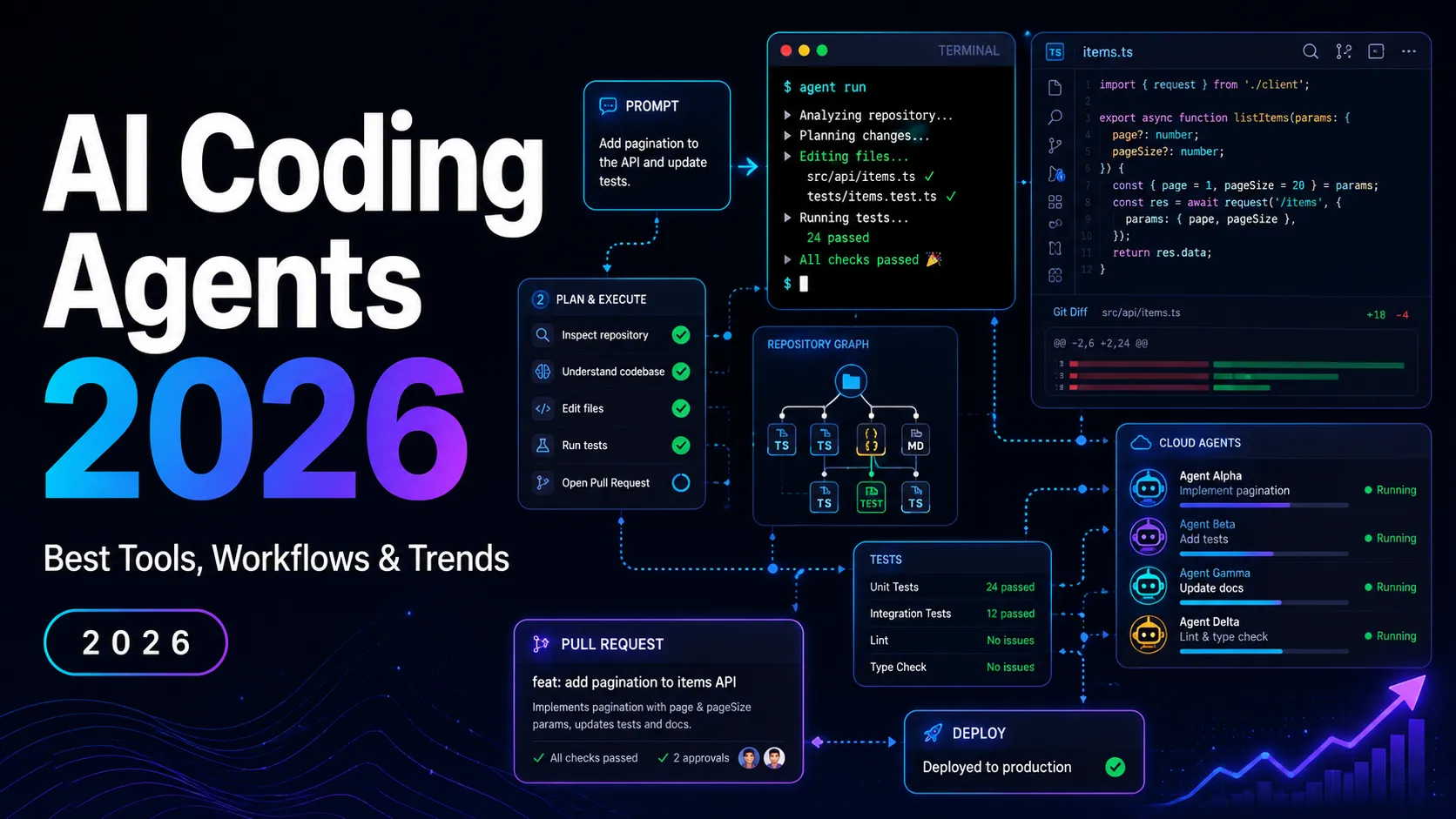
An AI coding agent is a software development tool that can do more than answer questions or autocomplete code. A real coding agent can inspect a repository, reason about architecture, edit files, run commands, interpret errors, generate tests, and iterate toward a working change.
A basic chatbot says:
Here is the code you can paste.A coding agent says:
I found the failing route, updated the handler, added a regression test, ran the test suite, and prepared a diff for review.That difference matters. In 2026, the center of AI coding is moving from suggestion to delegation.
Why AI Coding Agents Matter in 2026
AI coding tools used to be mostly about speed:
- faster autocomplete
- faster boilerplate
- faster explanations
- faster snippets
In 2026, the value proposition is different. The best tools now compete on workflow ownership.
Modern coding agents help with:
- Repository exploration — understanding unfamiliar codebases.
- Bug fixing — reproducing failures, editing code, and rerunning tests.
- Feature implementation — planning and making multi-file changes.
- Refactoring — moving code without manually touching every file.
- Test generation — adding unit, integration, and regression tests.
- Migration work — upgrading frameworks, APIs, dependencies, and schemas.
- Pull request preparation — creating branches, diffs, summaries, and implementation notes.
- Code review — finding risky changes, missing tests, and style inconsistencies.
- Documentation updates — keeping docs aligned with code changes.
The practical shift is simple: developers are no longer only asking AI for code. They are asking AI to operate inside the development loop.
The Five Types of AI Coding Agents
1. AI IDE Agents
These agents live inside a full code editor or AI-native IDE.
Examples:
Best for: developers who want AI deeply integrated into editing, navigation, review, and project context.
Main advantage: strong visual workflow.
Main risk: editor lock-in and usage-cost complexity.
2. Terminal / CLI Coding Agents
These agents run from the command line inside a local repository.
Examples:
Best for: professional developers who live in terminal workflows.
Main advantage: close to Git, shell commands, scripts, and local project state.
Main risk: unsafe commands or broad file edits if permission settings are too relaxed.
3. Cloud Coding Agents
These agents work in remote environments, often asynchronously.
Examples:
- Devin
- Jules
- Codex cloud
- GitHub Copilot cloud agent
Best for: teams that want to delegate tickets, bugs, migrations, or background implementation tasks.
Main advantage: parallel work without blocking the developer’s local machine.
Main risk: vague tasks can waste compute, create poor diffs, or require heavy review.
4. GitHub-Native Agents
These agents connect tightly to GitHub repositories, issues, branches, and pull requests.
Examples:
- GitHub Copilot
- Jules
- Codex cloud
- Devin
Best for: teams that already manage engineering work through GitHub.
Main advantage: smoother issue-to-PR workflow.
Main risk: generated PRs can appear more complete than they really are.
5. Open-Source and Model-Flexible Agents
These agents give developers more control over model choice, local execution, and provider routing.
Examples:
Best for: developers who want control, transparency, lower cost, or local/open-model experimentation.
Main advantage: less platform lock-in.
Main risk: more setup and security responsibility.
1. Claude Code
Best for: terminal-first developers who want a powerful coding agent inside real repositories.
Claude Code is one of the most important AI coding agents in 2026 because it represents the cleanest version of the terminal-agent workflow. It reads code, edits files, runs commands, and can work through multi-step engineering tasks with human approval.
Strengths:
- Strong codebase reasoning.
- Natural terminal workflow.
- Good for debugging, refactoring, and test generation.
- Works well with repository instructions and project-specific context files.
- Strong fit for developers who prefer local control over browser-based app builders.
Weaknesses:
- Requires careful approval settings.
- Long sessions can become expensive.
- Overly broad prompts can produce overly broad edits.
- Developers still need to review shell commands, file changes, and generated tests.
Best use cases:
- Bug diagnosis.
- Multi-file refactors.
- Test generation.
- Framework upgrades.
- CLI-heavy backend work.
- Repository onboarding.
Recommended workflow:
Read the repository first.
Summarize the relevant files.
Propose a plan before editing.
Make the smallest safe change.
Run tests.
Show the diff and risk areas.
Do not touch unrelated files.
2. Codex CLI
Best for: OpenAI-native coding workflows across local terminal, app, IDE, web, and cloud surfaces.
Codex CLI is OpenAI’s terminal coding agent. Its biggest advantage is ecosystem reach: the same Codex concept now spans local CLI, app-based workflows, IDE integration, web/cloud tasks, and review-oriented development.
Strengths:
- Strong fit for OpenAI users.
- Local repository editing.
- Shell command execution.
- Works well with structured specs.
- Can connect into broader Codex app and cloud workflows.
Weaknesses:
- Needs good task boundaries.
- Usage can climb during long repair loops.
- Vague tasks produce vague diffs.
- Best results require tests and clear acceptance criteria.
Best use cases:
- Feature implementation.
- Bug fixing.
- Test-driven tasks.
- Local repo automation.
- Pull request preparation.
- Multi-agent task decomposition.
Good task format:
Task: Add usage-based billing to the existing SaaS app.

Scope:
1. Inspect current auth and user schema.
2. Propose database changes before editing.
3. Add billing routes behind feature flags.
4. Add tests for active, canceled, trialing, and past_due states.
5. Do not modify unrelated UI.
6. Summarize every changed file.
3. Cursor
Best for: developers who want an AI-native editor as their main development environment.
Cursor remains one of the most important AI coding tools because it owns the editor experience. Instead of treating AI as a terminal command or side panel, Cursor makes AI part of the everyday code navigation, editing, and review loop.
Strengths:
- Strong AI-native IDE workflow.
- Good codebase context.
- Familiar VS Code-style experience.
- Useful for multi-file edits and feature work.
- Strong adoption among developers who want agentic coding inside the editor.
Weaknesses:
- Heavy usage can become costly.
- Model and agent behavior can change quickly.
- Not ideal for teams that require local-only or fully open-source workflows.
- Requires review discipline when using autonomous edits.
Best use cases:
- Frontend product work.
- Full-stack app development.
- Refactoring.
- Codebase Q&A.
- Pair-programming inside the editor.
- Team workflows around AI-native editing.
4. Devin
Best for: engineering teams that want to delegate tasks to autonomous cloud agents.
Devin is different from most AI coding tools. It is closer to a background software engineer than an autocomplete assistant. The strongest Devin workflow is not “help me write this function.” It is “take this ticket, work in a cloud environment, run tests, and return a reviewable artifact.”
Strengths:
- Parallel cloud agents.
- Good for backlog work.
- Useful for migrations, bug reproduction, and test generation.
- Produces reviewable outputs such as pull requests and implementation notes.
- Stronger for teams than casual solo use.
Weaknesses:
- Vague tasks waste time and credits.
- Review is still mandatory.
- Not ideal for tight interactive editing.
- Cost structure matters for high-volume agent work.
Best use cases:
- Code migrations.
- Bug reproduction.
- Ticket-based implementation.
- Documentation maintenance.
- Test expansion.
- Multi-repo engineering work.
5. GitHub Copilot
Best for: teams already standardized on GitHub and Microsoft developer workflows.
GitHub Copilot is not always the most aggressive AI-native coding agent, but it has one of the strongest distribution advantages. For companies already using GitHub, Copilot is often easier to roll out than switching everyone to a new IDE.
Strengths:
- Strong GitHub integration.
- Familiar enterprise procurement path.
- Good IDE coverage.
- Useful for inline suggestions, chat, review, and cloud-agent workflows.
- Easier adoption for teams already using GitHub.
Weaknesses:
- Less AI-native than Cursor-style editors.
- Agentic workflows may feel more conservative.
- Teams still need code review standards.
- Works best when repositories have good tests and issue hygiene.
Best use cases:
- Enterprise adoption.
- GitHub issue-to-PR workflows.
- Code review assistance.
- Developer onboarding.
- Standardized team AI tooling.
6. Jules
Best for: asynchronous GitHub repository tasks in a cloud VM.
Jules is Google’s autonomous coding agent for repository work. Its core workflow is simple: select a GitHub repository and branch, assign a task, let the agent work in a cloud environment, and review the result.
Strengths:
- Cloud VM execution.
- GitHub-oriented task flow.
- Can run or create tests.
- Good fit for async work.
- Useful for bug fixes, cleanup tasks, and small feature implementation.
Weaknesses:
- Ecosystem is less mature than GitHub Copilot, Codex, Claude Code, or Cursor.
- Requires clear tasks.
- Generated work still needs review.
- Best for repository tasks, not general product planning.
Best use cases:
- Small GitHub issues.
- Test generation.
- Bug fixes.
- Dependency updates.
- Documentation cleanup.
7. Gemini CLI
Best for: developers who want a Google/Gemini terminal agent.
Gemini CLI is an open-source terminal agent that gives developers direct access to Gemini from the command line. It can read repositories, use local or remote tools, and work through a reason-and-act loop.
Strengths:
- Open-source terminal workflow.
- Google/Gemini ecosystem fit.
- MCP support.
- Useful for codebase exploration, bug fixing, and test coverage work.
- Good for developers already using Google AI tools.
Weaknesses:
- Google’s developer-agent ecosystem is changing quickly.
- Teams should evaluate migration paths carefully.
- Requires terminal and permission discipline.
- Less polished than some paid IDE agents.
Best use cases:
- Terminal-based code tasks.
- Gemini model workflows.
- Codebase Q&A.
- Test generation.
- MCP-connected development.
8. Google Antigravity
Best for: Gemini-native agent-first development.
Google Antigravity is best understood as a broader agent-first development environment rather than only a terminal tool. It is aimed at coordinating agents across editor, terminal, browser, desktop, cloud, and review artifacts.
Strengths:
- Agent-first workflow.
- Strong Google ecosystem alignment.
- Useful for coordinating multiple surfaces.
- Better strategic fit for new Google AI development workflows than legacy Firebase Studio-style approaches.
Weaknesses:
- Platform coupling matters.
- Teams outside Google Cloud may prefer provider-neutral agents.
- New workflows require operational testing before production use.
Best use cases:
- Gemini-first teams.
- Firebase or Google Cloud projects.
- Agent orchestration.
- Reviewable AI development artifacts.
9. Kiro
Best for: spec-driven development and production-oriented teams.
Kiro is useful because it pushes against the weakest part of “vibe coding”: vague prompts. Instead of jumping straight from prompt to code, Kiro emphasizes specs, tasks, designs, hooks, and structured implementation.
Strengths:
- Spec-driven workflow.
- Better structure for larger projects.
- Useful for turning ideas into tasks and implementation plans.
- Strong fit for teams that want less chaotic AI coding.
Weaknesses:
- More process than quick prototyping tools.
- Casual users may find it slower than direct prompt-to-code agents.
- Works best when the team already values specs and review.
Best use cases:
- Production features.
- Structured implementation plans.
- Team workflows.
- Large codebases.
- Projects where requirements matter.
10. Windsurf
Best for: visual agentic IDE workflows.
Windsurf is best evaluated as part of the shift from classic AI editors toward agent-first development environments. Its strength is making agent work visible inside an editor-style interface.
Strengths:
- Visual review-oriented workflow.
- Good for developers who want AI inside the editor.
- Useful for codebase navigation and multi-file edits.
- Stronger UX than many terminal-only tools.
Weaknesses:
- Market positioning has changed as Windsurf moved into the Devin ecosystem.
- Developers should check current product direction before committing.
- Not as terminal-native as Claude Code, Codex CLI, or Aider.
Best use cases:
- IDE-based AI coding.
- Visual review.
- Frontend and full-stack workflows.
- Teams comparing Cursor-style alternatives.
11. OpenCode
Best for: open-source, terminal-native, model-flexible coding.
OpenCode is attractive for developers who want an open-source coding agent without being locked into one model provider or IDE.
Strengths:
- Open-source orientation.
- Terminal-native workflow.
- Model flexibility.
- Good for developers who want control over provider choice.
- Useful for local and GitHub-connected workflows.
Weaknesses:
- Requires setup discipline.
- Less polished than managed commercial IDEs.
- Security depends heavily on user configuration.
Best use cases:
- Local repo work.
- Provider-flexible AI coding.
- Open-source workflows.
- Developers who dislike closed AI IDEs.
12. Aider
Best for: Git-aware terminal pair programming.
Aider remains important because it is simple, practical, and Git-native. It edits real files in a local repository and makes it easy to inspect diffs, commits, and changes.
Strengths:
- Open source.
- Terminal-native.
- Strong Git workflow.
- Good for direct file editing.
- Model-flexible.
Weaknesses:
- Less full-agent orchestration than newer systems.
- More manual workflow than cloud agents.
- Best suited to developers comfortable with Git.
Best use cases:
- Small features.
- Refactors.
- Bug fixes.
- Test generation.
- Cost-conscious AI coding.
13. Qwen Code
Best for: developers using Qwen Coder models or Alibaba Cloud-based AI workflows.
Qwen Code is a terminal-first coding agent optimized around Qwen Coder models. It is useful for developers who want an open-source CLI workflow and strong provider flexibility.
Strengths:
- Open-source CLI.
- Qwen Coder alignment.
- MCP support.
- Provider routing flexibility.
- Good for terminal-first workflows.
Weaknesses:
- Setup and authentication require attention.
- Not a full graphical IDE.
- Best experience may depend on paid model access or provider configuration.
Best use cases:
- Qwen-based coding.
- Terminal repo work.
- Git automation.
- Codebase exploration.
- Model-flexible agent experiments.
14. Kimi Code
Best for: Kimi model users and long-context coding workflows.
Kimi Code is Moonshot AI’s terminal-first coding agent. It is relevant for developers who want Kimi model access, long-context repository work, and a CLI agent with extensibility features.
Strengths:
- Terminal-first workflow.
- Kimi model integration.
- MCP support.
- Provider flexibility.
- Useful for long-context codebase work.
Weaknesses:
- Paid access and quotas matter.
- Privacy review is important for sensitive repositories.
- Less suitable for users who want a full AI IDE.
Best use cases:
- Long-context code reading.
- CLI coding sessions.
- Kimi model evaluation.
- MCP-connected developer workflows.
15. Continue
Best for: teams that want open-source IDE extensions and model control.
Continue is valuable because it gives teams a more configurable and source-controlled approach to AI coding. It is less about one magic agent and more about integrating AI into existing editor and review workflows.
Strengths:
- Open-source orientation.
- Works with VS Code and JetBrains workflows.
- Model control.
- Good for teams that want AI checks and repository-defined behavior.
Weaknesses:
- More configuration work.
- Less polished than fully managed AI IDEs.
- Requires teams to define their own standards.
Best use cases:
- Model-flexible teams.
- Open-source AI coding setup.
- AI checks in pull requests.
- Organizations that want control over prompts and policies.
How to Choose the Right AI Coding Agent
Choose Claude Code if:
- The team prefers terminal-first workflows.
- Developers want strong repository reasoning.
- Tasks involve debugging, refactoring, testing, and command execution.
- Human approval before changes is important.
Choose Codex CLI if:
- The team is already OpenAI-native.
- Developers want local repo work plus access to Codex app/cloud workflows.
- Tasks can be clearly scoped.
- Tests and specs are available.
Choose Cursor if:
- The developer wants an AI-native editor.
- The team works heavily in frontend or full-stack code.
- Codebase context and fast iteration matter.
- A visual editing workflow is preferred over terminal-only agents.
Choose Devin if:
- The team wants background agents.
- Work is ticket-based.
- Multiple tasks can run in parallel.
- Engineers are ready to review generated PRs and artifacts.
Choose GitHub Copilot if:
- The company already uses GitHub heavily.
- Enterprise rollout matters.
- Developers need AI inside existing IDEs.
- The team prefers conservative adoption over switching to a new AI IDE.
Choose Aider, OpenCode, Continue, or Qwen Code if:
- Open-source control matters.
- The team wants model flexibility.
- Local workflows are preferred.
- The organization wants to avoid platform lock-in.
The Best AI Coding Agent Stack for 2026
For serious development, one tool is often not enough. A practical 2026 stack looks like this:
Solo Developer Stack
- Editor agent: Cursor or Zed AI
- Terminal agent: Claude Code, Codex CLI, or Aider
- Open-source fallback: OpenCode or Continue
- Review habit: always inspect diffs before committing
Startup Engineering Stack
- Primary IDE: Cursor or Kiro
- Terminal agent: Claude Code or Codex CLI
- Cloud delegation: Devin, Jules, or Codex cloud
- PR assistant: GitHub Copilot
- Rule files: AGENTS.md, CLAUDE.md, Cursor rules, project-specific test commands
Enterprise Stack
- Standard assistant: GitHub Copilot
- Advanced engineering agent: Claude Code, Codex CLI, or Cursor
- Autonomous agent: Devin or approved cloud agent
- Governance layer: SSO, audit logs, repository policy, allowed tools, model routing, and secrets policy
- Review requirement: generated code cannot bypass normal production controls
Open-Source / Local-First Stack
- CLI agent: Aider, OpenCode, or Qwen Code
- Editor extension: Continue, Cline, or Roo Code
- Model routing: local models, OpenAI-compatible endpoints, or provider-specific APIs
- Safety layer: isolated branches, allowlists, restricted shell permissions, and explicit approval modes
The 2026 AI Coding Agent Workflow
The best agent workflows are structured. The worst ones are vague.
Weak Prompt
Fix the app.Better Prompt
The login page returns a 500 error after submitting valid credentials.

Please:
1. Inspect the auth route and user lookup logic.
2. Identify the exact failure path.
3. Propose a fix before editing.
4. Add a regression test.
5. Run the relevant test command.
6. Show the final diff.
7. Do not modify unrelated files.
Strong Prompt for Production Work
Task: Implement team invitations.

Context:
- Existing app uses Next.js, PostgreSQL, and role-based access.
- Users can belong to multiple workspaces.
- Only workspace owners can invite members.

Acceptance criteria:
1. Owner can invite a user by email.
2. Invite token expires after 7 days.
3. Invited user joins the correct workspace after accepting.
4. Non-owners cannot create invites.
5. Duplicate pending invites are blocked.
6. Add unit tests for permission checks.
7. Add integration tests for accepting an invite.

Process:
- First inspect the current auth and workspace schema.
- Then propose the minimal schema change.
- Wait before editing migration files.
- After implementation, run typecheck and tests.
Repository Setup for AI Coding Agents
A good repository makes agents more reliable. A weak repository makes agents guess.
Add an Agent Instruction File
# AGENTS.md

## Project Overview
This is a Next.js SaaS app using PostgreSQL, Prisma, Stripe, and role-based workspaces.

## Rules
- Do not modify billing logic without explicit approval.
- Do not edit database migrations unless requested.
- Never commit secrets or .env files.
- Prefer small, reviewable changes.
- Run pnpm typecheck before final response.
- Run pnpm test when changing business logic.

## Architecture
- app/ contains routes and pages.
- components/ contains reusable UI.
- lib/auth.ts handles authentication.
- lib/db.ts creates the database client.
- prisma/schema.prisma defines the data model.

## Commands
- pnpm dev
- pnpm typecheck
- pnpm test
- pnpm lint
Add a Safe Task Template
Before editing:
1. Summarize the task.
2. Identify relevant files.
3. Explain the plan.
4. List risks.
5. Ask before touching migrations, auth, billing, or deployment files.

After editing:
1. Show changed files.
2. Explain why each change was needed.
3. Run tests or explain why tests were not run.
4. Mention unresolved risks.
Common AI Coding Agent Mistakes
- Giving agents vague tasks. Vague instructions create broad, risky diffs.
- Skipping tests. Without tests, the agent optimizes for plausible code, not verified behavior.
- Letting agents edit migrations too freely. Database mistakes are harder to undo than UI mistakes.
- Allowing broad shell access. A helpful command can become a destructive command if the scope is unclear.
- Trusting generated PR summaries. Summaries can miss side effects, deleted logic, or security regressions.
- Ignoring context files. Agents perform better when the repository documents architecture, commands, and boundaries.
- Using one agent for every task. IDE agents, CLI agents, and cloud agents solve different problems.
- Not tracking cost. Long sessions, repeated repairs, and large-context tasks can burn through usage limits quickly.
- Skipping secrets hygiene. Agents should never read, print, commit, or upload secrets.
- Bypassing human review. Agent-authored code still needs review, especially for auth, payments, permissions, data deletion, and infrastructure.
Security Checklist for AI Coding Agents
1. Use isolated branches for agent work.
2. Require approval for file writes and shell commands.
3. Block access to .env, secrets, keys, and production credentials.
4. Avoid YOLO mode on real repositories.
5. Require tests for business logic changes.
6. Review database migrations manually.
7. Review auth and permission changes manually.
8. Keep production deploys behind CI checks.
9. Log agent-generated changes.
10. Never merge agent PRs without inspecting the diff.
Pricing and Cost Traps
AI coding agents often look cheap until they are used for real work.
The main cost traps are:
- Large-context tasks: reading big repositories can consume significant tokens.
- Repair loops: agents may spend more tokens fixing their own mistakes than writing the first version.
- Parallel agents: running multiple cloud agents can multiply cost quickly.
- Model upgrades: better models often cost more.
- Team seats: developer, reviewer, manager, and admin seats can stack up.
- Hidden compute: cloud VMs, background sessions, and long-running tasks may have separate limits.
- Duplicate tools: teams may pay for Copilot, Cursor, Claude, Codex, and Devin at the same time.
A practical rule: pay for one primary coding environment, one terminal agent, and one cloud delegation tool only if there is a clear use case.
AI Coding Agents vs AI App Builders
AI coding agents and AI app builders are related, but they are not the same.
| Category | Main Goal | Examples | Best For |
|---|---|---|---|
| AI coding agents | Modify and maintain real codebases | Claude Code, Codex CLI, Cursor, Devin | Developers and engineering teams |
| AI app builders | Generate apps from prompts | Lovable, Bolt.new, Replit Agent, v0 | MVPs, prototypes, non-technical builders |
| AI IDEs | Code with AI inside an editor | Cursor, Kiro, Windsurf, Zed AI | Daily development workflows |
| CLI agents | Work from terminal | Claude Code, Codex CLI, Aider, Gemini CLI | Professional shell users |
| Cloud agents | Work asynchronously | Devin, Jules, Codex cloud | Delegated tickets and background PRs |
The key difference: app builders help create the first version; coding agents help maintain, debug, and evolve the codebase.
Who Should Use AI Coding Agents?
Use them if:
- The project has a real repository.
- There are tests or at least repeatable verification commands.
- Developers can review diffs.
- Tasks can be scoped clearly.
- The team wants faster implementation, debugging, or maintenance.
Be careful if:
- The app has no tests.
- The repository structure is chaotic.
- Production credentials are accessible locally.
- Developers do not review generated changes.
- The task touches payments, auth, permissions, migrations, or infrastructure.
Avoid heavy agent delegation if:
- The product requirements are vague.
- The team expects AI to replace architecture decisions.
- Nobody understands the generated code.
- The company has no code review or deployment controls.
The Future of AI Coding Agents
The next phase is not just smarter autocomplete. The direction is clear:
- More parallel agents working on separate branches or tasks.
- More cloud execution with reviewable artifacts.
- More repository configuration through AGENTS.md, rules, skills, hooks, and MCP servers.
- More verification loops where agents run tests, reproduce bugs, and prove changes.
- More enterprise controls around identity, secrets, audit logs, and model routing.
- More specialization between frontend agents, backend agents, review agents, migration agents, and documentation agents.
The winners will not be the tools that generate the most code. The winners will be the tools that produce the most reviewable, testable, maintainable software changes.
Conclusion
AI coding agents are becoming one of the most important developer tool categories in 2026. The market is no longer about simple code completion. It is about agents that can understand repositories, plan changes, edit files, run commands, test results, and produce reviewable work.
The practical recommendation is:
- Use Claude Code if terminal-first engineering is the priority.
- Use Codex CLI if the team is OpenAI-native.
- Use Cursor if the developer wants the best AI-native editor workflow.
- Use Devin if the team wants parallel cloud agents for ticket-based work.
- Use GitHub Copilot if enterprise GitHub adoption matters.
- Use Aider, OpenCode, Continue, Qwen Code, or Kimi Code if open-source control and model flexibility matter.
The best AI coding agent is not the one that writes the most code. It is the one that fits the team’s workflow, respects the repository’s boundaries, runs the right checks, and produces changes that humans can confidently review and ship.
Continue Reading
More articles connected to the same themes, protocols, and tools.

Referenced Tools
Browse entries that are adjacent to the topics covered in this article.