On This Page8 sections
Key Takeaways
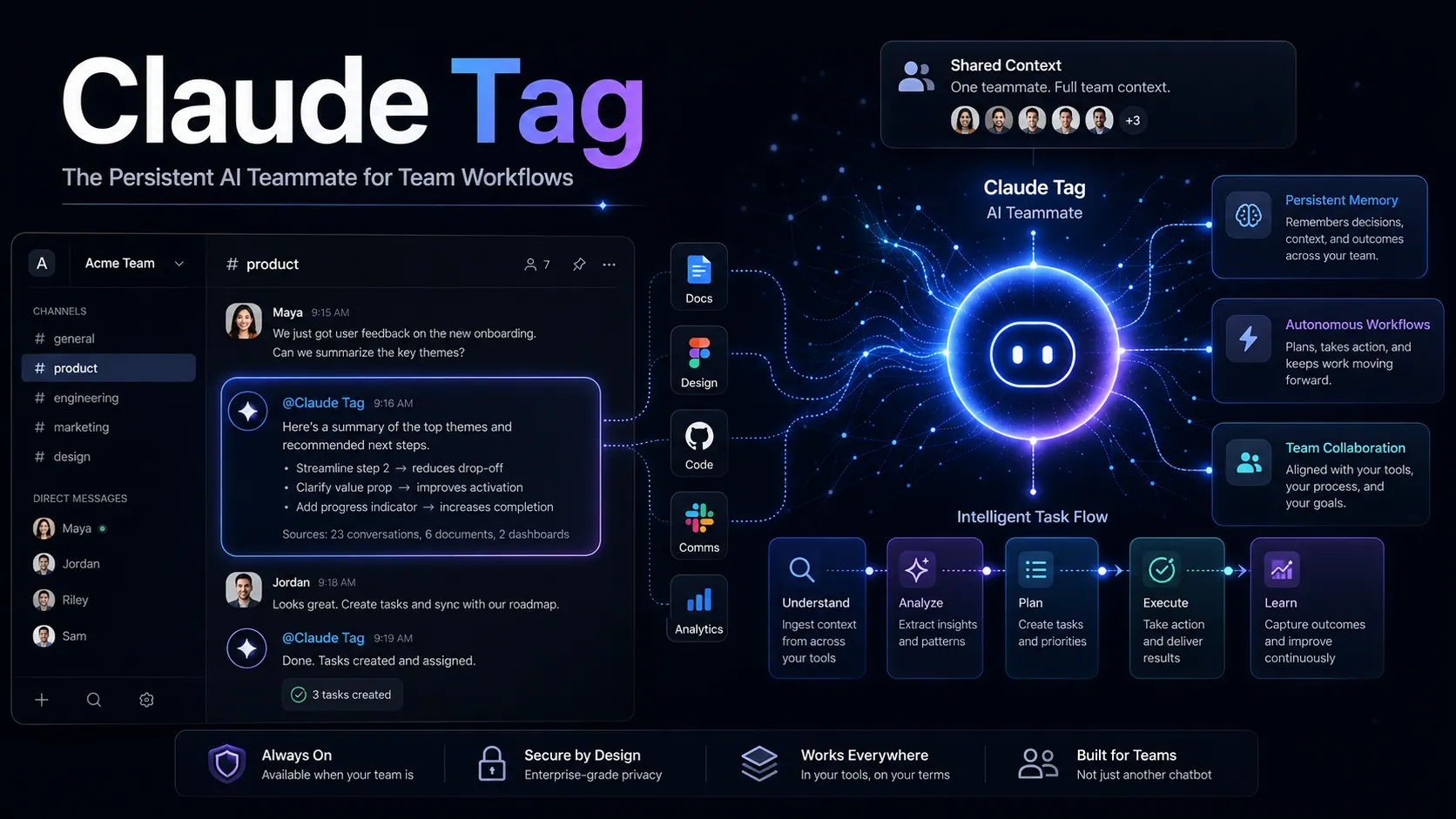
- Claude Tag is Anthropic's shared, persistent AI teammate for Slack, designed for team workflows rather than isolated one-to-one chats.
- The product extends the Claude Code agent model into collaborative work by combining channel context, persistent memory, scheduled routines, tool access, and a distinct agent identity.
- Claude Tag can do more than answer questions. With the right permissions, it can investigate incidents, query data, monitor channels, follow pull requests, create tickets, draft fixes, and report back asynchronously.
- The most important architectural change is the move from user-centric AI access to agent-centric access. Claude can operate through its own credentials and permissions instead of impersonating an employee.
- Claude Tag is currently most relevant to engineering, support, operations, analytics, product, and project-management teams that already coordinate work in Slack.
- The biggest deployment risks are not model quality alone. They are permission design, channel membership, memory scope, tool access, cost controls, and unclear ownership of autonomous actions.
- Claude Tag should be evaluated as an ambient team agent, not as another chatbot or Slack integration.
What Is Claude Tag?
Claude Tag is Anthropic's team-oriented agent experience for Slack. Instead of requiring every employee to open a separate Claude conversation, teams can bring Claude directly into shared Slack channels and threads by tagging it.
The basic interaction looks familiar:
@Claude investigate the checkout regression and summarize the likely cause.What makes Claude Tag different is what happens after that request.
Claude can use the conversation already happening in the channel, remember relevant workspace context, connect to approved business systems, continue working asynchronously, and return with results when the task is complete. Depending on the organization's configuration, it may also create tickets, inspect code, follow deployment status, query operational data, or prepare a pull request.
That makes Claude Tag closer to a persistent digital teammate than a conventional Slack bot.
Anthropic introduced Claude Tag on June 23, 2026, initially for Claude Team and Enterprise customers. By August 2026, Anthropic had also positioned it as the successor to the older Claude-in-Slack experience. Microsoft Teams support has been announced as a future expansion, indicating that the product is intended to become a broader enterprise collaboration layer rather than a Slack-only feature.
Why Claude Tag Matters
The AI assistant market has largely been built around a one-person, one-session interaction model:
Employee
  ↓
AI chat
  ↓
Answer
Claude Tag changes the interaction model to something closer to:
Team channel
  ↓
Claude
  ↓
Shared context + memory + tools
  ↓
Work performed
  ↓
Status returned to the team
This matters because much of real organizational work does not happen inside a private AI chat. It happens across Slack threads, GitHub pull requests, dashboards, ticket queues, documents, alerts, and handoffs between people.
Claude Tag attempts to sit in the middle of that workflow.
The result is a shift from destination AI, where a user deliberately opens an AI tool, to ambient AI, where the agent already exists inside the place where work is happening.
That transition is one of the most important reasons Claude Tag deserves more attention than a typical Slack integration.
How Claude Tag Works
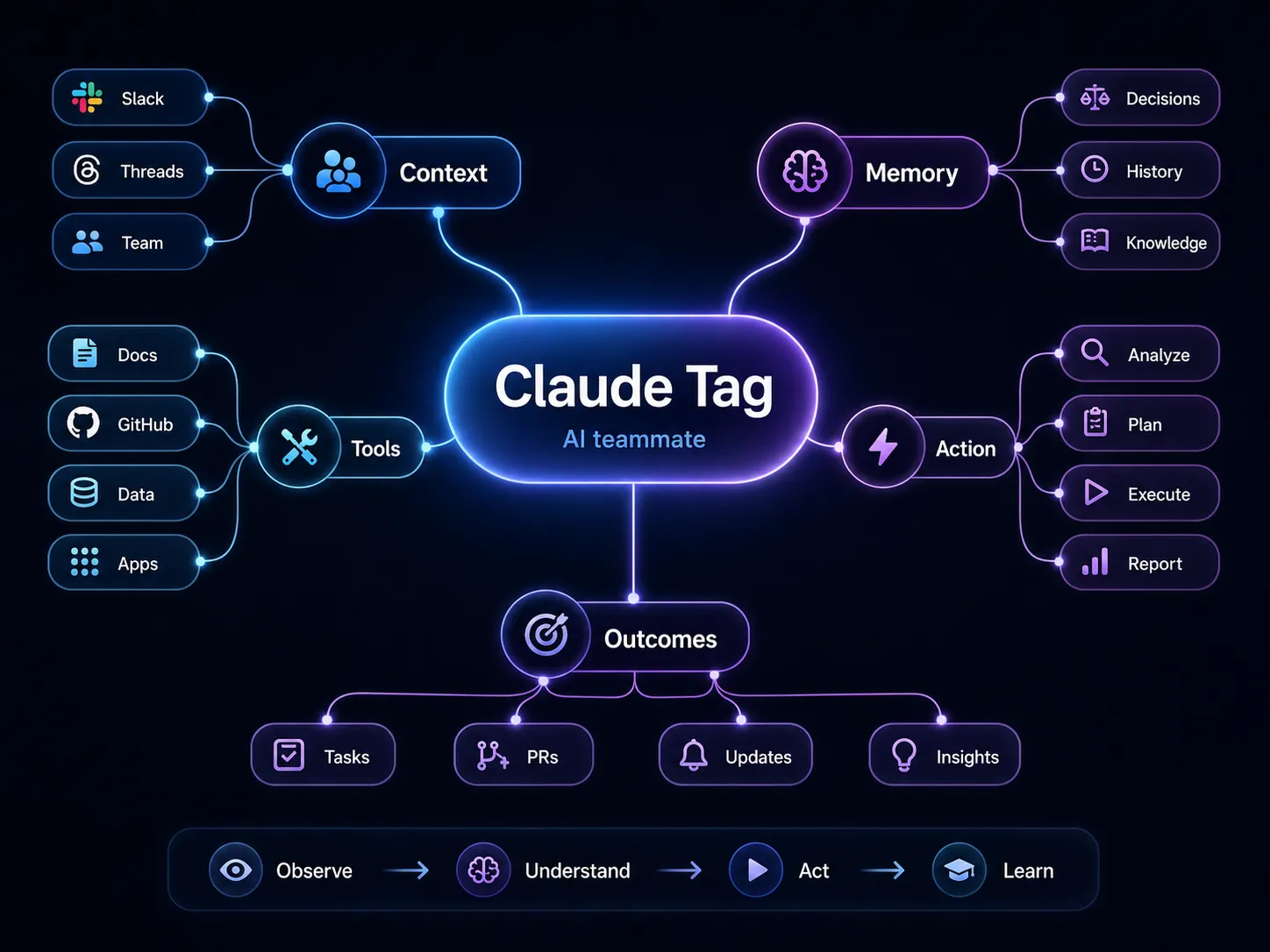
Claude Tag combines several capabilities that are often sold separately in enterprise AI products.
1. Shared Channel Context
Claude can work from the context of a Slack channel or thread rather than requiring each participant to restate the problem.
For example, a team may spend an hour discussing a failed deployment. A developer can then ask:
@Claude summarize the current hypotheses, check the latest deployment, and identify the most likely next diagnostic step.Because the relevant discussion already exists in the thread, the prompt can stay short.
This is especially valuable in incident response, project tracking, customer escalation, and product-development channels where the history of a decision is as important as the final request.
2. Persistent Memory
Claude Tag can maintain memory associated with a workspace or channel. This reduces the need to repeatedly explain recurring projects, products, customers, internal terminology, and decisions.
A project team could discuss a pricing migration on Monday and ask later in the week:
@Claude what blockers remain for the pricing migration?A useful persistent agent should be able to connect the new question with prior relevant context.
Persistent memory is powerful, but it introduces governance requirements. Teams need to understand:
- what information is remembered;
- which channels contribute to memory;
- who can inspect or delete stored memories;
- whether sensitive discussions should be excluded;
- how long stale context can influence future responses.
The value of memory depends on keeping it relevant, scoped, and auditable.
3. Connected Tools
Claude Tag becomes materially more useful when it can reach approved systems.
Typical connections may include:
- GitHub;
- issue trackers;
- observability platforms;
- cloud services;
- data warehouses;
- CRM systems;
- internal documentation;
- file storage;
- operational APIs.
This turns a request such as:
@Claude check whether yesterday's release caused the conversion drop.into a multi-step workflow:
Slack context
  ↓
Deployment history
  ↓
Analytics query
  ↓
Error logs
  ↓
Likely root cause
  ↓
Recommended action
The key difference is that Claude is no longer limited to generating text. It can become an orchestration layer across enterprise tools.
4. Asynchronous Execution
Many valuable tasks are not completed in a single response.
A useful agent may need to:
- wait for CI;
- monitor a deployment;
- collect several data points;
- follow a support escalation;
- watch for a pull request review;
- return when a condition changes.
Claude Tag is designed to support this longer-running pattern.
That makes it particularly suitable for work such as:
@Claude follow this pull request and tell the channel when CI passes and approval is complete.The agent can act as the persistent observer that humans often forget to be.
5. Routines and Proactive Work
Claude Tag can also be configured for scheduled or repeated workflows.
Examples include:
Every weekday at 9:00:
- review open blockers;
- check unresolved tickets;
- summarize pending approvals;
- post a short update.
Or:
Watch the support channel.
If multiple customers report the same new issue:
- group the reports;
- create a ticket;
- notify the responsible team.
This transforms Claude from a reactive assistant into a workflow participant.
The difference is important:
Reactive assistant: waits for a prompt.
Proactive agent: observes a defined environment, evaluates conditions, and acts within configured boundaries.
Claude Tag and Agent Identity
One of the most consequential parts of Claude Tag is its agent identity model.
Traditional enterprise AI integrations often rely on a human user's credentials. The system effectively operates as that employee.
Claude Tag can instead be configured so Claude has its own identity and service-level permissions.
The access model becomes:
Claude identity
  ├── GitHub permissions
  ├── data warehouse permissions
  ├── monitoring permissions
  └── internal API permissions
rather than:
Claude
  ↓
employee OAuth token
  ↓
everything the employee can access
This improves auditability because the organization can distinguish between:
- actions performed by a person;
- actions performed by the agent;
- systems the agent is allowed to reach;
- systems the agent is explicitly denied from reaching.
This is an early example of a broader category that will become increasingly important: Agent IAM, or identity and access management for autonomous software agents.
Why Channel Membership Becomes a Security Boundary
Agent identity solves one problem but creates another.
Suppose Claude has access to a private GitHub repository, and the Claude agent is available in an engineering channel. A user who cannot directly access that repository may still be able to ask Claude questions in the channel.
The security path becomes:
User
  ↓
Slack channel
  ↓
Claude agent
  ↓
Agent credential
  ↓
Protected resource
That means channel membership can indirectly affect access to protected systems.
This is a major deployment consideration.
Organizations should not assume that existing human permissions automatically map cleanly to agent permissions. Security teams need to review the entire chain:
- who can join the channel;
- who can invoke Claude;
- which credentials Claude can use;
- what data those credentials expose;
- whether output from restricted systems can be posted to broader channels.
A safe deployment treats every enabled channel as part of the authorization model.
Claude Tag Security Architecture
Claude Tag is designed around stronger isolation than a typical webhook-based Slack bot.
The architecture includes several important concepts:
- isolated execution environments;
- controlled credential injection;
- restricted outbound network access;
- organization- and channel-level configuration;
- auditable agent actions.
A simplified pattern looks like this:
Slack
  ↓
Claude execution environment
  ↓
Agent proxy
  ↓
Approved credential
  ↓
Allowed service
The strongest implementation principle is default deny.
The agent should only be able to access the domains, APIs, repositories, databases, and services that are explicitly required for its assigned workflows.
This matters because AI agents are susceptible to new classes of security problems, including:
- prompt injection from external content;
- accidental disclosure of sensitive data;
- overly broad credentials;
- cross-channel information leakage;
- unintended tool execution;
- stale memory influencing current decisions.
A powerful model is not a substitute for restrictive permissions.
Claude Tag vs Claude Code
Claude Tag and Claude Code share an agentic foundation, but they are optimized for different environments.
| Dimension | Claude Tag | Claude Code |
|---|---|---|
| Primary environment | Slack and team collaboration | Terminal and coding workflow |
| Main user model | Shared team | Individual developer |
| Context | Channels, threads, workspace memory, connected tools | Repository, shell, files, developer context |
| Collaboration | Multi-user | Primarily single-user |
| Proactive monitoring | Core use case | More task-oriented |
| Scheduled routines | Important capability | Not the primary interface |
| Identity | Organization-managed agent identity | Developer/user environment |
| Best fit | Cross-functional workflows | Software development |
Claude Code remains better suited to deep, hands-on development sessions where a developer is actively supervising code changes.
Claude Tag is more useful when the work starts in a shared conversation and may cross several business systems.
In many organizations, the two will be complementary:
Claude Tag
  ↓
detects or coordinates work
  ↓
Claude Code or developer workflow
  ↓
implements deeper code changes
Claude Tag vs Traditional Slack Bots
Claude Tag should not be evaluated against a basic command bot.
A conventional Slack bot usually follows deterministic flows:
/help
/status
/create-ticket
Claude Tag can interpret loosely specified goals, gather context, select tools, perform multi-step reasoning, and continue until the task is complete.
| Capability | Traditional Slack Bot | Claude Tag |
|---|---|---|
| Natural language | Limited or scripted | Core interface |
| Channel context | Usually shallow | Deep contextual use |
| Persistent memory | Rare | Designed for it |
| Tool orchestration | Fixed flows | Agentic workflows |
| Long-running tasks | Limited | Supported |
| Proactive routines | Usually custom-built | Product capability |
| Agent identity | Rare | Core enterprise concept |
| Complex investigation | Poor fit | Strong fit |
The trade-off is equally important.
A deterministic bot is easier to predict and secure. Claude Tag offers far more flexibility, but organizations must invest more effort in governance, evaluation, and access control.
Claude Tag Pricing and Cost Model
Claude Tag is available through Claude Team and Enterprise rather than being sold as a standalone consumer subscription.
The important pricing detail is that agent activity in shared channels is consumption based. Organizations therefore need to think about two different cost layers:
- Claude plan access
- Agent usage generated by shared workflows
For Team plans, seat pricing varies by billing term and seat type. Enterprise agreements combine seat access with usage-based model consumption.
Anthropic has also used promotional usage credits to encourage adoption, including larger organization-level credits for qualifying Team and Enterprise deployments.
The strategic implication is more important than the headline credit amount: Claude Tag can become expensive if teams treat it as an unlimited background worker.
The best cost controls include:
- channel-level spending limits;
- organization-level limits;
- usage alerts;
- model selection based on task complexity;
- narrow routines instead of broad monitoring;
- clear stop conditions for autonomous tasks.
A routine that scans a high-volume support channel continuously can consume far more resources than a scheduled daily summary.
Best Claude Tag Use Cases
Engineering Incident Investigation
A production channel can ask Claude to:
- summarize the symptoms;
- inspect recent deployments;
- query monitoring systems;
- compare error rates;
- identify suspicious code changes;
- open a ticket or prepare a draft fix.
This removes much of the repetitive context gathering that slows incident response.
Pull Request Monitoring
Claude can subscribe to an active pull request and report when:
- CI fails;
- CI passes;
- a reviewer comments;
- approval is granted;
- the branch is merged.
This is a simple use case with high value because it replaces manual checking without granting the agent a broad decision-making role.
Support Triage
In a support channel, Claude can:
- group similar reports;
- identify a sudden spike;
- search documentation;
- link known issues;
- open tickets;
- create a daily summary.
The highest-value implementation is usually not fully automated customer support. It is internal triage that helps humans react faster.
Product and Project Tracking
Claude can monitor open conversations and produce updates such as:
- unresolved blockers;
- decisions waiting for approval;
- ownerless tasks;
- overdue follow-ups;
- dependencies between teams.
This is particularly useful when project information is scattered across Slack rather than maintained in a perfectly updated project-management system.
Analytics
With controlled access to a warehouse, Claude can answer natural-language questions such as:
Compare enterprise conversion for the last seven days with the previous seven days and identify the three segments with the largest decline.The agent can combine discussion context with data retrieval, which is much more useful than a standalone business-intelligence chatbot.
Sales and Customer Operations
Claude can help sales teams retrieve account information, summarize customer history, identify open actions, and prepare internal updates.
Because customer data can be sensitive, this use case requires especially careful permission and channel design.
How to Deploy Claude Tag Safely
A strong rollout starts narrow.
Step 1: Choose One High-Value Workflow
Avoid launching Claude Tag across the whole organization on day one.
Good pilots include:
- monitoring one engineering pull request workflow;
- summarizing one project channel;
- triaging one internal support queue;
- producing one scheduled metrics update.
The workflow should be frequent enough to evaluate but limited enough to audit.
Step 2: Create a Dedicated Channel
A dedicated pilot channel makes it easier to understand:
- what Claude can see;
- who can use it;
- how memory develops;
- what actions it takes;
- how much it costs.
Mixing an experimental agent into a broad company channel makes troubleshooting harder.
Step 3: Grant Read-Only Access First
Start with the smallest possible permission set.
For example:
GitHub: read
Monitoring: read
Data warehouse: read-only
Ticket system: no write
Once the team understands the agent's behavior, selective write access can be added.
Step 4: Define Escalation Rules
Claude should know when to stop and ask a human.
Examples:
- never merge production code without approval;
- never delete customer records;
- never modify access controls;
- never issue refunds above a defined threshold;
- never publish external communications automatically.
The best agents are not the ones with maximum autonomy. They are the ones with well-designed boundaries.
Step 5: Measure Outcomes
Track more than token usage.
Useful metrics include:
- tasks completed;
- time saved;
- escalation rate;
- error rate;
- human correction rate;
- number of tool calls;
- cost per completed task;
- incidents caused or prevented;
- percentage of suggestions accepted.
This makes it possible to compare Claude Tag with manual workflows and simpler automation.
Common Claude Tag Pitfalls
Giving Claude Too Much Access
The most common early mistake is connecting every available system.
More tools do not automatically produce a better agent.
Every additional credential increases:
- attack surface;
- audit complexity;
- possible data exposure;
- cost;
- uncertainty about what the agent will do.
Use the principle of least privilege.
Treating Slack Access as Harmless
If Claude can access sensitive systems, channel membership becomes part of the security model.
A broad Slack channel plus a powerful agent credential can create an unintended data-access path.
Using Memory Without Governance
Persistent memory can improve continuity, but stale or inappropriate memories can degrade decisions.
Teams should periodically review memory and remove outdated assumptions.
Automating High-Risk Actions Too Early
Creating a draft pull request is low risk.
Merging it into production is much higher risk.
Drafting a response to a customer is low risk.
Sending it automatically may not be.
A strong rollout separates analysis, recommendation, preparation, and execution into different permission levels.
Ignoring Usage Costs
Background routines can quietly become expensive because they run whether or not a human is actively interacting with Claude.
Every recurring task should have:
- a clear schedule;
- a defined data scope;
- a stop condition;
- a measurable business outcome.
Expecting Perfect Context
Shared context is useful, but Slack conversations are often noisy, contradictory, incomplete, or outdated.
Claude should be instructed to distinguish:
- confirmed facts;
- assumptions;
- unresolved questions;
- decisions that have changed.
This is especially important for project-management and incident-response use cases.
Advanced Claude Tag Workflow Patterns
The Observer Pattern
Claude watches a specific workflow but cannot modify anything.
Example:
Watch this deployment.
Report if error rate exceeds the baseline by more than 20%.
Do not make changes.
This is a safe starting point for autonomous behavior.
The Investigator Pattern
Claude can read multiple systems and produce a diagnosis.
When a P1 incident appears:
- summarize the report;
- inspect the latest deployment;
- check logs;
- compare metrics;
- propose the most likely cause;
- wait for approval before making changes.
This pattern creates meaningful value while keeping execution under human control.
The Coordinator Pattern
Claude manages handoffs between people.
Every weekday at 4 PM:
- find unresolved launch blockers;
- identify the owner of each blocker;
- tag the owner;
- summarize what is waiting on another team.
This works well because coordination is repetitive but still context-heavy.
The Executor Pattern
Claude is allowed to perform defined actions.
Examples include:
- creating a ticket;
- opening a draft pull request;
- updating a status field;
- posting a summary;
- creating a document.
Execution should be introduced only after the underlying read-only workflow has been evaluated.
How to Write Better Claude Tag Instructions
The strongest prompts describe goal, scope, tools, limits, and completion criteria.
Weak:
@Claude watch this project.Better:
@Claude monitor this channel for release blockers until Friday.

Use the linked GitHub repository and ticket tracker.
Post an update only when:
1. a new blocker appears,
2. an existing blocker is resolved, or
3. an approval is overdue by more than 24 hours.

Do not change tickets or code without asking.
This reduces unnecessary activity and gives the agent a measurable stopping rule.
A useful instruction template is:
Goal:
What outcome should be achieved?

Scope:
Which channel, project, repository, customer, or dataset applies?

Tools:
Which connected systems may be used?

Permissions:
What may Claude read, create, edit, or execute?

Escalation:
When must a human approve the next step?

Completion:
What proves the task is finished?
Claude Tag for Engineering Teams
Engineering is likely to be one of the strongest early adoption areas because developers already work across many disconnected systems.
A single incident may involve:
- Slack;
- GitHub;
- CI;
- Sentry;
- Datadog;
- a ticket tracker;
- deployment infrastructure;
- product analytics.
Claude Tag can reduce the coordination cost between these systems.
However, Claude Code will usually remain the better environment for detailed coding work. Claude Tag is most valuable at the orchestration layer: noticing the problem, gathering the evidence, coordinating the team, and handing off implementation when needed.
Claude Tag for Non-Technical Teams
Claude Tag is not limited to software development.
The same architecture can support:
- finance reporting;
- sales operations;
- customer success;
- recruiting coordination;
- marketing operations;
- legal intake;
- internal IT;
- executive project tracking.
The limiting factor is not whether Claude can generate useful text. It is whether the organization can safely expose the right data and actions to the agent.
That makes enterprise integration and governance more important than prompt writing.
Claude Tag and the Future of Ambient Agents
Claude Tag represents a broader industry transition.
The first generation of generative AI products required users to visit a destination:
Open ChatGPT
Open Claude
Open Gemini
The next generation is embedded directly into the work environment:
Slack
GitHub
CRM
Email
Monitoring
Documents
Calendar
  ↓
AI agent
The agent does not need to be the primary application. It becomes a persistent coordination layer between applications.
This architecture creates three major product categories:
- Multiplayer agents: several people collaborate with the same AI context.
- Ambient agents: agents remain present and can react without a fresh prompt.
- Agent identity and IAM: organizations manage agents as independent actors with their own credentials and policies.
Claude Tag is one of the clearest commercial implementations of all three ideas in a single enterprise product.
Who Should Use Claude Tag?
Claude Tag is a strong fit for organizations that:
- already use Slack as an operational workspace;
- have frequent cross-tool workflows;
- spend significant time summarizing and coordinating information;
- can provide clean permission boundaries;
- have teams comfortable reviewing agent output.
It is a weaker fit when:
- company communication is mostly outside Slack;
- data access is poorly governed;
- workflows are already fully automated with deterministic systems;
- the organization cannot audit agent actions;
- tasks are too sensitive to allow probabilistic decision-making.
Claude Tag FAQ
Is Claude Tag the same as Claude in Slack?
Claude Tag is the newer team-agent experience and has been positioned as the successor to the earlier Claude-in-Slack workflow. The new model emphasizes shared context, memory, tools, routines, and agent identity rather than simple chat access.
Is Claude Tag a Slack bot?
Technically it operates inside Slack, but calling it a Slack bot understates the product. It is designed as a persistent agent that can reason across conversation history and connected systems.
Can Claude Tag write code?
Yes, when connected to appropriate development tools and repositories, Claude Tag can support code-related workflows. Deep interactive coding is still better aligned with Claude Code.
Can Claude Tag create pull requests?
With the required permissions, the agent can participate in workflows that include repository inspection and pull-request creation. Organizations should normally begin with draft changes and human approval.
Can Claude Tag work without being tagged?
Routines and proactive workflows allow Claude to perform scheduled or condition-based work within configured boundaries.
Does Claude Tag remember previous conversations?
It can use persistent workspace or channel memory, depending on organizational settings. Memory should be treated as a governed enterprise data layer rather than an unlimited conversation archive.
Is Claude Tag available for Microsoft Teams?
Microsoft Teams support has been announced as an upcoming expansion. Slack remains the primary environment for the current Claude Tag experience.
Is Claude Tag free?
Claude Tag is tied to qualifying Claude Team or Enterprise access, and shared agent usage is consumption based. Organizations should expect both subscription and usage considerations.
Is Claude Tag safe for sensitive company data?
It can be deployed with enterprise-grade controls, but safety depends heavily on configuration. Least-privilege credentials, restricted channels, controlled memory, network allowlists, audit logs, and human approval for high-risk actions remain essential.
Conclusion
Claude Tag is more than a way to mention Claude in Slack. It is an early implementation of a new enterprise computing model in which AI agents have shared context, persistent memory, independent identity, tool access, scheduled routines, and permissioned autonomy.
The most valuable deployments will not be the ones that give Claude access to everything. They will be the ones that choose a narrow workflow, provide just enough context and permissions, measure the result, and expand only when the agent consistently improves the process.
Teams evaluating Claude Tag should start with one repetitive, high-context workflow such as incident investigation, pull-request monitoring, support triage, or project tracking. Define the agent's scope, permissions, escalation rules, and cost limits before adding more autonomy.
The larger takeaway is clear: enterprise AI is moving from private chat windows toward persistent agents embedded directly in the systems where teams already work. Claude Tag is one of the strongest signals of that shift.
Continue Reading
More articles connected to the same themes, protocols, and tools.

Referenced Tools
Browse entries that are adjacent to the topics covered in this article.