
 AI Coding Agents
On This Page8 sections
As of August 31, 2026, comparing Codex and Claude Code by checking feature boxes is no longer very useful. Both can work in a terminal, edit local files, run commands, use cloud environments, isolate changes in Git worktrees, delegate to subagents, connect through MCP, load reusable skills, remember project context, run hooks, support CI/CD, and execute scheduled work.
The more useful question is this:
How does each product organize the relationship between a human developer, an AI agent, a codebase, and a growing queue of software work?
My practical answer is:
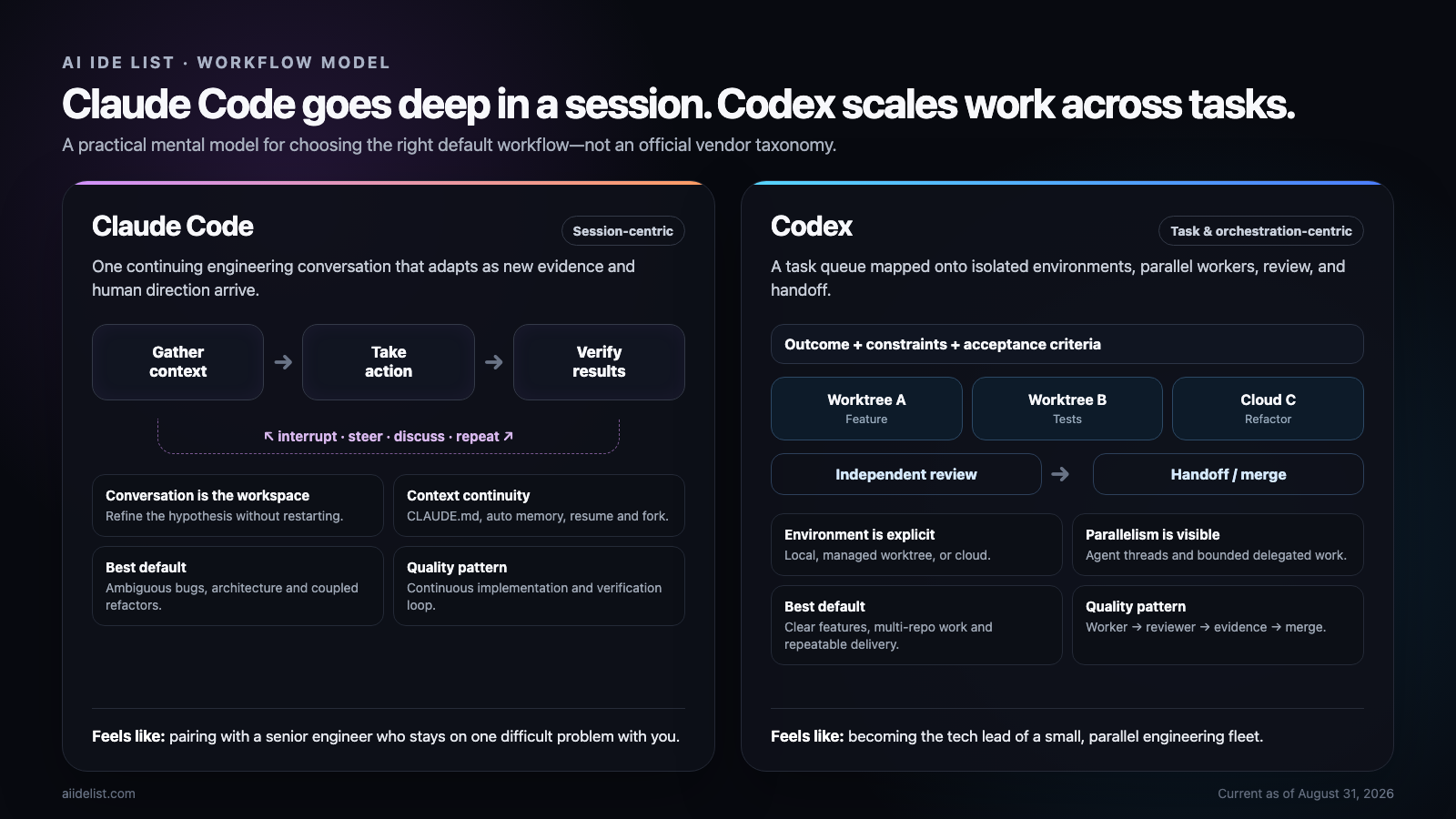
- Claude Code is session-centric. Its strongest default is a continuing, steerable engineering conversation that stays with one difficult problem.
- Codex is task- and orchestration-centric. Its strongest default is turning bounded outcomes into isolated environments, parallel agent threads, reviewable diffs, and handoffs.
These are analytical labels, not terminology used by Anthropic or OpenAI. They describe the center of gravity visible in the products today. Both tools can operate in either style, and the boundary is narrowing quickly.
If you want a conventional feature-by-feature view first, use our Claude Code vs Codex comparison. This guide goes one level deeper: it explains why two products with nearly the same capabilities can still feel fundamentally different in daily work.
The short answer
| Dimension | Codex | Claude Code |
|---|---|---|
| Natural unit of work | Task, chat, agent thread, environment | Session and continuing conversation |
| Default feeling | Delegate work to an engineering system | Pair with an engineer inside a terminal |
| Most natural flow | Specify → isolate → parallelize → review → hand off | Explore → discuss → change → test → correct → continue |
| Interactive terminal work | Strong | Especially central to the product identity |
| Mid-turn steering | Supported | A defining interaction pattern |
| Worktrees | Product-level environment and handoff model | Mature session and subagent isolation mechanism |
| Parallel independent tasks | A core product direction | Strong through Agent View and background sessions |
| Subagents | Enabled in current releases, inspectable by thread | Mature specialist model inside a main session |
| Multi-agent teams | Integrated orchestration direction | Agent Teams remain experimental and off by default |
| Persistent project context | AGENTS.md, skills, local memories, agent configs | CLAUDE.md, rules, skills, auto memory, agent memory |
| Review | Dedicated /review, prioritized findings, no edits by default | Verification loop, subagents, checkpoints, review workflows |
| Automation | codex exec, JSONL events, JSON Schema, CI | claude -p, pipes, routines, scheduled tasks, CI |
| Best default use | Clear outcomes that can be isolated and delegated | Ambiguous, coupled problems that benefit from continuous steering |
The crucial caveat is that Codex is not “non-conversational,” and Claude Code is not “single-agent only.” Those descriptions are already obsolete.
Why the feature checklist stopped being useful
The Claude Code product page and Codex CLI product page now describe products that overlap across almost every important layer:
- local and remote execution;
- interactive and non-interactive modes;
- worktree isolation;
- background tasks;
- subagents and custom agents;
- project instruction files;
- skills, MCP, hooks, and permissions;
- memory and session continuation;
- review and verification;
- CI/CD and scheduled automation.
That convergence changes the buying question. The issue is no longer whether a tool can perform a workflow. It is how much coordination work you must do to make that workflow feel natural.
A feature may exist in both products while carrying a different architectural meaning. A worktree can be a command-line isolation technique, or it can be the object around which a task, chat, background worker, review, and handoff are organized. A subagent can be a short-lived specialist inside a conversation, or one worker in a larger orchestration graph.
That difference in emphasis is what shapes productivity after the first week.
Claude Code starts with a continuous agentic loop
Anthropic's current documentation describes Claude Code as a loop of gathering context, taking action, and verifying results. Those phases blend together, and the user can interrupt or redirect the process at any point. The same guide explicitly frames effective use as a conversation: begin with an imperfect request, see what Claude discovers, and refine the direction without starting over. (Claude Code: How it works)
That produces a very recognizable workflow:
You: Fix the intermittent login failure.

Claude:
  reads the auth flow
  searches session code
  runs tests
  forms a hypothesis
  edits middleware

You: Stop. The failure only happens after session invalidation.

Claude:
  keeps the conversation
  changes the hypothesis
  traces invalidation
  reproduces the bug
  fixes and verifies it
The conversation is not merely a chat log around the work. It is the workspace in which the investigation evolves.
This is especially valuable when the task is underspecified. In a difficult bug, you may not know the correct component at the beginning. In an architectural change, the constraints may emerge only after the agent maps the repository. With Claude Code, changing direction feels like correcting a colleague who has already spent an hour understanding the system.
The supporting product mechanics reinforce that feeling:
- sessions can be resumed or forked;
- Claude checkpoints files before editing, allowing a rewind independent of Git;
CLAUDE.mdcarries durable project instructions;- auto memory stores useful project learnings across sessions and is enabled by default;
- subagents keep noisy exploration and logs outside the main context while returning summaries.
Anthropic documents auto memory as a machine-local project store under ~/.claude/projects/<project>/memory/, shared by worktrees in the same repository. The first portion of MEMORY.md is loaded when a conversation begins, while topic files can be read as needed. (Claude Code memory)
The result is a product that often feels as if the same engineer is becoming more familiar with your repository over time.
Codex can work conversationally too
It would be wrong to turn the previous section into “Claude talks while Codex accepts tickets.” The current Codex CLI is an interactive terminal agent that inspects code, edits files, runs commands, accepts follow-ups, and stays inside a continuing session. The official CLI documentation presents it as a terminal environment for both interactive work and repeatable automation. (Codex CLI documentation)
You can use Codex like this:
codex

> Investigate why account state disappears after refresh.

[Codex reads, runs, edits, and tests]

> The cache is a symptom. Trace the middleware lifecycle instead.

[Codex changes direction in the same session]
Codex therefore handles the foreground pair-programming pattern perfectly well. Its difference appears when the job can be separated into multiple outcomes. At that point, Codex's product design more naturally pulls the work outward—toward projects, chats, agent threads, worktrees, background execution, reviews, and environment handoff.
Codex makes the environment part of the task model
In Codex, a task is closely associated with where it runs. A chat can operate against your local checkout, a managed worktree, or a cloud environment. That decision determines isolation, access, validation, and how the result returns to your foreground workspace.
Managed worktrees are especially revealing. Codex creates them under its own worktree root, associates a chat with a particular worktree, and can hand the same chat and code between the background worktree and the local checkout. The official documentation describes Local as foreground and Worktree as background, with Handoff managing the Git operations required to move safely between them. (Codex worktrees)
That creates a natural system like this:
Project
├── Chat A → Worktree A → authentication fix
├── Chat B → Worktree B → dashboard UI
├── Chat C → Worktree C → regression tests
├── Chat D → Cloud       → API migration
└── Chat E → Review      → audit the combined direction
The human developer is no longer continuously present in every loop. The job becomes defining boundaries, checking progress, resolving dependencies, reviewing evidence, and deciding what enters the main line.
That is why “task-centric” is useful as a description. The task is not just a prompt. It is a bundle containing an outcome, execution environment, code state, agent context, evidence, and a path back to local work.
Worktrees have converged, but their product meaning still differs
Worktrees used to be an easy point of differentiation. That is no longer true.
Claude Code supports isolated worktree sessions with:
claude --worktree feature-authIt can isolate subagents in temporary worktrees, copy selected ignored files with .worktreeinclude, and create worktrees automatically for desktop sessions. Anthropic also uses worktree isolation in Agent View so background sessions do not collide when they begin editing. (Claude Code worktrees)
Codex also treats worktrees as isolated checkouts, but the desktop experience adds chat association, managed cleanup, restoration snapshots, persistent worktrees, and two-way Handoff between a managed worktree and Local.
So the practical distinction is not capability:
- Claude Code: a worktree is a mature way to isolate a session or specialist agent.
- Codex: a worktree is also a first-class environment in the product's task-management model.
The outcome can be identical. The difference is how much of the surrounding workflow the product organizes for you.
Subagents: same context solution, different default framing
Both tools use subagents to solve two expensive problems:
- independent work should run in parallel when possible;
- noisy exploration, test logs, and stack traces should not flood the main context.
Current Codex releases enable subagent workflows by default. Codex can spawn specialized workers, expose their threads in the app, CLI, and IDE, and collect their results in the main response. In the CLI, /agent lets the user inspect and switch between active agent threads. Custom agents can override models, reasoning levels, sandbox modes, MCP servers, and instructions. (Codex subagents)
Claude Code's subagents have a strong specialist identity. Teams commonly define read-only explorers, planners, reviewers, and implementation agents with their own prompts, tools, skills, hooks, memory scopes, effort settings, background behavior, and optional worktree isolation. (Claude Code subagents)
The mental models often become:
Claude Code
Main engineer
├── explorer returns repository map
├── planner returns implementation plan
└── reviewer returns risks
versus:
Codex
Lead task
├── worker A owns feature
├── worker B owns tests
├── worker C checks documentation
└── reviewer synthesizes findings
Nothing prevents you from reversing those patterns. They simply match the products' current centers of gravity.
Parallel work: Claude has caught up faster than many comparisons admit
The outdated claim that Codex supports parallel work while Claude Code does not should be retired.
Claude Code now has Agent View, opened with:
claude agentsIt shows background sessions that are working, waiting for input, ready for review, or complete. A per-user supervisor process keeps sessions running after the terminal view is closed. You can dispatch new work, inspect a session, reply without fully attaching, or attach for the complete conversation. Anthropic currently labels Agent View a research preview. (Claude Code Agent View)
Claude also has Agent Teams, where a lead session coordinates teammates through shared tasks and direct inter-agent messages. But the maturity label matters: Agent Teams remain experimental and disabled by default, and Anthropic documents known limitations in resumption, coordination, and shutdown. (Claude Code Agent Teams)
Codex's current local releases, by contrast, enable subagent workflows by default, while the app and CLI are explicitly structured around inspectable agent threads and parallel task execution.
This does not mean Codex wins every multi-agent job. It means orchestration is more central to its stable default product story today.
There is also a cost that marketing screenshots rarely show: parallel agents consume more tokens, duplicate repository exploration, and create coordination overhead. Both OpenAI and Anthropic advise using parallelism where work is genuinely independent. Multiple agents editing the same files are often slower than one well-steered session.
Context management: Claude emphasizes the life of a session
Claude Code documentation spends substantial attention on session history, context windows, compaction, resume, fork, checkpoints, CLAUDE.md, rules, auto memory, and subagent context.
That focus makes sense if the product assumes you may spend several hours with one engineering conversation. A long-running session must answer:
- What decisions have already been made?
- Which hypotheses failed?
- Which commands and tests matter?
- What should survive compaction?
- What should be remembered next time?
CLAUDE.md stores rules you deliberately write. Auto memory stores project knowledge Claude decides may be useful later. Subagents keep disposable investigation output out of the main conversation. Resume and fork let you continue or branch the work without discarding history.
If you use Claude Code heavily, our Claude Code cheatsheet organizes the current commands, configuration, memory, skills, hooks, and agent controls in one place.
Codex context is becoming equally sophisticated—but more configurable
Codex now combines:
- hierarchical
AGENTS.mdinstruction discovery; - reusable skills;
- custom agent files;
- local memories;
- session compaction and continuation;
- subagent summaries that protect the main thread.
AGENTS.md is especially deterministic. Codex reads global guidance, then walks from the repository root toward the current directory. Instructions closer to the working directory override broader guidance. AGENTS.override.md can replace the standard file at a particular level. (Codex AGENTS.md)
That makes policies such as these easy to express:
Global
└── use pnpm and run tests

Repository
└── TypeScript strict; no new production dependency without approval

services/payments
└── run payment integration tests; never alter key rotation
Codex also has local memories under ~/.codex/memories/, but the official documentation says they are off by default and must be enabled. OpenAI recommends keeping required team rules in AGENTS.md, with memory acting as a helpful recall layer rather than the only source of truth. (Codex memories)
That difference supports the broader impression:
- Claude Code defaults toward a companion that accumulates familiarity.
- Codex defaults toward an agent system governed by explicit, layered engineering instructions.
Again, this is a difference in defaults—not a hard capability boundary.
Planning and prompting feel different
Claude Code is particularly comfortable with a research-first prompt:
Do not edit yet.
Map the authentication flow, explain why it was designed this way,
identify every affected module, and propose two migration paths.
Plan mode can explore and propose without editing source files. After the discussion, the same session can move into implementation while retaining the reasoning and user corrections that shaped the plan.
Codex is particularly comfortable with an outcome contract:
Implement OAuth callback hardening.

Constraints:
- preserve the current database schema
- do not add dependencies
- keep public API behavior stable

Acceptance:
- reproduce the three listed failures
- add regression coverage
- run typecheck and tests
- return the diff, evidence, and remaining risks
The first style invites joint discovery. The second makes a task safe to delegate to a worker—or several workers—with less human presence.
Both tools respond well to either prompt. The distinction is which style unlocks the product's surrounding workflow with the least friction.
Review: Codex separates the reviewer role cleanly
Codex's /review workflow starts a dedicated reviewer that reads a chosen diff and returns prioritized, actionable findings without changing the working tree. It can review uncommitted changes, a branch against its base, or a specific commit. The review model can also be configured separately from the active session model. (Codex code review)
That encourages a strong engineering pattern:
implementer
    ↓
independent reviewer
    ↓
implementer fixes findings
    ↓
reviewer checks again
The separation matters. An agent that wrote the code has already committed to a particular interpretation of the problem. A reviewer with a fresh context is more likely to challenge the assumption rather than merely inspect syntax.
Claude Code integrates verification into the conversation
Claude Code's core quality loop is continuous:
gather context
→ change
→ run tests
→ inspect failure
→ revise
→ verify again
It can also use reviewer subagents, parallel sessions, CI integrations, and agent teams. But the product's foundational documentation places verification directly inside the same adaptive loop as investigation and implementation.
Checkpointing reinforces this interaction model. Before modifying a file, Claude stores a snapshot, and the user can rewind file changes independently of Git. That is particularly useful during exploratory refactors when the correct direction is not known at the beginning. (Claude Code checkpointing)
The ideal workflow is not review or verification. It is continuous verification during implementation followed by an independent review before merge.
Automation: Codex behaves like a programmable worker
codex exec is one of Codex's most important differentiators for engineering systems.
It can run non-interactively in scripts, pre-merge checks, scheduled jobs, and CI. With --json, Codex emits a JSON Lines event stream containing turn events, commands, file changes, MCP calls, web searches, and plan updates. With --output-schema, the final response can conform to a supplied JSON Schema. (Codex non-interactive mode)
For example:
codex exec --json \
  "Review this repository for release blockers" \
  | jq
Or a pipeline can demand a stable result object:
codex exec \
  "Classify the release risks" \
  --output-schema ./risk-schema.json \
  -o ./risk-report.json
This is more than convenient CLI output. It makes the agent easier to embed as a typed worker in a larger system.
If you are building unattended workflows, review our guides to Codex approval behavior and Claude Code permission modes before relaxing safeguards. Removing prompts is not the same as making a workflow safe; isolation, narrow credentials, reversible outputs, and independent validation matter more.
Claude Code automation feels more Unix-native
Claude Code's programmatic mode fits naturally into shell composition:
git diff main --name-only \
  | claude -p "Review these files for security regressions"
Claude also supports CI/CD, cloud routines, desktop scheduled tasks, GitHub events, and session-scoped /loop scheduling. Anthropic's current scheduling guide distinguishes cloud tasks that run without the local machine, desktop jobs with local access, and short-lived loops tied to a conversation. (Claude Code scheduled tasks)
A useful shorthand is:
- Claude Code: an AI-native Unix collaborator that can also manage background sessions.
- Codex: an agent runtime and command center that can also pair interactively.
A concrete example: building a SaaS usage dashboard
Imagine adding a usage dashboard to an existing SaaS product.
Claude Code-first workflow
You begin inside one session:
Map billing, usage aggregation, and account ownership.
Do not edit until we agree on the data boundary.
Claude explores the repository and proposes reusing an existing analytics service. You explain that the service will be removed next quarter. Claude updates the design, identifies a narrower interface, implements the backend, discovers two failing assumptions in the test fixtures, fixes them, and then adjusts the table after you review the UI.
This is a good fit because the requirements and architecture evolve while the agent is working.
Codex-first workflow
You already have a written specification, so you create bounded tasks:
Task A: implement the aggregation interface
Task B: build the API endpoint
Task C: build the dashboard UI
Task D: add regression tests
Task E: review architecture and data leakage risks
Tasks A, C, and D can begin in separate worktrees. Task B waits for the interface contract. The reviewer examines the combined direction without modifying it. You hand the selected chat to Local for final browser validation and merge.
This is a good fit because the problem has been decomposed into outcomes with limited overlap.
The difference is not which agent writes better TypeScript. The difference is whether the human's scarce attention is spent inside the implementation loop or at the boundaries between parallel pieces.
The combined workflow is stronger than choosing one winner
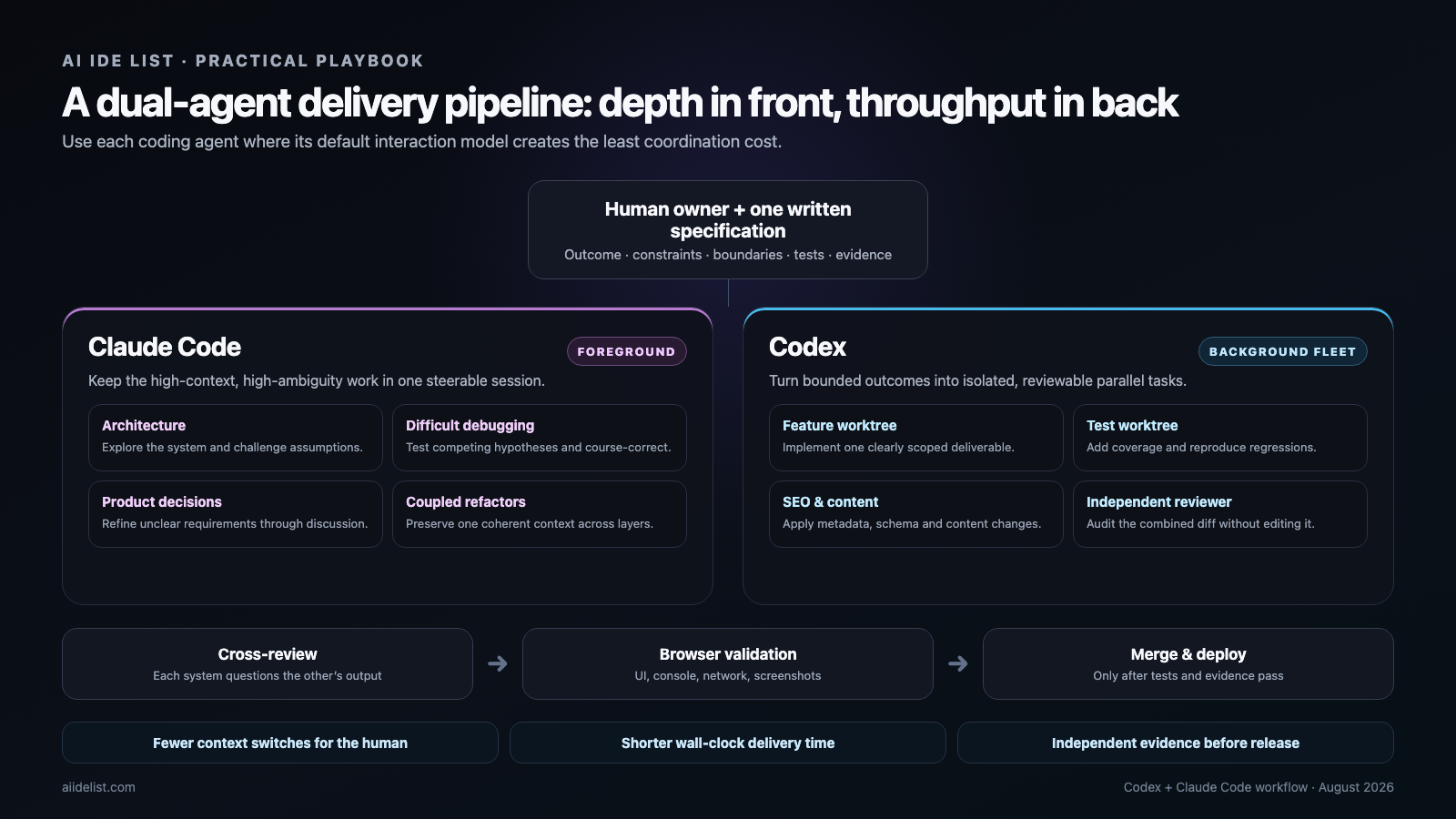
The highest-leverage setup is often a deliberate split:
- Claude Code as the foreground agent: architecture, ambiguous bugs, product discussion, coupled refactors, and work that needs frequent steering.
- Codex as the background fleet: clearly specified features, tests, migrations, metadata, documentation, isolated reviews, and repeatable automation.
This is also where an agent workspace becomes useful. Our Cindy Agent review examines a product designed to keep Claude Code, Codex, and Pi inside one workspace rather than forcing every team to choose a single harness.
For visual work, do not stop at unit tests. Add browser reproduction, console and network checks, responsive screenshots, and an explicit acceptance record. Our comparison of browser agent infrastructure covers the platforms that can supply isolated browser sessions when local validation is not enough.
A practical dual-agent protocol for website builders
For teams building several sites or shipping many content-driven product changes, use this sequence.
1. Write one source-of-truth specification
Include:
- desired user outcome;
- non-goals;
- files or systems that may be changed;
- files or systems that must not be changed;
- required tests;
- browser acceptance criteria;
- SEO and structured-data requirements;
- rollback conditions;
- evidence expected at completion.
The specification prevents Claude Code and Codex from solving subtly different problems.
2. Use Claude Code to challenge ambiguity
Ask a foreground session to map the existing architecture, find hidden dependencies, question the proposed approach, and convert unclear goals into decisions. Do this before spawning five implementation workers.
Parallel execution multiplies misunderstanding as efficiently as it multiplies correct work.
3. Give Codex independent worktree contracts
Each worker should have:
- one outcome;
- an explicit write scope;
- dependencies on other tasks;
- commands it must run;
- a stop condition;
- a concise handoff format.
Do not assign two agents to edit the same component unless their work is intentionally sequential.
4. Separate implementation from review
Use a fresh reviewer context. Require file references, severity, reproduction steps, and missing-test evidence. Avoid style-only findings unless they indicate a maintainability or correctness problem.
5. Validate the running product
For front-end changes, the acceptance record should include:
- page loads at target routes;
- key interaction works;
- browser console is clean;
- important network requests succeed;
- screenshots at desktop and mobile widths;
- metadata, canonical URL, internal links, and image alt text;
- production build and deployment result.
6. Merge only after the evidence converges
Tests, reviewer findings, browser behavior, and the original acceptance criteria should tell the same story. If they disagree, return the issue to the agent that owns the relevant context rather than asking a new worker to guess.
Where each tool wins today
| Situation | Better default | Why |
|---|---|---|
| Spend hours untangling one ambiguous production bug | Claude Code | The evolving conversation and steering loop reduce restart cost |
| Explore an unfamiliar monorepo before deciding what to change | Claude Code | Research-first discussion and context continuity feel natural |
| Requirements change during implementation | Claude Code | The same session can absorb new direction and revise its model |
| Execute five clearly independent features | Codex | Worktrees, agent threads, and task orchestration reduce wall-clock time |
| Coordinate work across multiple repositories | Codex | The product model is comfortable with projects, tasks, and isolated environments |
| Produce machine-readable CI output | Codex | JSONL events and JSON Schema make downstream integration explicit |
| Run an independent local diff review | Codex | /review creates a dedicated reviewer and avoids edits by default |
| Build persistent familiarity with a project by default | Claude Code | Auto memory is a core, enabled experience |
| Enforce hierarchical engineering rules | Codex | AGENTS.md discovery and overrides are highly deterministic |
| Operate several background sessions from a terminal UI | Either | Codex is mature here; Claude Agent View now covers the same broad need but remains preview |
| Let multiple peer agents coordinate directly | It depends | Claude Agent Teams are powerful but still experimental; Codex subagent orchestration is the safer default today |
| Terminal-first pair programming | Claude Code | Conversation and interruptibility remain central to the experience |
Model and effort settings still matter. See our current guides to Codex reasoning levels and Claude Code effort levels when deciding which jobs deserve deeper reasoning and which should use faster workers.
The hidden cost: coordination can erase parallel speed
Multi-agent diagrams make every task look parallel. Real repositories are dependency graphs.
Parallelism helps when:
- tasks have clear ownership;
- write scopes do not overlap;
- contracts between tasks are stable;
- each task can be tested independently;
- the cost of synthesis is lower than the time saved.
Parallelism hurts when:
- several agents edit the same files;
- one architectural decision invalidates all downstream work;
- every worker repeats the same repository exploration;
- tests require one scarce shared environment;
- the human must read five long transcripts to understand what happened.
The target is not the largest possible number of agents. It is the smallest coordination structure that reduces wall-clock time without weakening understanding.
That is why Claude Code remains so effective on tightly coupled problems. A single coherent context can outperform a fleet whose workers spend more time merging assumptions than writing code.
It is also why Codex performs best when the human acts like a strong tech lead: define contracts, isolate work, demand evidence, and keep the reviewer independent.
Final verdict
If I had to compress the difference into one sentence:
Claude Code optimizes how a human and an agent go deep on one evolving problem; Codex optimizes how a human directs many bounded pieces of engineering work.
That boundary is no longer absolute. Claude Code now has Agent View, background sessions, cloud execution, worktrees, subagents, routines, and experimental agent teams. Codex now has a strong interactive terminal, session steering, memories, subagents, and long-running conversations.
The strategic difference is therefore shifting away from model-versus-model comparisons. It is becoming a workflow-design problem:
one human + one agentversus:
one human
+ a written task system
+ isolated environments
+ specialized agents
+ independent review
+ automated validation
For a developer handling one difficult, ambiguous problem, start with Claude Code. For a builder managing several sites, repositories, or independent deliverables, start with Codex orchestration. For the strongest overall system, use Claude Code to reduce ambiguity in the foreground and Codex to turn the resulting clarity into parallel, reviewable output.
Explore the broader CLI coding agent directory, keep the Codex cheatsheet and Claude Code cheatsheet nearby, and review our guide to AI coding agents in 2026 when you need alternatives beyond these two products.
Sources and methodology
This analysis was updated on August 31, 2026. The session-centric and orchestration-centric labels are our interpretation of the products' current workflows, not official vendor positioning. Feature and maturity claims were checked against the latest official documentation for Codex CLI, Codex subagents, Codex worktrees, Codex memories, Claude Code's agentic loop, Claude Agent View, Claude Agent Teams, and Claude worktrees.
Continue Reading
More articles connected to the same themes, protocols, and tools.

Referenced Tools
Browse entries that are adjacent to the topics covered in this article.





