
 CursorCursor is an AI coding and cloud development platform that combines a VS Code-based editor, local and cloud agents, CLI workflows, Origin code hosting, repository collaboration, and prompt-to-app creation.
bb
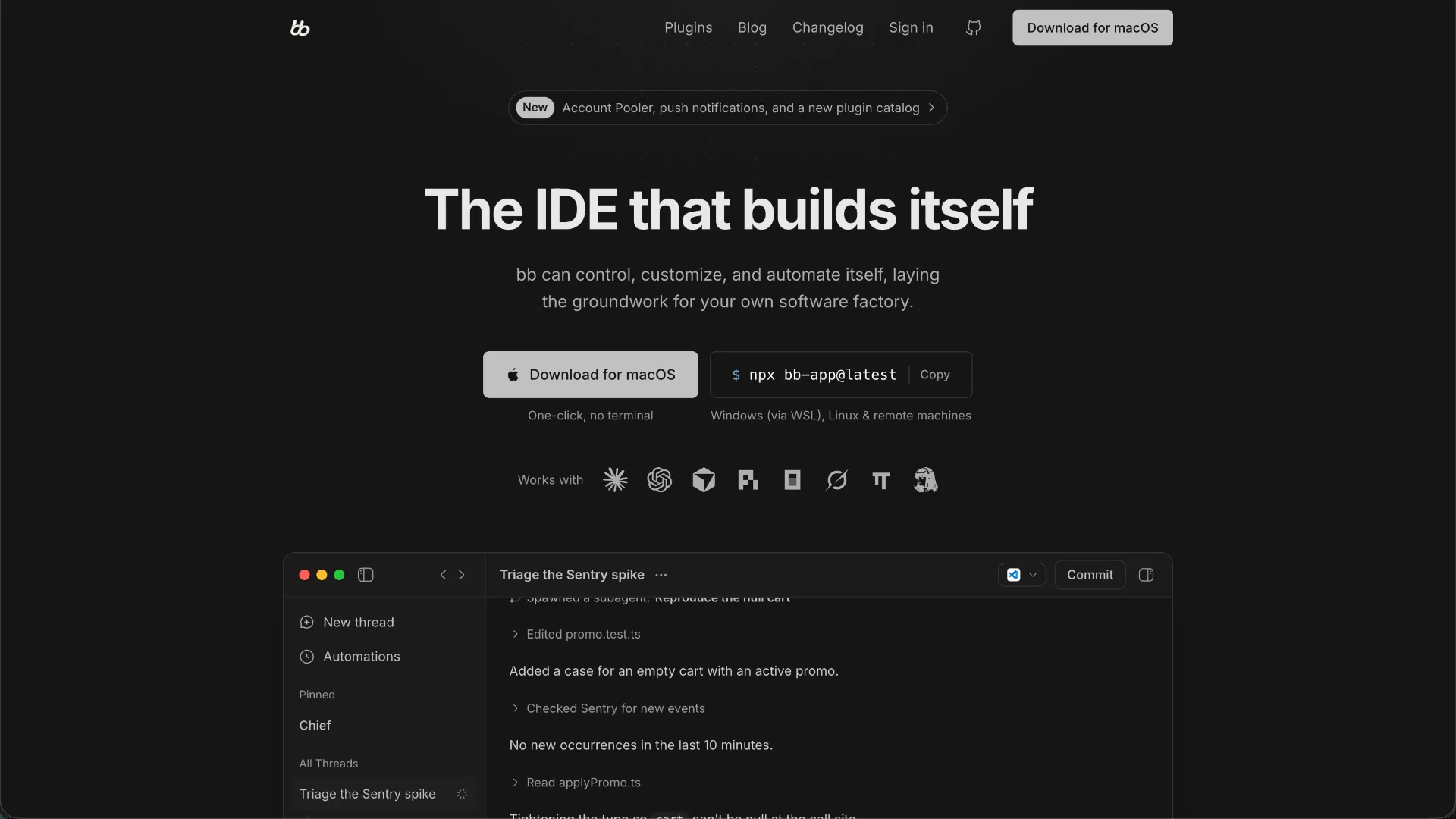
An open-source agentic IDE and orchestration workbench for developers who want to coordinate multiple coding agents and customize the environment around them.
Information checked: Sep 9, 2026 ·View sources
Tool details
- Type
- AI editors
- Platforms
- macOS, Linux, Windows via WSL2, Web, iOS (TestFlight)
- Free plan
- Yes
- Open source
- Yes
- Bring your own key
- Yes
- Local models
- No
Overview
Best for
- Developers who regularly switch between multiple coding agents
- Power users building custom agent workflows and internal developer tooling
- Developers experimenting with parallel agent execution
- Teams interested in a self-hostable, extensible agent workbench
- Users who want CLI or API control over coding-agent sessions
Strengths
- Free, MIT-licensed, and local-first
- Works with multiple existing coding-agent accounts instead of locking users to one provider
- Unusually extensible plugin architecture
- Well suited to parallel and multi-agent development workflows
- CLI and API make the workspace useful for automation as well as interactive coding
Limitations & trade-offs
- Users who only want a conventional VS Code-style editor with AI autocomplete
- Windows developers who require native PowerShell or CMD support
- Teams prioritizing a mature centralized enterprise administration product over extensibility
- Developers who want one bundled AI subscription with no provider setup
- The product is evolving quickly and some workflows or APIs can change between releases
- Native Windows PowerShell and CMD workflows are not supported; Windows requires WSL2
- The Linux desktop AppImage is still described as alpha
- Users must separately install and authenticate the coding-agent providers they want to use
- Less conventional-editor-first than tools such as Cursor or Windsurf if inline editing is the primary workflow
Get started
Pricing & usage limits
Free tier available
Open Source$0
bb is free and MIT-licensed. Coding-agent subscriptions or API usage are billed separately by the providers you use.
Pricing checked: Sep 9, 2026 · Subscription, usage limits, and model costs may be billed separately.
Features & details
Agent Orchestration
- Run different coding-agent providers from one workspace
- Follow, steer, fork, and hand off live agent threads
- Coordinate parallel tasks across threads, worktrees, and machines
Self-Customizing Workbench
- Agents can build and install bb plugins
- Plugins can add panels, commands, skills, services, and APIs
- Official and community plugin catalogs
Developer Surfaces
- Desktop and browser interfaces
- Integrated terminal, browser, file viewing, and file editing
- CLI, HTTP API, and Node SDK
Automation & Remote Work
- Programmatic thread creation and control
- Scheduled and background agent workflows
- Remote access and multi-machine execution
Why Choose bb?
bb makes the most sense when the unit of work is no longer a single chat panel inside a code editor. Its design assumes that a developer may have several capable coding agents available and wants a persistent place to dispatch work, inspect what each agent is doing, intervene when necessary, and connect those sessions to broader automation.
That makes bb closer to an agent workbench or control plane than a conventional editor with an AI sidebar. You can still inspect and edit files, open terminals, and work directly with a repository, but the higher-level object is the thread: a running piece of engineering work associated with an agent, environment, and project.
The second important distinction is that bb treats the development environment itself as something agents should be able to modify. Instead of waiting for the product team to add a narrowly specific workflow, a recurring requirement can become a plugin, command, panel, or skill. That approach is especially attractive to developers whose workflows are unusual enough that generic IDE features frequently feel one step removed from what they actually need.
The tradeoff is that this flexibility shifts some responsibility back to the user. A commercial editor can optimize one integrated experience and hide many implementation details. bb exposes more of the underlying agent ecosystem, which is powerful when you want control but unnecessary if all you need is reliable autocomplete and a single coding assistant.
Core Workflow
A useful mental model is to treat bb as the layer above your coding agents rather than as a replacement for the intelligence inside them. Authentication and much of the agent execution remain with tools such as Claude Code, Codex, Cursor, Pi, or another supported provider. bb supplies the workspace in which those agents are selected and coordinated.
For a small task, that may still look like ordinary agentic coding: open a project, start a thread, choose the provider, describe the change, and follow the resulting edits and commands. The workflow becomes more distinctive once a project contains several independent or dependent tasks. Separate threads can handle different pieces of work, an agent can create child work, and worktrees or separate environments can help prevent parallel tasks from immediately colliding with each other.
This structure also changes how provider choice can be used. Instead of committing a repository to one AI product, the provider becomes a per-task decision. A developer might use one agent for a long implementation, another for a focused review, and a third for a task where its existing subscription or model access is more appropriate. bb is therefore most useful when provider diversity is intentional rather than accidental.
Use Cases
One strong use case is the developer running several long-lived coding tasks at once. Traditional chat panes become difficult to manage when one session is debugging CI, another is implementing a feature, and a third is reviewing a migration. bb gives those jobs separate identities and makes the collection of running work more important than any one conversation.
Another is building a personalized internal developer environment. A team may have repository-specific release checks, task systems, documentation conventions, or deployment commands that are too specialized for a general-purpose editor. bb's plugin model creates a path for turning those routines into native parts of the workbench rather than maintaining a separate collection of scripts and browser tabs.
It is also interesting for software-factory experiments where work can originate outside the desktop UI. Because the same environment can be controlled programmatically, an external script or service can create a thread and leave it ready for a developer to inspect later. This is a different workflow from fully autonomous issue-to-PR systems: the emphasis remains on a developer-owned workspace where automated and interactive work can meet.
Comparison to Alternatives
Cursor and Windsurf are easier reference points for developers whose primary interaction is still editing code directly. They put the source editor at the center and layer increasingly capable agents around it. bb reverses that emphasis: the agents and their running work are central, while file editing is one surface available to support those jobs.
Kiro approaches agentic development through a more structured, specification-oriented workflow. That can suit teams that want requirements and implementation plans to be explicit parts of the development process. bb is less prescriptive about how a task must be represented and puts more emphasis on assembling your own environment around different agents and plugins.
Google Antigravity is a particularly relevant comparison because it also pushes toward agent-first development and multi-agent coordination. The buying decision is nevertheless different: bb is open source, designed to run around providers and subscriptions you already control, and exposes extensive customization surfaces. Antigravity is a more integrated product ecosystem. Developers deciding between them should therefore focus less on which agent can write a particular function and more on who should own the orchestration layer around those agents.
Best Configuration
For a first evaluation, use the stable channel rather than Nightly and connect only the provider you already use regularly. This keeps the initial test focused on whether bb's thread model improves your workflow instead of turning setup into a comparison of every available agent.
The standard package launcher is:
bash
npx bb-app@latestOn recent npm versions, bb's native dependencies may require installation scripts to be explicitly allowed. If the normal launcher reports missing native bindings, use the documented allow-list form:
bash
npx --allow-scripts=better-sqlite3,node-pty,@parcel/watcher bb-app@latestmacOS Apple Silicon users have the simplest desktop path. On Linux, developers who encounter problems with the alpha AppImage can use the npm-hosted application instead. Windows users should treat WSL2 as the actual bb host environment: install Node.js, Git, the relevant provider CLIs, and the repository inside or access it from that Linux environment rather than expecting native PowerShell behavior.
Keep provider authentication outside bb where possible. One of the product's advantages is that an existing authenticated agent CLI can remain the source of truth instead of creating another account configuration layer. Explicit provider keys are still available for routes that require them, but adding credentials simply because the option exists makes a multi-provider setup harder to reason about.
For privacy-sensitive installations, review the telemetry and remote-access settings before exposing the server beyond the local machine. Anonymous production telemetry can be disabled for a launch with:
bash
BB_TELEMETRY=false npx bb-app@latestFinally, resist the urge to build plugins immediately. First identify a workflow you repeat often enough to justify making it part of the environment. bb's self-extension model becomes much more valuable when plugins encode real recurring behavior rather than serving as demonstrations that the IDE can modify itself.
Migration Notes
Developers arriving from Cursor, Windsurf, or another editor-first tool should not try to reproduce their entire existing IDE setup on day one. bb can coexist with a preferred local editor, so a more effective migration is to move agent coordination first and keep manual editing in the editor you already know. Once the orchestration workflow proves useful, more editing and tooling can move into bb selectively.
Existing provider authentication also reduces migration friction. Rather than changing models and credentials at the same time as the workspace, keep Claude Code, Codex, Cursor, or another provider working independently and let bb orchestrate those existing installations. This makes it much easier to distinguish a bb-specific problem from a provider problem.
Teams building custom plugins should be more conservative. bb is under active development, and the project explicitly marks some plugin APIs as experimental. Internal workflows that become operationally important should avoid experimental interfaces where possible, pin versions when reproducibility matters, and treat upgrades as software changes that deserve testing rather than assuming every extension will remain compatible indefinitely.
Model support & data privacy
Supported models
- Claude Code
- Codex
- Cursor
- Pi
- OpenCode
- Grok Build
- omp
- Hermes Agent
- OpenAI
Privacy & data handling
bb states that its apps communicate with a bb server running on the user's own machine; prompts, source code, files, terminal output, and provider credentials are not sent to bb's operator as part of normal local operation. Data still goes to whichever AI provider the user selects. Production desktop and npx runs send limited anonymous usage telemetry such as app starts, thread creation counts, message counts, and public plugin installs using a random per-install identifier; telemetry can be disabled with BB_TELEMETRY=false. Optional bb Connect and the getbb.app website have separate data handling.
Guides, reviews & fixes
No published guides yet. Start with the official documentation above.
Product updates
Official changelogNo verified product updates listed yet. Follow this tool to see new relevant content in Saved.
See the content timelineAlternatives
CursorCursor is an AI coding and cloud development platform that combines a VS Code-based editor, local and cloud agents, CLI workflows, Origin code hosting, repository collaboration, and prompt-to-app creation. WindsurfWindsurf, now transitioning under the Devin Desktop brand, is an AI-native IDE for developers who want coding agents, codebase context, and editor workflows in one desktop environment.
 Kiro IdeKiro is an AWS-backed agentic AI IDE for spec-driven software development, combining local coding, CLI automation, web-based delegated agents, MCP tools, and team steering into one structured engineering workflow.
 Google AntigravityGoogle Antigravity is an agent-first AI development platform that combines a desktop agent manager, IDE, CLI, SDK, and Google ecosystem integrations for task-oriented software development.
Sources & verification
Verification dates record when this directory checked the information. Product release dates appear separately above.
Official websiteOfficial GitHub repositorybb-app documentationConfiguration documentationPrivacy policyOfficial changelog
Directory revision history
bb 0.42.0 added Account Pooler for Claude and Codex, push notifications, an expanded plugin catalog, context clearing, and additional provider and plugin capabilities.
bb 0.41.0 added scheduled message dispatch, concurrency controls, improved mobile support, plugin documentation, and additional thread workflow improvements.
bb 0.40.0 introduced its File Editor, quick command palette, broader provider APIs, and significant performance improvements.