On This Page8 sections
Key Takeaways
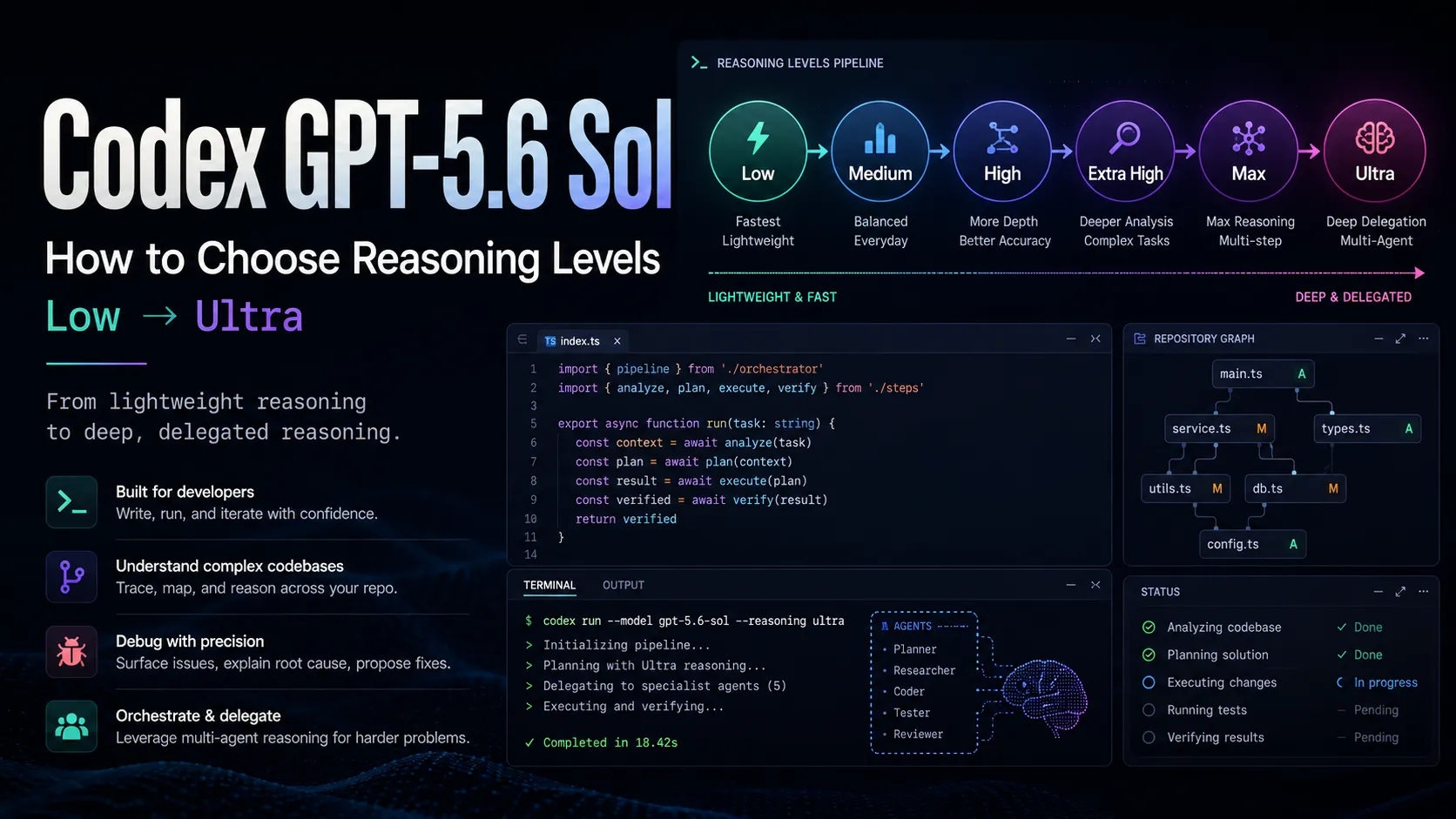
GPT-5.6 Sol is designed for demanding Codex workflows that involve repository exploration, code changes, terminal commands, testing, debugging, and multi-step engineering decisions. Sol with Medium reasoning is the best default for most development work. Use Low for small edits, High or Extra High for difficult debugging and refactoring, Max for one deeply complex problem, and Ultra for large tasks that can be split across multiple agents. Higher reasoning usually increases latency and credit usage, but there is no fixed cost multiplier between levels.
What Is GPT-5.6 Sol in Codex?
GPT-5.6 Sol is a high-capability coding model built for complex software engineering work inside Codex. It can inspect repositories, trace dependencies, edit multiple files, run terminal commands, execute tests, interpret failures, and continue refining an implementation until it satisfies the requested outcome.
Sol is most useful when a task requires more than code generation. It is designed for situations where Codex must understand an unfamiliar codebase, make engineering trade-offs, validate changes, and operate across tools rather than simply produce a standalone function.
A practical default configuration is:
Model: gpt-5.6-sol
Reasoning level: Medium
This combination gives Codex enough capacity for repository-level work without applying maximum reasoning to every request. Higher levels should be reserved for tasks that genuinely require deeper analysis, broader validation, or parallel execution.
What Is the Difference Between a Codex Model and a Reasoning Level?
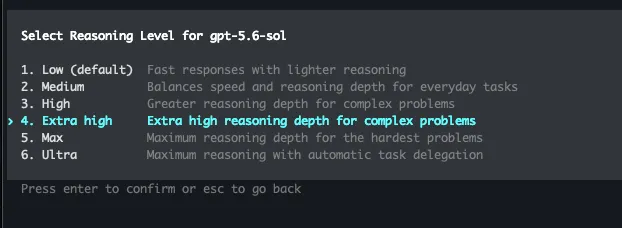
The model determines the underlying capability, while the reasoning level determines how much effort that model can spend on the current task. Selecting GPT-5.6 Sol chooses the coding model. Selecting Low, Medium, High, Extra High, Max, or Ultra changes how deeply Codex approaches the request.
A higher reasoning level can allow Codex to:
- Explore more files before editing
- Trace longer call chains
- Compare multiple implementation strategies
- Check more edge cases
- Run additional commands and tests
- Revisit failed assumptions
- Spend more time validating the final result
Reasoning level does not turn Sol into a different model. It changes the amount and structure of the work Sol performs before returning an answer.
Which GPT-5.6 Sol Reasoning Level Should You Choose?
Choose the lowest level that can complete the task reliably. Medium should be the default for normal development, while higher levels should be used when the scope, uncertainty, or cost of failure increases.
| Reasoning level | Best Codex use case | Relative speed | Relative usage | Recommended frequency |
|---|---|---|---|---|
| Low | Small edits, clear bugs, code explanations | Fastest | Lowest | Frequent |
| Medium | Feature work, multi-file edits, normal debugging | Fast | Moderate | Default |
| High | Difficult bugs, larger refactors, code review | Slower | Higher | As needed |
| Extra High | Architecture, migrations, performance, security | Slow | High | Complex tasks |
| Max | One extremely difficult, tightly connected problem | Very slow | Very high | Rare |
| Ultra | Large tasks that can be delegated across agents | Variable | Usually highest | Specialized |
The best setting depends on more than task size. A small concurrency bug may require Max because every clue must remain in one reasoning chain, while a much larger migration may fit Ultra because its workstreams can run independently.
When Should You Use Low Reasoning in Codex?
Low is best for narrow tasks with clear requirements and limited impact. It minimizes waiting time and is useful when developers need fast, repeated interactions during normal implementation work.
Good tasks for GPT-5.6 Sol with Low reasoning include:
- Adjusting CSS, spacing, or responsive behavior
- Fixing a specific TypeScript error
- Adding one field to an API response
- Updating button states or interface copy
- Explaining the purpose of a function
- Renaming variables, components, or files
- Adding a straightforward validation rule
- Writing a basic unit test for existing behavior
Low works well when the developer already knows where the change belongs. It is less reliable when Codex must discover the real source of a problem across state management, caching, authentication, database access, or asynchronous workflows.
Why Is Medium the Best Default for Codex?
Medium provides the best balance of speed, repository understanding, implementation quality, and credit usage. It gives Codex enough reasoning capacity to inspect relevant files, plan a change, edit multiple parts of the project, and perform basic validation.
Typical tasks for Sol with Medium reasoning include:
- Building a complete page or component
- Integrating a third-party API
- Updating frontend and backend data structures
- Adding search, pagination, authentication, or uploads
- Implementing a new endpoint
- Refactoring a medium-sized module
- Adding tests for an existing feature
- Fixing a normal runtime or build error
Medium is especially effective when the destination is clear but the exact implementation requires repository exploration. A good prompt can describe the objective, acceptance criteria, relevant directories, and required test command while allowing Codex to determine the specific edits.
When Should You Switch Codex to High Reasoning?
High is appropriate when Codex must trace complex behavior, evaluate competing solutions, or protect against subtle regressions. It gives the model more room to investigate the codebase before committing to an implementation.
High reasoning is useful for:
- Intermittent or difficult-to-reproduce bugs
- React state synchronization problems
- Race conditions in asynchronous workflows
- Cache and database inconsistencies
- Cross-directory refactoring
- Large pull request reviews
- Authentication and authorization issues
- Production-only failures
- Performance bottlenecks with several possible causes
High does not necessarily produce a longer final response. Codex may return a concise summary and a small patch after spending substantial effort tracing dependencies, checking types, running tests, and eliminating incorrect explanations.
What Is the Difference Between High and Extra High?
High focuses on solving a difficult engineering problem, while Extra High focuses on understanding and managing system-wide consequences. Extra High is better suited to changes that require planning, implementation, migration safety, compatibility checks, and rollback preparation.
| Dimension | High | Extra High |
|---|---|---|
| Typical scope | One difficult feature or related module | Several modules or an entire subsystem |
| Primary goal | Find a reliable solution | Design, implement, and validate a complete transition |
| Common use | Debugging, refactoring, review | Migration, architecture, security, performance |
| Validation | Targeted tests and checks | Multiple test layers and operational checks |
| Best repository type | Small or medium project | Large repository or monorepo |
Extra High is a strong choice for framework upgrades, authentication rewrites, database migrations, build-system replacements, service extraction, major dependency updates, and production performance investigations.
It is unnecessary for routine CRUD work. When the correct implementation is already obvious, additional reasoning may increase file reads, terminal activity, and validation steps without producing a proportionally better result.
When Should You Use Max Reasoning in Codex?
Max is designed for one extremely difficult problem that should remain inside a single, continuous reasoning process. It prioritizes depth rather than parallelism and is most valuable when the relevant evidence is tightly connected.
Appropriate Max tasks include:
- Diagnosing a complex memory leak
- Investigating deadlocks or data races
- Verifying transaction safety
- Proving the correctness of a critical algorithm
- Designing a zero-downtime migration
- Explaining a rare production failure
- Solving a problem that High and Extra High failed to resolve
Max is not the best setting for a list of unrelated tasks. If a project naturally divides into frontend, backend, database, testing, documentation, and security workstreams, Ultra is usually a better match.
How Does Ultra Work in Codex?
Ultra allows Codex to delegate parts of a large task to multiple agents and combine their results. The main agent coordinates the overall objective, while subagents can inspect separate areas of the repository, implement independent changes, run tests, or review risks in parallel.
A large system upgrade could be divided into workstreams such as:
- Agent A: Audit frontend dependencies and compatibility
- Agent B: Upgrade backend APIs and server code
- Agent C: Design database migration and rollback steps
- Agent D: Update tests and CI configuration
- Agent E: Review security and performance risks
- Main agent: Reconcile changes and produce the final result
Ultra is most effective when the task contains clearly separable components. Its advantage comes from broader and parallel execution, not merely from giving one agent more time to think.
What Is the Difference Between Max and Ultra?
Max increases the depth of one agent, while Ultra increases the breadth of work through delegation. Both target difficult tasks, but they solve different types of engineering complexity.
| Dimension | Max | Ultra |
|---|---|---|
| Execution model | One deeply reasoning agent | Main agent plus subagents |
| Primary advantage | Continuous, focused analysis | Parallel repository work |
| Best task structure | Difficult to divide | Easy to divide into workstreams |
| Typical use | Concurrency, algorithms, rare failures | Migrations, audits, multi-module development |
| Context handling | Centralized reasoning chain | Distributed analysis across agents |
| Total usage | Very high | Usually highest and more variable |
A complicated SQL deadlock is a Max-style problem because every clue contributes to one connected explanation. A full-stack migration is an Ultra-style problem because frontend, backend, data, testing, and documentation can progress independently.
How Do Reasoning Levels Affect Codex Credit Usage?
Reasoning levels do not have fixed credit multipliers. A High request is not guaranteed to cost twice as much as Medium, and Ultra does not consume a predetermined number of credits. Actual usage depends on the work Codex performs.
The main cost drivers include:
- Conversation and repository context size
- Number and size of files inspected
- Length of
AGENTS.mdinstructions - Number of enabled MCP servers
- Terminal output and test logs
- Commands and tool calls
- Internal reasoning tokens
- Cache reuse
- Repeated repository scans
- Number of subagents created by Ultra
The general pattern is:
Low < Medium < High < Extra High < MaxUltra does not fit neatly into that sequence because it combines several workstreams:
Ultra usage = main agent + subagents + tool calls + result integrationTwo requests using Sol with Medium can still differ dramatically. Updating one button and refactoring a payment system may use the same visible setting, but the second task requires far more repository analysis, tool execution, and validation.
Does One Codex Request Always Use the Same Amount of Credits?
One Codex request does not have a fixed cost. Usage reflects the amount of context processed, reasoning performed, tools invoked, and output generated rather than the number of prompts alone.
A short final response can still represent substantial work. Codex may inspect dozens of files, run builds, execute tests, analyze failures, revise code, and perform hidden reasoning before returning a brief summary of the completed changes.
This is why message count alone is not a reliable measure of consumption. A single repository-wide Ultra task can require more resources than many small Low requests combined.
How Is Reasoning Level Different from Codex Speed Settings?
Reasoning level controls analytical depth, while speed settings control how quickly the system prioritizes and processes the request. They affect different parts of the Codex experience.
Increasing the reasoning level gives Codex more room to plan, investigate, and validate. Increasing the speed setting can improve responsiveness or throughput, but may consume more credits depending on the account and product configuration.
For a long, non-urgent refactor, normal speed with High or Extra High reasoning may be appropriate. During interactive debugging, Medium reasoning with faster responses may produce a better workflow than repeatedly waiting for Max-level analysis.
Which Codex Setting Fits Each Coding Task?
The best configuration should match task scope, uncertainty, failure cost, and whether the work can be delegated. The following recommendations cover common Codex workflows.
| Codex task | Recommended configuration |
|---|---|
| Edit CSS, copy, or a small function | Sol Low |
| Build a normal page or business feature | Sol Medium |
| Integrate an API across several files | Sol Medium |
| Fix a normal bug or failing test | Sol Medium |
| Debug complex state or async behavior | Sol High |
| Review a large pull request | Sol High or Extra High |
| Investigate database and cache consistency | Sol High |
| Upgrade a framework or major dependency | Sol Extra High |
| Perform a security or performance review | Sol Extra High |
| Solve one critical, deeply connected problem | Sol Max |
| Audit a monorepo | Sol Ultra |
| Migrate several modules in parallel | Sol Ultra |
For most frontend, Node.js, SaaS, and independent web projects, Sol with Medium reasoning is sufficient. High and Extra High become valuable when the task crosses architectural boundaries or when an incorrect change could cause expensive regressions.
How Can You Tell When the Current Reasoning Level Is Too Low?
Repeatedly missing constraints, fixing symptoms instead of causes, and creating regressions are strong signs that the reasoning level is too low. Improve the prompt first, then increase the level if the problem continues.
Common warning signs include:
- Codex edits surface-level code without tracing the data source
- Fixing one module breaks another
- Multiple test runs fail without identifying the root cause
- Transaction, caching, permission, or concurrency boundaries are ignored
- The solution omits migration or deployment requirements
- Codex repeatedly inspects irrelevant files
- The same incorrect assumption appears across several attempts
Poor task descriptions can create the same symptoms. Before raising the level, provide reproduction steps, expected behavior, relevant paths, test commands, constraints, and files that must not be changed.
How Can You Tell When the Reasoning Level Is Too High?
Excessive planning, broad repository scans, and unnecessary architectural changes indicate that the reasoning level may be higher than the task requires. A simple edit should not trigger a repository-wide investigation.
Signs of an unnecessarily high setting include:
- Scanning the entire repository for a one-line configuration change
- Producing a large plan before a simple UI adjustment
- Suggesting several architectures for an established implementation
- Running unrelated test suites
- Expanding the modification beyond the requested scope
- Spending substantial time validating a low-risk edit
Lower the level to Medium or Low and make the boundaries explicit. For example, tell Codex to modify only named files, avoid unrelated refactoring, preserve public interfaces, and run one specific test command.
How Can You Reduce GPT-5.6 Sol Usage in Codex?
The most effective way to reduce usage is to remove unnecessary context and prevent repeated exploration. A precise Medium prompt can be cheaper than a vague Low prompt that requires several failed attempts.
Useful practices include:
- Define the task and acceptance criteria clearly
- Point Codex to the relevant directories
- Include a minimal reproduction
- Provide only the important part of an error log
- Keep root-level
AGENTS.mdinstructions concise - Place specialized rules in the relevant subdirectories
- Disable MCP servers that are unrelated to the task
- Separate unrelated changes into different requests
- Specify which tests or commands should be run
- Use Low for mechanical edits
- Raise the level only after identifying a real reasoning failure
Large tool definitions and repository instructions can be included in every interaction. Keeping them focused reduces context overhead and makes it easier for Codex to identify the files and tools that matter.
How Do You Switch to GPT-5.6 Sol in Codex CLI?
Codex CLI can select GPT-5.6 Sol at startup or from an active session. To launch Codex with the model explicitly selected, use:
codex -m gpt-5.6-solInside an active Codex session, open the model selector with:
/modelThe selector allows you to choose the model and an available reasoning level. To inspect the current model, reasoning configuration, permissions, context, and usage information, use:
/statusChanging the reasoning level does not automatically remove the existing conversation context. A long session can remain expensive even after switching from High to Low because previous messages, logs, and repository information may still be included.
Should You Leave Codex on Sol with Max Reasoning?
Codex should not remain on Sol with Max reasoning for normal development. Most tasks do not require the largest available reasoning budget, and using Max by default can increase latency, repository exploration, and credit consumption.
A practical escalation path is:
Sol Medium → Sol High → Sol Extra High → Sol Max or Sol UltraChoose Max when the problem is difficult to divide and depends on one connected chain of reasoning. Choose Ultra when the objective is broad and can be separated into independent workstreams.
For minor edits, move in the opposite direction and use Low. Matching the level to the task produces better results than treating the most expensive setting as the safest default.
What Is the Best Default GPT-5.6 Sol Configuration for Codex?
GPT-5.6 Sol with Medium reasoning is the best default configuration for most Codex users. It preserves strong repository understanding, coding ability, tool use, and engineering judgment without applying maximum reasoning to routine work.
A practical configuration map is:
Default development: GPT-5.6 Sol + Medium
Fast, narrow edits: GPT-5.6 Sol + Low
Complex debugging: GPT-5.6 Sol + High
Architecture and migrations: GPT-5.6 Sol + Extra High
One deeply difficult problem: GPT-5.6 Sol + Max
Large parallel engineering task: GPT-5.6 Sol + Ultra
This approach is more efficient than keeping one high setting for every request. It also makes Codex feel faster during ordinary work while preserving Max and Ultra for the tasks where their additional reasoning structure creates measurable value.
Conclusion
GPT-5.6 Sol is most valuable in Codex when the task requires repository understanding, code modification, terminal execution, testing, debugging, and engineering judgment. The reasoning level determines how much analytical and operational effort Codex can apply to that task.
The practical selection rule is straightforward:
- Use Sol with Medium for normal development
- Use Low for small, well-defined edits
- Use High for difficult debugging and larger reviews
- Use Extra High for migrations, architecture, security, and performance
- Use Max for one deeply connected problem
- Use Ultra for large projects that can be delegated across agents
Do not select the highest reasoning level by default. Select the lowest level that can complete the work reliably. One successful High request may cost less than several failed Low attempts, but using Max or Ultra for a simple change usually adds unnecessary latency, context processing, and credit consumption.
Continue Reading
More articles connected to the same themes, protocols, and tools.


Referenced Tools
Browse entries that are adjacent to the topics covered in this article.