
AI editors
Google Antigravity
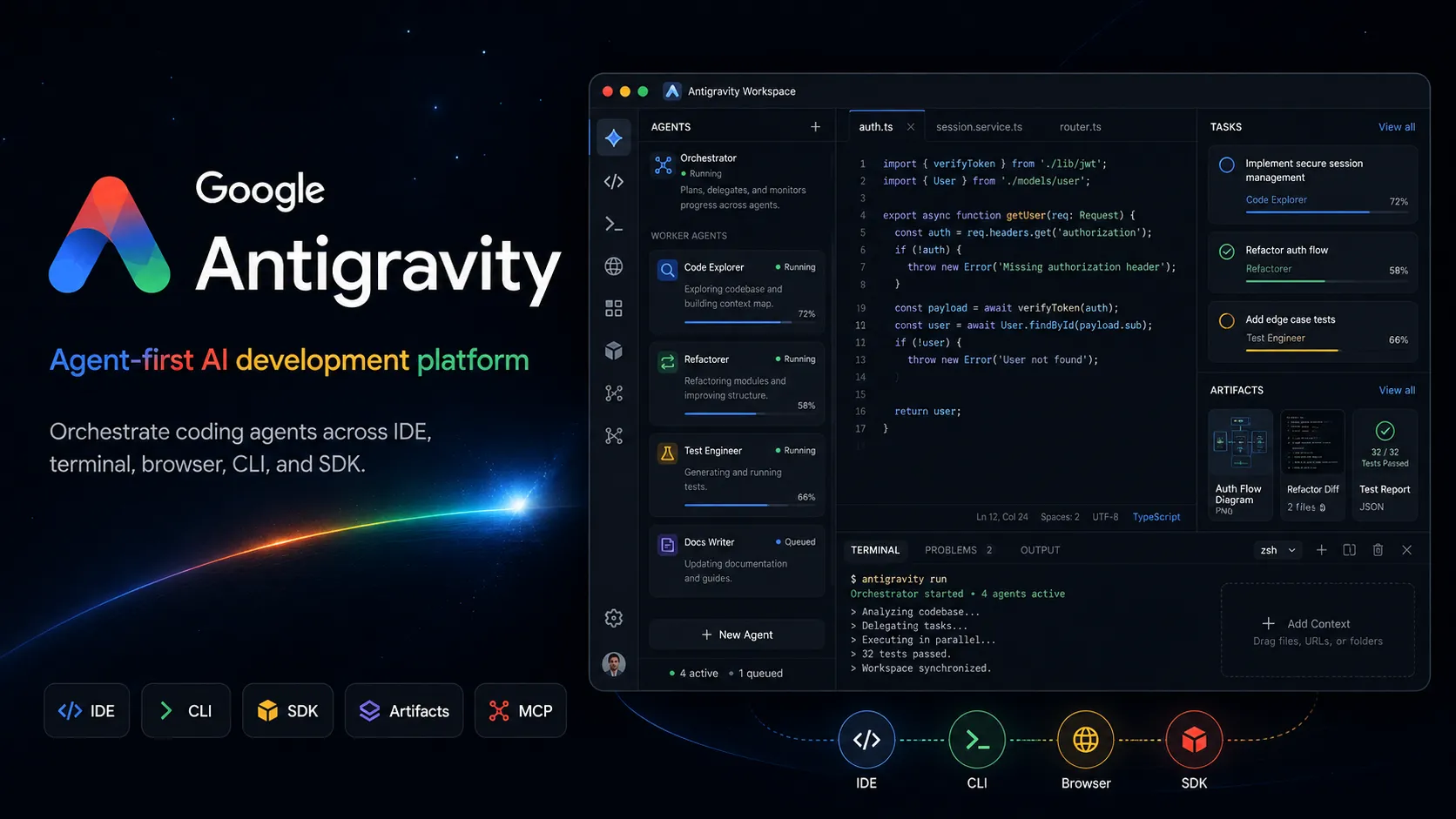
Google Antigravity 是 agent-first AI development platform,結合 desktop agent manager、IDE、CLI、SDK 與 Google 生態系整合,用於 task-oriented software development。
资料核对: 2026年6月14日 ·查看来源
工具信息
- 工具类型
- AI editors
- 平台
- macOS, Windows, Linux, Desktop app, Antigravity IDE, Antigravity CLI, Antigravity SDK, Google AI Studio, Firebase, Google Cloud, Android developer workflows
- 免费方案
- 支持
- 开源
- 不支持
- 自带密钥
- 不支持
- 本地模型
- 不支持
工具概览
适合哪些项目
- 想要 agent-first IDE 的開發者
- Multi-agent coding workflows
- Parallel background development tasks
- 具備 review artifacts 的大型 feature implementation
- 需要 screenshots 或 browser recordings 的 UI changes
- Firebase 與 Google Cloud projects
- Android app prototyping
- Google AI Studio 到 local development handoff
- 探索 task-oriented agent orchestration 的團隊
- 想要 Gemini-native coding agents 的開發者
优点
- 超越一般 IDE sidebar 的強大 multi-agent orchestration model。
- 結合 editor、terminal、browser、desktop manager、CLI 與 SDK surfaces。
- Artifacts 讓 agent work 更容易檢查與驗證。
- 與 Gemini、Google AI Studio、Firebase、Android、Google Cloud 深度對齊。
- 免費個人方案讓實驗更容易。
- 適合長時間 background tasks 與 parallel agent workflows。
局限与取舍
- 想要 fully open-source coding agent 的使用者
- 需要 local model execution 的開發者
- 需要 provider-neutral BYOK model routing 的團隊
- Agents 不能存取 terminal、browser 或 file tools 的工作流程
- 沒有 backups 與 review gates 的高風險 production repositories
- 只需要 lightweight inline autocomplete 的開發者
- 仍需要謹慎審查,因為 autonomous agents 可能造成破壞性錯誤。
- 最佳體驗與 Google account、Google models、Google ecosystem services 綁定較深。
- Usage quotas 與 model availability 會依 plan 與 geography 而異。
- 比 Aider 或 OpenCode 等 open-source CLI agents 更不 provider-neutral。
- Agentic workflows 需要 sandboxing、backups 與 permission discipline。
- 已有成熟 local IDE 或 custom CI/CD workflows 的團隊,採用前可能需要謹慎 pilot。
下载、安装与开始使用
价格与使用额度
提供免费方案
Individual$0 / month
免費個人存取,包含基礎 Gemini model quota、無限制 tab completions、無限制 command requests,以及基本每週 rate limits。
Google AI Pro$19.99 / month
Google AI 方案,Antigravity quota 高於免費個人基準,並受 Google AI 方案限制約束。
Google AI Ultra$100+ / month
較高使用量的 Google AI 層級,提供擴充 Antigravity quota,並在可用時提供 third-party models 存取。
Gemini Enterprise / Google CloudCustom
透過 Google Cloud 與 Gemini Enterprise Agent Platform 條款提供企業存取,支援 project-level integration 與 organization workflows。
价格核对: 2026年6月14日 · 额度、模型费用与订阅价格可能分别计算。
功能与详细介绍
Agent-first workspace
- 獨立 Antigravity 2.0 desktop app 作為 agent work 的 command center。
- Manager surface 可在多個 workspaces 之間協調 multiple agents。
- Agents 可平行執行 planning、coding、testing、verification 與 background tasks。
IDE 與 coding flow
- Antigravity IDE 提供熟悉的 code editor,並具備 agent manager、tab completions 與 inline commands。
- Agents 可跨 editor、terminal 與 browser 運作。
- Project settings 與 security policies 可依 project 隔離。
Artifacts 與 verification
- Agents 會產生 task lists、implementation plans、screenshots、browser recordings 等 artifacts。
- 使用者可以透過 deliverables 審查工作,而不是閱讀 raw tool logs。
- 可以直接在 artifacts 上留下 feedback,以引導後續工作。
CLI、SDK 與 automation
- Antigravity CLI 提供 terminal-first agent surface。
- Antigravity SDK 開放 agent harness,用於 custom agent behaviors。
- Scheduled Tasks 支援 background automation workflows。
Google 生態系整合
- 整合 Google AI Studio export workflows。
- 支援 Firebase、Android、Google Cloud 與 Google developer tooling integrations。
- MCP 支援可把 agents 連接到 local tools、databases 與 external systems。
安全控制
- Sandbox mode 與 strict mode 有助於限制 agent actions。
- File access policy 控制 agents 如何存取 project boundaries 之外的 files。
- Browser URL allowlist 與 denylist controls 有助於限制 agent web access。
為什麼選擇 Google Antigravity?
當開發流程正在從單次 prompts 轉向協調式 agent work 時,Google Antigravity 最有吸引力。它的核心想法是,AI coding tool 不應只是坐在聊天側邊欄裡,而應該有專門的操作介面,讓 agents 能規劃、建置、測試、驗證並回報進度,同時由開發者監督結果。
這讓 Antigravity 與傳統 AI IDE 不同。Editor 只是產品的一部分。獨立 desktop app、Manager surface、artifacts、browser control、terminal access、CLI、SDK,以及 Google 生態系整合,都圍繞同一種模式設計:委派任務級工作、觀察進度、審查證據,並在需要時介入。
核心工作流程
實用的 Antigravity 工作流程,應該從可驗證的任務開始。不要要求模糊的改善,而是定義想要的行為、目標檔案或 app 區域、acceptance criteria、test command,以及 agent 是否可以使用 browser 或 terminal。接著 agent 可以建立計畫、修改 codebase、執行 commands、測試結果,並產生 artifacts 來摘要發生了什麼。
對長時間工作來說,Manager surface 是關鍵差異。開發者可以把 agents 分派到不同 workspaces,讓它們平行執行,並透過 deliverables 而不是 raw logs 來審查每個任務。這很有用,但也會改變開發者的角色。開發者更像 reviewer、task designer 和 safety gatekeeper,而不只是手動輸入每個修改的人。
使用場景
Antigravity 適合 code、terminal 與 browser verification 都很重要的多步驟軟體任務。例如新增功能、修復 UI bug、重現 issue、產生 test case、測試 web flow、整合 Firebase、從 Google AI Studio 匯出到本機開發,或從 prompt 建立 Android prototype。
它也適合 background maintenance。Scheduled Tasks 與 parallel agents 可以協助週期性 cleanup、dependency work、triage、documentation updates 與 issue reproduction。不過,這些工作流程應逐步導入,因為自主工具存取套用在重要 repositories 或本機檔案上時,可能帶來實際風險。
與替代工具比較
與 Cursor 和 Windsurf 相比,Antigravity 更明確地偏向 agent-first。Cursor 與 Windsurf 是適合互動式 coding、inline changes 與 codebase chat 的強大 AI editors。Antigravity 則更重視 orchestration:multiple agents、Manager surface、artifacts、browser recordings,以及 Google-native agent harness。
與 Claude Code、Codex CLI、OpenCode 或 Aider 相比,Antigravity 不是 terminal-minimal,而是更 platform-oriented。CLI agents 適合希望本機、直接、provider-flexible 控制的開發者。當工作流程受益於圖形化 command center、verification artifacts、browser control 與 Google 生態系整合時,Antigravity 會更有吸引力。
與 Replit AI、Bolt.new 或 Lovable 相比,Antigravity 不只是簡單的 prompt-to-app builder,而更像 agentic development environment。它能幫助把想法變成 app,但更強的定位是監督在既有開發流程中工作的 agents。
最佳設定
最安全的設定從 project isolation 開始。使用獨立 workspaces、乾淨的 Git branches、backups,以及範圍狹窄的 file access settings。對敏感專案啟用更嚴格的 security controls,謹慎設定 outside-folder access,並在 agents 需要 web access 時使用 browser allowlists 或 denylists。
模型選擇方面,iteration 與 debugging 可使用較快的 Gemini models;當 quota 與 plan access 允許時,把更強或 third-party models 保留給較難的 reasoning tasks。團隊應標準化 agents 何時可以執行 terminal commands、何時可以碰 project 外的 files、什麼算 acceptable evidence,以及在 merge 或 deploy changes 之前由誰審查 artifacts。
遷移注意事項
從 Gemini CLI 遷移的開發者應先評估 Antigravity CLI,再判斷 desktop Manager surface 是否帶來足夠價值。從 Cursor 或 Windsurf 遷移的開發者,應在需要 browser verification 與 parallel background tasks 的工作流程上測試 Antigravity,而不只是測 inline edits。那才是產品最有差異化的地方。
團隊導入方面,最佳路徑是 controlled pilot。使用一個非關鍵 repository,定義安全任務,要求人為審查 diffs 與 artifacts,並記錄 agent 成功與過度行動的情況。在 production usage 之前,團隊應先確認 backup practices、permission rules、sandbox defaults、project isolation、rate-limit expectations,以及 Google Cloud 或 enterprise account terms。
模型支持与数据隐私
支持的模型
- Gemini 3.5 Flash
- Gemini 3.1 Pro
- Gemini 3 Pro
- Gemini 3 Flash
- Claude Sonnet 4.6
- Claude Opus 4.6
- gpt-oss-120b
隐私与数据处理
Antigravity 可能會處理 prompts、codebase context、file contents、terminal output、browser activity、tool calls、artifacts 與 project metadata,以運作其 agents。個人使用與 Google account terms 綁定,而 team 與 enterprise use 可能適用 Google Cloud 或 Gemini Enterprise terms。使用者在允許 agents 執行 commands 或修改重要 repositories 之前,應先設定 sandbox mode、strict mode、file access policies、browser allowlists 或 denylists、project isolation、backups 與 approval gates。
指南、评测与常见问题
查看全部
产品动态
暂时没有经过核对的产品动态。关注后,新的相关内容会出现在「我的收藏」。
查看相关内容动态替代工具
信息来源与核对记录
核对日期记录本站何时检查信息;不代表产品发版日期。
官方网站Google Antigravity 官方網站Google Antigravity 價格Google Antigravity 文件Google Antigravity 方案文件Build with Google Antigravity 發表Google I/O 2026 開發者重點Getting Started with Google Antigravity codelabGoogle Antigravity 設定Google Antigravity MCP 文件Google Antigravity 瀏覽器安全Google AI 訂閱
本站资料修订记录
建立條目,涵蓋 Antigravity 2.0 desktop app、IDE、CLI、SDK、artifacts、Gemini model access、Google AI plan quotas、Google 生態系整合與安全控制。