On This Page8 sections
Key Takeaways
- T3 Code is a free, open-source control center for AI coding agents, rather than a new AI model or a replacement for the agents themselves.
- It supports popular coding agents including Claude Code, OpenAI Codex, Cursor, OpenCode, Grok Build, and Google Antigravity, alongside additional providers and compatible Agent Client Protocol (ACP) agents.
- Developers can manage coding tasks through desktop, web, iOS, and Android interfaces while running the underlying agents on their own computers or remote development machines.
- T3 Code uses a bring-your-own-subscription model. The application is free, but the underlying AI providers retain their normal usage limits and billing arrangements.
- Built-in Git integration, isolated worktrees, pull request workflows, permission controls, and cross-agent collaboration make it particularly useful for developers managing multiple projects.
- Its remote development functionality requires a reachable host machine. A mobile phone acts as a control interface, not as an independent environment running the coding agents.
- T3 Code is released under the MIT license, allowing developers to inspect, modify, and fork its source code.
What Is T3 Code?
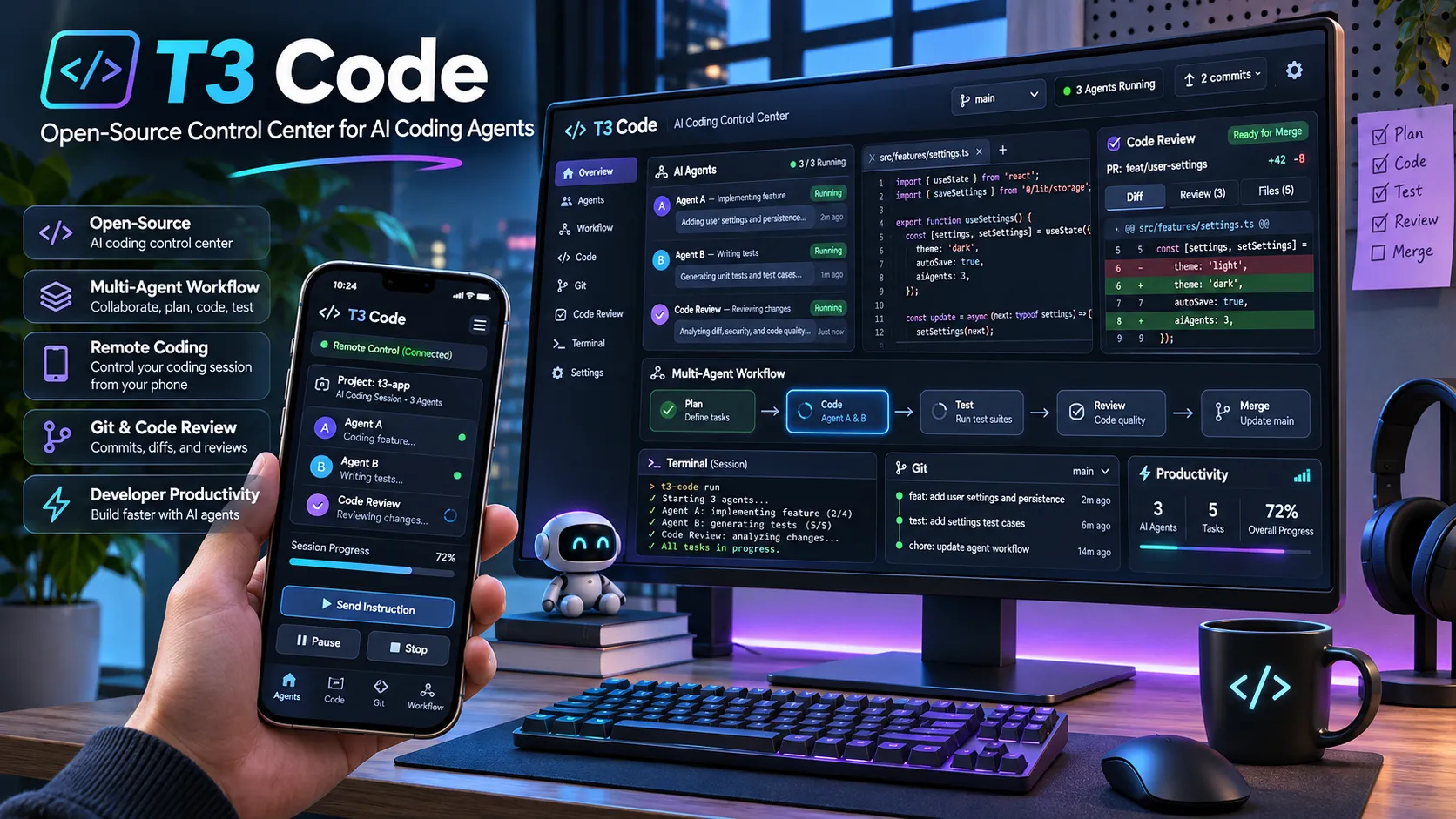
T3 Code is an open-source application designed to provide a unified interface for controlling AI coding agents.
Instead of switching between separate command-line interfaces and desktop applications, developers can use T3 Code to organize coding conversations, manage repositories, inspect changes, and interact with different AI agents from one place.
The project describes itself as an open-source control plane for coding agents.
That distinction is important. T3 Code does not introduce a proprietary foundation model, replace existing inference infrastructure, or provide unlimited AI usage. It connects to established coding agents and presents their capabilities through a common interface.
For example, a developer could use Claude Code to implement a feature, switch to Codex for a second assessment, review the resulting Git changes, and continue the conversation from a phone while the development machine remains online.
The application supports macOS, Windows, Linux, web browsers, and dedicated mobile applications.
Its source code is publicly available in the official T3 Code GitHub repository.
The central idea is straightforward: developers should be able to choose their preferred coding agents without rebuilding their entire workflow whenever they change providers.
How Does T3 Code Work?
Understanding T3 Code requires separating three components: the AI model, the coding agent, and the control interface.
| Component | Responsibility | Examples |
|---|---|---|
| AI model | Generates reasoning, code, and responses | Claude models, OpenAI models |
| Coding agent or harness | Provides tools, executes commands, edits files, and coordinates model interactions | Claude Code, Codex, OpenCode |
| Control interface | Manages conversations, agent selection, permissions, and development workflows | T3 Code |
The underlying agent is responsible for the actual coding operations. T3 Code communicates with that agent and organizes its activity.
A typical interaction follows this sequence:
- A developer opens T3 Code on a desktop, browser, or mobile device.
- T3 Code connects to a development environment running on a computer or server.
- The selected coding agent processes the developer's request using its own runtime and authentication.
- The agent reads files, executes permitted commands, and proposes or performs changes.
- T3 Code displays the conversation, tool activity, generated changes, and approval requests.
- The developer reviews the results and continues the workflow.
This architecture explains why T3 Code can support multiple agent providers without independently recreating every provider's execution environment.
It also explains an important limitation: T3 Code requires an underlying supported agent to perform coding tasks. Installing the interface alone does not provide a functioning AI programming assistant.
The official FAQ explicitly distinguishes T3 Code from the agent harnesses it controls.
T3 Code Features: What Makes It Different?
1. Multiple AI Coding Agents in One Interface
T3 Code's primary advantage is consolidating different AI coding agents into a consistent workflow.
Supported integrations include:
- Claude Code: Anthropic's agentic coding tool for repository exploration, implementation, debugging, and automation.
- OpenAI Codex: OpenAI's coding agent for modifying code, executing development tasks, and reviewing changes.
- Cursor: An AI-powered development environment with an associated coding agent.
- OpenCode: An open-source coding agent with configurable providers and models.
- Grok Build: An additional agent provider supported through its own development tooling.
- Google Antigravity: A supported agent environment using Google authentication.
- Additional agents: Support extends to integrations such as Pi, Muse Code, Kiro, fx, and compatible ACP agents, subject to configuration and version compatibility.
The official provider documentation describes the installation and authentication requirements.
T3 Code can also switch supported models and agents within a conversation.
Why this matters: Different coding agents can have different strengths in planning, implementation, debugging, and code review. A unified interface reduces the friction involved in moving between them.
However, switching agents does not guarantee that every provider-specific capability or internal state transfers perfectly. Developers should verify the available context, tools, and permissions after changing providers.
2. Remote AI Coding From iPhone and Android
Remote development is one of T3 Code's defining capabilities.
A developer can run an AI coding agent on a Mac, Windows computer, Linux workstation, or remote server while interacting with it from another device.
For example:
- Start a feature implementation on a desktop computer.
- Leave the development environment running.
- Open the T3 Code mobile application.
- Inspect the agent's progress.
- Approve a requested action.
- Send additional instructions.
- Review the resulting code changes.
The mobile application connects to the host environment. The AI agent continues running on that host rather than executing directly on the phone.
T3 Code supports several connection approaches, including local network access, Tailscale, and T3 Connect.
T3 Connect is the project's remote connection service. It allows users to access their development environments without manually configuring public router port forwarding.
According to the remote access documentation, the host machine must remain powered on, running the relevant server, and reachable.
This makes T3 Code useful for developers who want to supervise coding agents without remaining at their desks.
3. Git Worktrees and Parallel Development
Parallel coding tasks become difficult when multiple agents modify the same working directory.
For example, one agent might update a React component while another restructures the same files. Without isolation, their edits can overlap or invalidate each other's assumptions.
T3 Code addresses this through Git worktree integration.
A worktree allows another working directory to reference the same Git repository while maintaining a separate checked-out branch.
A practical workflow could include:
| Task | Agent | Working branch |
|---|---|---|
| Build a settings page | Claude Code | feature/settings |
| Improve API error handling | Codex | feature/api-errors |
| Refactor navigation | OpenCode | refactor/navigation |
When configured with separate worktrees, these tasks can proceed with fewer direct working-directory conflicts.
The benefit is isolation, not automatic conflict elimination. Changes may still conflict when branches are eventually merged.
Worktrees also consume disk space, especially when projects contain generated files or large dependency directories. T3 Code provides cleanup controls under its worktree settings.
Developers running many parallel tasks should periodically inspect unused worktrees and remove them through the application's supported cleanup workflow.
4. Built-In Git and Pull Request Workflows
T3 Code integrates source control directly into the agent interface.
Developers can review changes and perform supported repository operations without repeatedly switching between a terminal, coding agent, and repository hosting website.
Available workflows include:
- Inspecting changed files and code diffs.
- Reviewing individual commits and branch comparisons.
- Creating commits and pushing branches.
- Generating commit messages and pull request descriptions.
- Opening and reviewing pull requests.
- Working with multiple supported Git hosting platforms.
The source control documentation lists integrations with GitHub, GitLab, Forgejo, Gitea, Bitbucket, Azure DevOps, and other supported hosts.
A particularly useful capability is reviewing the code produced by an agent before publishing it.
This separates the implementation stage from the acceptance stage.
For production software, that separation is essential. AI-generated code can compile successfully while still introducing security weaknesses, unnecessary dependencies, or unintended behavior changes.
5. Permission Modes and Human Approval
T3 Code provides permission modes controlling when supported agents need approval before executing actions.
| Permission mode | Behavior | Appropriate scenario |
|---|---|---|
| Supervised | Requests approval for commands and file changes | Unfamiliar repositories and sensitive tasks |
| Auto-accept edits | Allows file edits automatically while other actions may require approval | Routine coding with command oversight |
| Auto | Uses supported provider review mechanisms to decide which actions require approval | Familiar development environments |
| Full access | Allows commands and edits without routine approval prompts | Trusted, isolated development environments |
Important security detail: The official documentation identifies Full access as the initial default for new threads. Developers handling production credentials or sensitive repositories should review this setting before starting work.
The precise behavior varies by provider. Not every coding agent implements every permission mode identically.
Permission controls should not be treated as a substitute for operating-system isolation, container security, or careful management of credentials.
The permission modes documentation explains the available settings and provider-specific differences.
6. Open Source and Customization
T3 Code is distributed under the MIT license.
The license permits broad use, modification, and redistribution subject to its terms.
This is valuable for developers who want to inspect how their coding agents are connected or modify the interface to fit a particular workflow.
Open source also provides a degree of portability: teams can maintain a fork rather than relying exclusively on the direction of a proprietary desktop application.
However, open-source licensing does not automatically make every external service or AI model free, nor does it guarantee that all connected providers offer equivalent usage rights.
How to Install T3 Code in 2026
T3 Code provides desktop applications and a command-line installation option.
The most appropriate method depends on the operating system and whether the developer wants a graphical application or a server accessible from other devices.
Install T3 Code on macOS
The desktop application can be installed through Homebrew:
brew install --cask t3-codeAlternatively, download a release from the official GitHub Releases page.
Intel Mac compatibility note: The official documentation states that the desktop application is available for Intel Macs, but the standalone prebuilt t3 CLI executable is not. Running a standalone server on an Intel Mac may require building from source.
Install T3 Code on Windows
Windows users can install the application with WinGet:
winget install T3Tools.T3CodeWindows Subsystem for Linux can also be used for Linux-based development environments, provided the required coding agents are installed and authenticated inside the environment where they execute.
Install T3 Code on Linux
Linux installation options include official release artifacts such as Debian packages and AppImage builds, alongside supported distribution-specific package managers.
For example, Arch Linux users can install the stable package through the AUR:
yay -S t3code-binPackage availability and architecture support should be checked against the latest official release.
Try T3 Code With npx
On a supported system with Node.js and npm available, the project documents a quick-start option:
npx t3@latestThis launches the command-line distribution and can offer installation of the persistent t3 command.
For a permanent installation, the official installer or a supported package manager is generally more convenient.
The installation guide contains the current platform-specific instructions.
How to Connect Claude Code and OpenAI Codex
After installing T3 Code, configure at least one supported coding agent.
Connecting Claude Code
Install Claude Code using Anthropic's supported installation method, then authenticate the agent on the machine where T3 Code will execute it:
claude auth loginConnecting OpenAI Codex
Install the Codex CLI through its official distribution, then authenticate:
codex loginConnecting OpenCode
Install OpenCode and configure its authentication:
opencode auth loginAfter authentication:
- Open T3 Code.
- Navigate to Settings and select Providers.
- Choose the development environment.
- Enable the available coding agent.
- Select a project or repository.
- Create a thread and choose the agent or model.
- Submit a small initial task to verify that the connection works.
For example, an initial task could ask the agent to inspect a repository, summarize its architecture, and identify the files responsible for the application routing system without modifying any files.
This is safer than using a destructive task to test a new installation.
Authentication happens on the environment running the agent. Signing in to a provider on a phone does not automatically install that provider's CLI on a remote development computer.
How to Control T3 Code From a Phone
A useful T3 Code workflow involves running coding agents on a computer while supervising them through a mobile device.
For a supported command-line installation, start the remote-access setup with:
t3 upThe setup process allows the developer to configure a connection method, including T3 Connect.
To inspect the running environment, use:
t3 statusThe desktop application also provides remote connection settings through its sharing and access interface.
Mobile setup process:
- Install the official T3 Code application from the Apple App Store or Google Play.
- Configure the host computer's T3 Code environment.
- Enable T3 Connect or another supported secure connection method.
- Sign in from the mobile application using the appropriate connection account.
- Select the available development environment.
- Open an existing coding thread or create a new one.
- Review agent activity and respond to approval requests as needed.
For additional protection, enable approval for new devices when using T3 Connect.
A common misunderstanding is that T3 Code continues developing software after the host computer shuts down.
It does not. Remote control requires the host environment to remain available.
Similarly, closing the final window of a desktop application may stop its local server unless a separately configured background service is running.
For reliable long-running access, use the documented background-service configuration rather than assuming that an open mobile session keeps the host process alive.
T3 Code Pricing: Is It Really Free?
T3 Code itself is free and open source.
The important distinction is between the cost of the control application and the cost of the AI coding services it manages.
| Component | Cost model |
|---|---|
| T3 Code application | Free, MIT-licensed software |
| Claude Code | Existing Anthropic subscription or supported provider billing |
| OpenAI Codex | Existing eligible access or applicable provider billing |
| Cursor agent | Governed by the user's Cursor access and limits |
| Other supported agents | Depends on the provider and configuration |
| T3 Connect | Currently free for a limited number of linked machines |
| Self-hosted environment | Hardware, electricity, hosting, and maintenance costs may apply |
T3 Code does not resell AI model tokens as its primary service.
According to the official FAQ, free T3 Connect accounts currently support up to three linked host machines, while connected phones and browsers do not count toward that machine limit.
Additional linked-machine capacity is available through eligible paid T3 Chat plans. These limits and commercial arrangements may change.
The most important pricing insight: Switching from one agent to another inside T3 Code does not eliminate the original provider's usage limits.
For example, developers with existing Claude Code and Codex subscriptions can use T3 Code to manage both, but the underlying providers continue enforcing their respective quotas.
There is no credible basis for interpreting T3 Code's free license as unlimited Claude or OpenAI inference.
Is T3 Code Safe? Privacy and Security Explained
T3 Code offers several properties that may appeal to developers concerned about source-code confidentiality.
First, the coding agents execute in developer-controlled environments rather than requiring T3 Code to host the source repository as a separate cloud IDE.
Second, the project publishes its source code, allowing independent examination of its implementation.
Third, the project documents how its remote connections and telemetry operate.
Nevertheless, open source and local execution should not be confused with complete data isolation.
Where Does Source Code Go?
According to the project's documentation, source code and prompts are transmitted from the development environment to the selected AI provider as required by that agent's operation.
Therefore, the privacy terms of Anthropic, OpenAI, and other connected providers remain relevant.
Developers processing confidential source code should review the provider's data handling terms, retention controls, and applicable enterprise settings before using its agent.
How Does Remote Connectivity Work?
T3 Connect uses a remote connectivity arrangement involving Cloudflare tunneling infrastructure. The project's documentation states that its relay establishes connections rather than proxying the coding session's HTTP or WebSocket traffic through T3 application servers.
This does not remove the need for authentication and device security.
Recommended precautions include:
- Enable new-device approval for remote connections.
- Protect the T3 Connect account with available account security measures.
- Avoid exposing development server ports directly to the public internet.
- Apply least-privilege access to Git repositories and hosting credentials.
- Use supervised permissions for unfamiliar or sensitive projects.
- Keep the desktop application, server, and provider CLIs updated.
- Review commands before executing actions that affect production systems.
Does T3 Code Collect Telemetry?
Yes. The official telemetry documentation describes product usage events that can include provider names, model identifiers, permission modes, usage metrics, and execution results.
The project states that product events do not include prompts, responses, source-file contents, or authentication tokens.
However, remote connection diagnostics and application crash reports may contain additional technical information, and error messages can sometimes include values being processed by the application.
The server's product telemetry can be disabled by setting the following environment variable before startup:
export T3CODE_TELEMETRY_ENABLED=falseThe documentation also distinguishes server telemetry controls from diagnostics sent by separate browser or mobile clients. Disabling the server setting should not be interpreted as a guarantee that every client-side diagnostic is disabled.
For security-sensitive organizations, these details warrant review alongside network access, provider policies, and repository permissions.
T3 Code vs Claude Code vs Codex vs Cursor
T3 Code is frequently compared with popular AI coding tools, but these products do not all compete at the same architectural layer.
| Feature | T3 Code | Claude Code | OpenAI Codex | Cursor |
|---|---|---|---|---|
| Primary role | Multi-agent control interface | Coding agent | Coding agent | AI-powered editor and agent environment |
| Multiple external agents | Core feature | Not its primary purpose | Not its primary purpose | Not its primary purpose |
| Desktop coding workflow | Yes | Yes | Yes | Yes |
| Mobile workflow | Dedicated remote-control experience | Provider-specific options | Provider-specific options | Provider-specific options |
| Git integration | Built-in workflow management | Agent-assisted Git operations | Agent-assisted Git operations | IDE-integrated Git workflow |
| Bring existing provider access | Yes | Primarily Anthropic | Primarily OpenAI | Primarily Cursor |
| Open-source control interface | Yes, MIT | Not equivalent to T3 Code | Depends on component | Proprietary editor |
| Best fit | Managing several coding agents | Anthropic-centered development | OpenAI-centered development | Interactive editing with AI assistance |
The comparison reveals that T3 Code's principal advantage is workflow consolidation, not a claim that it generates better code than the agents themselves.
Code quality remains primarily dependent on the underlying model, available tools, task instructions, repository context, and review process.
T3 Code vs Claude Code
Claude Code is the execution environment responsible for performing coding tasks.
T3 Code can provide an alternative interface to Claude Code while also allowing developers to work with other supported agents.
Choose native Claude Code when its own terminal experience and provider-specific capabilities already satisfy the workflow.
Choose T3 Code when cross-provider management, unified Git review, and remote control provide additional value.
T3 Code vs OpenAI Codex
Codex provides its own coding agent capabilities and interfaces.
T3 Code can control Codex alongside other agents, making it attractive to developers who regularly compare implementation approaches or distribute development tasks between providers.
However, using T3 Code does not fundamentally change Codex's underlying model capabilities or access limits.
T3 Code vs Cursor
Cursor is a complete AI-powered code editor.
Its main advantage is integrating conventional code navigation, editing, and AI assistance in a familiar development environment.
T3 Code emphasizes orchestration and agent activity rather than replacing every function of an IDE.
A developer can use T3 Code to manage automated coding tasks while retaining Cursor or Visual Studio Code for manual edits, debugging, and detailed code navigation.
These approaches are complementary rather than mutually exclusive.
Practical T3 Code Workflows for Developers
Workflow 1: Implement With Claude Code, Review With Codex
One valuable use case is separating implementation from review.
A practical process is:
- Create a feature branch or isolated worktree.
- Ask Claude Code to implement a narrowly defined feature.
- Review the changed files and run automated tests.
- Ask Codex to inspect the implementation for regressions and edge cases.
- Evaluate the findings rather than accepting every proposed change automatically.
- Apply justified corrections.
- Review the final diff and open a pull request.
The reasoning behind this workflow is that independent review can reveal assumptions overlooked during implementation.
However, agents may share similar failure modes. A second agent's approval is not a replacement for tests or human review.
Workflow 2: Parallel Development Across Multiple Projects
Developers maintaining several applications can organize coding threads by project and task.
For example:
- Project A: Fix a user authentication bug.
- Project B: Generate unit tests for an API endpoint.
- Project C: Improve an existing page's accessibility.
- Project D: Audit dependency updates.
Independent tasks may be suitable for simultaneous execution, provided their working environments and resource demands are understood.
Running more agents does not automatically produce proportional productivity gains. Parallel tasks can compete for provider quotas, CPU resources, memory, and developer review time.
The strongest opportunities for parallelism involve tasks with limited file overlap and clearly defined acceptance criteria.
Workflow 3: Remote Development From a Mobile Device
A developer can begin a task at a workstation and continue supervising it from a phone.
This is particularly useful for activities involving intermittent decisions:
- Approving a proposed file modification.
- Answering an agent's clarification question.
- Reviewing a pull request.
- Requesting a small follow-up change.
- Checking whether tests completed successfully.
Mobile control is less suitable for complex visual debugging, detailed interface inspection, or workflows requiring substantial manual code editing.
The practical role of the phone is to reduce interruptions in agent supervision, not to replace a full development workstation.
Advanced Tips for Getting Better Results With T3 Code
1. Define acceptance criteria before implementation.
Ask agents to identify affected files, implementation constraints, relevant tests, and expected behavior before making extensive changes.
2. Start sensitive tasks in Supervised mode.
Use broader permissions only after establishing trust in the task, environment, and commands being executed.
3. Separate development branches and worktrees.
Do not allow unrelated agents to modify the same working directory unless the coordination is deliberate.
4. Verify cross-agent handoffs.
When switching providers, confirm that the new agent understands the latest task state, existing changes, and unresolved questions.
5. Review the full branch comparison.
A single conversational turn's diff may not represent every change accumulated during a longer development session.
6. Protect environment secrets.
Avoid exposing production API keys or credentials to unrestricted development tasks. Use restricted credentials and isolated environments where practical.
7. Measure completed work rather than agent activity.
Useful productivity metrics include tasks merged, tests passing, bugs introduced, review effort, and cycle time. Raw token usage and the number of simultaneous agents are not reliable measures of delivered value.
8. Clean up unused worktrees.
Long-running parallel development can accumulate significant disk usage. Enable appropriate cleanup policies and review stale workspaces.
9. Keep agent runtimes compatible.
Updating T3 Code does not guarantee that every installed agent CLI is compatible. Check provider settings when unexpected failures occur.
10. Use automated validation before merging.
Build checks, linting, tests, security scans, and human review remain essential, regardless of how many agents participate in implementation.
Common T3 Code Problems and How to Fix Them
| Problem | Likely cause | Recommended action |
|---|---|---|
| Claude Code or Codex is missing | Provider is not installed, authenticated, or discoverable | Verify installation and login on the host machine; inspect the configured binary path |
| Mobile cannot connect | Host server is stopped or unreachable | Check t3 status, connectivity, and the remote-access configuration |
| Permission requests behave unexpectedly | Different providers implement modes differently | Review provider-specific permission behavior |
| Agent runs out of usage capacity | Underlying subscription or API limit | Check the original provider's quota and billing |
| Git push fails | Missing repository credentials or remote permissions | Verify Git authentication on the machine running the environment |
| Parallel tasks cause conflicts | Agents modified overlapping branches or files | Use separate worktrees and review merges carefully |
| Disk usage keeps increasing | Stale worktrees and project artifacts | Use T3 Code's worktree cleanup controls |
| CLI fails on an Intel Mac | No supported prebuilt standalone CLI | Use the desktop app or follow the source-build documentation |
The project's GitHub Issues can help identify known bugs, compatibility regressions, and provider-specific problems.
T3 Code Limitations and Potential Drawbacks
T3 Code provides a compelling interface, but it is not the best option for every developer.
Additional software layer: Introducing a control application creates another component that needs updates and troubleshooting.
Provider dependency: T3 Code cannot operate as a useful coding agent without a supported underlying provider.
Runtime compatibility: Different providers expose different capabilities and permission mechanisms. A uniform interface does not guarantee identical behavior.
Host dependency: Remote workflows require a reachable development environment. A mobile application alone does not eliminate this requirement.
Subscription limits remain: Provider quotas, rate limits, and billing continue to apply.
No native local-model solution: The official FAQ does not position T3 Code as a general-purpose local-model runtime. Users specifically seeking offline, locally hosted model execution should evaluate alternatives designed for that purpose.
Parallelism has overhead: Multiple worktrees, agents, and conversations can increase storage usage, resource consumption, and review complexity.
Young and evolving integrations: Supported providers and capabilities can change quickly. Developers should consult the release notes and documentation before relying on a particular integration in a critical workflow.
These limitations are most significant for developers who already have an efficient single-agent setup and do not need additional orchestration.
Who Should Use T3 Code?
T3 Code is especially relevant to developers who:
- Regularly use more than one AI coding agent.
- Maintain several repositories or applications.
- Want to supervise coding tasks from a phone.
- Need clear visibility into agent-generated changes.
- Use Git branches and pull requests extensively.
- Prefer open-source development tools.
- Want a common interface across multiple development machines.
It may be less valuable for developers who:
- Work exclusively inside one IDE and rarely switch agents.
- Need a fully offline local-model environment.
- Cannot keep a host machine available for remote access.
- Prefer minimal dependencies and direct CLI workflows.
The strongest use case emerges when multiple agents, devices, or repositories create enough coordination overhead that a unified interface meaningfully reduces friction.
Frequently Asked Questions About T3 Code
Is T3 Code free?
Yes. T3 Code is free, open-source software released under the MIT license. The connected AI providers may still require paid subscriptions or API usage charges.
Is T3 Code made by Anthropic or OpenAI?
No. T3 Code is an independent open-source project that integrates with supported coding agents, including products from Anthropic and OpenAI.
Can T3 Code use Claude Code and Codex together?
Yes. It supports both providers and enables developers to manage their coding workflows through a common interface. The exact behavior of model switching and task handoffs depends on the providers involved.
Does T3 Code replace Visual Studio Code?
Not necessarily. T3 Code focuses on controlling coding agents, managing development threads, and reviewing changes. Developers can continue using traditional editors and IDEs for manual programming and debugging.
Can T3 Code control a Mac from an iPhone?
Yes, provided the Mac is running a compatible T3 Code environment and the phone is connected through a supported remote-access method. The host must remain powered on and reachable.
Can T3 Code run multiple coding agents?
Yes. It supports multiple agent providers and parallel development workflows. Separate worktrees are advisable when agents modify different parts of a shared repository.
Does T3 Code provide unlimited Claude Code usage?
No. T3 Code does not remove Anthropic's subscription limits or provide unrestricted model inference.
Can T3 Code work with local AI models?
T3 Code does not currently advertise native local-model execution as a supported core capability. Its official FAQ explicitly states that local models are not supported.
Is T3 Code secure for private repositories?
Its security depends on the configured agent, provider policies, host environment, remote-access settings, and permissions. The application is open source, but the underlying providers may receive source code and prompts necessary to complete development tasks.
Is T3 Code related to Create T3 App or T3 Stack?
No. Despite sharing the T3 name, T3 Code is an AI coding agent control application. Create T3 App and T3 Stack refer to a separate ecosystem of web application development tools and conventions.
Conclusion
T3 Code represents an important shift in AI-assisted software development: the interface for managing coding agents is becoming a distinct product category from the models and agents doing the work.
Instead of committing every task to one provider, developers can manage different coding agents through a common workspace, inspect their changes, organize parallel development, and supervise activity remotely.
Its combination of open-source licensing, existing subscription support, mobile access, Git integration, and multi-agent workflows makes it a strong option for developers who have outgrown a single-agent workflow.
However, T3 Code should be evaluated as a productivity and coordination tool, not as a way to bypass model costs, eliminate code review, or automatically improve AI-generated code quality.
For developers already using Claude Code, Codex, or other supported agents, the most practical starting point is a small repository and a clearly scoped task. Compare the workflow against the provider's native interface, review the resulting changes, and determine whether unified agent management actually reduces development effort.
Explore the official T3 Code website, review the open-source repository, and follow the latest installation and security documentation before adopting it for production development.
Continue Reading
More articles connected to the same themes, protocols, and tools.

Referenced Tools
Browse entries that are adjacent to the topics covered in this article.