
On This Page8 sections
Key Takeaways
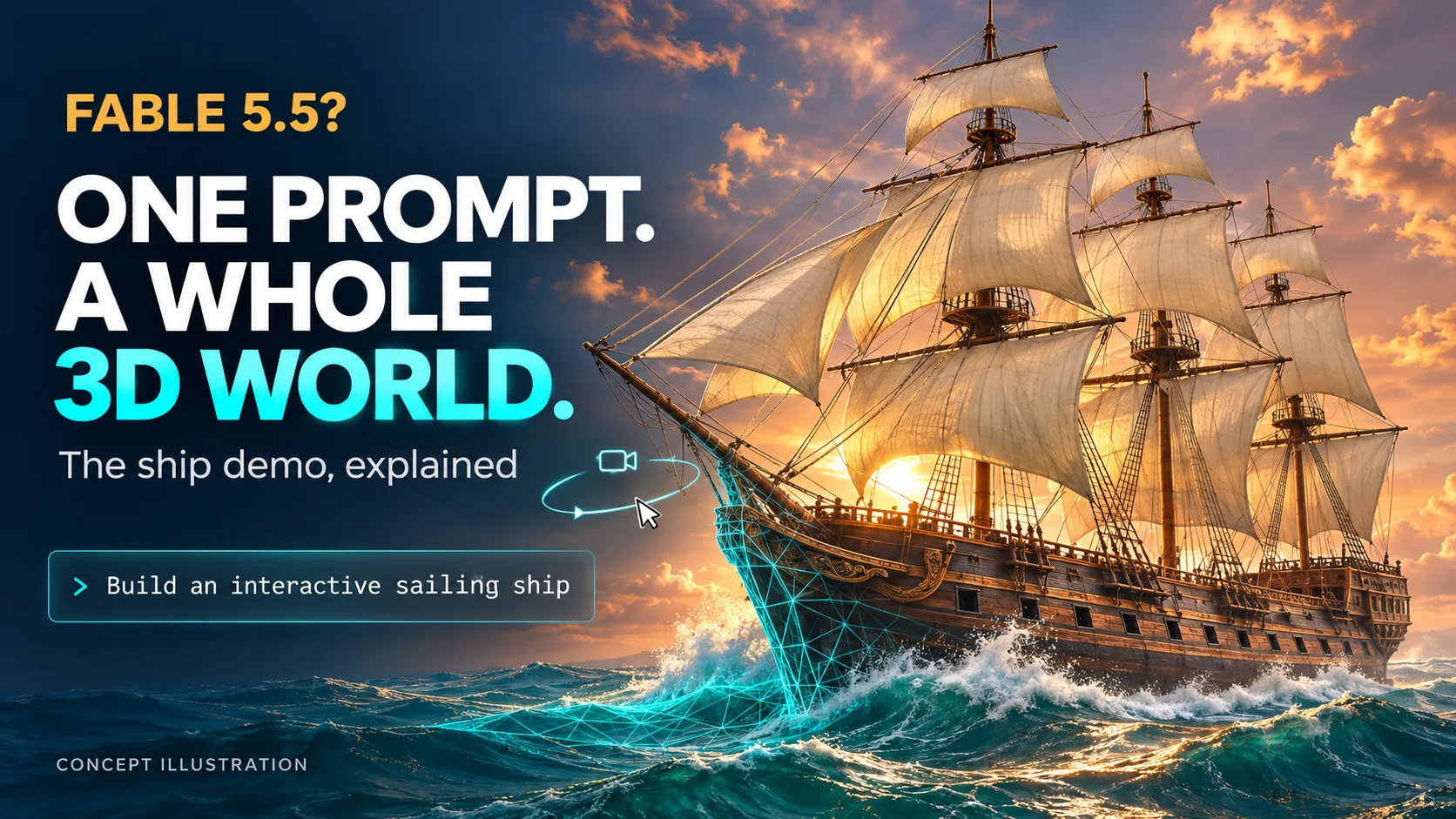
- The sailing ship has a traceable creator. @abhinavflac attributes the browser 3D demonstration to Fable 5.5 and describes it as zero-shot; that attribution remains a creator claim.
- Fable 5.5 is not listed in the official model overview checked on November 2, 2026. The listed Fable model is Fable 5.1.
- One user prompt can trigger many development steps. A coding agent may write files, run a build, inspect errors, and revise its implementation.
- Three practical prompts below turn the idea into testable projects: a sailing ship, a product configurator, and a moon-phase explorer.
- Judge the runnable application. Camera freedom, coherent geometry, responsive controls, frame times, and reproducible source matter more than a selected video.
The creator attribution is documented in the sailing ship discussion; public availability should be checked against Anthropic’s model overview.
What Is the Fable 5.5 Sailing Ship Demo?
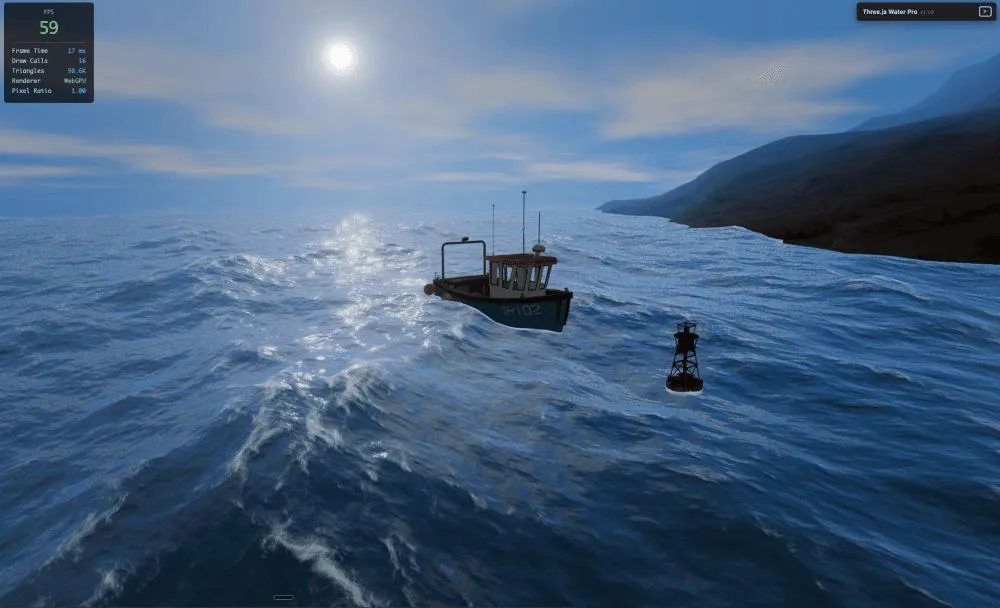
On November 1, 2026, @abhinavflac published a historical sailing ship demonstration, describing an interactive scene and attributing it to Fable 5.5. In the replies, the creator shared a prompt, identified Claude Code as the environment, and claimed some Opus requests were being routed to Fable. These statements are visible in the archived thread.
A public playable build, complete project source, and provider records confirming the underlying model were not located in the sources reviewed for this article. The available material supports discussing the demonstration and its stated brief; it does not establish repeatable performance or verified model identity.
The technical question is valuable regardless: can a coding agent assemble a coherent 3D object, animated environment, lighting, and usable controls from a written brief?
That is a broader engineering task than producing a striking image. A browser scene must continue making visual and spatial sense when the visitor changes the camera.
Is Fable 5.5 Officially Available?
As of November 2, 2026, Anthropic’s official model overview lists Fable 5.1, Opus 5.5, Sonnet 5.5, and Haiku 5.5. It does not list Fable 5.5. This establishes what is publicly documented on that page, rather than proving that no private testing exists.
Readers can reproduce the task with a model actually available in their account. There is no verified Fable 5.5 access procedure established by this demonstration.
Record the selected model, available response metadata, and session settings. A model’s answer to a recent-events question is not a reliable identity check, and a selected model label alone cannot resolve an alleged undocumented backend route.
The Original Sailing Ship Prompt: What Makes It Useful?
The creator’s prompt reply, also available in an accessible archive, opens with:
Create an interactive 3D historical sailing ship in the open sea that can be explored in a browser.
The remaining brief prioritizes detailed vessel construction, convincing ocean appearance, illumination, and interaction between the vessel and water. It also frames the task as a visual benchmark.
The useful pattern is subject + environment + interaction + quality priorities. It tells the agent what the experience should contain while leaving implementation choices open.
However, the brief does not define acceptance tests, supported devices, permitted assets, or delivery requirements. Those omissions matter when the objective changes from an impressive demonstration to a reusable application.
Calling a task a benchmark is not a proven quality improvement. Testing that wording would require controlled comparisons with the same model, environment, budget, and several independent runs.
Zero-Shot Does Not Mean One Inference
| Term | What it describes | What it does not establish |
|---|---|---|
| Zero-shot | No task-specific worked examples are supplied | No existing knowledge, libraries, or assets were used |
| One user prompt | The person submits one initial instruction | The agent performs only one model call |
| One attempt | One development run is allowed | No automatic debugging occurs during that run |
| Real-time 3D | Frames respond to the running scene and user input | Physically accurate simulation or film-production quality |
Claude Code’s architecture documentation describes a cycle of gathering context, taking action, and verifying results. File changes, command execution, and subsequent corrections can all happen within a single task.
For a fair comparison, record human interventions and agent actions separately. An autonomous run with numerous corrections can be useful, but its cost and reliability differ from a single generated code response.
Three Public Examples Worth Examining
These resources provide different kinds of evidence. They should not be presented as three verified Fable 5.5 projects.
| Resource | What is publicly available | What it helps assess |
|---|---|---|
| Creator’s sailing ship post | Demonstration and creator discussion | The claimed result and published brief |
| Three.js Ocean example | Browser example with public source | An inspectable starting point for water, sky, and camera integration |
| AA-3D benchmark and Explorer | Model-generated interactive scenes and evaluation methodology | Comparison across tasks and models |
The Three.js example is a library demonstration, not evidence of AI authorship. Its source is useful for understanding what existing components already provide.
Artificial Analysis describes AA-3D as a 55-task evaluation using written briefs, Three.js scenes, and blind pairwise voting. Its methodology permits one attempt per task, up to 250 agent turns, and a three-hour time limit—an explicit example of one attempt containing substantial internal iteration.
The leaderboard checked on November 2 listed Sonnet 5.5 at 1199 Elo and Opus 5.5 at 1196, with overlapping 95% intervals. Fable 5.5 was absent. These are preference-based results under the benchmark’s conditions, not measured film realism or a guarantee for an individual project.
Why Convincing Browser Water Is an Engineering Challenge
The following breakdown describes possible implementation choices, not verified internals of the creator’s ship.
| Layer | A practical approach | A useful inspection |
|---|---|---|
| Vessel | Procedural meshes or disclosed, licensed assets | Inspect the stern, underside, and close-up details |
| Ocean | Surface displacement plus shading | Check whether large waves change the silhouette |
| Flotation | Sample the water model around the hull | Watch whether pitch and roll follow nearby waves |
| Lighting | Coordinated sun, sky, exposure, and reflections | Change the sun position and inspect consistency |
| Camera | Orbit, zoom, reset, and constrained movement | Explore multiple angles without losing the subject |
Three.js documents its Water addon as a basic flat reflective effect. Animated surface detail should therefore not automatically be described as displaced waves or fluid simulation. Its Sky addon supplies a skydome, while OrbitControls provides orbiting, zooming, and panning.
A strong reproduction should connect its systems. If the ocean uses one time source and the ship bobs independently, the mismatch becomes obvious near the waterline. A proposed improvement is to derive visible waves and hull motion from the same wave model, with consistent coordinates and timing.
Likewise, a colorful sunset does not establish volumetric cloud rendering. Film-quality claims require evidence about geometry, materials, temporal stability, editability, and delivery requirements beyond a favorable camera angle.
Prompt 1: Build a Testable 3D Sailing Ship
Purpose: create a browser scene that can be inspected and compared.
This is an expanded original test brief inspired by the published task. It is not the creator’s verbatim prompt or a claim of a successfully reproduced result.
Build a browser-based 3D experience called Open Sea.

Use Three.js, TypeScript, and a small Vite project. Pin dependency versions and include a lockfile. Create a historical-style wooden sailing vessel with a coherent hull, raised stern, three masts, curved sails, visible rigging, railings, and deck fittings.

Place the vessel on an open ocean at golden hour. Prioritize a convincing silhouette, readable materials, consistent sunlight, and restrained atmospheric haze.

Implement animated waves. Use a consistent wave model and time source for the visible surface and the vessel's flotation approximation. Sample water around the hull to drive smooth pitch, roll, and vertical motion. Identify visual approximations in the README.

Support mouse and touch orbit controls, zoom limits, a reset-view button, and a pause-animation button. Allow inspection from every horizontal direction. Include sun-elevation and wave-strength controls.

Create vessel geometry procedurally for this experiment. Do not substitute a prerecorded video, a background image of a ship, or an undisclosed imported vessel. List every external dependency and asset, including its license.

Provide low and high quality presets. Keep the main controls usable on narrow screens and display an informative fallback if rendering is unavailable.

Run the build and inspect the scene in a browser if browser tools are available. Check front, side, stern, and close-up views. Report errors honestly; do not claim checks that were not performed.

Deliver the source, startup commands, asset inventory, known limitations, and a short record of automatic corrections. Do not claim a specific frame rate without measurements and device details.
Pass condition: the hull remains coherent around a full orbit, the camera responds correctly, and the ship’s motion is consistent with nearby water. Visual polish comes after those checks.
For a production project, licensed vessel assets can be a sensible choice. Evaluate that as a separate workflow so asset reuse is not confused with procedural modeling ability.
Prompt 2: Build an Interactive Product Showroom
Purpose: test material changes, state management, and useful interaction.
This is a proposed application exercise, not another documented Fable 5.5 result.
Create a responsive 3D product configurator for a generic desk lamp using Three.js and TypeScript.

Model a weighted base, articulated arm, shade, cable, and visible joints. Use procedural geometry unless a licensed asset is explicitly supplied. Describe the geometry approach in the README.

Let visitors orbit and zoom around the lamp, choose four body colors, adjust material roughness, and switch the lamp on or off. Moving a control must update the existing scene without resetting the camera.

Add selectable hotspots for the hinge, light source, and base. Each hotspot should open a short explanation and have an equivalent keyboard-accessible HTML button.

Use controlled studio lighting so differences between painted metal, plastic, and rubber remain visible. Avoid excessive bloom that hides surface detail.

Include reset controls, a loading or initialization state, a rendering-error fallback, and a reduced-motion option. Preserve normal page scrolling outside the viewer.

Deliver source code, pinned dependencies, startup instructions, and an asset/license list. Verify every control and report the tested browsers and devices. Treat screenshots as documentation, not proof of working interaction.
Pass condition: color changes, illumination, hotspots, and keyboard controls work without losing the current view. This exercise tests application behavior that a cinematic fly-through cannot reveal.
Prompt 3: Build a Moon-Phase Explorer
Purpose: test whether the agent can maintain a correct explanatory model across several views.
NASA explains that lunar phases result from seeing different portions of the Moon’s sunlit half as it moves around Earth. The new-moon-to-new-moon cycle averages about 29.5 days. These relationships provide external checks for an educational scene.
Build an interactive Three.js moon-phase explainer for a general audience.

Show an orbital overview of the Sun, Earth, and Moon alongside a separate Earth-observer view of the Moon. Use a phase-position slider to move through a simplified lunar cycle.

Derive the Moon's illuminated appearance from the same Sun-Moon-Earth geometry in both views. Do not choose a phase texture independently of the scene state.

Provide buttons for new moon, first quarter, full moon, and last quarter. Verify that the Earth-observer view is approximately dark, half illuminated, fully illuminated, and half illuminated at those positions.

Explain that ordinary lunar phases are not caused by Earth's shadow. Treat eclipses as outside this simplified model. Label distances and sizes as not to scale, and identify the viewing orientation.

Use NASA's moon-phase explanation as the factual reference. Do not present this as a calendar-date predictor or an astronomical ephemeris.

Provide pause, reset, keyboard-operable controls, readable labels, and a reduced-motion mode. Keep explanatory text available outside the canvas.

Deliver runnable source, pinned dependencies, startup instructions, factual references, and a list of modeling simplifications. Report visual and functional checks separately.
Pass condition: the overview, observer view, phase label, and explanatory text remain synchronized. Attractive lighting cannot compensate for incorrect geometry.
How to Run a Fair Claude Code Experiment
Use the same initial brief and project conditions for each model. The Claude Code profile provides a directory entry for the tool; the application’s official documentation explains the development loop.
- Prepare a clean project. Record starter files, dependencies, project instructions, asset availability, network access, and enabled tools.
- Choose an available model. Record the exact selectable identifier and effort settings. Do not infer an unreleased model from output quality.
- Set a budget. Choose time and spending limits before starting, and apply them consistently.
- Submit the brief once. Allow the agent’s normal development process, while preserving its activity log.
- Save the first completed result. Evaluate it before sending corrective instructions.
- Measure a separate improvement pass. Record additional prompts, elapsed time, and cost.
- Repeat when comparing models. Several independent runs reveal failures that a selected best result conceals.
Preserve a compact run record:
Date and project commit:
Selected model and available provider metadata:
Agent version and effort settings:
Initial prompt and project instructions:
Permitted assets, tools, and network access:
Elapsed time and available usage/cost records:
Human follow-up prompts:
Automatic corrections:
Build outcome and browser errors:
Device, browser, viewport, and pixel ratio:
Frame-time measurements and quality preset:
Known failures:
Common Failures and Targeted Fixes
These are diagnostic suggestions for generated Web3D projects, not findings about the unpublished sailing ship source.
| Symptom | What to investigate | Targeted repair request |
|---|---|---|
| Blank canvas | Console errors, module imports, asset requests, camera placement | Resolve initialization errors and verify a minimal visible mesh first |
| Water looks detailed but remains geometrically flat | Normal-map animation versus vertex displacement | Add surface displacement only if the scene actually requires large waves |
| Vessel floats above or cuts through waves | Coordinate mismatch, timing, hull offset | Align water sampling and hull motion in the same coordinate system |
| Severe slowdown on a phone | Render resolution, shadows, reflection passes, geometry | Profile first, then lower the dominant cost through a quality preset |
| Controls reset the view | Scene reconstruction or lost camera state | Update existing properties and preserve camera state |
| Reopening the viewer increases resource use | Duplicate animation loops or retained GPU resources | Clean up listeners, loops, and resources when the viewer is removed |
Keep repairs narrow. Asking the agent to make everything more realistic can change already-correct geometry while leaving the underlying defect unresolved.
What Should Be Published With a Successful Result?
A credible case study should make the outcome inspectable:
- A runnable URL and source snapshot, where distribution rights permit.
- The exact initial prompt, plus all human follow-up instructions.
- Model and environment details, including unresolved routing uncertainty.
- An asset inventory, distinguishing procedural work from imported content.
- Performance measurements with context, including device, browser, resolution, and quality setting.
- Known limitations, such as approximate flotation or restricted camera movement.
If a performance target is chosen, label it as a target until measured. A 60 FPS target implies roughly 16.7 milliseconds per frame, but an average alone can hide stutters; include frame-time variability when possible.
A public demo link also does not establish iframe compatibility or redistribution permission. Verify embedding policy separately before placing somebody else’s application inside a directory or article.
Frequently Asked Questions
Is the sailing ship an AI-generated video?
The creator describes an interactive 3D scene. The shared demonstration is a recording of that claimed experience; independently examining a runnable build would provide stronger verification.
Can the original ship be reproduced exactly?
The public brief supports attempting a similar task. Exact reproduction would also require the model, environment, assets, project context, and generation history.
Do these prompts require Fable 5.5?
No. They are task specifications for capable coding agents. Use a model available in the chosen tool and assess the actual output.
Does zero-shot mean there was no debugging?
No. It describes the absence of task-specific worked examples, not the absence of tool calls, build checks, or automatic revisions.
Does a convincing scene replace a production-ready 3D asset?
Not automatically. A reusable asset may need clean topology, UVs, rigging, export support, documented licensing, and reliable behavior in its intended pipeline.
Conclusion
The Fable 5.5 sailing ship is an interesting creator demonstration with a published brief, while its model attribution and reproducibility remain unresolved.
The actionable opportunity is to test whether coding agents can deliver coherent, interactive, inspectable 3D applications. That requires more than asking for cinematic visuals: define the interaction, disclose assets, connect the scene’s systems, and establish observable pass conditions.
Start with the sailing ship prompt, preserve the first result, and publish the runnable build alongside its limitations. Then use the showroom and moon-phase exercises to test whether the same workflow holds up when usability and correctness matter as much as appearance.
Continue Reading
More articles connected to the same themes, protocols, and tools.

Referenced Tools
Browse entries that are adjacent to the topics covered in this article.