
On This Page8 sections
Key Takeaways
- Manus 2.0 launched on September 28, 2026 as a major platform redesign rather than a simple model upgrade.
- Cascade is the architectural core. Manus says one tested configuration used 23.2% fewer tokens, completed tasks 28.2% faster, and reduced run cost by 32% versus the previous system. These are vendor-reported figures rather than independent benchmark results.
- Manus Studio expands the product into an editable workspace for documents, spreadsheets, PDFs, slides, websites, code, games, and video.
- Automations are now event-driven, allowing external events such as emails, calendar changes, Slack messages, Notion updates, and advertising-performance changes to trigger workflows.
- Cloud Computer provides persistent infrastructure for long-running apps, bots, databases, automations, and multiplayer games.
- Cue is a separate personal-agent product built on Manus infrastructure, with agents that can have dedicated communication, computing, and payment capabilities.
- Manus 2.0 does not appear to introduce a separate subscription category. Manus continues to use its broader Free, Pro, Team, credit, and Cloud Computer pricing structure.
What Is Manus 2.0?
Manus 2.0 is the September 2026 generation of the Manus general AI agent platform.
The key point is that Manus 2.0 is not simply a new foundation model. It is a broader redesign of the agent architecture, workspace, automation system, computing infrastructure, and product experience.
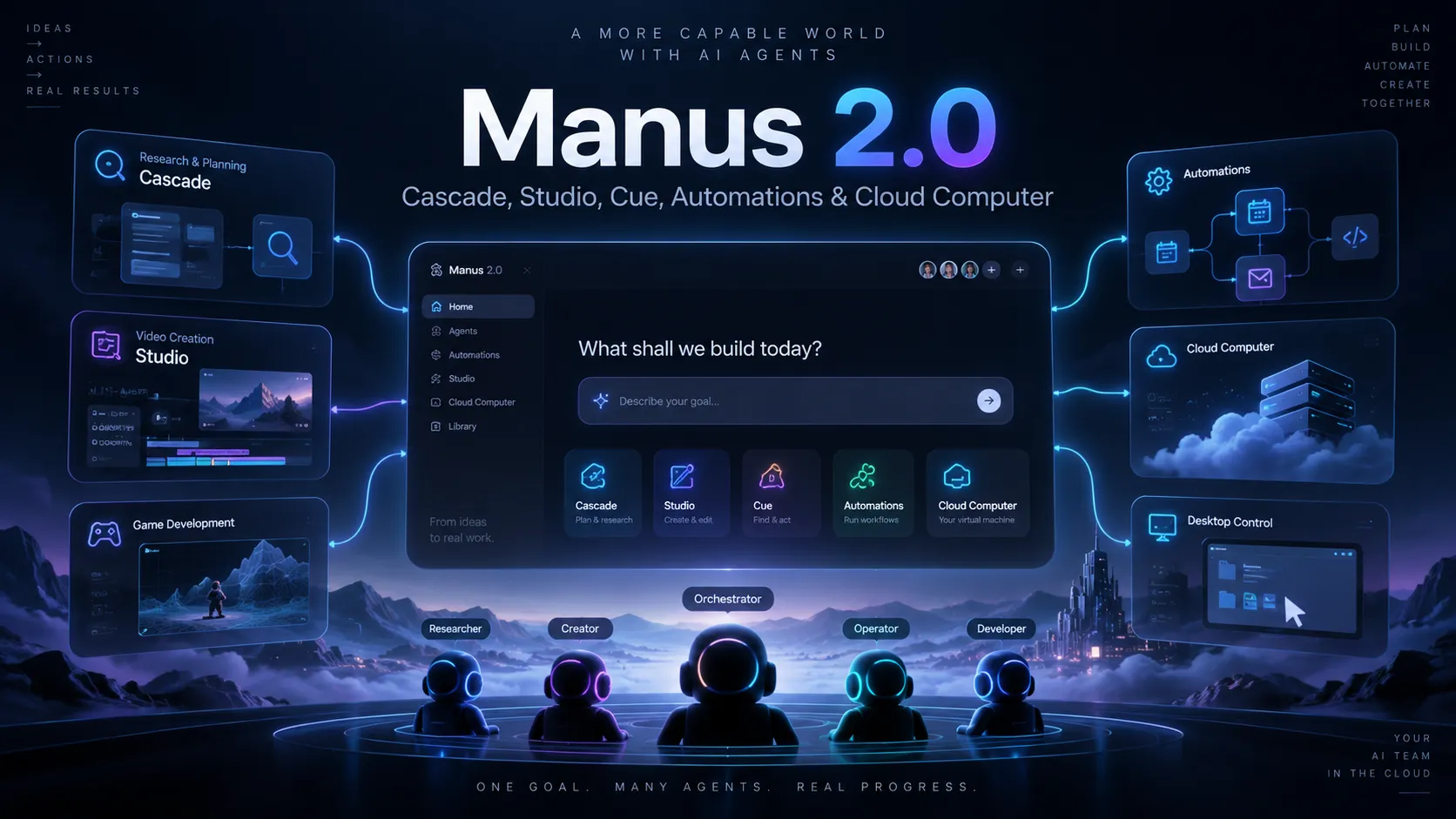
The release centers on several connected components:
- Cascade for agent orchestration
- Manus Studio for editable project work
- Automations for scheduled and event-triggered execution
- Cloud Computer for persistent compute
- Remote Control and Computer Use for operating authorized desktop environments
- Game Dev for generating and editing playable games
- Video Editor for editable AI video workflows
- Cue for persistent personal agents
The broader strategy is clear: Manus is moving from an AI that responds to one task at a time toward an AI system that can operate an ongoing project across tools, files, applications, and external events.
The Biggest Change: From Task Completion to Project Operation
Many AI assistants are optimized around a single interaction:
Prompt -> reasoning -> answerManus 2.0 is designed around a longer workflow:
Trigger or request
-> research
-> planning
-> tool execution
-> artifact creation
-> human editing
-> automation
-> persistent infrastructure
-> follow-up actions
That difference matters because real business and development work rarely ends with a single answer.
A product launch, for example, may require competitive research, a spreadsheet, a landing page, presentation slides, promotional video, monitoring, and follow-up actions. Manus 2.0 attempts to keep those stages inside the same project instead of splitting them across unrelated tools.
Cascade: The New Agent Harness
Cascade is the updated in-house agent harness behind Manus 2.0.
Its design addresses a practical problem with general-purpose agents: loading every tool, instruction, and capability into every task can make the system slower, more expensive, and harder to control.
Cascade instead loads specialized capabilities when they are needed.
For example, a project might begin with market research, then require spreadsheet analysis, web development, video generation, and finally a monitoring automation. The system does not need to keep every specialized environment active throughout the entire workflow.
Manus's Reported Performance Improvements
Manus reports that, in one tested configuration, Cascade achieved:
- 23.2% lower token usage
- 28.2% shorter task completion time
- 32% lower run cost
These numbers should be interpreted carefully.
They are vendor-reported results, and Manus has not published enough detail about the benchmark methodology, task distribution, model mix, failure rate, or reproducibility to treat them as independent performance measurements.
The more defensible takeaway is that Manus has redesigned its agent orchestration around lower context overhead and more selective capability loading.
Manus Studio: A Shared AI Workspace
Manus Studio is the upgraded desktop workspace in Manus 2.0.
It supports work involving:
- Documents
- Spreadsheets
- PDFs
- Slides
- Websites
- Code
- Games
- Video
The important improvement is not simply the number of supported formats. It is the ability to move between AI generation and direct editing.
Older AI workflows often follow this pattern:
Generate
-> spot a small problem
-> prompt again
-> regenerate too much
-> lose good parts
-> repeat
Manus Studio is designed to support a more controlled loop:
Generate
-> inspect
-> edit a specific element
-> ask Manus to continue from the edited state
This is especially valuable for production work where most of the result is already correct.
Video Editor: AI Video With an Editable Timeline
Manus 2.0 includes a video editor built around a timeline.
Instead of treating the generated video as one final block, the editor can expose individual elements such as:
- Video clips
- Images
- Text
- Motion graphics
- Audio
- Generated scenes
That allows users to replace a soundtrack, swap a scene, insert personal footage, move graphics, or change text without regenerating the entire video.
Likely use cases include:
- Product ads
- AI UGC-style videos
- Tutorials
- Social media videos
- Product explainers
- Motion-graphics content
- Data-driven videos
This approach is more practical than pure text-to-video generation when consistency and revision control matter.
Alchemy Mode
Manus also introduced Alchemy mode for more ambitious creative production.
It combines video generation with code-based composition and is positioned for workflows that need greater visual control, pacing, motion, and production quality.
The practical trade-off is straightforward: higher-quality creative workflows can require more compute, time, and credits than basic generation.
Game Dev: From Prompt to Editable Game
Game Dev is another major addition to Manus 2.0.
It combines coding, image, and video capabilities and gives users access to an editing environment where they can modify:
- Code
- Assets
- Movement
- Characters
- Art
- Scenes
- Gameplay behavior
This matters because one of the weaknesses of prompt-generated games is that small changes can require large regenerations.
With an editable environment, a user can change one character, replace one asset, modify one mechanic, or alter one scene without restarting the entire project.
Multiplayer and Cloud Computer
Manus can also connect a game to Cloud Computer infrastructure.
That can support persistent backends for:
- Multiplayer games
- Racing games
- Competitive games
- Shared-world prototypes
- Real-time game sessions
The key benefit is not just game generation. It is the ability to move from prototype to hosted playable experience without assembling every infrastructure component manually.
Remote Control and Computer Use
Manus 2.0 expands its ability to operate authorized desktop environments.
With Computer Use, Manus can interact with approved files, browser sessions, and applications inside a visible workspace.
Remote Control extends this further by allowing a user to issue commands from a phone while Manus works on an authorized computer.
A representative workflow might look like:
Find the latest presentation in the launch folder.
Check whether the PDF export is newer than the PPTX.
If it is not, export a fresh PDF.
Move the final PDF into the shared delivery folder.
The advantage is that the user can describe the desired outcome rather than manually controlling every click.
This can be useful for:
- File management
- Application testing
- Browser workflows
- Export operations
- QA
- Repetitive desktop tasks
However, Computer Use also increases security risk. Access should be limited to the minimum files, accounts, and applications required for the task.
Automations: From Scheduled Tasks to Event-Driven Agents
One of the most important Manus 2.0 changes is the expansion of Automations.
Earlier systems were commonly based on time schedules. Manus 2.0 can also react to events.
Potential triggers include:
- New emails
- Calendar events
- Slack messages
- Notion updates
- Advertising-performance changes
- Other connected-service events
A workflow might look like this:
Trigger: A new product announcement appears.

Actions:
1. Read the announcement.
2. Extract confirmed changes.
3. Compare them with the previous release.
4. Draft a 500-word update.
5. Create three example prompts.
6. Save the result as a draft.
7. Do not publish without approval.
The final approval rule is critical.
Event-driven AI should generally include human confirmation before actions that are difficult to reverse, such as:
- Publishing content
- Sending important messages
- Spending money
- Deleting files
- Modifying production systems
- Changing permissions
Why Event Triggers Matter
Scheduled tasks are periodic. Event-driven tasks are reactive.
A scheduled workflow might check a system every hour even when nothing changed. An event-triggered workflow can start only when a relevant event occurs.
That can reduce:
- Unnecessary runs
- Token usage
- Latency
- API calls
- Operational cost
This makes event-driven agents especially useful for marketing operations, support, research monitoring, content workflows, and sales operations.
Cloud Computer: Persistent Infrastructure
Cloud Computer provides a persistent Ubuntu-based environment with a public IP address.
This separates Manus from agents that only execute inside temporary sessions.
Typical Cloud Computer use cases include:
- Websites
- APIs
- Bots
- Scrapers
- Databases
- Automation workers
- Multiplayer backends
- Long-running applications
The documented Cloud Computer tiers include:
| Plan | Price | CPU | RAM | Storage | Typical use |
|---|---|---|---|---|---|
| Basic | $10/month | 2 vCPU | 1 GB | 35 GB | Scripts, lightweight bots, simple services |
| Standard | $30/month | 2 vCPU | 4 GB | 70 GB | Websites, APIs, dashboards, larger apps |
| Advanced | $50/month | 2 vCPU | 8 GB | 120 GB | Heavier persistent applications and databases |
The important distinction is persistence.
A normal agent task can stop when execution finishes. A Cloud Computer remains available for services that need to stay online.
Important Cloud Computer Caveat
Persistent infrastructure should not be treated as permanent storage.
If the Cloud Computer subscription ends, the environment can be shut down and locally stored files, tools, and databases may be deleted.
Production data should therefore be backed up independently.
Cue: Personal Agents With Their Own Identity
Cue is a separate product built on Manus infrastructure.
Cue agents can be assigned dedicated capabilities such as:
- Phone numbers
- Wallets
- Computers
That allows an agent to communicate, receive calls, operate its own environment, and potentially make purchases inside user-defined limits.
Cue also supports multi-agent collaboration.
For example:
Agent A: Research 30 possible venues.
Agent B: Filter them by price, location, and availability.
Agent C: Turn the shortlist into a presentation.
Human: Review the final options and make the decision.
This is significant because multi-agent systems are usually hidden behind the interface. Cue makes agents more explicit by giving them separate roles and identities.
Cue vs. Manus 2.0
Cue and Manus 2.0 should not be treated as the same product.
Manus 2.0 is the broader platform generation. Cue is a separate personal-agent application that uses Manus infrastructure.
That distinction matters for pricing, access, and feature availability.
Manus 2.0 vs. a Traditional Chatbot
| Capability | Traditional chatbot | Manus 2.0 |
|---|---|---|
| Answer questions | Yes | Yes |
| Multi-step execution | Limited to moderate | Core use case |
| Persistent compute | Usually no | Cloud Computer |
| Event-driven triggers | Often limited | Automations |
| Editable video timeline | Usually no | Video Editor |
| Game creation and hosting | Usually external workflow | Game Dev + Cloud Computer |
| Operate authorized desktop apps | Product-dependent | Computer Use |
| Persistent personal agents | Rare | Cue |
| Multi-agent role delegation | Usually hidden or experimental | Cue groups |
The key difference is scope of execution.
A chatbot primarily returns information. Manus 2.0 is designed to create artifacts, modify them, interact with software, react to external events, and keep supporting infrastructure online.
Manus 2.0 vs. AI Coding Agents
Manus overlaps with AI coding tools, but the center of gravity is different.
A coding agent typically focuses on:
- Repositories
- Terminals
- Tests
- Pull requests
- IDE workflows
- Deployment
Manus can work with code, but its projects can also include:
- Research
- Spreadsheets
- Presentations
- Websites
- Design assets
- Video
- Browser actions
- Automations
- Cloud infrastructure
This makes Manus more attractive for cross-functional workflows.
Dedicated coding agents can still be better when the work depends heavily on repository-aware diffs, code review, test execution, or deep IDE integration.
Manus 2.0 Pricing
Manus has not introduced a clearly separate subscription called a Manus 2.0 plan.
The broader pricing structure continues to include:
- Free: $0/month with limited usage
- Pro: starting around $20/month
- Higher Pro usage tiers: additional monthly credits at higher prices
- Team: starting around $20 per seat/month
- Cloud Computer: billed separately at approximately $10, $30, or $50 per month depending on resources
Users should verify the live pricing page before purchasing because credits, included models, trials, and plan entitlements can change.
The total cost of a Manus workflow can include:
- Manus subscription or credits
- Cloud Computer fees
- Third-party API usage
- External software subscriptions
- Advertising or commerce spend
- Other connected-service charges
The correct way to estimate cost is therefore:
Total cost
= Manus usage
+ persistent compute
+ external service costs
Privacy and Security Considerations
Manus 2.0 can touch more sensitive systems than a normal chatbot.
Potential access surfaces include:
- Connected services
- Browser sessions
- Local files
- Desktop applications
- Cloud infrastructure
- Communication channels
- Payment capabilities
That means autonomy should be matched with stronger controls.
Recommended practices include:
- Grant only the permissions needed for the task.
- Use separate service accounts for high-risk automations.
- Require human approval before publishing, deleting, paying, or changing production systems.
- Avoid putting secrets directly into prompts.
- Periodically review saved browser sessions.
- Back up Cloud Computer data.
- Use explicit spending limits when payment features are enabled.
- Separate development and production credentials.
A useful rule is: The more autonomous the agent, the narrower its permissions should be.
Best Use Cases for Manus 2.0
1. Product Launches
A single project can handle competitor research, planning, landing-page creation, slides, promotional video, and follow-up monitoring.
2. Content Operations
Automations can react to new information, prepare drafts, create supporting assets, and leave publishing to a human reviewer.
3. Indie App and Game Development
Game Dev can create a playable starting point, expose assets and code for editing, publish the game, and connect it to persistent multiplayer infrastructure.
4. Research-to-Deliverable Workflows
Manus is especially useful when research is only the first stage.
The same project can turn findings into reports, spreadsheets, presentations, websites, videos, or operational actions.
5. Repetitive Desktop Work
Computer Use can help with file retrieval, application QA, browser tasks, exports, and other repetitive visible workflows.
6. Small-Team Operations
Cue's multi-agent design can divide work into research, filtering, drafting, coordination, and follow-up while preserving human decision-making.
Where Manus 2.0 May Be Overkill
Manus 2.0 may not be the best tool when:
- The task is a simple factual question.
- A deterministic script is easier to audit.
- The work is almost entirely repository-centric.
- Regulations require tightly controlled manual approval.
- Very high-volume automation makes direct APIs more economical.
- Data must remain fully self-hosted.
- Persistent infrastructure is unnecessary.
In those cases, a conventional chatbot, coding agent, workflow automation platform, or custom API pipeline may be simpler.
How to Get Better Results From Manus 2.0
Define the Outcome
Weak prompt:
Research our competitors.Stronger prompt:
Identify the five closest competitors for this product.

Compare:
- pricing,
- positioning,
- onboarding,
- acquisition channels,
- major features,
- missing features.

Prefer evidence from the last 90 days.

Create:
1. a comparison table,
2. three positioning hypotheses,
3. a list of unresolved questions.

Do not contact any company or publish anything.
The second version gives the agent a clear scope, an evidence standard, a required output structure, and explicit action boundaries.
Add Approval Gates
For workflows connected to external systems, define what can happen automatically.
You may research, classify, draft, calculate, and save files automatically.

Ask for approval before:
- sending messages,
- publishing content,
- changing production data,
- spending money,
- deleting files,
- changing account permissions.
Prefer Targeted Edits
If a generated video is 90% correct, replace one clip instead of regenerating the entire project.
If a game scene is correct except for one character, edit that asset rather than starting again.
This reduces both creative drift and unnecessary compute.
Use Cloud Computer Only When Persistence Is Required
A project containing code does not automatically require a Cloud Computer.
Persistent compute makes sense when something needs to remain online, such as a backend, bot, database, automation worker, multiplayer server, or hosted application.
Common Manus 2.0 Mistakes
Mistake 1: Treating vendor benchmark claims as universal results.
The reported token, speed, and cost improvements are not guarantees for every workload.
Mistake 2: Assuming Manus 2.0 is one new model.
It is better understood as a new agent architecture and product stack.
Mistake 3: Giving automations unlimited authority.
Irreversible actions should normally require approval.
Mistake 4: Ignoring infrastructure costs.
Persistent Cloud Computer usage is separate from normal agent usage.
Mistake 5: Keeping the only copy of important data on a Cloud Computer.
Persistent compute still needs backups.
Mistake 6: Granting Computer Use excessive permissions.
Desktop automation should follow least-privilege principles.
Frequently Asked Questions
When was Manus 2.0 released?
Manus announced Manus 2.0 on September 28, 2026.
Is Manus 2.0 a new AI model?
Not in the conventional sense. It is better described as a new generation of Manus's agent architecture, workspace, automation system, computing infrastructure, and related products.
What is Cascade?
Cascade is the updated agent harness behind Manus 2.0. It is designed to load specialized capabilities only when necessary, reducing unnecessary context and execution overhead.
What is Manus Studio?
Manus Studio is an editable workspace for AI-assisted work across documents, spreadsheets, PDFs, slides, websites, code, games, and video.
Can Manus 2.0 edit videos?
Yes. The Video Editor exposes timeline elements so users can make targeted edits rather than regenerating the entire video.
Can Manus 2.0 build games?
Yes. Game Dev combines coding and generative-media capabilities with an editable game-development environment.
Can Manus 2.0 run multiplayer games?
It can connect projects to persistent Cloud Computer infrastructure, which can support multiplayer backends and other always-on services.
What are Manus Automations?
Automations are workflows that can start on schedules or in response to events such as emails, calendar events, Slack messages, Notion updates, or performance changes.
What is Cue?
Cue is a separate personal-agent product built on Manus infrastructure. Agents can have dedicated identities, communication channels, computing environments, and other capabilities.
Is Cue the Same as Manus 2.0?
No. Manus 2.0 refers to the broader Manus platform generation. Cue is a separate product that uses the same broader infrastructure.
How Much Does Manus 2.0 Cost?
There is no clearly separate Manus 2.0 subscription. Manus continues to use its broader Free, Pro, Team, usage-credit, and Cloud Computer pricing model.
Conclusion
Manus 2.0 is important because it expands the idea of an AI agent from a system that completes a prompt into a system that can operate an ongoing project.
The most consequential changes are structural:
- Cascade for more efficient orchestration
- Studio for editable outputs
- Automations for event-driven execution
- Cloud Computer for persistent infrastructure
- Computer Use for desktop workflows
- Game Dev and Video Editor for richer production work
- Cue for persistent personal and multi-agent workflows
The best way to evaluate Manus 2.0 is not with a simple question. Use a bounded workflow that crosses several stages:
Research
-> analyze
-> create
-> edit
-> automate
That is where Manus 2.0's architecture has the clearest opportunity to reduce manual handoffs and demonstrate whether its agent-first approach is genuinely useful in production.
Continue Reading
More articles connected to the same themes, protocols, and tools.
Referenced Tools
Browse entries that are adjacent to the topics covered in this article.





