On This Page8 sections
Key Takeaways
- LobeHub is no longer simply an AI chat interface. The project evolved from LobeChat into an agent-management platform built around persistent agent teammates, Tasks, Agent Groups, Skills, Connectors, knowledge, and external agents. GitHub
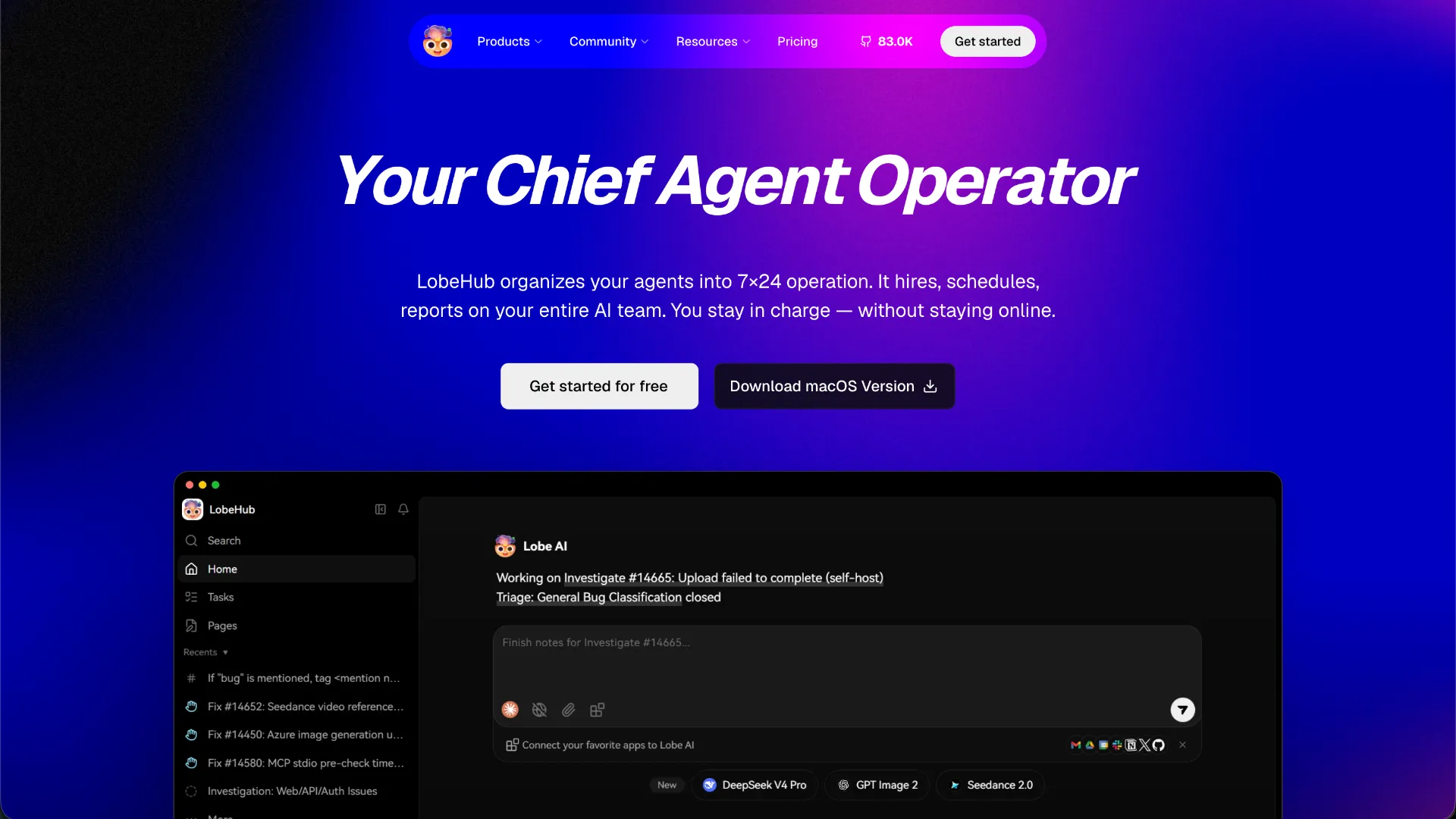
- In 2026, LobeHub positions itself as a Chief Agent Operator (CAO) that can help hire, schedule, coordinate, and report on an AI team instead of requiring users to supervise every agent manually. LobeHub
- LobeHub can combine native agents with external agents. Its Claude Code integration demonstrates the intended model: LobeHub manages assignment and visibility while the specialist coding agent handles repository work. LobeHub
- Multi-model support remains a major advantage. Different agents can use different models instead of forcing an entire workspace onto one provider.
- Skills define reusable ways of working, while Connectors give agents access to tools and services. LobeHub supports MCP and maintains a large Skills and MCP ecosystem. LobeHub
- LobeHub now extends far beyond conversations with Tasks, Pages, Resource Library, Agent Documents, scheduling, execution devices, and cloud sandboxes. LobeHub
- Official downloads currently cover macOS, Windows, Linux, iOS, and Android, while self-hosting remains available for users who want greater infrastructure control. LobeHub
- The repository currently uses the LobeHub Community License, not an unmodified Apache 2.0 license. Certain commercial derivative-distribution scenarios may require separate authorization. GitHub
- LobeHub is most compelling when the problem is coordinating several agents, models, tools, and data sources. For simple one-off questions, a conventional AI assistant may be easier.
LobeHub began as LobeChat, a popular self-hostable interface for working with multiple AI models. In 2026, that description is no longer sufficient.
The product is becoming an operating layer for AI agents.
Instead of keeping a research assistant in one tab, a coding agent in a terminal, a writing agent in another app, and an automation bot in Slack, LobeHub attempts to organize them inside one persistent system. Agents can have their own models, memory, Skills, tools, resources, Tasks, and collaboration patterns.
That change is what makes LobeHub important. It is not merely trying to build a better chat window. It is trying to solve the next problem created by agent adoption: who manages all the agents?
What Is LobeHub?
LobeHub is an AI agent workspace for finding, creating, connecting, organizing, and operating AI agents.
Its current product philosophy treats the Agent as the unit of work.
A conventional AI application often looks like:
User
  ↓
Conversation
  ↓
Model
LobeHub increasingly looks like:
User
  ↓
Agent or Agent Team
  ↓
Tasks + Memory + Skills + Tools + Knowledge + Models
  ↓
Work Results
An agent can represent a persistent role such as:
- research analyst
- software engineer
- code reviewer
- SEO specialist
- content editor
- operations assistant
- support specialist
- financial analyst
Instead of rebuilding the same instructions every session, the user can give an agent a durable role, model, memory, tools, and source material.
LobeHub vs LobeChat: What Changed?
The transition from LobeChat to LobeHub is much more than a branding update.
LobeChat was primarily known for:
- multi-model conversations
- self-hosting
- plugins
- knowledge bases
- RAG
- multimodal AI
In late 2025, the project announced a deeper transition toward LobeHub, including a server-centric architecture and a broader vision connecting people, agents, knowledge, and external services. GitHub
The modern platform emphasizes:
Persistent agent teammates
Chief Agent Operator
Agent Groups
Long-running Tasks
Scheduling
Skills
Connectors and MCP
External agents
Pages
Resource Library
Execution environments
Cloud sandboxes
Team workspaces
The main repository also moved from the older lobehub/lobe-chat identity to lobehub/lobehub. GitHub
The practical takeaway is straightforward: LobeHub is not simply LobeChat with a new name. It is a larger agent-management platform built on LobeChat's multi-model foundation.
What Is the Chief Agent Operator?
LobeHub 2.2 introduced the Chief Agent Operator, or CAO, in May 2026. GitHub
The idea is to move agent coordination one level higher.
Without an orchestration layer, a user may have to:
choose an agent
write instructions
wait for the result
open another agent
transfer context
check progress
repeat
The CAO model aims for:
User defines goal
      ↓
     CAO
      ├── decomposes work
      ├── selects agents
      ├── assigns Skills and tools
      ├── schedules execution
      ├── runs subtasks in parallel
      └── reports progress and results
This changes the user's role from operating individual prompts to managing an AI team.
For example:
Goal: Evaluate a new SaaS opportunity

CAO
├── Market Research Agent
├── SEO Demand Agent
├── Product Gap Agent
├── Technical Feasibility Agent
└── Analyst Agent
For a quick question, this structure is unnecessary. For recurring research, engineering, or business workflows involving several specialties, it can reduce coordination overhead significantly.
Tasks: LobeHub Is Moving Beyond Chat Threads
LobeHub's Task system is one of the clearest signs that the platform is moving beyond conversational AI.
Tasks can represent work such as:
- investigate a software bug
- produce a competitor report
- generate a weekly engineering digest
- analyze customer data
- prepare release notes
- monitor a market
- create marketing assets
The current interface uses familiar project-management concepts including backlog, in progress, review, and done. LobeHub also demonstrates subtasks, long-running execution, scheduling, comments, and attached context. LobeHub
Instead of:
Prompt → AnswerLobeHub can structure work as:
Task
├── objective
├── context
├── assigned agent
├── subtasks
├── execution history
├── status
├── output
└── review
That model is better suited to work lasting minutes or hours rather than seconds.
Agent Groups: Multiple Specialists Instead of One Generalist
LobeHub supports Agent Groups so several specialized agents can collaborate around one objective.
A product launch could use:
Launch Team
├── Market Research Agent
├── SEO Agent
├── Product Copy Agent
├── Technical Agent
└── Review Agent
This creates two important advantages.
First, specialization reduces context contamination. A code reviewer does not need the same persistent instructions as a marketing writer.
Second, different agents can use different models. Expensive reasoning models can be reserved for difficult decisions while faster or cheaper models handle classification, extraction, and routine transformations.
Agent Builder
LobeHub provides an Agent Builder intended to reduce the setup cost of creating specialized agents.
A user can start from an instruction such as:
Create an SEO audit agent that checks search intent,
technical SEO, content gaps, internal linking,
schema opportunities, and cannibalization.
A reusable agent can then combine:
- identity and role
- persistent instructions
- default model
- memory
- Skills
- Connectors
- knowledge resources
- expected output behavior
The key difference from a custom chatbot is persistence. A LobeHub agent is intended to become a reusable teammate inside a larger work system.
Multi-Model Support Is Still a Major Advantage
LobeHub retains one of the strongest ideas from the LobeChat era: different models should be usable for different jobs.
A practical configuration might look like:
Research Agent → strong reasoning model
Writer Agent   → strong prose model
Classifier     → inexpensive fast model
Vision Agent   → multimodal model
Coding Agent   → coding model or external coding agent
This matters even more in a multi-agent environment.
If every agent uses the most expensive model, costs scale quickly. If every agent uses the cheapest model, quality can suffer. Routing models by role creates a more efficient middle ground.
Skills: Reusable Operating Procedures
Skills answer a different question from ordinary prompts.
A prompt says:
What should the agent do now?A Skill says:
How should this type of work be performed?An SEO agent could have separate Skills for:
- keyword clustering
- search-intent analysis
- content-gap research
- internal-link audits
- schema recommendations
This prevents the same lengthy workflow instructions from being pasted into every Task.
A useful mental model is:
Agent = who
Model = intelligence
Skill = how
Connector = what it can access
Resource = what it knows
Task = what it must deliver
LobeHub now makes Skills a major part of its agent ecosystem. LobeHub
Connectors and MCP
An AI agent becomes substantially more valuable when it can interact with external systems.
LobeHub uses Connectors for this and supports the Model Context Protocol (MCP). GitHub
Potential tools include:
- GitHub
- Slack
- databases
- web search
- browsers
- file systems
- internal APIs
- productivity software
For example:
Summarize the five highest-priority GitHub issues
and post the digest to Slack.
Without tools, an agent can only explain how to perform that workflow. With appropriate Connectors, it can potentially execute it.
Why MCP Matters
MCP gives LobeHub access to an integration ecosystem larger than any one vendor could build alone.
But more tools do not automatically mean better agents.
Attaching too many MCP servers can create:
- excessive tool lists
- slower tool selection
- ambiguous actions
- higher context consumption
- larger security exposure
A stronger architecture is role-based:
Research Agent → search + browser
Engineering Agent → GitHub + code tools
Operations Agent → Slack + database
Finance Agent → spreadsheet + reporting tools
The better principle is least privilege plus relevant context.
External Agents: LobeHub as an Agent Manager
One of LobeHub's most differentiated directions is its ability to connect agents created outside LobeHub.
Its documentation explicitly describes connecting external coding CLIs and personal agent platforms. GitHub
Claude Code is a concrete example.
LobeHub's Claude Code integration allows coding work to be assigned from the task board while execution details such as logs, diffs, test runs, and PR links are surfaced in the Task history. LobeHub
This creates a useful hierarchy:
LobeHub
= orchestration and visibility

Claude Code
= specialized coding execution
That is strategically important. LobeHub does not need to become the best coding, research, browser, and writing agent simultaneously. It can become the system that coordinates specialist agents.
LobeHub for Software Development
LobeHub is not an AI IDE.
It does not replace:
- code completion
- inline editing
- debugging
- code navigation
- local IDE ergonomics
Its role is one layer higher.
A software-development workflow could look like:
Engineering Task
├── Coding Agent
│   └── implement change
├── Review Agent
│   └── inspect diff
├── Security Agent
│   └── audit risk
└── Documentation Agent
    └── update release notes
For developers already using Claude Code, Codex, or similar tools, LobeHub is more naturally evaluated as a coordination layer than as a replacement editor.
Resource Library
Agents need reusable, authoritative source material.
LobeHub's Resource Library is designed for files and knowledge that agents should be able to search and reference. GitHub
A support agent might use:
product documentation
support policies
troubleshooting guides
release notes
A research agent might use:
market reports
company filings
interview transcripts
strategy documents
This solves a different problem from simply increasing model context windows.
A large context window asks how much the model can read. A good knowledge system asks which information should be retrieved for this specific job.
Agent Memory
Different agents should remember different information.
For example:
Writing Agent
→ style and editorial preferences

Development Agent
→ architecture conventions

Research Agent
→ tracked industries and competitors
That is healthier than placing every preference and historical detail into one global memory.
Current paid LobeHub plans list Agent Memory among their capabilities. LobeHub
Pages and Agent Documents
LobeHub is also moving beyond chat messages toward persistent work artifacts.
Pages provide a place for standalone documents that can be created and refined with agents. Agent Documents provide another layer for notes and reference material associated with an agent or topic. GitHub
A mature workflow can therefore look like:
Conversation → explore
Task → execute
Page → produce final artifact
Agent Document → preserve working knowledge
Resource Library → store reusable sources
That structure is considerably stronger than treating chat history as the only knowledge store.
Execution Devices and Cloud Sandboxes
Agents need somewhere to execute code and tools.
LobeHub documentation includes Execution Devices and cloud sandboxes, allowing users to control where agent tools run. GitHub
For example:
Coding Task
↓
clone repository
↓
edit files
↓
run tests
↓
return diff
Execution environments also create security boundaries.
Users should understand:
- filesystem permissions
- network access
- secret availability
- repository credentials
- package installation
- persistence
Once agents execute actions instead of only generating text, infrastructure design becomes part of agent design.
Scheduled and Long-Running Work
LobeHub increasingly targets work that should continue while the user is offline.
Examples include:
- daily competitor tracking
- weekly reports
- recurring research
- inbox monitoring
- scheduled content production
- long-running engineering work
An operational agent can have:
schedule
state
tools
memory
task history
output destination
That is fundamentally different from a chatbot waiting for the next prompt.
LobeHub for Slack and Existing Work Channels
LobeHub also aims to bring agents into communication tools.
Its current Slack integration allows LobeHub agents to be used through Slack while retaining their model, memory, Skills, and tools. LobeHub
This reduces adoption friction. Agents are often used more consistently when they appear inside an existing work channel rather than another standalone application.
LobeHub CLI
LobeHub also provides a CLI for developers and automation workflows.
The current CLI includes commands for areas such as agents, generation, files, and model providers and is designed so other agents can invoke LobeHub using predictable command-line behavior. LobeHub
Installation is documented as:
npm i -g @lobehub/cliThen:
lh --helpPotential uses include:
- agent management
- provider configuration
- scripting
- CI automation
- agent-to-agent orchestration
- terminal workflows
LobeHub Cloud vs Self-Hosting
LobeHub offers two different deployment philosophies.
Choose LobeHub Cloud When
- fast setup matters
- infrastructure management is undesirable
- managed model access is useful
- managed storage is preferred
- cross-device access matters
Choose Self-Hosting When
- data location matters
- private models are required
- API keys should remain under organizational control
- custom infrastructure is needed
- network isolation matters
- the organization already operates databases and object storage
Cloud reduces operational burden. Self-hosting increases control.
Self-Hosting Is More Complex Than Old LobeChat
Older LobeChat releases became popular partly because deployment could be extremely simple.
LobeHub 2.x is more server-centric. The project's 2.0 redesign explicitly described a shift toward a server-centered architecture. GitHub
A serious deployment may need to consider:
- PostgreSQL
- vector storage
- object storage
- authentication
- model-provider configuration
- backups
- upgrade procedures
Users who only want a lightweight local-model chat interface may therefore find LobeHub more complex than necessary.
The additional infrastructure exists because persistent agents, Tasks, memory, shared resources, and cross-device state require more than a stateless frontend.
Docker and the Current Repository Identity
The maintained project now uses the LobeHub name.
A basic image pull is:
docker pull lobehub/lobehubOlder LobeChat deployments should not assume that major-version migration is risk-free. Back up databases and configuration first and review current migration requirements because the product architecture has changed substantially.
Desktop and Mobile Apps
LobeHub is available beyond the browser.
The official download page currently lists:
- macOS Apple Silicon
- macOS Intel
- Windows
- Linux
- iOS
- Android
This fits the persistent-agent model: work can begin on a desktop, continue in the cloud, and be reviewed from a phone later.
LobeHub Pricing in 2026
LobeHub Cloud currently uses a credit-based system.
| Plan | Monthly Billing | Annual Effective Price | Monthly Credits |
|---|---|---|---|
| Free | $0 | $0 | 500,000 |
| Basic | $12.90 | $9.90/mo | 5,000,000 |
| Premium | $24.90 | $19.90/mo | 15,000,000 |
| Ultimate | $49.90 | $39.90/mo | 35,000,000 |
Current pricing also differentiates model availability, file storage, vector storage, support, and Agent Memory. LobeHub
The important detail is that credits are not equivalent to messages. Different models consume the credit pool at significantly different rates.
A cheap fast model may support thousands of interactions while a frontier reasoning model consumes the same allowance much more quickly.
LobeHub Enterprise
The current Enterprise offering targets organizations needing capabilities such as:
- commercial licensing
- custom branding
- user management
- self-hosted model providers
- private models
- custom integrations
- dedicated support
Once agents can access internal documents, repositories, databases, and communication tools, enterprise requirements become less about chat UX and more about identity, deployment, governance, and permissions.
Is LobeHub Open Source?
This question requires careful wording.
LobeHub publishes its source code and supports self-hosting, but the current repository uses the LobeHub Community License. GitHub
The license is based on Apache 2.0 concepts but includes additional commercial restrictions.
Therefore:
Public source code
≠
unmodified Apache-2.0 licensing
Personal use and many internal self-hosting scenarios may not be affected. Companies planning to white-label, redistribute, or commercialize derivative versions should review the current license terms carefully.
LobeHub vs ChatGPT
ChatGPT and LobeHub overlap, but their centers of gravity are different.
ChatGPT Is Stronger When
- a polished first-party OpenAI experience is preferred
- minimal configuration matters
- OpenAI-native tools are central
- general-purpose personal assistance is the primary use case
LobeHub Is Stronger When
- multiple model providers matter
- self-hosting matters
- several persistent agents are required
- external agents should be coordinated
- MCP extensibility matters
- Agent Groups and Tasks are central
- infrastructure control matters
A useful simplification is:
ChatGPT → integrated first-party AI product
LobeHub → model- and agent-agnostic operations hub
LobeHub vs Open WebUI
Open WebUI is a strong choice for users who primarily want a self-hosted frontend around local or remote language models.
LobeHub becomes more differentiated when requirements expand into:
- persistent agents
- Task management
- Agent Groups
- Skills
- external agents
- long-running work
- collaborative artifacts
- orchestration
For a straightforward local Ollama interface, Open WebUI may be simpler. For an agent-centered workspace, LobeHub has a broader product scope.
LobeHub vs Dify
Dify and LobeHub both connect models, knowledge, and tools, but their primary abstractions differ.
Dify → build AI applications and workflows
LobeHub → assemble and operate AI teammates
Dify is often better aligned with teams building customer-facing AI apps and APIs.
LobeHub is more directly oriented toward people and teams that want agents to participate in daily work.
LobeHub vs Claude Code
LobeHub and Claude Code do not need to be treated as competitors.
Claude Code is a specialized coding agent. LobeHub can sit above it as an orchestration layer.
LobeHub
  ↓
Claude Code
LobeHub's dedicated Claude Code integration demonstrates this model directly: LobeHub handles assignment and visibility, while Claude Code handles repository-level execution. LobeHub
This may be LobeHub's strongest strategic position: coordinate excellent specialist agents instead of trying to replace all of them.
Who Should Use LobeHub?
LobeHub is particularly attractive for:
Multi-Model Power Users
People who regularly move among several model vendors gain a common agent layer.
Self-Hosting Users
Organizations that want greater control over infrastructure, providers, and data placement can run LobeHub themselves.
Agent-Heavy Professionals
Users already juggling several AI tools can consolidate Tasks, scheduling, memory, knowledge, and coordination.
Teams Building Internal AI Operations
Organizations can maintain specialized agents for:
- engineering
- research
- analytics
- growth
- content
- support
- operations
Who May Not Need LobeHub?
LobeHub can be overkill when the workflow is simply:
Open AI
Ask question
Read answer
Close AI
The additional concepts of agents, Skills, Tasks, memory, resources, Connectors, and execution environments create value mainly when work is recurring, persistent, or complex.
Users who only need local-model chat may also prefer a simpler frontend.
Common Mistake: Treating LobeHub as Another ChatGPT UI
That misses the current product direction.
A better mental model is:
LobeHub
=
AI workspace
+
agent registry
+
task system
+
knowledge layer
+
tool layer
+
orchestration layer
Chat is one interface, not the entire product.
Common Mistake: Giving Every Agent Every Tool
Agents should receive only the tools required for their roles.
Writer Agent
✓ web research
✓ documents
✗ production database

Engineering Agent
✓ GitHub
✓ code environment
✗ CRM export

Finance Agent
✓ spreadsheets
✓ finance data
✗ source-code write access
This improves both security and tool-selection quality.
Common Mistake: Using the Most Expensive Model Everywhere
Multi-agent systems can multiply model costs quickly.
A better routing strategy is:
classification → fast model
extraction → fast model
deep analysis → reasoning model
critical review → stronger model
vision → multimodal model
The goal is not maximum intelligence per call. It is maximum useful output per unit of cost.
Common Mistake: Creating Too Many Agents
A large marketplace does not mean every user needs a huge AI team.
A better starting point is:
Researcher
Writer
Developer
Analyst
Operations Assistant
Split roles only when specialization repeatedly improves quality or reduces context confusion.
Memory vs Knowledge: Keep Them Separate
Memory and knowledge solve different problems.
Memory:
The user prefers concise executive summaries.

Knowledge:
The current company pricing policy.
Memory should preserve preferences and accumulated relationship context.
Knowledge should preserve authoritative source material.
Confusing the two can make agents less reliable.
Privacy and Security
Self-hosting does not automatically make every LobeHub workflow private.
If a self-hosted instance sends requests to a cloud model provider, relevant data still leaves the deployment.
Security should be evaluated end to end:
- Which provider receives each request?
- What can each MCP server read or modify?
- Which agents have write permissions?
- Where does code execute?
- How are API keys stored?
- Which agents can access each knowledge source?
- What context is sent to external agents?
The more autonomous the agents become, the more important permission design becomes.
Recommended Personal LobeHub Setup
Start with a small team:
LobeHub
├── Research Agent
├── Writing Agent
├── Coding Agent
└── Operations Agent
Then give each agent only the capabilities it needs:
Research Agent → web + browser + research Skill
Writing Agent → style guide + Pages
Coding Agent → coding runtime + GitHub + review Skill
Operations Agent → Slack + calendar + scheduled Tasks
This is easier to secure and debug than creating dozens of overlapping agents immediately.
Recommended Small-Team Setup
A company could organize agents around functions:
Product
├── Research Agent
└── Product Manager Agent

Engineering
├── Coding Agent
├── Review Agent
└── Release Agent

Growth
├── SEO Agent
├── Content Agent
└── Competitor Monitor

Operations
├── Reporting Agent
└── Follow-up Agent
The CAO and Task layer can then coordinate work across these roles.
The value comes from persistent organizational structure, not clever one-off prompts.
LobeHub's Biggest Strategic Advantage
LobeHub's most important idea is heterogeneous agent orchestration.
The AI ecosystem is increasingly fragmented:
coding agent
research agent
browser agent
personal assistant
local model
frontier cloud model
MCP tools
That creates a new problem:
Who manages the agents?
LobeHub's answer is to become the operating layer above them.
If specialist agents continue to proliferate, a neutral coordination layer becomes increasingly valuable.
LobeHub's Biggest Risk
The same ambition creates its biggest weakness: complexity.
Users may need to understand:
- agent design
- model routing
- Skills
- Connectors
- MCP permissions
- knowledge systems
- memory
- Tasks
- execution environments
- external agents
That complexity can be justified for sophisticated workflows. For casual users, it can become unnecessary overhead.
The product therefore succeeds when it hides orchestration complexity without removing meaningful control.
Is LobeHub Worth Using in 2026?
For simple AI chat, LobeHub is one option among many.
For users who need multiple persistent agents, multiple models, shared knowledge, external tools, long-running Tasks, and self-hosting, it is significantly more differentiated.
Its strongest use case is no longer:
I need another ChatGPT interface.It is:
I already use multiple AI models and agents.
I need one system to organize and operate them.
That is where the Chief Agent Operator concept becomes compelling.
Conclusion
LobeHub has evolved from LobeChat's multi-model conversation interface into a broader AI agent operations platform.
The modern product combines reusable agents, Agent Groups, Tasks, multi-model intelligence, Agent Memory, Resource Library, Pages, Skills, Connectors, MCP, external agents, execution environments, scheduling, desktop and mobile clients, and self-hosting.
The most important addition is not another model. It is the Chief Agent Operator concept: define a goal, then let an orchestration layer help assemble, schedule, coordinate, and report on the agents required to complete it. LobeHub
That positioning becomes more valuable as specialized coding agents, research agents, browser agents, and personal assistants multiply.
LobeHub is not automatically the right choice for simple chat, and its broader architecture introduces setup, permission, and self-hosting complexity. But for developers, power users, and teams trying to build a persistent AI workforce rather than maintain a collection of disconnected agent tabs, it is one of the more ambitious platforms to evaluate in 2026.
A practical starting point is to create three to five agents around real recurring responsibilities, give each only the Skills and Connectors it needs, run one meaningful long-running Task, and measure whether LobeHub actually reduces coordination time. Expand the agent team only when the workflow proves that specialization creates measurable value.
Continue Reading
More articles connected to the same themes, protocols, and tools.

Referenced Tools
Browse entries that are adjacent to the topics covered in this article.