On This Page8 sections
Key Takeaways
- The Babydoll Dance AI video trend recreates the upbeat two-step associated with Jamie Miller's 2026 song “Babydoll”. It is different from the AI baby-dancing trend and from songs with similar names.
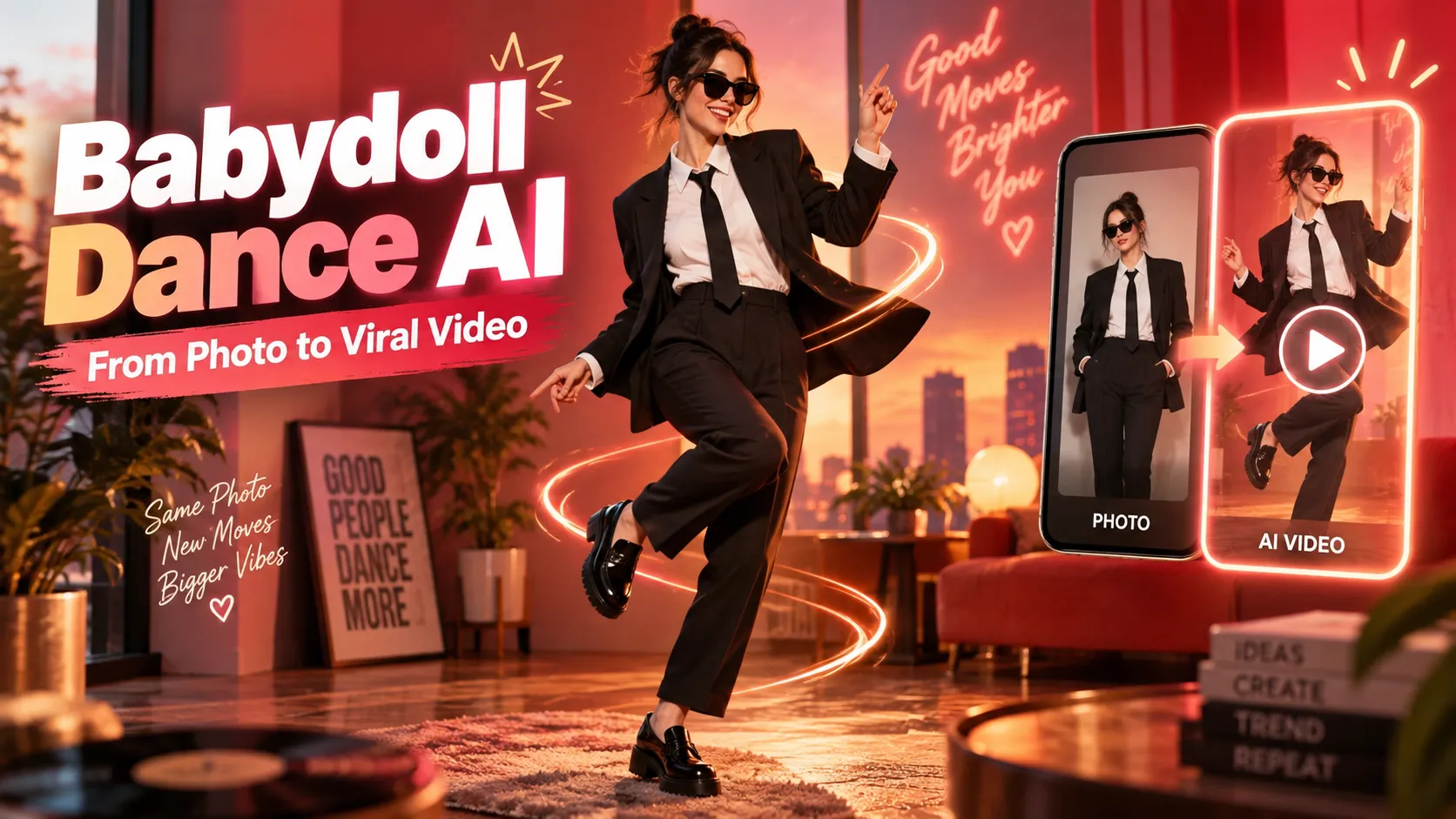
- Fastest method: use a dedicated Babydoll Dance AI template, upload an eligible photo, and generate a short vertical clip. Some templates place the subject in a black suit and sunglasses with two backing dancers; others preserve the source photo's outfit and setting.
- Best for matching the choreography: use image-to-video motion transfer, such as Kling AI Motion Control, with a clear full-body photo and a dance reference video that can lawfully be used.
- Best for a customized interpretation: use a text-guided image-to-video generator with a tightly staged dance prompt, although timing and exact steps will be less reliable than a motion reference.
- Prepare for 9:16 vertical delivery, inspect the hands and feet frame by frame, add appropriately licensed music, and disclose realistic AI-generated footage when posting.
What Is the Babydoll Dance AI Video Trend?
The Babydoll Dance is an upbeat, retro-inspired dance trend associated with singer Jamie Miller and his track “Babydoll,” released August 7, 2026. The song mixes contemporary pop with soul and Motown influences; it reached No. 3 on the UK Official Singles Chart in October 2026, according to Official Charts.
The recognizable social-video look features coordinated side steps, bouncing footwork, swinging arms, playful gestures, and smiling performers. One prominent version uses black suits, white shirts, sunglasses, and a three-person lineup. Other clips use casual clothing, home settings, or AI-animated pets.
An AI Babydoll Dance video typically takes an existing portrait or full-body photo and synthesizes a moving subject performing a similar routine. The person in the result does not need to have danced or filmed the choreography. The source photo controls appearance; a preset template, reference video, or written prompt controls the movement.
Important distinction: “Babydoll Dance” here refers to Jamie Miller's dance trend, not Dominic Fike's “Babydoll,” the Bollywood “Baby Doll,” or a generic AI baby dance generator. Checking the song and example preview before paying for a template prevents a common mismatch.
Three Ways to Make a Babydoll Dance AI Video
| Method | Input | What it does best | Main limitation |
|---|---|---|---|
| Dedicated Babydoll AI template | Usually one photo; some accept a second | Fast, recognizable trend styling with minimal setup | Limited control over costume, supporting dancers, and camera |
| AI motion transfer | Character image plus a permitted dance reference video | More closely reproduces step order, gestures, and rhythm | Needs a clean reference clip and well-matched framing |
| Prompt-based image-to-video | Character image plus movement instructions | Custom costumes, environments, and original variations | Can miss beats, invent choreography, or cause foot sliding |
Practical recommendation: choose a one-click template for a fast social post. Choose motion transfer when the recognizable Babydoll steps are the priority. Choose text prompts for an original dance inspired by the trend rather than a faithful reconstruction.
Method 1: Generate the Babydoll Dance From One Photo
A dedicated template is the most convenient option for first-time creators. Examples available in October 2026 include the Babydoll Dance effect on RapVideoAI and the Babydoll Dance template on MakeViral. They are separate services with different outputs and credit requirements, so their previews and current checkout screens should be checked independently.
Step 1: Choose the version of the dance
- Retro street ensemble: look for the black-suit, sunglasses, and backing-dancer presentation associated with Jamie Miller's two-step.
- Original outfit and location: choose a template that transfers the dance onto the person in the uploaded full-body image.
- Pet variation: use a template explicitly designed for animals; standard human motion transfer may distort paws and anatomy.
These are different visual interpretations of the trend, not interchangeable presets.
Step 2: Upload a photo that matches the template
For portrait-to-suit templates, use a clear, front-facing image with unobstructed facial features. For full-body dance-transfer templates, show the entire person, including both shoes and some floor space. Avoid crowded backgrounds, extreme perspective, folded arms, or another person overlapping the dancer.
Only upload an image that the user owns or is authorized to use, with the depicted adult's consent where applicable.
Step 3: Review the settings before generating
Check the preview, selected subject, duration, aspect ratio, watermark policy, and actual credit cost. A short 9:16 clip of roughly 9–15 seconds suits the social format, but the exact output length and resolution depend on the selected service and effect.
When an optional second photo is supported, confirm its assigned position before submitting. Do not assume every template can preserve three separately uploaded faces.
Step 4: Download, inspect, and prepare the soundtrack
Preview the video at normal speed and at half speed. Check facial identity, hand shape, the contact of shoes with the ground, and whether any backing dancers merge with the central figure. If the template adds audio, verify its posting rights before reusing it. Adding the song through the destination platform's licensed sound picker is often more practical for an eligible personal post.
Method 2: Recreate the Dance With Kling AI Motion Control
For more control, Kling AI Motion Control can use a character image and a reference-action video to transfer a performance. Kling's official guide describes motion extraction from an uploaded clip or motion library and explains why matching body visibility and orientation matters.
Step 1: Prepare the character image
Use a sharp standing photo with the head, hands, legs, and shoes visible. Leave space at the left and right edges for side steps. Use a vertical composition if the finished clip is intended for TikTok, Instagram Reels, or YouTube Shorts.
For the classic street look, use or create an authorized photo of the consenting subject already dressed in a black suit, white shirt, and sunglasses. A motion-transfer system may preserve the input clothing more reliably than it obeys a late request to change every garment.
Step 2: Obtain a suitable action reference
Use a dance clip filmed by the creator, a properly licensed clip, or another reference that the creator has permission to upload. Aim for one continuous shot, one clearly visible lead dancer, a steady camera, and moderate motion speed. A multi-person viral video may cause the model to follow only the largest subject, so a separately filmed single-dancer demonstration is often cleaner.
Kling's documentation for Motion Control 2.6 describes 3–30-second uploaded references, subject to model and mode support. Model limits can change, so the current interface remains authoritative.
Step 3: Add image and motion inputs
Open Kling's Motion Control workflow, upload the subject image, and attach the permitted motion reference. Where available, choose the orientation setting that matches the intended camera treatment. A front-facing dancer in both inputs generally reduces unintended turns and limb confusion.
Advanced facial-reference or element-binding features may improve identity retention when supported by the selected model. These controls are optional and do not guarantee perfect results.
Step 4: Apply a consistency-focused prompt
A motion reference already supplies timing and dance steps. The written prompt should primarily define identity, outfit, scene, framing, and stability:
A cheerful adult dancer performs the full-body choreography from the uploaded motion reference. Preserve the identity, facial structure, hairstyle, skin tone, outfit, and body proportions of the input photo. Natural weight shifts, grounded foot placement, clean hands and fingers, accurate leg articulation, and rhythmic upper-body motion. Full-body vertical composition, fixed camera, even daylight, enough clear floor space for side steps. Keep the same person and outfit throughout. No extra limbs, face changes, duplicated feet, sudden cuts, or camera shake.If a three-person scene is required, start by obtaining a stable solo dancer, then composite separately generated supporting dancers in an editor. Multiple AI-controlled people in a single generation increase the chance of identity swapping and overlapping limbs.
Step 5: Generate and evaluate the draft
Review the opening pose, transitions between steps, face during head turns, hand shapes, and floor contact. If shoes drift, shorten the reference to the cleanest continuous passage and reduce camera movement rather than adding more descriptive adjectives.
Step 6: Finish in a video editor
Trim unusable frames, preserve the most recognizable dance sequence, and synchronize the finished motion to the permitted version of the music. The final beat alignment should be checked after export, because generation and editing can introduce small timing shifts.
Method 3: Use an AI Video Prompt Without a Dance Reference
Image-to-video generators can create a Babydoll-inspired routine from a still photo and text. This is useful when there is no reusable motion clip or when a more original setting is preferred. It does not reliably duplicate the exact viral choreography, because a prompt describes movements but does not provide frame-by-frame body poses.
Copy-and-paste prompt: classic retro street version
Create a 10-second vertical 9:16 music-video-style shot of the adult subject in the reference image performing a joyful, retro soul-pop two-step. The subject wears a tailored black suit, white shirt, polished shoes, and sunglasses, dancing on a sunlit street with subtle vintage cars and palm trees in the distance. Start with two small side-to-side steps and a gentle bounce, then natural arm swings, a brief finger snap, a shoulder shimmy, and a confident final pose facing the camera. Full body stays visible, feet remain planted correctly between steps, continuous single take, stationary eye-level camera, natural anatomy, recognizable facial identity, smooth motion, realistic lighting. No cuts, no extra limbs, no cloned faces, no sliding feet, no text or logos.Copy-and-paste prompt: casual, original dance version
Animate the adult person in the uploaded full-body photograph performing a playful, upbeat two-step in the original location and clothing. Begin with a relaxed bounce, step left then right, swing both arms at waist height, add one shoulder shimmy, and finish with a smile and small side-point. Maintain the same face, hair, outfit, lighting, and background throughout. Use a static camera, full-body 9:16 framing, realistic foot contact, steady body proportions, clean fingers, and a single uninterrupted shot. Avoid floating, foot skating, abrupt zooms, body morphing, and extra people.Prompt-engineering insight: the most important details are not the adjectives “viral” or “cinematic.” They are the order of actions, fixed camera, grounded feet, visible legs, and identity constraints. Start with a 5–10-second draft. Extend or assemble clips only after a short segment works.
The Best Photo and Video Settings
| Element | Recommended starting point | Why it matters |
|---|---|---|
| Photo framing | Full body for motion transfer; clear face for portrait templates | Prevents the model from inventing missing legs or guessing identity |
| Pose | Standing, relaxed, front-facing or close to reference orientation | Simplifies motion mapping |
| Lighting | Even light with minimal face shadows | Improves face and clothing consistency |
| Background | Simple, with visible ground and room to move | Reduces limb-background blending |
| Composition | 9:16 vertical | Fits typical short-form viewing |
| Target export | 1080 × 1920 MP4 when available | Useful delivery target, not a promise of generator-native resolution |
| Frame rate | 30 fps as a practical editing target | Common short-form playback option; preserve original timing when converting |
| First draft | About 5–10 seconds | Easier to inspect and cheaper on many credit-based services |
If a generator only outputs 720p, exporting the same footage as 1080p does not create missing facial or hand detail. Actual detail depends on the source generation and any genuine enhancement workflow.
How the Babydoll Two-Step Should Move
A useful way to evaluate a generated clip is to break the routine into short motion phases. The following is an illustrative simplified sequence, not a claim that every TikTok variation uses identical choreography:
| Approximate beat sequence | Visible action | Common AI failure |
|---|---|---|
| Opening | Light bounce and small travel toward camera | Subject floats or drifts |
| Early phrase | Left-right side steps with low arm swings | Legs cross unnaturally |
| Middle phrase | Open stance, hand gesture, shoulder shimmy | Fingers fuse or shoulders snap |
| Later phrase | Quick weight change and playful arm accent | Feet skate across the ground |
| Ending | Confident smile, gesture, or held pose | Face morphs during head movement |
When the goal is an exact recreation, a legally usable motion-reference video is more dependable than this written sequence.
Why Babydoll Dance AI Videos Fail—and How to Fix Them
| Problem | Likely cause | Best corrective action |
|---|---|---|
| Feet slide across the ground | Missing floor cues, cropped shoes, or excessive motion | Use a full-body image with visible ground; reduce speed and camera movement |
| Face changes during turns | Weak facial reference or major angle mismatch | Upload a sharper face; use supported identity/element references; reduce extreme turns |
| Extra arms or distorted fingers | Fast gestures or dancer overlap | Isolate one subject, simplify hand motions, regenerate a shorter segment |
| Original clothes change unexpectedly | Style prompt conflicts with the image or reference | Pre-style the source image, or explicitly preserve its existing outfit |
| Dancers swap identities | Multiple characters overlap or move across the frame | Generate separately and composite; avoid crossing paths |
| Movement does not match the trend | Generic text-to-video is interpreting rather than copying the dance | Switch to a permitted motion reference or a dedicated Babydoll template |
| Audio appears off-beat | Generated movement timing differs from soundtrack timing | Adjust the edit on the beat; avoid excessive speed changes that create jitter |
| Blurry output | Low-resolution source, motion blur, or preview-quality export | Use the highest supported native-quality option and a sharper source image |
Efficient iteration rule: change only one major variable at a time—photo, motion clip, framing, or prompt. Otherwise, it becomes difficult to identify what actually fixed a problem.
Creative Babydoll AI Video Ideas
- Classic three-dancer entrance: black suits, sunglasses, sunlit street, and coordinated steps. Use a template designed for an ensemble rather than assuming one photo will generate stable friends.
- Best-friend challenge: create two consent-based solo versions and cut between them on the beat.
- Pet dance remix: use a pet-specific AI animation preset for a stylized, clearly fictional result; do not rely on human-body motion transfer for natural animal anatomy.
- Wedding-party surprise: use an authorized photo of adult participants and a celebratory setting, with a clearly marked AI-generated result.
- Before-and-after transition: start with the original still image for half a second, then cut to the generated dancing clip to make the effect immediately understandable.
The creative opportunity is to retain the recognizable two-step while changing one strong visual element—cast, outfit, or setting—rather than overcrowding the clip with effects.
Add the Babydoll Song, Edit for Social Media, and Post Responsibly
The relevant track is “Babydoll” by Jamie Miller. Its availability in a platform's sound catalog can vary by region, account type, and rights holder. A generator producing a video does not automatically grant rights to distribute a commercial recording.
For a personal post, choose the available sound directly within TikTok or Instagram when permitted. For brand promotions or advertisements, verify commercial licensing before using the song. TikTok's commercial-music guidance explains that music outside its Commercial Music Library is not automatically cleared for promotional content.
Before publishing, check the following:
- Crop and pacing: keep the lead dancer visible from the first second, with enough room for side steps and a clean ending.
- Captions: use a short, accurate description such as
Babydoll two-step, AI editionorOne photo, one retro dance challenge. - Hashtags: use relevant descriptors such as
#BabydollDance,#JamieMiller, and#AIDancerather than unrelated trending tags. - Transparency: mark realistic AI-generated content. TikTok's AI-generated-content policy explicitly covers depictions of a person dancing when that action did not occur.
- Consent and originality: do not animate another person's likeness without appropriate permission, impersonate someone deceptively, or upload third-party choreography footage without the rights needed for that use.
Frequently Asked Questions
How do you make a Babydoll Dance AI video from one photo?
Choose a dedicated Babydoll Dance AI template, upload a photo that meets its framing requirements, select the desired version, generate the clip, and inspect the result. For greater control, combine a full-body photo with a permitted dance reference in a motion-transfer tool.
What is the Babydoll Dance AI video prompt?
For text-guided generation, specify a cheerful retro two-step with side steps, arm swings, a shoulder shimmy, a fixed camera, full-body vertical framing, and stable identity. The copy-ready prompts above cover both a suit-and-sunglasses interpretation and a casual version. Exact choreography generally requires a motion reference, not just words.
Which AI tool is best for the Babydoll dance trend?
A purpose-built template is the simplest choice. Kling AI Motion Control is a stronger fit when exact dance timing and a reference clip matter. The better option depends on whether speed, clothing control, multi-person scenes, or choreography fidelity is most important.
Can the Babydoll AI dance be made for free?
Some editors or generators may offer introductory credits, trials, or free editing, but free generation of this specific effect is not guaranteed. Check the current credit price, watermark, export resolution, and refund rules before generating; third-party pricing can change.
Can two friends appear in the same Babydoll AI dance?
Some templates support an optional second person's image, while others only personalize the lead dancer. Multi-character generation can produce face swaps or overlapping limbs. A two-person result should be previewed carefully, and separately generated clips may be easier to control.
Is Babydoll Dance the same as the AI baby dance trend?
No. Babydoll Dance refers to the Jamie Miller two-step trend; AI baby dance usually describes animation of a baby-like character or a baby-themed template. Their music, body motion, and available effects are different.
Can the finished video be posted on TikTok, Reels, or Shorts?
A properly formatted video can be uploaded to those services, subject to their applicable rules. Use a vertical export, obtain consent and necessary rights, choose appropriately licensed music, and label realistic synthetic footage where required. Platform acceptance and music availability are not guaranteed by the AI generator.
Conclusion
Making a Babydoll Dance AI video is straightforward when the method matches the intended result. Start with a dedicated one-photo template for the recognizable retro aesthetic, use motion transfer for choreography accuracy, or build an original variation with a carefully staged image-to-video prompt. The biggest improvements come from a clear full-body image, steady reference motion, realistic foot contact, and deliberate music synchronization.
Choose a suitable photo, generate one short vertical draft, correct the most visible flaw, and publish a clearly labeled AI dance clip using music and images that are authorized for the intended use.
Continue Reading
More articles connected to the same themes, protocols, and tools.
Referenced Tools
Browse entries that are adjacent to the topics covered in this article.