On This Page8 sections
Key Takeaways
- The fastest method is a dedicated Hit the Road Dude AI template: upload one clear photo, choose the available format and generate a clip of yourself or your pet in the white pickup truck.
- The customizable method uses an image-to-video generator, a detailed scene prompt and, when needed, separate voiceover or lip-sync tools.
- The joke depends on timing, not just a convincing face swap. Preserve the driver's skeptical pause at the words “state property,” the dismissive point and the final “hit the road” reaction.
- A template and a text prompt are not equivalent. A template may preserve reference choreography and dialogue; ordinary image-to-video generation cannot guarantee exact speech, timing or mouth movements.
- Check costs, audio rights and AI labels before publishing. Several similarly named generators charge credits, and TikTok requires labeling realistic AI-generated content.
What Is the Hit the Road Dude AI Video Trend?
The Hit the Road Dude AI video is a remix of the State Property or Lock 'Em Up meme. In the original footage, an older man in a white pickup confronts people fishing near a pond. They say they believed the spot was state property. The driver responds with increasingly incredulous questions before telling them to leave.
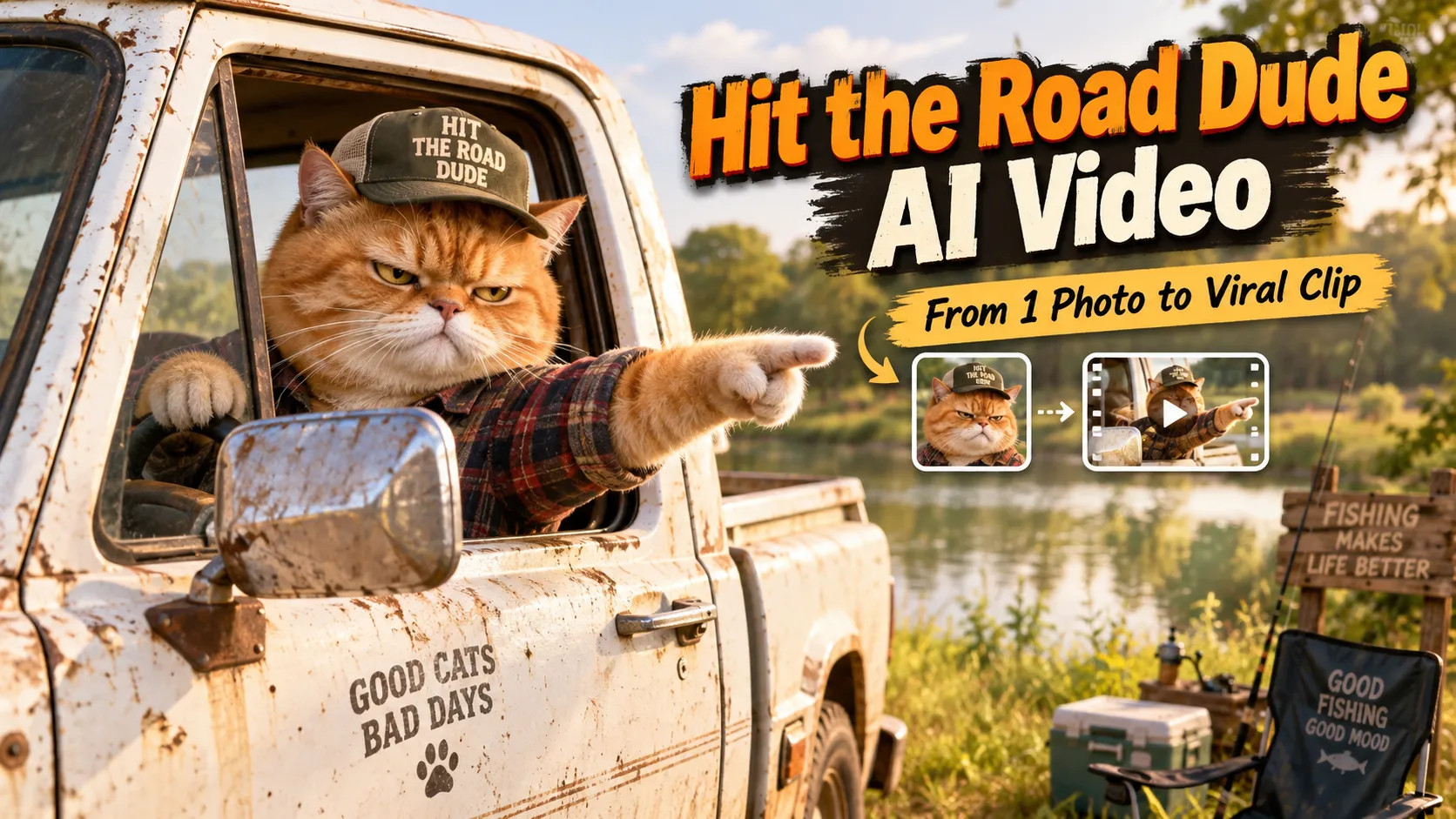
The humor comes from a recognizable sequence: confident question → baffled pause → emphatic dismissal. AI remixes preserve that dynamic while replacing the driver with a cat, dog, friend, fictional mascot or other character. A grumpy orange cat leaning out of the truck is one recognizable variation, but it is not the only version.
The original TikTok footage dates to August 21, 2025, according to Know Your Meme's State Property timeline. The AI character-swap format saw renewed attention in October 2026. Clips reposted by different accounts may not identify the original uploader correctly, so creators seeking the source should start with the documented timeline rather than a random repost.
Searchers may find the same format under “hit the road dude AI,” “this is private property AI,” “state property meme,” or “lock 'em up AI video.”
How to Generate a Hit the Road Dude AI Video With a Template
For someone who wants the recognizable dialogue and truck-window performance without writing a prompt, a dedicated template is the simplest route.
Step 1: Choose a template
Available examples include:
- Starrd's Hit The Road Dude template, which advertises a 15-second character-replacement clip from one photo, including a version for pets.
- TrendSwap's Hit the Road Dude generator, which describes a 10-second rendition with prearranged action and dialogue.
- Hit the Road Dude AI Trend, which lists 15-second and 30-second options in landscape or portrait orientations.
These are separate third-party services, not a single official meme app. Their examples, voice tracks, duration, technical capabilities and licensing terms can differ.
Step 2: Prepare one usable photo
Choose a portrait containing one clearly visible subject:
- People: An adult face that is not obscured by sunglasses, hair or strong shadows, preferably from the chest up.
- Cats and dogs: Both eyes and ears visible, sharp fur details and a recognizable muzzle.
- Original characters: A clean reference image with a consistent face or character design.
As a practical starting point, use a sharp image roughly 1024 pixels or more on its shorter side, if available. This is an image-quality suggestion, not a universal upload minimum; check each service's actual limits. Avoid group selfies, extreme profile shots, motion blur and aggressive beauty filters.
Step 3: Upload and set the video format
Upload the image, inspect any preview crop and choose settings that match the destination:
- 9:16 vertical: Usually the most practical format for TikTok, Reels and Shorts.
- 16:9 horizontal: Useful for a recreation closer to the original landscape phone footage or a standard YouTube video.
- 480p preview-quality output: Reasonable for checking composition before spending more credits, if the service offers it.
- 720p or 1080p: Better suited to final delivery when the generator supports those resolutions.
Do not assume a vertical export is available from every provider. For example, TrendSwap's cited 10-second template specifically advertises landscape output.
Step 4: Generate and review the performance
Start generation and review the resulting clip before sharing. Pay special attention to four visual checkpoints: face identity, truck-window geometry, hand or paw shape, and dialogue timing.
The strongest version usually holds the suspicious stare long enough to register the absurdity of “state property,” then delivers the dismissive gesture without jumping to a new camera angle.
Step 5: Download and finish the edit
Save the video in the format supplied by the tool. If needed, trim dead air, add readable captions and adjust the dialogue or ambient sound in a video editor. Review the final exported file, not just the embedded preview; audio synchronization and crops can change during export.
Hit the Road Dude AI Prompt: Copy and Paste
An AI video tool without a dedicated template can recreate the concept with a reference image and a written prompt. Media.io's Hit the Road Dude guide describes this image-to-video approach, while noting that exact speech and lip sync depend on the selected model.
Use the following prompt with an image-to-video model that supports a reference photo:
Create a 10–12 second photorealistic, handheld smartphone video in vertical 9:16.

IDENTITY:
Use the uploaded reference image as the sole identity reference for the main character. Preserve the subject's recognizable facial features, hairstyle, clothing, skin tone, or, for a pet, coat pattern, muzzle shape and natural paws.

SETTING:
A weathered white pickup truck is parked on a grassy track beside a quiet rural fishing pond during the afternoon. The driver's window is fully open. The camera is outside the driver's door, at a natural three-quarter angle, with a medium close-up of the subject sitting behind the steering wheel.

ACTION AND TIMING:
0–3s: The driver gives an off-camera visitor a skeptical look, one arm or foreleg resting on the open window.
3–6s: The driver pauses in disbelief after hearing that the visitor assumed the pond was public property. Hold the reaction for comedic effect.
6–9s: The driver leans slightly toward the window and points firmly down the road.
9–12s: The driver gives one final deadpan stare and settles back into the seat.

STYLE:
Natural daylight, realistic cabin shadows, subtle handheld camera shake, believable reflections, casual documentary-style phone footage, consistent subject appearance across all frames.

CONSTRAINTS:
Single continuous shot. No cuts, extra people in frame, changing faces, morphing clothes, human fingers on animals, deformed hands, duplicate paws, floating steering wheel, text, captions, logos or watermarks.

AUDIO:
Use an original comedic voiceover or add a licensed soundtrack in post-production. Do not imitate a real person's voice.
Why this works: The prompt separates identity, scene, performance, camera and negative constraints. That makes it easier to diagnose an error. If the vehicle and pose are right but the face drifts, strengthen the identity instructions instead of rewriting the entire scene.
For a 16:9 clip, replace vertical 9:16 with horizontal 16:9 and frame the driver with extra space around the pickup door. The generator must actually support the chosen aspect ratio for this change to take effect.
How to Add Dialogue and Accurate Lip Sync
A text-to-video model may generate convincing gestures but still produce silent footage, invented words or mouth movements that do not follow the desired speech. Precise lip sync is a separate capability, not an automatic benefit of a longer prompt.
A more controllable workflow uses three stages:
- Create the visual performance. Generate a short, stable truck-window clip, keeping the face large enough for mouth animation.
- Record original parody dialogue. For example: “You thought this was public property? Not today, buddy. Keep moving!” Leave a beat of silence before the dismissal.
- Use a compatible lip-sync editor. Supply the final audio and the video, synchronize the speaking subject, then recheck eye movement, facial distortion and the timing of the hand gesture.
If the tool offers reference-video motion transfer, it may reproduce a specified performance more closely than a prompt-only generator. However, exact motion matching usually depends on a supported reference format and the right to use that footage.
For a two-person exchange with the visitor remaining off camera, the driver should not move their mouth while the visitor speaks. This small detail often separates a convincing meme recreation from an obviously synthetic one.
The familiar recording is not automatically free to reuse because it circulates as a meme. Use original dialogue, audio you have licensed, or a sound supplied under the posting platform's applicable music and sound permissions. Avoid cloning the original driver's voice without consent.
Best AI Tools and Templates Compared
| Approach | Typical input | Advertised output | Main advantage | Limitation |
|---|---|---|---|---|
| Starrd template | One portrait or pet photo | 15 seconds; template page lists 150 credits | Preset performance, no prompt writing | Service-specific credit system |
| TrendSwap template | One portrait or pet photo | 10 seconds, 16:9; 480p/720p/1080p options | Short, direct meme recreation | Landscape-oriented template |
| Hit the Road Dude AI Trend | One photo | 15 or 30 seconds; 9:16 or 16:9 options | Longer scene and format choices | Costs scale with duration and quality |
| Media.io image-to-video | Reference image plus prompt | Depends on selected model | Greater creative control over setting and actions | Dialogue and motion may require extra editing |
Price snapshot, October 16, 2026: Starrd's live template page displays 150 credits for 15 seconds, even though an older Starrd article lists 100; the live template listing is the better checkout reference. TrendSwap's guide lists 25, 50 and 100 credits for its 480p, 720p and 1080p versions, respectively. Hit the Road Dude AI Trend lists a standard 15-second 480p option at 100 credits, with more credits for higher resolutions and extended clips. Credit-to-dollar conversion varies by package. Verify the displayed charge before generating, as these are vendor-listed terms rather than independently measured performance or permanent prices.
For a first attempt, prioritize one reliable subject, recognizable staging and correct timing over the most expensive resolution. Higher pixel count does not repair a mismatched mouth, an extra paw or a confusing camera angle.
How to Make the Hit the Road Dude AI Cat or Dog Version
Pet videos are especially suited to this meme because a territorial animal can make an exaggerated landowner feel instantly funny.
For a cat version, specify the same coat markings throughout, a paw on the steering wheel and the other paw resting on the window. For a dog version, maintain muzzle proportions and natural ear shape while the character looks suspiciously at the visitor.
Add this modification to the main prompt:
The main character is the cat or dog in the reference image. Keep the animal's exact coat markings, eye color, muzzle, ear shape and body proportions. The pet sits upright in the driver's seat, with one natural paw on the steering wheel and another resting on the lowered window frame. Preserve animal paws, not human hands. The reaction is grumpy but playful; gestures stay anatomically consistent.Avoid stacking complex actions such as driving, waving, speaking, standing up and writing on a notepad into the same short clip. Models have an easier task when one subject performs one prominent action at a time.
Troubleshooting: Why Your AI Meme Looks Wrong
| Problem | Likely cause | Targeted fix |
|---|---|---|
| Face changes between frames | Weak or obstructed identity reference | Use one sharp face-forward photo; reduce dramatic camera motion |
| Extra fingers or unnatural paws | Too many simultaneous hand actions | Specify one hand on the wheel and one on the window; remove unnecessary gestures |
| Mouth moves during the other speaker's line | Undifferentiated dialogue prompt | Separate the speakers or apply audio-driven lip sync afterward |
| Truck door covers the subject's face | Poor framing or subject scale | Request a chest-up view with the window edge below the mouth |
| Background jumps between shots | Prompt allows multiple camera angles | Require a single continuous shot with fixed camera position |
| Scene is polished but not funny | Reaction is rushed | Hold the skeptical pause before the final pointing gesture |
| Captions or random signage appear | Model hallucinates text | Ask for no generated text; add captions afterward in an editor |
| Lip sync drifts after export | Audio timing or frame-rate mismatch | Check the final MP4 and re-align audio in a video editor |
Useful diagnostic rule: Fix identity and composition before sound, then correct dialogue timing before resolution. Otherwise, rerenders may consume credits without addressing the actual defect.
Posting the Meme on TikTok, Reels and YouTube Shorts
The meme needs context quickly because many viewers will not know the original fishing clip.
- Opening frame: Show the driver clearly rather than beginning with a long approach to the pond.
- Captions: Use short beats such as “STATE PROPERTY?” followed by “HIT THE ROAD, DUDE.”
- Aspect ratio: Prefer a native 9:16 render for vertical platforms. If using a 16:9 original, crop carefully so the driver's face and pointing gesture stay visible.
- Sound mix: Keep spoken words understandable; do not bury the key pause and punchline under loud music.
- Cover image: Choose the moment when the driver turns toward the camera, not a blurry transitional frame.
For disclosure, TikTok's AI-generated content guidance requires labeling realistic AI-generated content and describes an AI-generated content setting under posting options. YouTube's creator guidance likewise requires disclosure for meaningfully altered or synthetic content that appears realistic. Follow the relevant platform's latest controls and obtain permission to use another person's likeness.
A caption that adds a twist can work better than simply repeating the quote: “POV: Your cat caught you sitting in its chair.” Other setups include a dog guarding the couch, a roommate defending a parking spot or a fictional character enforcing ridiculous house rules.
Frequently Asked Questions
How do you make the Hit the Road Dude AI video from one photo?
Open a dedicated template, upload one clear portrait or pet photo, select the available duration and format, generate, then download the result. If you need a different setting or dialogue, use an image-to-video model with the custom prompt above.
Is the Hit the Road Dude AI generator free?
Not necessarily. The reviewed dedicated template services display credit-based generation costs. Availability of trials, free credits and previews can change. Do not assume a page labeled “free AI video” provides a free final export.
Which app makes the Hit the Road Dude AI video?
There is no single required app. Browser-based services such as Starrd and TrendSwap offer dedicated templates, while Media.io describes a prompt-based recreation. Check the specific provider's supported devices and export settings.
What is the original Hit the Road Dude meme?
It comes from the State Property / Lock 'Em Up fishing confrontation video first posted in August 2025. The October 2026 AI trend replaces the driver with new characters while keeping the suspicious reaction and demand to leave as the central joke.
Can I create the video with my own cat or dog?
Yes. Several dedicated templates advertise pet support. Use a sharp solo pet portrait and keep the animal's natural features and paws consistent.
Can I generate the exact voice and dialogue with a text prompt?
Not reliably. A general image-to-video prompt can describe a scene, but exact phrasing and mouth synchronization depend on the model or an additional audio-driven workflow. Original or permitted audio is preferable to unlicensed extraction or voice imitation.
How long should the final video be?
A 10–15-second edit is a practical choice for the main reaction. A 30-second version makes sense when the drive-up, the confrontation and the aftermath all contribute to the punchline. The provider's supported duration takes precedence over any suggested length.
Why does my output look different from TikTok examples?
Creators use different source images, templates, models, aspect ratios and audio workflows. A text-only recreation of the same premise does not guarantee a frame-for-frame match with a reference-motion template.
Conclusion
Creating a Hit the Road Dude AI video is straightforward when the workflow matches the goal. Choose a one-photo template for a fast, recognizable private-property meme, or use the custom image-to-video prompt when creative control matters more than exact choreography.
Start with a clear portrait, preserve the white pickup and skeptical pause, check the hands and lip sync, and polish the final clip for its destination platform. For the quickest result, open a dedicated template; for a more original take, copy the prompt, swap in your pet or character and build a new joke around the familiar “hit the road” reaction.
Continue Reading
More articles connected to the same themes, protocols, and tools.
How to Generate the Viral Nicole Kidman Dance AI Video: Step-by-Step Guide, Prompts & Best AI Tools (2026)
How to Make the Viral Hotel Lobby AI Video With 2 Photos (2026 Guide + Prompts)

How to Make a Babydoll Dance AI Video in 2026: One-Photo Templates, Kling Motion Control & Prompts
Referenced Tools
Browse entries that are adjacent to the topics covered in this article.