

Cortex AI IDE
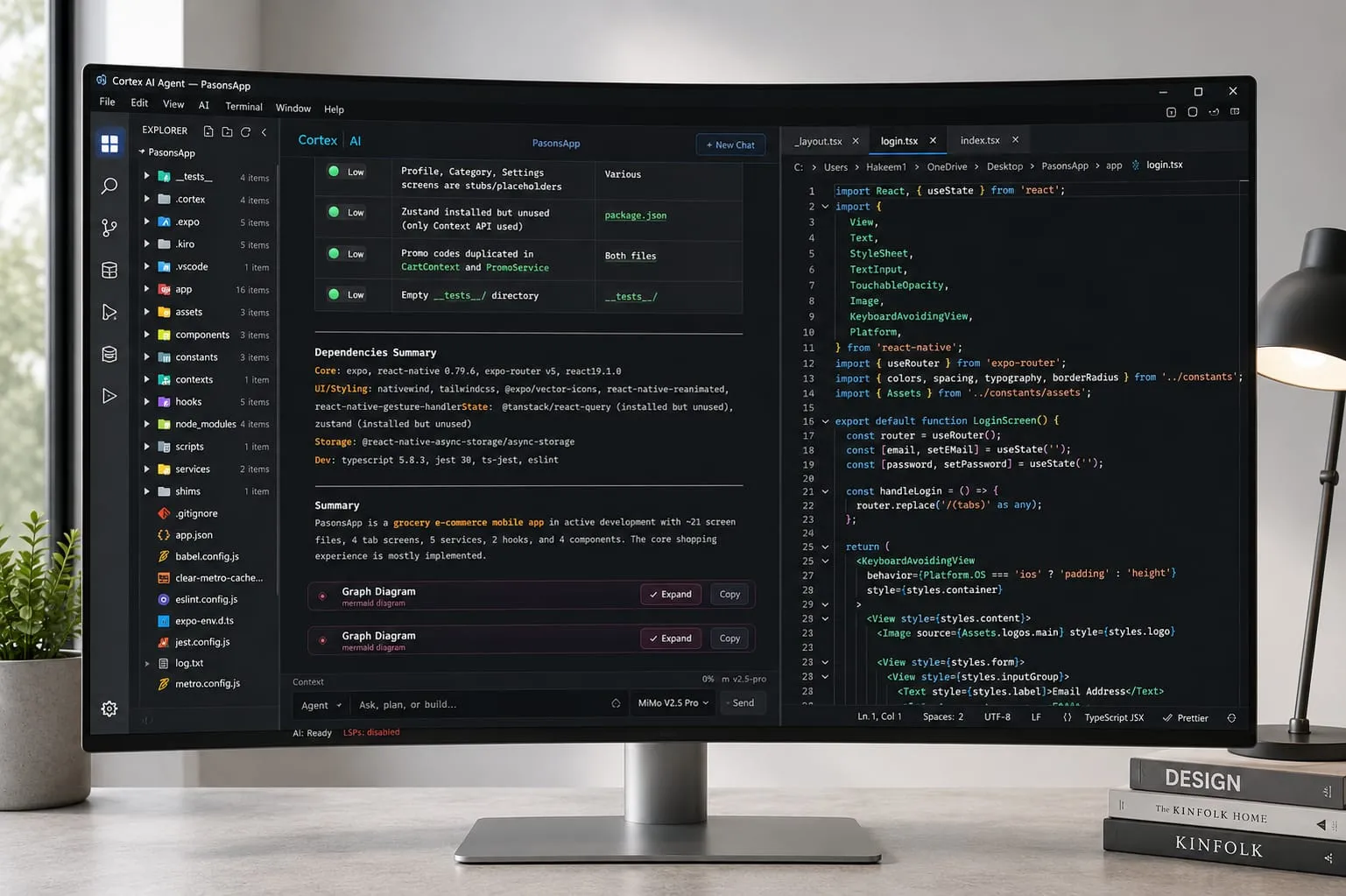
A standalone, local-first AI IDE centered on agentic multi-file coding, direct BYOK model access, and reviewable execution.
Information checked: Sep 27, 2026 ·View sources
Tool details
- Type
- AI editors
- Platforms
- Windows 10, Windows 11, Linux, macOS (source build)
- Free plan
- Yes
- Open source
- No
- Bring your own key
- Yes
- Local models
- No
Overview
Best for
- Developers who want an AI-native desktop IDE rather than an extension
- Developers who prefer direct provider billing and BYOK control
- Multi-file feature work, refactoring, debugging, and test-driven fixes
- Windows and Linux developers who want agent, planning, terminal, and diff review in one workspace
- Teams or individuals that want local project memory with optional MCP integrations
Strengths
- Direct BYOK workflow avoids model-token markup by the IDE vendor.
- Agent can plan, edit, run commands, and verify results across multiple files.
- Local project memory and chat storage reduce dependence on a hosted workspace.
- Supports multiple model providers and MCP-based tool integrations.
- Native Windows and Linux apps suit developers who prefer a desktop IDE.
Limitations & trade-offs
- macOS users who require a prebuilt, notarized installer rather than building from source
- Users who do not want to manage provider API keys or usage billing
- Teams requiring mature enterprise administration, SSO, policy controls, or procurement features
- Developers whose priority is a large VS Code or JetBrains extension ecosystem
- Users who specifically require documented local-model or Ollama support
- macOS has an official source-build path but no prebuilt .dmg is published yet.
- Users must supply and manage their own provider API keys for BYOK usage.
- Some managed services require a paid Cortex subscription.
- The public repository does not contain every component used by the complete Cortex service and distribution pipeline.
- Free semantic search and paid hosted embedding services use overlapping terminology in the official documentation.
Get started
Pricing & usage limits
Official pricingFree tier · From $10
Core IDE and BYOK coding workflow; model usage is billed directly by the selected AI provider.
Adds Cortex-managed services such as OCR, web search, voice prompts, MCP connections, and hosted platform features.
Annual Pro access with priority support and early-access features.
Pricing checked: Sep 27, 2026 · Subscription, usage limits, and model costs may be billed separately.
Features & details
Agentic Development
- Agent, Ask, and Plan modes
- Multi-file edits with reviewable diffs
- Terminal execution and verification
- Project-aware task planning
Models and Context
- Bring your own provider keys
- Multiple AI provider integrations
- Project memory stored locally
- Project-wide semantic code search
Developer Workflow
- Native Monaco-based editor
- Integrated terminal and Git tooling
- MCP server support
- Reusable coding skills and custom skills
Safety and Control
- Permission gates for file changes
- Command classification and path validation
- Local credential storage
- Per-project review before accepting changes
Why Choose Cortex AI IDE?
Cortex is differentiated less by autocomplete and more by how it structures agentic work. The intended loop is to understand a project, decide on an approach, change the relevant files, run the real commands, inspect the result, and then present a diff for review. That makes it a closer fit for developers who want to delegate complete engineering tasks rather than use AI only for line-by-line completion.
The second differentiator is model ownership. Cortex is designed around BYOK, so model choice and inference billing stay with the developer's selected provider. This can be attractive when a team already has preferred OpenAI, Anthropic, DeepSeek, Gemini, Qwen, MiMo, OpenRouter, or other compatible access and does not want an IDE-specific token bundle to become the main switching cost.
Its local-first design is also narrower and more precise than the phrase sometimes implies. Project memory, chat history, settings, and credentials are kept on the machine, while model requests still leave the device and go to the selected provider. Optional Cortex-hosted services can also process data for functions such as web search, OCR, or embeddings. The practical benefit is therefore control over routing and storage, not fully offline AI.
Core Workflow
A productive Cortex workflow starts with separation between understanding, planning, and execution. Ask mode is useful when the immediate goal is codebase comprehension. Plan mode is better for larger changes where architecture, migration steps, or risk should be reviewed before files are touched. Agent mode is the execution stage, where the assistant can work through the repository and use the terminal to validate its changes.
That separation matters on real repositories because many expensive agent mistakes begin before the first edit. A weak plan can produce correct-looking code in the wrong layer, duplicate an existing abstraction, or miss a migration dependency. Reviewing the plan first gives the developer a low-cost point to correct direction before the model starts spending tokens on edits and test cycles.
The shared terminal introduced in later releases also makes the workflow easier to audit. Commands run by the agent can live in the same shell context the developer is using, which is useful when environment variables, directory changes, local services, or remote sessions are part of the task.
Where Cortex Fits
Cortex sits between editor extensions and cloud coding agents. It is a standalone desktop IDE with its own editor, project tree, terminal, chat, permissions, and agent loop, so it does not require an existing VS Code or JetBrains installation. At the same time, it works against the developer's local repository instead of making a hosted workspace the center of the development model.
This positioning makes sense for developers who want an AI-native environment but still think of the local repository and terminal as the source of truth. It is less compelling when the existing editor setup is heavily customized around a large extension ecosystem or when organizational policy requires enterprise controls that are not documented by Cortex today.
Use Cases
Cortex is well suited to tasks where the agent needs to move across several files and then prove the change against the real project. Typical examples include implementing a feature that touches API, data, and UI layers; tracing and fixing a bug from a stack trace; performing a repository-wide refactor; or exploring an unfamiliar codebase before making a targeted change.
It can also be useful for developers who switch models by task. A lower-cost model can handle routine exploration or mechanical changes, while a stronger reasoning model can be selected for architecture-heavy work. Because provider keys are user-supplied, this model-switching strategy can be adjusted without waiting for the IDE vendor to redesign its own bundled credit plans.
Comparison to Alternatives
Against Cursor and Windsurf, Cortex competes on the same broad decision: whether to adopt an AI-native editor as the primary development workspace. Cortex places unusual emphasis on direct provider keys, local project state, explicit permission gates, and a visible plan-to-verification loop. The tradeoff is that developers should evaluate editor polish, ecosystem depth, operating-system availability, and team administration separately rather than assuming feature parity from the AI layer alone.
Void is another relevant comparison for users who care about model flexibility and control, while Trae and Zed AI are reasonable substitutes for developers comparing full AI-oriented editors rather than plugins. The important comparison is not the number of models in a dropdown; it is how easily each editor lets a developer control context, review changes, recover from a bad agent turn, and keep the workflow compatible with existing tools.
Best Configuration
For day-to-day use, a conservative configuration is often more predictable than maximizing autonomy from the first turn. Keep a primary provider and a backup provider configured, use Ask mode for codebase questions, switch to Plan mode before broad or risky changes, and reserve Agent mode for execution after the intended approach is clear.
Project memory is most useful when it contains stable engineering constraints rather than transient conversation details. Repository-specific rules such as deployment conventions, forbidden dependencies, test commands, architecture boundaries, or database restrictions give the agent information that would otherwise need to be repeated in every session.
MCP connections should be added selectively. A small set of trusted servers that map to real development needs is easier to reason about than a large collection of tools with overlapping permissions. The same principle applies to built-in and custom skills: enable instructions that improve a repeated workflow rather than enabling every available capability at once.
Migration Notes
Moving from another AI-native editor should be treated as an editor migration and an agent migration at the same time. First confirm that the operating system is supported and that the required provider keys are available. Then test the repository with a low-risk task before using Cortex for a large refactor or release-critical change.
Cortex can read existing MCP configuration from Cursor and Claude-related setups, which reduces one part of the migration cost. Editor-specific extensions, keybindings, tasks, snippets, and language tooling still need separate review because Cortex is a standalone environment rather than a VS Code extension.
Developers coming from a bundled-credit product should also budget differently. Cortex's core BYOK model means the IDE subscription and model inference are separate cost centers. Monthly spend therefore depends directly on the models selected, the size of the repository context, and how often long agent loops are used.
Tradeoffs in Practice
The current platform story is asymmetric: Windows and Linux have prebuilt distributions, while macOS has an official source-build path but no prebuilt .dmg yet. That can decide the comparison for Mac-first developers who need a signed installer and automatic update path rather than a manual build.
There is also an important documentation nuance around semantic search. The current download page lists full-codebase semantic search as part of the free BYOK experience, while the paid service is described in terms of hosted semantic search or embeddings. Other documentation sometimes uses the broader semantic-search label for the managed path. The practical distinction appears to be local or core search versus Cortex-hosted embedding services, but users for whom this matters should confirm the behavior in the current build before purchasing.
Finally, the GitHub repository is substantial but should not be described as the complete open-source Cortex product. The repository publishes the desktop application source under Apache-2.0, including the editor shell, agent runtime, provider integrations, UI, data layer, and security modules. Its own documentation also says that the build and packaging pipeline, automated test suite, hosted services, some documentation and plugin assets, and release binaries are not included. The most precise description is therefore an Apache-2.0 desktop source release with additional Cortex components and hosted services outside that repository.
Model support & data privacy
Supported models
- Xiaomi MiMo
- DeepSeek
- Anthropic
- OpenAI
- OpenRouter
- Alibaba Qwen
- Google Gemini
- InferenceHub
Privacy & data handling
Cortex states that BYOK API keys are stored in the operating system credential store and that code and prompts go directly from the device to the selected AI provider rather than through Cortex servers. Chat history and project memory are described as local. Account, subscription, and optional hosted services such as OCR, embeddings, and web search involve Cortex infrastructure, so local-first should not be interpreted as fully offline inference.
Guides, reviews & fixes
View allNo published guides yet. Start with the official documentation above.
Product updates
Official changelogNo verified product updates listed yet. Follow this tool to see new relevant content in Saved.
See the content timelineAlternatives
Sources & verification
Verification dates record when this directory checked the information. Product release dates appear separately above.
Directory revision history
The official download page listed v3.0.50 as the stable release when checked, with fixes for long conversation restore, content after code blocks, and large PDF rendering.
v3.0.45 added Project Health Map and a dead-code census, with improvements for long-running agent tasks.
v3.0.35 introduced a terminal shared between the developer and agent plus permission-based access to an active SSH session.
v3.0.22 added Plan mode, automatic discovery of existing Cursor and Claude MCP configurations, broader skill discovery, and Linux .deb/.rpm packages.
v3.0.0 added Microsoft Store distribution and Google Gemini provider support.
v2.7.0 was the initial public release for Windows 10/11.