
Wix Studio
Wix Studio is a professional AI website builder and managed web platform for agencies, freelancers, developers, and organizations that need to design, build, manage, and scale client websites efficiently.
Information checked: Jun 26, 2026 ·View sources
Tool details
- Type
- App builders
- Platforms
- Web, Wix Studio, Wix IDE, Velo, Wix Mobile App, Managed Wix Hosting
- Free plan
- Yes
- Open source
- No
- Bring your own key
- No
- Local models
- No
Overview
Best for
- Agency-built client websites
- Professional marketing sites
- Small business websites
- Responsive landing pages
- Portfolio and brand websites
- CMS-driven dynamic websites
- Ecommerce and booking websites
- Teams that need AI-assisted design, copy, images, SEO, and code in one managed platform
- Organizations managing multiple websites from a centralized dashboard
Strengths
- Strong all-in-one platform for agencies and teams building professional client websites.
- AI tools cover design, layout, code, copy, images, SEO, CMS, and marketing workflows.
- More developer-extensible than simple no-code site builders through Velo, APIs, and Wix IDE.
- Built-in ecommerce, bookings, CRM, payments, analytics, and marketing tools reduce plugin hunting.
- Enterprise and multi-site management features are useful for large client portfolios.
Limitations & trade-offs
- Teams that require self-hosting or full source-code ownership
- Developers looking for a local AI code editor like Cursor or Windsurf
- Open-source-first projects
- Complex full-stack SaaS applications with custom backend architecture
- Internal tools connected directly to private production databases
- Teams that want a framework-native workflow built entirely around Git and code review
- Not open-source and not designed for self-hosting or full source-code ownership.
- More platform-dependent than code-first stacks such as Next.js or Astro.
- Advanced customization can require learning Wix Studio, Velo, CMS, and platform-specific APIs.
- Pricing and feature availability vary by plan, region, billing period, and add-ons.
- Less suitable for complex full-stack SaaS products or deeply custom backend systems.
Get started
Pricing & usage limits
Official pricingFree tier · From $19
Free Wix Studio workspace for building and testing sites before upgrading.
Entry plan for online brands, with custom domain support, hosting, AI creation tools, and core Studio features.
Adds online payments and higher site capacity for business-ready websites.
Recommended plan for lead capture and sales growth, with expanded collaboration, CMS, analytics, and business features.
High-capacity plan for scaling business growth, larger teams, advanced analytics, ecommerce, and dedicated infrastructure.
Custom plan for large organizations needing multi-site management, SSO, IP allowlisting, audit logs, custom integrations, advanced governance, and dedicated support.
Pricing checked: Jun 26, 2026 · Subscription, usage limits, and model costs may be billed separately.
Features & details
AI Site Creation
- AI website builder for generating business-ready sites from prompts
- Aria AI agent for conversational site editing and refinement
- AI responsive design for adapting sections across screen sizes
- AI text, image, SEO meta tag, ad copy, CMS collection, and video trailer tools
Design and CMS
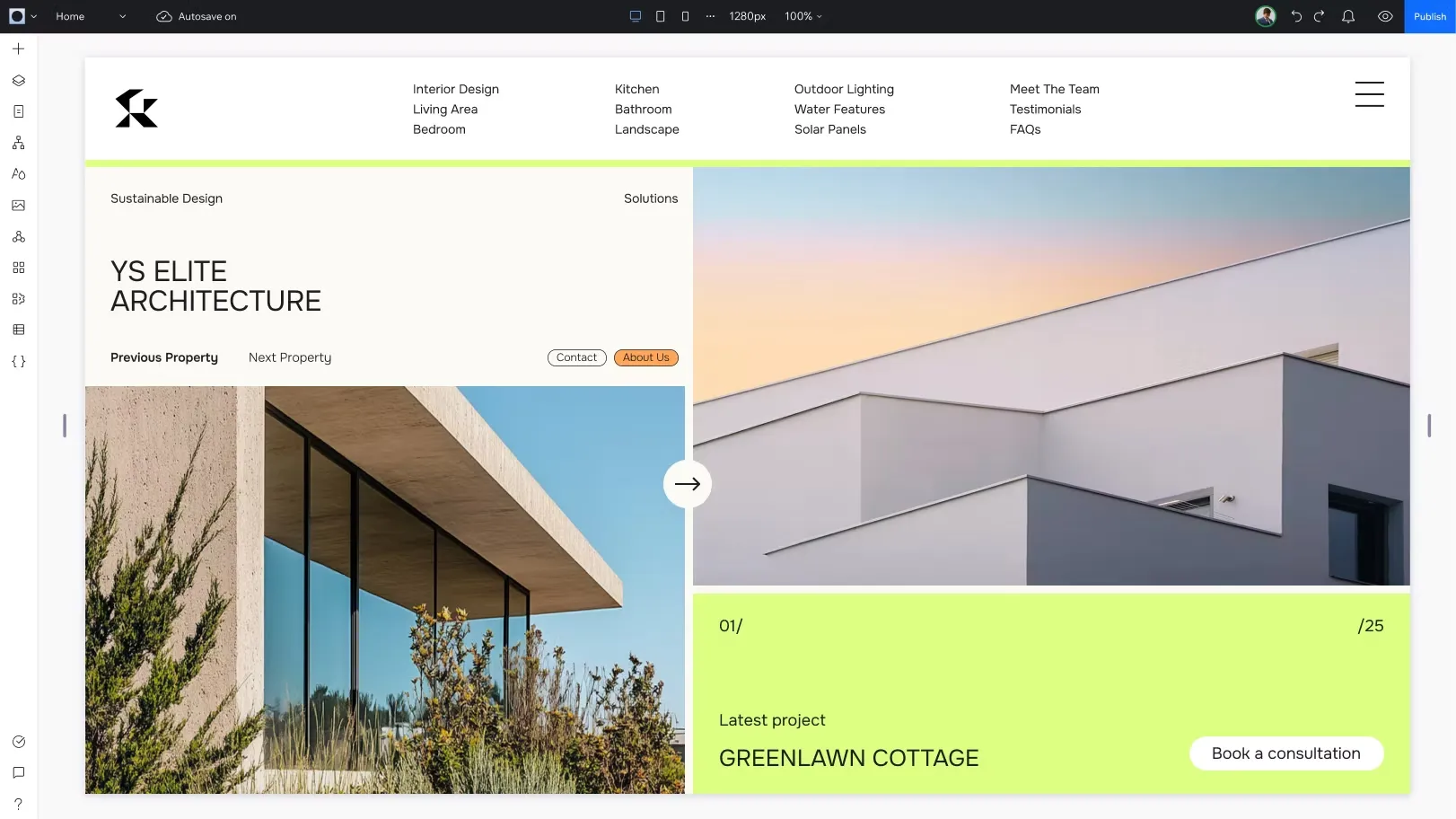
- Responsive visual editor with breakpoints, layouts, animations, and reusable assets
- Wix Studio CMS for dynamic pages, collections, filters, and structured content
- Figma to Wix Studio workflow for importing designs
- Templates, sections, client kits, and design-system-oriented workflows
Developer Workflow
- Velo development platform with frontend and backend JavaScript
- VS Code-based Wix IDE with AI code assistant
- Wix APIs, REST APIs, JavaScript SDK, HTTP functions, routers, packages, and service plugins
- GitHub integration and external IDE workflows for supported coding setups
Business and Commerce
- Native ecommerce, payments, bookings, events, forms, CRM, email marketing, and analytics
- Wix App Market and third-party integrations
- SEO tools, structured data, redirects, indexes, and search integrations
- Business-ready sites for stores, service businesses, portfolios, agencies, and client projects
Management and Enterprise
- Team workspaces, roles, permissions, client handoff, and collaboration tools
- Multi-site management for agencies and enterprise organizations
- Enterprise SSO, IP allowlisting, audit logs, custom templates, custom integrations, and centralized dashboards
- Managed multi-cloud hosting, CDN, security, performance, and customer support
Why Choose Wix Studio?
Wix Studio is built for a different buyer than the basic Wix editor. It targets agencies, freelancers, designers, developers, and organizations that need to ship polished client websites repeatedly, not just create a single brochure site. The platform combines visual design, AI assistance, CMS, ecommerce, collaboration, hosting, and business tools in one managed environment.
Its biggest strength is the breadth of the workflow. A team can start with AI, refine the design manually, build CMS-driven pages, add ecommerce or bookings, write custom logic with Velo, manage clients, and publish on Wix infrastructure without stitching together hosting, plugins, deployment, analytics, forms, and payments from scratch.
The AI layer is practical because it is embedded across the work surface. Wix Studio can help with responsive layout adaptation, copy, images, SEO metadata, CMS collections, code snippets, ad creative, and site generation. This is more useful than a standalone AI prompt box because the output lands inside the actual editor, CMS, or development environment where the team continues working.
Core Workflow
A typical Wix Studio workflow starts with either a blank canvas, a template, imported design direction, or the AI Website Builder. After the initial structure is created, designers refine layout, breakpoints, sections, animations, and visual hierarchy inside the responsive editor.
For content-heavy projects, the CMS becomes the center of the build. Teams define collections, dynamic pages, filters, repeaters, and structured content so clients can manage content without editing every page manually. For business sites, Wix native solutions add stores, bookings, events, forms, CRM, email marketing, payments, and analytics.
Developers can extend the site through Velo, Wix APIs, backend code, HTTP functions, service plugins, packages, GitHub-connected workflows, and the VS Code-based Wix IDE. That means Wix Studio is not only a no-code design canvas; it can support custom business logic when the project outgrows simple drag-and-drop editing.
Practical Use Cases
Wix Studio is strongest for client websites that need professional design plus business functionality. Good examples include agency sites, service business sites, ecommerce storefronts, booking websites, portfolios, event sites, restaurants, hotels, local businesses, education sites, membership sites, and campaign landing pages.
It is also useful for agencies managing many small or mid-sized sites. Multi-site dashboards, reusable assets, roles, client access, templates, and handoff workflows reduce the repetitive operational burden that comes with maintaining client portfolios.
AI is most useful in the early and middle stages of a project: generating a draft site, adapting responsive sections, creating visual assets, writing placeholder copy, producing SEO tags, building CMS collections, and accelerating code snippets. Final brand judgment, UX review, copy editing, and performance checks still need human ownership.
Comparison to Alternatives
Compared with Webflow, Wix Studio is more all-in-one and business-solution-heavy. Webflow often appeals to teams that want deeper visual CSS-style control and a more designer-developer handoff culture. Wix Studio is stronger when the site also needs native bookings, ecommerce, CRM, payments, email marketing, agency management, and AI assistance in one place.
Compared with Framer, Wix Studio is broader and more operational. Framer is excellent for high-polish marketing sites and design-led launches. Wix Studio is usually better when the project requires more business tooling, client management, ecommerce, and multi-site workflows.
Compared with WordPress, Wix Studio removes much of the hosting, plugin maintenance, and security burden. WordPress remains stronger for plugin ecosystem depth, self-hosting, and long-term content ownership flexibility. Wix Studio is better for teams that want a managed, professional web platform rather than assembling a stack from themes, plugins, and hosting providers.
Compared with Squarespace, Wix Studio is more flexible and agency-oriented. Squarespace is simpler for template-first creator sites, while Wix Studio gives professional builders more control over layout, collaboration, business features, and developer extension.
Compared with Plasmic or Builder.io, Wix Studio is less codebase-integrated but more complete as a hosted website/business platform. Plasmic and Builder.io fit teams that already have a React app or headless frontend. Wix Studio fits teams that want the platform itself to handle hosting, editor, CMS, business tools, and site management.
Best Configuration
For freelancers or small projects, Basic can be enough for brand sites that do not need serious commerce or large CMS usage. Standard is the practical starting point when online payments are required. Plus is usually the safer default for professional client projects because it gives more room for CMS, collaboration, analytics, and business growth.
Elite makes sense for high-capacity sites, larger collaboration needs, advanced ecommerce, and teams that need more infrastructure and performance headroom. Enterprise should be evaluated when the requirement is no longer just one site, but centralized governance across many sites, custom integrations, SSO, audit logs, IP restrictions, and multi-team operations.
For developer-heavy projects, plan the Velo architecture early. Decide what belongs in native Wix business solutions, what belongs in CMS collections, what needs backend code, and what should be handled by external systems through APIs. This keeps the site maintainable as business logic grows.
Migration Notes
Wix Studio is a natural migration target for older Wix sites, Editor X projects, agency-built brochure sites, and client websites that need better responsiveness, AI-assisted workflow, or more professional management. Migration is easiest when the existing site has clear pages, simple content structure, and standard business features.
Migration from WordPress, Webflow, Squarespace, or custom websites should start with a content and URL audit. Map pages, SEO metadata, redirects, forms, analytics, scripts, CMS collections, ecommerce products, booking flows, and integrations before rebuilding the visual design.
Migration is harder when the current site depends on custom backend systems, advanced plugin behavior, complex membership logic, or framework-level code control. In those cases, Wix Studio may still be a strong marketing-site layer, but the custom application or backend should remain separate unless the required functionality maps cleanly to Wix APIs and business solutions.
Model support & data privacy
Supported models
- OpenAI
Privacy & data handling
Wix Studio is a hosted platform with managed infrastructure, AI tooling, business apps, CMS, and optional developer features. AI tools may process prompts, site content, images, layout context, CMS structures, or code-assistant requests depending on the feature used. Organizations should review Wix Studio’s AI tools, privacy policy, enterprise security, SSO, roles, permissions, audit logs, API access, data integrations, and app marketplace permissions before using it for sensitive or regulated workflows.
Guides, reviews & fixes
View allNo published guides yet. Start with the official documentation above.
Product updates
No verified product updates listed yet. Follow this tool to see new relevant content in Saved.
See the content timelineAlternatives
Sources & verification
Verification dates record when this directory checked the information. Product release dates appear separately above.
Directory revision history
Checked Wix Studio official pages, Wix Studio pricing, AI Website Builder, AI tools, developer documentation, Velo docs, REST API docs, enterprise features, roles and permissions, SSO, and activity log documentation.