Budibase
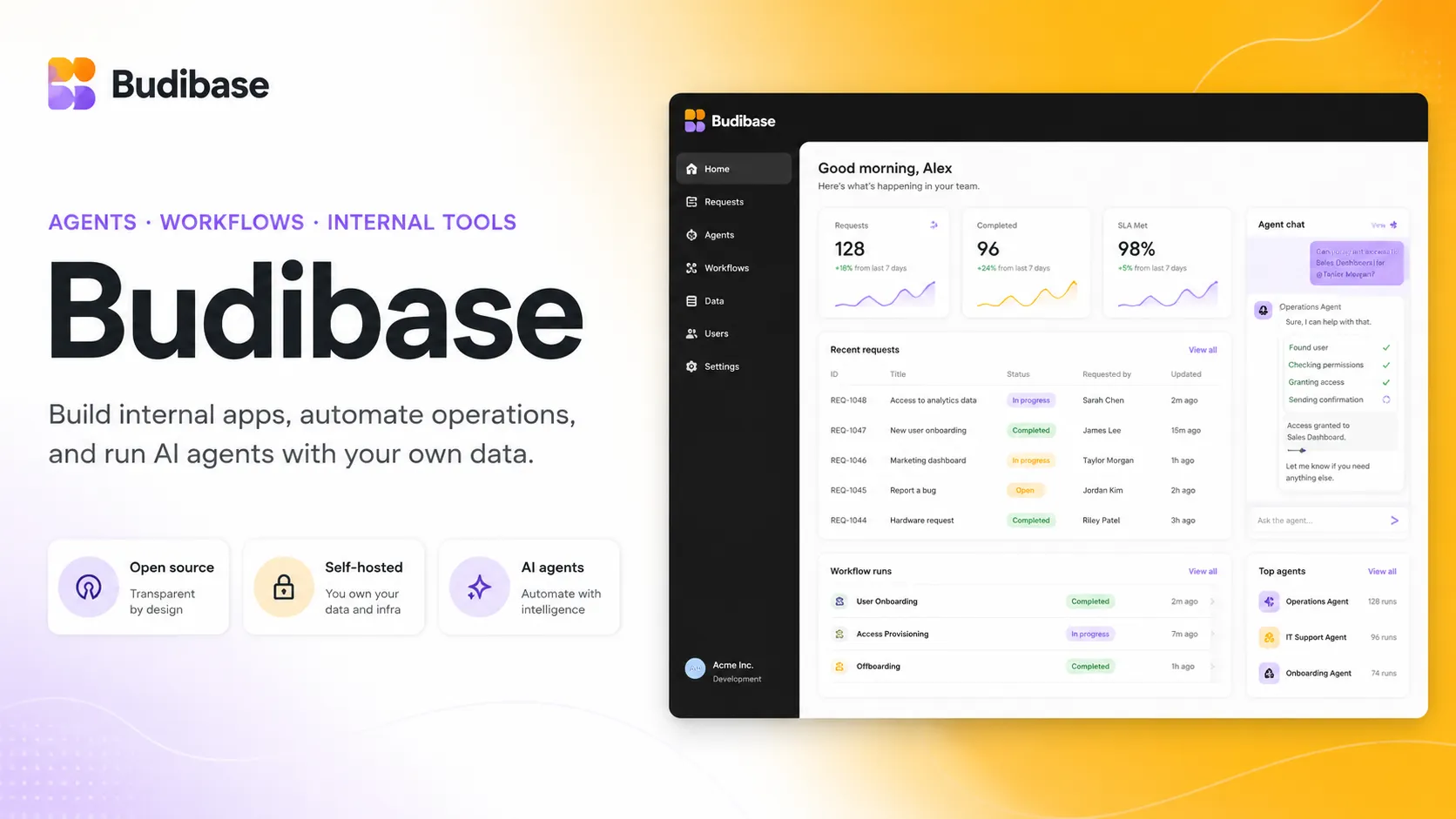
Budibase is an open-source operations platform for building internal apps, automations, and AI agents. It is especially useful for teams that want self-hosting, workflow automation, model-provider flexibility, and business apps connected to existing data sources.
Budibase is a strong choice when a team wants an open-source platform for internal apps, workflow automations, and AI agents, especially if self-hosting, unlimited app users, and operations-focused workflows matter more than owning a traditional codebase.
Pricing Plans
Open source
Free self-hosted plan with 1 workspace, unlimited apps, automations, agents, users, actions, community support, and SSO.
Pro
Cloud plan with 1 creator, 1 workspace, 5K actions, 2K Budibase AI credits, 1 day logs, unlimited agents, and synchronous automations.
Premium
Cloud plan with 1 creator, 10 workspaces, 20K actions, 10K Budibase AI credits, backups, custom branding, SSO, and creator/user add-ons.
Business
Cloud plan with 3 creators, unlimited workspaces, 250K actions, 50K Budibase AI credits, 30 day logs, environment variables, enforced SSO, and user groups.
Enterprise Cloud
Custom cloud plan with custom actions, SCIM, 365 day logs, audit logs, priority support, SLAs, micro frontends, and optional air-gapped deployment.
Enterprise Self-host
Self-hosted enterprise plan with open-source features plus branding, backups, environment variables, enforced SSO, groups, SCIM, audit logs, SLAs, and add-ons.
End users add-on
Optional additional end-user seats for Pro, Premium, and Business cloud plans.
Creator add-on
Optional additional creators for Premium and Business cloud plans.
Core Features
1Apps and Interfaces
- Drag-and-drop interface designer for internal business apps
- 40+ pre-built components for forms, tables, charts, and layouts
- Multi-screen responsive apps for desktop and mobile use cases
- Reusable design blocks and JavaScript-based bindings
2AI and Agents
- Agent Builder for AI agents with instructions, tools, models, and knowledge sources
- AI Columns for generating, transforming, summarizing, and cleaning table values
- AI automation actions for classification, generation, categorization, document extraction, and custom prompts
- AI-assisted JavaScript, cron expressions, and Budibase DB table generation
3Data and Automations
- Budibase DB for built-in structured data
- External SQL, REST API, custom queries, and external records
- Automation Builder with triggers, actions, synchronous webhooks, and workflow logs
- Public API for applications, users, tables, and data
4Deployment and Governance
- Budibase Cloud and self-hosted deployment options
- Docker, Kubernetes, DigitalOcean, and Azure App Service deployment paths
- SSO, RBAC, table access security, environment variables, and workspace roles
- Enterprise support for SCIM, audit logs, enforceable SSO, backups, SLAs, and air-gapped deployment
Pros
- Open-source self-hosted plan supports unlimited users, apps, agents, automations, and actions.
- Strong fit for operations workflows that combine apps, automations, approvals, and AI agents.
- Model-provider flexibility with Budibase AI, OpenAI, Anthropic, Google, Mistral, OpenRouter, Groq, and custom providers.
- Good balance of visual building, structured data, automations, and JavaScript customization.
- Self-hosting makes it attractive for teams with infrastructure, privacy, or cost-control requirements.
Cons
- Cloud pricing can become more complex with creators, end-user add-ons, actions, and AI credits.
- Self-hosting requires operational responsibility for deployment, storage, secrets, upgrades, backups, and networking.
- Advanced controls such as SCIM, audit logs, enforced SSO, air-gapped deployment, and micro frontends require Enterprise.
- Not a traditional AI IDE for editing arbitrary local code repositories.
- Complex business systems still need careful data modeling, access control, and workflow ownership.
Why Choose Budibase?
Budibase is most compelling when the goal is not just to build a screen, but to run an operational workflow. Its product direction combines three layers that are often split across separate tools: internal apps for users, automations for process logic, and agents for conversational or AI-assisted work.
That makes Budibase different from a pure database tool or a simple form builder. A team can create a request portal, store structured data, trigger approvals, call external systems, and let an AI agent classify or route work from the same platform. This is useful for IT, HR, finance, support, compliance, operations, and other teams that need practical internal systems without turning every workflow into a full engineering project.
The open-source self-hosted option is a major differentiator. Teams with infrastructure capacity can run Budibase themselves and avoid software licensing fees for the open-source plan. That is especially attractive when a workflow has many end users but only a few people maintaining the application.
Core Workflow
A typical Budibase workflow starts with a workspace. Inside the workspace, teams define data sources, build apps, configure automations, and optionally connect AI models for agents or AI-assisted steps. The data layer can be Budibase DB, external SQL databases, REST APIs, custom queries, or other connected systems.
From there, builders design interfaces with components, bindings, forms, tables, cards, charts, and reusable blocks. Automations handle backend workflow logic such as approvals, notifications, record updates, webhooks, categorization, and routing. Agents add a conversational layer where users can ask questions, request actions, or initiate workflows through chat-style interactions.
The practical advantage is that Budibase keeps the app, data, automation, and agent surfaces close together. The practical risk is the same: teams need clear ownership. If apps, automations, and agents all modify business data, someone must define permissions, review workflow behavior, test edge cases, and monitor production usage.
Practical Use Cases
Budibase fits operational workflows that are too specific for off-the-shelf SaaS but too repetitive to handle manually. Examples include employee request portals, approval apps, support ticket triage, inventory tracking, access request systems, expense approvals, incident logs, risk registers, procurement workflows, onboarding tools, and lightweight CRM-style applications.
Its AI agents are most useful when employees repeatedly ask similar operational questions or submit similar requests. For example, an agent can help categorize support issues, create records, route approvals, answer workplace questions from connected data, or trigger a workflow after collecting required context from the user.
AI should be introduced where the output can be reviewed or constrained. Classification, summarization, draft generation, document extraction, and routing are safer starting points than fully autonomous updates to sensitive systems. Budibase works best when AI is treated as a workflow component, not as an unchecked replacement for process design.
Comparison to Alternatives
Compared with Retool, Budibase is more open-source and operations-workflow oriented, while Retool is often stronger for engineering-led internal tools connected to production data with a mature commercial enterprise platform. Retool may suit teams that want a polished developer platform; Budibase may suit teams that want self-hosting, unlimited open-source users, and a combined app-automation-agent model.
Compared with Appsmith and ToolJet, Budibase competes in the open-source internal app builder category but places more visible emphasis on operations and agents. Appsmith often feels more developer-centric around JavaScript and internal dashboards, while ToolJet emphasizes AI-native app generation and builder-based pricing. Budibase is strongest when the workflow itself is the product.
Compared with Microsoft Power Apps, Budibase is less tied to Microsoft 365, Dataverse, Teams, and tenant-level Microsoft governance. Power Apps is often the default inside Microsoft-heavy organizations. Budibase is more attractive when teams want a stack-neutral, self-hostable, open-source platform.
Compared with Airtable, Budibase is less spreadsheet-like but more app-and-automation oriented. Airtable is excellent when the shared database is the center of the team workflow. Budibase is better when teams want to build custom internal apps, automate backend processes, and deploy agents on top of operational data.
Best Configuration
For teams evaluating Budibase, the best first project is a workflow with clear pain: a request system, approval queue, support intake process, internal admin tool, or spreadsheet-backed tracker that already consumes time every week. Start with a narrow app, connect the minimum data sources, and add automation only after the manual flow is understood.
For self-hosted deployments, plan infrastructure before inviting a large number of users. Budibase self-hosting involves environment variables, authentication secrets, object storage, CouchDB, backups, session settings, SMTP, networking, and upgrade practices. The open-source price is attractive, but the operational responsibility is real.
For cloud deployments, the main planning point is usage shape. Budibase Cloud plans combine creators, end users, action limits, logs, AI credits, and workspace limits. A small process with a few users may fit easily, while a high-volume automation or agent workflow may need careful plan selection.
For AI configuration, choose model providers deliberately. Budibase supports managed and external model providers, but each workspace needs its own AI model configuration. Sensitive use cases should define which providers are allowed, which data can be sent to the model, what actions an agent may call, and how logs are reviewed.
Migration Notes
Budibase is a natural migration target for spreadsheets, shared inbox workflows, manual approval processes, legacy forms, simple admin panels, and internal tools that have grown beyond informal handling. The easiest migrations preserve the existing process but give it a cleaner interface, structured data, permissions, and automations.
Migration is harder when the existing system has complex transactional logic, advanced custom UX, high-performance frontend requirements, or deeply specialized business rules. Budibase supports custom logic and extensibility, but it should not be treated as a universal replacement for a fully custom software stack.
A practical migration sequence is to model the data first, build a read-and-submit interface second, add workflow automation third, and introduce AI agents last. This prevents teams from automating or agentifying a process before the underlying data model and access rules are stable.
Best For
- Internal tools and admin panels
- Workflow automation for operations teams
- AI agents that answer questions, route approvals, and update business systems
- Self-hosted low-code deployments
- CRUD apps, forms, portals, and approval workflows
- Replacing spreadsheets, shared inboxes, and manual ticket routing
- Teams that want unlimited self-hosted users without per-seat software licensing
- Organizations that want model-provider flexibility for AI workflows
Not Ideal For
- Developers looking for a local AI code editor like Cursor or Windsurf
- Consumer SaaS products requiring fully custom frontend and backend engineering
- Teams that do not want to operate infrastructure but also need very high-volume free usage
- Organizations that require SCIM, audit logs, enforceable SSO, or air-gapped deployment without an Enterprise plan
- Highly transactional systems requiring custom database engineering beyond a low-code platform
- Teams that need full source-code export of each generated application as a conventional framework project
Privacy Notes
Budibase can run in Budibase Cloud or be self-hosted. AI features are configured per workspace through AI model providers such as Budibase AI, OpenAI, Anthropic, Google, Mistral, OpenRouter, Groq, or a custom provider, and self-hosted Budibase AI usage requires an Enterprise license. Teams handling sensitive data should review datasource credentials, AI provider terms, workspace access, SSO, RBAC, audit logs, hosting settings, backups, network access, and any outbound AI or license connectivity requirements before production use.
Alternatives
Sources
Update History
- Jun 26, 2026: Checked Budibase official website, pricing page, GitHub repository, AI documentation, agent documentation, hosting settings, SCIM, SSO, and public API documentation.
Related Tools
More listings in a similar part of the directory.






Budibase Articles
Guides, comparisons, and launch notes connected to this listing.