
 AppsmithAppsmith is an open-source low-code platform for engineering-led teams building internal apps, dashboards, workflows, and AI-enhanced tools on top of databases and APIs.
Retool
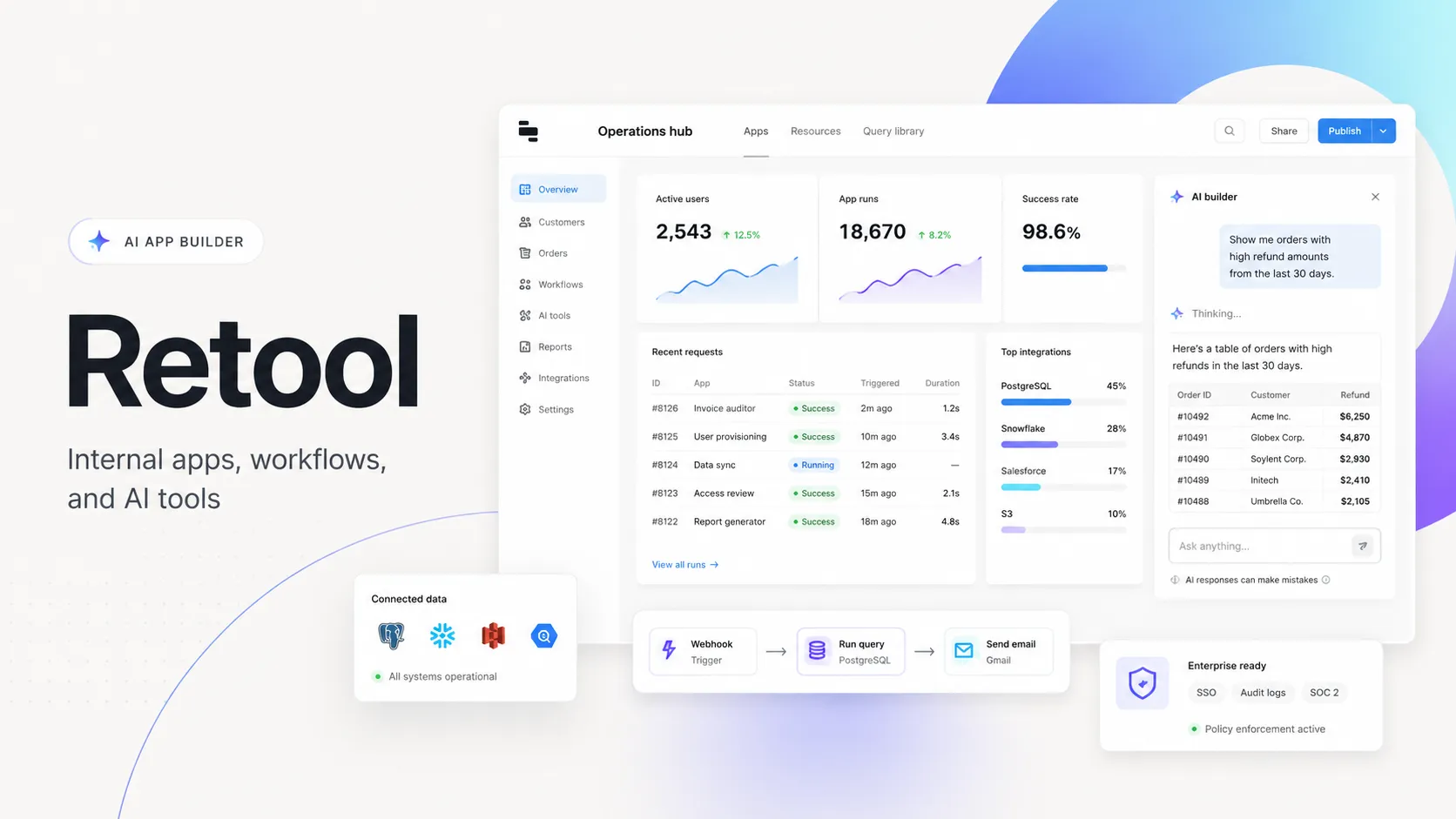
Retool is an enterprise-oriented low-code and AI app platform for teams building internal software, operational workflows, and governed AI tools on top of existing business systems.
Information checked: Jun 26, 2026 ·View sources
Tool details
- Type
- App builders
- Platforms
- Web, Retool Cloud, Self-hosted, iOS, Android, PWA
- Free plan
- Yes
- Open source
- No
- Bring your own key
- Yes
- Local models
- Yes
Overview
Best for
- Internal dashboards and admin panels
- Operations tools connected to live databases and APIs
- AI-assisted internal app generation
- Business workflow automation
- AI agents that need controlled access to company systems
- Enterprise teams that need RBAC, audit logs, SSO, and deployment controls
- Teams that want to ship internal apps faster without building every UI from scratch
Strengths
- Strong fit for internal tools that need real production data quickly.
- Combines visual development with JavaScript, SQL, APIs, and custom logic.
- Enterprise governance is much stronger than most prompt-to-app builders.
- Broad integration surface across databases, APIs, SaaS systems, and AI providers.
- Self-hosting option is valuable for regulated or data-sensitive teams.
Limitations & trade-offs
- Developers looking for a local AI code editor
- Open-source teams that need full source-code ownership of the platform
- Consumer-facing products requiring highly bespoke frontend experiences
- Very small teams that only need a simple form or spreadsheet workflow
- Projects where per-user pricing is a hard blocker
- Less suitable for consumer SaaS products that need fully custom UX and code ownership.
- Pricing can grow with builder, internal user, external user, AI credit, agent, and workflow usage.
- Advanced governance, source control, SSO, and self-hosting are concentrated in higher tiers.
- Teams still need technical ownership for schemas, permissions, queries, and production data safety.
- Not a traditional AI IDE for editing an existing codebase like Cursor or Windsurf.
Get started
Pricing & usage limits
Official pricingFree tier · From $10
Free$0 / month
Free workspace for up to 5 users with limited monthly AI credits and workflow runs.
Team$10 / builder/month
Paid builder seats with additional AI credits and workflow capacity; internal users listed from $5/user/month.
Business$50 / builder/month
Adds business-grade controls such as richer permissions, audit logs, external apps, branding, and higher AI credit allocation.
EnterpriseCustom
Custom plan for advanced security, source control, observability, self-hosting, SSO, independent workspaces, platform APIs, support, and volume pricing.
Pricing checked: Jun 26, 2026 · Subscription, usage limits, and model costs may be billed separately.
Features & details
App Building
- AI-native app builder for generating and refining internal tools
- Visual UI components with JavaScript and SQL extensibility
- Reusable modules, themes, and app release history
- Support for web apps, mobile apps, and external portals
Data and Integrations
- Connects to databases, REST APIs, GraphQL, SaaS tools, and AI providers
- Query library for reusable database and API logic
- Retool Database with editor UI and connection strings
- Staging and production resource environments on paid tiers
AI and Automation
- AI Actions and AI resource queries inside apps and workflows
- AI agents for multi-step business tasks with tool access
- Workflow automation with schedules, webhooks, retries, and custom logic
- RAG, monitoring, evaluations, and audit trails for AI usage
Governance and Deployment
- Retool Cloud and Enterprise self-hosted deployment options
- RBAC, permissions, audit logs, and SSO on higher tiers
- Source control and independent workspaces for enterprise teams
- Admin controls for AI features, model access, and usage monitoring
Why Choose Retool?
Retool is most valuable when the application is close to internal operations: dashboards, approval queues, support tools, fraud review panels, inventory systems, data correction workflows, and AI-assisted business processes. Instead of starting with a blank codebase, teams start with connected resources, visual components, permissions, and deployment already handled by the platform.
Its differentiation is less about being a pure code generator and more about reducing the production gap. A prototype built in a generic prompt-to-app tool often still needs authentication, data permissions, audit logging, error handling, environments, deployment, and admin controls. Retool is designed around those concerns from the start, which makes it more practical for software that employees actually use every day.
Core Workflow
A typical Retool workflow starts by connecting existing data sources: databases, internal APIs, SaaS tools, AI providers, or Retool Database. Builders then create a UI with components, bind queries to user actions, add JavaScript where custom logic is needed, and publish the result to an authenticated workspace.
The newer AI app-building flow changes the entry point. Instead of assembling every view manually, a builder can describe the operational tool they need and refine the generated app against real schemas and resources. The important practical detail is that Retool still expects a technical owner: someone needs to validate queries, permission boundaries, data writes, environment mapping, and failure behavior before a tool becomes part of business operations.
Practical Use Cases
Retool fits workflows where speed matters, but the app still touches serious business data. Common examples include customer support consoles, refund approval systems, CRM enrichment tools, warehouse dashboards, finance operations review screens, vendor portals, compliance queues, and data quality tools.
Its AI layer is especially relevant when internal tools need natural language interfaces, document processing, summarization, classification, or multi-step agent behavior. For example, a support triage agent can read from a ticket system, check customer records, summarize likely causes, and recommend next actions while keeping the final approval inside a governed Retool app.
Comparison to Alternatives
Compared with open-source internal tool builders such as Appsmith, ToolJet, and Budibase, Retool generally leans more enterprise and commercially managed. The tradeoff is cost and platform dependence, but the upside is a more mature commercial ecosystem, stronger governance options, and a broad product surface that includes apps, workflows, database, mobile, external apps, and AI agents.
Compared with prompt-to-app tools such as Lovable or Replit Agent, Retool is less about creating a standalone codebase and more about operating internal software safely on top of existing systems. That makes it better for enterprise workflows, but less attractive for teams trying to build a public SaaS product with complete code ownership and a custom frontend stack.
Compared with Microsoft Power Apps, Retool is often more appealing to engineering-led teams that prefer SQL, JavaScript, APIs, Git-style workflows, and flexible integration patterns. Power Apps can be a stronger default inside Microsoft-heavy organizations where Dataverse, Microsoft 365, Teams, and Azure governance are already the center of gravity.
Best Configuration
For a small technical team, Retool Cloud with a small number of builder seats is usually the simplest way to validate whether the platform fits. Start with one high-value internal workflow rather than attempting to migrate every spreadsheet and admin panel at once. The best first project is usually painful, repetitive, connected to live data, and owned by a team that can give fast feedback.
For larger teams, the setup should be treated more like an internal platform initiative. Define naming conventions for resources, separate development and production data, restrict write access carefully, document shared queries, and decide who is allowed to use AI features. Without those rules, a low-code platform can become another layer of operational sprawl.
For regulated environments, Retool Enterprise self-hosting is the configuration to evaluate first. The main question is not only whether Retool can run in your infrastructure, but whether your team is prepared to operate upgrades, networking, secrets, SSO, logging, monitoring, and access reviews as part of the platform lifecycle.
Migration Notes
Retool is easiest to adopt when replacing scattered internal tools: spreadsheets with scripts, half-maintained admin pages, one-off dashboards, manual Slack approval flows, or fragile Zapier-style automations. In these cases, Retool can become a governed interface over the systems that already exist.
Migration is harder when the current tool is already a polished custom product with deeply bespoke UX, complex frontend state, heavy offline behavior, or customer-facing differentiation. Retool can still support portals and mobile workflows, but it should not be treated as a universal replacement for a product engineering stack.
A practical migration plan is to start with read-heavy dashboards, then add controlled write actions, then automate repeatable workflows, and only later introduce AI agents. This sequence gives teams time to validate permissions, logging, ownership, and rollback behavior before letting AI or automation act across business-critical systems.
Model support & data privacy
Supported models
- OpenAI
- Anthropic
- Google Gemini
- Google Vertex AI
- Amazon Bedrock
- Azure OpenAI
- Custom AI Provider
Privacy & data handling
Retool can run in Retool Cloud or be self-hosted by Enterprise customers. Queries run against connected customer data sources, and AI usage depends on the configured AI resource, Retool-managed keys, BYOK setup, and organization-level AI controls. Teams should review Retool security, subprocessors, deployment, and AI provider settings before connecting sensitive data.
Guides, reviews & fixes
No published guides yet. Start with the official documentation above.
Product updates
No verified product updates listed yet. Follow this tool to see new relevant content in Saved.
See the content timelineAlternatives
AppsmithAppsmith is an open-source low-code platform for engineering-led teams building internal apps, dashboards, workflows, and AI-enhanced tools on top of databases and APIs. ToolJetToolJet is an open-source, AI-native low-code platform for teams building internal apps, dashboards, workflows, and AI agents with flexible cloud or self-hosted deployment.
 SuperblocksSuperblocks is an enterprise AI app builder for teams that want business users to generate internal apps while IT and platform teams centrally govern data access, identity, deployment, and auditing.
 BudibaseBudibase is an open-source operations platform for building internal apps, workflow automations, and AI agents with cloud or self-hosted deployment options.
 Microsoft Power AppsMicrosoft Power Apps is an enterprise low-code and AI app-building platform for organizations that want to build governed business applications inside the broader Microsoft Power Platform ecosystem.
 AirtableAirtable is a collaborative low-code app and workflow platform for teams that want to build business applications from structured operational data with AI assistance.
 Zapier InterfacesZapier Interfaces is Zapier’s no-code interface and form-building layer for creating lightweight business frontends that collect data and trigger automated workflows across Zapier’s broader AI orchestration platform.
 LovableLovable is a full-stack AI web app builder positioned between no-code prototyping tools and developer-first AI coding environments.
 Replit AIReplit AI is an all-in-one browser-based AI software creation platform that combines prompt-to-app generation, a cloud IDE, built-in infrastructure, publishing, and collaboration.
Sources & verification
Verification dates record when this directory checked the information. Product release dates appear separately above.
Official websitePricingRetool AISupported AI modelsAI providers and modelsAI credits billing and usageSecurity practices
Directory revision history
Checked official Retool website, pricing page, AI pages, model support docs, and security documentation for current directory entry.