

Appsmith
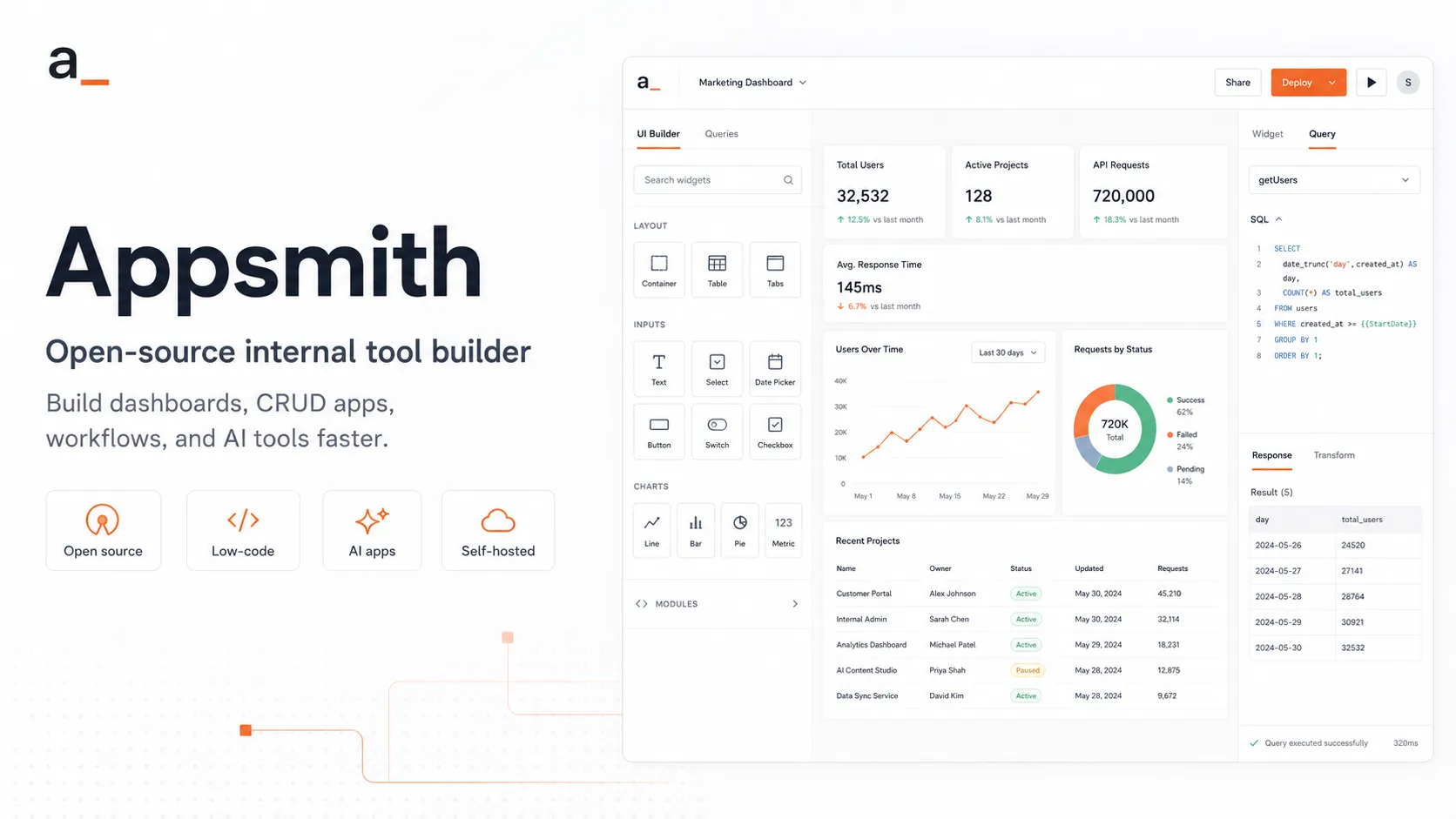
Appsmith is an open-source low-code platform for engineering-led teams building internal apps, dashboards, workflows, and AI-enhanced tools on top of databases and APIs.
Information checked: Jun 26, 2026 ·View sources
Tool details
- Type
- App builders
- Platforms
- Web, Appsmith Cloud, Self-hosted, Docker, Kubernetes, AWS AMI
- Free plan
- Yes
- Open source
- Yes
- Bring your own key
- Yes
- Local models
- No
Overview
Best for
- Internal dashboards and admin panels
- CRUD apps connected to production databases
- Developer-led low-code workflows
- Self-hosted internal tools
- Database and API frontends
- Operational tools for support, finance, data, and back-office teams
- AI-assisted internal apps using OpenAI, Anthropic, Google AI, or Appsmith AI
- Teams that want open-source control and Git-based app management
Strengths
- Open-source foundation gives teams more control than most SaaS-only low-code builders.
- Strong fit for internal tools connected to databases, APIs, and enterprise systems.
- JavaScript customization makes it friendly for developers, not only citizen developers.
- Self-hosting is valuable for teams with private networks, internal databases, or compliance needs.
- Pricing is relatively straightforward compared with many per-builder/per-end-user low-code platforms.
Limitations & trade-offs
- Developers looking for a local AI coding editor like Cursor or Windsurf
- Consumer SaaS products requiring highly custom product UX
- Non-technical teams that want a spreadsheet-first app builder
- Organizations that want everything managed through Microsoft 365 and Dataverse
- Teams that do not want to operate or govern a self-hosted platform
- AI workflows that require native local model management rather than API-based integrations
- Not a full AI IDE or code editor for editing existing application repositories.
- Advanced security, CI/CD, SCIM, private embedding, and air-gapped deployment require Enterprise.
- Teams still need engineering discipline around data access, app ownership, and production changes.
- UI customization is flexible, but not equivalent to owning a fully custom React frontend.
- AI Agents appear as a separate Appsmith product surface with separate pricing and documentation.
Get started
Pricing & usage limits
Official pricingFree tier · From $15
Open-source self-hosted edition for building internal apps with the core Appsmith platform.
Free cloud plan for individual developers and small teams, with up to 5 cloud users and 5 workspaces.
For teams needing more customization and collaboration, including unlimited workspaces, Git repos, workflows, packages, premium integrations, custom roles, and audit logs.
For teams needing advanced security, scale, SAML/OIDC SSO, SCIM, CI/CD, private embedding, custom integrations, and dedicated support.
Separate Appsmith Agents plan with a 7-day trial, RAG storage, function calls, RBAC, embedding, and custom branding.
Sales-led plan for larger AI agent deployments with enterprise requirements.
Pricing checked: Jun 26, 2026 · Subscription, usage limits, and model costs may be billed separately.
Features & details
Internal App Builder
- Drag-and-drop widgets for dashboards, admin panels, and CRUD apps
- Responsive UI building with custom widgets
- JavaScript, HTML, CSS, and external JS library support
- Reusable packages for sharing logic and UI across apps
Data and Integrations
- Connects to databases, SaaS tools, REST APIs, and GraphQL APIs
- Built-in support for PostgreSQL, MongoDB, MySQL, Snowflake, Redis, Elasticsearch, S3, and more
- AI integrations for Appsmith AI, OpenAI, Anthropic, and Google AI
- Environment-aware datasource configuration for development and production
AI and Automation
- Appsmith AI queries for text generation, classification, summarization, entity extraction, and image understanding
- AI datasources using provider API keys for OpenAI, Anthropic, and Google AI
- Appsmith Agents for chat-driven AI workflows with knowledge sources and function calls
- Workflows for backend automation, triggers, queries, and reusable functions
Deployment and Governance
- Cloud and self-hosted deployment options
- Docker, Kubernetes, and AWS AMI installation paths
- Git version control, unlimited repos on paid plans, and CI/CD on Enterprise
- Granular access controls, audit logs, SSO, SCIM, and air-gapped deployment options on higher tiers
Why Choose Appsmith?
Appsmith is most appealing when a team wants low-code speed without giving up developer control. It is not trying to be a pure no-code spreadsheet tool or a general-purpose AI IDE. Its center of gravity is internal software: dashboards, admin panels, CRUD apps, approval consoles, customer 360 views, operational workflows, and AI-enhanced business tools connected to real databases and APIs.
The open-source foundation changes the buying decision. Teams that are uncomfortable with fully SaaS-hosted internal tooling can self-host Appsmith close to private databases and internal networks. That makes it especially attractive for engineering, data, platform, IT, and operations teams that need to expose controlled interfaces over sensitive systems without building every UI from scratch.
The AI angle is practical rather than magical. Appsmith AI and provider integrations can add generation, classification, summarization, extraction, and chat-style interactions to internal apps. Appsmith Agents expands that into more agentic workflows with knowledge sources and function calls, but the strongest use cases still depend on well-defined data access, explicit backend actions, and human review for sensitive operations.
Core Workflow
A typical Appsmith workflow starts with a datasource: a database, REST API, GraphQL endpoint, SaaS integration, or AI provider. Builders then create queries, place widgets on a canvas, bind UI state to data, and use JavaScript expressions or JSObjects to transform data and orchestrate logic.
This workflow feels closer to frontend engineering than traditional no-code building. A non-technical operator may be able to use the resulting app, but a technical builder usually owns the query design, permissions, validation, and error handling. That is one reason Appsmith works well inside engineering-led organizations: it lowers repetitive UI work while preserving enough code-level flexibility for real business logic.
For production use, Git versioning and environment separation are important. Internal tools often start as quick dashboards, then become operational dependencies. Once people rely on the app for refunds, support actions, data corrections, or approvals, teams need a release process, ownership model, and rollback strategy rather than treating the app as a disposable prototype.
Practical Use Cases
Appsmith fits workflows where the interface is the missing layer over existing systems. Examples include database admin panels, support triage consoles, warehouse dashboards, finance review tools, fraud queues, HR operations apps, incident response dashboards, customer onboarding tools, reporting portals, and data quality workflows.
It is also useful when internal users need controlled write access to databases. Instead of giving a business team direct SQL access or forcing every change through an engineering ticket, Appsmith can provide a validated UI with forms, tables, approval buttons, and audit-friendly interactions.
AI use cases work best when the AI output is tied to a specific internal task. For example, an Appsmith app can summarize a support conversation, classify a lead, extract fields from uploaded documents, generate a draft response, describe an image, or route a case based on rules and model output. The app wrapper matters because it provides the guardrails around the model call.
Comparison to Alternatives
Compared with Retool, Appsmith is usually more attractive to teams that prioritize open-source access, self-hosting, and cost control. Retool generally has a broader commercial platform surface and mature enterprise packaging, but Appsmith gives developer-led teams more confidence when source access and deployment control are key requirements.
Compared with ToolJet and Budibase, Appsmith competes in the same open-source internal tools category. The decision often comes down to preferred developer experience, available components, connector coverage, governance needs, deployment model, community maturity, and the way each platform handles custom code.
Compared with Microsoft Power Apps, Appsmith is less tied to Microsoft 365, Dataverse, and tenant-level administration. Power Apps may be the better default for Microsoft-first enterprises, while Appsmith can be a better fit for teams that want a stack-neutral internal tool platform connected to PostgreSQL, MongoDB, Snowflake, REST APIs, GraphQL APIs, and custom services.
Compared with Airtable, Appsmith is more developer-oriented. Airtable is usually easier for business users to adopt as a shared operational database, while Appsmith is stronger when the team already has production systems and needs to build a controlled application interface over them.
Best Configuration
For small teams, Appsmith Cloud is the fastest way to validate the workflow. The best first project is usually a single painful internal process: a manual spreadsheet update, a database correction queue, a support lookup tool, or a repetitive operations dashboard. Start with one app that has clear ownership and measurable time savings.
For engineering-led teams with private infrastructure, self-hosting should be evaluated early. The key questions are networking, secrets management, datasource access, upgrades, backups, logging, and identity integration. Self-hosting gives control, but it also makes Appsmith part of the platform engineering surface area.
For larger organizations, the best setup uses separate environments, Git versioning, custom roles, audit logs, and a clear workspace structure. Avoid letting every team create unowned tools connected to production data. Appsmith can reduce internal software backlog, but only if teams treat apps as maintained operational assets.
For AI usage, use provider-specific integrations or Appsmith AI where the workflow is bounded and reviewable. Sensitive use cases should define which records are sent to a model, which provider is used, what outputs can trigger actions, and whether human approval is required before data is changed.
Migration Notes
Appsmith is a strong migration target for internal tools currently handled through direct database access, scripts, spreadsheets, shared admin pages, or fragile custom dashboards. In those cases, the main value is not only rebuilding the UI faster, but making access safer and more maintainable.
Migration is harder when the existing internal tool has deep custom frontend behavior, heavy offline requirements, complex real-time collaboration, or a polished product-grade user experience. Appsmith can support custom widgets and JavaScript, but it should not be treated as a universal replacement for every custom application.
A practical migration path is to start with read-heavy dashboards, then add controlled write operations, then introduce workflow automation, and finally add AI features. This sequence lets teams validate data access, permissions, logging, and ownership before adding more powerful automation or agentic behavior.
Model support & data privacy
Supported models
- Appsmith AI
- OpenAI
- Anthropic
- Google AI
Privacy & data handling
Appsmith can be used through Appsmith Cloud or self-hosted in private infrastructure. Appsmith AI documentation states that prompts, outputs, embeddings, and data are not shared with other users or used to fine-tune models, while OpenAI, Anthropic, and Google AI integrations require provider API keys and are subject to each provider’s terms. Teams handling sensitive data should review self-hosting, telemetry, datasource credentials, AI provider settings, network access, audit logs, and role permissions before production use.
Guides, reviews & fixes
View allNo published guides yet. Start with the official documentation above.
Product updates
No verified product updates listed yet. Follow this tool to see new relevant content in Saved.
See the content timelineAlternatives
Sources & verification
Verification dates record when this directory checked the information. Product release dates appear separately above.
Directory revision history
Checked official Appsmith website, pricing page, documentation, GitHub repository, AI integration docs, and Appsmith Agents docs for current positioning, pricing, and product capabilities.