On This Page8 sections
Key Takeaways
- Wan2.2 Animate turns a character image and a driving video into an animated performance. Its two core workflows are character animation and video character replacement.
- The original checkpoint is
Wan-AI/Wan2.2-Animate-14B, released with inference code on September 19, 2025. The model card identifies its license as Apache 2.0. - Alibaba Cloud exposes the workflows as
wan2.2-animate-moveandwan2.2-animate-mix, with standard and professional service modes. Its hosted services support videos up to 30 seconds and output up to 720P. - Input preparation matters: a clean performance, suitable character proportions, and accurate preprocessing are better starting points than repeatedly changing prompts.
- Wan-Animate-2 is a separate successor. Its architecture, checkpoints, and deployment requirements should be evaluated separately from the original model.
Updated October 23, 2026. Prices and hosted-service specifications reflect the documentation available on this date.
What Is Wan2.2 Animate?
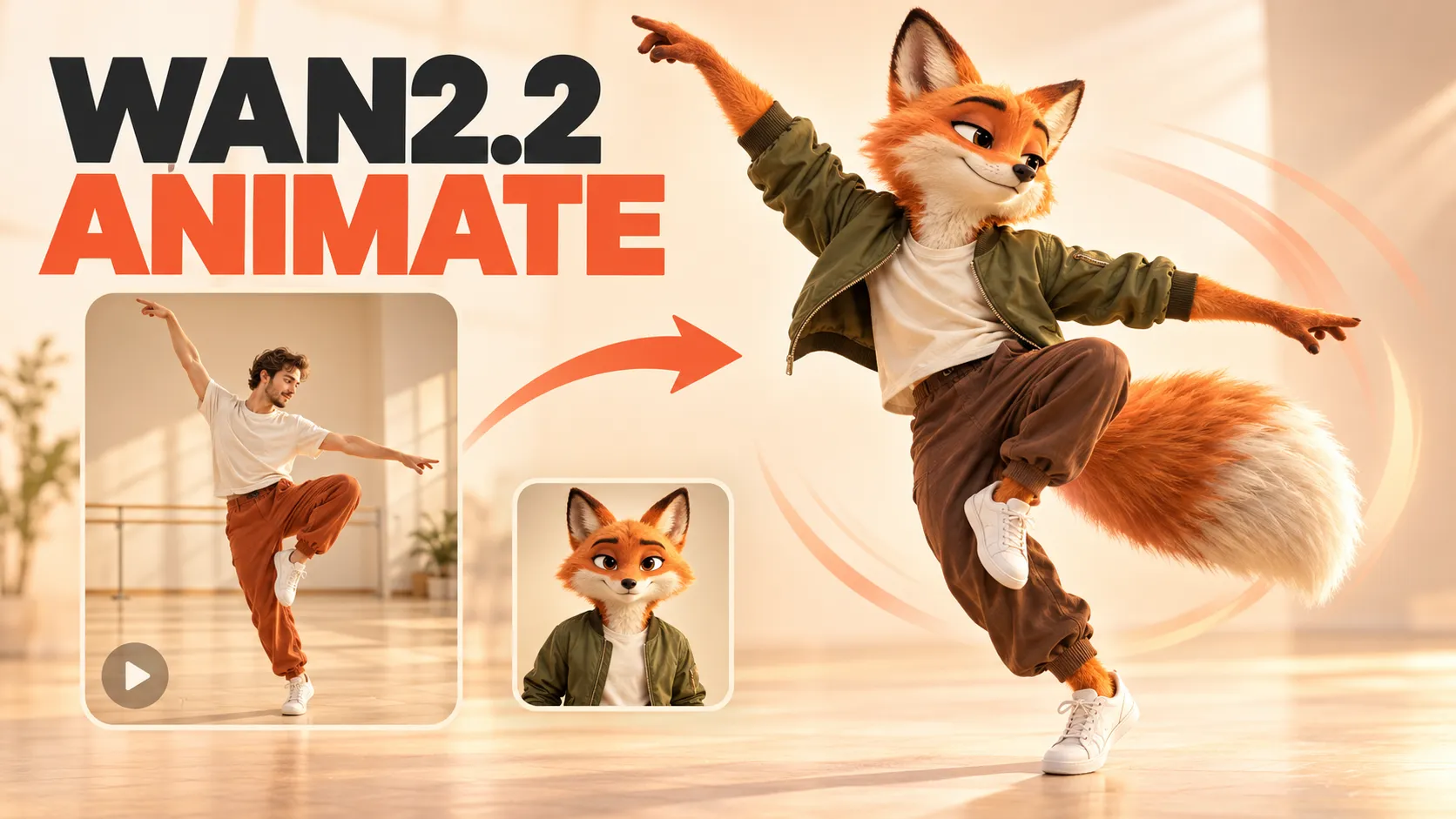
Wan2.2 Animate, also called Wan-Animate, is an AI character animation and replacement model from Alibaba's Tongyi Lab. It uses a character image to establish appearance and a reference video to supply the performance.
The reference video provides the movement to reproduce: a dance, a gesture, a facial expression, or a short acting performance. The target character can then perform those actions in a generated video. In replacement mode, the system places the new character into the driving video's scene. The official project page demonstrates both workflows.
For a creator, the practical attraction is repeatable performance direction. Instead of describing an exact sequence of movements in text, the creator supplies a recording of that sequence.
For example, a proposed mascot campaign could reuse one approved character image across several short performances. Each driving clip would supply a different action while the reference image would provide the intended visual identity. Consistency would still need to be checked across the finished clips.
Animation vs. Replacement: Which Mode Should You Choose?
The two workflows serve different editing goals.
| Question | Character animation | Character replacement |
|---|---|---|
| What is the main task? | Make an image character perform reference movements | Replace the performer in an existing video |
| What supplies appearance? | The character image | The character image |
| What supplies movement? | The driving video | The original video |
| What should the creator prioritize? | Character appearance and performance | Character appearance, performance, and scene integration |
| Alibaba Cloud model ID | wan2.2-animate-move | wan2.2-animate-mix |
These model IDs correspond to Alibaba Cloud's documented motion-transfer and character-replacement services.
Choose animation when the creative brief is about the character: a mascot dancing, an illustrated presenter gesturing, or a stylized character repeating a recorded performance.
Choose replacement when the existing shot is central to the brief: the location, composition, and surrounding action should remain recognizable while the main performer changes.
Replacement should be judged as a compositing task as well as an animation task. A believable face is insufficient if the character's feet slide, its silhouette overlaps furniture incorrectly, or its lighting conflicts with the scene. These are useful review criteria rather than guarantees about any particular output.
How Wan2.2 Animate Works
The Wan-Animate research paper describes a system with several complementary controls:
- Body motion: spatially aligned skeleton information guides the character's movement.
- Facial performance: implicit features extracted from face images drive expressions.
- Unified conditioning: the input formulation distinguishes reference information from areas that need generation.
- Environmental adaptation: an auxiliary Relighting LoRA helps replacement characters match the scene's lighting and color.
A useful technical distinction is that the paper describes Wan-Animate as building on Wan2.1, even though the released checkpoint is named Wan2.2-Animate. The broader Wan2.2 family's architectural descriptions should therefore not automatically be applied to this specialized model.
The practical implication is that quality depends on both motion extraction and synthesis. If the extracted controls misrepresent an arm or face, the generation stage receives an imperfect description of the intended performance. Inspecting intermediate controls is therefore a sensible troubleshooting step before spending more compute on another render.
Wan2.2 Animate vs. Wan-Animate-2
As of October 2026, searches for Wan Animate can lead to two distinct generations.
| Identifier | Original Wan2.2 Animate | Wan-Animate-2 |
|---|---|---|
| Main checkpoint | Wan2.2-Animate-14B | Wan2.2-Animate-2-14B |
| Public release | September 2025 | August 2026 |
| Motion input approach | Extracted motion and facial controls | Driving video consumed directly by the redesigned model |
| Integration assumption | Use the original preprocessing and inference workflow | Follow the successor's own implementation |
The Wan-Animate-2 repository records the release of inference scripts, Base weights, and Distillation weights on August 7, 2026.
The successor's research paper introduces direct video conditioning and text-driven viewpoint control. It also describes a separate Lite variant for streaming animation. Those Lite research results do not establish that every public checkpoint or hosted endpoint runs in real time.
Hardware expectations also differ. The successor's repository defaults target eight A800 GPUs for 720P generation and report testing 480P on two A800 GPUs. These are documented configurations, not universal minimum requirements.
When evaluating an upgrade, compare the actual workflow needed. A newer animation model should not be assumed to preserve the original replacement interface, parameters, or behavior.
How to Use Wan2.2 Animate: A Practical Workflow
1. Define one outcome.
Decide whether the goal is to animate a character or preserve an existing shot while replacing its performer. This determines the mode and the criteria for accepting the result.
2. Prepare a short test performance.
Start with roughly five seconds of one continuous action. This is a practical testing recommendation: a short clip is easier to inspect, revise, and compare than an entire sequence.
Choose material where the important action is visible. For a dance, inspect the legs and feet. For a speaking performance, prioritize facial visibility. Avoid beginning with a montage containing cuts between unrelated poses.
3. Match the reference image to the shot.
Prefer an image that shows the body regions needed for the action. A close portrait provides little visual information about shoes or clothing below the waist.
Compare the intended character's silhouette with the performer. Large differences in head size, limb length, or clothing volume deserve a dedicated test before producing longer clips.
4. Generate a baseline.
Record the mode, source assets, output settings, and seed if the interface exposes one. Change one major variable at a time so improvements can be attributed to a specific adjustment.
5. Review the whole clip.
Watch at normal speed, then inspect difficult moments frame by frame. Check the beginning, turns, hand crossings, periods of occlusion, and the final pose.
6. Finish the video.
Approve the visual performance before adding captions, music, transitions, or upscaling. Editing around a defective movement can consume more time than regenerating a short section.
Input Requirements and Hosted-Service Limits
Alibaba Cloud documents the following input requirements for its original Animate services:
| Input | Supported specification |
|---|---|
| Character image formats | JPG, JPEG, PNG, BMP, WEBP |
| Image dimensions | Each dimension from 200 to 4096 pixels |
| Image file size | Up to 5 MB |
| Driving video formats | MP4, AVI, MOV |
| Video dimensions | Each dimension from 200 to 2048 pixels |
| Video file size | Up to 200 MB |
| Video duration | 2–30 seconds |
| Image and video aspect ratios | Between 1:3 and 3:1 |
The media must be available through HTTP or HTTPS URLs that the service can retrieve. These are hosted API requirements, not universal limits of the downloadable weights. See the character replacement API reference for its exact request schema.

Validate files before submitting a job. A useful upload form should show the detected duration, dimensions, and file size, then explain any rejected requirement immediately.
Is Wan2.2 Animate Free?
The downloadable model, a public demonstration, and a hosted generation service have different cost structures.
- Downloadable weights: the official model card labels the checkpoint Apache 2.0. Running it still requires computing resources.
- Demonstrations: the official project page links to Hugging Face and ModelScope demos. A listed demo is not a guarantee of available GPU capacity, permanent access, or unrestricted usage.
- Hosted APIs: usage is metered, potentially with an introductory allowance.
The current Alibaba Cloud pricing page lists a 50-second free quota for each of the two Animate model entries in Singapore, subject to eligibility and the stated 90-day validity rules. Its corresponding Beijing entries do not list a free quota. Check the account console before relying on an allowance.
For a production application, budget around paid generation. Introductory credits are useful for evaluation but should not determine the long-term business model.
Wan2.2 Animate API Pricing
The following USD rates are published in Alibaba Cloud's model pricing documentation.
| Workflow | Mode | Singapore per second | Beijing per second | Singapore cost for 10 seconds |
|---|---|---|---|---|
| Motion transfer | Standard | $0.12 | $0.06 | $1.20 |
| Motion transfer | Pro | $0.18 | $0.09 | $1.80 |
| Character replacement | Standard | $0.18 | $0.09 | $1.80 |
| Character replacement | Pro | $0.26 | $0.13 | $2.60 |
The 10-second figures are calculations using the listed rates, before applicable taxes or other costs. Regional eligibility and service requirements should guide deployment; the lower-priced region is not automatically suitable for every application.
Calculate the cost of an accepted result.
For a hypothetical example, assume a 10-second standard motion-transfer render costs $1.20 and only half of successfully generated clips meet the creative brief. Under that assumption, expected generation spending is approximately $2.40 per accepted clip.
Estimated generation cost per accepted clip
= Cost per completed render / Creative acceptance rate

Example: $1.20 / 0.50 = $2.40
The 50% acceptance rate is illustrative, not a measured Wan-Animate benchmark. Storage, delivery, editing, and support would add further costs.
Integrating the Alibaba Cloud API
The motion-transfer API uses asynchronous jobs. A Singapore request follows this endpoint pattern; replace {WorkspaceId} with the actual workspace ID:
POST https://{WorkspaceId}.ap-southeast-1.maas.aliyuncs.com/api/v1/services/aigc/image2video/video-synthesisInclude the required headers:
Authorization: Bearer YOUR_API_KEY
Content-Type: application/json
X-DashScope-Async: enable
Example request body, with placeholder asset URLs:
{
  "model": "wan2.2-animate-move",
  "input": {
    "image_url": "https://example.com/character.png",
    "video_url": "https://example.com/performance.mp4",
    "watermark": true
  },
  "parameters": {
    "mode": "wan-std"
  }
}
Save output.task_id, then query it using the same region's credentials:
GET https://{WorkspaceId}.ap-southeast-1.maas.aliyuncs.com/api/v1/tasks/{task_id}Alibaba recommends polling at a reasonable interval, such as 15 seconds. Successful result URLs expire after 24 hours, so download completed videos to durable storage. Failed API calls are not billed, but a completed video rejected for creative reasons is a different case.
For an application, keep credentials on the server, persist job state, and prevent repeated button clicks from submitting duplicate work. If a submission times out, investigate its status before automatically creating another paid job.
Local Deployment, Diffusers, and ComfyUI
The original Wan2.2 repository provides preprocessing and inference instructions. After installing its dependencies, downloading the correct checkpoint, and preparing the example inputs, an animation command takes this form:
python generate.py --task animate-14B --ckpt_dir ./Wan2.2-Animate-14B/ --src_root_path ./examples/wan_animate/animate/process_results/ --refert_num 1The documented replacement command uses its replacement input directory and adds --replace_flag and --use_relighting_lora. These commands assume an already prepared environment; they are not a complete installation procedure.
Diffusers requires the correct control inputs.
The WanAnimatePipeline documentation specifies a pose video and face video. Replacement also needs background and mask videos. An ordinary performance recording should not be passed directly as pose_video.
Diffusers also exposes temporal-conditioning controls. Its documentation recommends one or five previous conditioning frames, with five requiring more memory. The default guidance scale is 1.0; increasing guidance concerns text and face conditioning and should not be treated as a universal repair for incorrect motion controls.
ComfyUI offers another integration route.
Kijai's ComfyUI-WanVideoWrapper lists WanAnimate support, FP8 model options, and GGUF loading. Its maintainer describes the wrapper as experimental and recommends native ComfyUI functionality when it already covers the required feature.
For a reproducible setup, retain the workflow file, model identifiers, custom-node revisions, and generation settings together.
How Much VRAM Does Wan2.2 Animate Need?
A useful hardware estimate must specify the checkpoint, precision, resolution, frame count, offloading configuration, and acceptable processing time.
A simple weight-only calculation illustrates the scale:
14 billion parameters × 2 bytes per parameter
≈ 28 GB in decimal units
This estimates BF16 storage for roughly 14 billion parameters. It is not a minimum VRAM requirement: it excludes activations, auxiliary models, temporary buffers, and runtime overhead, while offloading can keep some weights outside GPU memory.
Likewise, lower-precision weights do not guarantee a particular generation speed or maximum duration. Evaluate memory use and elapsed time on the exact intended workflow.
The practical purchasing rule is to request a reproducible configuration. A claim that a model runs on a particular GPU is incomplete without the output dimensions, clip length, precision, and rendering time.
Common Problems and How to Investigate Them
The original preprocessing guide documents several important constraints:
- Animation benefits from pose retargeting when body proportions differ.
- Replacement disables retargeting by default to account for interactions with the environment.
- The supplied replacement-mask extraction is designed for single-person videos.
- Larger masks provide more room to generate the character but can alter more background.
- Smaller masks preserve more background but can constrain the new silhouette.
The following diagnostic suggestions apply those constraints to common editing problems. They are troubleshooting hypotheses, not guaranteed diagnoses.
| Symptom | What to inspect | First experiment |
|---|---|---|
| Limbs appear stretched | Character proportions and motion controls | Use a closer silhouette match |
| The wrong person drives the result | Subject selection and tracking | Crop or isolate one performer |
| Parts of the original outfit remain | Replacement-mask coverage | Inspect the silhouette at difficult frames |
| The background changes near the subject | Mask coverage beyond the body | Test a tighter mask where feasible |
| A turn causes identity drift | Frames with weak facial visibility | Test a shorter segment around the turn |
| Hands merge with a prop | Visibility and contact geometry | Compare a take with clearer separation |
| Later frames become unstable | Timing of the first visible defect | Compare shorter sections of the same source |
Inspect the earliest incorrect stage.
If the pose control already contains a tracking error, start there. If the controls look plausible but the generated character drifts, investigate synthesis settings or the reference image. If animation is convincing but replacement looks pasted into the scene, inspect the mask and lighting workflow.
Upscaling should come after these checks. More pixels do not resolve an incorrect pose or a missing body part.
Wan2.2 Animate Alternatives Worth Comparing
The most useful comparison depends on the intended deliverable.
| Option | Documented capability | Suggested evaluation focus |
|---|---|---|
| Wan-Animate-2 | Direct video conditioning and viewpoint control | Whether the successor improves the intended performance workflow |
| Runway Act-Two | Performance transfer using a character image or video | Facial acting, gestures, and production workflow |
| Viggle Mix / Remix | Character-image and motion-video combination | Reusable motion and character workflows |
| Viggle-Animate | Dedicated character replacement | Scene integration and accepted-output cost |
Runway's Act-Two documentation distinguishes image and video character inputs: gesture control is available with images, while video inputs retain their existing body and camera movement. That difference matters when designing a comparison.
Viggle's developer page lists Mix / Remix at $0.01 per output second and a separate pricing workflow for Viggle-Animate based on a $0.01-per-driving-second reservation. Their capabilities and billing details should be evaluated individually. These prices do not establish quality equivalence with Wan2.2 Animate.
Use the same source assets wherever the tools' requirements allow. Otherwise, document why a comparison required different framing or inputs.
How to Evaluate Results Without Cherry-Picking
A polished demonstration proves that a successful result is possible. It does not reveal the probability of success on a particular production brief.
A useful evaluation set should contain both ordinary and difficult shots:
- A simple gesture with a clearly visible face.
- A full-body dance with visible feet.
- A turn that temporarily hides the face.
- A hand crossing the torso or face.
- A replacement shot involving furniture or a prop.
For each output, record:
- Identity: Does the character retain recognizable facial and costume details?
- Motion: Are key actions reproduced at the expected moments?
- Temporal stability: Do defects appear between otherwise convincing frames?
- Contact: Do hands, feet, and objects interact plausibly?
- Scene integration: Are silhouette edges, lighting, and background continuity acceptable?
- Operational cost: How much time and spending were required to obtain an approved clip?
Define acceptance before reviewing results. For a mascot dance, uninterrupted silhouette consistency might matter most. For a presenter, facial expression and mouth movement could dominate the decision.
Report all completed attempts, including rejected ones. A comparison based only on the best render can hide the production cost of obtaining it.
Licensing and Commercial Deployment
The repository includes an Apache 2.0 license, which provides broad permissions subject to its conditions. Redistribution requires attention to license copies, relevant notices, and identification of modified files.
Review the complete workflow separately. Additional checkpoints, optional preprocessing components, and hosted services can carry their own terms. The main model's license should not be treated as a license for every dependency or uploaded asset.
For a commercial product, use authorized character images and performances, explain where uploads are processed, and establish deletion and retention behavior. Keep these choices visible in the product rather than assuming users understand the underlying provider arrangement.
Frequently Asked Questions
Is Wan2.2 Animate a face-swap tool?
Its replacement workflow addresses the character and performance, including the body and surrounding scene integration. Assess it against a whole-character editing brief rather than only facial resemblance.
Can it produce editable 3D animation?
The documented Wan-Animate workflow produces video. It should not be presented as an automatic exporter of a rigged character, animation curves, or a game-ready skeleton.
Does it generate speech or guarantee lip sync?
Facial-expression transfer does not establish a complete speech-generation or audio-synchronization workflow. Check how the chosen implementation handles the original soundtrack, frame timing, and any additional audio processing before promising a finished talking-character video.
Can better prompting fix bad tracking?
Treat tracking and prompting as separate controls. Inspect the extracted pose and face inputs first; changing descriptive text should not substitute for correcting defective control material.
Should beginners run it locally?
A hosted test is a practical way to evaluate the desired result before configuring a GPU environment. Local deployment becomes more attractive when customization, infrastructure control, or repeatable volume justifies maintaining the workflow.
Conclusion
Wan2.2 Animate is useful when a recorded performance provides the clearest direction for a character video. Its animation and replacement workflows cover different creative needs, and successful production depends on choosing the right mode, preparing suitable inputs, and reviewing the complete result.
Start with one authorized character image and a short, clearly visible performance. Generate a baseline, inspect the difficult frames, and measure the cost of an accepted clip. Then compare the same brief with Wan-Animate-2 or another performance-transfer tool before committing to a larger workflow.
Continue Reading
More articles connected to the same themes, protocols, and tools.


Referenced Tools
Browse entries that are adjacent to the topics covered in this article.