On This Page8 sections
Key Takeaways
- RemoveVocals.ai is now much more than a basic vocal remover. It combines vocal removal, stem splitting, mastering, noise reduction, pitch shifting, BPM and key detection, cutting, joining, conversion, recording, EQ, bass enhancement, audio effects, and lyrics transcription in a browser-based toolkit.
- Its most interesting technical feature is hybrid processing. Vocal and stem separation can run on remote GPU infrastructure, while many simpler editing tools process audio directly in the browser.
- The free tier is useful but not completely unlimited. Standard processing is available for free, while additional usage, HD exports, batch processing, storage, and advanced stem modes are tied to account limits, export packs, or paid plans.
- Higher plans turn the service into a lightweight music-production workflow. Features such as project storage, MIDI export, 6-stem separation, lead-vocal isolation, and the browser-based Studio make it more than a single-purpose utility.
- Privacy depends on the feature being used. Some tools operate locally, while vocal separation and certain AI features can send processed audio to external infrastructure.
- Separation quality should be evaluated with real-world tracks rather than marketing claims alone. Dense harmonies, reverb, live recordings, and heavily compressed music remain difficult for any source-separation system.
What Is RemoveVocals.ai?
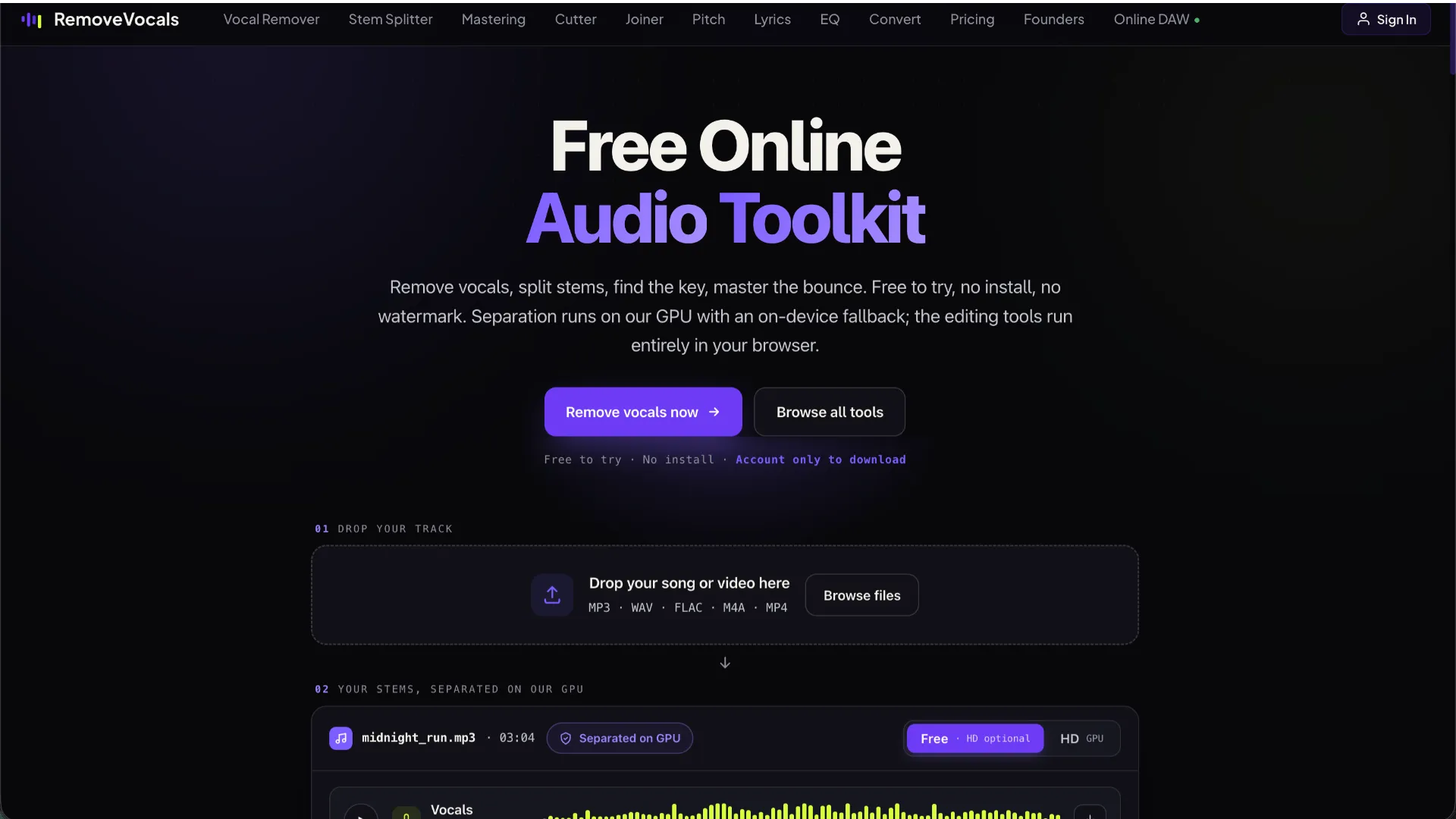
RemoveVocals.ai is a browser-based audio processing platform designed around AI-powered source separation and lightweight audio editing. Its original value proposition is straightforward: upload a song, separate the vocals from the instrumental, preview the outputs, and download the result.
The platform has since expanded into a broader collection of music and audio tools. Instead of requiring users to move between separate websites for vocal removal, trimming, conversion, noise reduction, BPM detection, and mastering, RemoveVocals.ai attempts to place these workflows inside one browser-based environment.
Its current toolset includes Vocal Remover, Stem Splitter, AI Mastering, Audio Cutter, Audio Joiner, Pitch Changer, Noise Reducer, Equalizer, Bass Booster, Audio Effects, Audio Converter, BPM Finder, Key Finder, Voice Recorder, and Lyrics Finder.
This broader positioning is important. Basic two-stem vocal removal has become increasingly commoditized. The more defensible value proposition is now the complete workflow surrounding source separation.
How RemoveVocals.ai Vocal Removal Works
The standard Vocal Remover separates a mixed track into two primary outputs:
- Vocals
- Instrumental
For users who need more control, the Stem Splitter can divide the recording into multiple components such as:
- Vocals
- Drums
- Bass
- Other instruments
Higher-tier options can provide additional separation for sources such as guitar and piano, as well as lead-vocal isolation intended to distinguish a main vocal from harmonies and backing vocals.
The workflow is deliberately simple. Users upload an audio file, wait for the separation process, preview the generated stems, and download the outputs they need.
RemoveVocals.ai supports common audio formats including MP3, WAV, FLAC, OGG, and M4A. It can also work with audio extracted from common video containers such as MP4, MOV, and WebM.
This simplicity is one of the platform's main strengths. Source-separation software such as open-source command-line tools can provide greater control, but they normally require model downloads, Python environments, local GPU resources, or additional configuration.
Hybrid GPU and Browser Processing
One of the most technically interesting aspects of RemoveVocals.ai is that not every tool uses the same processing architecture.
AI source separation is computationally expensive. Vocal Remover and Stem Splitter can therefore use remote GPU infrastructure to perform neural source separation. This avoids requiring every user to own a powerful GPU and makes the service usable from ordinary laptops, tablets, and other relatively low-powered devices.
The platform can also provide an on-device fallback for some separation workflows. In that mode, the necessary model is downloaded and processing occurs locally in the browser.
Many traditional editing operations are considerably less computationally expensive and can run directly on the user's device. Tools such as cutting, joining, pitch changing, equalization, bass enhancement, format conversion, BPM detection, key detection, and recording are well suited to browser-side processing.
This hybrid architecture offers several advantages:
- GPU-intensive AI tasks can use specialized infrastructure.
- Simple operations avoid unnecessary uploads.
- Browser-side tools can feel more responsive.
- Server infrastructure costs can be concentrated on tasks that genuinely require it.
- Users can complete several editing steps without installing desktop software.
From a product-design perspective, this is a stronger architecture than sending every operation to a server.
What the STFT Technical Claims Mean
RemoveVocals.ai describes its separation pipeline using techniques related to the Short-Time Fourier Transform, or STFT.
STFT-based audio processing divides a recording into overlapping windows and analyzes the frequency spectrum inside each window. Neural separation models can then estimate which portions of the time-frequency representation belong to vocals, drums, bass, or other instruments.
A larger FFT window can improve frequency resolution, but FFT size by itself does not determine separation quality.
Real-world output depends on factors such as:
- Neural network architecture
- Training dataset quality
- Amount and diversity of training data
- Time and frequency resolution
- Phase reconstruction
- Window overlap
- Post-processing
- Model specialization
- Genre and recording conditions
This distinction matters because technical specifications can sound impressive without providing a reliable comparison between competing separation systems.
A more meaningful technical comparison would require standardized measurements on datasets such as MUSDB-HQ using metrics such as SDR or SI-SDR.
RemoveVocals.ai does not currently provide enough standardized public benchmark data to make a rigorous numerical comparison with open-source systems such as Demucs.
Separation Quality in Real-World Music
AI source separation works best when the target sources are acoustically and spectrally distinct.
Modern pop, hip-hop, electronic music, and many studio-produced tracks can produce impressive results because lead vocals are often prominently mixed and reasonably distinguishable from the instrumental arrangement.
More difficult material includes:
- Layered backing vocals and choirs because multiple voices overlap.
- Heavy reverb and delay because vocal energy becomes embedded throughout the mix.
- Distorted guitars because their harmonic content frequently overlaps with vocals.
- Live recordings because microphones capture room sound and instrument bleed.
- Older masters because limited recording separation and aggressive mastering can reduce source independence.
- Dense orchestral or jazz arrangements because many instruments occupy overlapping frequency ranges.
Users should therefore avoid judging a separator using only one easy track.
A better test is to process several difficult sections, especially choruses where instrumentation and backing vocals are dense. Listen specifically for:
- Vocal leakage into the instrumental
- Instrument leakage into the vocal stem
- Metallic or watery artifacts
- Missing cymbal transients
- Distorted consonants
- Phase-like high-frequency artifacts
- Damaged stereo imaging
These characteristics often reveal more about practical quality than a marketing statement describing a model as high resolution or studio quality.
RemoveVocals.ai Pricing in 2026
RemoveVocals.ai currently follows a freemium business model rather than functioning as a completely unlimited free service.
The Free tier provides access to standard processing and many browser tools. It is suitable for occasional users who want to test vocal separation or perform simple audio edits.
The Basic tier is positioned toward regular users who need features such as HD exports, batch workflows, MIDI export, project storage, synchronization, and an ad-free experience.
The Pro tier adds more advanced creative capabilities, including expanded stem separation, lead-vocal isolation, a browser-based Studio environment, additional project functionality, and sharing features.
The Studio tier primarily targets heavier users who need significantly more project storage and longer-term workflow capacity.
RemoveVocals.ai also offers one-off export packs in some regions. This is useful because not every customer who needs high-quality separation wants another monthly subscription.
That creates three distinct user paths:
- Free processing for occasional users
- Export packs for intermittent professional use
- Subscriptions for recurring workflows
This pricing structure is more flexible than requiring every advanced user to subscribe immediately.
Why Some Older Descriptions of RemoveVocals.ai Are Misleading
Search results and older third-party pages may describe RemoveVocals.ai using phrases such as completely free, no signup, or unlimited vocal removal.
That description no longer captures the complete product model.
The current platform combines free usage allowances with paid exports, subscriptions, account-based project features, and higher-quality processing options.
Users evaluating the service should therefore rely on its current pricing interface rather than older reviews or cached descriptions.
This is particularly important for SEO-driven software reviews. AI tools frequently change their limits and monetization models, so articles that repeat a launch-era pricing claim can become inaccurate very quickly.
Privacy and File Processing
Privacy is more complicated than saying that RemoveVocals.ai either processes everything locally or uploads everything to a server.
The answer depends on the tool.
Many conventional editing tools can process audio directly in the browser. This can reduce unnecessary file transfers and makes browser-based processing attractive for routine operations.
AI-powered vocal and stem separation can use remote GPU infrastructure. Audio therefore may leave the local device when users run these features.
Lyrics transcription is another workflow that can involve external AI infrastructure.
Users should distinguish between three different concepts:
- Temporary processing: audio is transmitted to infrastructure to complete a task.
- Local processing: the browser handles the operation without uploading the source.
- Project storage: the user intentionally saves source files or generated outputs to an account library.
These are not equivalent from a privacy perspective.
For normal karaoke, remixing, education, and casual creator workflows, this architecture is unlikely to be unusual. Users working with unreleased music, confidential client recordings, NDA-protected material, or commercially sensitive audio should review the current privacy policy and their contractual obligations before uploading files.
The Browser Studio Is Strategically Important
The addition of a browser-based Studio changes the positioning of RemoveVocals.ai.
A standalone vocal remover is fundamentally a utility. A user arrives with one problem, produces one output, downloads it, and leaves.
A browser studio creates a longer workflow:
Upload → Separate → Edit → Organize → Mix → Save → Export → Share
That workflow can increase retention because the user now has a reason to keep projects inside the platform.
It also creates stronger differentiation from hundreds of simple vocal-removal websites that compete primarily on the same keyword.
For RemoveVocals.ai, the real competitive opportunity is therefore not necessarily achieving slightly better two-stem separation than every alternative. It is making the entire post-separation workflow easier.
MIDI Export: Useful but Technically Difficult
MIDI export is another interesting addition to the platform.
Audio-to-MIDI conversion attempts to detect musical notes in recorded audio and translate them into MIDI events that can be edited inside music-production software.
This works best when the input is relatively clean and melodically simple.
A separated bass line or isolated melody is significantly easier to transcribe than a complete mastered song containing vocals, drums, chords, effects, and multiple instruments.
A practical workflow is therefore:
- Separate the original track.
- Choose the cleanest melodic stem.
- Convert that stem to MIDI.
- Import the MIDI into a DAW.
- Correct false notes, timing errors, note lengths, and octave mistakes manually.
Users should not expect complex polyphonic audio to become flawless MIDI automatically.
RemoveVocals.ai vs VocalRemover.org
VocalRemover.org represents the classic minimalist approach to this market.
Its core workflow focuses on quickly separating vocals and instrumental audio with very little complexity.
That simplicity can be an advantage for users who only need one task.
RemoveVocals.ai is moving in a different direction. Its value increasingly comes from combining separation with editing, mastering, conversion, MIDI tools, project storage, and a browser studio.
The practical distinction is therefore straightforward:
- Choose a minimalist tool when the goal is simply to create an instrumental or vocal stem.
- Choose a broader platform when separation is only the first step in a longer production workflow.
RemoveVocals.ai vs Demucs
Demucs represents a more technical alternative.
It is an open-source source-separation system associated with research and developer workflows. It can run locally and gives technically experienced users much more control over models, processing parameters, automation, and reproducibility.
The tradeoff is complexity.
Running a local separation model can require:
- Python
- Command-line usage
- Large model downloads
- FFmpeg or related dependencies
- Significant CPU processing time or a compatible GPU
- Storage for source files and generated stems
RemoveVocals.ai removes most of this setup burden.
The distinction is therefore less about whether one approach is universally better and more about the intended workflow.
Demucs is attractive for developers, researchers, automation, and fully local processing. RemoveVocals.ai is designed for users who prioritize accessibility and browser convenience.
RemoveVocals.ai vs Moises and LALAL.AI
Moises and LALAL.AI are among the most recognizable commercial competitors in AI audio separation.
The most useful comparison should focus on workflow requirements rather than marketing claims.
Consider these questions:
- How many stems are required?
- Does the service isolate the specific instruments needed?
- How clean are its outputs on the user's actual tracks?
- Is local browser processing important?
- Are mobile apps required?
- Are project storage and collaboration important?
- Is MIDI conversion useful?
- Is subscription pricing acceptable?
- Are occasional export credits more economical?
For source separation, there is no substitute for processing the same source file through competing tools and comparing the results directly.
Best Use Cases for RemoveVocals.ai
Karaoke Creation
The most obvious use case remains karaoke. Removing lead vocals from a song produces an instrumental backing track that can be used for singing practice or karaoke-style playback, subject to applicable copyright restrictions.
Remixing and Sampling
Multi-stem separation can help producers isolate vocals, drums, bass, guitar, piano, and residual instrumentation for remixing and experimentation.
Music Practice
Musicians can isolate instruments, detect BPM, identify musical keys, adjust pitch, and slow or modify tracks for practice.
Content Creation
Video creators can use vocal removal, noise reduction, cutting, joining, EQ, conversion, and mastering without opening a traditional DAW for every simple task.
Podcast and Voice Editing
Noise reduction, recording, trimming, equalization, and audio conversion can cover basic spoken-audio workflows.
Education
Teachers and students can isolate components of songs to study arrangement, rhythm, harmony, vocal performance, or instrumentation.
Where RemoveVocals.ai Is Less Suitable
RemoveVocals.ai is primarily designed as an interactive browser product.
It may therefore be less suitable for users who need:
- Large-scale automated processing
- A documented production API
- Fully offline workflows
- Reproducible model versions
- Advanced DAW mixing and routing
- Scientific source-separation benchmarking
- Enterprise-level collaboration controls
Developers processing thousands of tracks may prefer an API or self-hosted source-separation stack.
Professional producers will also still need a full DAW for detailed mixing, automation, plugin chains, mastering, and project delivery.
Common Pitfalls
Do not assume AI separation recreates original studio multitracks. The model is estimating hidden sources from a finished stereo mix.
Do not test only simple songs. Dense choruses and layered harmonies expose weaknesses much more effectively.
Do not assume every tool processes audio locally. AI separation can involve remote GPU infrastructure.
Do not assume separated audio becomes copyright-free. Rights in the original recording and composition still apply.
Do not rely on old pricing descriptions. Free limits and paid features can change frequently.
Do not expect perfect MIDI from complex mixes. Separation before transcription generally produces better results.
Why RemoveVocals.ai Is Interesting as a Product
RemoveVocals.ai illustrates a broader trend in AI utility websites.
A single AI feature can attract search traffic, but standalone utilities are increasingly easy to replicate. Sustainable products therefore tend to expand horizontally or vertically around the original user intent.
RemoveVocals.ai started with a high-intent problem: remove vocals from a song.
From there, adjacent needs naturally appear:
- Split additional instruments
- Change pitch
- Detect key
- Detect BPM
- Clean audio
- Convert formats
- Master the result
- Save projects
- Convert audio to MIDI
- Continue editing in a studio
This expansion is strategically coherent because every additional feature serves roughly the same creator audience.
Rather than building unrelated AI tools, the platform is creating a cluster of features around one repeated workflow.
That is arguably the most important lesson from RemoveVocals.ai as a product: the strongest opportunity may not be the vocal-removal model itself, but everything users need immediately before and after separation.
Conclusion
RemoveVocals.ai has evolved from a straightforward vocal-removal utility into a broader browser-based audio production toolkit.
Its strongest advantages are low setup friction, AI stem separation, browser-based editing, multiple complementary audio tools, flexible paid upgrades, project storage, MIDI features, and an expanding Studio workflow.
The main limitations are equally important. Free usage has restrictions, some AI processing can occur on remote infrastructure, separation quality varies substantially by source material, and the platform does not currently provide enough standardized benchmark data to prove that its separation engine consistently outperforms major alternatives.
For casual users, musicians, karaoke creators, and content producers, the service offers a convenient way to complete several common audio tasks without installing desktop software.
For users comparing AI vocal removers, the most reliable method remains simple: process the same difficult track through RemoveVocals.ai and competing tools, compare the resulting stems carefully, and choose based on actual output quality and workflow requirements rather than marketing claims alone.
Continue Reading
More articles connected to the same themes, protocols, and tools.

Referenced Tools
Browse entries that are adjacent to the topics covered in this article.