 AI Coding Agents
On This Page8 sections
Dify New Agent Explained: Linux Sandboxes, Skills, Workflows, and the New Agent Runtime
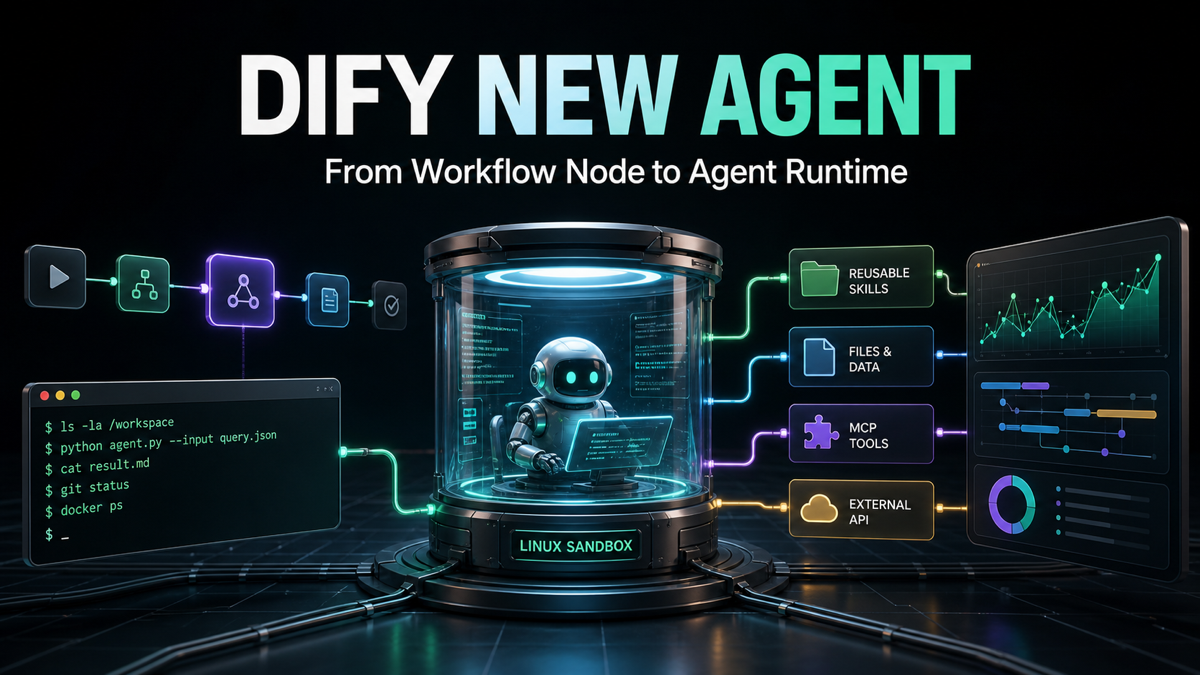
Dify's New Agent is not a cosmetic update to its previous agent node. Announced in beta on August 27, 2026, it is a redesign of how Dify builds, runs, reuses, and governs autonomous workers.
The old mental model was relatively simple: give a model a prompt, expose several tools, let it choose a function, and return an answer. The new model looks much closer to a modern coding agent:
Model-driven ReAct loop
        +
Isolated Linux sandbox
        +
Bash, Python, Node.js, and files
        +
Skills, plugins, APIs, and MCP tools
        +
Reusable workflow orchestration
        +
Versions, logs, tracing, and deployment
That architecture places Dify in an interesting position. It borrows the computer-using loop popularized by tools such as Claude Code, Codex CLI, and OpenCode, but applies it to business processes rather than only software repositories.
The result is best understood as a reusable AI worker inside an orchestration platform—not simply another chatbot with function calling.
The quick answer
The New Agent turns an agent into a first-class Dify resource with its own model, prompt, Skills, files, tools, environment variables, sandbox, versions, logs, and access points. You can build it once, publish it as a web app or API, and invite the same configured Agent into multiple workflows.
Its biggest architectural changes are:
- A Linux sandbox in which the Agent can inspect files, run commands, and install utilities.
- A model-driven loop that can plan, act, inspect results, and revise its approach.
- Build Mode, where you configure the Agent by chatting with an Agent Builder.
- Native support for the open Agent Skills format.
- A clearer separation between Agent intelligence and Workflow orchestration.
- Reusable Agent configurations instead of duplicated prompts and tools in every workflow.
- Agent-level logs, tracing, versions, and structured outputs.
It is also still a beta. Runtime storage is conversation-scoped, model compatibility depends on reliable native tool calling, and the Community Edition sandbox is not presented as a hardened isolation boundary for mutually untrusted public users.
What Dify actually launched
The first important change is organizational: an Agent is no longer merely a disposable node buried inside one workflow.
Each Agent can now own a complete configuration:
| Component | What it controls |
|---|---|
| Model | The reasoning and tool-calling model used at runtime |
| Prompt | Identity, operating principles, constraints, and goals |
| Skills | Reusable procedures, reference material, scripts, and assets |
| Files | Templates, documentation, examples, and working material |
| Tools | Plugins, APIs, MCP servers, and workflows exposed as tools |
| Environment variables | Runtime configuration and credentials made available to the sandbox |
| Sandbox | The isolated computer environment used for commands and files |
| Version | A publishable snapshot of the Agent's configuration |
| Logs and tracing | The execution history for debugging, review, and monitoring |
| Access points | Web app, service API, and workflow reuse |
This creates a single source of truth. A team can improve one research Agent, publish a new version, and use it from several workflows without copying its system prompt, tool list, files, and operating rules into each one.
Conceptually, Dify has moved from this:
Workflow A → Prompt A + Tools A
Workflow B → Prompt B + Tools B
Workflow C → Prompt C + Tools C
to this:
                 Reusable Agent
            Prompt + Skills + Tools
               /        |        \
      Workflow A   Workflow B   Workflow C
That is a much more maintainable model for production teams. It turns the Agent from a workflow implementation detail into a service-like resource with an independent lifecycle.
Why the new architecture resembles coding agents
Dify explicitly connects its redesign to the rise of CLI agents. The common foundation is a model-driven ReAct loop combined with Bash and an isolated sandbox.
In a conventional tool-calling agent, the model selects from a relatively fixed menu of functions. If no tool was prepared for a particular transformation, the agent could not do much beyond generating text.
The New Agent can instead work through a task in an open-ended sequence:
Receive a goal
  ↓
Inspect instructions and files
  ↓
Choose a command or tool
  ↓
Run Bash, Python, Node.js, or an external integration
  ↓
Read the result
  ↓
Detect an error or missing input
  ↓
Revise the plan
  ↓
Continue until the deliverable is verified
Consider a request to analyze a CSV, identify the 20 fastest-growing products, create charts, and return a PowerPoint presentation. A traditional visual workflow might require separate parser, analysis, charting, and presentation nodes prepared in advance. A sandboxed Agent can decide to inspect the CSV, write a Python analysis, generate charts, install or use a presentation library, build the deck, and verify the resulting file.
This does not eliminate purpose-built tools. It changes the boundary between what must be preconfigured and what the Agent can solve dynamically.
The Linux sandbox is the center of the redesign
The sandbox gives the Agent a computer rather than only a list of API calls. Dify's runtime includes common development tooling such as Python, Node.js, pnpm, and uv, allowing the Agent to combine shell commands, scripts, packages, and files during a run.
That capability matters outside coding. A business Agent can use the same execution model for tasks such as:
- Cleaning and joining spreadsheets.
- Extracting information from documents.
- Producing charts and reports.
- Converting file formats.
- Running a company-specific validation script.
- Calling a CLI that has no dedicated Dify plugin.
- Packaging several outputs into a downloadable artifact.
The sandbox also makes results inspectable. Instead of trusting a single generated answer, the Agent can run a script, open the output, compare it with the requested criteria, and retry when validation fails.
The practical shift is from “choose a function” to “operate inside a controlled workspace.”
Build Mode lets you create an Agent by conversation
Build Mode is one of the most distinctive parts of the release. Instead of manually editing every configuration field, you can describe the worker you want:
Create an SEO research Agent that analyzes search intent,
reviews competitors, scores opportunities, and produces
a structured Markdown report.
The builder can then create or modify Skills, files, environment variables, and other Agent resources. Those changes are staged in a Build Draft. You review the draft and choose whether to apply or discard it.
This is an important safety and usability decision. Conversational configuration is convenient, but an Agent should not silently rewrite its durable setup while handling an ordinary user request. Dify therefore distinguishes between two modes:
| Mode | Can change the durable Agent configuration? | Typical purpose |
|---|---|---|
| Build Mode | Yes, through a reviewable Build Draft | Creating and improving the Agent |
| Published run | No; runtime additions are temporary | Completing end-user tasks |
During Build Mode, the configuration panel becomes read-only because the builder is managing the proposed changes. Apply commits the draft to the Agent; Discard removes it.
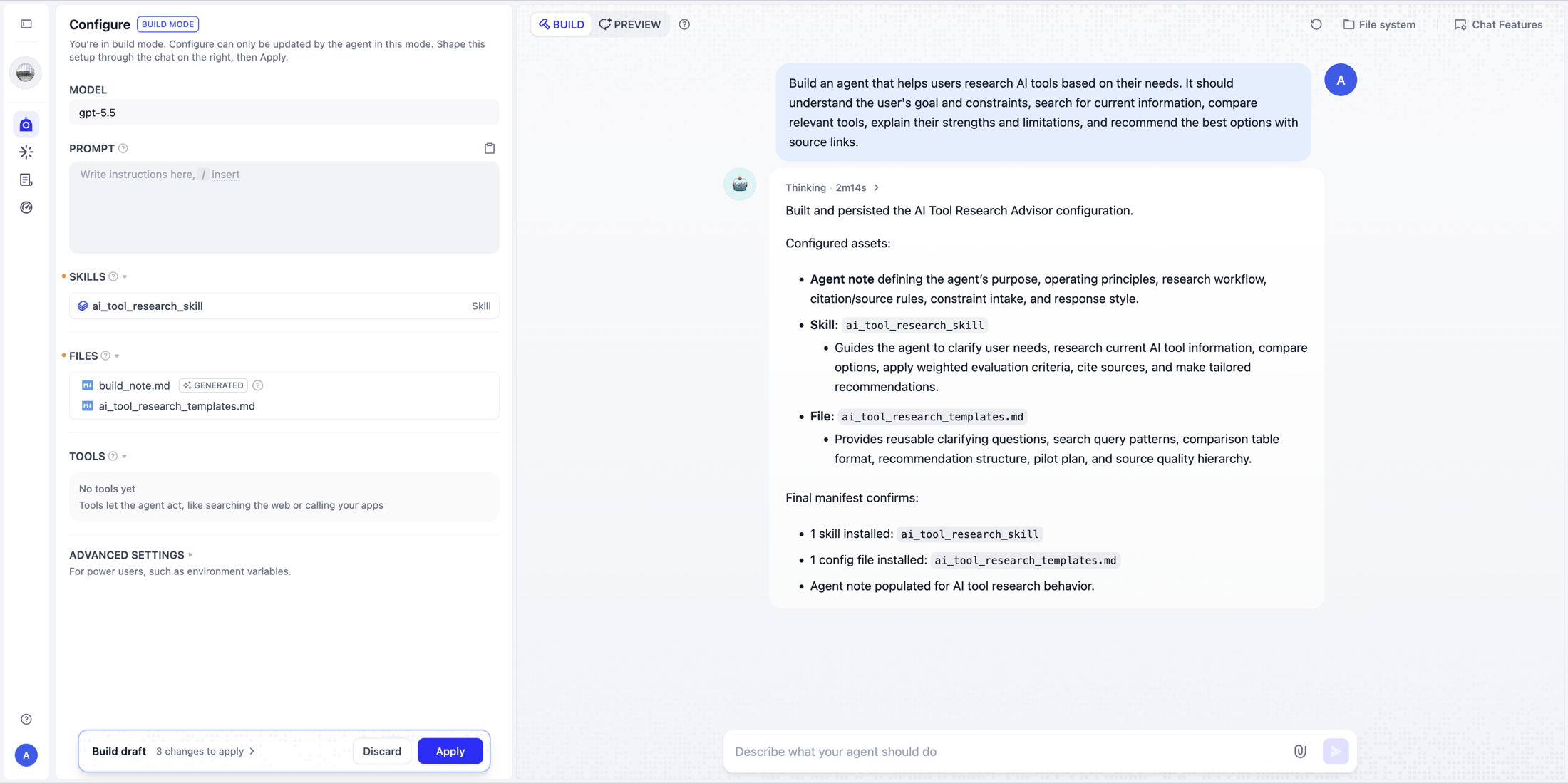
What is build_note.md?
Dify also introduces a special file named build_note.md. It acts as durable construction context for the builder.
Suppose you explain that every SEO report must include search intent, competing pages, traffic potential, an opportunity score, and a recommended content type. The builder can record those decisions in build_note.md. When you begin another build conversation, it reads the Agent prompt and this note before making changes.
The idea resembles repository-level configuration files used by coding agents, but its purpose is narrower: it preserves onboarding knowledge about how this particular Agent should be built and maintained.
It is crucial not to confuse build memory with runtime memory. build_note.md helps future Build Mode sessions understand the Agent's configuration. It does not give every published conversation a permanent shared hard drive.
Skills become a first-class capability
The New Agent adopts the open Agent Skills structure rather than inventing a Dify-only prompt package.
A typical Skill looks like this:
seo-research/
├── SKILL.md
├── scripts/
├── references/
└── assets/
SKILL.md describes the Skill's name, purpose, and instructions. The package can also contain scripts, templates, examples, reference documents, structured data, and other resources that the Agent loads when appropriate.
This enables progressive disclosure. An Agent does not need to keep every operating procedure in its main prompt. It can discover a relevant Skill, read its instructions, and load only the referenced resources required for the task.
Dify supports a workspace Skill Library with up to 500 Skills. A single Agent can add up to 20 Library Skills. Skills can be imported and exported as .zip or .skill packages, versioned, and shared across Agents. Agents using a Library Skill follow its latest published version.
The cross-platform format is the strategic part. A well-designed Skill is no longer necessarily locked inside one runtime. The same structure can potentially move between Dify and other Agent Skills-compatible products.
Skill, Tool, or CLI: which one should you use?
The release makes three layers of capability easier to distinguish:
| Capability | Best for | Example |
|---|---|---|
| Skill | A reusable method, policy, or standard operating procedure | How to perform keyword research and score an opportunity |
| Tool | A stable external action or data source | Search Console API, an Ahrefs integration, or an MCP server |
| CLI | A temporary computation or one-off utility | Running python analyze_keywords.py in the sandbox |
For an SEO Agent, a Skill might define how to classify intent and produce the report. Tools provide live data from search or analytics systems. The CLI performs a transformation or calculation that does not justify a permanent integration.
A useful rule is:
One-off execution → CLI
Reusable method   → Skill
Reliable business operation → Tool, API, or MCP
This layering is more flexible than trying to force every capability into a visual node or every procedure into one giant system prompt.
MCP becomes more useful inside an operating Agent
The New Agent can use Dify plugins, custom APIs, MCP servers, and workflows exposed as tools. MCP is therefore no longer just another isolated function connector. It becomes one source of capability inside a broader runtime that also understands files, Skills, and commands.
An Agent might combine:
Research Skill
    +
Browser or search MCP
    +
GitHub MCP
    +
Internal analytics API
    +
Python analysis in the sandbox
The model chooses the sequence, inspects intermediate results, and can switch approaches when one integration does not provide enough information.
This is why the New Agent is better described as an Agent runtime and MCP host inside a workflow platform, rather than as a collection of connectors.
Agent and Workflow now have different jobs
Dify's most useful design principle is that the Agent decides how to do the work, while the Workflow decides when the work runs and what surrounds it.
The Agent is suited to ambiguity:
- Researching an unfamiliar question.
- Deciding which files and tools are relevant.
- Writing and running code.
- Interpreting inconsistent data.
- Revising an approach after a failed attempt.
The Workflow is suited to determinism and control:
- Schedules and events.
- Inputs and outputs.
- Branches and retries.
- Human approval.
- Permissions and policy gates.
- Notifications and downstream systems.
A production flow might look like this:
Scheduled trigger
  ↓
Collect source data
  ↓
Agent: investigate and analyze
  ↓
Conditional policy check
  ↓
Human approval
  ↓
Agent: generate the final report
  ↓
Send through Slack or email
The Agent handles the parts that require judgment; the Workflow supplies the operating rails. This is more credible for business automation than assuming an unconstrained autonomous Agent should own scheduling, approvals, retries, and execution policy by itself.
Reuse an Agent—or create a temporary one
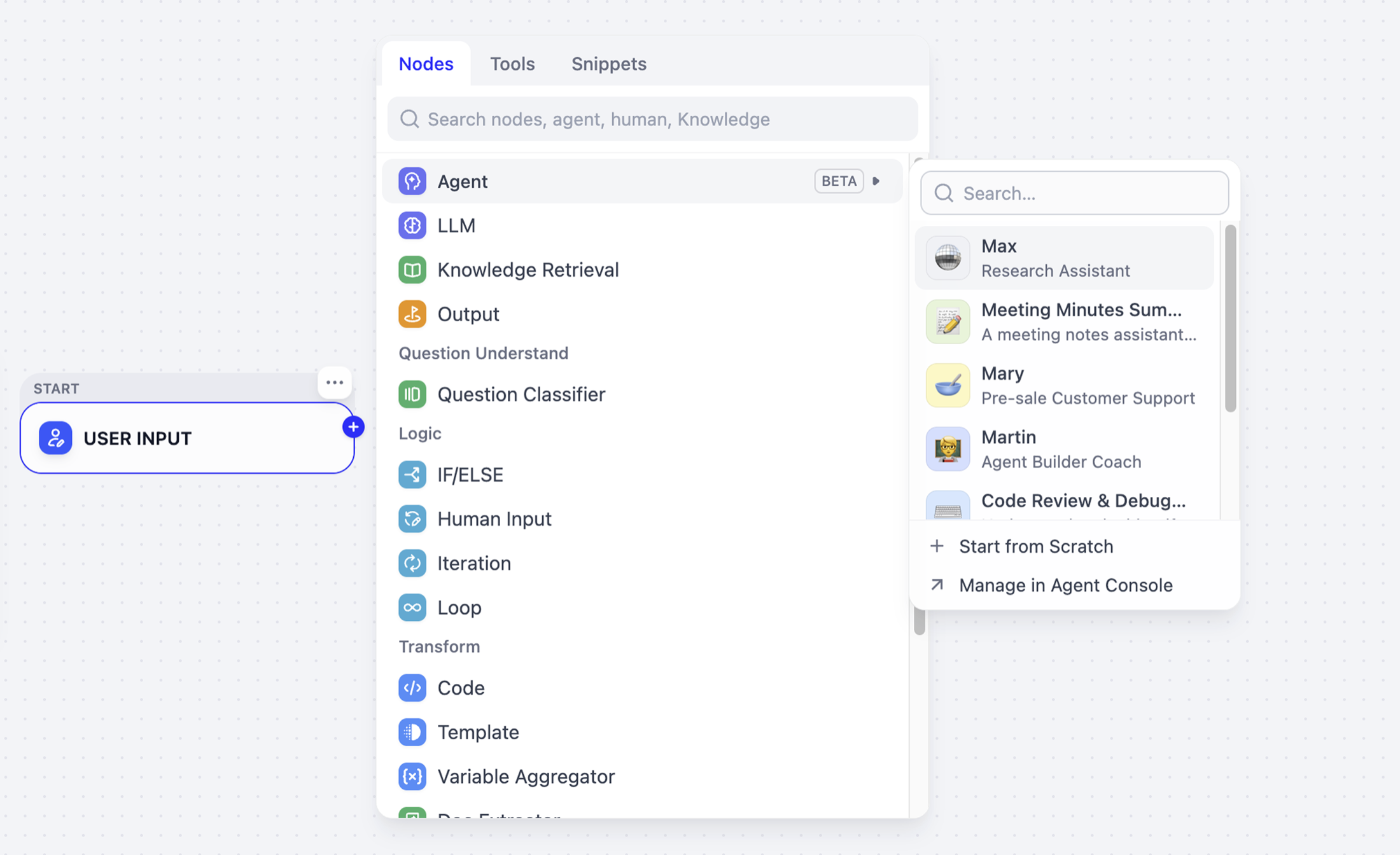
Inside a Workflow, Dify offers two paths:
| Option | How it works |
|---|---|
| Invite Agent | Select an existing published Agent and reuse its maintained configuration |
| Start from Scratch | Define an Agent for this Workflow without first creating a standalone resource |
A useful temporary Agent can later be promoted and saved to the Agents area. This lowers the cost of experimentation while retaining a path to standardization.
The distinction also prevents every small task from becoming a globally managed asset. Teams can keep truly reusable workers centralized and leave specialized, local behavior inside the Workflow that needs it.
Declarative outputs make Agent results usable by software
Long unstructured answers are difficult to pass through a production process. The New Agent node therefore supports declarative outputs.
Instead of asking an Agent to compare vendors and then sending its essay to another model for extraction, a Workflow can define fields such as:
vendor_name
price
recommendation
quote_file
Downstream nodes can reference those outputs directly. This reduces parsing ambiguity, unnecessary model calls, and failure modes caused by slight changes in prose.
There is also a practical input constraint: Dify's documentation says text variables passed into the Agent task are truncated at roughly 2,000 characters. Longer source material should be provided as a file so the Agent can inspect it in the sandbox.
That suggests a useful data-handling pattern:
Small values and instructions → Variables
Long documents               → Files
Stable operations            → Tools
Reusable procedures          → Skills
Files are powerful, but runtime persistence is not yet permanent
The Agent's file system has different lifecycles. Resources created and applied during Build Mode can become part of the durable Agent configuration. Files created during a normal published run are temporary to that execution context and do not silently alter the Agent itself.
Each conversation has its own memory, and a new conversation starts fresh. That means the New Agent does not yet behave like a long-lived employee with one permanent disk shared across all jobs.
For example, an Agent could generate daily files such as:
reports/2026-08-27.md
reports/2026-08-28.md
reports/2026-08-29.md
But a new conversation cannot automatically rely on those runtime files being present. A weekly summary that needs cross-run history should store artifacts in an external durable system such as an object store, database, knowledge base, or business API.
This is currently one of the most important limitations to understand. Dify has a strong execution workspace, but agent-scoped persistent runtime storage remains an open architectural need.
Logs, tracing, and versions turn the Agent into an operable resource
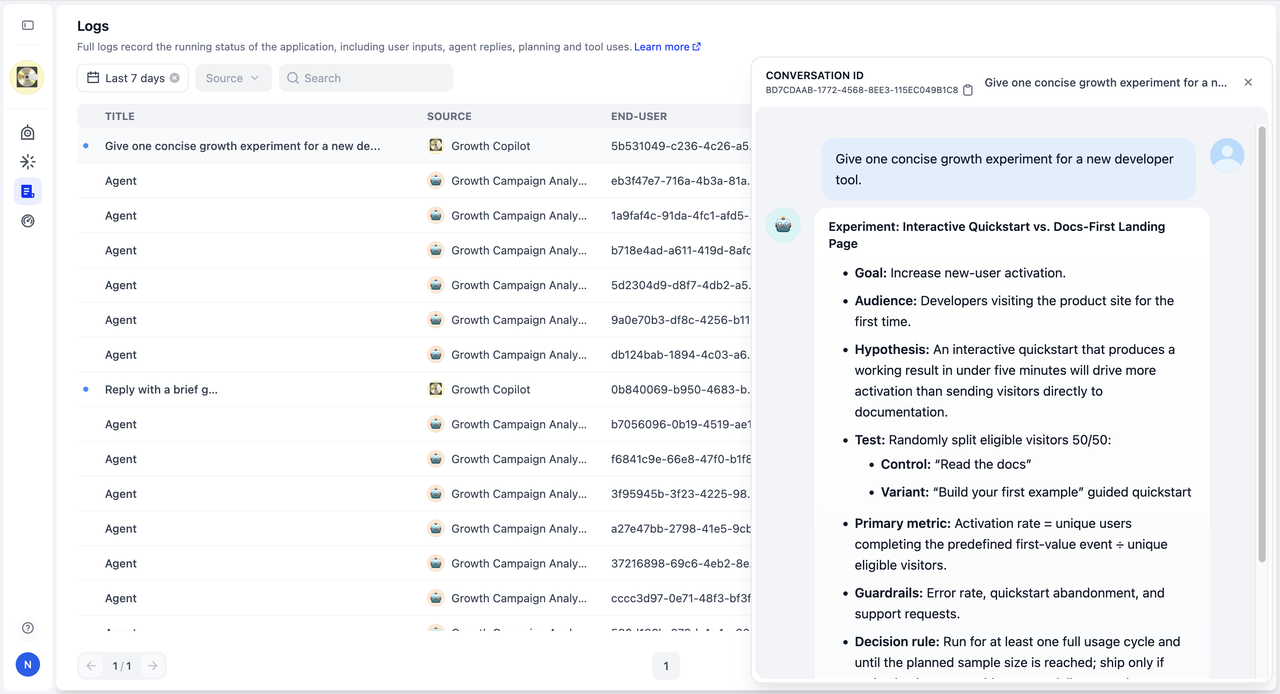
Autonomy without visibility is difficult to trust. Dify gives the New Agent its own run history and detailed execution views so teams can examine what happened rather than only reading the final message.
This can help answer operational questions such as:
- Which model and Agent version handled the run?
- Which tools or commands were invoked?
- Where did the Agent spend time?
- Which step failed?
- Did a new Skill version change behavior?
- What files were returned?
The Agent can also be published and versioned independently of a Workflow. That separation makes controlled updates, testing, and rollback strategies more realistic for teams that reuse the same worker across several processes.
Security: a sandbox is not automatically a multi-tenant boundary
The New Agent can execute shell commands and install software. That power deserves a much stricter security model than a conventional chatbot.
Dify's documentation explicitly warns that the Community Edition Agent Runtime should not be treated as a hardened security boundary between mutually untrusted users. In practical terms, a self-hosted team should not expose unrestricted shell-capable Agents to arbitrary public users and assume the default Docker deployment offers the same isolation as a purpose-built multi-tenant sandbox platform.
Dify describes stronger Enterprise isolation options, including per-session containers, process and filesystem isolation, network policies, and non-root execution. Even then, production design should apply least privilege:
- Expose only the secrets and network destinations an Agent needs.
- Keep sensitive credentials out of prompts and user-visible files.
- Restrict outbound network access where possible.
- Separate internal Agents from public-facing Agents.
- Require approval for consequential business actions.
- Retain logs and define an incident response path.
- Treat uploaded files and user instructions as untrusted input.
Self-hosters should also replace the default DIFY_AGENT_SERVER_SECRET_KEY and DIFY_AGENT_API_TOKEN before production use.
Model compatibility matters more than before
The New Agent asks more of its model than the legacy tool-calling flow. The model must repeatedly choose actions, produce valid tool calls, interpret command results, recover from failures, and decide when the task is complete.
Dify therefore recommends modern reasoning models with reliable native tool calling. An endpoint that is “OpenAI compatible” at the HTTP level is not necessarily behaviorally compatible with a long-running Agent loop.
This is especially relevant for local vLLM or custom OpenAI-compatible deployments. If the model or serving stack does not implement tool calling correctly, the Agent may answer directly instead of running the shell, produce malformed arguments, or fail the run. Test the exact model and server combination with representative tools before treating it as production-ready.
Current beta limits
The official documentation lists several defaults and package limits:
| Limit | Current documented value |
|---|---|
| Maximum Agent run duration | 1 hour |
| Maximum model requests per run | 500 |
| Maximum returned file size | 50 MB |
| Maximum embedded Skill size | 50 MB |
| Library Skills per Agent | 20 |
| Skills in a workspace library | 500 |
Many runtime limits can be adjusted in self-hosted deployments, but the defaults reveal the intended workload. A ceiling of 500 model calls is designed for tasks that may involve dozens or hundreds of steps, not only a single tool invocation.
At the same time, the beta label should be taken seriously. Public issue reports already cover areas such as Skill package handling, tool and plugin configuration, vLLM compatibility, and the absence of agent-scoped persistent storage.
Legacy Agent vs New Agent
| Capability | Legacy Agent | New Agent |
|---|---|---|
| Primary model | LLM plus tools | Reusable AI worker |
| Isolated sandbox | No | Yes |
| Bash and CLI execution | No | Yes |
| Install and run utilities | No | Yes |
| Working file system | Limited | Yes |
| Agent Skills | Limited | First-class |
| MCP and external tools | Tool-oriented | Integrated with Skills, files, and CLI |
| Standalone reusable Agent | Limited | First-class resource |
| Conversational Build Mode | No | Yes |
| Build memory | No | build_note.md |
| Workflow reuse | Configuration often repeated | One Agent can serve multiple workflows |
| Declarative outputs | Limited | Supported in the Agent node |
| Agent-level versions and logs | Limited | Core lifecycle features |
| Durable runtime disk across conversations | No | Not yet native |
Calling this “Agent 2.0” understates the change. It is closer to a reconstruction of Dify's Agent runtime and product model.
Dify New Agent vs Claude Code and Codex
The execution loop is becoming similar, but the product goals remain different.
| Dimension | Claude Code / Codex | Dify New Agent |
|---|---|---|
| Default environment | Terminal and source repository | Isolated general-purpose sandbox |
| Bash, Python, Node.js, and files | Yes | Yes |
| Skills | Yes | Yes |
| MCP and external tools | Yes | Yes |
| Primary audience | Software engineers | Teams building business Agents and apps |
| Visual workflow orchestration | Not the core interface | A core strength |
| Scheduling and event triggers | Usually external or product-specific | Workflow-native |
| Human approval and deterministic branches | Possible, but not the main visual model | Workflow-native |
| No-code configuration | Limited | Central to the product |
| Web app and service API publishing | Available in different forms | First-class access points |
| RAG and business integrations | Possible through tools | Native Dify ecosystem |
Dify is not trying to replace a repository-focused coding Agent. It is applying a similar computer-using architecture to research, reporting, operations, customer support, data processing, and other business work—then placing those Agents inside governed workflows.
A concise description would be:
Coding-agent-style runtime
+ visual workflow orchestration
+ MCP and plugins
+ Agent Skills
+ RAG and business integrations
+ deployment and observability
Where the New Agent is already compelling
The beta is particularly attractive for tasks that are complex enough to benefit from a sandbox but still have clear business boundaries:
- SEO and competitor research.
- Recurring analytical reports.
- Document processing and transformation.
- Internal knowledge work.
- Multi-source research with citations.
- Data cleaning, charts, and presentation generation.
- Content operations with human approval.
- Internal developer utilities and release support.
- Agent prototypes that combine Skills, MCP, and files.
These tasks tolerate some exploratory behavior, produce inspectable artifacts, and can be wrapped in deterministic Workflow steps.
Where caution is still warranted
The current beta is a weaker fit for:
- Irreversible financial transactions without approval.
- Safety-critical or regulated automated decisions.
- Public multi-tenant shell execution on a default Community Edition setup.
- Workloads that assume a permanent Agent-owned disk across conversations.
- Local models with incomplete or unreliable tool-calling support.
- Processes that cannot tolerate beta-level runtime or integration changes.
For high-impact operations, use the Agent to investigate and prepare a recommendation, then let a Workflow enforce approvals, validation, and restricted execution.
Why this matters for the Agent Skills ecosystem
The most important long-term signal may be Dify's adoption of an open Skills format.
Prompt marketplaces sold blocks of text. A mature Agent Skill can package instructions, executable scripts, reference material, templates, and assets into a versioned unit that works inside a runtime with real tools and files.
That creates room for a new software layer:
- Skill directories and registries.
- Compatibility testing across Agent runtimes.
- Skill validators and security scanners.
- Version management and dependency tracking.
- Domain-specific Skill packs.
- Benchmarking for Skills and sandbox environments.
- Setup guides that connect MCP servers to reusable Skills.
Examples could include an SEO audit Skill, a GA4 analysis Skill, a product research Skill, a PDF report Skill, or an advertising creative review Skill. The value is not merely the prompt. It is the repeatable procedure plus the resources and code needed to complete the job.
Dify's workspace library, imports, exports, versions, and reusable Agents provide early infrastructure for this kind of ecosystem.
Final verdict
Dify's New Agent is a significant shift from visual AI workflow builder to Agent operating platform.
The release combines a model-driven loop, Linux sandbox, Bash and file operations, Agent Skills, MCP and external tools, reusable Agent configuration, structured Workflow integration, and execution observability. More importantly, it preserves a sensible division of responsibility:
The Agent supplies intelligence and adaptation. The Workflow supplies orchestration and control.
That is a stronger production model than assuming an autonomous Agent should own every trigger, approval, retry, and side effect.
The beta still has real gaps. Runtime storage is not persistent across conversations by default, model compatibility must be tested carefully, and the Community Edition runtime should not be exposed as an unrestricted multi-tenant sandbox. But the direction is clear.
Dify is no longer treating an Agent as an LLM node that happens to call tools. It is building a reusable, observable worker with a computer—and giving organizations a workflow system to manage that worker.
Frequently asked questions
Is Dify New Agent generally available?
No. As of August 31, 2026, Dify labels the New Agent as beta.
Can I self-host the New Agent?
Yes. The Agent Runtime is integrated with the Community Edition Docker Compose setup and is enabled by default in the current documentation. Production deployments should replace the default Agent server secrets and review the sandbox security warning carefully.
Does the New Agent support MCP?
Yes. MCP servers can be added as tools alongside Dify plugins, custom APIs, and workflows exposed as tools.
Does it replace Dify Workflow?
No. The two layers are complementary. The Agent chooses how to solve an open-ended task; the Workflow manages triggers, ordering, branches, approvals, retries, and downstream actions.
Does a Dify Agent have permanent memory?
It has conversation memory, and Build Mode can preserve construction context in build_note.md. A new runtime conversation starts fresh, however, and files generated in prior published runs are not a native permanent Agent disk. Use external storage for durable cross-run state.
Can one Agent be used by several workflows?
Yes. A published Agent can be invited into multiple workflows, allowing its prompt, Skills, files, tools, and other configuration to be maintained in one place.
What models work best?
Models with strong reasoning and dependable native tool calling. OpenAI-compatible endpoints should be tested for actual tool-call behavior rather than assumed compatible based only on their API shape.
Is the Community Edition sandbox safe for arbitrary public users?
Dify explicitly says it should not be treated as a hardened boundary between mutually untrusted users. A public shell-capable service needs stronger isolation, network restrictions, secret management, and abuse controls.
Official sources
- Introducing New Agent — Dify
- Why We Redesigned Dify's Agent — Dify
- New Agent overview — Dify Docs
- Build an Agent — Dify Docs
- Skills — Dify Docs
- Agent Workflow node — Dify Docs
- Agent Skills specification
- Agent-scoped persistent storage request — Dify GitHub
- vLLM compatibility report — Dify GitHub
Last verified: August 31, 2026.
Continue Reading
More articles connected to the same themes, protocols, and tools.
OpenCode 2.0 Is Here: Code Mode, Background Agents, and a Major Rebuild of the Open-Source Coding Agent
Herdr GUI Is Now Roamgate: The Complete Guide to Managing AI Coding Agents from Your Browser

15 Best Gemini 4 Argon Prompts: Viral 3D Games, Blender Demos & AI Agent Examples
Referenced Tools
Browse entries that are adjacent to the topics covered in this article.