Theia IDE
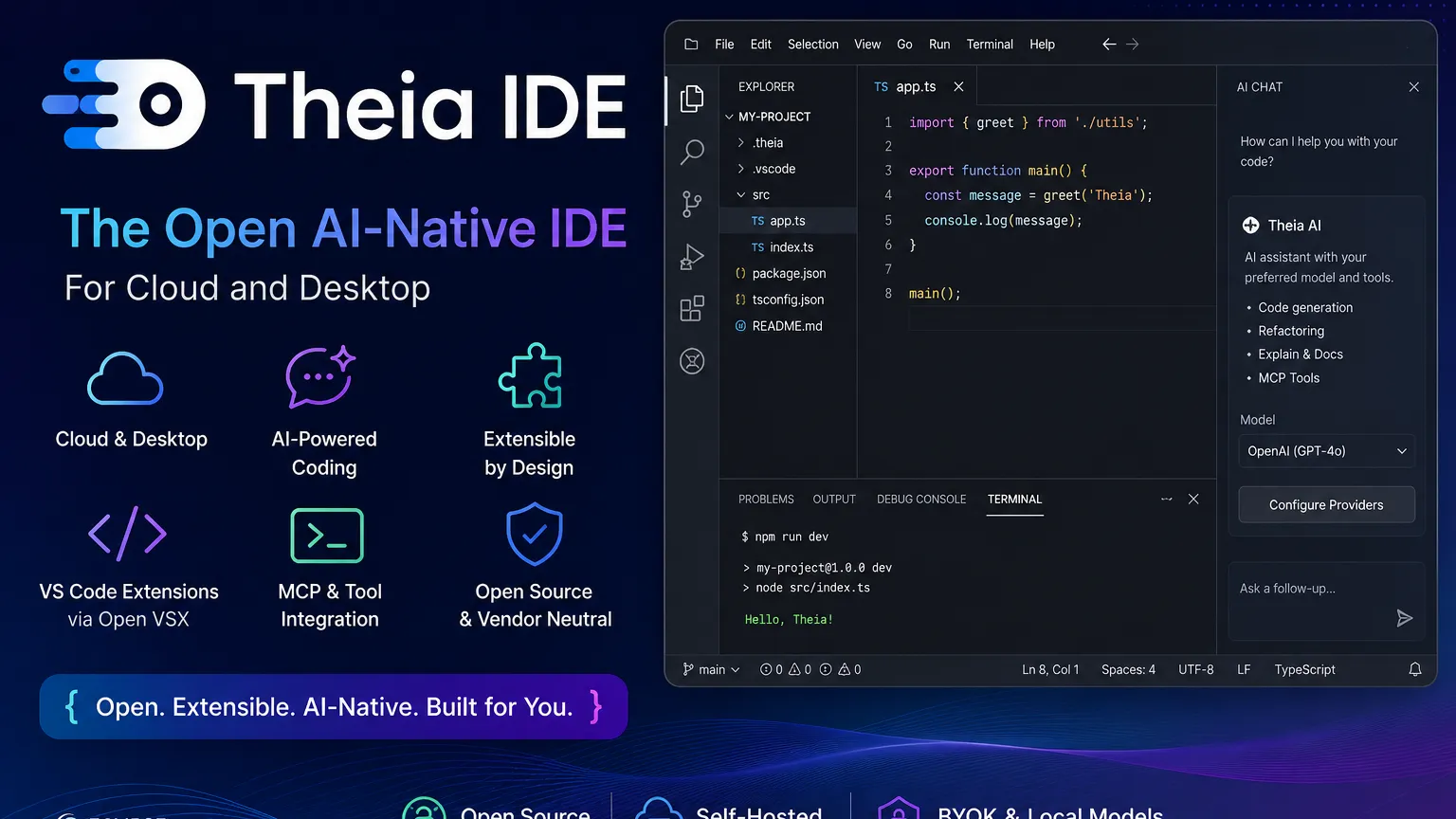
Theia IDE is an open-source, AI-native development environment for desktop and cloud. It is best understood as both a usable IDE and a reference product built on the highly customizable Eclipse Theia Platform.
Choose Theia IDE when openness, self-hosting, model choice, and custom tool building matter more than having the most frictionless AI editor experience on day one.
Pricing Plans
Open Source
Free open-source IDE and platform; external AI model usage may incur separate provider costs.
Professional Support
Commercial support and custom tool development are available through ecosystem service providers.
Core Features
1Cloud & Desktop IDE
- Runs as a desktop application on Windows, macOS, and Linux
- Can be used as a browser-based IDE
- Experimental Docker image for self-hosted online IDE deployments
2AI Development Workflow
- Theia AI-based chat and coding assistants
- Supports cloud, self-hosted, and local model providers
- MCP server configuration for tool-augmented AI workflows
3Extensibility
- Built on the modular Eclipse Theia Platform
- Supports VS Code extensions through Open VSX where compatible
- Language Server Protocol support for multi-language development
4Customization
- Suitable as a template for custom IDE products
- Transparent prompt and agent configuration
- Vendor-neutral open-source governance
Pros
- Open-source and vendor-neutral alternative to VS Code-style IDEs.
- Works across desktop and browser-based development environments.
- Strong fit for teams building custom or domain-specific developer tools.
- AI setup supports BYOK, self-hosted, and local model workflows.
- Extensible through Theia extensions and many VS Code-compatible extensions.
Cons
- AI features require setup and are disabled by default in current documentation.
- Not as mainstream or plug-and-play as VS Code, Cursor, or GitHub Copilot.
- Some VS Code extension APIs may be stubbed or only partially supported.
- Packaged browser/Docker deployment is more experimental than the desktop app.
- Best value appears when customization matters, not just when using a default editor.
Why Choose Theia IDE?
Theia IDE is not just another code editor trying to imitate VS Code. Its strongest angle is control: control over the IDE shell, control over extensions, control over AI providers, and control over how the product is deployed. That makes it especially relevant for organizations that want an AI-assisted development environment but cannot fully rely on a closed SaaS editor.
For an individual developer, Theia IDE can feel like an open, VS Code-style environment with AI features layered in. For a platform team, it is more interesting as a foundation for building a custom development product. This dual identity is important: Theia IDE is usable on its own, but the deeper value comes from the Theia Platform behind it.
Core Workflow
A typical Theia workflow starts with a familiar IDE layout: editor, terminal, file explorer, source control, extensions, and language tooling. Developers can then add VS Code-compatible extensions through Open VSX where supported, giving the editor access to common language, linting, Git, Docker, and notebook workflows.
The AI layer is more configurable than many closed AI editors. Instead of forcing one model provider, Theia AI is designed around model choice and agent customization. Teams can connect hosted providers, OpenAI-compatible endpoints, local Ollama models, or self-hosted infrastructure depending on their security and cost requirements. MCP support also makes Theia more interesting for tool-augmented workflows where the assistant needs access to project-specific systems.
Use Cases
Theia IDE is strongest when a team needs a development environment that can be shaped around a specific product, stack, or organization. Examples include embedded development tools, cloud workspaces, internal engineering platforms, education environments, domain-specific modeling tools, and controlled AI coding environments.
It is also a good candidate for teams that like the VS Code ecosystem but want a more open foundation. Theia is independently developed and not a VS Code fork, which matters for organizations concerned about vendor dependency or long-term product control.
Comparison to Alternatives
Compared with Cursor or Windsurf, Theia is less about a polished out-of-the-box AI coding experience and more about openness, deployment choice, and extensibility. Cursor is likely easier for a single developer who wants powerful AI coding immediately. Theia is more compelling when an organization wants to decide which models are used, how prompts are configured, how tools are integrated, and where the IDE runs.
Compared with Gitpod or CodeSandbox, Theia is less of a managed cloud development service and more of an IDE foundation. You can use it in browser-based environments, but its strategic value is the ability to build and package a controlled developer experience.
Compared with VS Code, Theia offers a familiar architecture and extension compatibility goals, but compatibility is not identical. Some extensions may work well through Open VSX, while others can hit API gaps or behavior differences. Teams migrating from VS Code should test their must-have extensions before committing.
Best Configuration
The most practical setup is to treat Theia IDE as a controlled base environment rather than a random personal editor. Start with the desktop app for evaluation, confirm core language support, then test the required extensions through Open VSX. After that, configure AI providers through environment variables rather than storing API keys directly in preferences.
For AI-heavy usage, a good configuration is BYOK for hosted models plus a local or self-hosted fallback for sensitive repositories. If the team already runs OpenAI-compatible inference endpoints, Theia can fit into that architecture without forcing a single vendor. For tool integration, MCP should be tested early because it can turn Theia from a chat-in-editor experience into a more workflow-aware engineering assistant.
Migration Notes
Migrating from VS Code should be handled as a compatibility project, not a simple editor swap. The editor experience may feel familiar, but extension behavior, marketplace availability, settings, and AI workflows can differ. The safest path is to build a shortlist of required extensions, verify Open VSX availability, test language servers, and run a pilot with real repositories.
Teams building custom IDEs should evaluate Theia at the platform level: packaging, branding, extension policy, AI provider policy, update strategy, and support model. Theia can be very powerful in this role, but it rewards teams that are willing to own their development environment rather than simply rent one.
Best For
- Teams that want an open-source IDE they can customize deeply.
- Organizations building domain-specific engineering tools.
- Developers who want a VS Code-like workflow without using a VS Code fork.
- AI coding workflows that need BYOK, local models, self-hosted endpoints, or MCP integration.
- Cloud IDE builders who need a framework rather than only a finished editor.
Not Ideal For
- Developers who want the most polished AI editor experience with no configuration.
- Teams that depend on full compatibility with every VS Code extension.
- Users who prefer a hosted SaaS IDE with managed billing, accounts, and collaboration out of the box.
- Non-technical users looking for prompt-to-app generation.
Privacy Notes
Theia IDE is open source and emphasizes user control, but AI privacy depends on the configured model provider and deployment. The documentation notes that API keys entered through preferences may be stored in clear text, and recommends environment variables for more secure key handling.
Alternatives
Sources
Update History
- Jun 25, 2026: Created directory profile using official Theia IDE, Theia AI, documentation, and GitHub sources.
Related Tools
More listings in a similar part of the directory.




Theia IDE Articles
Guides, comparisons, and launch notes connected to this listing.