

Gitpod
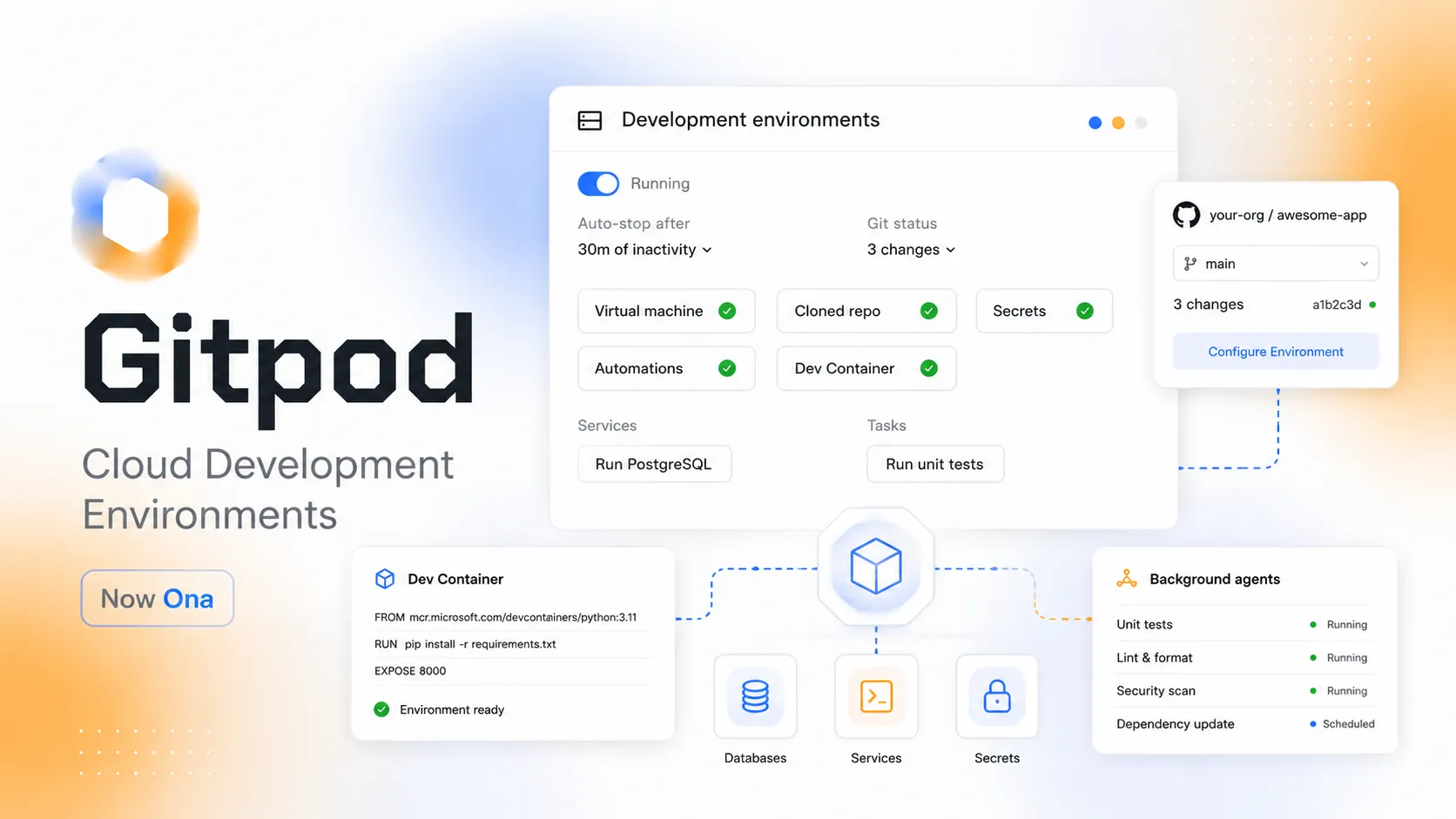
Gitpod, now Ona, is a cloud development environment and agent runtime platform for reproducible developer workspaces, background software agents, and governed cloud execution.
Information checked: Jun 14, 2026 ·View sources
Tool details
- Type
- Cloud IDEs
- Platforms
- Web browser, VS Code, Cursor, JetBrains IDEs, CLI, SSH, GitHub, GitLab, Bitbucket, Linear, Jira, Notion, AWS, GCP, Ona Cloud, Self-hosted VPC deployments
- Free plan
- Yes
- Open source
- No
- Bring your own key
- Yes
- Local models
- No
Overview
Best for
- Reproducible cloud development environments
- Developer onboarding
- Remote development
- Secure BYOD development
- Standardized enterprise workspaces
- Pull request review environments
- Background AI agent execution
- Scheduled engineering automations
- Code migration workflows
- CVE remediation workflows
- Regulated teams needing VPC deployment
- Teams that want governed development environments for humans and agents
Strengths
- Strong reproducible environment model for teams and contributors.
- Supports both human developers and AI agents in isolated cloud workspaces.
- Broad editor access across browser, VS Code, Cursor, JetBrains, CLI, and SSH.
- Prebuilds and warm pools can reduce environment startup time.
- Enterprise VPC deployment is attractive for regulated or security-sensitive organizations.
- Good governance story for controlling agent execution, secrets, MCP usage, and auditability.
Limitations & trade-offs
- Users who only need a lightweight browser sandbox
- Developers looking primarily for AI autocomplete
- Non-technical users looking for prompt-to-app builders
- Small teams that want simple fixed pricing with no usage credits
- Organizations that do not want to manage cloud development environment policy
- Teams that require fully local development only
- Users who want a product still marketed only under the old Gitpod name
- The Gitpod-to-Ona rebrand can confuse users searching for legacy Gitpod plans and docs.
- Core pricing uses OCUs, which may require monitoring for environment runtime and agent usage.
- Enterprise-grade deployment and governance require setup effort.
- Less GitHub-native than GitHub Codespaces for teams fully centered on GitHub.
- Not primarily a prompt-to-app builder or AI autocomplete product.
- Gitpod Classic workflows may need migration to newer Ona environment and automation concepts.
Get started
Pricing & usage limits
Official pricingFree tier available
Free starting access is available for trying Ona/Gitpod-style environments; sustained team usage is centered on paid Core and Enterprise plans.
For individuals and teams. Includes pooled Ona Compute Units, up to 100 team members, unlimited parallel environments, prebuilds, project sharing, RBAC, MCP support, and cloud-hosted compute.
Additional Ona Compute Units for environment runtime and agent conversations. Monthly credits expire monthly; add-on credits are valid for one year.
Self-hosted, Ona-managed VPC deployment with custom credits, SSO/OIDC, audit trails, org-wide secrets, network control, SDK/API access, warm pools, SLAs, and dedicated support.
Older Gitpod Classic workspace and credit-based documentation remains available under Ona docs for existing or historical Gitpod workflows.
Pricing checked: Jun 14, 2026 · Subscription, usage limits, and model costs may be billed separately.
Features & details
Cloud development environments
- Create isolated environments from projects, branches, repositories, or automation triggers.
- Define reproducible setups with Dev Containers, startup tasks, services, dotfiles, and prebuilds.
- Use environments for development, review, debugging, experiments, and agent work.
Editor access
- Connect through browser-based editors, VS Code, Cursor, JetBrains IDEs, CLI, or SSH.
- Use the same environment from multiple editor surfaces when needed.
- Run services, terminals, databases, watchers, and dev servers inside the environment.
Agents and automation
- Run background agents in cloud environments for coding, review, migration, and maintenance tasks.
- Trigger automations from pull requests, schedules, webhooks, issue trackers, or manual tasks.
- Use AGENTS.md, skills, MCP, and project configuration to guide agent behavior.
Infrastructure options
- Core runs on Ona Cloud multi-tenant infrastructure.
- Enterprise can run in an Ona-managed VPC on AWS or GCP.
- Environment classes support different CPU, RAM, disk, spot, and GPU options where available.
Governance and security
- RBAC, org-wide commands, command deny lists, and MCP controls help govern developer and agent actions.
- Enterprise adds SSO/OIDC, SCIM, audit logs, org-wide secrets, custom policies, and network control.
- Environments are isolated, ephemeral, and can be auto-deleted or governed by custom retention policies.
Gitpod Classic compatibility
- Classic Gitpod workflows used .gitpod.yml, browser workspaces, prebuilds, and Git provider integrations.
- Existing Gitpod users should treat Ona as the current product direction.
- The old Gitpod name remains important for search, migration, and legacy workspace documentation.
Why Choose Gitpod?
Gitpod is best understood today through its current name: Ona. What started as a one-click cloud IDE for GitHub has evolved into a platform for reproducible cloud development environments and background software agents. That matters because the modern problem is no longer only “how do I open a repo in the browser?” It is also “how do humans and agents run code safely, repeatedly, and under organizational control?”
The product is most compelling for teams that want environment standardization without forcing every developer to maintain a fragile local setup. It is also increasingly relevant for AI engineering workflows, where agents need isolated, preconfigured places to inspect code, run commands, test changes, and produce work that humans can review.
Core Workflow
A practical workflow begins with a project connected to source control. The team defines the environment through Dev Containers, startup tasks, services, dotfiles, secrets, and optional prebuilds. A developer or agent then creates an environment from a branch or project, connects through a preferred editor, and starts work with the same tooling every time.
The newer Ona workflow expands this into automation. Environments can be created for pull request events, schedules, webhooks, or issue-tracker tasks. Agents can work inside those same environments, using the same tools a developer would use. This makes the environment layer more important than the editor itself.
Use Cases
Gitpod/Ona fits developer onboarding, remote development, secure BYOD access, standardized enterprise environments, pull request review, temporary debugging, code migrations, CVE remediation, agent execution, and scheduled engineering automation. It is especially useful where local development is expensive to support or where security teams want ephemeral, governed workspaces.
It is less ideal if the goal is only a simple front-end playground or a prompt-to-app tool. For lightweight examples, StackBlitz or CodeSandbox may be faster. For non-technical app generation, Replit AI, Bolt.new, Lovable, or v0 may be more appropriate. Gitpod/Ona is more about professional development environments and controlled execution.
Comparison to Alternatives
Compared with GitHub Codespaces, Gitpod/Ona is less tied to GitHub and more oriented toward cross-tool environments, background agents, and governance. Codespaces is the simpler default for teams fully standardized on GitHub and VS Code. Gitpod/Ona becomes more interesting when the organization needs VPC deployment, multi-source workflows, custom policies, or agent execution infrastructure.
Compared with CodeSandbox, Gitpod/Ona is more enterprise-CDE and automation focused. CodeSandbox is stronger as a sandbox and SDK platform for isolated code execution and browser collaboration. Compared with StackBlitz, Gitpod/Ona uses cloud environments instead of browser-native WebContainers, making it better for heavier or more controlled workloads.
Compared with Devin or Google Antigravity, Gitpod/Ona is more infrastructure-oriented. It provides environments and governance for humans and agents; Devin and Antigravity are more visibly agent-product experiences. In practice, these categories can overlap as engineering teams combine agents with governed environments.
Best Configuration
The best setup starts with a clean Dev Container configuration. Define the image, system packages, editor extensions, startup tasks, ports, services, and environment variables as code. Then add prebuilds for expensive setup steps and choose environment classes based on real project needs rather than defaulting to the largest available machine.
For teams using agents, add AGENTS.md, skills, command deny lists, MCP controls, and clear rules for what agents may do. Enterprise teams should configure SSO/OIDC, org-wide secrets, audit trails, RBAC, and VPC networking before allowing sensitive repositories or production-adjacent systems into the platform.
Migration Notes
Existing Gitpod Classic users should treat the migration as both a naming change and an architecture shift. The old Gitpod mental model was workspace-first: open a repo, run a preconfigured environment, code in the browser. The Ona model is broader: environments, agents, automations, governance, and VPC runners all become part of the platform.
During migration, inventory .gitpod.yml files, devcontainer.json files, prebuilds, secrets, Git provider connections, workspace classes, IDE preferences, and automation scripts. Then decide which pieces become Ona projects, environment classes, automations, or agent configuration. For documentation and SEO, keep Gitpod aliases because many developers will continue searching for the old name long after the product has moved to Ona.
Model support & data privacy
Supported models
- Codex
- Claude Code
- AWS Bedrock
- Google Vertex
- private APIs
Privacy & data handling
Ona/Gitpod environments may contain repository code, generated files, secrets, terminal output, development services, agent conversations, MCP tool results, and connected source-control or issue-tracker context. The current Ona pricing page states that customer data and code are not used to train models. Teams should still configure secrets, RBAC, audit logs, command deny lists, MCP controls, retention policies, VPC networking, and environment auto-delete settings carefully before running sensitive workloads or autonomous agents.
Guides, reviews & fixes
View allNo published guides yet. Start with the official documentation above.
Product updates
No verified product updates listed yet. Follow this tool to see new relevant content in Saved.
See the content timelineAlternatives
Sources & verification
Verification dates record when this directory checked the information. Product release dates appear separately above.
Directory revision history
Created entry with current Gitpod-to-Ona rebrand context, Ona Core and Enterprise pricing, OCUs, cloud development environments, Dev Containers, editor access, background agents, automations, VPC deployment, governance, and Gitpod Classic migration notes.