
 LovableLovable is a full-stack AI web app builder positioned between no-code prototyping tools and developer-first AI coding environments.
Tempo
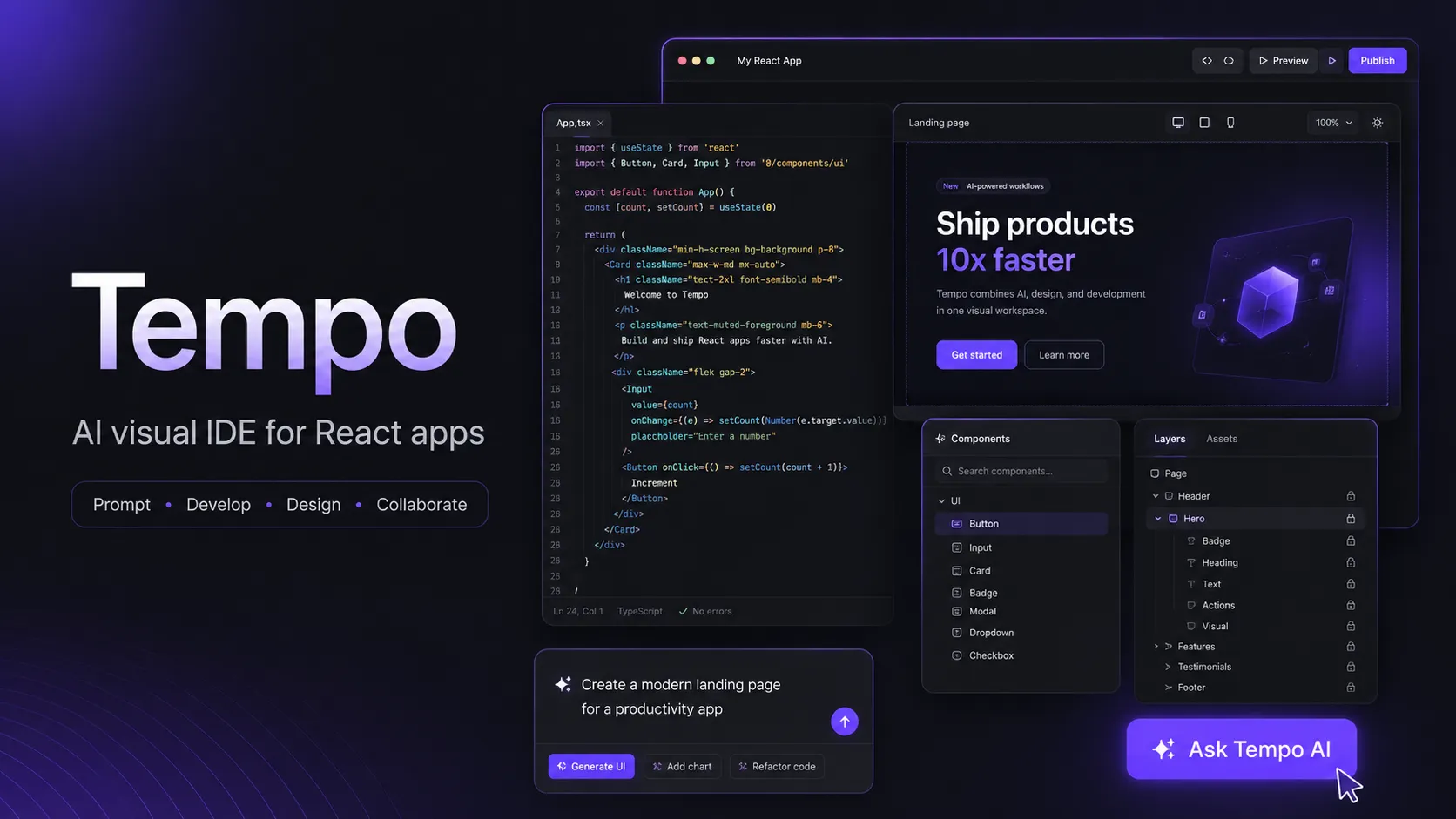
Tempo is a code-first AI app builder and visual React IDE positioned between prompt-to-app tools, Figma-to-code workflows, and developer-centric AI editors.
Information checked: Jun 16, 2026 ·View sources
Tool details
- Type
- App builders
- Platforms
- Browser, GitHub, Vercel, VS Code, Cursor, Windsurf, Expo, React Native
- Free plan
- Yes
- Open source
- No
- Bring your own key
- No
- Local models
- No
Overview
Best for
- React app prototypes that need to become real codebases
- Designers and PMs collaborating with engineers on UI implementation
- Teams using Figma, Tailwind, ShadCN UI, GitHub, and Vercel
- SaaS MVPs using Supabase, Stripe, Polar, Convex, or Clerk
- Builders who want AI generation plus manual code control
Strengths
- Strong fit for React teams that want visual editing without abandoning code ownership.
- Figma, GitHub, Vercel, and local IDE workflows make it more developer-friendly than many no-code builders.
- Useful middle ground between AI app builders and traditional code editors.
- SaaS templates reduce setup time for common auth, database, and payments stacks.
- Local Mode helps teams continue work in Cursor, Windsurf, or VS Code.
Limitations & trade-offs
- Backend-heavy products that are not centered on React UI development
- Teams that require open-source self-hosting
- Developers who want full control over local AI models or BYOK routing
- Non-React stacks such as Laravel, Rails, Django, Svelte, or Flutter-first apps
- Enterprises that need mature admin, compliance, and procurement controls before adoption
- Primarily optimized around React, Vite, Tailwind, and related web stacks.
- Free plan is limited by prompt count and daily usage cap.
- GitHub organization support and marketplace distribution details may still require verification before team rollout.
- Figma import may require AI/manual cleanup for interactive elements.
- Not a local-first or open-source coding environment.
Get started
Pricing & usage limits
Official pricingFree tier · From $30 · per month
Free$0 / month
30 prompts, max 5 prompts per day.
Pro$30 / month
150 prompts with premium features and Fix with AI support.
Scale$50 / month
250 prompts for frequent professional use.
Ultimate$100 / month
555 prompts for daily power users.
Power$350 / month
2,150 prompts for higher-volume professional usage.
Unlimited$500 / month
Unlimited prompts for very high-volume workflows.
Bonus Prompts$50
One-time top-up of 250 prompts with no expiration for paid plans.
Pricing checked: Jun 16, 2026 · Subscription, usage limits, and model costs may be billed separately.
Features & details
Visual React Building
- Prompt-to-React app generation
- Visual canvas for UI refinement
- Design-panel control for layout and styling
- Code editor access for manual changes
Codebase Workflow
- React + TypeScript + Vite starter repository
- Tailwind CSS and ShadCN UI setup
- GitHub repository and branch integration
- Feature canvas workflow for isolated changes
AI Development Modes
- Normal mode for quick generation and debugging
- Reasoning mode for larger codebase planning
- Search mode for external references
- Fix with AI for error recovery
Integrations
- Figma-to-Tempo plugin workflow
- Vercel deployment flow
- Local Mode sync with VS Code, Cursor, and Windsurf
- SaaS templates for Supabase, Stripe, Polar, Convex, and Clerk
Mobile and Preview
- Expo project generation
- React Native preview through Expo Go
- Temporary preview links
- Collaborator sharing from the canvas
Why Choose Tempo?
Tempo is most interesting when the goal is not just to generate a throwaway prototype, but to keep moving a React product toward a maintainable codebase. Its core idea is that designers, PMs, founders, and engineers can work on the same app visually while still producing a real React project that can be pushed to GitHub and edited in a normal IDE.
That makes Tempo different from pure no-code builders. The visual canvas is useful for layout iteration, but the product is still anchored around code, branches, components, and deployment. For teams already using React, Tailwind, ShadCN UI, Vite, Supabase, Stripe, or Vercel, Tempo fits naturally into the existing frontend ecosystem instead of forcing a proprietary runtime.
Core Workflow
A typical Tempo project starts with a product description or PRD-style prompt. Tempo generates requirements, wireframes, and an initial application, then opens the project in an editor where the team can continue through chat, visual editing, code editing, or GitHub sync.
The stronger workflow is iterative rather than one-shot. Use Tempo to generate a first version, inspect the generated UI and architecture, then refine feature-by-feature. For larger changes, treat the feature canvas as a branch-like workspace: complete one feature, push it, review it, and merge before creating the next major feature. This avoids the common AI-builder problem where rapid changes produce an app that looks impressive but becomes hard to reason about.
Local Mode is especially important for developer teams. It lets Tempo sit beside Cursor, Windsurf, or VS Code instead of replacing them. A designer or PM can adjust UI in Tempo, while an engineer handles edge cases, business logic, tests, and refactors locally.
Use Cases
Tempo works well for landing pages, SaaS dashboards, authenticated app shells, internal tools, UI-heavy MVPs, and product prototypes that need to graduate into production code. It is also useful for design-engineering collaboration, where the main bottleneck is translating Figma or product feedback into polished React UI.
The SaaS template direction makes it practical for common startup patterns: auth, database, payments, and app shell. The mobile support through Expo is promising for React Native prototypes, but teams should still expect normal mobile release work outside Tempo when moving to the App Store or Google Play.
Comparison to Alternatives
Compared with Lovable and Bolt.new, Tempo is more explicitly centered on visual React editing and team collaboration around code. Lovable and Bolt.new may feel broader for quick app generation, while Tempo is more appealing when the team cares about UI control, Git-backed workflow, and design-to-code iteration.
Compared with v0, Tempo is closer to a full app workspace. v0 is often strongest for generating interface components and Next.js-oriented UI patterns, while Tempo is better framed as a visual IDE for building and refining an application over multiple iterations.
Compared with Cursor or Windsurf, Tempo is not trying to be a full local editor. It is better understood as a browser-based visual layer that can connect to those editors when deeper engineering work is needed.
Best Configuration
For most React web projects, start with the Vite path unless the project clearly needs Next.js features such as server-side rendering, framework-level routing conventions, or deeper full-stack behavior. Keep the stack conventional: TypeScript, Tailwind, ShadCN UI, GitHub, and Vercel. The more standard the codebase, the easier it is to move between Tempo and a normal IDE.
For SaaS MVPs, pick the backend and payment providers before generating too much UI. Supabase plus Stripe is a straightforward choice for many early-stage products, while Clerk plus Convex may fit teams that prefer managed auth and reactive data patterns. Document these decisions in the project prompt so the AI does not drift between architectures.
Migration Notes
Teams migrating from a no-code builder should treat Tempo as a bridge into code ownership, not as a magic export button. Rebuild the highest-value flows first, push to GitHub early, and make sure an engineer reviews data models, auth rules, environment variables, and deployment assumptions.
Teams migrating from a traditional React repo should begin with a small feature or isolated UI surface rather than importing the whole product workflow at once. Tempo is strongest when the visual layer and AI agent have a clear target. Complex legacy codebases, custom build systems, and non-standard component conventions may need cleanup before Tempo becomes efficient.
Model support & data privacy
Supported models
- Claude 3.7
- Gemini
Privacy & data handling
Tempo is a cloud-based SaaS/PaaS service. Its privacy policy says it collects account, business contact, usage, device, analytics, and other provided information, and may share information with service providers and other parties described in the policy. Teams should review the privacy policy and terms before uploading proprietary code or customer data.
Guides, reviews & fixes
No published guides yet. Start with the official documentation above.
Product updates
No verified product updates listed yet. Follow this tool to see new relevant content in Saved.
See the content timelineAlternatives
LovableLovable is a full-stack AI web app builder positioned between no-code prototyping tools and developer-first AI coding environments. Bolt.newBolt.new is a browser-native AI web app builder for quickly turning product ideas into editable, runnable, and deployable JavaScript applications.
 v0v0 is Vercel’s AI app builder for creating, refining, integrating, and deploying modern web applications from prompts, design inputs, and repository context.
 Replit AIReplit AI is an all-in-one browser-based AI software creation platform that combines prompt-to-app generation, a cloud IDE, built-in infrastructure, publishing, and collaboration.
 Base44Base44 is a no-code AI app builder for creating functional web apps, websites, internal tools, and portals from natural-language prompts with built-in backend services.
 CreateCreate is an AI-first prompt-to-app builder, now also branded as Anything, for turning natural-language ideas into working web apps, mobile apps, internal tools, dashboards, and AI-powered workflows.
 CursorCursor is an AI coding and cloud development platform that combines a VS Code-based editor, local and cloud agents, CLI workflows, Origin code hosting, repository collaboration, and prompt-to-app creation.
 WindsurfWindsurf, now transitioning under the Devin Desktop brand, is an AI-native IDE for developers who want coding agents, codebase context, and editor workflows in one desktop environment.
Sources & verification
Verification dates record when this directory checked the information. Product release dates appear separately above.
Official websiteOfficial pricing documentationGetting Started documentationChat Modes documentationGitHub integration documentationLocal Mode documentationFigma plugin documentationSaaS templates documentationMobile apps with Expo documentationPrivacy PolicyY Combinator company profile
Directory revision history
Created initial directory entry using official Tempo documentation, pricing page, privacy policy, and YC profile.