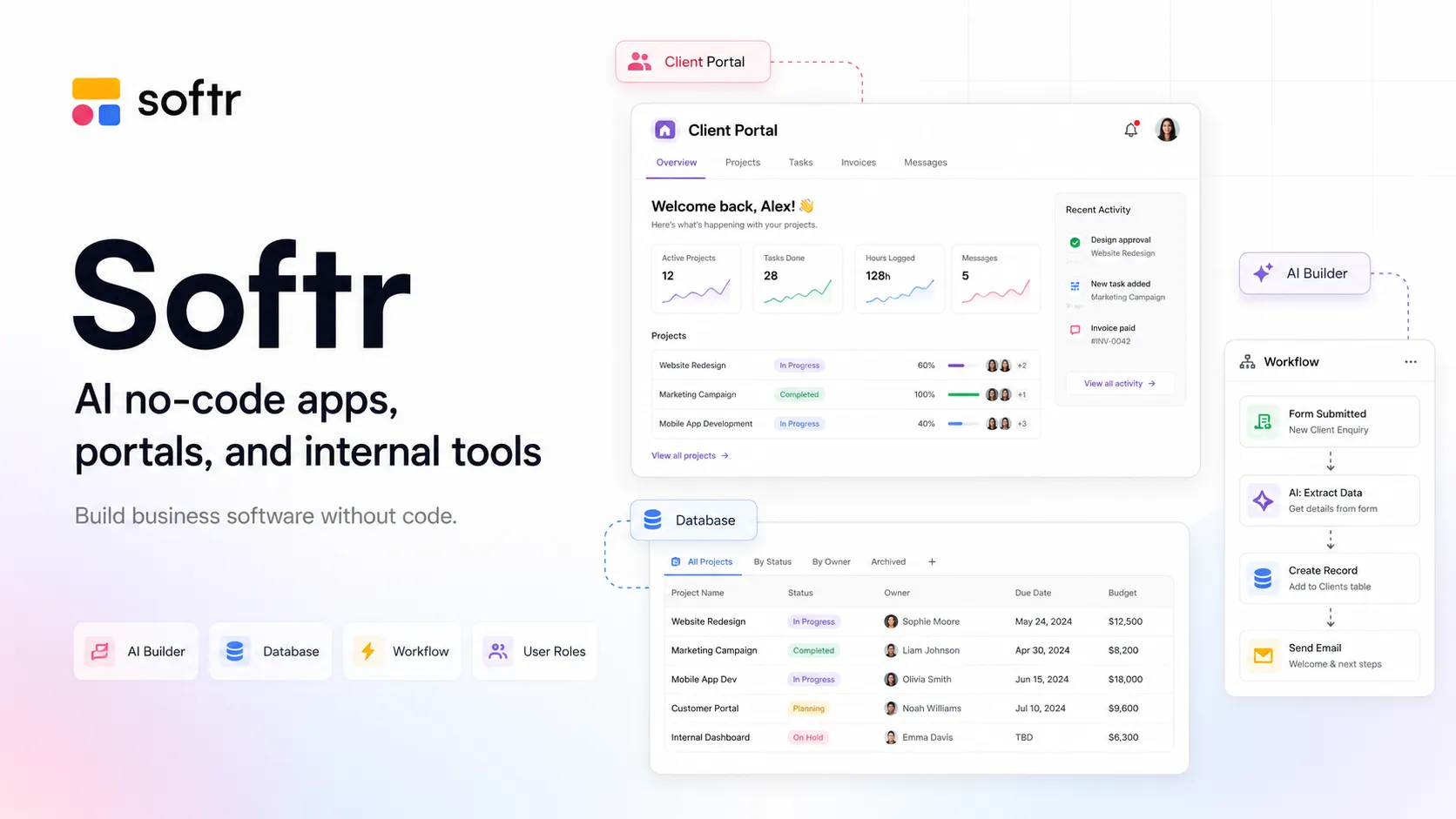
Softr is an AI-native no-code business app builder for teams that need secure portals, internal tools, dashboards, databases, workflows, and AI data operations without building a custom software stack.
Includes unlimited apps and collaborators, 10 app users, 5 AI credits/month, 5,000 Softr Database records, 500 workflow actions, unlimited form responses, and basic data sources.
Basic$49 / per month, billed yearly
For simple projects; includes 20 app users, 10 AI credits/month, 50,000 database records, 2,500 workflow actions, custom domain, and supported starter data sources.
Professional$139 / per month, billed yearly
For companies building portals and internal tools; includes 100 app users, 50 AI credits/month, 500,000 database records, 10,000 workflow actions, custom user groups, and broader data-source access.
Business$269 / per month, billed yearly
For advanced systems at scale; includes 500 app users, 100 AI credits/month, 1M database records, 25,000 workflow actions, unlimited user groups, and advanced data sources such as HubSpot, BigQuery, SQL, and REST API.
EnterpriseCustom
For extra volume, security, and support; includes custom usage limits, SSO, custom agreements and SLAs, SOC 2 reporting, IP blocking, audit logging, and enterprise support.
AI Credit Add-onsFrom $10 / per month
Paid plans can add AI credits; AI features pause when credits run out unless credits reset or add-ons are purchased.
Pricing checked: Jun 23, 2026 · Subscription, usage limits, and model costs may be billed separately.
Features & details
AI App Building
AI Co-Builder generates apps from prompts
Creates database structure, pages, blocks, permissions, and basic logic
Vibe Coding block for custom AI-generated UI components
Everything generated by AI remains visually editable
Data and Apps
Softr Databases with records, relationships, lookups, rollups, and formula fields
Connects to Airtable, Google Sheets, Notion, HubSpot, monday.com, SmartSuite, ClickUp, Xano, Supabase, BigQuery, SQL, and REST API
Portals, dashboards, CRMs, intranets, directories, and internal tools
Forms, lists, tables, kanban, calendars, maps, charts, and detail views
Permissions and Security
Default and custom user groups
Page, block, action, and record-level permissions
Server-side visibility and conditional filters
Built-in authentication, SSO options, IP blocking, and audit logging on higher tiers
Automation and AI Data Workflows
Visual workflow builder with triggers, actions, branches, waits, filters, and bulk actions
AI Actions for writing, summarizing, categorizing, and custom prompts
Database AI Agents for enrichment, tagging, validation, summarization, and PDF extraction
Softr MCP Server and app-level MCP access for connecting AI assistants to Softr data
Why Choose Softr?
Softr is strongest when a business process has outgrown spreadsheets but does not justify a full custom engineering project. It gives teams a way to turn operational data into usable software: portals, CRMs, dashboards, intranets, inventory systems, and internal tools that real users can log into and use every day.
The product has moved beyond its earlier reputation as an Airtable frontend. Softr now combines app interfaces, native databases, workflows, AI generation, permissions, and external data connections. That makes it closer to a lightweight business software platform than a simple page builder.
The key difference from AI coding tools is ownership of the workflow. Softr does not generate a repository for developers to maintain. Instead, it gives business teams a hosted visual system where AI can create the first version and humans can keep refining the app through no-code controls.
Core Workflow
A practical Softr workflow starts with the data model. You can let the AI Co-Builder draft the app from a prompt, connect an existing source such as Airtable or Google Sheets, or build directly on Softr Databases. The quality of the final app depends heavily on how clearly the entities, user roles, and permissions are defined.
Once the structure exists, the visual editor becomes the main workspace. Teams can adjust pages, blocks, tables, lists, forms, detail views, navigation, filters, themes, and user visibility. The AI-generated result is not a locked black box; it can be edited with the same builder controls as a manually created app.
For more advanced systems, Workflows and AI data operations become the next layer. A new form submission can update records, trigger notifications, branch by status, enrich data with AI, or call external services. This is where Softr becomes useful for operations, not just presentation.
Use Cases
Softr works well for client portals, vendor portals, internal knowledge bases, lightweight CRMs, inventory trackers, approval systems, project dashboards, employee directories, event systems, recruitment portals, and customer-facing data views.
It is especially useful for multi-role apps. A client can see only their projects, an admin can edit all records, and a manager can view aggregate dashboards. Softr’s permission model is one of the reasons it fits portals better than basic website builders or form tools.
The AI features are most useful when they are tied to structured business tasks. Examples include generating a first app blueprint, creating a custom calculator block, summarizing records, classifying support requests, extracting information from PDFs, enriching leads, or answering questions over a permitted block of data.
Comparison to Alternatives
Compared with Glide, Softr is often better for portals, dashboards, public/private pages, and multi-role business apps. Glide can feel more app-like for mobile-friendly operations workflows, while Softr often feels stronger for branded portals and structured external-facing experiences.
Compared with Bubble, Softr is faster and easier for standard business apps but less flexible for highly custom product logic. Bubble is closer to a general no-code application platform; Softr is more opinionated around data-backed business tools and portals.
Compared with Airtable Interfaces, Softr is more suitable when the interface needs to be client-facing, branded, role-based, or separated from the underlying data workspace. Airtable remains strong as a database and team workspace, while Softr can act as a polished application layer on top.
Compared with Retool, Softr requires less developer involvement. Retool is better for engineering-led internal tools connected to APIs and databases. Softr is better when business users need to build and maintain the application themselves.
Compared with Lovable, Bolt.new, or v0, Softr is not trying to produce a developer-owned codebase. Those tools are stronger when the final artifact should be code. Softr is stronger when the final artifact should be a hosted business app that non-developers can keep operating.
Best Configuration
The best Softr setup starts with a clean database design. Avoid building a serious app directly on a messy spreadsheet. Define tables, relationships, ownership rules, statuses, and required fields before spending too much time on layout.
For portal-style apps, configure permissions early. Page visibility and block visibility are not enough on their own; record-level restrictions and action permissions should match the real business rules. Test with sample users from each role before publishing.
For AI usage, keep prompts specific and bounded. Ask the Co-Builder to create a concrete app with known roles, records, and workflows. Then review the result manually. The AI can create the structure quickly, but business logic, security expectations, and edge cases still need human validation.
For cost control, watch three areas: app users, database records, and workflow/AI usage. A small app can stay inexpensive, but high-volume portals or automation-heavy systems should be modeled against the paid plan limits before launch.
Migration Notes
Migrating from spreadsheets works best when the spreadsheet is cleaned and normalized first. Separate users, companies, projects, tasks, invoices, inventory items, and other entities into clear tables. A spreadsheet with mixed concepts will usually become a confusing app.
Migrating from Airtable is a common path. Keep Airtable as the source of truth at first if the team already depends on it, then move selected workloads into Softr Databases only when performance, AI features, or native workflow behavior justify the switch.
Migrating from Glide, Stacker, Noloco, or Airtable Interfaces requires checking more than data. Rebuild the permissions, user groups, forms, views, automations, and external integrations deliberately instead of assuming every feature maps one-to-one.
Migrating away from Softr should also be planned for critical systems. Because Softr is a hosted no-code runtime, teams should document data models, workflows, formulas, permissions, and integrations clearly. That makes future rebuilds easier if the organization later needs a fully custom codebase.
Model support & data privacy
Supported models
OpenAI
Anthropic
GPT-4.1
Claude Sonnet 4
Privacy & data handling
Softr is a hosted SaaS platform, so teams should review connected data sources, user permissions, AI settings, workflows, MCP access, and app-sharing rules before using it with sensitive data. Softr states that it is SOC 2 Type II compliant, that user data is hosted in Europe, and that permission checks and record filters are evaluated server-side. Business and Enterprise users can use their own OpenAI or Anthropic API keys for some AI workflow actions, while Enterprise adds additional controls such as SSO, IP blocking, audit logging, custom agreements, and SOC 2 reporting.
Created directory entry and verified current Softr positioning, AI Co-Builder, pricing, AI credits, data sources, permissions, Workflows, AI Agents, MCP support, API access, and security notes from official Softr sources.