

Glide
Glide is a no-code AI app builder for business teams that want data-driven internal tools and operational apps without writing traditional application code.
Information checked: Jun 23, 2026 ·View sources
Tool details
- Type
- App builders
- Platforms
- Web, Browser, Progressive Web App, Google Sheets, Airtable, Excel, Glide Tables, Big Tables, API, Webhooks
- Free plan
- Yes
- Open source
- No
- Bring your own key
- No
- Local models
- No
Overview
Best for
- Operations teams building internal tools
- Spreadsheet-based business workflows
- Inventory, logistics, procurement, field sales, CRM, and work order apps
- Dashboards, portals, approval workflows, and lightweight business systems
- Teams that want AI-assisted app generation without hiring a full development team
- Businesses that need mobile-friendly apps backed by structured data
Strengths
- Excellent for quickly turning spreadsheets and operational processes into usable business apps.
- Glide Agent can create a starting app from a prompt, spreadsheet, or described workflow.
- Strong fit for internal tools, dashboards, portals, inventory systems, CRMs, and field workflows.
- Workflows, integrations, Call API, and Glide API make it more capable than a simple form builder.
- Security center documents SOC 2 Type 2, GDPR support, encryption, row ownership, and access controls.
Limitations & trade-offs
- Developers looking for an AI-native code editor like Cursor or Windsurf
- Teams that need full source-code export and complete runtime ownership
- Consumer apps that require native App Store distribution and deep device APIs
- Highly custom SaaS products with complex backend architecture
- Projects where unpredictable update volume or user growth makes usage-based billing risky
- Not a full AI IDE or traditional coding environment.
- Glide Agent is still beta and has limitations around workflows, permissions, external APIs, and advanced transformations.
- Apps run on Glide’s hosted platform rather than as fully exported source-code projects.
- Pricing can become harder to predict when business users, updates, integrations, and external data syncs grow.
- Complex backend logic, native mobile requirements, and deeply custom UI may require a code-based stack.
Get started
Pricing & usage limits
Official pricingFree tier · From $19
For learning and draft apps; includes 1 editor, limited personal users, Glide Tables, and community support.
For small personal projects; includes 1 published app, 100 personal users, Glide AI, Workflows, and light integrations.
For prototypes, communities, and personal-brand apps; includes 3 published apps, unlimited personal users, Google Sheets, custom domains, and custom branding.
For internal business tools; includes unlimited apps, 10 editors, 30 business users, 5,000 updates, Airtable/Excel sync, Glide API, Call API, and Express support.
For larger organizations needing custom users, custom updates, SQL and enterprise data sources, SSO, data backups, enterprise integrations, account management, and priority support.
Additional updates can be billed when usage exceeds included plan limits; additional Business users are listed at $5/month annually or $6/month monthly.
Pricing checked: Jun 23, 2026 · Subscription, usage limits, and model costs may be billed separately.
Features & details
App Building
- AI-assisted app creation with Glide Agent
- Visual layout editor
- 40+ UI components
- Responsive web apps installable on mobile home screens
Data Layer
- Glide Tables and Big Tables
- Google Sheets, Airtable, Excel, and CSV import/sync options
- High-scale data sources on advanced plans
- User-specific data, roles, row owners, and protected columns
Automation
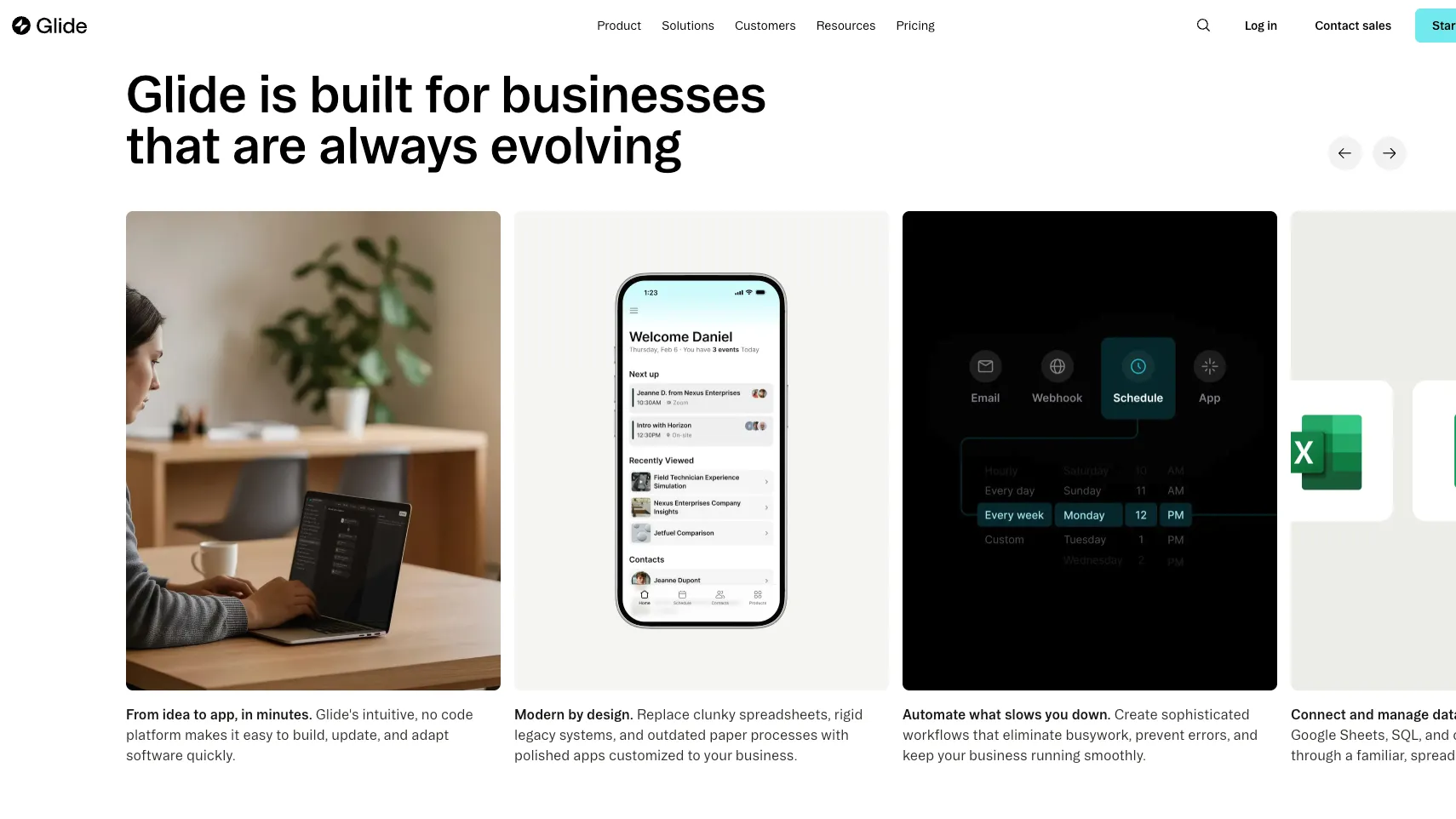
- Workflows with app, schedule, email, webhook, and manual triggers
- Native actions for data, navigation, and communication
- Call API and Glide API on Business and Enterprise plans
- Third-party integrations and webhooks
AI Capabilities
- Generate text and structured responses
- Audio, document, and image-to-text transformations
- Text-to-JSON, text-to-choice, text-to-date, and classification actions
- Enterprise experimental advanced reasoning
Why Choose Glide?
Glide is strongest when the app starts from business data rather than from a blank codebase. If a team already runs work through spreadsheets, Airtable bases, Excel files, forms, or structured tables, Glide can turn that operational layer into a usable app much faster than a traditional engineering project.
The important distinction is that Glide is not an AI IDE. It does not try to be Cursor, Windsurf, or a repository-editing coding agent. Instead, it gives non-developers and operations teams a controlled way to build software-like workflows: screens, tables, roles, actions, automations, AI transformations, and integrations.
This makes Glide especially useful when the cost of waiting for engineering is higher than the need for perfect custom architecture. A warehouse checklist, vendor portal, sales tracker, equipment log, approval flow, or internal CRM often needs reliability and usability more than a bespoke framework.
Core Workflow
A practical Glide workflow usually starts with the data model. You either import a spreadsheet, connect a supported data source, or let Glide Agent create a first structure from a prompt. The next step is not writing backend code; it is shaping tables, screens, user roles, filters, forms, actions, and workflows around the real process.
Glide Agent is helpful at the beginning because it can turn a described process or uploaded spreadsheet into an initial app structure. But it should be treated as a starter, not as a finished software architect. The stronger workflow is to use Agent for the first draft, then refine the data model, permissions, workflows, and user experience manually.
For more advanced apps, Glide becomes a small business systems platform. Workflows can react to app interactions, schedules, emails, webhooks, or manual triggers. AI columns and actions can convert messy input into structured data. Integrations and API calls can connect Glide to tools outside the app.
Use Cases
Glide is a strong fit for internal operations apps: inventory management, job tracking, procurement, logistics, vendor management, field sales, work orders, asset tracking, event operations, lightweight CRMs, client portals, and dashboards.
It also works well when a business needs a mobile-friendly interface over data that already exists. Instead of asking users to edit a spreadsheet on a phone, Glide can expose the same workflow as forms, cards, detail screens, approval buttons, filtered views, and role-specific dashboards.
The AI features are most useful when they are embedded into a real workflow. Examples include extracting text from uploaded documents, summarizing notes, classifying requests, converting text into structured fields, generating email drafts, or turning unstructured comments into categories that downstream workflows can use.
Comparison to Alternatives
Compared with Bubble, Glide is more opinionated and data-first. Bubble gives more freedom for custom web app logic and user-facing products, but Glide is usually faster for internal tools and spreadsheet-backed workflows.
Compared with Retool, Glide is more accessible to non-developers. Retool is powerful for engineering-led internal tools that connect directly to APIs and databases. Glide is better when operations teams want to build and maintain the app themselves with less code.
Compared with AppSheet or Microsoft Power Apps, Glide often feels more modern and approachable for small and mid-sized teams. AppSheet and Power Apps may make more sense inside organizations already standardized on Google Workspace or Microsoft 365, especially where procurement and governance favor those ecosystems.
Compared with Lovable, Bolt.new, or v0, Glide is less about generating a codebase and more about shipping a hosted operational app. AI coding tools are better when the final output must be developer-owned source code. Glide is better when the final output is a working business system backed by structured data.
Best Configuration
The best Glide projects start with a clean data model. Before building screens, define which tables represent real entities, which fields users can edit, which rows each role should see, and which data should live natively in Glide versus an external source.
For sensitive apps, permissions should be designed early. Do not rely on hiding components as a security boundary. Use sign-in rules, row owners, roles, protected columns, and appropriate sharing settings so users only access the data they should actually be allowed to see.
For AI features, keep them close to bounded tasks. Classification, extraction, summarization, and structured conversion are usually safer than open-ended autonomous behavior. Glide’s own docs recommend reviewing AI outputs for accuracy, so production workflows should include human review where mistakes would be costly.
For cost control, watch updates and external sync patterns. Apps built mostly on Glide-native data sources can behave differently from apps that rely heavily on external spreadsheets, API calls, or frequent workflow runs. The right architecture depends on how often the app reads, writes, syncs, and automates.
Migration Notes
Migrating from spreadsheets to Glide works best when the spreadsheet is cleaned first. Remove duplicate concepts, normalize inconsistent columns, separate users from transactions, and decide which sheets should become app tables. A messy spreadsheet can become a messy app if imported without redesign.
Migrating from Airtable, AppSheet, or Power Apps requires more than copying tables. Permissions, automations, computed values, forms, and integrations may behave differently. Rebuild the workflow around Glide’s concepts instead of assuming every old feature maps one-to-one.
Migrating away from Glide should also be considered before major adoption. Glide is convenient because it owns the hosted runtime and builder experience. That same convenience means teams that later need full source-code ownership may have to rebuild in a traditional stack. For mission-critical systems, document the data model, business rules, and integrations clearly so the organization is not dependent on tribal knowledge inside the builder.
For engineering teams, a hybrid approach can work well: keep complex backend systems in code, expose stable data or APIs to Glide, and let operations teams build interfaces and workflows on top. This preserves developer control where it matters while giving business teams faster iteration for day-to-day tools.
Model support & data privacy
Privacy & data handling
Glide is a hosted SaaS platform, so app data, user data, files, integrations, and AI features should be reviewed against the team’s privacy requirements. Glide’s security documentation states that data is encrypted in transit and at rest, that Glide is SOC 2 Type 2 certified, and that app creators remain responsible for security decisions such as sign-in methods, row owners, roles, protected columns, and visibility rules. Glide docs also state that experimental AI features can involve allowing Glide to train on some app configuration data, so teams should review AI settings before using sensitive workflows.
Guides, reviews & fixes
View allNo published guides yet. Start with the official documentation above.
Product updates
No verified product updates listed yet. Follow this tool to see new relevant content in Saved.
See the content timelineAlternatives
Sources & verification
Verification dates record when this directory checked the information. Product release dates appear separately above.
Directory revision history
Created directory entry and verified current positioning, pricing, GlideOS/Agent direction, AI features, workflows, data sources, API access, and security notes from official Glide sources.