

Amazon Q Developer
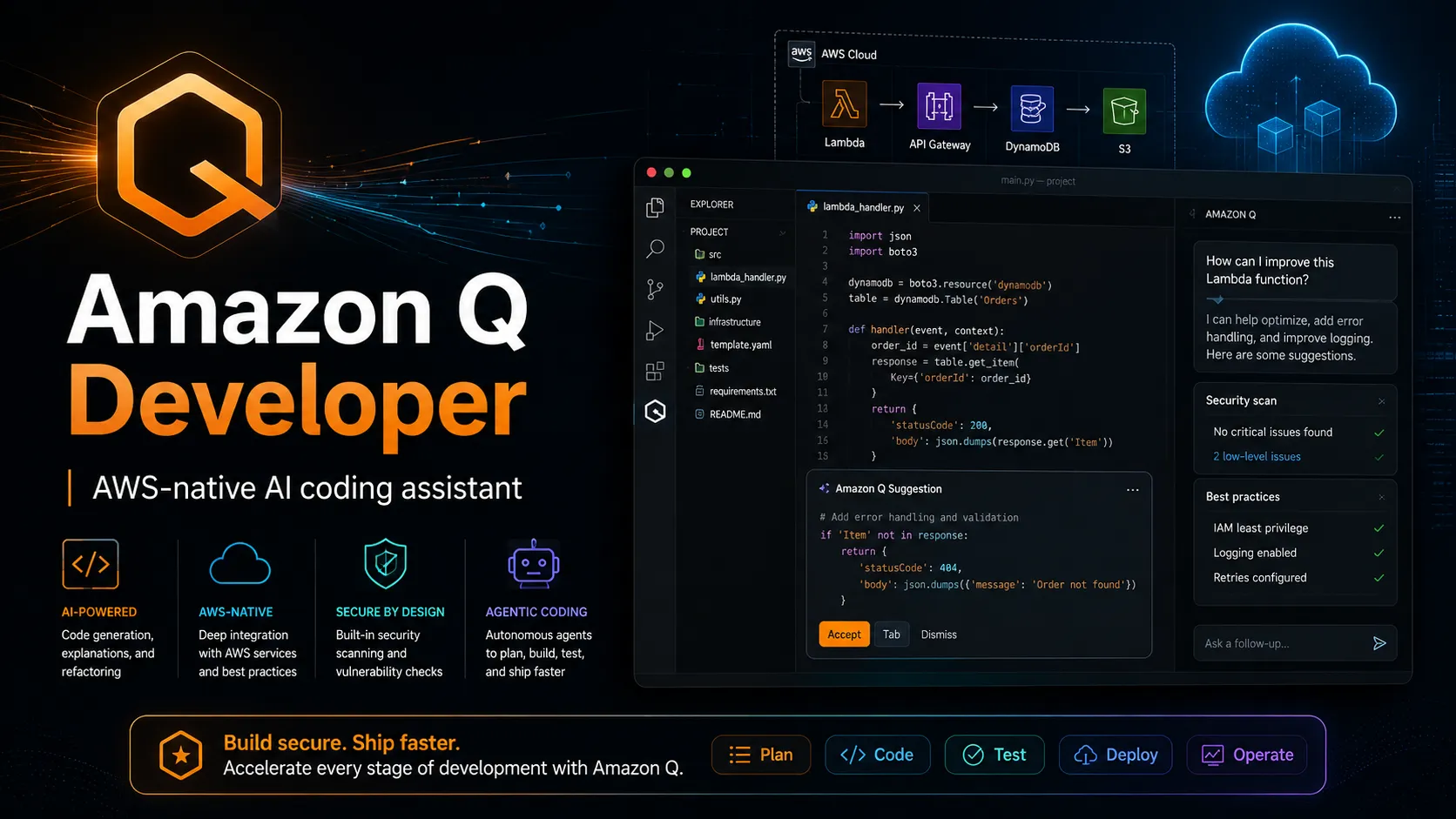
Amazon Q Developer is AWS’s AI coding assistant for building, securing, operating, and transforming applications in IDEs, AWS Console, GitLab, GitHub, chat apps, and AWS workflows. It is strongest for teams already invested in AWS that need code assistance, security scanning, modernization agents, and cloud-aware guidance.
Choose Amazon Q Developer when your team builds, operates, or modernizes software on AWS and wants AI help across IDEs, AWS Console, security review, GitLab/GitHub workflows, and application transformation. Choose a provider-neutral agent or full AI IDE if model flexibility, local execution, or non-AWS workflows matter more.
Pricing Plans
Free Tier
Perpetual free tier with monthly limits, including 50 agentic requests per month and up to 1,000 lines of code per month for supported transformations.
Amazon Q Developer Pro
Expanded usage limits, latest Claude model access, IDE/CLI use, Identity Center support, admin dashboard, policy management, data opt-out by default, and IP indemnity.
Transformation overage
Applies to Amazon Q Developer transformation usage above included Pro allocations for eligible Java upgrade transformations.
GitLab Duo with Amazon Q
Available through supported GitLab workflows and tiers; use depends on GitLab Duo and AWS integration setup.
Enterprise / Organization use
Managed through AWS accounts, IAM Identity Center, subscriptions, quotas, governance, and AWS organization billing.
Core Features
1IDE coding assistant
- Inline code suggestions from snippets to full functions.
- Chat, inline chat, code generation, refactoring, optimization, and explanation inside supported IDEs.
- Supports VS Code, JetBrains IDEs, Visual Studio, and Eclipse.
2Agentic development
- Agentic coding can read and write files, generate diffs, run shell commands, and report progress.
- Supports multi-step tasks such as implementing features, documenting code, generating tests, reviewing code, and refactoring.
- MCP server support is available in supported IDE workflows.
3Security and quality
- Code review can scan for SAST issues, secrets, infrastructure-as-code issues, code quality issues, deployment risks, and software composition analysis findings.
- Suggests remediation for detected issues.
- Reference tracking and public-code-suggestion suppression are available.
4AWS-native guidance
- Answers questions about AWS architecture, resources, best practices, documentation, and support topics.
- Available in AWS Console and AWS mobile/website surfaces where supported.
- Can help investigate operational issues, diagnose console errors, and reason about AWS cost and resource usage.
5Application transformation
- Supports automated Java upgrade workflows.
- Supports .NET transformation workflows where available.
- Generates changes for review rather than applying modernization output blindly.
6Collaboration surfaces
- GitLab Duo with Amazon Q supports feature development, code reviews, unit test generation, and chat in GitLab workflows.
- Amazon Q Developer for GitHub preview supports issue-to-PR feature work and automated code reviews.
- Microsoft Teams and Slack integrations help monitor events, troubleshoot, and operate AWS resources.
Pros
- Deep AWS ecosystem awareness is stronger than generic coding assistants.
- Free tier makes it easy to try in supported IDEs.
- Pro tier is relatively simple at $19 per user/month.
- Supports IDEs beyond VS Code, including JetBrains, Visual Studio, and Eclipse.
- Security scanning, code review, and modernization agents are useful for enterprise SDLC workflows.
- IAM Identity Center, admin controls, and data opt-out support organization rollout.
Cons
- Best fit is AWS-centric; less compelling for teams not using AWS.
- Provider and model choice is less flexible than open-source BYOK agents.
- CLI direction has shifted toward Kiro CLI in current AWS documentation.
- Agentic request and transformation limits require monitoring on larger teams.
- GitHub integration is still described as preview.
- Production changes still require human review, tests, and security validation.
Why Choose Amazon Q Developer?
Amazon Q Developer is most compelling when the software lifecycle is already connected to AWS. It is not just a code-completion plugin; it is an AWS-aware development assistant that can answer architecture questions, reason about AWS resources, scan code, generate tests, help modernize applications, and support development workflows in IDEs, consoles, repositories, and chat tools.
That positioning makes it different from generic AI coding tools. A team that mostly needs local code edits may prefer Cursor, Claude Code, or an open-source agent. A team that needs help building, operating, securing, and transforming AWS applications can get more leverage from Q Developer because it understands AWS services, identity, billing, operations, and best-practice patterns.
Core Workflow
A practical workflow starts inside the IDE. Developers use Q for inline suggestions, chat, file-aware changes, code review, security scanning, refactoring, and test generation. For larger changes, the agentic coding experience is more appropriate because it can read and write files, propose diffs, run commands, and iterate with feedback.
The AWS Console workflow is different. There, Q is most useful for answering questions about resources, diagnosing errors, investigating costs, and navigating AWS service concepts. The repository workflow is different again: in GitLab and GitHub, Q is better framed as an issue, pull request, code review, and test-generation assistant rather than an editor companion.
Use Cases
Amazon Q Developer fits cloud-native engineering teams, platform teams, DevOps teams, and application teams that maintain AWS workloads. It is especially useful for serverless applications, infrastructure-heavy teams, Java modernization, .NET modernization, AWS cost investigation, operational troubleshooting, and security review.
It is also a strong candidate for organizations standardizing AI assistance through IAM Identity Center. Pro subscriptions, admin controls, usage visibility, and AWS-native identity make it easier to roll out in AWS-centered companies than a consumer-first coding tool.
Comparison to Alternatives
Compared with GitHub Copilot, Q Developer is more AWS-aware and cloud-operations-oriented. Copilot is usually stronger for GitHub-native developer ubiquity, while Q Developer is better when AWS architecture, resources, modernization, and security workflows are central.
Compared with Tabnine, Q Developer is less focused on private deployment and air-gapped control, but more deeply integrated with AWS services and AWS identity. Compared with Cursor or Windsurf, Q Developer is not a full AI-native editor; it is a cross-surface assistant that works inside supported IDEs and AWS workflows.
Compared with Claude Code or Codex CLI, Q Developer is less provider-neutral and less terminal-first. Its advantage is AWS context and SDLC integration; its limitation is that developers seeking local, model-flexible agent control may find open CLI agents or AI IDEs more flexible.
Best Configuration
The best configuration starts with identity. Individual developers can experiment with Builder ID, but teams should plan IAM Identity Center, Pro subscriptions, access policies, billing ownership, and user management before broad rollout. That is especially important because Pro activation and transformation overages can affect costs.
For engineering teams, pair Q Developer with repository rules and code review practices. Define what Q should optimize for: AWS Well-Architected guidance, secure defaults, cost controls, Java upgrade conventions, test standards, or infrastructure review. The better the organization defines those expectations, the more useful Q becomes as a consistent assistant rather than a generic chatbot.
Migration Notes
Teams moving from CodeWhisperer should treat Amazon Q Developer as the successor surface, since CodeWhisperer capabilities were folded into Q Developer. Validate IDE compatibility, authentication method, and whether developers need Free or Pro access.
Teams moving from Copilot, Tabnine, or Cursor should pilot Q on AWS-specific tasks instead of only generic coding prompts. Test one AWS architecture question, one security scan, one Java or .NET transformation, one GitLab or GitHub workflow, and one production-cost question. That will reveal whether Q’s AWS context is valuable enough to justify using it alongside or instead of a general-purpose coding assistant.
For command-line workflows, note that AWS documentation now points Q CLI users toward Kiro CLI. Existing Q CLI usage should be inventoried before migration: commands, aliases, auth, MCP servers, automation scripts, and CI jobs should be tested against the current Kiro path before standardizing new terminal workflows.
Best For
- AWS developers
- Cloud application teams
- Serverless and infrastructure teams
- Java modernization projects
- .NET modernization projects
- Security scanning in IDE workflows
- AWS cost and resource investigation
- Teams using IAM Identity Center
- GitLab Duo users building with AWS
- Developers who want AI help across IDE and AWS Console workflows
- Organizations that need AWS-native governance and admin controls
Not Ideal For
- Teams that are not invested in AWS
- Developers who want local model execution
- Users who need provider-neutral BYOK model routing
- Non-technical users looking for prompt-to-app builders
- Developers who want a full standalone AI IDE
- Teams that need open-source agent runtime control
- Workflows where AI agents cannot read files, write diffs, or run shell commands
Privacy Notes
Amazon Q Developer can process prompts, code context, local project files, diffs, shell output, security scan context, AWS resource metadata, GitLab or GitHub workflow context, and chat content depending on where it is used. AWS states that Amazon Q Developer Pro proprietary content is not used for service improvement, while the Free tier provides opt-out controls. Teams should still avoid exposing secrets, credentials, regulated data, or production tokens in prompts, files, terminal output, repositories, or connected chat and DevOps tools.
Alternatives
Sources
- Amazon Q Developer official page
- Amazon Q Developer pricing
- Amazon Q Developer documentation
- Amazon Q Developer Free and Pro tiers
- Amazon Q Developer in IDEs
- Install Amazon Q Developer in IDEs
- Amazon Q Developer build page
- Amazon Q Developer features
- Amazon Q Developer code reviews
- Amazon Q Developer code transformation
- Amazon Q Developer third-party integrations
- Amazon Q Developer endpoints and quotas
- Amazon Q Developer VS Code Marketplace
- Amazon Q Developer command line note
Update History
- Jun 14, 2026: Created entry with current Amazon Q Developer Free and Pro pricing, IDE support, agentic coding, code review, Java/.NET transformation, GitLab/GitHub integrations, AWS Console and chat-app workflows, privacy notes, and Kiro CLI migration context.
Related Tools
More listings in a similar part of the directory.





Amazon Q Developer Articles
Guides, comparisons, and launch notes connected to this listing.

