On This Page8 sections
Key Takeaways
- TRAE Work is TRAE's general-purpose AI work assistant, designed for research, writing, data analysis, presentations, planning, design, and application development rather than coding alone.
- TRAE Work is the successor to TRAE SOLO. TRAE officially renamed SOLO to TRAE Work on June 9, 2026 as the product expanded beyond software development into broader professional workflows.
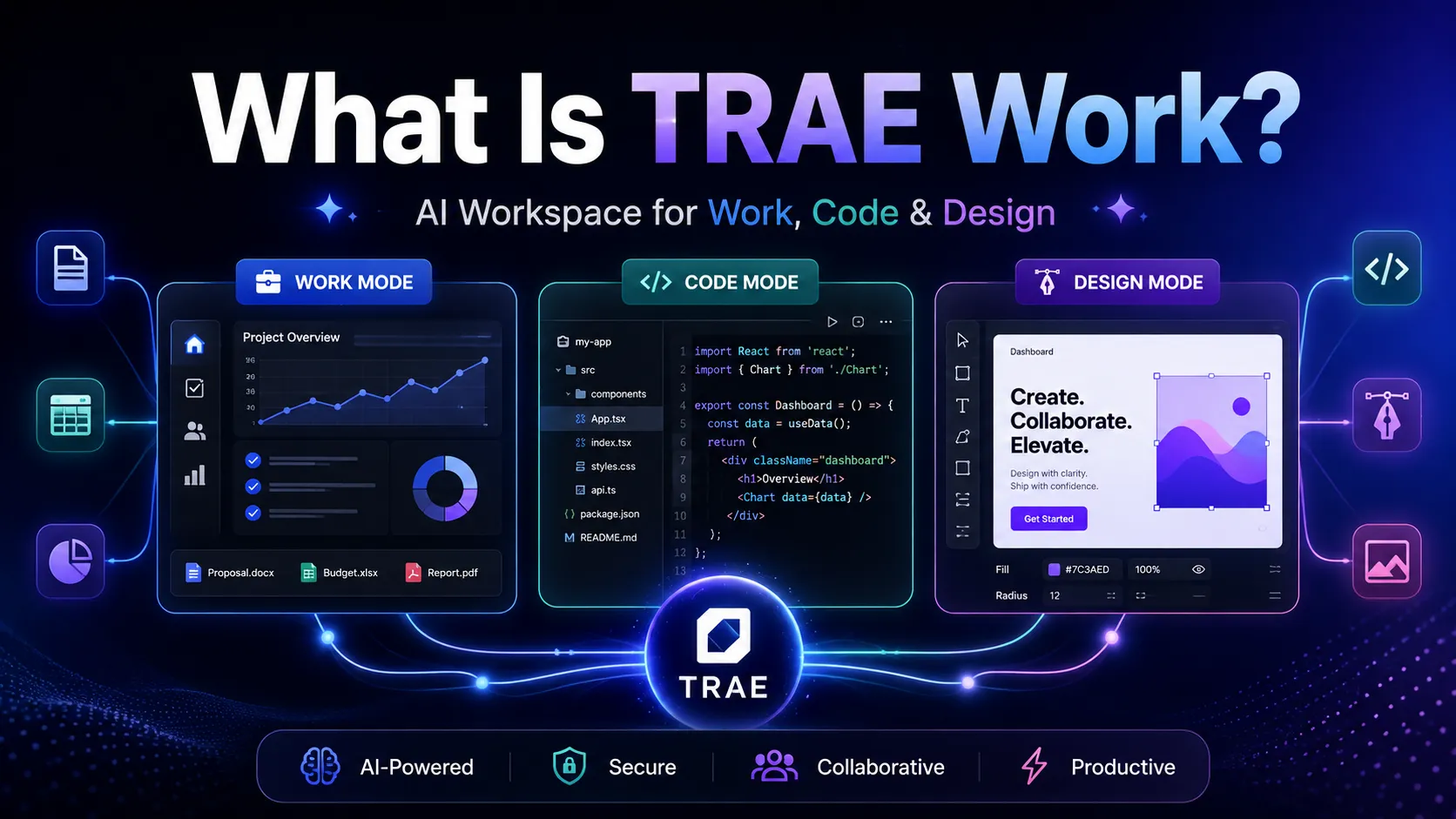
- The product now centers on Work, Code, and Design modes. Work handles knowledge-work deliverables, Code handles conversation-driven software creation, and Design provides natural-language design generation and editing.
- Its defining idea is not simply AI chat. TRAE Work organizes files inside a persistent Workspace, can reason across formats such as
.docx,.csv,.pptx, and Python files, and can execute multiple cloud tasks in parallel. - TRAE Work and TRAE's coding product are not the same thing. TRAE Work goes broad across professional work, while TraeCode is positioned specifically for software developers and engineering teams.
- The biggest practical advantage is deliverable-oriented execution: users specify an outcome, provide context, and review generated artifacts instead of manually moving information between a chatbot, spreadsheet tool, slide editor, browser, and coding environment.
What Is TRAE Work?
TRAE Work is an agentic AI workspace that can take a professional task from instructions and source material to a reviewable deliverable.
That distinction matters.
A conventional chatbot primarily generates responses. TRAE Work is designed around a broader loop:
context → task decomposition → tool use → artifact creation → review → revision
TRAE Work can handle slides, data analysis, deep research, document writing, code development, and other everyday work. It also maintains project files inside a single Workspace instead of treating every prompt as an isolated conversation.
In practical terms, a user could upload research papers and request a literature review, provide a CSV and ask for trend analysis, turn research into a presentation, or describe a web application and ask TRAE Work to build it.
This makes TRAE Work easier to understand as an AI execution workspace than as another AI text generator.
Why Did TRAE SOLO Become TRAE Work?
The history explains the product better than the name.
TRAE originally introduced SOLO around autonomous software development: users described what they wanted, the agent planned the work, edited files, ran tools, and attempted to deliver a functioning result.
Users increasingly applied SOLO to tasks outside programming, including:
- Product specifications
- Dataset analysis
- Marketing plans
- Research reports
- Cross-functional project work
On June 9, 2026, TRAE formally renamed SOLO to TRAE Work. The change reflected an expansion from a coding-oriented agent into an AI workspace for professionals across roles.
That history also explains why TRAE Work feels more agentic than many office-focused AI products. Its foundation came from a system originally expected to execute multi-step software tasks, not merely complete documents one paragraph at a time.
How TRAE Work Works
TRAE Work's interaction model can be summarized in five stages.
1. Start with an outcome
Instead of prompting for one small transformation at a time, users can define a larger result:
Analyze these market reports, identify the three strongest trends, produce a management summary, and turn the findings into a presentation.
The important unit is the task, not the individual prompt.
2. Add project context
TRAE Work can reason across multiple file types within a Workspace, including .docx, .csv, .pptx, and Python files.
This matters because many real business tasks are cross-format by nature. A quarterly review may involve spreadsheets, written notes, previous decks, screenshots, and scripts rather than one clean text document.
3. Let the agent decompose and execute
TRAE Work can break larger tasks down and call appropriate tools. The user defines the required result while the system handles much of the execution path.
This is where the product differs most clearly from ordinary chat. A sufficiently broad task may require research, analysis, file generation, code execution, or several intermediate steps.
4. Review artifacts, not just messages
Generated results can be previewed while they are produced. Users can comment, request changes, and iterate while the output and feedback remain connected to the project.
That artifact-review loop is important for professional use because the final deliverable often matters more than the prose describing how it was created.
5. Run work across devices and in parallel
TRAE Work is cloud-oriented and supports cross-device continuation. Multiple tasks can run simultaneously, allowing users to review one task while another continues executing.
For users doing research, reporting, and application development at the same time, parallel task execution can be more valuable than marginal improvements in chat response speed.
TRAE Work Modes Explained
The current TRAE Work experience centers on Work, Code, and Design modes.
These modes are best understood as different execution environments around the same broader goal: turning instructions into finished work.
Work Mode
Work Mode is the general knowledge-work environment.
It is designed for tasks such as:
- Deep research
- Document writing
- Data analysis
- Planning
- Presentations
- Coordination
- Business deliverables
For example, a useful Work Mode task could be:
Review the attached customer interview transcripts and CSV export.

1. Cluster complaints into themes.
2. Quantify how often each theme appears.
3. Identify the highest-impact product problems.
4. Create an executive summary.
5. Produce a presentation with one slide per major finding.
6. Add an appendix explaining the methodology.
The difference between this and a simple chat prompt is scope. The output can span analysis, writing, and presentation artifacts within one project context.
Code Mode
Code Mode is a conversation-first environment for building software.
It is suitable for developers and non-engineers who want to define a software task while AI handles more of the implementation.
Typical requests include:
- Build an internal dashboard
- Turn a specification into an application
- Analyze an existing repository
- Fix or extend an application
- Produce a working prototype from a business requirement
A useful distinction is that Code Mode is not the same as using a full AI IDE.
If the user wants to spend most of the day manually navigating source files, reviewing diffs, editing code, managing extensions, and controlling an engineering workflow, TraeCode is the more natural TRAE product.
If the user wants to say what should be built and primarily review the result, TRAE Work's Code Mode is closer to the intended experience.
Design Mode
Design Mode extends TRAE Work beyond writing and code.
It is designed for workflows such as:
- Generating design drafts
- Applying batch edits through natural language
- Managing design systems
- Exporting design to code
This is strategically important. It means TRAE Work is moving toward a workspace where documents, analysis, design, and software can share one task context instead of being separate AI products.
TRAE Work vs TRAE IDE / TraeCode
The most common source of confusion is TRAE's product naming.
As of 2026, the product family is best understood like this:
| Product | Primary role | Interaction model | Best fit |
|---|---|---|---|
| TRAE Work / TraeWork | General professional AI workspace | Task and deliverable oriented | Research, documents, analysis, presentations, design, app creation |
| TraeCode | AI coding environment | Editor and engineering workflow oriented | Developers working directly in codebases |
| TRAE Work Code Mode | Software creation inside TRAE Work | Conversation first | Users who want to delegate implementation rather than live in an IDE |
TRAE's naming has changed quickly. Older documentation and discussions may still use TRAE SOLO, SOLO Desktop, or TRAE IDE.
The key transition is that SOLO became TRAE Work while the dedicated engineering product remains separate.
TRAE Work vs Cursor and Claude Code
TRAE Work overlaps with AI coding tools, but comparing it directly with Cursor or Claude Code can be misleading.
TRAE Work vs Cursor
Cursor is fundamentally editor-first. Its center of gravity is the source repository and coding workflow.
TRAE Work is workspace-first and task-first. Coding is one possible deliverable alongside research, documents, presentations, data analysis, and design.
Use Cursor when the primary object is a codebase and the user expects to actively edit software.
Use TRAE Work when the task may start with PDFs, spreadsheets, notes, requirements, or market research and end with a report, deck, design, or application.
TRAE Work vs Claude Code
Claude Code is fundamentally terminal-first and optimized around software engineering tasks executed from a command-line environment.
TRAE Work is oriented toward a visual cross-device workspace and professional artifacts.
The choice is less about which model is smarter and more about where the work lives:
- Repository and shell → Claude Code
- Code editor → Cursor or TraeCode
- Mixed files and finished business artifacts → TRAE Work
That distinction prevents a common evaluation mistake: comparing tools only on model output while ignoring workflow architecture.
What Can You Do With TRAE Work?
TRAE Work becomes most useful when a task crosses boundaries between research, analysis, creation, and delivery.
Deep Research and Literature Reviews
A research workflow might include:
- Uploading papers or reports
- Extracting key claims
- Comparing methodologies
- Organizing themes
- Identifying contradictions
- Producing a literature review
- Turning the result into a presentation
A stronger prompt specifies both the research standard and the deliverable:
Analyze the uploaded papers on AI coding agents.

Create:
- a literature matrix with author, date, methodology, dataset, and findings;
- a section on areas of consensus;
- a section on conflicting evidence;
- a list of unresolved research questions;
- a 10-slide presentation for a technical audience.

Do not merge claims from different papers unless the evidence supports the synthesis.
Data Analysis
TRAE Work can consume spreadsheet-style context and produce analysis and visual deliverables.
Good tasks include:
- Sales performance analysis
- User-behavior segmentation
- Marketing campaign review
- Financial scenario analysis
- Survey analysis
- Market trend detection
The important best practice is to ask for methodology and intermediate calculations, not only a polished conclusion.
For example:
Analyze the attached CSV.

Before writing conclusions:
1. Report row count and missing-value rates.
2. Identify duplicate records.
3. Explain any filtering or transformations.
4. Calculate the requested metrics.
5. Flag results that may be sensitive to outliers.
6. Create charts only after validating the underlying aggregates.
This reduces one of the biggest risks in AI-assisted analytics: a persuasive narrative built on an incorrect transformation.
Presentations
TRAE Work can combine research and presentation creation in the same workflow.
Instead of asking an AI model for slide copy and manually rebuilding the deck, the more valuable workflow is:
research → synthesis → narrative → slides → revision
For better results, specify:
- Audience
- Decision the deck should support
- Number of slides
- Required evidence
- Visual density
- Tone
- Appendix requirements
Product and Strategy Work
Product managers can use TRAE Work to turn mixed inputs into structured outputs such as:
- PRDs
- Competitive analyses
- Roadmaps
- User-story drafts
- Launch plans
- Research summaries
- Decision memos
This is one of the strongest fits for the Workspace model because product work usually combines documents, datasets, user feedback, screenshots, and implementation constraints.
Rapid Application Development
Code Mode can move from a natural-language request to an application.
A high-quality build request should include acceptance criteria rather than vague statements such as build me a dashboard.
For example:
Build a responsive analytics dashboard.

Requirements:
- React and TypeScript
- CSV upload
- KPI cards for revenue, orders, AOV, and conversion
- Date-range filtering
- Daily trend chart
- Category breakdown
- Mobile responsive
- Empty, loading, and error states

Before implementation, summarize the proposed architecture and data flow.
After implementation, verify each acceptance criterion.
The acceptance-criteria step matters because autonomous agents optimize much better against explicit completion conditions than against subjective phrases such as make it good.
Design-to-Code Workflows
Design Mode creates an interesting bridge between visual work and implementation.
A team could:
- Generate a first design direction.
- Apply natural-language changes across multiple elements.
- Align output to a design system.
- Export the result toward code.
- Continue implementation in Code Mode.
The potential advantage is reduced handoff loss between a static design artifact and the coded implementation.
Workspace, Memory, and Context
One of TRAE Work's most important architectural ideas is persistent context.
Project files can live in one Workspace, reducing repeated uploads and version hunting. Memory features can also help repeated interactions preserve useful context over time.
This can improve work such as:
- Maintaining a consistent reporting format
- Reusing product terminology
- Remembering project conventions
- Continuing long-running research
- Preserving context across devices
But persistent memory introduces a governance tradeoff: the more context an agent remembers, the more carefully users should manage what information enters that context.
For confidential work, teams should distinguish between information that is convenient to remember and information that should remain isolated to a specific project or approved environment.
Parallel Cloud Execution
Parallel execution is easy to overlook, but it changes how an AI assistant can be used.
TRAE Work can run multiple tasks instead of requiring every task to finish sequentially on the local computer.
That enables workflows such as:
- Task A: analyze customer interviews
- Task B: research competitors
- Task C: build a prototype
- Task D: draft a presentation
The user can review completed work while the remaining tasks continue.
The tradeoff is that parallelism can also increase consumption quickly. Users on usage-based plans should treat concurrency as a throughput feature, not free compute.
Devices and Availability
TRAE Work is positioned across desktop, web, and mobile.
The practical model is:
- Desktop: create and review substantial work
- Web: access workspaces without installing the desktop client
- Mobile: capture ideas, dispatch tasks, monitor progress, and review results
This is more than synchronization. The mobile experience can function as a lightweight dispatch surface while heavier work continues elsewhere.
Is TRAE Work Free?
TRAE has offered a free entry tier alongside paid plans for heavier usage.
The platform has also used token-based membership structures with multiple paid tiers. Usage can depend on model choice, context length, and task complexity rather than a simple fixed number of prompts.
Because pricing and regional billing can change, current pricing should always be checked at purchase time rather than inferred from older reviews.
The more durable point is this: agentic tasks are not equal-cost requests. A long research project with many files and tool calls can consume far more usage than a short writing task.
TRAE Work Strengths
Analysis of the product architecture suggests several clear strengths.
One Workspace for Mixed Professional Context
TRAE Work can reason across document, spreadsheet, presentation, and code inputs rather than forcing the user to separate these workflows.
Deliverable-Oriented Interaction
The user asks for an outcome and reviews the artifact. This is better aligned with many business workflows than an endless chat transcript.
Parallel Task Execution
Running multiple cloud tasks can materially increase throughput for users who regularly juggle independent projects.
Broad Role Coverage
The product is not limited to developers. Its workflow is relevant to product management, analytics, marketing, operations, development, founders, and business leaders.
Strong Bridge Between Work and Software Creation
A research task can become a specification; a specification can become a design; a design can become code. TRAE Work's mode structure reduces the number of times context must be manually transferred between specialized tools.
Limitations and Common Pitfalls
TRAE Work's breadth is useful, but it also creates failure modes that are easy to miss.
Treating Agent Output as Verified Truth
A polished spreadsheet analysis or research report can still contain:
- Incorrect calculations
- Missing rows
- Unsupported causal claims
- Misread sources
- Hallucinated details
- Broken assumptions
For consequential analysis, require the agent to show methodology, inputs, exclusions, and intermediate calculations.
Giving Vague Completion Criteria
A request such as analyze this and make a presentation leaves too much room for interpretation.
Better prompts define:
- Objective
- Audience
- Inputs
- Required methodology
- Deliverable format
- Constraints
- Acceptance criteria
The more autonomous the agent becomes, the more valuable explicit success criteria become.
Confusing TRAE Work With TraeCode
Users who expect a full-time IDE experience may choose the wrong TRAE surface.
TRAE Work is the broader AI workspace. TraeCode is the dedicated coding environment.
Assuming Cloud Convenience Means Zero Data-Governance Work
Cloud-powered parallel execution and cross-device workspaces are convenient, but organizations handling confidential, regulated, or client-controlled information should review privacy, retention, regional hosting, and enterprise controls before uploading sensitive material.
Do not assume that privacy behavior for local coding workflows automatically applies identically to every cloud-based TRAE Work artifact.
Starting Too Many Parallel Tasks
Parallel execution can improve throughput, but poorly scoped tasks can create duplicated work and faster usage consumption.
A better pattern is to parallelize tasks only when they have clearly independent inputs and outputs.
Using One Giant Prompt Instead of a Reviewable Workflow
Autonomy does not remove the need for checkpoints.
For high-value work, a stronger pattern is:
Phase 1: inspect and summarize the available inputs.
Phase 2: propose the analysis plan and flag missing information.
Phase 3: execute the approved analysis.
Phase 4: generate the deliverable.
Phase 5: self-check against the acceptance criteria.
This keeps the agent autonomous while preserving review points where errors are cheapest to correct.
Best Practices for Getting Better Results
The highest-quality TRAE Work prompts behave more like briefs than casual questions.
Define the deliverable first
State exactly what should exist when the task is complete.
Separate facts from assumptions
Tell the agent when it may infer and when it must flag missing evidence.
Require provenance inside analytical work
For research, require claims to remain traceable to the supplied material or retrieved evidence.
Add acceptance criteria
For code, design, reports, and presentations, include a checklist of conditions the finished result must satisfy.
Use the right mode
- Work: research, analysis, documents, decks
- Code: implementation and application creation
- Design: visual creation and design-to-code workflows
Review high-impact outputs
AI should reduce production effort, not eliminate human responsibility for decisions.
Who Should Use TRAE Work?
TRAE Work is particularly compelling for users whose work crosses traditional application boundaries.
Strong fits include:
- Product managers working across research, requirements, data, and prototypes
- Founders who need strategy, analysis, decks, and lightweight software
- Analysts who want to move from raw files to explainable deliverables
- Marketers and operators creating research-backed plans and reports
- Designers moving from concept to implementation
- Non-developers who want to create functional software conversationally
- Developers who occasionally want to delegate complete outcomes instead of editing every line manually
It is less obviously suited to teams that require every task to remain inside a deterministic local toolchain, or developers whose primary requirement is a deeply interactive code-editor workflow. In those cases, a dedicated IDE or terminal coding agent may remain the better core environment.
Is TRAE Work Worth Trying?
For users evaluating AI workspaces in 2026, TRAE Work is notable because it combines three trends that are usually sold as separate categories:
- AI knowledge work for research, documents, analysis, and presentations.
- Agentic coding that can turn requirements into functioning software.
- Artifact-oriented workspaces that preserve files, context, revisions, and task state.
The key question is therefore not whether TRAE Work can answer prompts.
The better question is:
Can it reliably complete enough of an end-to-end workflow that the user spends more time reviewing decisions and less time transferring information between tools?
That is the metric that determines whether an agentic workspace creates meaningful productivity gains.
Frequently Asked Questions
Is TRAE Work the same as TRAE SOLO?
TRAE Work is the product that TRAE SOLO evolved into in June 2026. Older tutorials may still use the SOLO name.
Is TRAE Work the same as TRAE IDE?
No. TRAE Work is a broad professional AI workspace. TraeCode is aimed more directly at developers and engineering teams.
Can TRAE Work write code?
Yes. Code Mode is specifically designed for conversation-first software creation, repository analysis, application development, and related coding workflows.
Can TRAE Work analyze Excel or CSV data?
Yes. Data analysis is one of the main Work Mode scenarios, especially when spreadsheet data must be turned into summaries, charts, or presentations.
Can TRAE Work make presentations?
Yes. Presentation and slide creation is one of the platform's major knowledge-work use cases.
Does TRAE Work have a design mode?
Yes. Design Mode supports design generation, natural-language editing, design-system workflows, and design-to-code scenarios.
Does TRAE Work run tasks in the background?
TRAE Work can execute multiple cloud tasks in parallel, allowing users to move between tasks instead of waiting for each one sequentially.
Can TRAE Work be used on mobile?
Yes. TRAE Work is designed to support cross-device workflows across desktop, web, and mobile environments.
Conclusion
TRAE Work is best understood as TRAE's move from an autonomous coding agent to a broader AI execution workspace. The transition from TRAE SOLO was not merely a rename: the product now targets research, documents, data, presentations, design, and software creation through Work, Code, and Design modes.
Its most important feature is the workflow model behind those modes. Files stay organized around a Workspace, the agent can combine different kinds of context, tasks can execute in parallel, and users review deliverables rather than manually orchestrating every intermediate step.
For anyone evaluating TRAE Work, the best test is a real multi-step project rather than a synthetic prompt. Give it several source files, define a concrete deliverable and acceptance criteria, and measure how much of the path from raw context to finished work it can complete accurately. That is where TRAE Work's agentic approach is most differentiated.
Continue Reading
More articles connected to the same themes, protocols, and tools.

Referenced Tools
Browse entries that are adjacent to the topics covered in this article.