
On This Page8 sections
Key Takeaways
- Google Playground launched on October 7, 2026, introducing an experimental AI-powered platform for creating, playing, and sharing browser games without writing code.
- Natural-language game creation: Users can describe gameplay mechanics, characters, visual styles, and rules, then refine their games through conversational instructions.
- Free and paid creation access: Playground offers free gameplay and a limited free creation tier. Eligible Google AI subscribers receive higher weekly generation allowances.
- Downloadable source code: Creators can export their games as ZIP archives containing HTML, JavaScript, CSS, and generated assets.
- Multiplayer and community features: Playground supports game discovery, sharing, creator profiles, multiplayer experiences, and leaderboards, although certain features remain experimental.
- Unity Spark integration: Google is partnering with Unity to develop more advanced AI-assisted game creation capabilities, including sophisticated 3D experiences.
- Limited initial availability: As of October 8, 2026, Playground is initially available to users aged 18 and older in the United States, with expansion to additional countries planned.
What Is Google Playground?
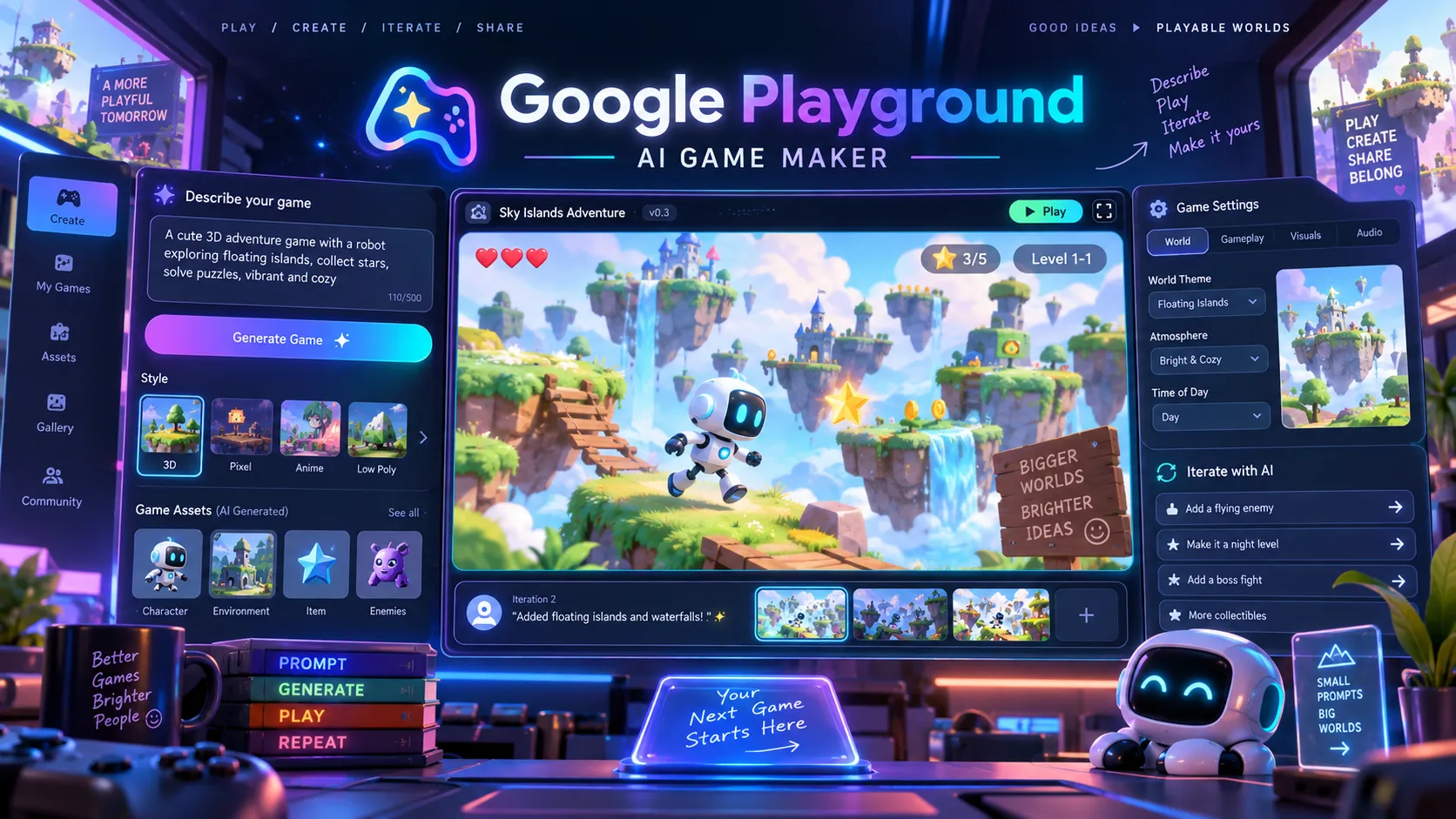
Google Playground is an AI-powered game creation and discovery platform developed by Google Labs. It enables users to transform natural-language descriptions into interactive games that can be played directly in a web browser.
Instead of learning programming languages, configuring a traditional game engine, or manually creating every visual asset, users describe the experience they want to build.
For example, a creator could request a retro arcade shooter with colorful enemies, a three-life system, increasing difficulty, and a high-score screen. Playground attempts to generate the playable experience and allows further refinement through conversational instructions.
Google introduced the platform on October 7, 2026, through its official announcement and a Google Labs post on X.
The platform is accessible at playground.google.
Google describes its central concept with the slogan: If you can think it, you can play it.
However, Playground is more than a simple text-to-game generator. It combines several functions traditionally handled by separate tools:
- AI-assisted game creation.
- Conversational gameplay editing.
- AI-generated visual assets.
- Browser-based game execution.
- Public and private publishing.
- Multiplayer functionality.
- Player leaderboards.
- Community discovery and creator profiles.
- Downloadable game source code.
This combination is important because conventional game development typically separates creation, testing, hosting, distribution, and community engagement.
Playground attempts to bring these activities into one accessible environment.
What Can You Do With Google Playground?
1. Generate Games From Natural-Language Prompts
Playground provides a conversational interface where users can describe their game ideas in ordinary language.
Creators can start from an original idea or use guided creation options for genres such as trivia, tower defense, and racing.
A useful prompt can describe multiple aspects of a game:
- Game mechanics: Movement, combat, puzzles, scoring, and winning conditions.
- Visual style: Pixel art, cartoon graphics, environments, and animations.
- Player interaction: Keyboard controls, touch input, and mouse interaction.
- Difficulty: Enemy behavior, puzzle complexity, timers, and progression.
- Game structure: Levels, start screens, restart buttons, and completion conditions.
For example, a user could describe a side-scrolling platformer featuring a character that jumps between floating islands while avoiding enemies and collecting stars.
Playground can use the description to construct an interactive prototype.
The main benefit is accessibility. Creators can focus on expressing an intended experience rather than specifying every implementation detail.
Nevertheless, a successful generation does not guarantee correct gameplay logic. Collision detection, input handling, scoring, and edge cases still require testing.
2. Modify Games Through Conversation
Playground supports iterative game editing after the initial generation.
A creator can request changes such as increasing player movement speed, adjusting enemy behavior, changing the background, adding a timer, or modifying scoring rules.
Google's Playground Help Center recommends making focused changes rather than combining many complicated requests into one instruction.
This approach is technically sensible. Changing gameplay physics, visual presentation, scoring, and multiplayer synchronization simultaneously introduces more opportunities for unexpected behavior.
A more reliable workflow modifies one system, tests the result, and continues only when the change behaves correctly.
3. Generate Visual Assets From Reference Images
Playground supports reference-image uploads that can influence the appearance of generated game assets.
Supported image formats include PNG and JPG. Uploaded images can be transformed into stylized game assets rather than simply displayed unchanged.
Video uploads are not supported in the documented creation workflow.
Reference images can help communicate a visual direction, including hand-drawn environments, colorful arcade aesthetics, or character designs.
However, image uploads do not establish ownership or permission to reproduce copyrighted artwork, recognizable people, or protected characters.
4. Create Single-Player and Multiplayer Games
Playground supports single-player experiences and provides early-preview multiplayer generation for supported games.
Multiplayer options include turn-based and real-time gameplay.
Creators must select multiplayer during the initial game creation process.
Because multiplayer is experimental, developers should not assume that every gameplay genre or networking requirement will work with production-level reliability.
Session synchronization, player disconnections, reconnect behavior, and competitive integrity require additional attention.
5. Discover and Share Games
Playground includes an Explore gallery where users can discover games published by other creators.
Players can browse experiences, follow creators, and interact with community features connected to Google Play Games profiles.
Creators can keep projects private, share unlisted links, or publish games publicly after the required safety checks.
The discovery system introduces an important distinction between Playground and a standalone AI coding assistant: games can reach players without requiring every creator to build an independent distribution website.
However, publication does not guarantee traffic, ranking visibility, or sustained engagement.
How to Create a Game With Google Playground
The following process reflects the documented creation and publishing workflow.
Step 1: Open Google Playground
Visit playground.google using a supported browser.
Users in supported regions can browse available games. Creating games requires an eligible account with generation access.
At launch, free creators may need to join a waitlist, while eligible paid Google AI subscribers can receive immediate creation access.
Step 2: Choose a Game Concept
Start with a focused idea rather than a complicated project containing dozens of unrelated mechanics.
Suitable first projects include:
- A daily word puzzle.
- A simple platformer.
- An arcade survival game.
- A reaction-time challenge.
- A geography guessing game.
- A multiple-choice trivia game.
A well-defined game concept should answer four questions:
- What does the player do repeatedly?
- What makes the experience challenging?
- How does the player succeed or fail?
- What makes the game worth playing again?
These questions establish the core gameplay loop before visual details are added.
Step 3: Write a Detailed Prompt
Describe the game genre, controls, rules, scoring, interface, and completion conditions.
For puzzle games, specify whether answers can repeat, how invalid attempts are handled, and when the game ends.
For action games, specify movement, collision behavior, difficulty progression, and restart rules.
Specific requirements reduce ambiguity, although they cannot guarantee correct implementation.
Step 4: Generate and Test the Game
Submit the prompt and allow Playground to generate the game.
Generation time varies according to complexity, system conditions, and other factors. Google does not guarantee a fixed completion time.
Once the game is playable, test the primary mechanics before evaluating visual polish.
Step 5: Refine the Gameplay
Use conversational instructions to correct problems or improve the experience.
For example, adjust difficulty, improve mobile controls, clarify instructions, or repair scoring behavior.
Test after each meaningful revision.
Step 6: Publish or Share
Choose whether the completed game should remain private, become accessible through an unlisted link, or appear in the public discovery gallery.
Publicly listed games are subject to Google's safety review and community requirements.
Step 7: Export the Source Code
Creators can download the generated source files for inspection and further development.
The export feature provides an additional workflow for developers interested in understanding or modifying the underlying implementation.
Best Google Playground Prompts: Practical Examples
A strong game-generation prompt combines a clear gameplay loop with testable rules, device requirements, and expected behavior.
The following examples are reusable starting points rather than independently verified generation results.
Prompt 1: Create a Daily Word Puzzle
Create an original, mobile-friendly daily word puzzle game.

Game concept:
Players must guess a hidden five-letter English word within six attempts.

Core requirements:
- Display a five-column guessing grid.
- Provide a physical keyboard and an on-screen keyboard.
- Validate guesses against an English word list.
- Use visual feedback for correct, misplaced, and absent letters.
- Allow a maximum of six valid guesses.
- Display a win or loss screen with the correct answer.
- Include a separate unlimited practice mode.

Daily challenge:
- Use deterministic date-based puzzle selection.
- Ensure all players receive the same daily answer.
- Define the daily reset using UTC.
- Prevent invalid guesses from consuming attempts.

Design:
- Original visual identity.
- Responsive portrait layout.
- Accessible colors and non-color indicators.
- Clear instructions and smooth animations.

Additional features:
- Local statistics for completed games.
- A replay option for practice mode.
- Shareable emoji results without revealing the answer.

Do not reproduce copyrighted game branding or artwork.
Why this prompt works: It defines game rules, scoring boundaries, input handling, accessibility requirements, and replay functionality.
A common AI-generated game failure is producing an attractive interface while overlooking logical consistency.
For daily games, developers should verify that independent devices receive the same answer on the same UTC date. A prompt alone cannot establish that the implementation is deterministic.
Prompt 2: Create a Retro Arcade Game
Build an original retro arcade game called Neon Meteor Dash.

Gameplay:
- The player controls a spaceship near the bottom of the screen.
- Meteors descend from the top at increasing speed.
- Move left and right to avoid collisions.
- Survive as long as possible to earn points.
- Begin with three lives.
- End the game when all lives are lost.

Difficulty:
- Increase meteor speed gradually.
- Avoid impossible obstacle arrangements.
- Introduce short warning animations before major hazards.

Controls:
- Arrow keys and A/D on desktop.
- Large touch controls on mobile.
- Pause when the browser tab becomes inactive.

Interface:
- Start screen with instructions.
- Live score, remaining lives, and pause button.
- Game-over screen with final score and restart action.

Art direction:
- Original neon arcade aesthetic.
- Dark background with glowing visual effects.
- Smooth, lightweight animations.
- Responsive layout for mobile and desktop.
Why this prompt works: Arcade games depend on predictable controls, collision handling, readable obstacles, and difficulty progression.
During testing, verify that obstacle patterns remain survivable, restarting resets the entire game state, and browser focus changes do not create unexpected behavior.
Prompt 3: Create a Multiplayer Trivia Game
Create an original turn-based multiplayer trivia game for 2 to 4 players.

Gameplay:
- Each match contains five rounds.
- Present one multiple-choice question per round.
- Award 100 points for a correct answer.
- Award zero points for an incorrect answer.
- Display each player's score after every round.
- Show final rankings and handle tied scores fairly.

Multiplayer requirements:
- Keep the current round consistent across players.
- Prevent duplicate submissions.
- Handle a player leaving during a round.
- Show a waiting state when other players are responding.

Design:
- Bright game-show-inspired appearance.
- Large touch-friendly answer buttons.
- Readable question text on smaller devices.
- Clear visual feedback after each answer.

Include a lobby, instructions, match screen, results screen, and replay option.
Important: Multiplayer must be selected during Playground's initial creation flow. Adding multiplayer instructions to a prompt does not replace that requirement.
Multiplayer support remains experimental, and global platform leaderboards are unavailable for multiplayer titles at launch.
Advanced Prompting Tips for Better AI-Generated Games
Describe Rules Before Visual Effects
A game can look polished while remaining mechanically incomplete.
Prioritize player controls, objectives, state transitions, scoring, and failure conditions before requesting elaborate animations.
For example, a platformer should reliably detect when a player lands on a platform before adding advanced movement effects.
Define Edge Cases Explicitly
AI-generated game logic can overlook situations outside the expected gameplay sequence.
Important edge cases include:
- Restarting after completing a game.
- Submitting invalid answers.
- Rapidly pressing the same button.
- Resizing or rotating a mobile device.
- Losing browser focus.
- Refreshing during gameplay.
- Reaching tied scores.
- Disconnecting from multiplayer sessions.
Make Each Revision Focused
Instead of requesting a complete redesign, use targeted instructions.
Keep the current gameplay rules and visual theme unchanged.

Fix only the scoring logic.

Each obstacle successfully avoided should award exactly 10 points.
Collisions must not award points.
Restarting must reset the score to zero.

Preserve the existing controls and difficulty progression.
Narrow instructions make changes easier to inspect and reduce the possibility of unintentionally modifying unrelated systems.
Use Acceptance Criteria
An effective development workflow defines what constitutes a successful result.
For a daily word game, acceptance criteria might include a consistent daily solution, a maximum of six valid attempts, and correct handling of repeated letters.
For a racing game, they might include reliable lap counting, consistent collision detection, and a functional restart system.
This shifts evaluation from whether a game looks complete to whether it behaves correctly.
Is Google Playground Free? Pricing and Generation Limits
Google Playground offers free gameplay and a limited free game-creation tier. However, access to AI creation is being introduced gradually.
According to the official Help Center, game generation uses a weekly token allowance associated with the user's access tier.
| Account type | Game access | Creation access |
|---|---|---|
| Eligible US user aged 18+ | Free access to available games | Free-tier waitlist during rollout |
| Eligible paid Google AI subscriber | Free access to available games | Immediate creation access with higher weekly limits |
| User outside supported regions | Not officially available at launch | Not officially available at launch |
As of October 8, 2026, Google's publicly available documentation does not provide a complete, stable table of exact weekly generation allowances for every subscription tier.
Specific generation counts should therefore not be inferred from subscription pricing alone.
What Happens When Game Generation Fails?
Playground temporarily reserves generation credits when creation begins.
Credits are permanently deducted only after the generated game successfully compiles and becomes playable.
If generation fails or times out, the reserved credits are automatically refunded under the documented process.
This reduces the cost of some unsuccessful attempts, although it does not provide unlimited free experimentation.
Can Family Members Share Creation Credits?
No. Google One Family Sharing does not support pooling or transferring Playground creation credits at launch.
Can You Export Google Playground Games as HTML and JavaScript?
Yes. Google explicitly supports downloading the source code of games created in Playground.
This is one of the platform's most valuable features for developers.
According to Google's documentation, the export process involves the following steps:
- Open the Your Games section.
- Select a game created under the account.
- Click the pencil icon to enter the Creation Studio.
- Select Export or Download ZIP from the top navigation.
- Download the archive containing the generated game files.
The ZIP includes HTML, JavaScript, CSS, and generated assets.
Why Source Code Export Matters
Code export provides a possible transition from AI-generated prototypes to conventional web development workflows.
Developers can inspect the implementation, understand the game logic, and identify potential problems.
The exported files may also provide a foundation for additional customization in a local development environment.
However, source export does not necessarily mean that every hosted Playground feature is portable.
For example, developers should verify whether leaderboard functionality, account authentication, multiplayer services, and external dependencies remain operational outside Playground.
Google documents the source-export feature, but does not establish that all platform services are automatically included in a standalone deployment.
Checklist Before Independently Deploying an Exported Game
- Inspect the archive for external scripts, fonts, APIs, and runtime dependencies.
- Confirm that generated assets and third-party materials have suitable usage rights.
- Test the game without the original Playground session.
- Verify that scores and progress persist correctly.
- Check mobile performance, keyboard input, and loading time.
- Review generated JavaScript for unnecessary network requests and unsafe patterns.
- Confirm that analytics and advertising integrations comply with applicable policies.
- Review the current Playground terms before commercial deployment.
The ability to download source files makes Playground more useful than a completely closed demonstration tool.
Nevertheless, the export feature should not be interpreted as a blanket commercial license or a promise of complete platform independence.
Google Playground Community, Publishing, and Leaderboards
Playground offers several game visibility modes.
| Visibility | Access | Public discovery |
|---|---|---|
| Draft | Creator during development | No |
| Private | Creator only | No |
| Unlisted | Anyone with the unique link | No |
| Listed | Public Playground users | Yes, after safety review |
New creations begin as drafts. Publishing requires an explicit creator action.
Creators can continue editing after publication. New changes remain in draft form until an updated version is published.
Global and Group Leaderboards
Playground integrates with Google Play Games profiles to support player identity and competitive features.
However, leaderboard eligibility is restricted.
Global leaderboards are currently available only for publicly listed single-player games.
They are not available for draft, private, unlisted, or multiplayer games.
Group leaderboards support invite-only competition with up to 100 members per group.
These distinctions are important for creators designing competitive experiences.
Community Moderation
Public games undergo safety screening before appearing in the discovery gallery.
Users can report policy violations, and Google can remove games that violate platform requirements.
The Playground Community Guidelines also restrict sharing or displaying external website URLs within the community.
Consequently, Playground should not be treated as an unrestricted promotional link-building platform.
Which AI Models Power Google Playground?
Google Playground combines multiple AI technologies to support game generation.
According to launch coverage from The Verge, the platform uses Google's Gemini, Nano Banana, and Lyria model families alongside internal generation and evaluation systems.
These model families provide complementary capabilities:
- Gemini: Language understanding and code-related capabilities.
- Nano Banana: AI image-generation capabilities relevant to visual asset creation.
- Lyria: Music-generation capabilities.
This does not establish that every game generation invokes every model or that Google has disclosed the exact internal workflow.
The complete orchestration process, model versions, evaluation criteria, and runtime implementation have not been publicly documented in sufficient detail to reconstruct the platform's architecture reliably.
Generating a playable game involves more than creating a single image or responding to a text prompt.
The resulting application must coordinate rendering, input handling, game state, collision behavior, rules, and interactive feedback.
Visual quality alone therefore provides limited evidence about a generated game's reliability.
Google Playground vs. Unity Spark: What's the Difference?
Google announced Playground alongside a strategic partnership with Unity.
The companies are developing Unity Spark, an advanced AI-assisted game creation experience intended to work with the broader Playground ecosystem.
| Category | Google Playground | Unity Spark |
|---|---|---|
| Main purpose | Accessible AI game creation and discovery | More sophisticated game development |
| Availability in October 2026 | Launched for eligible US adults | Testing and closed beta preparation |
| Creation interface | Natural-language prompts and conversational editing | AI-assisted creation with more advanced editing planned |
| 3D capabilities | Supports games with 3D presentation | More advanced 3D and sophisticated mechanics planned |
| Runtime | Browser-based games | Unity runtime integration planned |
| Distribution | Playground gallery and sharing | Planned integration with Playground |
The partnership was confirmed in Unity's official announcement.
Why Unity Spark Matters
Traditional game engines provide powerful capabilities but require creators to understand project structures, assets, animation, physics, and application logic.
Unity Spark aims to make more of those capabilities accessible through AI-assisted creation.
Unity CEO Matt Bromberg has emphasized the importance of meaningful creative development rather than generating simple copies of existing games from prompts.
Unity Spark is also designed to connect with the Unity Asset Store, providing access to artist-created assets.
This approach may address an important limitation of purely AI-generated content: high-quality game development still requires original design, coherent visual direction, and appropriate licensing.
Unity Spark is not yet a fully launched general-access replacement for Unity Editor.
Its capabilities should be evaluated after broader availability and independent testing.
More details are available on the Unity Spark website.
Is Google Playground the Same as Project Genie?
No. Google Playground and Project Genie are separate products with different goals.
Google DeepMind introduced Project Genie as an experimental experience for creating and exploring AI-generated interactive worlds.
Project Genie uses Genie 3 world-model technology to generate environments that respond to user movement and exploration.
Google Playground focuses on generating playable games with defined mechanics, publishing options, and community features.
The distinction is straightforward:
- Project Genie: Generate and explore interactive environments through world-model technology.
- Google Playground: Generate, play, edit, and share games with explicit gameplay rules.
- Unity Spark: Develop more sophisticated games using AI-assisted tools and Unity technology.
The existence of Project Genie does not establish that Playground uses Genie 3 as its underlying generation engine.
Google Playground vs. Roblox Build
Google is not the only company attempting to simplify game creation through AI.
Roblox offers Build, a mobile-first creation tool that converts natural-language requests into Roblox games.
| Feature | Google Playground | Roblox Build |
|---|---|---|
| Creation method | Natural-language prompts | Natural-language prompts |
| Primary environment | Web browser | Roblox mobile application |
| Publishing destination | Playground community | Roblox ecosystem |
| Target creators | Browser-game creators and experimenters | Roblox players and creators |
| Source export | Documented HTML, JS, and CSS ZIP export | Different platform-specific development workflow |
| Availability | US adults, phased rollout | Separate eligibility and regional rollout requirements |
Roblox Build concentrates on making game creation accessible within the Roblox ecosystem.
Google Playground provides a more browser-oriented experience and documents source-code export.
Neither product automatically replaces professional development environments such as Unity Editor, Godot, or Roblox Studio.
Which Platform Should Creators Choose?
Choose Google Playground when browser-based experimentation, downloadable source files, and prompt-driven prototyping are priorities.
Choose Roblox Build when the intended audience is already active on Roblox and publishing within that ecosystem is the primary goal.
Consider Unity Spark for future projects that require more sophisticated 3D mechanics, while recognizing that its broader capabilities remain under development.
Can Google Playground Games Be Monetized?
Monetization remains an important unresolved area for creators considering commercial projects.
Google's Playground Additional Terms of Service, last modified September 20, 2026, state that Google does not claim ownership of games created by users.
However, Google retains rights in the features, services, and assets it provides.
The terms also allow Google to monetize games on the platform, including through advertising, subject to obtaining the creator's permission where required.
This does not establish a public creator revenue-sharing program.
As of October 8, 2026, the reviewed documentation does not establish a standard public earnings formula or guaranteed creator payout model.
Creators considering commercial use should distinguish between three questions:
- Ownership: Who owns the original game and independently created elements?
- Licensing: What rights apply to generated assets, third-party content, and platform services?
- Monetization: What commercial activities are permitted on Playground or after exporting a game?
Downloading a ZIP file does not automatically resolve these questions.
Creators planning independent deployment should review the current terms, asset licenses, and relevant third-party agreements before monetization.
Google Playground Limitations and Common Problems
1. Regional Restrictions
Playground initially launched for users aged 18 and older in the United States.
Additional countries are planned, but a global release date has not been announced.
Users outside supported regions may be unable to access the creation workflow.
2. Limited Free Creation Access
Free creation access is rolling out gradually, and a waitlist applies during the initial release.
Weekly token allowances can also constrain repeated generation and experimentation.
3. Complex Games May Require Extensive Refinement
A game that compiles successfully is not necessarily polished.
Creators must still evaluate collision handling, scoring, difficulty balance, state persistence, accessibility, and performance.
4. Multiplayer Remains Experimental
Turn-based and real-time multiplayer generation is available in early preview.
Synchronization, reconnect handling, network behavior, and competitive fairness require additional testing.
5. Exported Code May Depend on External Services
The documented ZIP export includes web source files and assets, but independent operation of every platform-connected feature is not guaranteed.
Before self-hosting, developers should inspect dependencies and confirm whether online functionality requires services outside the exported archive.
6. Public API and Embedding Support Are Unclear
The reviewed official documentation does not establish a generally available third-party game-generation API or standardized iframe embedding program.
This should be treated as a documentation limitation rather than proof that every possible integration is technically impossible.
7. Copyright and Content Policies Still Apply
Creators remain responsible for ensuring that games comply with intellectual-property laws and platform requirements.
Unauthorized use of copyrighted characters, protected artwork, and images of people without appropriate consent may violate applicable rules.
Who Should Use Google Playground?
Beginners and Hobbyists
Playground lowers the technical barrier between having a game idea and producing a playable prototype.
It is particularly relevant to people who want to experiment with interactive entertainment without first learning a traditional game engine.
Independent Game Developers
Developers can use prompt-based creation to explore gameplay ideas, interface concepts, and rule variations.
The downloadable source-code feature provides an additional opportunity to inspect and refine generated implementations.
Web Developers
Playground is potentially useful for developers familiar with HTML, CSS, and JavaScript.
Its exported files can serve as a starting point for further development, provided that dependencies, licensing, and deployment requirements are verified.
Game Designers
Experienced designers can prototype gameplay loops, test alternative rules, and explore different visual directions.
Its usefulness depends on whether generated prototypes can be refined into stable, enjoyable experiences.
Content Creators and Gaming Communities
The discovery gallery and sharing features allow creators to distribute playable experiences and receive community feedback.
Long-term visibility will likely depend on originality, player satisfaction, and repeat engagement rather than the total number of generated games.
What Google Playground Means for the Future of AI Games
The broader significance of Playground lies in the combination of AI-assisted creation, playable experiences, and built-in distribution.
Earlier AI tools often assisted with isolated development tasks, including code generation, visual asset creation, and prototype design.
Playground attempts to combine these capabilities into a more accessible creation workflow.
Google's Unity partnership extends that strategy toward more sophisticated game development.
Three implications are particularly important.
Game Prototyping Is Becoming More Accessible
Lower technical barriers allow more people to explore game ideas that previously required programming knowledge or significant development resources.
This could increase experimentation across casual games, educational experiences, puzzles, and interactive storytelling.
Game Discovery May Become More Valuable
If AI tools significantly increase the number of playable games, effective discovery and quality evaluation become increasingly important.
Players still need ways to identify interesting mechanics, reliable experiences, and games worth returning to.
The ability to generate large numbers of games does not automatically solve the problem of helping players find the best ones.
Human Judgment Remains Important
Interesting mechanics, balanced difficulty, original creative direction, and player retention cannot be inferred from successful code generation alone.
AI can reduce implementation effort, but enjoyable games still require thoughtful design, testing, and iteration.
These are industry implications rather than confirmed measurements of Playground's commercial performance.
Large-scale public benchmarks for Playground's creator earnings, user retention, and generation quality are not yet available.
Frequently Asked Questions
Is Google Playground available now?
Yes. Google Playground launched on October 7, 2026, for eligible users aged 18 and older in the United States. Game creation access is being rolled out gradually.
Is Google Playground free?
Playing available games is free for eligible users. AI game creation includes a limited free tier, while eligible paid Google AI subscribers receive higher weekly allowances and immediate creation access during the initial rollout.
Can Google Playground generate 3D games?
Playground includes games with 3D presentation, including examples shown in Google's gallery. More sophisticated 3D development capabilities are planned through Unity Spark.
Can Google Playground create multiplayer games?
Yes. It supports turn-based and real-time multiplayer generation in early preview. Multiplayer must be selected during initial creation, and global leaderboards are unavailable for multiplayer titles at launch.
Can Google Playground games be downloaded?
Yes. Creators can export games as ZIP archives containing HTML, JavaScript, CSS, and generated assets.
Can exported games be hosted on another website?
The source export provides files that developers can inspect for independent deployment. However, platform-connected services may require additional work, and applicable licensing restrictions must be reviewed before commercial use.
Does Google Playground use Genie 3?
Google has not established that Genie 3 powers Playground's game-generation workflow. Project Genie is a separate Google DeepMind experiment focused on interactive world generation.
What is Unity Spark?
Unity Spark is an upcoming AI-assisted game creation experience developed through Google's partnership with Unity. It aims to support more advanced gameplay mechanics, sophisticated 3D games, and Unity runtime capabilities.
Is Google Playground an alternative to Roblox?
For creating and sharing simple games, Playground offers an alternative approach. However, Roblox provides a different player ecosystem, publishing environment, and creator economy. The best choice depends on the intended audience and distribution strategy.
Does Google Playground have an API?
As of October 8, 2026, the reviewed official documentation does not establish a publicly available third-party game-generation API.
Can creators earn money from Playground games?
No standard public creator revenue-sharing program has been established in the reviewed documentation. Independent commercial use requires evaluation of licensing terms, dependencies, and applicable platform policies.
Conclusion
Google Playground represents a significant new experiment in AI-powered game creation. Launched on October 7, 2026, it combines natural-language game generation with browser-based gameplay, source-code export, community discovery, multiplayer features, and game sharing.
Its strongest immediate advantage is accessibility. Creators can describe and refine interactive games without manually building every component in a conventional development environment.
The ability to export HTML, JavaScript, CSS, and generated assets makes Playground particularly interesting for developers who want to inspect and extend AI-generated projects.
Nevertheless, Playground remains an early-stage experiment. Regional restrictions, limited generation access, experimental multiplayer support, licensing considerations, and unverified deployment portability remain important limitations.
The upcoming Unity Spark integration could expand the platform's capabilities, but its more ambitious features still require broader release and independent evaluation.
For eligible creators, the most practical starting point is a small game with clear rules and measurable success conditions. Generate a prototype, test its mechanics, improve it through focused prompts, and inspect the exported code before planning a larger project.
Explore Google Playground, review the official documentation, and follow Unity Spark to discover how AI-assisted game development evolves.
Continue Reading
More articles connected to the same themes, protocols, and tools.

Referenced Tools
Browse entries that are adjacent to the topics covered in this article.





