On This Page8 sections
Key Takeaways
- EffectCraft is a free, open-source motion graphics and compositing application built in Rust. Its timeline, layers, keyframes, effects, and panels deliberately resemble Adobe After Effects, but it is an independent project rather than an Adobe product.
- The official repository documents 306 effects, 38 blend modes, JavaScript expressions, 3D cameras and lights, Lottie import/export, and multiple video export formats. Its effects catalog lists 280 effects with GPU implementations.
- EffectCraft v0.9.2, released October 12, 2026, is the latest tagged release as of October 13, 2026. Development is moving quickly, and the software remains in alpha.
- MCP support and a headless CLI make EffectCraft notable for automated animations, reproducible renders, and agent-assisted creative workflows. An AI agent controls editing commands; EffectCraft is not automatically a text-to-video generator.
- It cannot open After Effects
.aepor.aepxprojects, use Adobe plug-ins, or guarantee matching output. The maintainers estimate approximately 91% feature breadth but only 45% readiness for professional work.
What Is EffectCraft?
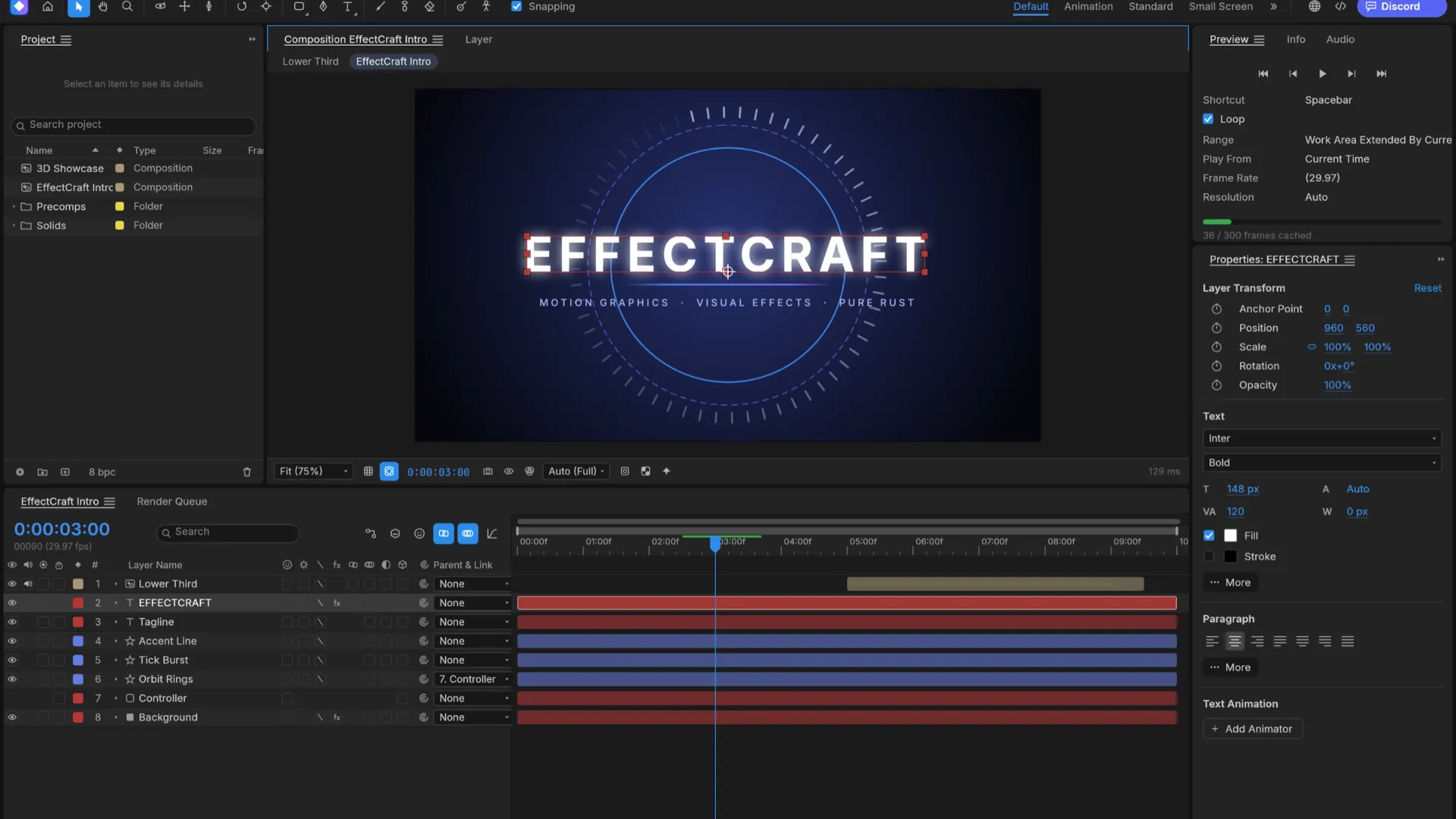
EffectCraft is an open-source motion graphics editor and visual effects compositor developed by the ArtCraft team. It is designed for work such as animated titles, kinetic typography, shape animations, promotional graphics, layered video composites, and visual effects.
The workflow is familiar to After Effects users: import footage, create a composition, arrange layers on a timeline, animate properties with keyframes, apply effects, and render the result. Its interface includes the Project panel, Composition viewer, Timeline, Effect Controls, Effects & Presets, and Render Queue.
Underneath that familiar interface is a different architecture. EffectCraft uses Rust, an egui-based interface, a shared command registry, and native project files with the .ecproj extension. The project describes its implementation as clean-room, based on publicly documented application behavior rather than Adobe's source code.
That distinction defines the product. EffectCraft aims for a recognizable editing experience, not file compatibility with Adobe After Effects. Matching effect names, keyboard shortcuts, and parameter layouts do not prove pixel-for-pixel equivalence.
EffectCraft Features: What Can It Actually Do?
The maintained effects catalog reports 306 effects, 3,017 parameters, and GPU implementations for 280 effects. All 306 are described as supporting 32-bit floating-point image processing. These are project-maintained implementation counts—not independent rendering benchmarks.
| Feature | Documented capability | Why it matters |
|---|---|---|
| Compositions and layers | Solids, footage, text, shapes, adjustment layers, nested comps, nulls, cameras, lights, parenting, track mattes | Supports familiar layer-based motion design |
| Keyframe animation | Linear, hold, Bezier, Easy Ease, roving keys, motion paths, Graph Editor | Lets creators tune timing and acceleration |
| Vector animation | Trim Paths, repeaters, gradient strokes, shape modifiers, editable masks | Useful for logos, reveals, and interface animation |
| Text and expressions | Text animators, range selectors, JavaScript expressions, pick-whip links | Enables editable titles and procedural motion |
| Effects | Blur, glow, color correction, keying, distortions, noise, particles, simulation | Covers many everyday compositing tasks |
| 3D compositing | 3D layers, cameras, depth of field, lighting, shadows | Adds spatial motion to titles and composites |
| Export | H.264, ProRes, HEVC, AV1, WebM, GIF, image sequences, Lottie | Targets video, compositing, and web workflows |
| Automation | CLI commands, JSON control channel, MCP server, scripts | Makes repeatable and agent-assisted editing possible |
Among its recognizable effects are Glow, Curves, Lumetri-style color correction, Fractal Noise, Timewarp, CC Particle World, Shatter, and keying tools. Its traditional timeline shortcuts, including P for Position and T for Opacity, reduce relearning for experienced motion designers.
Important qualification: an effect being listed as implemented does not establish its accuracy on demanding footage. The project's gap assessment explicitly identifies incomplete comparative validation and workflow reliability as major limitations.
What's New in EffectCraft v0.9.2?
The GitHub Releases page marks v0.9.2 as the latest release on October 13, 2026. Published on October 12, the release includes improvements such as:
- Import of binary and ASCII STL 3D models.
- Pasting SVG markup into a shape layer.
- Dragging a Mesh Warp grid directly in the Composition viewer.
- Copying a composition frame to the clipboard.
- Graph Editor interaction improvements and additional timeline fixes.
- Refinements involving multilayer EXR decoding, working gamma, fonts, and interface behavior.
This rapid cadence creates an SEO and usability trap: the official product landing page still describes 259 effects and lists v0.8.0 standalone assets, whereas the GitHub repository documents 306 effects and Releases offers v0.9.2. For the newest build, check GitHub Releases first.
Feature counts and support claims should always be tied to a release date, because a tutorial written for one alpha version can quickly become inaccurate.
EffectCraft Download: macOS, Windows, Linux, FreeBSD, and Web
The primary download destinations are the EffectCraft website and official GitHub release assets.
| Platform | Available package options | Installation note |
|---|---|---|
| macOS | Universal .dmg for Apple silicon and Intel | The CLI has a separate macOS zip release asset |
| Windows | MSI and portable zip for x64, x86, and ARM64 | Use the build that matches the CPU architecture |
| Linux | AppImage, Flatpak, deb, rpm, and tar.gz for supported architectures | Choose the package appropriate to the distribution |
| FreeBSD | x86_64 tarball | Check the release's platform requirements |
| Browser | Static WebAssembly bundle | Host the build; do not assume there is a managed online editor |
The project also offers selected Linux RISC-V builds. Package availability can change from release to release.
Download safety: retrieve installers from the maintainers' official release assets, match the filename to the operating system and architecture, and verify checksums against the release's SHA256SUMS.txt. Avoid unofficial repackaged installers.
How to Install and Run EffectCraft From Source
Building from source is useful for contributors and developers who want to automate editing. According to the repository setup instructions, the project requires Rust 1.95 or newer, Git, and platform-specific build dependencies.
Clone and run the desktop editor:
git clone https://github.com/storytold/effectcraft.git
cd effectcraft
cargo run --release -p effectcraft
Open its demonstration project explicitly:
cargo run --release -p effectcraft -- --demoRender the bundled demo without opening the editor:
cargo run --release -p effectcraft-cli -- render --out demo.mp4Contributors can execute the workspace tests and broader repository checks:
cargo test --workspace
cargo xtask ci
These commands use the checked-out source tree, which may be ahead of a tagged release. For reproducible comparisons, check out a specific tag or commit and record the exact build.
Getting Started: Create a Simple Animated Title
A four-second title animation is an effective first project because it exercises the editor's timeline, interpolation, text rendering, effects, and export path.
- Create a composition at 1920 × 1080, 30 fps, with a four-second duration. Use 1280 × 720 if preview performance is limited.
- Add a solid background, followed by a text layer with the desired title.
- Animate Position from outside the frame at the start to the center at approximately one second.
- Apply Easy Ease (
F9) to the selected keyframes, then inspect the speed curve in the Graph Editor. - Add a restrained Glow to the text. Compare the appearance at full resolution and at the preview resolution.
- Render an MP4 and a short PNG sequence, then save the project as
.ecproj.
The PNG sequence helps diagnose dropped frames, unexpected alpha edges, or color differences that a compressed preview can conceal.
A practical quality gate: inspect the first frame, the midpoint of the move, the final resting frame, and the final encoded output. Reopen the saved .ecproj and repeat the render. Successful preview playback alone is not an acceptance test.
EffectCraft MCP Server: How AI Agents Control Animations
EffectCraft's standout developer feature is its shared command architecture. Its desktop menus, automation CLI, local JSON control interface, and MCP server invoke the same underlying editing actions. This lets an agent inspect compositions, add layers, modify properties, generate keyframes, apply effects, and request preview frames.
The agent integration documentation identifies two operating modes:
- Headless MCP:
effectcraft-cli mcpruns an editor session without opening a window. It uses CPU rendering by default unless the optional--gpupath is enabled and a suitable adapter is available. - Live bridge:
effectcraft-cli mcp --bridge 9877connects to a running desktop editor started witheffectcraft --control 9877, allowing changes to appear in the interface and exposing UI inspection tools.
To compile the CLI from source:
cargo build --release -p effectcraft-cliFor a compatible MCP client, a minimal project-level .mcp.json configuration is:
{
  "mcpServers": {
    "effectcraft": {
      "command": "/absolute/path/to/effectcraft-cli",
      "args": ["mcp", "--autosave"]
    }
  }
}
Replace the example executable path with the installed CLI path. On macOS, download the separate CLI asset if using packaged releases. On Windows, an MSI typically installs the CLI in the application directory rather than adding it to PATH.
Claude Code users can register an already installed CLI through the terminal:
claude mcp add effectcraft -- effectcraft-cli mcpFor live control, start the two programs in separate terminals:
effectcraft --control 9877effectcraft-cli mcp --bridge 9877The MCP server exposes operations such as get_project, get_layer, set_property, add_keyframe, add_effect, render_frame, and save_project. An effective agent workflow performs one small edit, renders a verification frame, checks the result, and saves a milestone instead of modifying an entire composition without validation.
There are two important operational caveats:
- Persistence: without
--autosave, unsaved headless edits remain in memory until an explicit save. With the flag enabled, the server writes checkpoints after successful editing tool calls, but projects should still be saved to a deliberate destination. - Security: the live control port binds to local
127.0.0.1and has no authentication. Do not expose or forward it to untrusted systems. The control protocol reference provides the technical details.
MCP does not make EffectCraft a native generative video model. Its immediate benefit is programmable creation and manipulation of conventional motion-graphics projects.
EffectCraft CLI Tutorial: Make a Project and Render a Frame
The documented CLI is useful for repeatable animation templates, scripted QA, and continuous integration.
Create a new 1280 × 720 composition inside an otherwise empty project:
effectcraft-cli exec comp.new --params '{"name":"Main","width":1280,"height":720}' --empty --save-as main.ecprojAdd a solid layer to the saved project:
effectcraft-cli exec layer.newSolid '{"color":"#3366ff"}' main.ecproj --saveInspect available property paths before guessing which field to change:
effectcraft-cli props Main '#1' --project main.ecprojSet the layer's opacity and a position keyframe:
effectcraft-cli set Main '#1' transform/opacity 40 main.ecproj --save
effectcraft-cli set Main '#1' transform/position '[100,360]' --time 0 main.ecproj --save
Render a preview frame and write a JSON status response:
effectcraft-cli render-frame main.ecproj --time 1 --max-side 640 --out frame.png --jsonWhy this matters: text-based commands can be audited and repeated. A CI workflow can inspect a render frame for missing media or unexpected layout, although visual quality still requires a defined acceptance standard.
Advanced users should also inspect time-base behavior. The MCP interface supports timeBase: "comp" for applicable property/keyframe actions. Without it, commands may interpret times in layer space, which differs from composition time after trimming or time stretching. Naming layers and checking their property paths reduces automation ambiguity.
Project Files, Lottie, Video Export, and Compatibility
Native .ecproj projects are versioned JSON. That makes them inspectable and relatively friendly to version control, but it does not solve interchange with Adobe software.
| Format or workflow | What to expect |
|---|---|
.ecproj | Native EffectCraft project |
.aep / .aepx | Cannot be opened |
.ffx and third-party After Effects plug-ins | Not supported |
Lottie .json / .lottie | Import/export supported, subject to feature limitations |
| H.264 / HEVC / AV1 / WebM | Supported video outputs; check codec options and player compatibility |
| ProRes MOV and EXR sequences | Useful for higher-quality or compositing workflows |
| GIF and PNG sequences | Useful for previews, sprites, and frame inspection |
The export documentation describes H.264 MP4, ProRes MOV—including alpha-capable profiles—HEVC, AV1, VP9 WebM, GIF, audio export, and PNG/JPEG/TIFF/32-bit EXR image sequences. Codecs are implemented in Rust rather than relying on a bundled FFmpeg executable.
Lottie is not a universal motion-graphics interchange format. Many effects, 3D cameras, lights, audio, and video footage cannot be expressed faithfully in Lottie. EffectCraft's exporter returns warnings about unsupported content; inspect them and preview the actual file in the intended Lottie player.
Another subtle migration problem is media relinking. The maintainers' known-gaps report states that project media references use absolute paths and automatic relinking is not yet implemented. Transferring a project to another machine may therefore break footage links even when the .ecproj file itself opens correctly.
Can You Use EffectCraft in a Web Browser?
Yes, with a significant distinction: a browser-capable build exists, but the release offers a WebAssembly bundle to host rather than promising a fully managed cloud editor.
The web build documentation describes a WebAssembly version with the same core engine and egui interface, WebGPU support, a WebGL2 fallback, browser-side storage, and Web Workers for rendering tasks.
With the project checked out, set up the required Rust target and the matching wasm-bindgen version:
rustup target add wasm32-unknown-unknown
cargo install wasm-bindgen-cli --version 0.2.129 --locked
cargo xtask web --serve 8765
The development server runs at http://127.0.0.1:8765/. Production hosting should deliver .wasm with the correct MIME type and provide the cross-origin isolation headers the project documents.
For privacy, the web documentation says projects, media, and renders remain in browser-local storage. For resilience, export project and render files to durable storage before clearing site data or relying on a browser profile for important work.
EffectCraft vs After Effects, Fusion, Natron, and Blender
Different editing models make these applications only partially interchangeable.
| Tool | Primary workflow | Strongest reason to choose it | Important limitation |
|---|---|---|---|
| EffectCraft | Layer-based motion graphics and compositing | Free/open-source AE-like workflow with CLI and MCP automation | Alpha reliability, no .aep or AE plug-ins |
| Adobe After Effects | Mature timeline-based motion design and VFX | Existing AE projects, plug-in ecosystem, established client handoff | Proprietary and subscription-based |
| DaVinci Resolve Fusion | Node-based visual effects and compositing | Complex compositing integrated into an editing pipeline | Different workflow from AE-like layer animation |
| Natron | Open-source node-based compositing | Node workflows and OpenFX-oriented pipelines | Less direct for animation-heavy AE-style titles |
| Blender | 3D creation with node compositing | 3D models, animation, rendering, and VFX in one package | More complex for simple 2D title work |
This is a workflow comparison, not a performance ranking. No credible, repeatable benchmark currently establishes that EffectCraft renders equivalent scenes faster than After Effects, Fusion, or Blender across hardware configurations.
For an editor with a large archive of .aep deliverables, After Effects remains the practical choice. For a technically oriented creator starting a new automated animation pipeline, EffectCraft's command-driven model is more compelling.
Is EffectCraft Ready for Professional Work?
Not yet as an After Effects replacement. The project labels itself alpha and publishes an unusually useful distinction between feature breadth and real-world readiness.
Its October 10, 2026 roadmap gives two maintainer estimates:
- Approximately 91% feature breadth: how much of the After Effects feature inventory appears to exist.
- Approximately 45% readiness for real work: whether those capabilities perform reliably enough for everyday production.
Neither percentage is an independently verified benchmark. The gap exists because checkbox feature availability is much easier to demonstrate than correct output, stable scrubbing, portable projects, plug-in interoperability, and cross-platform testing.
The gap audit highlights practical weaknesses: limited output-parity testing against After Effects, reported preview and audio issues, missing hardware video encode/decode paths, missing .aep import, incomplete relinking, and uneven reliability across operating systems.
The right question is not whether EffectCraft has a particular button. It is whether a specific workload opens, previews, saves, reopens, and renders correctly on the required machines.
A Five-Point Production Acceptance Checklist
- Compatibility: can all required assets, fonts, and source media be imported?
- Fidelity: do representative frames, easing curves, masks, alpha channels, and colors look right at delivery resolution?
- Performance: can the target machine scrub and export the real composition without unacceptable delays?
- Recoverability: does the project reopen after a restart, and are automatic and manual backups working?
- Delivery: does the final file play correctly in the client's application and preserve the required metadata or transparency?
A short pilot composition that passes these checks is a more useful adoption signal than a broad feature-count comparison.
Privacy, Security, and Licensing
EffectCraft is distributed under a choice of MIT or Apache-2.0 licenses, but its bundled assets and trademarks carry separate terms. Check the repository's NOTICE, ATTRIBUTION.md, and license files before redistributing a custom build.
The maintainers state that the desktop app has no telemetry and does not make network requests without user action. Certain optional tracking features download models when requested—for example, MobileSAM for Roto Brush and MediaPipe Face Landmarker for face tracking. This is a project statement, not an independent security audit.
For teams handling confidential footage, consider three boundaries: local scripting permissions, the unauthenticated loopback control port, and the trust level of third-party AI agents that can modify or inspect projects. The ability to run locally can help privacy-conscious workflows, but local execution alone is not a guarantee of security.
Common EffectCraft Problems and Fixes
- An After Effects project will not open:
.aepand.aepximport are not supported. Start a native project and import separately exported assets where practical. - Media goes missing after moving a project: absolute file paths can break. Keep assets in predictable locations and validate the project on the destination machine.
- Dragging footage does nothing on Wayland: the documented native Wayland backend may not deliver file-drop events. Use File → Import → File or try XWayland if available.
- An MCP edit disappears: use
mcp --autosaveor callsave_projectexplicitly; unsaved headless state can be lost when the process ends. - A keyframe appears at the wrong time: inspect layer offsets and use composition-time options such as
timeBase: "comp"where appropriate. - Lottie output differs from the original: inspect exporter warnings and replace unsupported effects or 3D elements with compatible primitives.
- Preview stutters or export takes too long: reduce the preview workload, inspect CPU/GPU mode, test a shorter segment, and compare with a rendered frame sequence. Do not infer GPU acceleration merely because an effect is listed.
- Browser files disappear: back up
.ecprojfiles and exports outside browser storage.
When reporting issues, attach minimal non-sensitive reproduction steps, the version, operating system, CPU/GPU, expected output, and observed output through the GitHub issue tracker.
Frequently Asked Questions
Is EffectCraft free and open source? Yes. The application is distributed under MIT or Apache-2.0 terms, with separate licensing considerations for bundled assets and trademarks.
Is EffectCraft an Adobe After Effects clone? It is an independent, clean-room reimplementation of a familiar motion-graphics workflow. It is not an Adobe product and does not currently provide native After Effects project compatibility.
Can EffectCraft open .aep files? No. Its native project format is .ecproj.
Does EffectCraft have AI features? It offers agent control through MCP and optional model-based tracking tools. These should not be confused with a general-purpose text-to-video generation service.
Does EffectCraft support Windows and Linux? Yes, release builds exist, but the maintainers describe macOS as the most-tested environment and acknowledge platform-specific problems.
Can EffectCraft export Lottie animations? Yes. Basic compatible animation structures can be exported, but effects, 3D, audio, and footage may generate warnings or require alternate treatment.
Is EffectCraft faster than After Effects? There is no comprehensive independent benchmark establishing that. Test the actual compositions and export formats on the intended hardware.
What is the latest version? As of October 13, 2026, the latest GitHub release is v0.9.2, published October 12. Check the releases page for subsequent updates.
Conclusion
EffectCraft is a promising free After Effects alternative for new motion-graphics projects—especially when open source, local control, JSON projects, Lottie, and AI-agent automation matter. Its broad effect catalog and Rust implementation are interesting technical strengths, but they do not erase alpha-stage limitations.
The most effective next step is to download the latest EffectCraft release, create a short title animation, save and reopen the project, and compare the final MP4 or PNG sequence against the intended delivery requirements. If the test reveals a reproducible problem, report it to the maintainers. That practical validation is the right basis for deciding whether EffectCraft belongs in a production workflow.
Continue Reading
More articles connected to the same themes, protocols, and tools.
Referenced Tools
Browse entries that are adjacent to the topics covered in this article.