On This Page8 sections
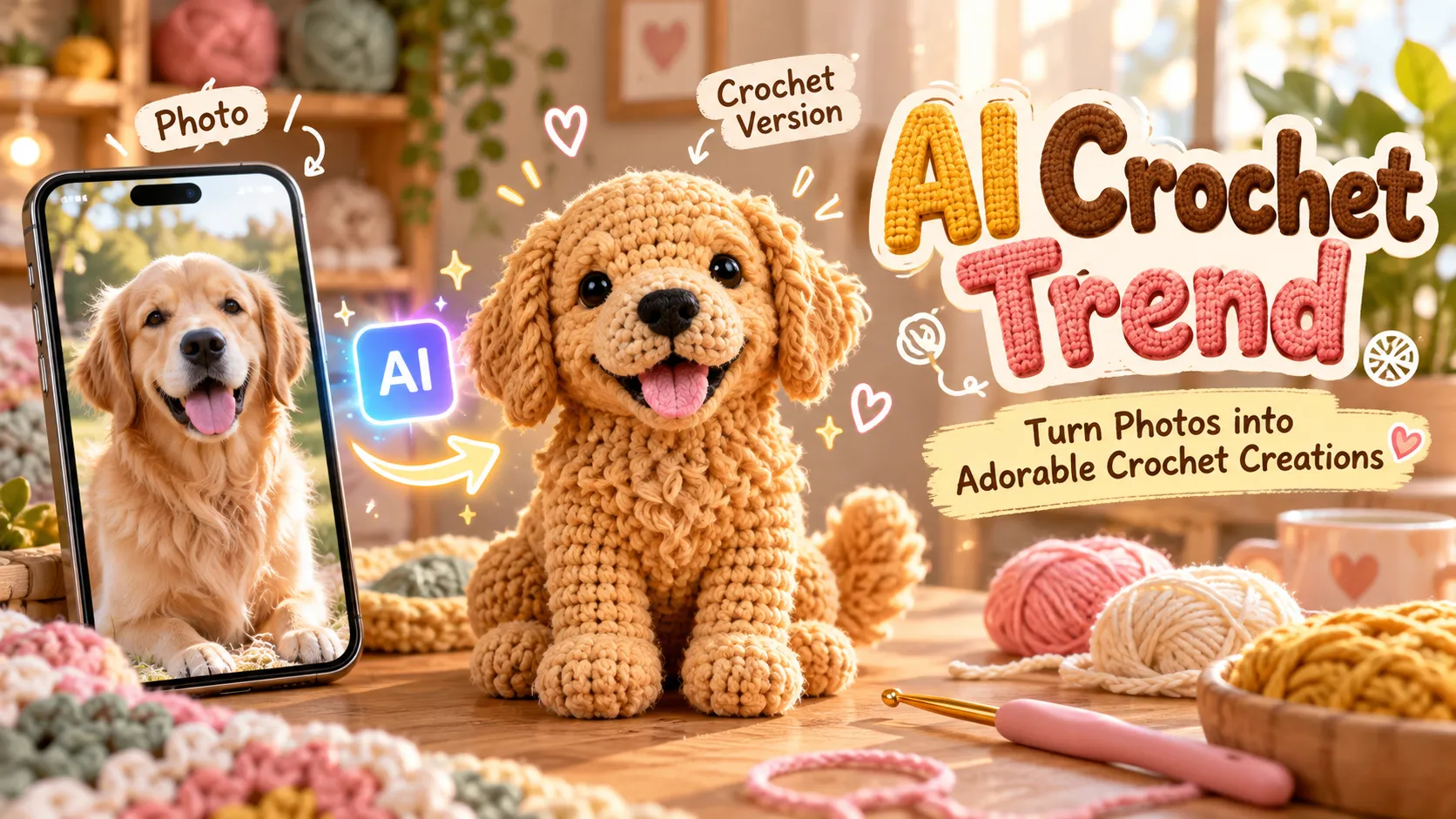
The AI Crochet Trend is transforming ordinary photographs into adorable handmade-looking crochet dolls, miniature yarn characters, and cozy knitted worlds. From pets recreated as tiny stuffed animals to portraits transformed into personalized amigurumi figures, this AI image trend combines nostalgic craftsmanship with modern generative technology.
The appeal is simple: upload a photo, describe a crochet transformation, and generate an image that looks like a real handmade yarn creation. The result can feature visible stitches, fluffy fibers, embroidered facial details, and miniature accessories without requiring any actual crocheting.
The trend has expanded beyond static images. Creators can also animate their crochet characters, produce before-and-after transformations, and build short videos for TikTok, Instagram Reels, and YouTube Shorts.
This comprehensive guide explains how to create AI crochet images and videos, which AI generators to use, the exact prompts that produce convincing yarn textures, and how to solve common problems such as plastic-looking surfaces, distorted features, and inconsistent crochet stitches.
Key Takeaways
- The AI Crochet Trend uses generative AI to transform people, pets, objects, and entire scenes into images resembling handmade crochet or knitted creations.
- ChatGPT Images and Google Gemini are practical starting points because both support uploading and editing reference photographs.
- Amigurumi-style prompts work especially well for small plush toys, recognizable pet characters, and miniature human dolls.
- Realistic crochet textures require specific instructions, including single crochet stitches, visible stitch rows, yarn fibers, seams, and stuffed construction.
- The easiest workflow involves uploading a photograph, applying a detailed crochet prompt, and refining the result with targeted editing instructions.
- For AI crochet videos, generate a consistent crochet image first, then animate it using an image-to-video tool such as CapCut.
- AI-generated crochet images are visual concepts, not automatically accurate or usable crochet patterns.
- The strongest results preserve the original subject's defining characteristics while convincingly reconstructing the subject as a physical yarn object.
What Is the AI Crochet Trend?
The AI Crochet Trend is a creative image-generation trend in which photographs or text descriptions are transformed into visual representations of crocheted objects.
Rather than applying a simple texture filter, modern image-generation models can reinterpret the structure of a subject as if it were assembled from yarn, stitches, stuffing, and handcrafted components.
For example, a golden retriever photograph might become a miniature stuffed dog made from golden cotton yarn, with floppy crocheted ears, embroidered facial features, and carefully joined limbs.
A portrait might become a small handmade doll wearing a crocheted version of the person's original outfit.
The technique is closely associated with amigurumi, the Japanese craft tradition of creating small knitted or crocheted stuffed figures.
Popular AI Crochet Trend Variations
The broader trend includes several related visual styles:
| Trend Variation | What It Creates | Best Starting Image |
|---|---|---|
| AI Crochet Doll | Miniature yarn version of a person | Clear portrait or full-body photograph |
| AI Crochet Pet | Crocheted dog, cat, or other animal | Well-lit pet photograph |
| AI Knitted Doll | Soft knitted or yarn-inspired character | Portrait or character illustration |
| AI Crochet World | Entire scene reconstructed from yarn | Landscape, room, or street photograph |
| Crochet Product Art | Everyday objects recreated as handmade yarn objects | Product photograph |
| AI Crochet Video | Animated crochet character or transformation | Generated crochet image |
| Crochet Before and After | Original image beside its yarn interpretation | Any recognizable photograph |
These variations share a similar handcrafted aesthetic but require different prompting techniques.
A portrait-to-doll transformation should prioritize identity preservation. A crochet-world transformation should prioritize material consistency across every visible object.
Why Is the AI Crochet Trend So Appealing?
The format combines recognizable subjects with an unexpected material transformation.
A familiar pet, person, or everyday object becomes something that appears small, soft, and collectible. The visual contrast makes the transformation understandable even without a long explanation.
Several characteristics contribute to its appeal.
1. Strong Before-and-After Contrast
A realistic photograph and its crochet counterpart are visually different but semantically connected.
When both images preserve the same pose, colors, and distinctive features, the transformation is immediately understandable.
2. Recognizable Handmade Details
Visible stitches, embroidered eyes, yarn strands, and imperfect seams create the impression of physical craftsmanship.
These details are important because a smooth 3D character with a fuzzy texture does not necessarily resemble an authentic crochet toy.
3. Personalized Results
The same technique can recreate a family pet, a friend, a fictional character, or a memorable object.
This makes it suitable for personal gifts, profile pictures, seasonal greetings, and creative social-media posts.
4. Easy-to-Understand Creative Process
Unlike traditional crocheting, generating an AI crochet image does not require knowledge of stitch patterns, hook sizes, or yarn tension.
A reference image and a carefully written prompt are usually enough to begin.
5. Multiple Content Formats
One successful crochet transformation can become a profile image, photo carousel, before-and-after comparison, short animation, or printable creative concept.
However, public examples of the trend do not establish reliable overall view counts or engagement rates. Claims about virality should be distinguished from verified platform analytics.
How to Make the AI Crochet Trend With ChatGPT
ChatGPT Images supports editing an uploaded photograph using natural-language instructions. This makes it suitable for preserving a recognizable subject while changing its visual appearance.
The workflow follows the capabilities described in OpenAI's official image-generation documentation.
Step 1: Open ChatGPT Images
Visit ChatGPT and start an image-generation or editing conversation.
Upload an existing photograph using the attachment option, or open the Images interface where available.
The original image should provide a clear view of the subject.
Step 2: Choose a High-Quality Photograph
For the best chance of preserving recognizable details, use a photograph with:
- A clearly visible subject.
- Natural or evenly distributed lighting.
- Sharp facial features or distinctive markings.
- Limited motion blur.
- A relatively simple composition.
- Minimal obstruction from foreground objects.
For pet transformations, photographs showing the ears, face, paws, and distinctive coat patterns are especially useful.
For human portraits, visible hairstyle, clothing, and accessories provide useful identity cues.
Step 3: Paste the AI Crochet Prompt
Use this general-purpose prompt:
Transform the main subject in the uploaded photo into an adorable handmade amigurumi crochet doll.

Preserve the subject's recognizable characteristics, including facial features, hairstyle or fur markings, original color palette, distinctive accessories, and overall personality.

Reconstruct the subject as a real physical crochet plush toy made from soft cotton yarn. Show individually recognizable single crochet stitches, tightly worked stitch rows, subtle yarn fibers, carefully joined body parts, small handmade seams, and softly stuffed proportions.

Give the doll a charming miniature appearance with a slightly oversized head and rounded body. Use embroidered details and realistic yarn construction rather than smooth plastic surfaces.

Place the finished doll on a natural wooden tabletop in a cozy craft studio. Add soft window lighting, realistic contact shadows, delicate background blur, and professional product photography.

The entire doll must look genuinely crocheted, not like a 3D character with a yarn texture applied over it.

Preserve the subject's identity. Avoid extra limbs, distorted anatomy, plastic shine, melted stitching, unreadable text, and unrealistic floating objects.

Aspect ratio: 3:4 portrait.
Step 4: Generate the Image
Submit the photograph and prompt together.
The model will attempt to reinterpret the subject as a physical crochet object while incorporating the requested materials and photographic setting.
Evaluate the first result before making further changes.
Step 5: Refine the Crochet Texture
If the output resembles a smooth plastic toy, use a focused correction:
Keep the same character, pose, color palette, and composition. Improve only the handmade crochet construction. Replace all smooth surfaces with clearly defined single crochet stitches and visible yarn fibers. Add realistic stitch rows, subtle handmade seams, and natural textile imperfections. Remove any glossy plastic or synthetic rubber appearance.If the subject no longer resembles the original, use an identity-focused correction:
Keep the handmade crochet style, but make the doll more recognizable as the subject in the reference photo. Restore the original hairstyle or fur pattern, clothing colors, distinctive facial details, and accessories. Do not redesign the character or change the overall composition.Step 6: Save the Final Result
Once the transformation is satisfactory, save the image in an available high-quality format.
For social-media use, portrait compositions such as 3:4 or 4:5 work well for static posts. A vertical 9:16 composition is preferable when the result will become a full-screen short video.
How to Create the AI Crochet Trend With Google Gemini
Google Gemini also supports generating and editing images using uploaded references.
Google's image-generation family, commonly associated with the Nano Banana name, supports natural-language image-editing workflows. Available models and limits can change by account and region.
The official Gemini image-generation help page explains how to edit uploaded images and generated results.
Step-by-Step Gemini Workflow
- Open Gemini and choose an interface that supports image generation or editing.
- Upload a clear portrait, pet photograph, or object image.
- Paste a crochet transformation prompt.
- Generate the first result.
- Inspect the accuracy of the subject and the visibility of the yarn stitches.
- Request targeted corrections rather than regenerating an entirely new composition unnecessarily.
- Save the finished image.
A useful Gemini prompt is:
Use the uploaded photograph as the primary reference. Reimagine the subject as an intricately handcrafted miniature crochet amigurumi figure.

Maintain the identity, main colors, silhouette, pose, and distinctive features of the original subject.

Construct the figure entirely from tightly crocheted cotton yarn, with authentic single crochet stitches, visible stitch rows, slightly fuzzy fibers, subtle seams, and carefully embroidered details.

Photograph the completed toy resting in two natural human hands, with realistic finger placement and contact shadows. Use warm daylight, shallow depth of field, and a softly blurred indoor background.

Make the result look like an authentic handmade collectible photographed with a real camera. Avoid plastic surfaces, generic facial features, extra fingers, impossible seams, and artificial-looking materials.
The most important instruction is to preserve the subject's identity while replacing its material and construction.
Without this constraint, the model may produce a generic crocheted animal or doll that has little resemblance to the uploaded photograph.
Best AI Tools for the Crochet Trend Compared
Different tools offer different levels of control over identity, style, composition, and animation.
| AI Tool | Main Capability | Best For | Important Limitation |
|---|---|---|---|
| ChatGPT Images | Prompt-based image generation and editing | Personalized crochet dolls and iterative corrections | Small identity details may change |
| Google Gemini | Reference-image editing and image generation | Pet portraits, characters, and detailed yarn scenes | Output consistency varies by model and prompt |
| Adobe Firefly | Style-reference and controlled image generation | Consistent craft aesthetics and design concepts | A style reference alone may not preserve exact identity |
| TalkPix | Dedicated knitted-doll photo template | Simple one-photo yarn-doll transformations | Preset composition and credit requirements |
| VdoBloom | Crochet and knitted-doll image templates | Quick preset-based image generation | Customization depends on the selected workflow |
| CapCut | AI image-to-video and editing | Crochet transformations and social-media videos | Animation can introduce texture flicker or shape changes |
Useful official resources include Adobe Firefly, CapCut's image-to-video generator, the TalkPix knitted-doll template, and VdoBloom's crochet trend guide.
Recommended approach: Start with ChatGPT Images or Gemini when recognizable identity matters. Consider dedicated templates for convenience, and use CapCut or another compatible video generator when animation is required.
Pricing, free credits, output resolution, and commercial-use rights should be verified directly. A tool advertised as free may still impose generation limits or require credits for certain features.
8 Best AI Crochet Trend Prompts to Copy and Paste
The following prompts are designed for distinct applications. Each can be adapted to an image generator that supports the required reference-image functionality.
Prompt 1: AI Crochet Doll From a Selfie
Transform the person in the reference photo into a charming handmade crochet amigurumi doll. Preserve their recognizable face, hairstyle, hair color, skin-tone representation, outfit colors, and distinctive accessories. Create a miniature plush character with a slightly oversized round head, carefully stitched arms and legs, embroidered facial features, and authentic single crochet stitch texture. Soft cotton yarn, visible fiber strands, tiny handmade seams, realistic stuffed construction. Place the doll on a wooden craft table with warm window lighting and a softly blurred background. Professional macro product photography, adorable but recognizable, 3:4 portrait composition.Best for: Selfies, profile pictures, personalized keepsakes, and social-media portraits.
Prompt 2: AI Crochet Dog From a Pet Photo
Turn the dog in the uploaded photograph into a realistic handmade crochet amigurumi plush toy. Faithfully preserve the dog's breed characteristics, fur colors, ear shape, facial markings, nose shape, and distinctive expression. Recreate the fur using carefully selected yarn colors and visible crochet stitch rows. Make the ears, legs, tail, and head appear as individually crocheted pieces assembled with subtle seams. Use small embroidered facial details, realistic yarn fibers, and softly stuffed proportions. Place the completed plush dog on a cozy wooden tabletop beside a ball of yarn and a crochet hook. Warm natural lighting, realistic contact shadows, shallow depth of field, professional product photography.Best for: Dog portraits, pet memorial concepts, and personalized pet-themed images.
Prompt 3: AI Crochet Cat
Recreate the cat in the reference image as a miniature handmade crocheted plush toy. Preserve the original coat pattern, ear shape, eye color, facial markings, whisker placement, and overall expression. Use tightly worked single crochet stitches and carefully shaped yarn sections to represent the cat's fur patterns. Add delicate embroidered whiskers, softly stuffed paws, a curled crochet tail, and subtle handcrafted imperfections. Position the crochet cat sitting on a folded linen blanket in warm afternoon sunlight. Realistic macro photography, authentic yarn texture, cozy handmade aesthetic, 4:5 composition.Best for: Cat owners, animal-themed accounts, and personalized artwork.
Prompt 4: Two People as Crochet Dolls
Transform the two adults in the reference photo into a matching pair of handmade crochet amigurumi dolls. Preserve each person's unique hairstyle, outfit colors, distinguishing features, and relative position. Ensure the two dolls remain clearly identifiable as separate individuals. Construct both characters using detailed cotton yarn stitches, small embroidered faces, realistic stuffed bodies, and tiny handmade clothing. Place them side by side on a wooden shelf in a cozy craft room. Soft natural lighting, realistic shadows, miniature collectible photography. Do not merge faces, swap clothing, duplicate limbs, or alter the number of subjects.Best for: Couple portraits, friendship gifts, and family-themed creative images.
Prompt 5: Crochet Food Photography
Create a photorealistic miniature crocheted version of a strawberry cake. Every component must be made from yarn, including the cake layers, frosting, strawberries, and decorative details. Show dense, authentic crochet stitches, carefully joined sections, embroidered accents, and visible soft fiber texture. Place the crochet cake on a real ceramic plate on a light wooden kitchen table. Soft morning sunlight, shallow depth of field, beautiful handmade craft photography, natural shadows, no plastic or edible-looking smooth surfaces, 1:1 composition.Best for: Food-themed content, handmade product concepts, and playful creative posts.
Prompt 6: AI Crochet World
Transform the entire reference scene into a whimsical handcrafted crochet world. Reconstruct every visible element using realistic yarn and crochet techniques, including buildings, roads, trees, clouds, furniture, animals, and background objects. Preserve the original layout, perspective, relative scale, and overall color palette. Use visible crochet stitch rows, yarn fibers, embroidered details, soft handmade seams, and realistic three-dimensional textile construction. The scene should resemble an intricately crafted miniature diorama photographed in a studio. Warm natural lighting, subtle shadows, detailed textile surfaces. No smooth plastic, realistic human skin, or ordinary unconverted materials inside the crochet world.Best for: AI knitted-world videos, imaginative scenes, landscapes, and animated environments.
Prompt 7: Crochet Doll Held in Human Hands
Create a close-up photograph of a handmade crochet doll based on the uploaded person or animal. Preserve the subject's most recognizable features and translate them into a miniature amigurumi design. The doll is gently held in two realistic human hands, emphasizing its small physical size. Show clearly defined single crochet stitches, soft yarn fibers, tiny embroidered details, rounded stuffed proportions, and subtle handcrafted asymmetry. Natural skin texture on the hands, believable finger placement, accurate contact shadows, cozy indoor environment, warm daylight, shallow depth of field, premium craft photography, 3:4 portrait.Best for: Emotional keepsake imagery and visually clear miniature-toy transformations.
Prompt 8: Original Crochet Character
Design an original adorable crochet amigurumi character shaped like a small smiling mushroom. Create a rounded cream-colored body, a soft coral-red mushroom cap with tiny embroidered cream spots, short crocheted arms, small stuffed feet, and a friendly embroidered face. Construct the entire character from tightly crocheted cotton yarn with visible stitch patterns, realistic fibers, and handmade seams. Place the figure in a miniature woodland craft scene with soft moss-like yarn decorations and warm natural lighting. Photorealistic miniature product photography, charming collectible aesthetic, detailed crochet construction, 1:1 composition.Best for: Original characters, collectible concepts, seasonal artwork, and brand mascots.
The Secret to Realistic AI Crochet: Prompt Engineering
Many weak AI crochet images have the correct subject but the wrong material. They look like ordinary 3D toys with a generic knitted texture applied afterward.
The difference between convincing crochet and artificial-looking crochet lies in how the prompt describes material, stitch construction, object assembly, and photographic evidence of physical scale.
1. Specify Real Crochet Stitches
The word crochet by itself is often insufficient.
Use construction terms such as:
- Single crochet stitches: Small, densely arranged stitches commonly used for tightly constructed amigurumi.
- Visible stitch rows: Clearly defined rows or rounds of connected loops.
- Tight crochet gauge: Dense fabric with relatively small openings.
- Spiral rounds: A plausible construction method for rounded heads and bodies.
- Joined crochet components: Separate ears, limbs, and accessories sewn to the main figure.
These details help direct the model toward a plausible physical textile object.
2. Describe the Yarn Material
Different yarn types produce different visual effects.
| Material Description | Expected Visual Character |
|---|---|
| Cotton yarn | Crisp, visible stitches and relatively smooth fibers |
| Acrylic yarn | Soft, colorful plush appearance |
| Chenille yarn | Thick, velvety, fluffy toy appearance |
| Wool yarn | Natural fiber texture and subtle fuzz |
| Fine yarn | Small, detailed stitches |
| Chunky yarn | Large, visibly pronounced loops |
Cotton or tightly worked acrylic yarn is a useful starting point when individual crochet stitches should remain visible.
Chunky chenille can create an adorable plush appearance but may hide the underlying stitch definition.
3. Include Construction Details
A convincing crocheted object should look assembled, not manufactured from a single smooth surface.
Useful instructions include:
- Individually crocheted arms and legs.
- Small seams where components are attached.
- Slight handmade asymmetry.
- Soft stuffing beneath the yarn surface.
- Embroidered noses, mouths, and decorative elements.
- A believable base where the toy touches the table.
Not every seam needs to be prominently visible. Overemphasizing seams can make the output look damaged or poorly assembled.
4. Choose Realistic Photography
Lighting and environmental context strongly affect perceived material authenticity.
A toy resting on a wooden table with natural contact shadows appears more physically grounded than the same toy floating against an abstract background.
For product-style images, a useful photographic direction is:
Professional macro product photography, soft side-window lighting, shallow depth of field, realistic contact shadows, natural fiber detail, warm neutral background, sharp subject and softly blurred surroundings.A close-up view can emphasize individual stitches, while a wider composition better communicates the character's overall proportions.
5. Use Negative Constraints Carefully
Negative instructions can help prevent common visual failures:
Avoid smooth plastic, shiny vinyl, flat printed yarn patterns, melted stitches, extra limbs, duplicated body parts, inconsistent yarn texture, distorted faces, floating objects, unrealistic shadows, excessive blur, text artifacts, and watermarks.Not every image generator supports a separate negative-prompt field. When it does not, these constraints can be incorporated into the main prompt.
Crochet vs. Knitted AI Images: What Is the Difference?
The terms AI crochet, AI knitted doll, and AI yarn art are often used interchangeably in online image prompts, but crochet and knitting are different textile techniques.
According to the Craft Yarn Council, crochet typically uses a hook to create interlocking stitches, while knitting generally uses two needles to form rows of interconnected loops.
Crochet Appearance
- Compact stitches with pronounced texture.
- Rounded shapes and dense plush construction.
- Separate components joined together.
- Particularly suitable for amigurumi animals and miniature dolls.
Knitted Appearance
- More recognizable V-shaped stitch columns or ribbed patterns.
- Flexible fabric resembling knitted garments.
- Often suitable for sweaters, blankets, scarves, and large yarn-covered environments.
Why the Distinction Matters
If a prompt requests crochet but also specifies a prominent stockinette knit pattern, the model may combine incompatible visual cues.
For an amigurumi toy, prioritize single crochet stitches, tight rounds, and sewn components.
For a knitted sweater or knitted landscape, use stockinette stitches, ribbed knitting, and soft knitted fabric where appropriate.
The distinction improves visual specificity, although generative images still cannot guarantee technically correct stitch construction.
How to Make an AI Crochet Trend Video
The AI Crochet Trend can also be adapted into short animations featuring moving yarn characters or transformations from ordinary photographs into crochet art.
The most controllable approach separates the workflow into two stages: generate the crochet image first, then animate it.
Step 1: Generate a High-Quality Crochet Image
Use ChatGPT Images, Gemini, or another compatible image generator to create a finished crochet character.
Resolve visible problems with the yarn texture, facial details, and object proportions before generating motion.
Step 2: Choose an Image-to-Video Generator
Open a tool that supports image-to-video generation, such as CapCut.
CapCut supports image-based video creation and subsequent editing, although exact options vary across products and versions.
Step 3: Upload the Crochet Image
Import the completed crochet illustration as the visual reference.
A centered character with enough room around its body generally provides more space for animation.
Step 4: Use a Gentle Motion Prompt
Animate this handmade crochet character as a real physical yarn toy. The character slowly turns its head, blinks gently, raises one small crocheted paw, and gives a playful wave. Preserve the exact stitch pattern, yarn colors, embroidered facial details, body proportions, and handmade construction throughout the animation. Soft natural lighting, fixed camera, realistic physical movement, consistent background, smooth continuous motion. Do not transform the yarn into skin, plastic, or another material.The prompt prioritizes subtle motion because large movements can expose limitations in the model's understanding of the character's construction.
Step 5: Keep the Animation Short
A 4–6 second clip is a useful starting target when supported by the chosen model.
For simple crochet animations, one meaningful action is usually easier to control than several simultaneous movements.
Step 6: Review Temporal Consistency
Inspect the entire generated video, especially the middle and final frames.
Look for:
- Stitch rows appearing or disappearing.
- Facial details changing position.
- Limbs becoming longer or shorter.
- Yarn textures turning into smooth surfaces.
- Accessories moving independently of the character.
- Background objects changing shape.
Reject visibly inconsistent generations rather than assuming that a high-quality first frame guarantees a high-quality video.
Step 7: Edit and Export
Use a video editor to add captions, transitions, and appropriately licensed background music.
For TikTok, Reels, and Shorts, a 9:16 vertical composition is a practical default. When the source supports it, 1080 × 1920 is a suitable delivery resolution.
AI Crochet Before-and-After Video Tutorial
Before-and-after videos are a useful way to emphasize the material transformation.
A simple production method avoids asking the video model to animate an entire complex material conversion.
Recommended Workflow
- Save the original photograph.
- Generate its crochet counterpart.
- Align the two images to approximately the same composition and subject position.
- Import both into a video editor.
- Display the original photograph briefly.
- Add a quick transition to the crochet image.
- Hold the final crochet image long enough for viewers to recognize the details.
- Add optional subtle camera movement or an independently generated crochet animation.
For a particularly clean transition, preserve the original pose and camera angle during image generation.
A useful transformation prompt is:
Transform only the main subject into a realistic handmade crochet doll. Preserve the original camera angle, composition, framing, subject position, and surrounding environment as closely as possible. Keep the background photorealistic and unchanged. Reconstruct the subject from authentic visible yarn stitches, sewn components, and soft stuffing while retaining recognizable identity details.This differs from prompts that recreate the entire image as a cozy craft-studio photograph.
Technical insight: Keeping the background stable makes the transformation easier to understand and reduces distracting visual changes during editing.
Best AI Crochet Trend Ideas for TikTok and Instagram
The format can be adapted to several content categories without simply repeating the same transformation.
1. My Pet as a Crochet Doll
Show a pet photograph followed by a miniature crochet version that preserves the animal's distinctive markings and expression.
2. Crochet Version of My Outfit
Transform a full-body fashion photograph into an amigurumi doll wearing a recognizable miniature version of the original clothes.
3. Best Friends as Crochet Characters
Turn a photograph of two friends into matching yarn dolls while maintaining their individual hairstyles, accessories, and clothing colors.
4. My Room in a Crochet World
Reimagine a bedroom with crocheted furniture, yarn blankets, knitted wall decorations, and soft fabric architecture.
5. Everyday Objects as Crochet Toys
Transform headphones, cameras, coffee cups, fruit, or other recognizable items into miniature yarn collectibles.
6. Crochet Pet Transformation Video
Start with the original pet photograph and reveal the handmade-looking crochet version with a short animation.
7. Seasonal Crochet Characters
Create Halloween pumpkins, Christmas ornaments, Valentine's Day hearts, or spring flowers using consistent yarn textures.
8. Crochet Food Collection
Generate a coordinated series of crocheted desserts, fruit, bread, and miniature meals using a shared photographic style.
9. Crochet Character Animation
Animate an original yarn creature waving, blinking, or making a small movement.
10. AI Crochet Miniature Collection
Create a set of related crochet figures with matching yarn palettes, lighting, and background compositions.
For series content, consistency across images matters more than adding many unrelated visual effects.
Common AI Crochet Problems and How to Fix Them
| Problem | Likely Cause | Recommended Solution |
|---|---|---|
| The doll looks plastic | Insufficient textile and construction detail | Specify visible stitches, yarn fibers, and sewn parts |
| The result does not resemble the subject | Weak identity preservation | Emphasize distinctive markings, hairstyle, outfit, and accessories |
| Crochet stitches look melted | Overcomplicated texture generation | Simplify the composition and request uniform stitch rows |
| The doll has extra limbs | Ambiguous pose or overlapping subjects | Use a clearer photograph and explicitly define body parts |
| The background also becomes yarn | Unclear transformation scope | Specify that only the main subject should change |
| The toy looks too realistic | Weak miniaturization instructions | Request stuffed proportions, a miniature scale, and embroidered details |
| The subject becomes a generic cartoon | Too much emphasis on illustration style | Request photorealistic product photography of a physical handmade toy |
| Multiple people merge together | Multi-subject generation difficulty | Clearly specify subject count and individual identifying details |
| The video texture flickers | Poor temporal consistency | Reduce movement and use a stable source image |
| The doll appears to float | Missing physical context | Add tabletop contact, realistic shadows, and grounded positioning |
| Text on a name tag is unreadable | Image-generation text limitations | Add the label separately during editing |
Why Does AI Crochet Sometimes Look Like Plastic?
A prompt containing only cute crochet toy may communicate the overall concept without sufficiently defining the physical surface.
As a result, the model can generate a smooth object with superficial yarn patterns rather than a figure constructed from interlocking stitches.
The solution is to describe how the object is made: yarn type, stitch rows, component seams, stuffing, and embroidered finishing details.
Why Does the Crochet Doll Lose Its Resemblance?
Turning a human face or animal into a miniature doll changes its proportions and surface details.
If the transformation exaggerates the head, simplifies facial features, or alters distinctive markings too aggressively, the subject may become unrecognizable.
The best correction is to preserve a small set of identity-defining characteristics before modifying the broader artistic style.
Why Are AI Crochet Video Results Sometimes Unstable?
An image-to-video model must generate new frames without necessarily having a complete physical representation of the crocheted object.
During motion, stitches and seams can shift because the model is approximating the appearance of the object over time.
Small, predictable movements and a stable camera reduce the number of details that must be reconstructed.
Advanced Tips for Better AI Crochet Images
Use a Two-Pass Workflow
Separate subject preservation from material refinement.
Pass 1: Identity and composition
Generate a recognizable miniature character with the correct pose, clothing, and facial details.
Pass 2: Textile construction
Refine stitch definition, yarn fibers, component seams, and physical realism without changing the underlying character.
This approach makes it easier to identify which instruction caused an improvement or regression.
Control the Transformation Scope
Decide whether the goal is a crochet doll inside a realistic environment or an entirely crocheted world.
These require different instructions.
For a doll transformation, explicitly preserve the background.
For a knitted-world transformation, specify that every relevant environmental element should use textile materials.
Preserve Distinctive Colors
Color consistency is especially important for pets, branded objects, and recognizable clothing.
Instead of requesting a generic brown dog, describe the exact placement of cream, black, tan, or white markings.
For difficult subjects, a close-up reference photograph can help preserve distinguishing details.
Avoid Excessively Complicated Backgrounds
Detailed backgrounds compete with the subject for visual attention and can introduce more generation errors.
For a first attempt, use a wooden table, light fabric backdrop, or neutral studio setting.
Use an Appropriate Aspect Ratio
| Content Type | Suggested Aspect Ratio |
|---|---|
| Social-media portrait | 4:5 |
| Crochet doll photography | 3:4 |
| Profile picture | 1:1 |
| TikTok or Reels video | 9:16 |
| Blog hero image | 16:9 |
| Product gallery | 1:1 or 4:5 |
These are practical composition choices rather than requirements imposed by every AI platform.
Add Text Outside the Image Generator
AI-generated labels, name tags, and tiny lettering can contain spelling errors.
For exact text, generate the crochet artwork first and add captions, names, or branding using a conventional editor.
Can AI Crochet Images Become Real Crochet Patterns?
An AI-generated crochet image is not automatically a usable crochet pattern.
A physically reproducible pattern requires information that a rendered image generally does not provide, including:
- Yarn weight and material.
- Crochet hook size.
- Stitch counts for every row or round.
- Increases and decreases for shaping.
- Component assembly instructions.
- Stuffing and finishing methods.
- Gauge, dimensions, and material quantities.
A convincing-looking AI image may even contain stitch arrangements that would be difficult or impossible to reproduce exactly with real yarn.
The Craft Yarn Council's yarn standards explain how yarn weight, stitch gauge, and tool sizes relate to practical textile construction.
Crocheters can use AI images as design inspiration, but a pattern should be drafted, tested, and corrected before being described as physically workable.
This distinction matters especially for anyone planning to sell finished crochet kits or downloadable patterns.
Is the AI Crochet Trend Free?
It is possible to begin experimenting with AI crochet images using tools that offer free access or limited free-generation allowances.
However, access conditions differ among platforms and can change over time.
Potential limitations include:
- Daily or periodic image-generation quotas.
- Credit costs for individual renders.
- Limits on image resolution.
- Subscription requirements for certain models.
- Paid image-to-video generation.
- Watermarks on exported content.
- Restrictions on commercial licensing.
Dedicated crochet templates can be convenient, but they are not necessarily more economical than general-purpose image editors.
For cost-efficient experimentation, begin with one clear photograph and one detailed prompt. Refine an existing result when the tool supports targeted editing instead of repeatedly generating unrelated images.
Before purchasing credits, verify whether unsuccessful or rejected generations are billable.
Privacy, Copyright, and Responsible Use
AI crochet transformations are generally playful artistic content, but creators should still consider the rights associated with uploaded photographs and generated outputs.
Use Photographs With Appropriate Permission
Use personally owned photographs or images that can lawfully be edited and shared.
When transforming another person's portrait, especially for public or commercial use, obtain appropriate consent.
Be particularly cautious when uploading photographs of children or other sensitive personal images to unfamiliar services.
Review Image-Upload Policies
Different AI platforms have different retention, training, deletion, and privacy policies.
Creators should review the applicable terms before uploading private photographs, client images, or commercially sensitive designs.
Check Commercial-Use Rights
A successful image generation does not automatically guarantee permission to use every underlying photograph, character, logo, or protected design commercially.
For commercial projects, verify the AI platform's terms and the rights associated with reference material.
Disclose AI-Generated Content When Appropriate
A crochet illustration is usually visibly stylized, but its origin should not be misrepresented as a real handmade product.
For realistic or significantly AI-altered content, review the relevant platform's disclosure requirements. TikTok's AI-generated content policy provides guidance on labeling synthetic media.
If a generated crochet doll is presented as a product for sale, distinguish the visual mockup from an actual handmade item.
Frequently Asked Questions
What Is the AI Crochet Trend?
The AI Crochet Trend is a creative AI image effect that transforms photographs and other subjects into visuals resembling handmade crochet dolls, stuffed yarn animals, or knitted environments.
How Do You Do the AI Crochet Trend?
Upload a clear photograph to an image generator such as ChatGPT Images or Gemini, apply a detailed amigurumi crochet prompt, and generate the result. Refine the image to improve stitches, identity, and material realism.
What Is the Best AI Crochet Prompt?
A strong prompt specifies the original subject, handmade amigurumi construction, visible single crochet stitches, yarn fibers, sewn components, recognizable identity details, realistic lighting, and a physical photographic setting.
Which AI App Makes Crochet Pictures?
ChatGPT Images and Google Gemini support reference-image editing. Dedicated templates, including knitted-doll and crochet-themed generators, can provide simpler preset-based workflows.
Can ChatGPT Turn a Photo Into a Crochet Doll?
Yes. ChatGPT Images supports editing uploaded images using natural-language instructions, making it suitable for crochet-style transformations.
Can Gemini Generate AI Crochet Images?
Yes. Gemini supports image editing with uploaded reference photographs. A detailed prompt can request a miniature crocheted interpretation of the original subject.
Can the AI Crochet Trend Be Used for Pets?
Yes. Dogs, cats, and other animals are suitable subjects. The best results preserve distinctive colors, facial markings, ear shapes, and recognizable expressions.
Can AI Crochet Images Be Animated?
Yes. Generated crochet images can be used as inputs to compatible image-to-video tools. Short, gentle motions are typically easier to keep visually consistent than complex character animation.
Is AI Crochet the Same as AI Knitting?
Not exactly. Crochet and knitting are different textile techniques. AI prompts often mix the terms, but specific stitch descriptions can help produce more authentic-looking results.
Can AI Crochet Images Be Made Without a Reference Photo?
Yes. Text-to-image generation can create original crochet characters and objects from written descriptions. A reference image is most useful when preserving the appearance of a specific person, animal, or object.
How Can AI Crochet Stitches Look More Realistic?
Specify individual single crochet stitches, tightly worked rounds, visible yarn fibers, plausible seams, stuffed construction, and natural lighting. Avoid prompts that rely only on generic words such as cute, fluffy, or knitted.
Why Does an AI Crochet Doll Look Different From the Original Person?
The transformation simplifies and exaggerates features while changing the subject's material and proportions. More explicit identity-preservation instructions and a clearer reference image can improve recognition.
Is the AI Crochet Trend Free?
Some AI tools offer free access or limited free-generation quotas. Advanced image models, premium templates, and video-generation features may require credits or subscriptions.
Can AI Crochet Images Be Used Commercially?
Potentially, depending on the image generator's terms, the rights to the original reference material, and the intended use. Generated art should not be marketed as a photograph of a physical handmade product unless that product actually exists.
Can an AI Crochet Picture Be Converted Into a Real Pattern?
It can serve as a design reference, but producing a reliable real-world crochet pattern requires stitch counts, yarn specifications, shaping instructions, assembly details, and physical testing.
What Aspect Ratio Works Best for AI Crochet Trend Videos?
A 9:16 vertical composition is generally the most suitable starting format for TikTok, Instagram Reels, and YouTube Shorts. Static images can use 3:4, 4:5, or square compositions depending on their intended use.
Conclusion
The AI Crochet Trend offers an accessible way to transform ordinary photographs into charming handmade-looking yarn creations. Whether the goal is a miniature pet, a personalized crochet doll, an imaginary knitted world, or a short animated video, the core process remains the same: start with a recognizable subject, describe authentic textile construction, and refine the result until the material looks convincing.
For beginners, ChatGPT Images and Google Gemini provide straightforward reference-image editing workflows. Dedicated crochet templates simplify the process further, while image-to-video tools allow finished crochet characters to become short animations.
The most important lesson is that convincing crochet imagery requires more than a generic style filter. Visible stitches, believable yarn fibers, handcrafted seams, consistent identity, and natural photographic lighting are what make a generated doll appear like a real physical object.
Ready to try the AI Crochet Trend? Choose a favorite pet photo or portrait, copy one of the prompts above, generate a crochet version, and experiment with a before-and-after transformation or a short animated clip. For the best results, refine the stitch texture and recognizable features before adding more elaborate backgrounds or movement.
Continue Reading
More articles connected to the same themes, protocols, and tools.
How to Make a Babydoll Dance AI Video in 2026: One-Photo Templates, Kling Motion Control & Prompts
How to Make the Viral Hotel Lobby AI Video With 2 Photos (2026 Guide + Prompts)
How to Generate the Viral Nicole Kidman Dance AI Video: Step-by-Step Guide, Prompts & Best AI Tools (2026)
Referenced Tools
Browse entries that are adjacent to the topics covered in this article.