
 FlutterFlowFlutterFlow is a visual Flutter app builder positioned between no-code app builders, AI prompt-to-app tools, and developer-oriented cross-platform mobile workflows.
Draftbit
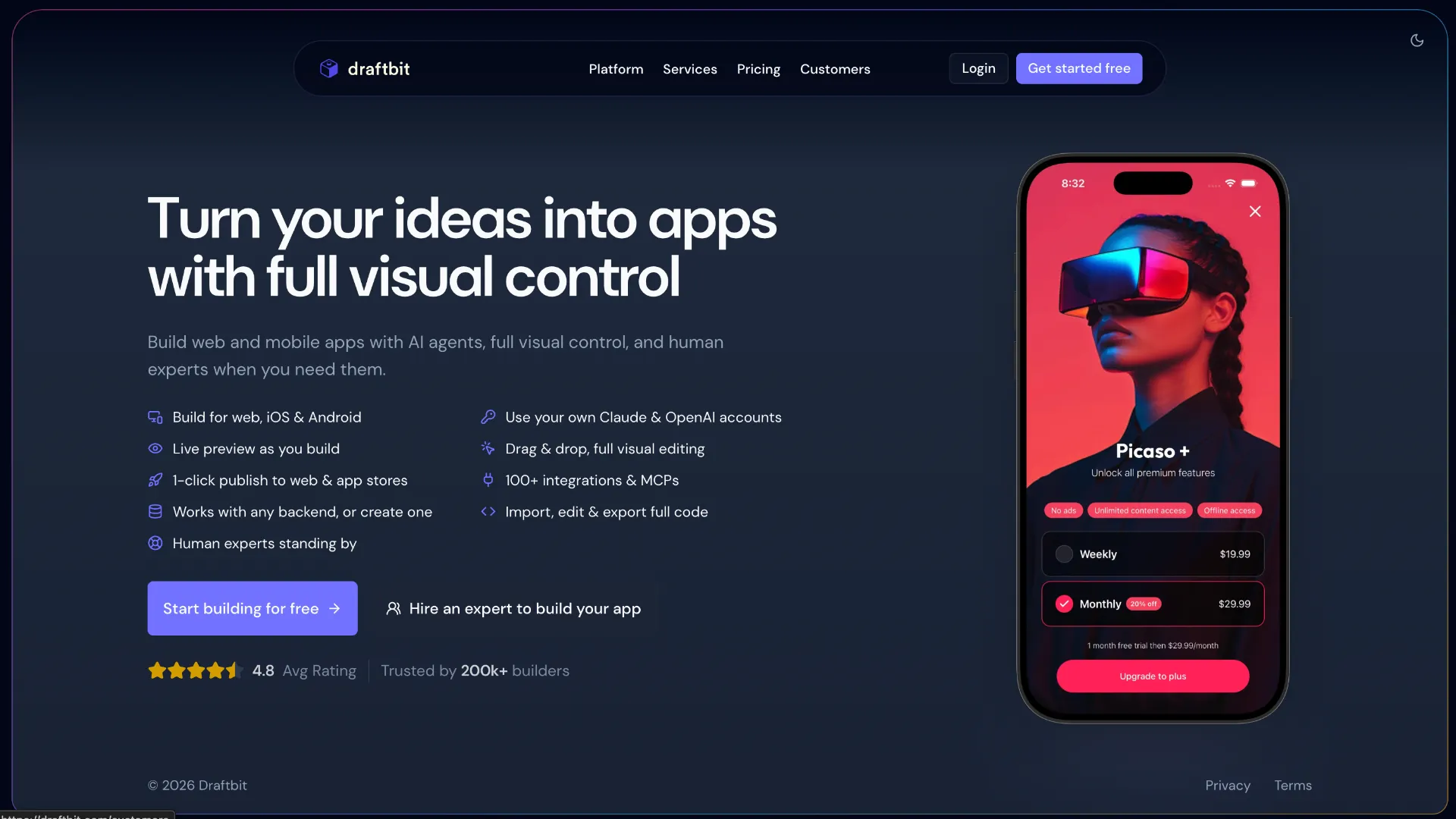
A browser-based AI and visual development platform for building, customizing, exporting, and publishing React Native, Expo, and web applications.
Information checked: Jul 10, 2026 ·View sources
Tool details
- Type
- App builders
- Platforms
- Web browser, iOS, Android, Web, PWA
- Free plan
- Yes
- Open source
- No
- Bring your own key
- Yes
- Local models
- No
Overview
Best for
- Founders building mobile-first MVPs
- React Native teams accelerating screen and workflow development
- Agencies delivering cross-platform client applications
- Designers who need visual control without surrendering source ownership
- Teams that want AI agents and manual code editing in the same project
- Projects using Supabase, Firebase, Xano, REST, or GraphQL backends
- Businesses planning an eventual handoff to an internal development team
Strengths
- Combines AI generation, visual editing, and direct code editing in one workflow.
- Generates exportable React Native and Expo source code.
- Supports native iOS, Android, and web delivery from related codebases.
- BYOK is available on every plan, including Free.
- Provides a practical handoff path to React Native developers.
- Integrated previews reduce the need for an immediate local mobile setup.
- Human development and launch assistance is available for difficult projects.
Limitations & trade-offs
- Teams developing native Swift or Kotlin applications without React Native
- Developers who need to import and modify an arbitrary existing repository
- Projects requiring a completely local or offline development environment
- Users expecting complex production applications to require no technical review
- Teams that want unlimited AI generation included in the base subscription
- Organizations that require an open-source builder
- Applications heavily dependent on unsupported native modules or custom platform code
- Paid base plans do not include recurring AI credits by default.
- Full code editing and export require a paid plan.
- Arbitrary existing GitHub repositories cannot currently be opened directly.
- Advanced custom code still requires React Native and TypeScript knowledge.
- Custom-code issues receive more limited platform support.
- Native simulators and several advanced agent controls require Pro or higher.
- Production mobile apps still require manual testing, security review, and app-store compliance work.
Get started
Pricing & usage limits
Official pricingFree tier available
Free$0 / month
Includes three projects, one integration, limited agents and models, 5,000 one-time credits, visual editing, and Draftbit-hosted web publishing.
Standard$12 / month
Adds unlimited projects and integrations, all agents and models, code editing and export, mobile publishing, custom domains, and unbranded apps.
Pro$24 / month
Adds concurrent agents, custom MCP servers, GitHub export, advanced agent controls, larger sandboxes, native simulators, and priority support.
Team$120 / month
Includes ten editor seats, ten team workspaces, live collaboration, onboarding, training, and a dedicated account manager.
EnterpriseCustom
Adds unlimited seats and workspaces, SSO or SAML, custom SLAs, dedicated infrastructure, private hosting options, and custom integrations.
Pricing checked: Jul 10, 2026 · Subscription, usage limits, and model costs may be billed separately.
Features & details
AI Development
- Claude Code and OpenAI Codex agents
- Prompt-to-app project generation
- Parallel task threads and agents
- Reusable agent instructions and saved prompts
- Bring-your-own AI keys and subscriptions
Visual and Code Editing
- Drag-and-drop screen construction
- Infinite multi-device design canvas
- Built-in TypeScript code editor
- Component-level code and style controls
- Git history, diffs, and rollback
Backend and Integrations
- Built-in Supabase workflow
- REST and GraphQL API connections
- Firebase, Xano, Stripe, and RevenueCat integrations
- Environment-specific secrets and variables
- Custom MCP server connections
Preview and Publishing
- Browser, simulator, and physical-device previews
- Side-by-side build comparison
- One-click iOS, Android, and web publishing
- Custom domains and PWA deployment
- GitHub and ZIP source export
Teams and Support
- Shared projects and task management
- Live team collaboration
- Role and workspace controls
- App-store submission assistance
- Optional expert development services
Why Choose Draftbit?
Draftbit is positioned between a traditional no-code builder and an AI coding environment. A founder can begin with a natural-language description, a designer can refine individual screens visually, and a React Native developer can inspect or modify the underlying project. This hybrid approach is the main reason to consider Draftbit over tools that expose only a prompt box or only a drag-and-drop canvas.
The React Native and Expo foundation also changes the long-term value of the platform. Draftbit can serve as an application accelerator rather than necessarily becoming the permanent runtime or development environment. A team can validate an idea visually, publish an early version, and later move the exported project into a conventional React Native toolchain when requirements exceed the builder's preferred workflow.
This makes Draftbit particularly relevant to mixed-skill teams. Product owners can communicate through prompts and visual previews, while developers retain access to familiar JavaScript, TypeScript, package, API, and source-control concepts. The tradeoff is that the project eventually inherits the same engineering responsibilities as any other React Native application.
Core Workflow
A new project normally starts with a description of the intended application. Draftbit converts that description into an initial task plan and builds a first version inside a cloud sandbox. Starting with a narrow product scope generally produces a more coherent foundation than asking the agent to generate every planned feature in one pass.
The initial result should be treated as a working specification rather than finished software. The visual canvas is useful for correcting hierarchy, spacing, typography, navigation, and responsive behavior before substantial backend logic is introduced. Establishing a consistent theme and reusable component structure early reduces the number of one-off styles the agent may create later.
Feature development is better separated into focused threads. Authentication, profile management, payments, notifications, and administrative workflows should not share one continuously expanding conversation. Smaller threads reduce irrelevant context, make credit consumption easier to understand, and produce changes that are simpler to inspect and reverse.
Backend work should begin with a clearly chosen source of truth. Draftbit can connect to hosted databases and APIs, but the data model, authorization rules, environment separation, and error behavior still need to be designed deliberately. An AI agent can create integration code, yet it cannot infer all business permissions or compliance requirements from a broad product description.
Before publication, the application should be evaluated on physical devices as well as browser previews. Native keyboards, safe areas, permissions, deep links, in-app purchases, push notifications, and background behavior can differ from a web simulation. Store submission should occur only after production credentials, privacy disclosures, screenshots, account-deletion flows, and platform-specific requirements have been reviewed.
Where Does Draftbit Fit Best?
Draftbit fits mobile-first MVPs that need more than a clickable prototype but do not yet justify a fully staffed native engineering team. Marketplaces, membership products, event applications, booking tools, content platforms, customer portals, and internal field applications are practical candidates when their backend can be exposed through supported services or standard APIs.
Agencies can use Draftbit to shorten the distance between client approval and implementation. A client can review interactive screens while the development team works against an exportable codebase. This is more flexible than delivering a prototype that must later be rebuilt in an unrelated framework, although agencies still need clear rules for where visual edits end and custom engineering begins.
Draftbit can also help React Native teams with repetitive product work. Screen scaffolding, forms, navigation flows, responsive layouts, and ordinary data connections can be assembled quickly before developers focus on domain-specific behavior. It provides less leverage when most of the application consists of custom native modules, specialized graphics, real-time media processing, or deeply platform-specific behavior.
For non-technical founders, Draftbit is most successful when paired with some technical review. The platform lowers the effort required to create and publish an application, but production reliability still depends on database rules, authentication design, dependency maintenance, analytics, monitoring, security testing, and release management.
How Does Draftbit Compare to Alternatives?
FlutterFlow is the closest broad competitor. Both combine visual development, AI assistance, integrations, source access, and cross-platform publishing. The major architectural decision is React Native and TypeScript versus Flutter and Dart. Teams should select the ecosystem their developers can maintain after export rather than judging only the initial visual-building experience.
Adalo prioritizes a more managed no-code workflow, including its own database-oriented application model. It may be easier for users who want to remain entirely inside one platform. Draftbit is more suitable when source ownership, external APIs, React Native compatibility, and eventual developer handoff are central requirements.
RapidNative and Newly take a more AI-first, code-generation-oriented approach. They may produce a usable Expo project faster from a prompt, particularly for developers comfortable continuing in code. Draftbit provides a stronger visual editing layer for teams that want to inspect and refine the application structurally without translating every design change into another prompt.
Web-first tools such as Lovable, Bolt, and v0 overlap with Draftbit for browser applications but are not exact mobile substitutes. They are generally optimized around React web interfaces and web deployment. Draftbit is the more direct comparison when Apple App Store and Google Play delivery are primary requirements rather than optional wrappers around a responsive website.
The most useful comparison test is to build the same small product flow in each candidate. Measure how quickly the initial screens appear, how much manual repair is required, how clearly data and navigation are represented, whether the exported project is understandable, and how difficult it is to implement one requirement that the visual builder does not support directly.
Best Configuration
Decide early whether Draftbit or the exported repository will be the continuing source of truth. Using the visual builder and a heavily modified external codebase as equal editing environments can create divergence. Teams planning an early code handoff should keep custom behavior modular, export regularly, and document the point at which development moves outside Draftbit.
Create agent instruction files that explain the application's architecture, naming conventions, component rules, backend boundaries, and validation commands. Instructions should describe the current project rather than a long-term product roadmap. Excessive context increases cost and can make agent behavior less focused.
Use one AI model or agent as the default for routine work and switch only when a task requires a different capability. Bringing an existing provider key or subscription can make costs easier to control, but it also shifts billing limits and data handling to that provider. Thread history should be checked to confirm which gateway handled each request.
Define development, staging, and production environments before connecting real user data. API endpoints, authentication clients, analytics identifiers, payment credentials, and feature flags should not be shared casually across environments. Generated code should reference managed environment values rather than embedding credentials in files or prompts.
Pin package versions instead of requesting the latest release automatically. Expo and React Native packages have compatibility constraints, and an unplanned dependency upgrade can break cloud previews or exported builds. Native packages should be validated against the Expo version used by the project before they become foundational dependencies.
Migration Notes
Draftbit provides a migration path for projects created in Draftbit Classic, but it does not currently function as a general-purpose importer for arbitrary React Native or GitHub repositories. Teams with an existing application should evaluate whether to recreate selected screens in Draftbit, use it only for a new product area, or continue with a conventional AI coding tool instead.
Exported projects use standard React Native and Expo structures, allowing development to continue with common editors, libraries, build tools, and deployment services. The important limitation is workflow direction: exporting is straightforward, while bringing an extensively modified external repository back into the visual builder is not presented as a general round-trip workflow.
Before handing an exported project to another development team, run it independently of Draftbit's hosted environment. Confirm that dependencies install cleanly, environment variables are documented, development and production builds complete, native permissions are declared, and publishing credentials are controlled by the application owner.
Teams migrating from another visual builder should not expect components, actions, and data bindings to translate automatically. The most reliable approach is to preserve the backend and data contracts, recreate the interface in Draftbit, and move business rules into ordinary TypeScript modules where possible. This produces a cleaner result than attempting to imitate another platform's internal abstraction layer.
Practical Tradeoffs
Draftbit reduces the time required to produce a cross-platform application, but it does not remove the distinction between prototype quality and production quality. AI-generated changes can compile and still contain authorization mistakes, inconsistent loading states, inaccessible controls, inefficient requests, or fragile assumptions about data.
Visual builders are usually fastest while an application follows familiar component and navigation patterns. The advantage narrows as requirements become highly customized. Draftbit's code access provides an escape route, but custom code can make parts of the project harder for non-technical collaborators to edit safely through the visual interface.
The separate credit system also affects planning. A low subscription price grants access to the platform, while substantial agent usage may require purchased credits or an external provider account. Teams comparing Draftbit with flat-rate development tools should estimate both platform charges and model consumption rather than comparing base prices alone.
The strongest reason to adopt Draftbit is therefore not that it eliminates software engineering. It creates a gradual path from idea, to generated application, to visual refinement, to owned source code. That path is valuable when a team wants speed today without making a proprietary builder the only place its application can exist.
Model support & data privacy
Supported models
- Anthropic Claude
- OpenAI Codex
- Google Gemini
- Qwen
Privacy & data handling
Draftbit states that customers retain ownership of generated application code and that project code is not used to train AI models. API keys and credentials are described as encrypted at rest with AES-256 and protected in transit with TLS or SSL. Projects and agent sandboxes run in Draftbit's cloud environment, while BYOK requests are routed to the selected provider and remain subject to that provider's privacy, retention, and account policies.
Guides, reviews & fixes
No published guides yet. Start with the official documentation above.
Product updates
No verified product updates listed yet. Follow this tool to see new relevant content in Saved.
See the content timelineAlternatives
FlutterFlowFlutterFlow is a visual Flutter app builder positioned between no-code app builders, AI prompt-to-app tools, and developer-oriented cross-platform mobile workflows. AdaloAdalo is a visual AI no-code app builder for publishing database-driven mobile and web apps without traditional software development.
 RapidNativeAn AI-native React Native and Expo builder with code export and a generous evaluation path.
 NewlyA prompt-to-native-mobile builder for React Native, Expo, and Supabase applications.
 ThunkableA prompt-to-native-app builder that combines AI generation, visual app construction, direct code editing, testing downloads, and app-store publishing.
Sources & verification
Verification dates record when this directory checked the information. Product release dates appear separately above.
Official websiteDraftbit PlatformDraftbit PricingDraftbit DocumentationAI App Builder DocumentationAgent Customization DocumentationDraftbit Common QuestionsDraftbit Credits DocumentationDraftbit Product UpdatesDraftbit Expert ServicesDraftbit Privacy Policy
Directory revision history
Pricing, supported platforms, code ownership, agent configuration, integrations, and enterprise options were reviewed against official product pages.
Draftbit opened website projects to all users, reorganized projects and billing plans, redesigned version history, and moved current documentation to docs.draftbit.com.
Draftbit added support for using Claude and ChatGPT subscriptions, introduced a built-in Supabase workflow in open beta, and expanded theme and typography editing.
Draftbit made REST integrations and BYOK access available more broadly, moved new mobile projects to Expo 54, and expanded agent usage reporting.