Hygraph
Hygraph is a GraphQL-native headless CMS and federated content platform for structured content, composable architectures, and multi-channel delivery. It now also includes AI Assist, AI Agents, and an MCP server for AI-assisted content operations and developer workflows.
Choose Hygraph when your team needs a hosted GraphQL-native CMS with structured content, federation across external systems, and AI-aware content workflows; choose a simpler CMS or self-hosted framework when cost, code ownership, or editorial simplicity matters more.
Pricing Plans
Hobby
Free plan for personal projects and exploration, with 1,000 entries, 500,000 API calls, 3 seats, 2 locales, and 100GB asset traffic.
Growth
Self-serve plan for growing projects, with higher limits, 10 seats, more API calls, larger asset uploads, and access to Content Federation.
Enterprise
Custom enterprise plan with large-scale usage, advanced governance, security, support, add-ons, and custom limits.
Core Features
1GraphQL Content Platform
- GraphQL-native content APIs
- Content and Management APIs
- GraphQL mutations for content operations
- GraphQL Playground and API reference
- Frontend-agnostic delivery
2Content Modeling
- Structured models and fields
- Reusable components
- References and relational content
- Union types for flexible content relationships
- Schema builder and migrations
3Content Federation
- Remote Sources
- Remote Fields
- Top-level Remote Fields
- External API data inside the Hygraph content API
- Federated CMS and third-party data delivery
4Editorial Workflow
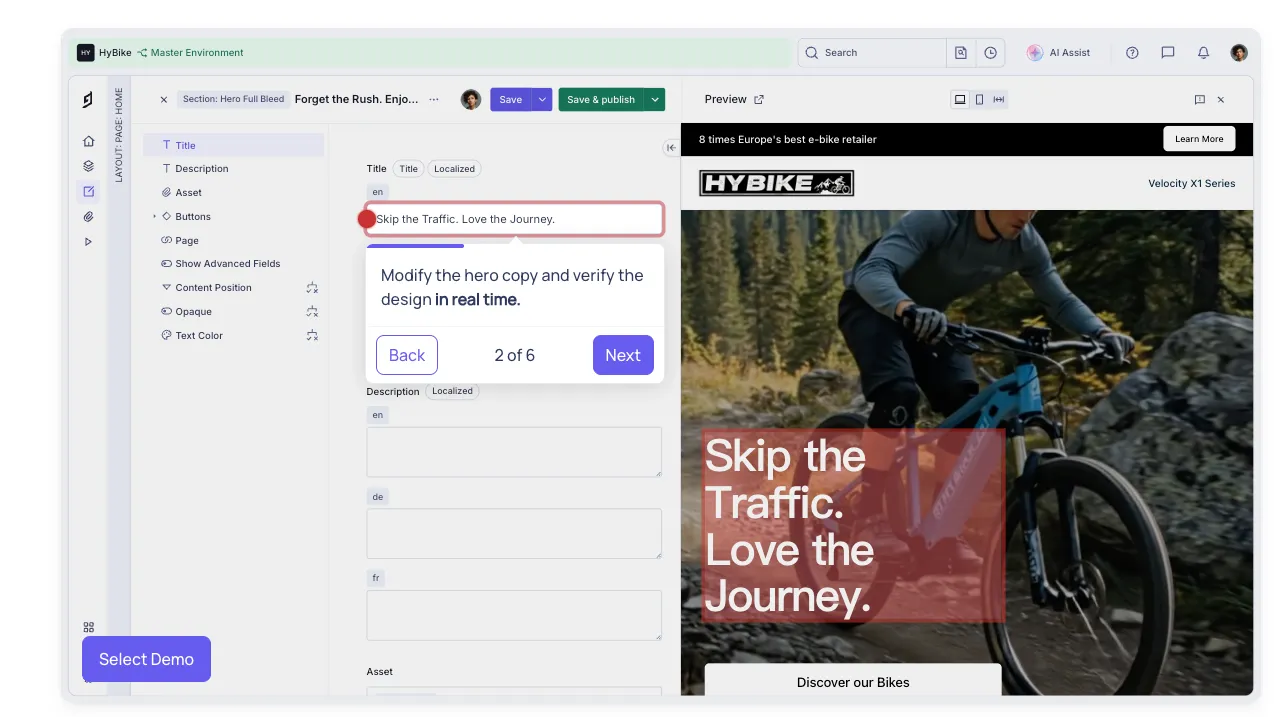
- Hygraph Studio editing interface
- Live preview
- Commenting and assignment workflow
- Localization and multi-locale content
- Content views and role-based access
5AI & Automation
- AI Assist for content creation, improvement, and translation
- AI Agents for enterprise workflow automation
- MCP server for AI assistant access
- Natural-language content operations
- Schema inspection and bulk content workflows
6Developer Extensibility
- Management SDK
- Permanent Auth Tokens
- Advanced permissions
- App Framework
- Marketplace integrations
- GitHub examples and starter projects
Pros
- GraphQL-native design is strong for typed, structured, frontend-agnostic content delivery.
- Content Federation is useful when content and product data live across multiple systems.
- Good fit for composable stacks with Next.js, Nuxt, Astro, React, Vue, and mobile apps.
- AI Assist and MCP support make Hygraph relevant to agent-assisted content workflows.
- Enterprise positioning is strong for multi-brand, multi-region, and governance-heavy content operations.
Cons
- Not an AI IDE, code editor, or prompt-to-app builder.
- Growth starts at a higher price point than many basic headless CMS alternatives.
- Remote Sources and advanced federation require paid-plan access or trial access.
- GraphQL-first architecture may be less familiar for teams standardized on REST-only workflows.
- Complex federated content models require careful schema, permission, and performance planning.
Why Choose Hygraph?
Hygraph is strongest when content is structured, distributed, and connected to other systems. It is not just a place to write pages. It is designed to model content as a graph, expose it through GraphQL, and combine CMS-managed content with external data sources when the frontend needs a unified API.
That matters for teams working across markets, brands, portals, ecommerce catalogs, product data, support content, and personalized digital experiences. Instead of copying every external record into a CMS, Hygraph can act as the content layer that joins editorial content with remote systems.
Its AI direction also fits this architecture. AI Assist helps editors generate, improve, and translate content inside the editor. AI Agents and MCP support point toward a more automated content operations model, where agents can inspect schemas, update entries, and run repeatable workflows against structured content.
Core Workflow
A typical Hygraph project starts with content modeling. Developers and content teams define models, fields, relationships, components, locales, workflows, and permissions. Once the schema is stable, the frontend consumes published content through GraphQL queries.
The workflow becomes more powerful when external data is involved. Product details may remain in a PIM, pricing may live in commerce infrastructure, customer-specific data may come from another API, and editorial content may stay in Hygraph. Content Federation lets the application query these pieces together through a more unified API surface.
For developer teams, the Management SDK and Management API make schema work more repeatable. Instead of relying only on manual changes in the UI, teams can treat schema changes and migrations as part of the engineering workflow.
Use Cases
Hygraph works well for marketing websites, ecommerce experiences, documentation hubs, multi-language content platforms, mobile apps, customer portals, product pages, franchise or multi-brand sites, and digital experiences that need both editorial control and structured API delivery.
The most distinctive use case is federated content. For example, an ecommerce frontend can combine CMS-managed landing page copy with product data from a PIM and campaign metadata from another service. That can reduce duplication, but it also requires clear ownership of each data source.
Comparison to Alternatives
Compared with Contentful, Hygraph leans more strongly into GraphQL-native architecture and federation. Contentful has a mature enterprise ecosystem and broad market adoption, while Hygraph is often more attractive when the team wants a graph-shaped content API and remote data composition.
Compared with Sanity, Hygraph is more API-platform oriented out of the box, while Sanity is more editor-studio and content-lake oriented. Sanity can be deeply customized for editorial experience, while Hygraph is compelling when the GraphQL API and external data federation are the central requirements.
Compared with Strapi, Hygraph is hosted and SaaS-first. Strapi gives more control through open-source self-hosting and backend customization, while Hygraph reduces infrastructure responsibility and focuses on managed GraphQL content delivery.
Compared with Storyblok, Hygraph is less centered on visual page editing and more centered on structured content models, relationships, and API delivery. Storyblok can be easier for teams that need visual previews and page composition, while Hygraph is stronger for backend-agnostic structured content and federated data.
Best Configuration
The best Hygraph setup starts with a clear content ownership map. Decide which content belongs in Hygraph, which data should stay in remote systems, and which fields are editorial overlays on top of external records. Without that boundary, teams can accidentally create duplicate sources of truth.
For frontend applications, design GraphQL queries around the actual page and app needs rather than exposing every field everywhere. Content Federation is powerful, but remote fields should be used deliberately because external API latency, availability, and authorization can affect the user experience.
For AI and MCP usage, start with read-only or low-risk operations. Schema inspection, draft summaries, translation suggestions, and bulk metadata cleanup are safer starting points than autonomous publishing. Permanent Auth Tokens should be scoped narrowly, and production publishing should keep human review where brand, legal, or SEO risk is high.
Migration Notes
Migrating from a traditional CMS usually starts with content decomposition. Pages, templates, and plugin fields need to become reusable models, components, references, and locales. This is often the most valuable part of the migration because it forces the team to separate content structure from presentation.
Migrating from another headless CMS requires careful schema mapping. Field types, locales, slugs, assets, references, draft states, publish states, API permissions, and webhook behavior may not map one-to-one. Frontend GraphQL queries or REST calls will also need to be rewritten.
Migrating into Content Federation should be treated differently from a normal content import. The goal is not always to move everything into Hygraph. For systems like PIM, commerce, search, or CRM, keeping data in the source system and exposing it through Remote Sources may be a better long-term architecture.
If a team plans to leave Hygraph later, it should document schemas, content IDs, remote source dependencies, API permissions, asset handling, and frontend query patterns from the beginning. Hosted CMS platforms can be portable at the content level, but application architecture still needs planning.
Best For
- Developers building GraphQL-first websites and applications
- Content-heavy projects using composable architecture
- Enterprise teams managing content across brands, locales, regions, and channels
- Commerce and product teams that need CMS content plus external PIM, CRM, or commerce data
- Teams that want a hosted headless CMS with structured content and strong API delivery
- AI-aware content workflows that need AI Assist, AI Agents, or MCP access to CMS content
Not Ideal For
- Developers looking for a full AI code editor like Cursor or Windsurf
- Teams that need a self-hosted open-source CMS core
- Small blogs or simple marketing sites where a cheaper CMS is enough
- Projects that do not want to work with GraphQL
- Teams that need full backend source-code ownership and database-level control
- Workflows where AI assistants should not have access to production content operations
Privacy Notes
Hygraph is a hosted SaaS content platform. Teams should review project roles, API permissions, Permanent Auth Tokens, public API permissions, MCP server configuration, AI Assist usage, AI Agents, and enterprise security documentation before exposing sensitive content or operational workflows. MCP access is permission-aware but can still perform real content operations, so narrow tokens and human review are recommended.
Alternatives
Sources
- Hygraph Official Website
- Hygraph Pricing
- Hygraph Documentation
- Hygraph Overview Documentation
- Hygraph AI Documentation
- AI Assist Documentation
- Hygraph MCP Server Blog
- Content Federation Documentation
- Remote Sources Documentation
- Remote Fields Documentation
- Hygraph for Developers
- Hygraph for Enterprise
- API Access Documentation
- Permissions Documentation
- Management API Permissions
- Hygraph GitHub Organization
- Hygraph Management SDK
- Hygraph Examples
Update History
- Jun 30, 2026: Created directory entry and checked official Hygraph website, pricing, docs, AI Assist, AI Agents, MCP, Content Federation, Remote Sources, permissions, developer resources, and GitHub repositories.
Related Tools
More listings in a similar part of the directory.




Hygraph Articles
Guides, comparisons, and launch notes connected to this listing.