
 SanitySanity is a developer-first structured content platform with AI-assisted content operations, best suited for teams that want a programmable CMS rather than a conventional page-builder.
Storyblok
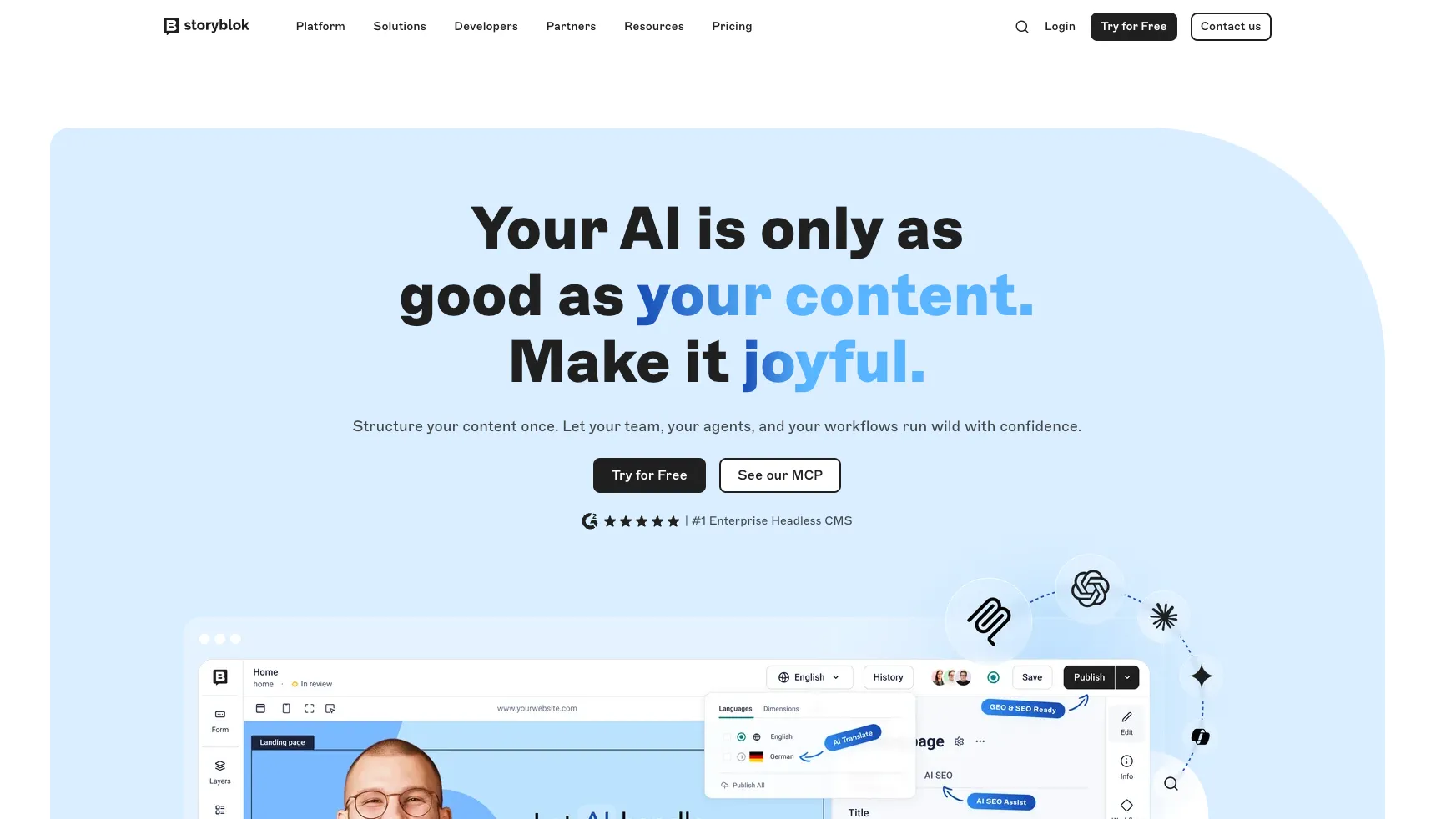
Storyblok is a visual-first headless CMS for teams that need developer-controlled frontends, marketer-friendly editing, and increasingly AI-aware content operations.
Information checked: Jun 30, 2026 ·View sources
Tool details
- Type
- Developer workflows
- Platforms
- Web, REST API, GraphQL API, Management API, JavaScript, TypeScript, Next.js, Nuxt, Astro, React, Vue, Eleventy, Symfony, MCP-compatible clients
- Free plan
- Yes
- Open source
- No
- Bring your own key
- Yes
- Local models
- No
Overview
Best for
- Developer-led teams that still need a strong visual editing experience for marketers.
- Next.js, Nuxt, Astro, Vue, and React sites that need structured content and live preview.
- Multilingual content operations with reusable components and editorial workflows.
- Composable commerce, campaign, documentation, and brand sites where content must ship across channels.
- Teams experimenting with AI-assisted content localization, SEO, accessibility, and agent workflows.
Strengths
- Strong balance between visual editing for marketers and headless flexibility for developers.
- Component-based content model maps naturally to modern frontend frameworks.
- MCP and AI Suite make Storyblok relevant for agentic content workflows.
- Good fit for multilingual websites, campaign pages, and composable architecture.
- Free Starter plan and self-serve paid plans make early evaluation straightforward.
Limitations & trade-offs
- Developers looking for an AI-native code editor or autonomous coding agent.
- Teams that want a fully self-hosted CMS with database ownership.
- Very small static sites that do not need visual editing, APIs, or content governance.
- Organizations that want all enterprise workflow and security features on a low-cost self-serve tier.
- Teams unwilling to maintain frontend preview logic and component-to-content mapping.
- Not an AI IDE or coding agent; it supports content workflows rather than code generation.
- Advanced governance, release management, GraphQL, SSO, and SCIM are gated behind custom plans.
- Pricing can jump noticeably from Starter to Growth and Growth Plus as teams scale.
- Visual editing still requires developers to implement frontend preview and component mapping correctly.
- Teams with simple brochure sites may not need the overhead of a headless CMS.
Get started
Pricing & usage limits
Official pricingFree tier · From $99
Starter$0 / month
Free plan for testing and personal projects; includes 1 space, 1 included user seat, 100GB traffic, 100k API requests, 2 locales, and AI credits.
Growth$99 / month
Entry-level business plan with 5 included seats, 400GB included traffic, 1M API requests, single story scheduling, SEO meta tags, and integrations.
Growth Plus$349 / month
Higher self-serve plan with 15 included seats, 1TB included traffic, 4M API requests, 10 included locales, and larger AI credit allowance.
Premium / EliteCustom
Custom plans for organizations needing configurable spaces, users, workflows, release management, SSO, SCIM, higher uptime SLA, and advanced support.
Pricing checked: Jun 30, 2026 · Subscription, usage limits, and model costs may be billed separately.
Features & details
Headless Content Platform
- Visual Editor with in-context preview
- Component-based content modeling
- REST, GraphQL, and Management APIs
- Frontend SDKs and framework guides
AI Content Workflows
- AI translations
- AI alt text generation
- AI SEO assistance
- AI branding and custom AI configuration
Developer Workflow
- API-first delivery
- MCP Server for agent access
- Blueprints and framework starters
- Apps and integrations ecosystem
Governance and Scale
- Roles and permissions
- Workflows and release management
- Localization support
- Enterprise SSO, SCIM, SLA, and support
Why Choose Storyblok?
Storyblok is strongest when a team needs both frontend freedom and a comfortable editing experience. Many headless CMS products give developers clean APIs but leave editors working inside abstract forms. Storyblok's main differentiation is that content teams can work visually while the underlying architecture remains component-based and API-first.
That makes it useful for teams where marketing velocity matters. Developers can build the frontend in the framework they prefer, while editors can assemble pages from approved content blocks, preview changes in context, and manage content without constantly asking engineering to adjust copy or layout. The result is not a no-code system, but a collaborative model where developers define the building blocks and editors use them safely.
Storyblok's AI direction also fits the content-operations layer rather than the coding layer. Its AI tools are aimed at translation, accessibility, SEO, brand consistency, and agent access to content. For a developer tools directory, the important point is that Storyblok can become a structured content backend for AI-assisted workflows, not a replacement for an IDE like Cursor or a CLI agent like Claude Code.
Core Workflow
A typical Storyblok project starts with defining components that mirror the frontend design system. Developers create page sections, content blocks, global elements, and reusable structures, then connect those blocks to the frontend through Storyblok's APIs and preview bridge. Editors then build and update pages through the visual interface, using the same components that the frontend renders in production.
The workflow works best when content components are neither too rigid nor too open-ended. If every tiny layout variation becomes a new component, the system becomes hard to maintain. If components are too generic, editors can create inconsistent pages that break the design language. A good Storyblok implementation usually treats components as editorial tools: enough flexibility for content teams, enough constraints for brand and frontend quality.
Preview setup is a practical milestone. Storyblok's editing experience depends heavily on the frontend correctly rendering draft content, resolving routes, and handling live updates. Teams should treat preview as part of the product experience, not as an afterthought. When preview is reliable, editors can work independently; when it is fragile, the CMS feels much less powerful.
Use Cases
Storyblok is a strong fit for marketing websites, campaign pages, multilingual brand sites, composable commerce frontends, and content-heavy product experiences. These projects usually need reusable sections, non-technical editing, preview, localization, and structured publishing workflows.
It is also useful for agencies and product teams that repeatedly ship sites on modern frameworks. Component-based content modeling maps well to a shared design system, so teams can reuse patterns across clients, regions, brands, or product lines while still leaving room for localized content decisions.
For AI-oriented teams, Storyblok is useful when content needs to be accessible to agents in a governed way. Instead of letting an AI assistant operate on unstructured documents or scrape published pages, teams can expose structured content through APIs or MCP-based workflows. That makes agent behavior easier to constrain, audit, and review.
Comparison to Alternatives
Compared with Sanity, Storyblok leans more toward visual editing and marketer usability out of the box. Sanity often appeals to teams that want deeper schema-as-code customization and a highly programmable studio. Storyblok is usually easier to explain to content teams that expect to edit pages visually.
Compared with Contentful, Storyblok's visual editor and component-based page assembly are central to its identity. Contentful remains a common enterprise choice with a mature ecosystem, but Storyblok may feel more natural for teams that want editors to build pages from reusable blocks and see the page context while editing.
Compared with Strapi or Payload, Storyblok reduces backend ownership because it is a hosted CMS. That can speed up delivery, but it also means the content backend is a platform dependency. Teams that require full self-hosting, database-level control, or custom backend logic may prefer Strapi or Payload.
Compared with Builder.io, Storyblok is more CMS-oriented and structured-content-oriented. Builder.io is often considered when visual page composition is the primary goal. Storyblok is a stronger candidate when content governance, localization, APIs, and editorial workflows matter alongside visual editing.
Best Configuration
The best Storyblok setup usually starts with a clear frontend component system. Before modeling content, teams should decide which page sections are reusable, which fields editors should control, and which layout decisions should remain in code. This prevents the CMS from becoming either too restrictive or too chaotic.
For modern frontend stacks, keep Storyblok component definitions, frontend rendering components, route handling, and preview configuration aligned. A mismatch between content models and frontend components is one of the fastest ways to create editor frustration. Treat content schema changes like product changes: review them, test them, and document the intended editor behavior.
For AI features, start with low-risk operational tasks. Alt text suggestions, translation drafts, SEO metadata, and brand-guided copy improvements are easier to review than large-scale automated rewrites. If agents are connected through MCP, give them narrow scopes first and keep publishing permissions under human control until workflows are proven.
For larger organizations, define space strategy, localization approach, roles, workflow stages, release process, and naming conventions early. Storyblok can support complex content operations, but governance needs to be designed before many teams and markets begin creating content independently.
Migration Notes
Migrating to Storyblok works best when the old site is decomposed into reusable content blocks instead of copied page by page. A legacy CMS may store content as pages, templates, shortcodes, or long rich-text fields. Storyblok works better when those pages are mapped into structured components that editors can reuse and rearrange.
The migration should separate durable content from presentation artifacts. Product facts, authors, categories, locations, campaign metadata, and reusable sections should become structured content. One-off layout hacks from the old site should usually be redesigned or retired rather than preserved as permanent CMS fields.
Teams moving from WordPress or traditional CMS platforms should plan for editor training. The visual editor reduces friction, but the mental model is still different: editors are assembling structured blocks that feed a decoupled frontend. Clear component names, field descriptions, and preview behavior will matter as much as the technical migration script.
Tradeoffs in Practice
Storyblok's biggest practical tradeoff is that the editing experience depends on implementation quality. When the frontend preview, component naming, and content model are carefully designed, editors can move quickly. When those pieces are rushed, the CMS can feel confusing despite having a strong visual editor.
Another tradeoff is cost scaling. The free plan is useful for experiments, but serious teams should evaluate seats, traffic, API requests, locales, assets, workflows, and enterprise requirements before committing. The correct comparison is not just monthly subscription price; it is the cost of developer maintenance, editor speed, governance, and future migration risk.
The key decision is whether your team values a visual editing layer on top of a headless architecture. If yes, Storyblok is a strong candidate. If your team only needs a simple content backend, a static site CMS, or a fully self-hosted admin panel, a lighter alternative may be easier to operate.
Model support & data privacy
Supported models
- OpenAI
- Google Gemini
Privacy & data handling
Storyblok is a hosted CMS, so customer content is stored and processed in Storyblok's cloud service. Storyblok states that it acts as a processor for customer content under its DPA, uses security controls such as encryption in transit and at rest, and supports GDPR-oriented documentation. AI features and custom AI tokens should be reviewed against the customer's own data policy, subprocessor requirements, and the sensitivity of content being sent to model providers.
Guides, reviews & fixes
No published guides yet. Start with the official documentation above.
Product updates
Official changelogNo verified product updates listed yet. Follow this tool to see new relevant content in Saved.
See the content timelineAlternatives
SanitySanity is a developer-first structured content platform with AI-assisted content operations, best suited for teams that want a programmable CMS rather than a conventional page-builder. ContentfulContentful is a composable, API-first content platform positioned between headless CMS infrastructure and enterprise digital experience management.
 StrapiStrapi is an open-source headless CMS and backend framework for developers building structured content APIs, custom admin workflows, and modern frontend experiences.
 Payload CMSPayload CMS is an open-source Next.js backend and headless CMS framework for developers who want code-first content infrastructure, generated APIs, and full deployment ownership.
 PrismicPrismic is a hosted headless CMS and agentic web platform for code-owned marketing sites, combining Slice Machine, visual page building, and AI-assisted content workflows.
 Builder.ioBuilder.io is a collaborative AI visual development platform for teams that want to generate, edit, review, and publish production web experiences against their real codebase and design system.
 HygraphHygraph is a GraphQL-native headless CMS and federated content platform for teams that need structured content, external data federation, and enterprise-grade content delivery.
Sources & verification
Verification dates record when this directory checked the information. Product release dates appear separately above.
Official websiteStoryblok pricingStoryblok pricing FAQStoryblok featuresStoryblok documentationStoryblok Visual Editor docsStoryblok AI Assistance docsStoryblok AI SuiteStoryblok custom AI tokens and models changelogStoryblok Data Processing Agreement
Directory revision history
Created directory entry and checked current pricing, AI Suite positioning, MCP messaging, Visual Editor documentation, API positioning, and privacy-related documentation.