
Gemini Code Assist
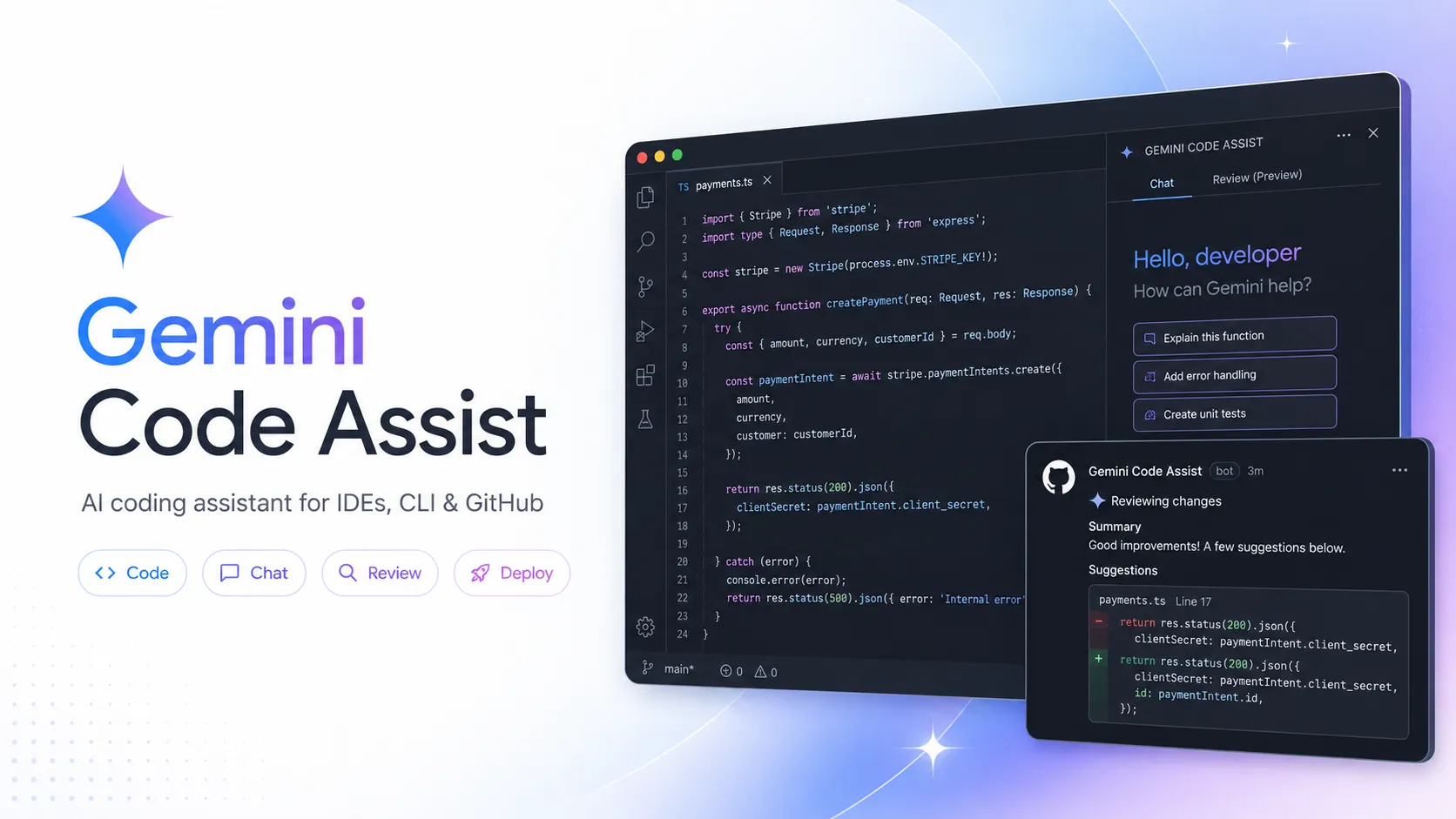
Gemini Code Assist is Google’s AI coding assistant for IDEs, terminals, GitHub reviews, and Google Cloud development workflows. It is strongest for teams already using VS Code, JetBrains IDEs, Android Studio, Cloud Workstations, GitHub, and Google Cloud services.
Gemini Code Assist is a strong choice for teams that want AI coding assistance inside existing IDEs while staying aligned with Google Cloud, Gemini CLI, GitHub review, and enterprise admin workflows. It is less suitable for developers who need local model control, BYOK flexibility, or a standalone AI editor experience.
Pricing Plans
Gemini Code Assist for individuals
Free version for eligible personal Gmail accounts; Google notes unpaid IDE extension access is being replaced by Antigravity on June 18, 2026.
Standard Monthly
Business plan with IDE code assistance, local codebase awareness, code transformation, agent mode, Gemini CLI, and enterprise-grade security.
Standard Annual
Annual commitment pricing with upfront annual commitment.
Enterprise Monthly
Adds code customization, expanded Google Cloud integrations, and increased agent usage.
Enterprise Annual
Annual commitment pricing with upfront annual commitment.
Google Developer Program
Gemini Code Assist is also available through Google Developer Program plans with other developer resources.
Core Features
1IDE Coding Assistance
- Code completion and generation
- Conversational chat inside IDEs
- Smart actions and commands
- Code transformation and explanations
2Supported Development Surfaces
- VS Code extension
- JetBrains IDE support
- Android Studio integration
- Cloud Shell Editor and Cloud Workstations
3Agent and Terminal Workflows
- Gemini CLI access on Standard and Enterprise
- Agent mode for multi-step development tasks
- Multiple file edits with project context
- MCP ecosystem tool integration
4Repository and Review
- GitHub pull request reviews
- Automatic pull request summaries
- Ready-to-commit code suggestions
- Enterprise GitHub app setup through Google Cloud
5Enterprise Context
- Code customization from private repositories
- Local codebase awareness
- 1M token context window for business plans
- Usage metrics and adoption dashboards
6Google Cloud Integration
- Firebase assistance
- Cloud Run code completion
- BigQuery and database assistance
- Apigee and Application Integration support on Enterprise
Pros
- Strong fit for Google Cloud, Firebase, Android Studio, and enterprise Google ecosystems.
- Supports VS Code, JetBrains IDEs, Android Studio, Cloud Shell Editor, and Cloud Workstations.
- Business plans include Gemini CLI and agent mode, extending the workflow beyond IDE autocomplete.
- Enterprise edition can customize suggestions with private repositories and organization coding style.
- GitHub review features add pull request summaries, review comments, and code suggestions.
Cons
- Free individual IDE extension access is in transition to Antigravity as of June 18, 2026.
- Best enterprise value is tied to Google Cloud setup, billing, admin, and licensing workflows.
- BYOK and local model routing are not core Gemini Code Assist IDE features.
- Enterprise features such as code customization require higher-tier licensing and configuration.
- Generated code, reviews, and agent edits still require human validation before production use.
Why Choose Gemini Code Assist?
Gemini Code Assist is most compelling when software development already touches Google’s ecosystem. It is not just an autocomplete extension; it connects IDE assistance, Gemini CLI, GitHub review workflows, Google Cloud services, Firebase, Cloud Run, BigQuery, Apigee, and enterprise administration into one Google-managed coding assistant path.
That makes the product especially relevant for teams that want AI help without replacing their existing editor. A developer can keep using VS Code, IntelliJ IDEA, PyCharm, WebStorm, GoLand, Android Studio, Cloud Workstations, or Cloud Shell Editor while getting Gemini-powered completion, chat, explanations, transformations, and agent-style workflows.
Core Workflow
A practical workflow starts in the IDE. Developers use completions for local flow, chat for explanations and design questions, and smart actions for targeted tasks such as fixing errors, generating code, transforming selected code, or explaining unfamiliar sections.
For larger tasks, Gemini Code Assist becomes more useful when combined with local codebase awareness and agent mode. Instead of asking for a single snippet, the developer can ask the assistant to reason across project context, modify multiple files, and use tools with human oversight. Gemini CLI extends the same direction into the terminal for developers who prefer command-line workflows.
GitHub review is a separate but important workflow. The Gemini Code Assist GitHub app can summarize pull requests, review code, and suggest changes directly in PRs. For teams with mature review practices, this is often a more practical adoption path than expecting every developer to change their IDE behavior immediately.
Use Cases
Gemini Code Assist is useful for writing boilerplate, explaining code, generating tests, debugging errors, updating code across files, reviewing pull requests, summarizing changes, modernizing code, writing SQL, working with Firebase, and answering Google Cloud development questions.
It is particularly well suited to teams that build on Google Cloud or Android. The value grows when developers need help across both application code and cloud services: Cloud Run handlers, Firebase app logic, BigQuery queries, Apigee APIs, Application Integration flows, and operational troubleshooting.
Comparison to Alternatives
Compared with GitHub Copilot, Gemini Code Assist is more Google Cloud-centered. Copilot remains a natural default for GitHub-native teams that want broad IDE support and Microsoft/GitHub ecosystem integration. Gemini Code Assist is stronger when Google Cloud services, Gemini CLI, Android Studio, and enterprise Google controls matter.
Compared with Cursor and Windsurf, Gemini Code Assist does not ask developers to switch to a new AI-native editor. Cursor and Windsurf can feel more cohesive for AI-first coding sessions, while Gemini Code Assist is better for teams that want AI layered onto existing IDEs and cloud workflows.
Compared with Amazon Q Developer, the difference is cloud alignment. Amazon Q Developer is best for AWS-heavy teams, while Gemini Code Assist is the more natural choice for Google Cloud, Firebase, Android, and BigQuery-heavy environments.
Compared with Claude Code or Codex CLI, Gemini Code Assist is less purely terminal-first. Its advantage is the combination of IDE, terminal, GitHub review, and Google Cloud integrations rather than a single local command-line agent experience.
Best Configuration
For individual users, check the current migration status before relying on the free IDE extension. Google has announced that unpaid Gemini Code Assist IDE extension access is being replaced by Antigravity on June 18, 2026, so long-term usage planning should not assume the original free individual extension path remains unchanged.
For business teams, Standard is the starting point when the main need is IDE coding assistance, local codebase awareness, code transformation, agent mode, Gemini CLI, and enterprise-grade security. Enterprise is more appropriate when private repository customization, broader Google Cloud integrations, and increased agent usage are important.
For enterprise rollout, begin with a pilot across different IDEs and repositories. Track adoption, suggestion acceptance, review quality, time saved, false positives, and security-sensitive changes. The best implementation is not simply installing an extension; it is defining when developers should use chat, agent mode, GitHub review, Gemini CLI, and cloud-specific assistance.
Migration Notes
Teams moving from GitHub Copilot should evaluate more than autocomplete. Compare code review quality, Google Cloud assistance, Gemini CLI workflows, code customization, data governance, and admin controls. If the team already uses GitHub heavily but not Google Cloud, the switch may be less obvious.
Teams moving from Cursor or Windsurf should expect a different product shape. Gemini Code Assist works inside existing IDEs and cloud surfaces rather than replacing the editor. That can reduce migration friction, but it may not provide the same all-in-one AI-editor feel.
Teams moving from ad-hoc Gemini CLI usage should decide whether they want the licensed business experience. Standard and Enterprise licenses can bring the same family of assistance into governed IDE, terminal, and cloud workflows with clearer enterprise controls.
For organizations handling sensitive code, privacy and data governance should be reviewed by edition. Standard and Enterprise have different controls and commitments than the individual free version, and code customization requires connecting private repositories for indexing and context retrieval.
Best For
- Developers using VS Code, JetBrains IDEs, Android Studio, or Google Cloud workstations
- Teams building on Google Cloud, Firebase, Cloud Run, BigQuery, Apigee, or Application Integration
- Organizations that want managed AI coding assistance with enterprise security and Google Cloud administration
- Teams that want IDE assistance plus terminal workflows through Gemini CLI
- Enterprises that need code customization based on private repositories and organization coding style
Not Ideal For
- Users looking for a fully open-source coding assistant
- Developers who need local model support or BYOK routing inside the IDE assistant
- Teams outside the Google Cloud ecosystem that want minimal cloud admin setup
- Users who want a standalone AI-native editor like Cursor or Windsurf
- Developers relying on the unpaid individual IDE extension for long-term usage after the Antigravity migration
Privacy Notes
Gemini Code Assist Standard and Enterprise documentation says Google does not use customer data to train models without permission. Gemini Code Assist for individuals has a separate privacy notice and may use data to improve Google machine learning models unless the user opts out. Teams should review edition-specific privacy notices, administrator controls, repository access, code customization settings, GitHub app permissions, and Google Cloud data governance before rollout.
Alternatives
Sources
- Official Gemini Code Assist website
- Gemini Code Assist for business
- Gemini for Google Cloud pricing
- Gemini Code Assist overview
- Gemini Code Assist Standard and Enterprise overview
- Supported languages, IDEs, and interfaces
- Gemini Code Assist FAQ
- Quotas and limits
- Security, privacy, and compliance
- Privacy notice for Gemini Code Assist for individuals
- Code customization overview
- Configure code customization
- Review GitHub code using Gemini Code Assist
- Gemini Code Assist GitHub App
- Gemini CLI GitHub Action
Update History
- Jun 16, 2026: Created initial directory entry using official Gemini Code Assist website, pricing, documentation, FAQ, quotas, privacy, security, code customization, GitHub review, and GitHub app sources.
Related Tools
More listings in a similar part of the directory.





Gemini Code Assist Articles
Guides, comparisons, and launch notes connected to this listing.

