
DevPod
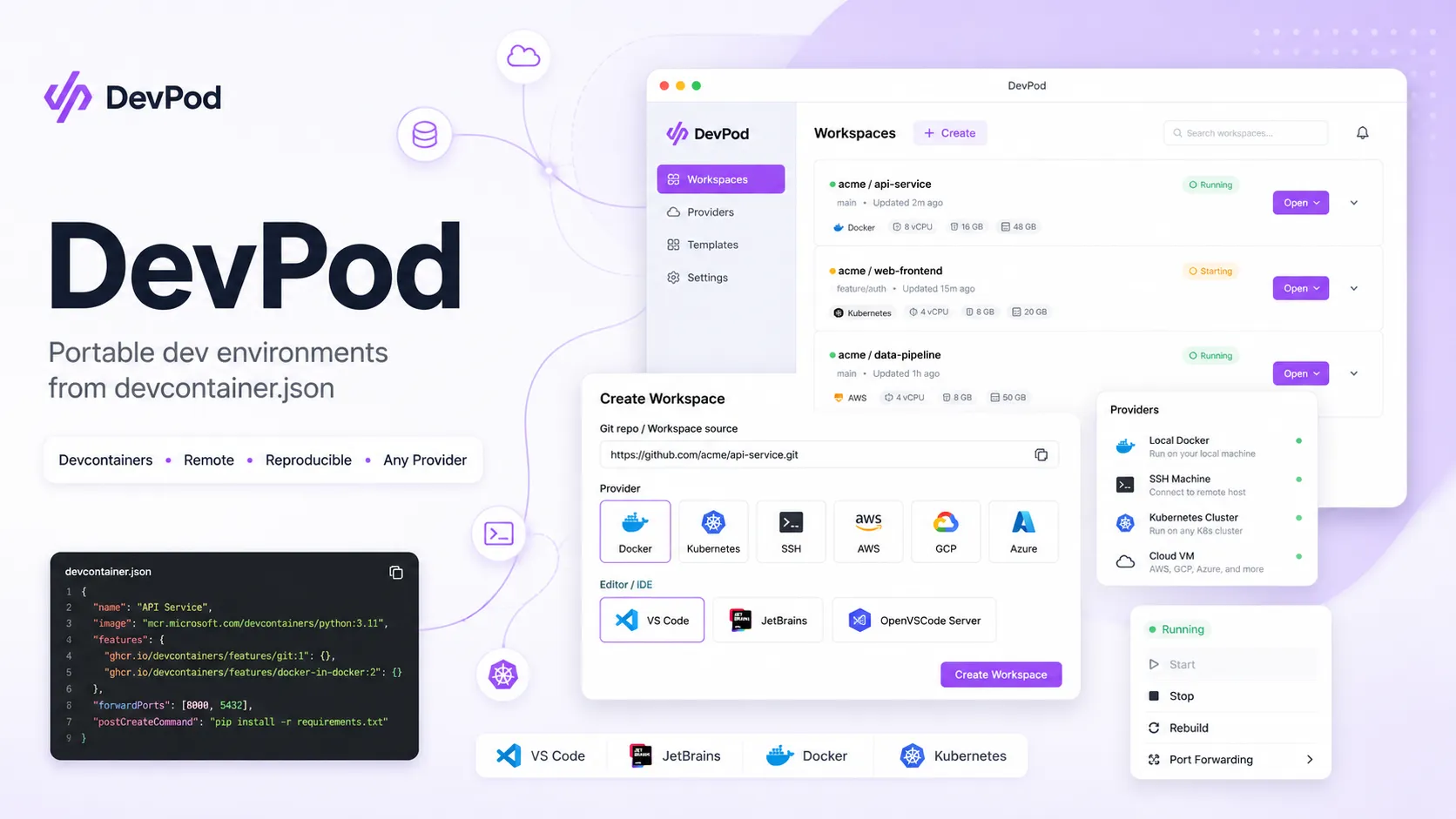
DevPod is an open-source, client-only tool for creating reproducible dev environments from devcontainer.json on local machines, remote servers, Kubernetes, or cloud VMs. It is best for teams that want Codespaces-like developer environments without being locked into one hosted platform.
DevPod is a strong fit for teams that want reproducible devcontainer-based workspaces without committing to a single hosted cloud IDE. It is less suitable when the team wants a fully managed browser IDE, built-in AI coding features, or centralized enterprise controls without infrastructure work.
Pricing Plans
Open Source
Free and open-source DevPod desktop app and CLI.
Bring Your Own Infrastructure
You pay for your chosen backend, such as local Docker, SSH machines, Kubernetes, or cloud VMs.
Custom Providers
Provider model is extensible; teams can build custom providers for their own infrastructure.
Core Features
1Reproducible Workspaces
- devcontainer.json-based environments
- Automatic best-effort setup when no config exists
- Consistent local and remote workspace behavior
- Public and private Git repository support
2Infrastructure Flexibility
- Local Docker provider
- SSH and remote machine providers
- Kubernetes provider support
- Cloud VM provider ecosystem
3Editor Support
- VS Code support
- JetBrains IDE support
- OpenVSCode Server support
- SSH-based access for other editors
4Developer Workflow
- Desktop app
- Programmable CLI
- Workspace start, stop, delete, and rebuild
- Port forwarding and workspace lifecycle management
5Cost and Control
- Client-only architecture
- No mandatory server-side control plane
- Auto inactivity shutdown
- Git and Docker credential sync
Pros
- Open-source alternative to hosted dev environment platforms.
- Works across local Docker, remote machines, Kubernetes, and cloud VMs.
- Supports VS Code, JetBrains IDEs, OpenVSCode Server, and SSH workflows.
- Reuses the devcontainer.json standard used by VS Code Dev Containers and GitHub Codespaces.
- Client-only model avoids running a heavy centralized control plane.
Cons
- Not an AI coding assistant or AI-native IDE by itself.
- Teams are responsible for their own infrastructure, security, and cost controls.
- Less turnkey than fully managed products such as GitHub Codespaces.
- Complex multi-service production-like environments may need additional tooling.
- Developer experience depends heavily on the quality of the project’s devcontainer setup.
Why Choose DevPod?
DevPod is most useful when a team wants reproducible development environments without handing the entire workflow to a single hosted provider. Its core idea is simple: keep the environment definition in the repository, then let each developer run that workspace wherever it makes sense — locally, on a spare remote machine, in Kubernetes, or on a cloud VM.
That makes DevPod different from traditional cloud IDEs. It is not primarily selling a hosted editor or managed compute pool. It is closer to a portable workspace launcher that connects the developer’s preferred IDE to the right machine for the job. For platform teams, this can be a cleaner fit than forcing every project into one vendor-specific development environment.
Core Workflow
A typical DevPod workflow starts with a repository that includes a devcontainer.json file. DevPod reads that configuration, creates the workspace on the selected provider, connects the editor, handles ports and credentials, and lets the developer work in a consistent containerized environment.
The practical pattern is to keep the development environment definition close to the code. Toolchains, runtimes, extensions, ports, setup scripts, and base images should be documented in the devcontainer configuration rather than hidden in onboarding notes or individual laptops. Once that file is reliable, DevPod becomes a way to run the same environment across different machines.
The provider model is the key decision. Local Docker is simplest for everyday work. SSH machines are useful when developers need more CPU, memory, or a stable remote box. Kubernetes is a better fit for organizations that already operate clusters and want workspace compute near internal services. Cloud VM providers are useful for burst capacity or standardized remote machines.
Use Cases
DevPod is a good fit for onboarding-heavy teams, polyglot repositories, open-source projects, contractors, platform engineering groups, and companies trying to reduce “works on my machine” problems. It is also useful for developers who want remote compute power but do not want to move entirely into GitHub Codespaces, Gitpod, or another hosted workspace provider.
It can also work well for AI-era development workflows even though DevPod is not an AI tool itself. A reproducible, disposable dev container is a safer place to run coding agents, experiment with dependency changes, or isolate risky repository operations than a developer’s long-lived local machine.
Comparison to Alternatives
Compared with GitHub Codespaces, DevPod offers more infrastructure choice. Codespaces is more turnkey for GitHub-first teams, but DevPod is better when compute location, provider choice, local development, or GitHub independence matters.
Compared with Gitpod, DevPod is lighter and more client-driven. Gitpod provides a broader managed workspace platform, while DevPod is closer to a portable tool for starting and managing devcontainer workspaces on infrastructure the user controls.
Compared with Coder, DevPod has less centralized platform machinery. Coder can be a stronger fit for enterprises that want a self-hosted workspace platform with templates, access controls, and admin workflows. DevPod is more appealing when the team wants fewer server-side components and more developer-level flexibility.
Compared with Devbox, the underlying model is different. Devbox uses Nix to create reproducible local environments, while DevPod uses containerized workspaces and devcontainer.json. Teams that already use Docker and devcontainers will usually find DevPod more natural.
Best Configuration
Start with a small number of officially supported provider paths. For many teams, that means local Docker as the default and one remote provider for heavier workloads. Too many provider choices can create inconsistent debugging and support expectations.
The devcontainer file should be treated as production-quality developer infrastructure. Pin versions where possible, document setup assumptions, define ports clearly, avoid long fragile bootstrap scripts, and test the workspace from a clean machine. If onboarding is the goal, the environment should work for the newest developer, not just the person who wrote the config.
For teams using cloud or Kubernetes providers, configure inactivity shutdown aggressively. DevPod’s cost advantage depends on not leaving large machines running. It is also worth standardizing machine sizes, regions, credentials, and provider naming so developers do not accidentally create expensive or non-compliant environments.
Migration Notes
Teams moving from GitHub Codespaces should begin by reusing existing devcontainer.json files and testing whether the same project opens cleanly in DevPod. The main migration work is usually not the container definition; it is provider selection, authentication, secrets, port behavior, and developer documentation.
Teams moving from ad-hoc local setup should not try to containerize every edge case immediately. Start with the primary app runtime, package manager, database access, and test command. Once the base workflow is stable, add editor extensions, prebuild behavior, and remote provider options.
For organizations evaluating DevPod against a managed platform, the key question is operational ownership. DevPod gives flexibility and avoids lock-in, but the team must own provider setup, permissions, cost controls, and support practices. If the organization wants centralized governance and a polished web workspace platform, a managed or self-hosted enterprise alternative may be a better fit.
Best For
- Teams standardizing development environments with devcontainer.json
- Developers who want Codespaces-like workflows without GitHub-only hosting
- Platform teams that want local, cloud, SSH, and Kubernetes workspace options
- Organizations that need more control over compute location and data residency
- Developers who want to keep using VS Code, JetBrains IDEs, or SSH-based tools
Not Ideal For
- Users looking for an AI code editor or AI coding agent
- Teams that want a fully managed browser IDE with no infrastructure decisions
- Organizations that need built-in preview environments, staging, and production lifecycle management
- Projects without Docker or devcontainer adoption
- Teams that need centralized enterprise governance out of the box rather than a client-first workflow
Privacy Notes
DevPod is client-only and runs workspaces on infrastructure chosen by the user, such as local Docker, SSH machines, Kubernetes, or cloud providers. Code and credentials are therefore governed mainly by the selected Git host, provider, machine, and team configuration rather than by a mandatory DevPod-hosted control plane. Teams should still review credential sync, Docker access, SSH keys, cloud permissions, and provider-specific logging before rollout.
Alternatives
Sources
Update History
- Jun 16, 2026: Created initial directory entry using DevPod official website, documentation, GitHub repository, provider, CLI, architecture, and license sources.
Related Tools
More listings in a similar part of the directory.






DevPod Articles
Guides, comparisons, and launch notes connected to this listing.

