
 CursorCursor is an AI coding and cloud development platform that combines a VS Code-based editor, local and cloud agents, CLI workflows, Origin code hosting, repository collaboration, and prompt-to-app creation.
Delta
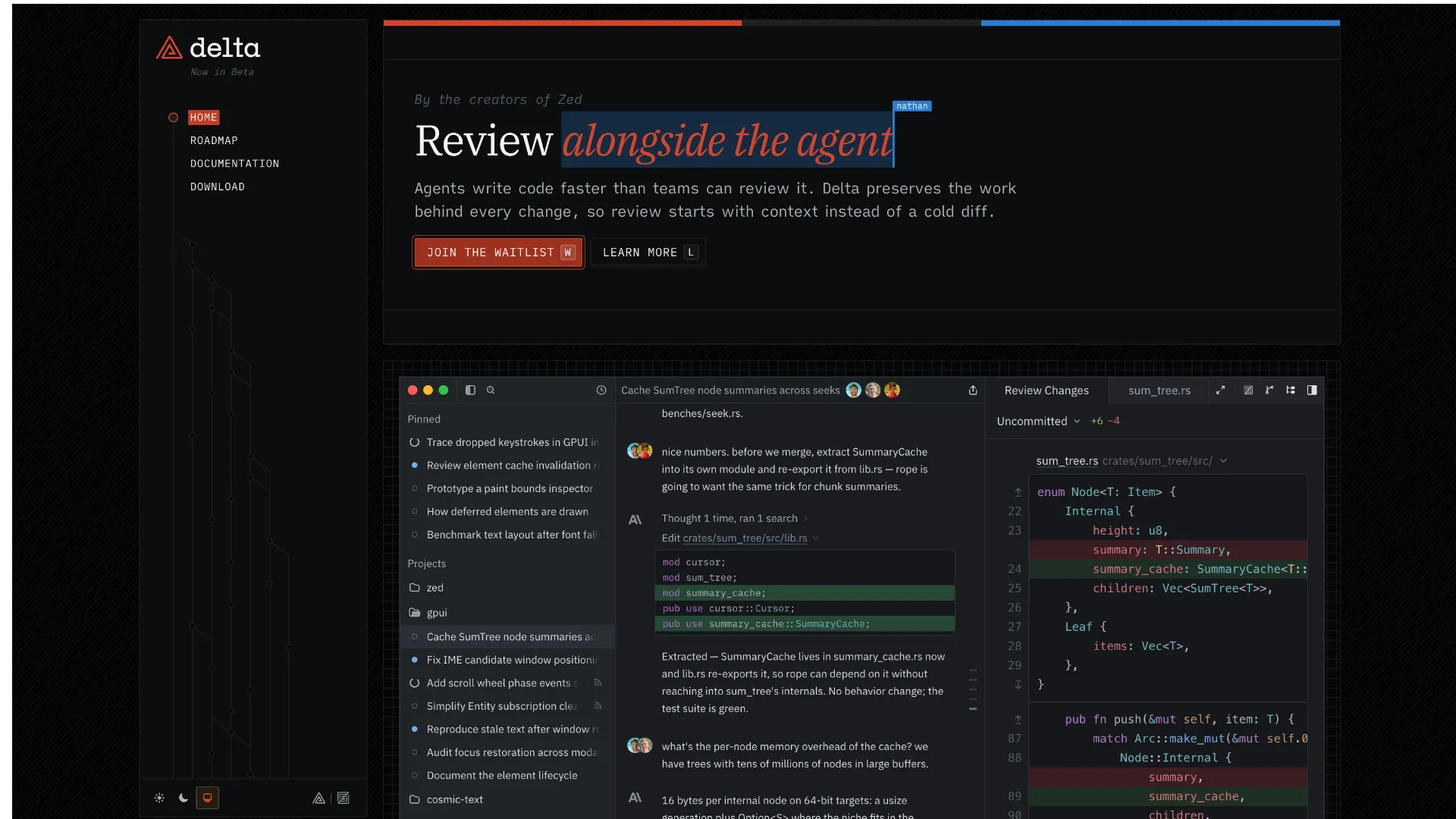
An agent-first, multiplayer coding environment from Zed that makes the persistent thread—conversation plus evolving code—the primary unit of software work and review.
Information checked: Sep 7, 2026 ·View sources
Tool details
- Type
- AI editors
- Platforms
- macOS, Linux, Windows, Web
- Free plan
- Yes
- Open source
- No
- Bring your own key
- Yes
- Local models
- No
Overview
Best for
- Teams reviewing substantial amounts of agent-generated code
- Parallel coding tasks that benefit from isolated workspaces
- Collaborative agent steering and code review
- Developers who want flexible model and billing choices
- Git-centric workflows that need strong provenance between prompts and changes
Strengths
- Keeps agent reasoning, conversation, and code changes connected for contextual review.
- Isolated thread workspaces make parallel agent tasks safer to coordinate.
- Real-time multiplayer threads let teammates steer and review the same work.
- Supports hosted models, provider subscriptions, and bring-your-own API keys.
- Fits existing Git branch and pull-request workflows instead of replacing Git.
Limitations & trade-offs
- Developers who require a fully offline coding workflow
- Projects that are not stored in Git repositories
- Teams that require a mature generally available product today
- Local-model-first workflows, which Delta does not currently document as supported
- Users who want a conventional editor-centric AI experience with minimal workflow change
- Still in private beta / early development, so access and behavior can change quickly.
- Requires a Zed account and an online check-in to open a workspace.
- Projects must be backed by Git; non-Git folders are not supported as projects.
- Synced repository and thread data is stored on Delta/Zed infrastructure, so it is not a purely local workflow.
- Cloud execution is still rolling out and currently uses Delta-hosted models only.
Get started
Pricing & usage limits
Official pricingFree tier available
Personal$0 / forever
Use Delta with supported bring-your-own API keys; no bundled hosted-model credits.
Pro$10 / month
Includes $5 of hosted-model token credits; additional hosted usage is usage-based.
Business$30 / seat/month
Adds organization controls, governance, roles, and unified spend visibility; AI credits are not bundled.
Pricing checked: Sep 7, 2026 · Subscription, usage limits, and model costs may be billed separately.
Features & details
Agent Workspaces
- Persistent agent threads linked to code history
- Isolated per-thread Delta worktrees by default
- Local or rolling cloud agent execution
- Conversation compaction and model switching
Review & Collaboration
- Real-time shared threads with attributed edits
- Inline comments on transcript, files, and diffs
- Branch, last-commit, and last-turn diff views
- Dedicated review threads with approve/request-changes flow
Models & Providers
- Zed-hosted models on eligible plans
- Anthropic, OpenAI, OpenRouter, and OpenCode API keys
- ChatGPT, GitHub Copilot, and Grok subscription sign-in
- Small, Balanced, and Frontier model roles
Developer Workflow
- Inline and background terminals inside threads
- Git local and origin handoff paths
- GitHub CI status integration
- macOS, Linux, Windows, and Delta Web access
Why Choose Delta?
Delta is most differentiated when the hard part of agentic development is no longer producing code, but understanding, reviewing, and coordinating what agents changed. Instead of treating AI as a panel attached to an editor, Delta treats a persistent thread as the unit of work. The conversation, the evolving files, comments, tool activity, and review state stay connected, which makes the history behind a change easier to inspect than a final diff with detached chat context.
That design is especially relevant once teams run several agent tasks in parallel. A conventional chat-plus-editor workflow can become difficult to audit when prompts, intermediate edits, terminal output, and reviewer feedback live in different places. Delta's approach is to keep those artifacts inside the same synchronized work record. The tradeoff is that adopting Delta means adopting a thread-first workflow rather than simply installing another autocomplete or chat extension.
Core Workflow
A practical Delta workflow starts with a Git repository and a narrowly scoped thread for one task. By default, the agent works in an isolated managed checkout, so exploratory edits do not immediately touch the developer's normal working tree. The thread then becomes the task room: prompts steer the implementation, terminals run against the same checkout, and review comments can point at either the conversation or the resulting code.
The important difference appears during review. Instead of only asking whether the final branch diff is acceptable, reviewers can inspect the work in relation to the turn that produced it, request revisions inside the same thread, or move into a dedicated review thread. Once the work is accepted, it can move back into the normal repository through the local Git remote or through the shared origin and pull-request flow.
For teams, the same thread can be shared rather than handed off as screenshots or pasted chat logs. Each participant receives a synchronized checkout and can follow the same conversation, code history, comments, and agent activity. Model usage is attributed to the participant who sends a request, which also makes shared threads less dependent on one person's provider credentials.
Use Cases
Delta is particularly well suited to long-running refactors, bug investigations, dependency upgrades, and feature work where the implementation may span many files and several rounds of review. The persistent thread helps preserve the rationale behind changes that would otherwise be compressed into a commit message or lost in an agent transcript.
It is also a natural fit for parallel experimentation. Separate threads can work against isolated copies of the same project, reducing the chance that two agent tasks overwrite each other's working state. Teams can use one thread for implementation and another review thread for structured approval or change requests, while still keeping the review connected to the original work.
A less obvious use case is handoff. Because Delta synchronizes the code state and conversation together, another developer can join the thread and inspect what happened without first reconstructing the agent's context from a PR description. This can be valuable when ownership changes mid-task or when a reviewer needs to understand why an unusual implementation choice was made.
Comparison to Alternatives
Cursor, Windsurf, Trae, Void, and Zed are easier to understand as editor-first products: the coding surface remains primary and AI is integrated into that environment. Delta reverses that emphasis. The thread is primary, while file views, diffs, terminals, comments, and agent execution are attached to the thread's evolving work.
That makes Delta less compelling for someone who mainly wants fast inline completion or a familiar editor with an AI assistant. It becomes more interesting when the workflow includes multiple agents, multiple reviewers, or repeated requests to explain how a change evolved. In that setting, Delta's provenance and multiplayer model can matter more than editor ergonomics alone.
Zed is the closest conceptual comparison because both products come from the same team, but they serve different primary workflows. Zed remains a code editor that can host agents; Delta is a separate application built around conversations and collaborative agent work. Developers can also open a Delta-managed checkout in Zed when they want a fuller editing surface.
Best Configuration
For most repositories, the safest default is to keep agent tasks in isolated workspaces and only use an in-place checkout for small, controlled changes where immediate edits to the current working tree are intentional. This preserves a clean separation between experimentation and accepted work while still making it easy to push a finished branch back to the local repository.
Model configuration is most useful when treated as a routing problem rather than a single-provider choice. A lower-cost model can handle exploration and summarization, a balanced model can cover routine implementation, and a frontier model can be reserved for planning or difficult review. Teams using hosted models should also set a monthly spend limit, while BYOK users should keep credentials in the supported environment or Delta configuration path rather than inside the repository.
For shared work, keep default thread visibility private unless organization-wide sharing is intentional. Add the GitHub integration when CI status is part of the review loop, and use background terminals for dev servers, watchers, or long-running test processes that the agent needs to interact with over several turns. Repositories with repeatable workspace setup can use an executable .agents/prepare script so new managed checkouts begin from a consistent environment.
Migration Notes
Delta is not a drop-in replacement for a VS Code profile or an extension bundle. The project must live in Git, and the workflow assumes tasks will be organized as persistent threads with their own worktrees. Teams moving from an editor-centric agent setup should start with one repository and a few bounded tasks rather than trying to relocate every development activity at once.
Existing Git conventions can remain in place. Delta does not replace commits, branches, remotes, or pull requests; it adds a finer-grained history between them. A repository with no remote can still be used locally, but thread sharing requires a remote that collaborators can access. Jujutsu users should treat support as early and incomplete rather than assuming full parity with Git workflows.
The biggest migration decision is therefore organizational, not technical: decide which work belongs in a shared agent thread, how reviews should be performed, and when changes graduate back into the team's normal branch and PR process. Delta delivers the most value when those boundaries are explicit.
Model support & data privacy
Supported models
- Anthropic
- OpenAI
- OpenRouter
- OpenCode Zen
- OpenCode Go
- ChatGPT
- GitHub Copilot
- Grok
Privacy & data handling
Delta stores synced repository and thread contents/history on the user's machine and on Zed-operated infrastructure to provide synchronization and collaboration. Hosted-model requests pass through Zed Cloud, while supported BYOK and subscription connections can go directly to the selected provider. Delta documents TLS/infrastructure encryption and local redaction of recognized secrets before synchronized thread content leaves the device.
Guides, reviews & fixes
No published guides yet. Start with the official documentation above.
Product updates
No verified product updates listed yet. Follow this tool to see new relevant content in Saved.
See the content timelineAlternatives
CursorCursor is an AI coding and cloud development platform that combines a VS Code-based editor, local and cloud agents, CLI workflows, Origin code hosting, repository collaboration, and prompt-to-app creation. WindsurfWindsurf, now transitioning under the Devin Desktop brand, is an AI-native IDE for developers who want coding agents, codebase context, and editor workflows in one desktop environment.
 Zed AIZed AI is an open-source standalone AI code editor positioned around speed, agent review, flexible model access, and collaboration rather than VS Code compatibility.
 TRAE / TraeCodeTRAE combines TraeCode, an AI coding environment for working with source files, and TraeWork, a task-oriented AI work assistant. This page focuses on choosing and setting up the coding workflow, reviewing changes and understanding subscription usage.
 VoidVoid is an open-source AI IDE and Cursor-style VS Code fork for developers who want model choice, local/BYOK workflows, and more control over AI coding data paths.
Sources & verification
Verification dates record when this directory checked the information. Product release dates appear separately above.
Official websiteGetting StartedModels & ProvidersPlans & UsageZed PricingPrivacy & SecurityData Storage & DeletionSecurityLatest ReleaseIntroducing Delta
Directory revision history
Delta 0.6.0 expanded review threads, cross-device thread sync, Delta Web capabilities, model controls, GitHub CI visibility, and collaboration reliability.
Zed introduced Delta and began inviting users to the private beta.