On This Page8 sections
Key Takeaways
- Laya-MLX is not a chatbot or a general-purpose text generator. It is a native MLX runtime for Laya's typed decision models on Apple Silicon.
- Instead of generating prose token by token, it evaluates a state plus typed questions and returns bounded decisions with probabilities.
- It supports three decision primitives:
choice,score, andnoul. - The published M3 Max benchmark reports 13.42 ms P50 for one short English decision with the 421M-parameter checkpoint and 7.39 ms P50 with the 322M multilingual checkpoint. Model loading is excluded from those timings.
- The runtime is fully local after the model checkpoint has been downloaded. It does not require a cloud API, PyTorch, or the Transformers runtime for inference.
- Laya-MLX is best understood as a fast decision layer for software and agents, not as a replacement for GPT-style models that write, reason in prose, or generate code.
- It is an independent MLX port, not an official Convai Innovations release. The upstream Laya models and training work come from Convai Innovations and contributors.
What Is Laya-MLX?
Laya-MLX is an open-source runtime that runs the Laya family of typed decision models natively through Apple's MLX framework.
The simplest mental model is:
state + typed questions
        ↓
bidirectional encoder
        ↓
decision heads
        ↓
choice / score / probability
A conventional generative LLM might receive a support ticket and respond with something such as:
This looks like a billing issue. The customer is requesting a refund and appears moderately frustrated.Software then has to parse that text, validate the output, recover from formatting errors, and decide how much to trust it.
Laya-MLX approaches the same problem differently. The application declares the questions and allowed answer shapes in advance. The model returns structured decisions rather than prose.
That makes it useful for tasks such as:
- request routing
- content classification
- moderation
- agent tool selection
- risk scoring
- semantic filtering
- support triage
- workflow gates
- ranking or prioritization
- deciding whether an expensive LLM call is necessary
The core idea is that many production AI tasks are not actually generation problems. They are judgment problems.
Why Laya-MLX Exists
Modern AI applications often use large generative models for tiny decisions.
A workflow may send hundreds or thousands of tokens to an LLM merely to answer questions such as:
- Is this request about billing?
- Which of four tools should the agent call?
- Is this document relevant?
- How urgent is this ticket?
- Should this task escalate to a stronger model?
A generative model can answer those questions, but it also performs work the application does not need: autoregressive decoding, text generation, schema enforcement, output parsing, and sometimes retries.
Laya takes a different architectural path. The upstream project describes Laya as a non-autoregressive decision model that evaluates typed questions over text or structured state in a single forward pass. The main English checkpoint uses a fully fine-tuned ModernBERT-large backbone plus a learned decision stack, for about 421M parameters total.
Laya-MLX ports that inference path to MLX so it can run efficiently on Apple Silicon.
The result is a local decision engine designed for situations where software needs an answer such as which option, what score, or how likely, rather than a paragraph.
What Does MLX Add?
MLX is Apple's machine-learning array framework optimized for Apple Silicon and its unified-memory architecture. It provides NumPy-like operations, neural-network primitives, automatic differentiation, and graph optimization while allowing workloads to run efficiently on Apple hardware.
Laya-MLX reimplements the Laya inference architecture using MLX.
According to the project documentation, the encoder, decision Transformer, scoring head, and action head all run in MLX, while tokenization uses Hugging Face's Rust tokenizer. The port preserves the original model weights, prompt construction, calibration behavior, and output schema.
This matters because running the original Laya stack typically involves the PyTorch/Transformers ecosystem. Laya-MLX removes those runtime dependencies for inference on a Mac.
The practical advantages are:
- local execution
- low latency
- no per-request cloud API
- no generated output tokens
- predictable typed outputs
- Apple Silicon optimization
- smaller operational surface than a full generative-model serving stack
Laya-MLX Is a Decision Model, Not a Small LLM
This is the most important distinction.
Laya-MLX does not take a prompt and continue writing text.
It is based on a bidirectional encoder. The complete input is visible to the model at once, and the output heads score predefined decisions.
That means it is good at questions like:
Which department should receive this request?
billing / technical / sales
It is not intended for questions like:
Write a polite response to this customer.The first task is a bounded decision.
The second is generation.
A useful production architecture is therefore:
user input
   ↓
Laya-MLX
route / score / filter
   ↓
application logic
   ↓
LLM only when generation or deeper reasoning is needed
This hybrid design can reduce the number of expensive generative calls while keeping deterministic application code in control of the workflow.
The Three Laya Decision Types
Laya exposes three core question types: choice, score, and noul. The upstream Laya checkpoints and the MLX port preserve these primitives.
choice: pick one option
Use choice when the output should be one member of a fixed set.
Examples:
- billing vs technical vs sales
- bug vs feature request vs question
- relevant vs duplicate vs unrelated
- documentation vs coding vs testing
A choice answer includes probabilities over the candidate options.
Conceptually:
billing     0.92
technical   0.05
sales       0.03
Your application can use the top option directly or apply its own confidence policy.
score: place something on an ordered scale
Use score when the answer belongs on an ordinal rubric.
Examples:
- low / medium / high urgency
- weak / moderate / strong relevance
- safe / questionable / dangerous
- poor / acceptable / excellent fit
Unlike a categorical choice, the levels have an order.
Laya can return the distribution over levels as well as the expected score.
noul: estimate whether a proposition is true
noul is the boolean-style primitive.
It returns P(true) for a proposition.
Examples:
Does this request ask for a refund?Does this document contain a security incident?Is this page relevant to the query?The result is a probability rather than a generated yes/no string.
That makes it convenient for threshold-based application logic:
if refund_probability > 0.85:
    route_to_refund_flow()
A key engineering point is that a probability is still model output, not a permission system or mathematical proof. Thresholds should be validated on the application's own labeled data before they control costly or irreversible actions.
Laya-MLX Architecture
The default English Laya checkpoint uses:
- ModernBERT-large as the encoder
- approximately 421M total parameters
- a 512-token total context
- a learned decision Transformer
- option scoring heads
- an action head
- calibrated decision probabilities
The multilingual checkpoint uses:
- mmBERT-base
- approximately 322M parameters
- a 1,024-token context
- multilingual input support
The typed-decisions checkpoint also uses ModernBERT-large, has about 421M parameters, and provides a 1,024-token context for its specialized workflows.
The context limit is important because it is not reserved entirely for the source document.
The budget includes:
- question instructions
- option descriptions
- state
- other formatting required by the model
A long state plus verbose labels can therefore exceed the useful context budget quickly.
How Fast Is Laya-MLX?
The project's published M3 Max measurements are unusually fast for an AI inference workload, but the benchmark boundary needs to be understood correctly.
For FP16 end-to-end inference on an Apple M3 Max with 40 GPU cores and 128 GiB of unified memory, the project reports:
| Benchmark | Laya 421M | Multilingual 322M |
|---|---|---|
| One short question, P50 | 13.42 ms | 7.39 ms |
| One short question, P95 | 13.92 ms | 7.79 ms |
| 50-question throughput | 146.8 questions/s | 395.0 questions/s |
| Peak MLX allocation, one short question | 943.6 MiB | 687.6 MiB |
The timing includes:
- prompt preparation
- tokenization
- tensor creation
- synchronized inference
- calibration
- result formatting
It excludes initial model loading.
The 50-question test also uses a larger batch_size=64, while the normal API default is 16.
Those details matter. A benchmark measured with short inputs on an M3 Max should not be treated as a universal latency guarantee for every Mac, every state length, or every batch size.
Is Laya-MLX Really a 7 ms AI Model?
In one specific sense, yes.
The project's multilingual checkpoint measured a 7.39 ms P50 for its short one-question benchmark on the stated M3 Max configuration.
But the more accurate statement is:
Laya-MLX can execute narrow typed decisions in single-digit to low-double-digit milliseconds under the project's tested M3 Max conditions.
That is different from saying a full agent task takes 7 ms.
Real workflow latency can also include:
- loading data
- retrieval
- application code
- multiple decision passes
- network calls to other systems
- an LLM call after routing
- tool execution
- UI interaction
The latency number should therefore be interpreted as the cost of the decision-model inference path, not the entire application.
Laya-MLX vs Original Laya
Laya-MLX does not introduce a new base model.
It is primarily an inference port.
| Area | Laya | Laya-MLX |
|---|---|---|
| Model family | Laya | Laya checkpoints |
| Core task | Typed decisions | Typed decisions |
| Generation | No | No |
| Main runtime | PyTorch / Transformers ecosystem | MLX |
| Target hardware | General supported accelerators | Apple Silicon |
| Cloud required | No | No |
| Training/fine-tuning implementation | Upstream project | Not included as the main purpose |
| Preconverted MLX weights | No | Yes |
| Apple-native inference focus | No | Yes |
The Laya-MLX documentation explicitly states that its conversion changes parameter names for MLX and preserves the source weights rather than retraining the model. The default export is FP16; converting to FP32 changes arithmetic precision but does not restore weight precision that was not present in the source checkpoint.
Laya-MLX vs Jev
Laya-MLX is likely to attract attention because its interface resembles the emerging typed-decision pattern popularized by TypeSafe's Jev.
Both approaches focus on decisions rather than prose, and both expose concepts corresponding to choice, score, and noul.
But they should not be treated as the same product.
| Area | Laya-MLX | TypeSafe Jev |
|---|---|---|
| Access | Local, open-source runtime | Hosted TypeSafe service |
| Weights | Laya weights are available | Jev weights are not publicly released |
| Hardware | Apple Silicon | Remote API |
| Output | Typed decisions and probabilities | Typed decisions and probabilities |
| Free-form generation | No | No |
| Primary advantage | Locality, low latency, control | Managed service and TypeSafe's proprietary model |
| Context | 512 or 1,024 tokens depending on Laya checkpoint | Much larger hosted context in current Jev service |
| Runtime cost model | Local hardware cost | API pricing |
TypeSafe describes Jev as a System One model for typed decisions with calibrated confidence rather than generated strings.
The important caution is benchmarking.
Claims such as Laya-MLX is 50x faster than Jev are not universally established by the available evidence. Laya-MLX's published numbers are local inference measurements on a specific M3 Max, while Jev's figures are hosted API end-to-end measurements with a different model, context envelope, infrastructure path, and benchmark methodology.
The valid conclusion is narrower: Laya-MLX demonstrates extremely low local decision latency on Apple Silicon for the tested workloads.
Laya-MLX vs a Generative LLM
The comparison is less about which model is better and more about which problem needs solving.
| Need | Laya-MLX | Generative LLM |
|---|---|---|
| Route into a known category | Excellent fit | Works, but often unnecessary |
| Return a probability | Native use case | Often derived indirectly |
| Rank against an explicit rubric | Good fit | Good, but usually slower |
| Generate an explanation | Not supported | Strong fit |
| Write code | Not supported | Strong fit |
| Summarize a document | Not the intended task | Strong fit |
| Brainstorm | Not supported | Strong fit |
| Run locally on Mac | Yes | Yes, depending on model |
| Guaranteed bounded output shape | Core design | Requires structured-output controls |
| Long-context reasoning | Weak fit | Better fit |
A practical rule is:
Use Laya-MLX when the application already knows the possible shape of the answer. Use a generative model when the answer itself must be created.
Installing Laya-MLX
The published package targets Apple Silicon with macOS 14+ and Python 3.11+. The first model load downloads the checkpoint; later inference can run locally.
Install the package:
python -m pip install laya-mlxThen load the preconverted English checkpoint:
import laya_mlx as laya

agent = laya.load("aac6fef/laya-mlx")
The default checkpoint is roughly 0.4B parameters, and the Hugging Face MLX model artifact is about 843 MB.
Minimal Laya-MLX Example
A useful first example is routing a customer request while simultaneously checking whether it asks for money back.
import laya_mlx as laya

agent = laya.load("aac6fef/laya-mlx")

state = "I was charged twice for the same subscription. Please reverse the duplicate charge."

questions = {
    "department": {
        "type": "choice",
        "instructions": "Which department should handle this request?",
        "criteria": [
            "billing",
            "technical",
            "sales",
        ],
    },
    "refund_requested": {
        "type": "noul",
        "instructions": "Does the customer ask for money back?",
    },
}

result = agent.predict(state, questions)

print(result["answers"])
The important detail is what is missing: there is no prompt asking the model to produce JSON.
The response shape is controlled by the decision interface itself.
Using score
For an ordered rubric:
questions = {
    "urgency": {
        "type": "score",
        "instructions": "How urgent is this request?",
        "criteria": [
            "not urgent",
            "needs attention soon",
            "critical",
        ],
    }
}
The application can then combine the score with ordinary code.
For example:
urgency = result"answers"["score"]

if urgency >= 1.8:
    escalate()
This pattern is often easier to operationalize than prompting a generative model to explain urgency and then attempting to convert the prose back into a number.
Running Multilingual Decisions
The base English checkpoint should not be assumed to perform well on non-English inputs.
Laya provides a separate multilingual checkpoint, and Laya-MLX publishes an MLX conversion for it.
A router can select the multilingual path:
from laya_mlx import Router, triage_questions

router = Router(dtype="float16", max_loaded=2)

result = router.predict(
    {"message": "发票被重复扣款,请退款。"},
    triage_questions(),
)

print(result["routing"])
The upstream multilingual model uses an mmBERT-base encoder, about 322M parameters, and a 1,024-token context. Upstream documentation also warns that multilingual quality is uneven across languages and that domain-specific fine-tuning may still be necessary.
Precision: FP16 vs FP32
Laya-MLX defaults to FP16.
You can request FP32 arithmetic:
agent = laya.load(
    "aac6fef/laya-mlx",
    dtype="float32",
)
Why do this?
FP32 can produce probabilities closer to the upstream FP32 computation.
But there is an important limitation: the source weights used by the published conversion are already FP16. Running the computation in FP32 does not recreate information that was discarded from the stored weights.
For most routing workloads, the practical question is not whether every probability matches to the last decimal place. It is whether the selected decision and threshold behavior remain stable on the application's evaluation set.
How Faithful Is the MLX Port?
The project includes explicit port-fidelity testing.
Its documentation reports that the three supported checkpoints matched the upstream selected answer across 63 validation questions in both FP16 and FP32, producing 378 matching comparisons in total. It also reports 100 repeated deterministic calls per configuration with no measured active-memory growth after clearing caches.
The English Hugging Face model card separately reports a maximum calibrated probability difference of about 0.00544 in its validation setup.
These results are useful, but they prove port fidelity on tested fixtures, not universal task accuracy.
That distinction matters.
A runtime can perfectly reproduce the upstream model and the upstream model can still make the wrong semantic decision.
Performance Tuning
For repeated workloads, Laya-MLX exposes several optional performance controls.
The project documents:
compile=Truepad_to_multiple=16cache_prompts=True- configurable
batch_size - explicit
device="gpu"ordevice="cpu"
Example:
agent = laya.load(
    "aac6fef/laya-mlx",
    dtype="float16",
    batch_size=32,
    compile=True,
    pad_to_multiple=16,
    cache_prompts=True,
)
These switches are not free wins.
Compilation introduces first-use overhead and shape specialization. Padding can increase wasted compute. Prompt caching can help repeated state preparation but does not mean arbitrary question embeddings are reused: each question still receives its own encoder computation.
Benchmark the actual workload instead of enabling every optimization by default.
The Snake Demo: What It Demonstrates
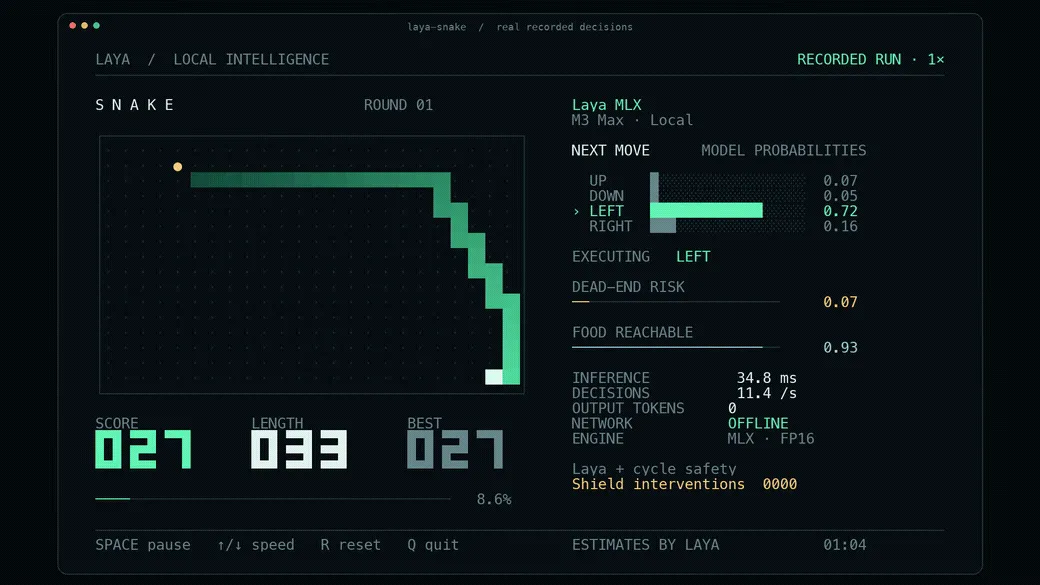
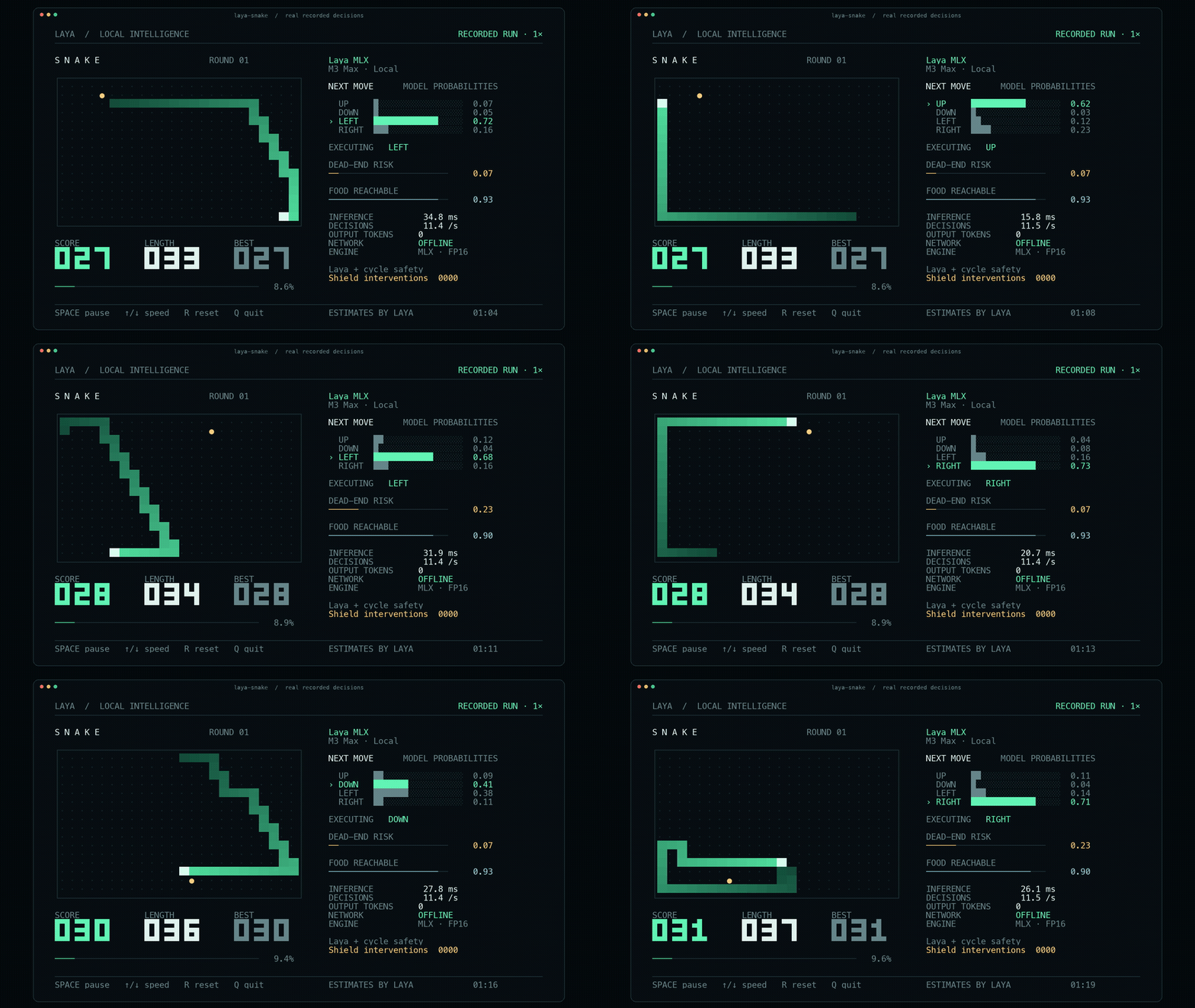
One of the project's more visual demonstrations is a terminal Snake game in which Laya makes repeated movement decisions.
The optimized demo reportedly reached 75.40 moves per second across 2,400 moves on the tested M3 Max, with zero deaths and two visible interventions from a separate cycle-safety layer. The optimized path was about 6.5% faster than its paired eager control.
This is useful as a demonstration of low-latency closed-loop decision making.
It should not be confused with a general intelligence benchmark.
The Snake environment has a bounded state and bounded actions, which is exactly the kind of setting where a typed decision model can be effective.
Where Laya-MLX Fits in an AI Agent
A common agent architecture asks a large model to do everything:
observe → reason → choose tool → execute → inspect → repeatLaya-MLX suggests a more heterogeneous architecture:
observe
  ↓
fast decision model
  ├─ choose route
  ├─ score urgency
  ├─ detect condition
  └─ decide whether escalation is needed
  ↓
deterministic code
  ↓
generative model only when required
  ↓
tool execution
This can be useful when an agent has frequent, repetitive judgments that do not require open-ended reasoning.
Examples include:
- choosing among a known set of internal tools
- detecting whether a request needs browsing
- selecting a document collection
- deciding whether a change is risky enough for deeper review
- routing a coding task to test, documentation, or implementation workflows
- filtering obvious low-value candidates before an expensive reranker
The important design rule is to keep authority in application code.
A model probability should inform the branch. It should not silently become permission to perform a high-impact side effect.
A Practical Two-Stage Pattern
One of the strongest use cases is using Laya-MLX as a fast first stage.
For example:
1. Receive task
2. Laya-MLX classifies task
3. If confidence is high:
      take cheap deterministic route
4. If confidence is ambiguous:
      call stronger LLM
5. Validate result
6. Execute
This architecture can improve throughput because the expensive model is reserved for uncertain or genuinely generative work.
It is especially attractive for local developer tools where the decision layer needs to run many times per second without sending every observation to a remote API.
Good Use Cases for Laya-MLX
Laya-MLX is a strong candidate when all of the following are true:
- the input is mostly text or structured text
- the output can be bounded in advance
- decisions happen frequently
- latency matters
- local execution is valuable
- probabilistic confidence is useful
- the application can evaluate decisions against labeled examples
Examples include:
Ticket routing
Choose a department and estimate urgency.
Agent routing
Choose between coding, search, retrieval, testing, or human review.
Moderation prefilter
Estimate whether text matches a policy category before deeper evaluation.
RAG filtering
Judge whether retrieved passages are relevant before passing them to a large model.
Content operations
Classify pages, assign taxonomy labels, or determine whether an item needs manual review.
Workflow gating
Estimate whether a condition is true before executing a downstream branch.
When You Should Not Use Laya-MLX
Laya-MLX is the wrong tool when the required output is inherently open-ended.
Do not choose it when the application needs to:
- write an article
- answer a broad knowledge question
- generate source code
- summarize long documents
- perform long multi-step reasoning
- produce a conversational response
- inspect images directly
- synthesize information from live web sources by itself
A typed decision model can sit around those tasks, but it does not replace them.
Important Limitations
Context is relatively small
The English checkpoint has a 512-token total context, while the multilingual and typed-decisions checkpoints provide 1,024 tokens. Instructions, options, and state share that budget.
This is far smaller than modern long-context LLMs.
Long documents usually need preprocessing, chunking, extraction, or retrieval before they reach Laya.
Confidence is not correctness
Calibration is valuable only when it holds on the distribution where the system is deployed.
The upstream Laya documentation explicitly recommends evaluating calibration on your own data before relying on it for full automation.
A 0.95 probability is not a guarantee.
Some tasks belong in deterministic code
The upstream model documentation specifically warns against relying on the model for arithmetic, counting, date comparisons, and multi-hop index lookups when ordinary code can compute them reliably.
This is a useful general principle:
Use models for semantic judgment. Use code for exact computation.
It is early-stage software
The laya-mlx Python package's first listed release, version 0.1.0, was published on September 19, 2026.
That does not make it unusable, but it means production adopters should expect a younger ecosystem than PyTorch, Transformers, or mature hosted model APIs.
Pin versions and model revisions if reproducibility matters.
It is Apple-Silicon-focused
The project's main target is Apple Silicon.
If the production environment is NVIDIA CUDA, conventional Linux servers, or another accelerator stack, the upstream Laya implementation may be a more natural choice.
Common Mistakes
Mistake 1: treating Laya-MLX like a prompt-to-JSON LLM
It is not simply a tiny LLM with JSON mode.
The decision architecture and outputs are purpose-built.
Mistake 2: using it for tasks with unknown output space
If the model needs to invent the answer, use a generative model.
Mistake 3: trusting benchmark latency as an application SLA
The published 7–14 ms results come from specific short-question M3 Max tests.
Measure your own state length, question count, batch size, precision, and hardware.
Mistake 4: treating confidence as authorization
A model can be confidently wrong.
Keep permissions, irreversible actions, and security boundaries in deterministic systems.
Mistake 5: sending huge states
With a 512- or 1,024-token budget, unnecessary context can crowd out the information needed for the decision.
Mistake 6: forcing one model to handle every language
Use the multilingual checkpoint where appropriate, and evaluate the specific language/domain rather than assuming uniform quality.
How to Evaluate Laya-MLX for Production
A realistic evaluation should contain more than latency.
Create a labeled dataset from the actual workflow and measure:
- accuracy
- per-class precision and recall
- confusion matrix
- Brier score for probabilistic predictions
- expected calibration error
- risk at chosen confidence thresholds
- false-positive cost
- false-negative cost
- P50 latency
- P95 latency
- memory use
- behavior on long or malformed inputs
- behavior on out-of-distribution examples
Then evaluate the system at the policy level.
For example:
probability >= 0.90  → automate
0.60–0.90            → stronger model
< 0.60               → manual review or safe fallback
Those thresholds are examples, not defaults.
They should come from the measured cost of errors in the actual application.
Why Laya-MLX Matters
The significance of Laya-MLX is not that it replaces large language models.
It demonstrates a different way to design AI software.
The last several years pushed many applications toward one pattern:
everything → LLM → generated text → parser → actionTyped decision models suggest another:
state → specialized judgment model → probabilities → codeFor tasks that really are classification, ranking, routing, scoring, or gating problems, the second architecture can be cleaner.
Laya-MLX makes that pattern particularly interesting for Mac-native and local-first software because the decision layer can run directly on Apple Silicon with no cloud round trip.
FAQ
Is Laya-MLX an LLM?
Not in the conventional autoregressive, text-generating sense.
It uses transformer-based encoders and learned decision heads, but it does not generate free-form output token by token.
Is Laya-MLX the same as Laya?
No.
Laya is the upstream model family and Python project. Laya-MLX is an independent MLX inference port designed for Apple Silicon.
Is Laya-MLX an official Convai Innovations project?
No.
The Laya-MLX repository explicitly describes itself as an independent port. The original Laya models and upstream code are by Convai Innovations and contributors.
Can Laya-MLX run offline?
Yes, after the required checkpoint has been downloaded. Normal inference does not require a cloud API.
Does it require PyTorch?
No for the Laya-MLX inference runtime.
The project states that model computation runs in MLX without requiring PyTorch or the Transformers runtime.
How much memory does it use?
In the project's one-short-question M3 Max benchmark, peak MLX allocation was approximately 943.6 MiB for the 421M English checkpoint and 687.6 MiB for the 322M multilingual checkpoint. These figures are benchmarked MLX allocations, not a promise of total system-process memory in every workload.
Can it generate text?
No.
Use a generative LLM when the application needs prose, code, summaries, explanations, or other open-ended content.
Can it replace Jev?
It can address some of the same typed-decision use cases, but it is not Jev and should not be treated as a drop-in equivalent in model quality, context capacity, calibration, or deployment characteristics.
Is the 7–14 ms benchmark realistic?
It is a reported measurement from the project's M3 Max test setup for short typed decisions. It should be reproduced on the intended hardware and workload before being used for capacity planning.
Conclusion
Laya-MLX is a native Apple Silicon runtime for a new class of AI workload: fast, bounded, probability-backed decisions instead of generated text.
Its value is easiest to see when a program repeatedly needs to answer questions such as:
- Which route should this take?
- How strong is this signal?
- Is this condition probably true?
- Should this task be escalated?
For those workloads, running a full generative LLM can be unnecessary.
Laya-MLX combines Laya's typed decision interface with MLX-based local inference, delivering published single-question latency in the single-digit to low-double-digit millisecond range on an M3 Max while keeping inference on-device.
The best way to evaluate it is not to ask whether it can replace an LLM. Instead, identify the decisions inside an existing AI workflow, benchmark those decisions on real labeled data, and move the narrow, high-frequency ones onto the fastest reliable layer that can handle them.
Continue Reading
More articles connected to the same themes, protocols, and tools.



Referenced Tools
Browse entries that are adjacent to the topics covered in this article.