
On This Page8 sections
Key Takeaways
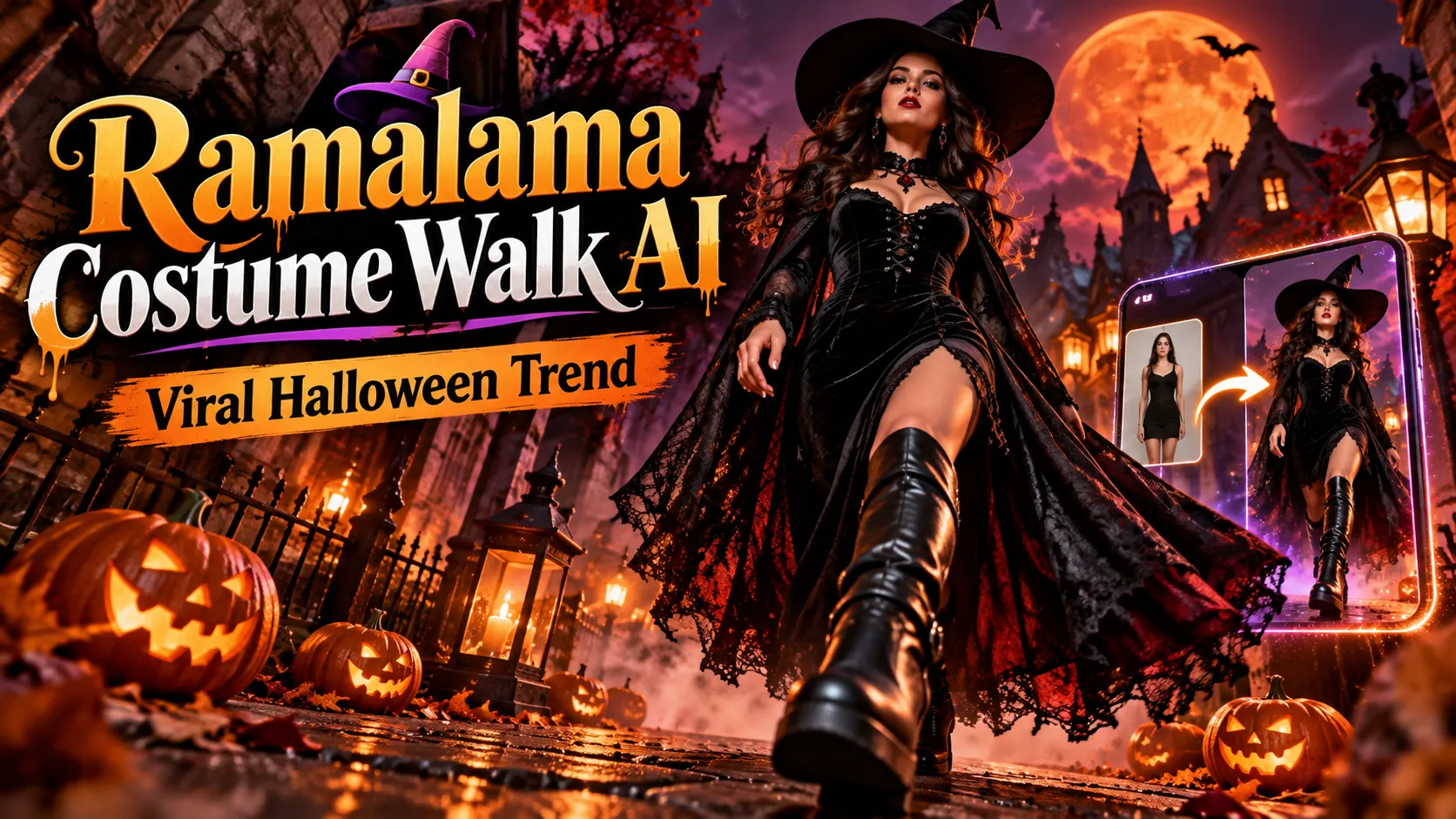
- Ramalama Costume Walk AI recreates a Halloween outfit reveal in which the camera begins at shoe level, follows an approaching subject, and tilts upward to reveal the complete costume.
- The trend uses Róisín Murphy's 2005 song Ramalama (Bang Bang). Its distinctive suspense-and-reveal format returned to TikTok in October 2026; AI generators now let creators make a version from a photo.
- A well-lit full-body or half-body image generally offers more reliable walking motion and costume consistency than a tightly cropped selfie.
- PicLumen, Media.io, Veevid, and dedicated Ramalama generators offer different levels of costume control, output options, and payment models. Free sign-up credits do not necessarily mean a complete video is free.
- For the most reliable result, generate a 10–15-second vertical video, inspect the feet and face frame by frame, and add appropriately licensed music during editing or publishing.
What Is the Ramalama Costume Walk AI Trend?
The Ramalama Costume Walk is a short-form costume-reveal video, typically associated with Halloween and Róisín Murphy's track Ramalama (Bang Bang) from the 2005 album Ruby Blue.
The format has three recognizable moments:
- The mystery: Boots, shoes, or paws approach a camera positioned close to the ground. The face remains hidden.
- The buildup: The subject continues walking as the camera tracks backward or tilts upward, revealing fabric, accessories, and silhouette.
- The payoff: The full outfit and recognizable face appear near a memorable musical cue.
An AI version synthesizes the walk, costume, camera movement, and background from a still image. It is a video-generation effect, not a standalone AI model and not necessarily a face-swap filter. Some tools provide one-click templates; others let users write detailed movement prompts.
The visual trick works because the opening frames withhold the information viewers want: the identity of the character and the complete look. The final reveal resolves that curiosity. Unlike a conventional outfit-change transition, the costume may be present throughout the clip; the camera simply keeps it out of view until the right moment.
Why Is Ramalama Trending Again in October 2026?
The format has an established Halloween association, but the 2026 revival has reached both traditional social-video creators and AI-effect platforms.
Marketing agency New Engen ranked the Ramalama Costume Walk second in its October 2026 TikTok trend roundup, updated October 14. Its description emphasizes the low camera angle, slow approach, and delayed costume reveal. Separately, Trends by Masterhooks reported approximately 50.5 million combined views across six related videos posted between September 29 and October 4, 2026. That is a specific tracked sample, not a platform-wide view count or proof that AI-generated versions received those views.
Three developments help explain the format's renewed reach:
- Seasonal relevance: Halloween gives viewers an immediate reason to watch costume reveals and share their own versions.
- A repeatable visual structure: The low-angle opening and upward reveal are recognizable even when the costume, creator, or setting changes.
- Lower creation effort: Image-to-video tools let people explore elaborate outfits without physically making or filming every costume.
A popular soundtrack does not guarantee a viral result. The costume concept, pacing, framing, and final visual payoff still matter.
How to Make a Ramalama Costume Walk AI Video From One Photo
Step 1: Select a generator
Choose a dedicated Ramalama effect if speed matters more than customization. Choose a general image-to-video workflow with editable prompts if precise costume materials, camera direction, or scenery are important.
Check the actual upload requirements and generation price before adding a photo; individual tools differ significantly.
Step 2: Prepare the right image
Use a sharp, front-facing or three-quarter image of an adult who consented to its use, or a pet. A half-body or full-body photo provides more information about proportions and clothing. Avoid sunglasses, hands covering the face, heavy motion blur, multiple overlapping subjects, and cropped feet when the desired effect begins with footwear.
For a portrait-only image, consider first creating a full-body character reference that preserves the person's likeness. This two-stage workflow can help, but it may also introduce identity drift, so compare the reference with the original before animation.
Step 3: Choose a costume with a strong silhouette
Witch hats, sweeping capes, platform boots, skeleton prints, ornate collars, and layered dresses reveal distinct visual information as the camera moves upward. A costume with almost no shape change between shoes and shoulders is less effective for this particular format.
Specify two or three visually important details rather than an excessively long list of accessories.
Step 4: Define the shot, not just the outfit
A prompt saying only person in a witch costume walking may produce an ordinary full-body shot. The defining instructions are boots-only opening, forward steps, continuous upward camera tilt, and a final face reveal.
A practical 12-second sequence is:
- 0–4 seconds: Low camera, shoes or paws only.
- 4–9 seconds: Smooth upward tilt while the subject keeps walking.
- 9–12 seconds: Complete costume and face reveal, followed by a short final pose.
These are production guidelines, not fixed timestamps in the original song. Adjust the timing to the specific sound segment used in your edit.
Step 5: Generate a vertical first draft
Prefer 9:16, approximately 10–15 seconds, and a modest resolution for the first test. A 720p draft can be sufficient for checking motion and composition; whether a service charges for failed attempts or higher-resolution regeneration depends on its terms.
Step 6: Inspect the result before paying for an upscale
Replay the opening, midpoint, and ending. Look for shoes sliding above the floor, swapped faces, duplicated hands, changed costume colors, hats that appear from nowhere, or abrupt changes in camera direction.
If the tool supports regeneration, fix the input photo or reduce the prompt's complexity before trying again. Higher resolution cannot repair fundamentally incorrect motion.
Step 7: Add audio and publish
Export a clean MP4, upload it to TikTok or Instagram Reels, and add the chosen audio using a library your account is permitted to use. Align the reveal with the relevant sound cue in the editor. Label realistic AI-generated content as required by the platform.
Best Ramalama Costume Walk AI Generators Compared
These are examples of publicly listed workflows as of October 18, 2026. They are not a hands-on quality ranking, and availability, credits, and prices can change.
| Generator | Best for | What its public page offers | What to check |
|---|---|---|---|
| PicLumen | Custom costume concepts | Character-photo upload plus a written costume description | Current credits, export settings, and effect availability |
| Media.io | Template-based creation | A low-angle Ramalama effect, with solo and group examples | Final resolution, music handling, and free-credit limits |
| Veevid | Detailed controls and presets | Eight costume presets, editable prompts, pet option, model and resolution controls | Credit cost before generation; its workflow excludes children |
| Ramalama Halloween AI | One-off paid exports | Listed 10-second videos at $6.99 for 480p, $9.99 for 720p, and $19.90 for 1080p | Current checkout terms, previews, refunds, and output rights |
| AptVideoAI | Single or small-group reveals | Costume presets, image uploads, and 9:16 generation with credit-based options | Actual song rights, output tier, and credit requirements |
Which should you choose? For the fastest recreation, a fixed Ramalama template is simpler. For a distinctive character, the ability to edit the costume and shot instructions is more valuable than an extensive preset list. For pets or multiple people, choose a workflow explicitly designed for those subjects rather than assuming a solo portrait effect will work.
Is there a free Ramalama AI generator? Some sites advertise starter credits or previews, but a complete downloadable video may still require payment. Distinguish a free account, free watermarked preview, and genuinely free export before committing.
Four Copy-and-Paste Ramalama AI Prompts
These original prompt templates are designed around the trend's visual grammar. Results depend on the selected model, reference photo, aspect ratio, and any prompt-length restrictions; they are starting points, not guaranteed one-click results.
1. Gothic Witch Costume Walk
Create a 12-second cinematic vertical 9:16 Halloween costume walk using the uploaded consenting adult as the identity reference. Preserve recognizable facial features, hairstyle, skin tone, and proportions.

Costume: an elegant gothic witch, black velvet dress, structured pointed hat, lace-up boots, and a violet-lined cape. Scene: misty stone street, warm lanterns, subtle moonlight.

0-4s: Ground-level tracking shot showing only boots taking believable steps toward the camera.
4-9s: One continuous smooth upward tilt reveals the cape, dress, and hat as the subject walks forward.
9-12s: Clear face reveal, direct eye contact, confident final pose.

Keep the same face, costume, and environment throughout. Feet contact the ground naturally. No extra limbs, flickering accessories, text, logos, or automatic copyrighted soundtrack. Silent output.
2. Cinematic Vampire Reveal
Animate the uploaded adult reference into a 12-second, 9:16 costume reveal. Maintain the person's identity.

Costume: black tailored vampire coat, deep-red brocade vest, polished boots, high collar, flowing black cape with crimson lining. Scene: candlelit gothic corridor with a light atmospheric haze.

Begin at ankle height with slow, weighted footsteps approaching the lens. Track backward while tilting smoothly from boots to torso and then face. Complete the reveal at 9 seconds; the subject opens the cape for a dramatic pose.

Natural leg movement, stable garments, consistent facial anatomy, restrained camera motion, one continuous shot, no subtitles or logos. Export without music.
3. Pet Witch Walk
Create a charming 12-second vertical costume-walk video of the pet in the uploaded image. Preserve the exact species, breed characteristics, fur markings, eye color, and body proportions.

A small black witch cape and tiny purple pointed hat. Autumn porch at night, pumpkins and warm fairy lights.

0-4s: Only the pet's paws walking naturally on the ground are visible.
4-9s: The camera glides backward and tilts upward to reveal the small costume.
9-12s: The recognizable pet face fills the frame; the pet pauses and makes a curious head tilt.

Maintain natural four-legged anatomy and physically plausible paw contact. No human hands, extra legs, morphing fur patterns, or text. Silent 9:16 video.
4. Two-Person Halloween Costume Walk
Create a 12-second cinematic 9:16 Halloween walk using two authorized adult reference subjects. Keep each person's face and costume distinct.

Character A: black-and-silver witch costume with tall hat and platform boots.
Character B: burgundy vampire outfit with red-lined cape and polished black boots.
Both walk side by side through a misty mansion hallway.

0-4s: Frame only both pairs of shoes approaching at the same pace.
4-9s: The camera smoothly tilts up, showing the costumes without crossing identities or changing outfit details.
9-12s: Reveal both faces clearly and hold a synchronized final pose.

Exactly two people in every frame, consistent left-right positions, realistic steps, stable facial likeness, no duplicate bodies, no sudden cuts, no words or logos. Silent output.
Advanced tip: If a single prompt repeatedly fails to produce the correct first shot, use a model that accepts separately defined starting and ending frames or camera controls. Create a boots-level starting composition and a final full-body identity reference, then animate between them. This adds preparation but can constrain the camera path more effectively than increasingly elaborate text.
How to Film the Ramalama Walk Without AI
AI is optional. A real costume and phone can produce the effect with fewer anatomical artifacts.
- Set a phone near floor level in a stable, safe position. Leave space for the subject to approach.
- Choose a simple background: A hallway, garage, doorway, or stairwell landing makes the silhouette easy to read. Avoid walking near traffic or obstacles.
- Start with shoes in frame. Keep the camera still initially or have a camera operator move backward slowly.
- Reveal gradually. Tilt upward or cut to a wider shot as the subject nears the camera. Keep the face hidden until the payoff.
- Edit the timing. Place the full reveal on the selected audio cue, trim unnecessary seconds, and export a vertical clip.
The trade-off is straightforward: real footage offers authentic motion and physical costume details, while AI enables fictional looks, impossible environments, and costumes the creator does not own.
Why Some AI Costume Walk Videos Look Wrong
Image-to-video models estimate three-dimensional motion from limited visual evidence. The hardest part is not generating gothic fabric; it is keeping the subject stable while the virtual camera moves from the feet to the face.
| Problem | Likely cause | Practical fix |
|---|---|---|
| Feet float, slide, or merge | Unclear leg geometry or conflicting motion instructions | Use a full-body image; request slow steps and explicit ground contact |
| Face changes at the reveal | Weak identity reference or large perspective change | Use a sharp unobstructed face; reduce makeup complexity |
| Costume changes halfway through | Too many accessories or competing style descriptions | Describe one coherent outfit and its defining materials |
| Camera begins on the face | The model follows the uploaded portrait's original framing | Supply a boots-level start frame or a dedicated template |
| Two people merge together | Occlusion or unclear subject identities | Use separate references where supported and maintain fixed left-right positions |
| The reveal misses the song | Video generation and music timing are separate processes | Export without music and align the video manually in the editor |
| Pet becomes humanlike | A model prioritizes human runway motion | Explicitly request four-legged gait and normal animal anatomy |
For a stronger short-form result, favor one continuous camera move, one principal reveal, and one clean final pose. Adding spins, explosions, costume swaps, and multiple new characters in the same ten seconds multiplies the opportunities for visual errors.
Video Settings That Matter Most
- Aspect ratio: 9:16 for TikTok, Reels, and Shorts.
- Length: Roughly 10–15 seconds is a practical target for this format, not a mandatory platform limit.
- Resolution: Start with a lower-cost draft; export 720p or 1080p when facial detail and outfit texture justify it.
- Composition: Keep the final face centered and away from interface overlays; leave useful space above tall hats.
- Lighting: Separate dark clothing from the background with side or rim light so the costume remains readable.
- Motion: Use slow steps and a smooth tilt before adding secondary actions.
- Sound: Treat soundtrack placement as an editing step unless the tool clearly documents audio generation and licensing.
For creators building repeated videos, a reusable template with a fixed camera path makes results easier to compare than changing the entire scene on every attempt.
How Much Does Ramalama AI Cost?
Price depends on the service and the final video tier. For example, Ramalama Halloween AI's published pricing lists $6.99 for a 10-second 480p export, $9.99 for 720p, and $19.90 for 1080p as of October 18, 2026. Other services use credits instead of direct per-video payment.
The underlying generation model also changes costs. Kie.ai's public Seedance 2.5 rate card lists image-driven generation at $0.140, $0.315, and $0.790 per output second for 480p, 720p, and 1080p respectively. For ten seconds, that corresponds to $1.40, $3.15, and $7.90 at the published API rates. Those are developer-side generation rates, not guaranteed consumer prices, and retries, upscaling, reference-video billing, and provider fees can change total cost.
Before buying, compare the total cost of a usable download, not just the headline number of free credits. Also check watermarks, regeneration policies, commercial-use terms, and whether deleted uploads are retained by the model provider.
Can You Use the Ramalama Song and Post the Video Safely?
The trend's signature song is copyrighted. A video generator mentioning Ramalama (Bang Bang) does not automatically grant a license to distribute that recording.
For ordinary social posts, find the song using the destination platform's available music tools and follow the terms applicable to your account. Commercial posts need additional care: TikTok's Commercial Music Library guidance says businesses should use commercially cleared music for promotional content rather than assuming music in the general library is cleared for that purpose.
Realistic AI-generated footage can also require disclosure. TikTok's AI-generated content guidance describes labeling requirements for realistic synthetic content and restrictions on certain depictions. Apply the current platform rules, obtain explicit permission for anyone whose likeness is used, and do not assume a label makes every use lawful. For services that exclude children, respect those restrictions rather than bypassing them.
For an uncomplicated workflow, generate a silent video, edit the timing separately, use properly authorized audio, and disclose AI generation when required.
Ramalama Costume Walk AI FAQ
What song is used in the Ramalama costume walk?
The recognizable soundtrack is Ramalama (Bang Bang) by Róisín Murphy, from the 2005 album Ruby Blue. Its theatrical rhythm makes it suitable for suspenseful reveals.
Can one selfie really create the entire video?
Yes, some specialized services accept one photo. However, a head-and-shoulders selfie gives the model less information about body shape and footwear. A clear half-body or full-body image usually provides a better starting point.
Is Ramalama Costume Walk AI the same as the witch-on-a-broom trend?
No. The costume walk uses approaching feet and an upward outfit reveal. Some other Ramalama-inspired AI clips feature flying witches or different transitions set to the same song. They are related sound-based variations, not the same camera sequence.
Can I make a Ramalama video with a cat or dog?
Yes, some generators offer pet modes. Use a clear photo, keep the animal's markings consistent, and specify natural four-legged motion. A generic human-costume template may distort pet anatomy.
Does CapCut automatically create the AI video?
Not necessarily. CapCut can help assemble footage, apply transitions, and synchronize sound. Generating a realistic moving subject from a single still requires an AI image-to-video capability or external generator that supports the effect.
How long should the video be?
A 10–15-second vertical video is a practical starting length. More important than the exact duration is leaving enough time for the shoes-only opening, smooth camera reveal, and final recognizable pose.
How can I make my version different from other videos?
Choose a distinctive silhouette or unexpected subject: a coordinated gothic couple, a pet witch, a retro science-fiction costume, or a bright outfit revealed after a deliberately ominous opening. Preserve the familiar low-to-high camera movement so the trend remains recognizable.
Will using the trend guarantee views?
No. Trend participation may help viewers understand the format, but reach depends on execution, relevance, audience response, distribution, and platform behavior. Public examples of highly viewed videos are not forecasts for a new upload.
Conclusion
Ramalama Costume Walk AI turns a simple camera trick into an accessible Halloween video effect: start on the shoes, build suspense, and reveal an unmistakable costume and face at the right moment.
The best results come from a clean reference image, a visually distinct outfit, a tightly controlled camera path, and a deliberate audio edit—not from making the prompt as complicated as possible. Try a dedicated template for speed, or use the prompts above for more creative control. Before posting, check the final frames, verify your music rights, and label realistic AI footage as required.
Choose a costume, create a short vertical draft, and refine the reveal before exporting your Halloween video.
Continue Reading
More articles connected to the same themes, protocols, and tools.
Referenced Tools
Browse entries that are adjacent to the topics covered in this article.





