
On This Page8 sections
Key Takeaways
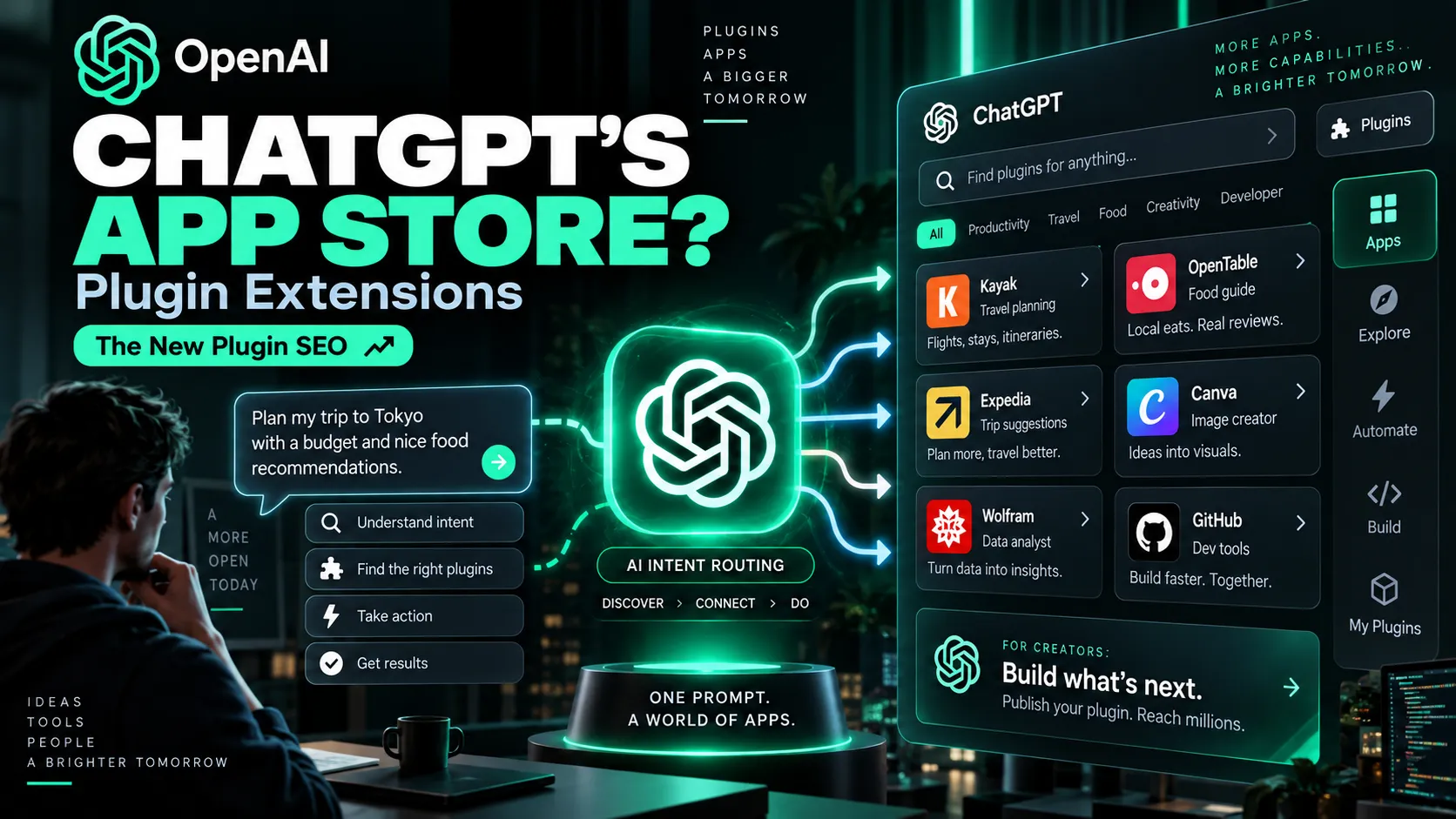
- OpenAI’s DevDay 2026 Plugin Extensions are primarily a distribution shift. Plugins can now have a ChatGPT sidebar home, interactive panels, custom file viewers, and a listing in the universal directory shared by ChatGPT and Codex.
- OpenAI says ChatGPT has 1.2 billion weekly users, making conversational plugin discovery potentially more important than a conventional app-store listing.
- Real examples already include Figma, Notion, GitHub, Remotion, and Google Slides workflows, ranging from design-to-code to repository triage and native deck editing.
- The emerging growth discipline is less like classic SEO and more like intent routing: tool names, descriptions, parameter documentation, and completion quality can influence whether the model selects a plugin.
- There is still meaningful platform risk. Earlier versions of the ChatGPT app ecosystem suffered from weak discovery, approval friction, bugs, and limited usage data.
- SaaS monetization is still constrained inside plugins, so the safest strategy is to use ChatGPT as a distribution and execution surface while keeping billing, accounts, analytics, and customer ownership on the independent product.
What OpenAI Actually Changed
At DevDay 2026, OpenAI introduced Plugin Extensions, opening the platform used to build ChatGPT features so outside developers can create more native experiences inside ChatGPT.
A modern plugin can combine:
- Skills for reusable workflow instructions and resources.
- MCP servers for tools, authentication, data access, and actions.
- Optional UI for structured interaction, previews, editing, and confirmation.
- MCP Events for automations triggered by external changes.
- Shared distribution through a universal ChatGPT and Codex plugin directory.
The biggest strategic change is discovery.
Instead of forcing users to search for an integration manually, ChatGPT can surface relevant plugins inside a conversation when the user’s intent matches what the plugin can do.
That creates a new acquisition path:
User describes a problem → ChatGPT identifies the intent → a relevant plugin is surfaced → the user authorizes it → the task is completed.
This is much closer to an AI-native app store than a traditional integration catalog.
Why This Is Different From the Old ChatGPT Plugin Store
Developers are justified in being cautious because OpenAI has changed the packaging of its third-party ecosystem several times.
The progression has roughly looked like this:
| Generation | Core idea | Typical experience |
|---|---|---|
| 2023 Plugins | API connector | ChatGPT calls an external endpoint |
| GPTs | Customized assistant | Instructions plus actions |
| 2025 Apps | Mini-app in ChatGPT | Interactive app experience |
| 2026 Plugins | Capability package | Skills + MCP + UI + events + shared discovery |
The name has returned to “plugins,” but the product is much closer to a packaged agent capability layer.
Real Examples: What Plugins Can Already Do
Figma: Design-to-Code and Design-System Workflows
OpenAI’s public plugin examples include Figma workflows for translating frames and components into production-ready UI code, inspecting design context, creating design-system rules, and updating design artifacts.
The useful pattern is not simply “search Figma.”
It is:
design context → implementation → design-system constraints → updated artifact
That is a multi-step workflow where conversational orchestration is more valuable than a simple connector.
Notion: Workspace Knowledge to Execution
A Notion integration becomes much more useful when it can move beyond retrieval.
A strong workflow could look like:
find product specs → synthesize requirements → create an implementation plan → prepare a meeting brief → write decisions back to Notion
This is a strong template for knowledge-heavy SaaS products because the plugin turns stored context into action.
GitHub: Triage, Debugging, and Code Preparation
GitHub is another clear example of the difference between a weak connector and an agentic workflow.
A weak workflow is:
“List my open issues.”
A stronger workflow is:
“Investigate this failed CI run, connect it to the likely regression, explain the root cause, and prepare a fix for review.”
The second is delegated work rather than retrieval.
Remotion: Agentic Video Creation
Remotion demonstrates how a plugin can package product-specific implementation knowledge for programmatic video creation with React.
That can include:
- animations,
- captions,
- audio,
- transitions,
- charts,
- text effects,
- 3D elements.
The key advantage is that the user describes the desired output while the plugin carries the technical knowledge required to produce it.
Google Slides: Editing Existing Assets
Google Slides is useful because many real workflows are not about generating a new artifact from scratch.
Users often need to:
- update an existing deck,
- preserve an existing template,
- restyle selected slides,
- repair formatting,
- add new sections without breaking the original design system.
That is exactly the kind of workflow where a native plugin surface can be more useful than a generic chat response.
MCP Events: External Events Can Start the Workflow
MCP Events introduce another major shift.
The flow can become:
external event → MCP event → ChatGPT workflow → tool calls → result
For example:
- a bug report appears in a product-feedback channel,
- a review comment is added to a document,
- a deployment fails,
- a project task changes status.
Instead of waiting for the user to open ChatGPT and ask for help, the external event can become the trigger for the workflow.
The New Opportunity: Plugin SEO
“Plugin SEO” is not an official OpenAI term, but the mechanics are becoming clear.
Traditional SEO asks:
Which webpage should rank for a keyword?
Conversational plugin discovery asks:
Which tool should the model choose for this intent?
That changes the optimization target.
Instead of focusing mainly on backlinks, titles, and keyword density, developers need to think about:
- tool names,
- descriptions,
- parameter documentation,
- activation boundaries,
- negative cases,
- completion success,
- user satisfaction,
- latency,
- reliability.
A useful tool definition might look like this:
{
  "name": "compress_video",
  "description": "Use this when the user wants to reduce a video file size or hit a specific upload limit. Do not use for editing, transcription, or identifying codecs.",
  "inputSchema": {
    "type": "object",
    "properties": {
      "targetSizeMb": {
        "type": "number",
        "description": "Maximum desired output size in megabytes."
      }
    }
  }
}
The goal is not keyword stuffing.
It is classification clarity.
A model should be able to understand:
- when to use the tool,
- when not to use it,
- what arguments are required,
- what success looks like.
That suggests a new growth loop:
clear intent coverage → correct selection → successful completion → satisfied users → more distribution opportunities
Why Narrow Utility Plugins May Have an Advantage
A model can route a narrow capability more reliably than a vague platform.
Compare:
“An all-in-one AI media platform.”
with:
“Compress a video below a user-specified upload limit while preserving readable text and audio.”
The second has a clearer activation boundary.
That makes several categories especially interesting:
- file compression and conversion,
- document transformation,
- specialized data access,
- design-to-code workflows,
- developer triage,
- publishing and asset workflows,
- domain-specific validation,
- event-driven monitoring with a clear next action.
A broad SaaS product can still participate, but its MCP surface should expose narrow, well-defined tools rather than one generic “do everything” action.
What Users and Developers Are Saying
Reaction is mixed, and developer excitement should not be confused with mainstream consumer demand.
Developers are excited about three things:
- access to ChatGPT’s enormous user base,
- the possibility of conversational discovery,
- richer in-chat application experiences.
The skepticism comes from OpenAI’s platform history.
Developers have already seen multiple versions of the ecosystem:
Plugins → GPTs → Apps → Plugins again
That creates a reasonable concern:
Will the platform stay stable long enough to build a business on top of it?
Earlier app developers also complained about:
- weak discovery,
- slow review processes,
- buggy tooling,
- limited analytics,
- uncertainty around customer ownership.
DevDay 2026 appears to address several of those complaints with better discovery, richer UI, Plugin Creator, a redesigned submission flow, and a shared directory.
However, that does not remove platform risk.
The safest approach is to treat ChatGPT as a major distribution surface, not as the only place where the product exists.
The Monetization Catch for SaaS Builders
Current plugin rules remain restrictive for digital businesses.
That means most SaaS companies should not assume the plugin itself will replace the product website.
A practical architecture is:
Website: SEO, signup, pricing, subscriptions, billing, account management, analytics, customer relationship.
ChatGPT plugin: discovery, task execution, workflow automation, retention, and re-engagement.
This separation matters because a platform can change distribution rules much faster than a company can rebuild its business model.
A Practical Launch Playbook
1. Start With the Headless MCP Capability
Make the core workflow work without custom UI first.
The plugin should already be useful when invoked from conversation.
2. Build an Intent Test Set
Test:
- direct prompts,
- indirect prompts,
- negative prompts,
- ambiguous prompts,
- prompts requiring clarification.
Track:
- selection precision,
- selection recall,
- argument accuracy,
- completion rate,
- OAuth drop-off,
- latency,
- cancellations,
- user corrections.
3. Add UI Where It Changes the Outcome
Interactive panels are most useful for:
- media previews,
- editable schedules,
- comparison tables,
- maps,
- structured records,
- file workflows,
- visual editors.
Do not build a custom interface simply because the platform allows it.
4. Add MCP Events Only for High-Value Triggers
Useful triggers include:
- new bug reports,
- review comments,
- failed deployments,
- project status changes,
- new tasks requiring action.
The event should map to a clear, user-approved action instead of generating noise.
5. Keep the Business Independent
Maintain:
- the website,
- billing,
- login,
- analytics,
- support,
- product database,
- customer relationship.
Treat ChatGPT as an important client and distribution surface, not as the only home of the business.
Will This Become ChatGPT’s App Store Moment?
Three conditions matter.
First, discovery must work.
An app ecosystem does not matter if users do not know the apps exist. Conversational recommendations directly target that problem.
Second, intent routing must be reliable.
If ChatGPT repeatedly recommends irrelevant plugins, the ecosystem behaves like a bad search engine.
Third, developers need durable economics.
The platform must provide enough discovery, stability, analytics, and monetization flexibility to justify long-term investment.
The strategic shift is therefore bigger than “apps inside ChatGPT.”
On the traditional web:
user chooses software → user performs task
In an agentic interface:
user states goal → model selects capability → software enters the workflow
That changes what software distribution means.
Conclusion
OpenAI Plugin Extensions may become one of DevDay 2026’s most consequential announcements for independent developers because they combine native ChatGPT UI, MCP tools, skills, events, and conversational discovery on top of a platform with enormous reach.
The opportunity is significant, but so is the platform risk.
The strongest strategy is not to build an entire company inside ChatGPT.
It is to expose clear, high-intent capabilities that ChatGPT can understand and invoke reliably while keeping the core business independent.
For builders, the next optimization discipline may sit beside SEO and App Store Optimization:
Agent Discovery Optimization — winning the moment when an AI decides which software should solve the user’s problem.
Continue Reading
More articles connected to the same themes, protocols, and tools.
Referenced Tools
Browse entries that are adjacent to the topics covered in this article.





