On This Page8 sections
Key Takeaways
- Magi AI is Sand.ai's video-generation ecosystem, not a general-purpose chatbot. The name now spans the hosted Magi creation product, the open-source MAGI-1/MAGI-1.1 family, and the newer MAGI-2 Preview research release.
- MAGI-1's defining idea is autoregressive video generation: it creates and denoises video in temporal chunks rather than treating the entire clip as one fixed block. That design makes video continuation, streaming generation, and chunk-level prompting natural parts of the architecture.
- MAGI-1.1 is the practical continuation of the original model family. Sand.ai open-sourced MAGI-1.1 24B weights in June 2026, while the older MAGI-1 family still offers lighter 4.5B variants that are substantially easier to run locally.
- MAGI-2 Preview is a different generation stack, not simply MAGI-1 with more parameters. Released August 5, 2026, it is a 114B-parameter unified audio-video model that activates about 6B parameters per token through MagiMoE. It generates 10-second clips with synchronized audio from text or an image plus text.
- Local MAGI-2 inference is currently an infrastructure project, not a typical desktop workflow. The official release calls for eight NVIDIA Hopper GPUs and roughly 307 GB of checkpoint data.
- The hosted Magi product is much easier to try, but its pricing information should be checked before purchase because credit allowances and plan details can change.
What Is Magi AI?
Magi AI is an AI video-generation system developed by Sand.ai, a research and product company focused on generative video. In search results, the term can refer to several related but technically different things:
- Magi, the browser-based creation product for generating and extending videos.
- MAGI-1, the original open-source autoregressive video model released in 2025.
- MAGI-1.1, the updated 24B model whose weights were open-sourced in 2026.
- MAGI-2 Preview, the August 2026 research release focused on scaling unified audio-video generation with a sparse mixture-of-experts architecture.
That distinction matters. Someone searching for a simple image-to-video website needs the hosted product. A ComfyUI user or local inference developer is more likely looking for MAGI-1. A research team evaluating synchronized audio-video generation may actually want MAGI-2 Preview.
There is also an important naming trap: magi.ai is not Sand.ai's Magi video product. The domain is associated with an unrelated analytics and digital-marketing business. Sand.ai's official Magi product, model repositories, and model weights use Sand.ai-controlled properties and accounts.
Archive note (August 2026): The videos and diagrams in this article were preserved from the former
magi-ai.orghomepage before that domain was redirected here. They document the original 2025 MAGI-1 release, so they should not be read as MAGI-1.1 or MAGI-2 Preview benchmark evidence.
The original MAGI-1 showcase reel, archived from the former magi-ai.org homepage.
MAGI-1.1 vs MAGI-2 Preview: What Changed?
The biggest mistake in current Magi AI coverage is treating MAGI-2 Preview as a straightforward version bump. The two generations explore different technical questions.
| Area | MAGI-1 / MAGI-1.1 | MAGI-2 Preview |
|---|---|---|
| Core goal | Long-horizon, controllable video generation | Efficient scaling of unified audio-video generation |
| Architecture | Autoregressive denoising + Diffusion Transformer | Single-stream Transformer + MagiMoE |
| Temporal strategy | Generates video chunk by chunk | Does not carry over MAGI-1's autoregressive chunking |
| Audio | Video-focused generation pipeline | Joint synchronized audio-video generation |
| Inputs | Text-to-video, image-to-video, video-to-video | Text-to-video and image-to-video |
| Current clip behavior | Duration controlled through frames; continuation is a core feature | Fixed 10-second clips in the Preview release |
| Open source | Yes, Apache 2.0 | Yes, Apache 2.0 |
| Practical local hardware | 4.5B variants can run on a single high-VRAM consumer GPU | Official inference requires eight Hopper GPUs |
| Best fit | Local experimentation, continuation, controllable video workflows | Research, high-end infrastructure, unified audio-video experiments |
MAGI-2 does not simply reuse MAGI-1's autoregressive chunking. MAGI-2 instead starts from a unified single-stream design for text, video, and audio, then scales capacity using MagiMoE. This means MAGI-1.1 and MAGI-2 Preview should be viewed as different tools with overlapping video-generation goals rather than one completely replacing the other.
Why MAGI-1's Autoregressive Design Matters
Most diffusion video models are easiest to understand as generating or refining a fixed temporal block. MAGI-1 changes the framing by treating a video as a sequence of temporal chunks.
The implementation divides generation into temporal chunks, allowing groups of frames to be denoised as units. Generation of subsequent chunks can build on prior visual context, which helps make continuation and streaming-style generation practical.
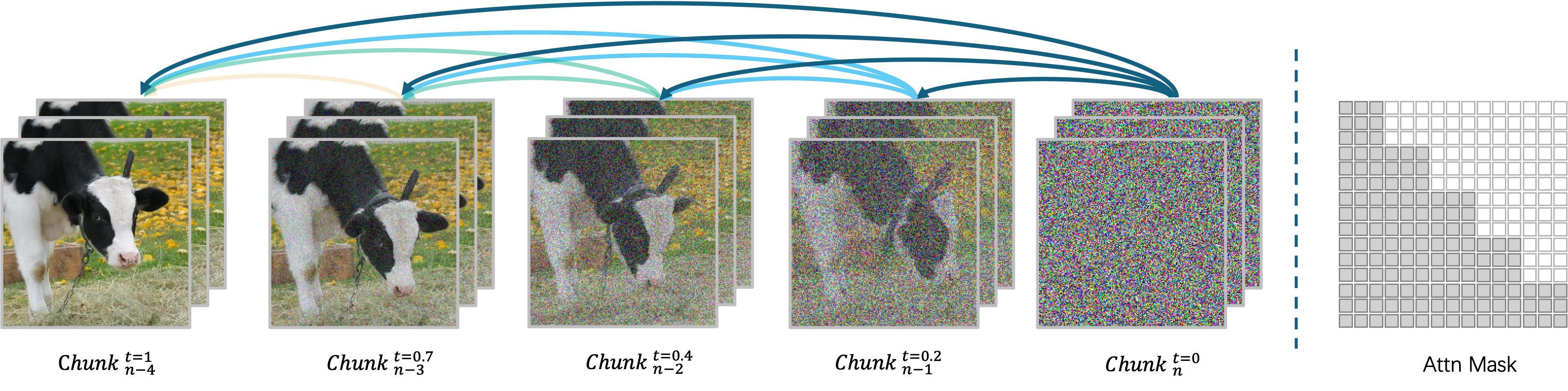
The release-era diagram shows MAGI-1 denoising consecutive temporal chunks while reusing causal context from earlier chunks.
This architecture creates several useful properties.
1. Video continuation is native to the model
A continuation model can condition on earlier content and generate what happens next instead of repeatedly generating isolated clips and stitching them afterward. This is particularly useful for:
- continuous camera moves;
- character actions that take longer than a short clip;
- product demonstrations;
- establishing shots that transition into close-ups;
- narrative sequences with changing instructions.
2. Prompt control can change over time
MAGI-1 supports chunk-wise prompting, so later temporal regions can receive different instructions. This is more powerful than putting several events into one long paragraph and hoping the model assigns them to the correct moments.
A better conceptual prompt plan looks like this:
0-2s: A runner waits at the starting line, medium shot, subtle camera shake.
2-5s: The runner accelerates forward as the camera tracks from the side.
5-8s: The camera moves behind the runner while the stadium opens into view.
8-10s: The runner crosses the finish line and slows naturally.
The exact control surface depends on the interface or inference pipeline, but the principle is consistent: describe temporal progression explicitly instead of compressing an entire sequence into one static visual prompt.
3. Physical continuation becomes a meaningful benchmark
Video continuation tests something image-quality benchmarks often miss: whether the model can preserve the state of moving objects and produce plausible next events.
Published MAGI evaluations have emphasized physical consistency and continuation quality. Such benchmark numbers are useful signals, but they should not be treated as universal rankings because generation mode, resolution, prompt set, sampling settings, and human preference can all change the result.
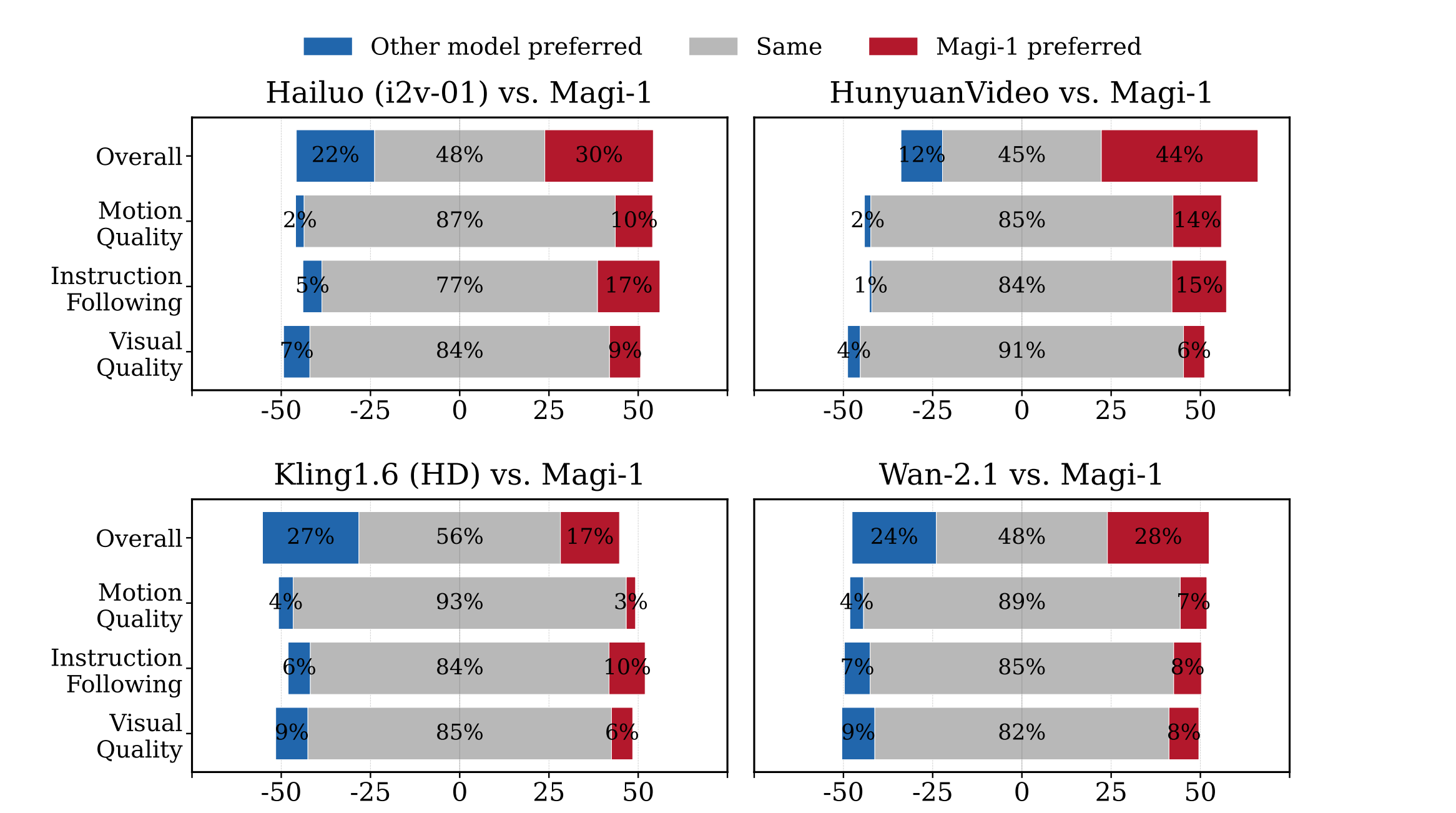
This archived in-house evaluation graphic compares the original MAGI-1 release with Hailuo i2v-01, HunyuanVideo, Kling 1.6 HD, and Wan 2.1. It is historical first-party evidence, not an independent or current ranking.
Preserved MAGI-1 Architecture and Demo Media
The former MAGI-1 homepage paired its technical summary with an architecture diagram and three short visual samples. They are retained here so the original release material remains available after the domain redirect.
Diffusion Transformer architecture
The original 24B model used a Diffusion Transformer with block-causal attention, parallel attention, timestep conditioning, T5 text embeddings, and sandwich normalization in the feed-forward blocks. These components supported temporal causality while keeping chunk processing parallel where possible.
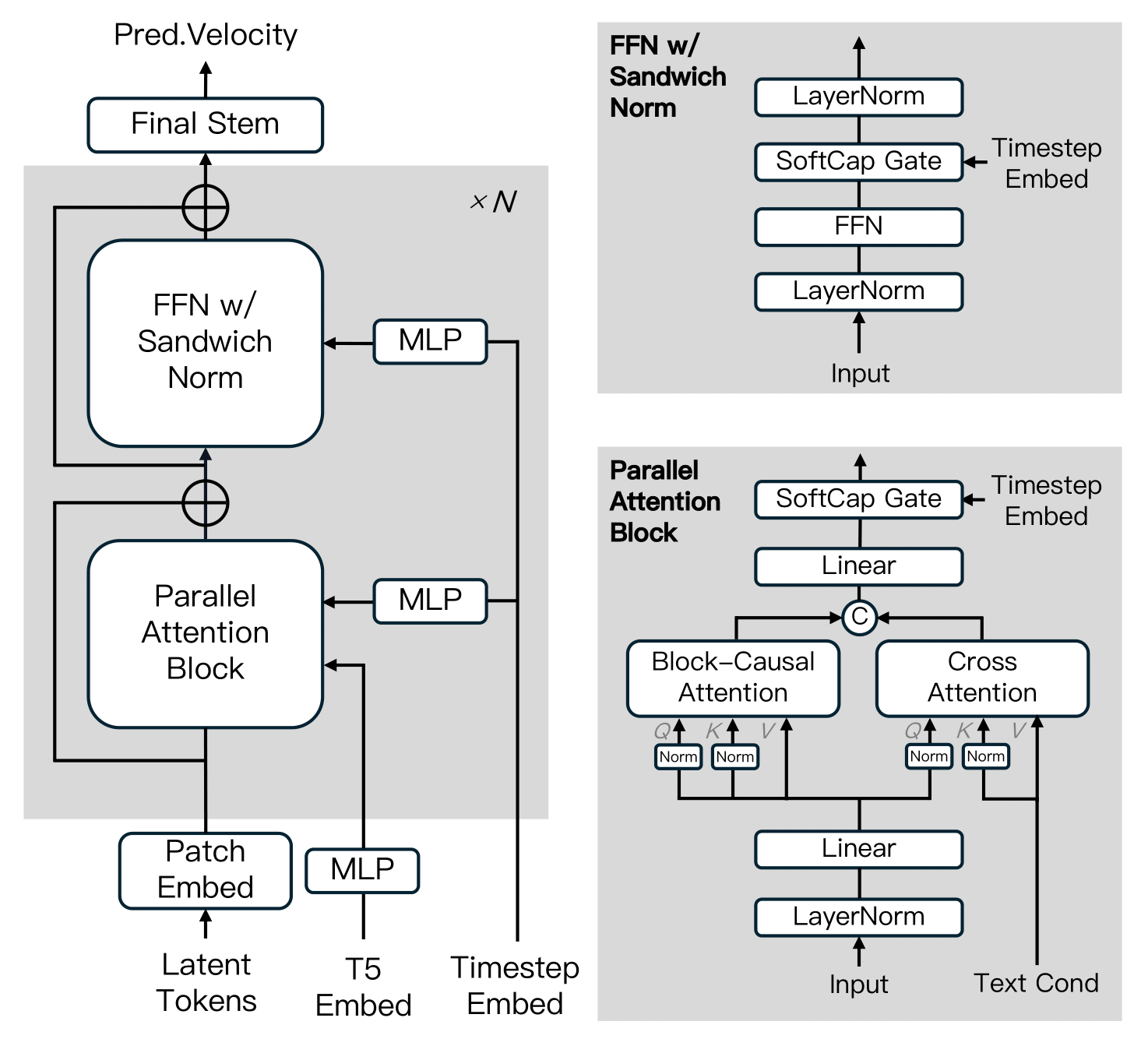
Archived MAGI-1 DiT diagram showing its block-causal attention and feed-forward structure.
Transformer VAE reconstruction demo
The release described a 614M-parameter Transformer VAE with 8× spatial and 4× temporal compression. The following reconstruction sample was used on the former homepage to illustrate that component.
Shortcut-distillation demo
MAGI-1's distilled variants used a shortcut-distillation objective intended to support different inference budgets while retaining conditional alignment. This sample accompanied that explanation on the former homepage.
Additional MAGI-1 generation sample
The final preserved clip is the astronaut sample that appeared immediately before the original installation section.
What Is New in MAGI-1.1?
MAGI-1.1 is the newer branch of the autoregressive family. Sand.ai released open model weights for MAGI-1.1 24B in 2026, including optimized variants intended to make inference more practical.
An important practical detail is that the model lineup is not symmetrical:
- MAGI-1 includes 24B and 4.5B variants, with distilled and quantized options.
- MAGI-1.1 focuses primarily on the larger 24B-class release.
That makes the older 4.5B branch relevant even after MAGI-1.1 arrived. Developers who need consumer-GPU inference should not automatically select the newest version number.
MAGI-2 Preview Explained
MAGI-2 Preview changes direction from long autoregressive video continuation toward scalable, unified audio-video generation.
Sand.ai released the Preview on August 5, 2026 as an intermediate research release. The model has approximately 114 billion total parameters but activates only about 6 billion parameters per token. It uses a system called MagiMoE, designed to increase model capacity without paying the full compute cost of a dense 114B network at every token.
A single stream for text, video, and audio
Instead of maintaining completely separate modality pipelines, MAGI-2 places text, video, and audio into a unified sequence processed by the same Transformer backbone.
The goal is to let dialogue, lip motion, body movement, sound effects, music, camera rhythm, and visual events influence one another throughout generation.
For creators, the practical promise is straightforward: audio becomes part of the generation problem rather than a separate post-processing step.
MagiMoE: 114B capacity without 114B active compute
MAGI-2 Preview uses a mixture-of-experts architecture. Only a subset of the model's experts participates in processing each token, allowing total parameter capacity to grow much larger than the amount of compute activated for each step.
The practical interpretation is more important than the architecture terminology: MAGI-2 is large in stored capacity, but sparse in which parameters it activates for each token.
This can make 100B-scale video architectures more computationally realistic than an equally large dense model, although attention, decoding, memory movement, video resolution, audio processing, and repeated denoising still make generation expensive.
MAGI-2 Preview Limitations
The word Preview should be taken seriously. This is not yet a lightweight replacement for mainstream hosted video generators.
Current limitations include:
- 10-second clips in the initial Preview release.
- Eight NVIDIA Hopper GPUs for the official reference inference setup.
- Roughly 307 GB of model components.
- A two-stage process involving preview generation and refinement.
- High storage and GPU-memory requirements.
- A workflow designed for developers comfortable with Docker, Python,
torchrun, multi-GPU inference, checkpoint management, andffmpeg.
For most individual creators, running MAGI-2 locally is therefore less attractive than using a hosted service. For research labs and infrastructure teams, however, the open weights and permissive licensing make it unusually inspectable for a video model of this scale.
Magi AI Features That Matter Most
Image-to-video generation
The hosted Magi product can animate a still image using a text instruction. This is one of the most practical entry points because the reference image handles composition, identity, clothing, objects, and visual style while the prompt can focus on motion.
For better results:
- use a clean source image with a clear subject;
- specify one primary action before adding secondary motion;
- distinguish subject motion from camera motion;
- describe speed explicitly: slow, brisk, sudden, subtle, continuous;
- avoid asking the first frame to become a completely unrelated scene.
Video extension
Video continuation is one of Magi's most differentiated features. Instead of producing an unrelated second shot, the model can continue from prior frames and attempt to preserve motion and scene state.
Good use cases include:
- extending a tracking shot;
- completing an action cut off by a short generation window;
- lengthening ambient footage;
- building a continuous fantasy or cinematic sequence;
- producing transition material between planned beats.
Text-to-video and video-to-video
The open MAGI-1 inference pipeline supports t2v, i2v, and v2v workflows. This makes the open model useful for more than basic image animation.
Synchronized audio-video with MAGI-2
MAGI-2 Preview can generate a video and corresponding audio together. Its unified design targets dialogue, singing, lip synchronization, expressions, body language, environmental sound, and camera behavior.
This is strategically important because the next generation of AI video tools is moving from silent visual clips toward complete audiovisual shots.
A model that understands both streams jointly can potentially reduce the mismatch created when video, speech, lip-sync, ambience, and sound effects are generated by unrelated systems.
Magi AI Pricing
The hosted Magi service uses a credit-based subscription model. Pricing has included free access and paid tiers aimed at individual creators, professional users, and higher-volume generation.
The important variable is not only the monthly subscription price but the effective cost per generated second.
When evaluating Magi pricing, calculate:
Effective cost per usable clip = monthly subscription cost / number of accepted clipsThis is more useful than cost per generation because video workflows often involve retries.
For example, if a workflow generates five versions before finding one usable 10-second clip, the practical cost can be several times higher than the advertised generation price.
Before subscribing, verify:
- current monthly credits;
- credits consumed per video second;
- whether extensions cost the same as initial generations;
- maximum resolution;
- queue priority;
- watermark rules;
- commercial-use permissions;
- whether unused credits roll over.
Pricing and credit allocations can change, so the current checkout screen should be treated as authoritative.
Is Magi AI Free?
Yes, but there are three different meanings of free.
- Hosted free tier: the web product offers limited no-cost usage.
- Open-source model access: MAGI model code and selected model weights can be downloaded without paying a subscription fee.
- Free local generation: technically no SaaS subscription is required, but GPU hardware, cloud compute, storage, electricity, and engineering time still have real costs.
For occasional users, the hosted product is usually cheaper than owning the required hardware. For developers generating at scale, local deployment can become attractive when utilization is high enough to justify GPU costs.
What Hardware Do You Need for Local MAGI?
MAGI-1 4.5B
The 4.5B family is the most practical entry point for local users. Higher-VRAM consumer GPUs can run appropriate variants, while quantized versions reduce memory requirements further.
A GPU with roughly 24 GB of VRAM is the safest target for comfortable experimentation. More aggressively optimized configurations can work with substantially less memory, although generation speed and configuration flexibility may be reduced.
MAGI-1 / MAGI-1.1 24B
The full 24B models target multi-GPU hardware. Quantization reduces requirements, but they are still much heavier than the 4.5B branch.
For individual developers, cloud GPU rental may make more economic sense than purchasing a multi-GPU workstation purely for MAGI inference.
MAGI-2 Preview
The current reference configuration requires eight NVIDIA Hopper-class GPUs and hundreds of gigabytes of checkpoint storage.
If the requirement is simply to experiment with Magi locally, MAGI-1 4.5B is the rational starting point. MAGI-2 Preview makes sense when the purpose is specifically to study the new audio-video architecture or evaluate a large sparse model.
How to Run MAGI-1 Locally
Sand.ai provides a containerized environment for MAGI-1. A typical setup begins with an official Docker image:
docker pull sandai/magi:latest
docker run --gpus all -it sandai/magi:latest /bin/bash
The inference pipeline can then be configured for modes such as t2v, i2v, or v2v depending on the selected model and workflow.
For reproducible production work, do not rely blindly on latest.
Pin:
- the Docker image version;
- Git commit;
- model checkpoint;
- CUDA environment;
- PyTorch version;
- generation parameters;
- seed;
- resolution;
- number of frames.
Video-model dependencies change quickly, and a reproducible seed is not useful if the runtime itself changes.
How to Run MAGI-2 Preview
MAGI-2 Preview also provides a containerized deployment path. A typical environment starts with:
docker pull sandai/magi-2-preview:latestThe reference workflow expects multiple Hopper GPUs and can be launched using distributed PyTorch tooling such as torchrun.
A production team should pay particular attention to:
- GPU placement and offloading modes;
- checkpoint storage bandwidth;
- deterministic execution settings;
- preview versus refiner stages;
- exact output dimensions;
- container and commit pinning;
- future distilled or optimized checkpoints.
The important takeaway is that MAGI-2 Preview is currently a research-scale deployment, not a normal one-GPU installation.
How to Write Better Magi AI Prompts
Magi responds better when prompts describe motion and time, not just appearance.
A weak prompt:
A cinematic woman walking in Tokyo at night.A stronger prompt:
A 10-second cinematic night shot in Tokyo. A woman in a black coat walks steadily toward the camera through light rain. Neon signs reflect on the wet street. The camera tracks backward at walking speed with a 50mm lens look. Her coat and hair move subtly in the wind. Natural body motion, realistic foot contact, consistent face and clothing, no sudden camera cuts.For a multi-stage action, structure the prompt around temporal beats:
0-3s: The cyclist waits at the intersection and looks left.
3-7s: The light changes and the cyclist accelerates forward.
7-10s: The camera rises slightly while following from behind.
Longer, structured prompts are particularly useful for advanced video models because they provide information about composition, action, timing, camera behavior, environment, and audio instead of forcing the model to infer everything from a short phrase.
Prompting rules that improve consistency
- Describe the starting state first. The model needs a stable spatial setup before motion.
- Use verbs with measurable motion. Walks, turns, reaches, accelerates, tilts, pans, tracks, and zooms are more actionable than vague words such as dynamic.
- Separate camera movement from subject movement.
- Do not overload ten seconds with five unrelated events.
- Keep identity constraints explicit when a person must remain consistent.
- Mention contact and physics when hands, feet, tools, liquid, cloth, or vehicles interact.
- Use negative constraints sparingly. A long list of prohibitions can compete with the main action description.
- For I2V, respect the input image. A prompt that contradicts the initial pose, perspective, lighting, or object layout creates unnecessary failure modes.
A Better Prompt Formula for Magi AI
A reusable prompt structure is:
[Duration and shot type] + [subject and starting state] + [main action] + [environment] + [camera movement] + [secondary motion] + [lighting/style] + [consistency constraints]Example:
10-second medium-wide cinematic shot. A red sports car is stopped on a rain-covered city street at night. The car accelerates rapidly forward while water sprays from the rear tires. Neon storefronts reflect across the wet asphalt. The camera tracks alongside the driver's side at matching speed. Light rain continues throughout the shot. Realistic suspension movement, consistent vehicle geometry, stable wheels, natural reflections, no scene cuts.This structure works because it separates what exists, what changes, and how the camera observes the change.
Best Use Cases for Magi AI
Magi is particularly well suited to tasks where continuation and temporal control matter.
Short films and previsualization
Chunk-based generation makes it possible to prototype continuous shots and test shot progression before committing to expensive production.
Directors and storyboard artists can use it to explore:
- camera trajectories;
- blocking;
- scene timing;
- transitions;
- action pacing;
- alternate shot concepts.
Advertising and product motion
A product image can be animated with controlled camera motion, environmental effects, or staged reveals.
For commercial work, consistency of logos and product geometry should be checked frame by frame. AI video can easily distort packaging text, controls, wheels, handles, or other geometric details.
Social video
The hosted workflow is appropriate for creators who need short clips quickly and do not want to manage GPUs.
Potential formats include:
- short narrative hooks;
- product reveals;
- visual transformations;
- fantasy scenes;
- meme videos;
- music visualizers;
- vertical promotional clips.
AI characters and performances
MAGI-2 Preview's synchronized audio-video direction is especially relevant to dialogue, singing, virtual performers, and character-driven clips.
Its current infrastructure requirements, however, make it more suitable for research and advanced development than casual local generation.
Video extension and B-roll
MAGI-1's continuation architecture is a strong fit when the first clip is good but simply ends too early.
Extending an existing motion can be more efficient than regenerating the complete shot.
Common Magi AI Problems and How to Fix Them
The motion looks slow or weak
Add explicit action speed and camera behavior.
Replace vague wording such as:
cinematic movementwith instructions such as:
The motorcycle accelerates rapidly from left to right while the camera tracks alongside it at matching speed.The subject changes identity
Use a high-quality image reference, avoid unnecessary scene changes, and repeat the most important identity anchors.
Long continuations can accumulate drift, so evaluate each extension before chaining the next one.
The video ignores later actions
Reduce the number of events per generation or use temporal instructions.
Instead of asking for six actions in ten seconds, generate two or three clearly separated stages.
The camera behaves unpredictably
Specify one primary camera operation at a time:
- locked camera;
- slow dolly in;
- side tracking;
- handheld follow;
- orbit;
- crane up;
- slow zoom.
Combining orbit, zoom, pan, crane movement, and handheld shake in a short clip can produce conflicting trajectories.
Hands or objects deform during interaction
Interaction scenes remain difficult for video models because the model must maintain geometry while objects overlap and change pose.
Improve reliability by:
- simplifying the action;
- keeping hands visible before interaction;
- avoiding extremely fast movement;
- describing the grip or contact point;
- using a stronger reference image;
- shortening the generation window.
Local inference runs out of memory
Choose a smaller, distilled, or quantized MAGI-1 variant rather than assuming the newest model is appropriate.
Also consider:
- reducing resolution;
- reducing temporal window size;
- enabling CPU offloading where supported;
- closing unrelated GPU applications;
- using optimized attention implementations;
- renting a larger cloud GPU for occasional workloads.
Magi AI vs Kling, Veo, Sora, and Wan
There is no single winner because these systems optimize for different deployment models.
Magi AI
Best suited to users interested in:
- open model access;
- local inference;
- video continuation;
- autoregressive temporal generation;
- experimentation with unified audio-video generation.
Kling
Kling is primarily attractive as a polished hosted video-generation service. It removes infrastructure complexity and offers creator-oriented workflows, but local model control is not its main selling point.
Veo
Veo targets high-end managed video generation with strong emphasis on cinematic output, prompt understanding, and audiovisual generation. It is more appropriate for users who prioritize managed quality over open deployment.
Sora
Sora focuses on an integrated hosted creative experience. Its advantage is accessibility through a consumer-facing workflow rather than user-managed model infrastructure.
Wan
Wan is particularly relevant as an open ecosystem alternative. It has become attractive to local users because of model availability, community integrations, ComfyUI workflows, and a broad range of video-generation use cases.
Which should you choose?
A useful decision rule is:
- Choose hosted Magi when speed of access matters.
- Choose MAGI-1 4.5B when local experimentation and realistic hardware requirements matter.
- Choose MAGI-1.1 24B when the autoregressive MAGI architecture is the priority and multi-GPU resources are available.
- Choose MAGI-2 Preview when synchronized audio-video research and large-scale sparse modeling are the actual objectives.
- Choose Wan when community tooling and practical open-source workflows are more important.
- Choose Kling, Veo, or Sora when managed generation matters more than model ownership.
Magi AI vs Traditional Image-to-Video Models
The key difference is not merely visual quality.
Traditional image-to-video workflows are often designed around one short generation:
Image → Prompt → Short videoMAGI-1's continuation-oriented workflow is closer to:
Initial state → Chunk 1 → Chunk 2 → Chunk 3 → Continued sequenceThat architectural difference matters for storytelling.
If the goal is a three-second animated portrait, many models can solve the problem. If the goal is to maintain an evolving scene across a longer sequence, temporal continuation becomes much more important.
Is Magi AI Safe for Commercial Use?
Open MAGI releases use a permissive open-source license, while paid hosted tiers can support commercial workflows.
However, model licensing is only one layer of the legal analysis.
It does not automatically grant rights to:
- copyrighted characters;
- brand logos;
- celebrity likenesses;
- third-party photographs;
- music or voice recordings;
- private or confidential footage.
Businesses should maintain provenance for source assets and review generated footage before publication, particularly when a prompt involves recognizable people, trademarks, or protected media.
How to Evaluate Magi AI Output Properly
Do not judge an AI video model from one attractive demo clip.
A better evaluation framework includes:
Visual quality
Check:
- facial stability;
- object geometry;
- texture consistency;
- lighting continuity;
- background stability;
- detail retention.
Motion quality
Check:
- body mechanics;
- acceleration and deceleration;
- foot contact;
- wheel rotation;
- cloth behavior;
- water and particle movement.
Temporal consistency
Check whether the same character, clothing, product, or environment remains consistent from the first frame to the last.
Prompt adherence
Verify whether the model actually follows:
- action sequence;
- camera direction;
- subject count;
- scene layout;
- specified timing.
Continuation quality
For MAGI specifically, continuation deserves separate evaluation.
Check whether extensions preserve:
- direction of movement;
- character identity;
- object placement;
- camera trajectory;
- lighting;
- scene state.
Usable-generation rate
The most commercially important metric is often:
Usable rate = accepted generations / total generationsA model that produces spectacular results 10% of the time may cost more in practice than a slightly less impressive model with a 50% usable rate.
Who Should Use Magi AI?
Magi is a strong choice for:
- AI video creators who value long or extendable shots;
- developers who want open weights and local inference;
- researchers studying autoregressive video generation;
- teams exploring synchronized audio-video generation;
- ComfyUI users experimenting with MAGI workflows;
- studios prototyping shots before conventional production;
- developers building custom AI video pipelines.
Magi is less suitable when:
- the user has only a low-memory GPU and wants the newest large model;
- the workflow requires MAGI-2 on a single consumer workstation;
- a polished one-click commercial platform is more important than model openness;
- exact identity, typography, logos, or frame-perfect product geometry must be guaranteed without manual review;
- the user does not want to manage Python, Docker, CUDA, checkpoints, and GPU dependencies.
Frequently Asked Questions
Is Magi AI the same as MAGI-1?
Not exactly. Magi AI commonly refers to Sand.ai's broader product and model ecosystem. MAGI-1 is the original autoregressive open-source model family, while MAGI-1.1 is its newer 24B update and MAGI-2 Preview is a separate unified audio-video research release.
Is MAGI-2 better than MAGI-1.1?
Not in every workflow.
MAGI-2 Preview adds synchronized audio-video generation and a much larger sparse architecture, but it also has much heavier infrastructure requirements. MAGI-1.1 remains relevant when autoregressive continuation and the MAGI-1 generation architecture are the priority.
Can Magi AI make long videos?
MAGI-1 is designed around continuation and temporal generation, while the hosted product also supports extending generated clips.
Long output should still be reviewed for identity drift, geometry changes, lighting changes, and accumulated motion errors.
Can MAGI-2 generate sound?
Yes. MAGI-2 Preview is designed for unified video and audio generation, enabling synchronized audiovisual output rather than relying entirely on a separate sound-generation stage.
Can MAGI-1 run on an RTX 4090?
The smaller 4.5B MAGI-1 variants are the appropriate branch for a high-VRAM consumer GPU such as an RTX 4090. The 24B variants require substantially more resources.
Is there a lightweight MAGI model?
Yes. MAGI-1 4.5B is the most practical official family for local users, especially when using distilled or quantized variants.
Is Magi AI open source?
Important parts of the MAGI ecosystem are open source, including model code and downloadable weights for selected releases. The hosted Magi web service is a separate commercial product layer.
Does Magi AI support image-to-video?
Yes. Image-to-video is one of its core workflows. A reference image provides the starting visual state, while the prompt specifies movement, camera behavior, and scene progression.
Does Magi AI support video-to-video?
MAGI-1 includes video-to-video workflows, making it useful for continuation and transformation pipelines in addition to standard text-to-video and image-to-video generation.
Is MAGI-2 practical for normal home PCs?
No. The Preview release targets large multi-GPU systems. Individual users should generally use a hosted implementation or choose a smaller MAGI-1 model for local experimentation.
Conclusion
Magi AI is most interesting not because it is simply another AI video generator, but because Sand.ai is exploring two distinct directions in open video generation: MAGI-1's autoregressive, extendable video architecture and MAGI-2's sparse, unified audio-video scaling strategy.
For most creators, the best first step is the hosted Magi interface. For local developers, MAGI-1 4.5B offers the most realistic balance between openness and hardware requirements. MAGI-1.1 targets teams with heavier multi-GPU infrastructure, while MAGI-2 Preview is currently best treated as a research-grade platform for teams evaluating synchronized audio-video generation at extremely large model scale.
Before choosing a workflow, define the real requirement: fast hosted creation, local control, long video continuation, or unified audio-video research. That decision matters more than simply selecting the model with the newest version number.
For creators and developers evaluating Magi AI, the most useful next step is to test the same prompt across Magi and competing video models, measure the usable-generation rate, and compare consistency, motion quality, generation cost, and workflow complexity rather than judging models from curated demo clips alone.
Continue Reading
More articles connected to the same themes, protocols, and tools.

Claude Sonnet 5.5 on Amazon Bedrock: The Complete 2026 Setup, Pricing, API & Migration Guide
Higgsfield AI Influencer 2026: New Character Builder, Genjutsu Workflow, Pricing & Full Guide

EveryGen AI Video Generator Review 2026: Models, Pricing, Studio Workflow & the Everygen.ai Confusion
Referenced Tools
Browse entries that are adjacent to the topics covered in this article.