

PR Lens by Coldtea
Pull-request visualization through animated architecture and data-flow diagrams.
Information checked: Sep 12, 2026 ·View sources
Tool details
- Type
- Review & testing
- Platforms
- Not verified
- Free plan
- Yes
- Open source
- Yes
- Bring your own key
- Yes
- Local models
- Not verified
Overview
Best for
- Reviewers reading changes across several components
- Teams explaining agent-generated pull requests
Strengths
- Gives reviewers a visual starting point for changes across several files.
- Offers several integration paths and an MIT-licensed toolkit.
Limitations & trade-offs
- Users seeking a standalone bug detector or test runner
- An inferred diagram still needs checking against the actual code.
- Visualization does not replace tests or defect-focused review.
Get started
npx skills add coldteadotai/pr-lensPricing & usage limits
Free tier available
MIT-licensed rendering and tooling. Model usage depends on the chosen workflow.
The project advertises free use for open-source repositories. Private-repository terms should be checked with the maintainer.
Pricing checked: Sep 12, 2026 · Subscription, usage limits, and model costs may be billed separately.
Features & details
Understand the change
- Architecture and data-flow views
- Added, modified, and removed components distinguished visually
- Interactive canvas with pan, zoom, and guided walkthrough
Bring it into review
- GitHub App with an updated PR comment on pushes
- CLI, GitHub Action, and agent skill
- Repository configuration for correcting the generated view
Read the system change before the individual lines
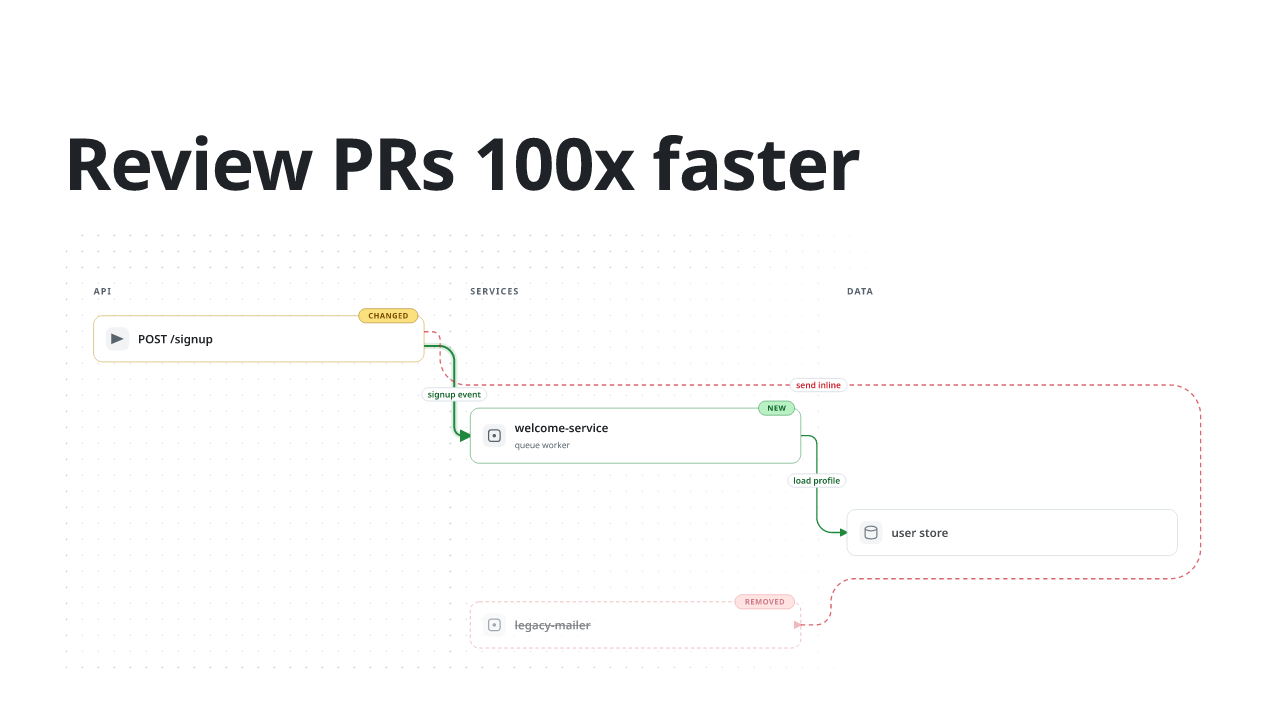
PR Lens is designed to answer questions such as which component now calls a service and where data moves after a refactor. New, modified, and removed elements use different visual treatments. The view keeps relevant surrounding components so the change can be understood in context.
For example, a change that moves email delivery into a queue is easier to discuss as API → queue → worker. That example illustrates the kind of relationship to inspect, not a diagram that every PR will produce.
Try a diagram on a real pull request
- Choose a PR with a clear change across a few files and use the official GitHub App or skill.
- Generate the architecture or data-flow view for that change.
- Open the canvas and follow the modified components and their connections.
- Compare the important edges with the source, correct misleading labels through repository configuration, and continue the code review.
The documented skill installation command is:
npx skills add coldteadotai/pr-lensUse the diagram to guide questions
Ask what happens on failure, which caller still uses the old path, and whether the tests exercise the new boundary. Those questions turn a visual overview into a review aid. A polished diagram is a model of the code, not proof that the code behaves correctly.
Model support & data privacy
Privacy & data handling
GitHub App, CLI, and skill workflows have different access paths. A local renderer does not imply that the agent producing its diagram uses local inference.
Guides, reviews & fixes
No published guides yet. Start with the official documentation above.
Product updates
No verified product updates listed yet. Follow this tool to see new relevant content in Saved.
See the content timelineSources & verification
Verification dates record when this directory checked the information. Product release dates appear separately above.