On This Page8 sections
Key Takeaways
- Herdr GPUI is a native desktop client for Herdr, not a standalone AI coding agent, IDE, or terminal multiplexer. The Herdr daemon remains the source of truth for terminal processes, workspaces, agent state, and persistence.
- It is built in Rust with GPUI, the GPU-accelerated Rust UI framework associated with Zed. The repository currently pins Rust 1.96.1 and GPUI 0.3.6.
- Its main advantage is turning a persistent, terminal-first multi-agent runtime into a native visual control center for workspaces, Git worktrees, agents, remote hosts, diffs, pull requests, browser previews, notifications, and usage monitoring.
- Closing Herdr GPUI does not kill the underlying terminal sessions. The GUI attaches to Herdr’s client socket, renders daemon-provided terminal surfaces, and sends input back while the daemon owns the actual session state.
- As of October 6, 2026, the latest published release is
v20261006.1. macOS is the most mature target; Linux and Windows builds exist but remain experimental, with platform-specific limitations. - Herdr GPUI is an Apache-2.0 open-source project and explicitly states that it is unaffiliated with Herdr and herdr.dev.
What Is Herdr GPUI?
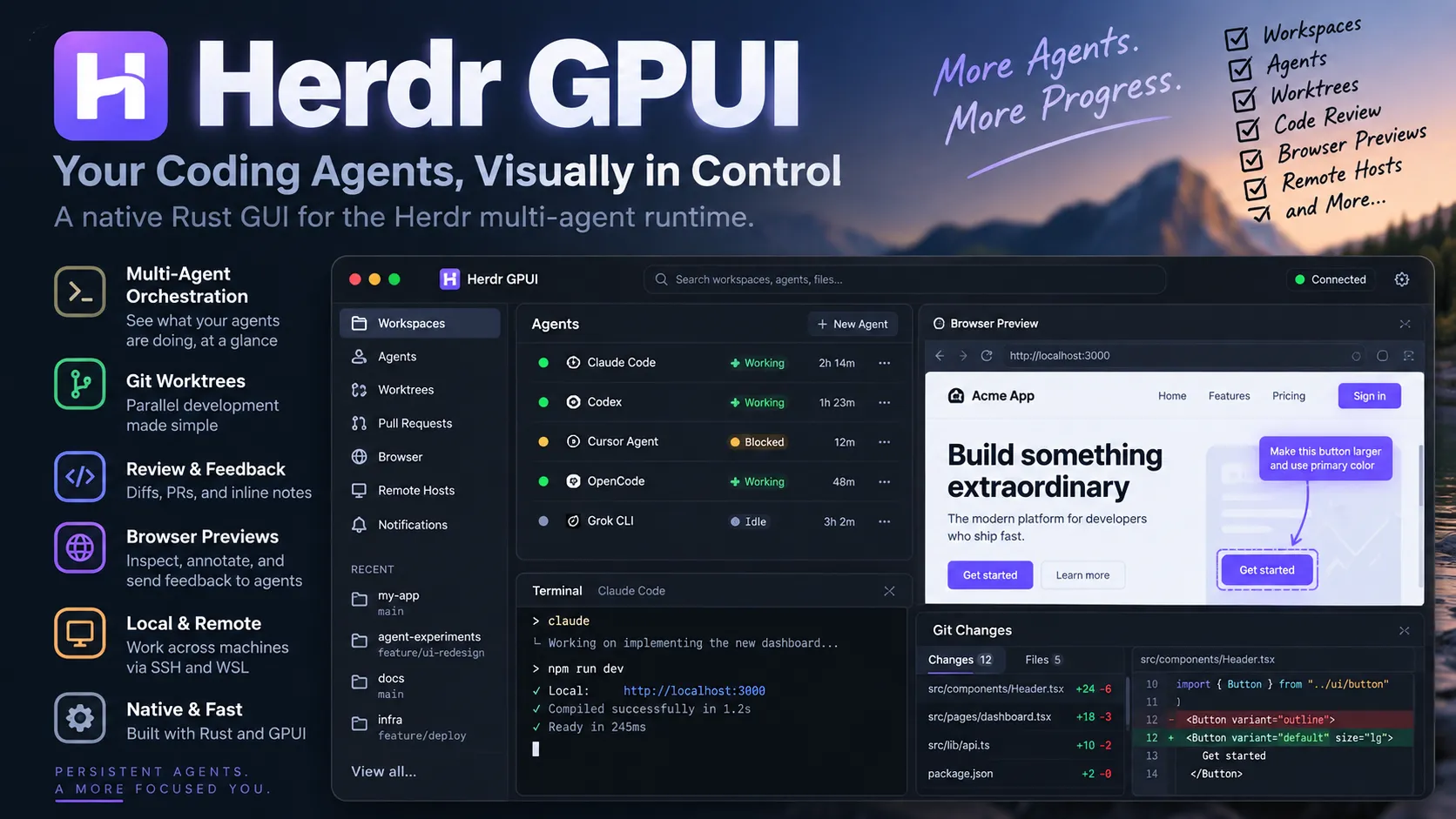
Herdr GPUI is an open-source native graphical client for the Herdr coding-agent runtime. It gives developers a desktop interface for sessions already managed by a Herdr daemon: terminal panes, workspaces, Git worktrees, agent status, remote machines, reviews, browser previews, and related workflow controls.
That distinction matters. Herdr itself is the runtime that keeps terminal processes alive, organizes workspaces and panes, tracks coding-agent state, and enables agents to continue working after a client disconnects. Herdr GPUI does not replace that runtime. It connects to it and visualizes it.
A useful mental model is:
- Herdr daemon: owns sessions, panes, terminals, processes, workspaces, and persistent runtime state.
- Herdr GPUI: displays and controls that state through a native desktop application.
- Coding agents: tools such as Claude Code, Codex, Cursor Agent, OpenCode, Grok CLI, and others continue running inside real terminal panes managed by Herdr.
This architecture makes Herdr GPUI closer to a native operations console for agentic development than to a conventional code editor.
Why Herdr GPUI Exists
Terminal multiplexers are efficient, but multi-agent coding creates a visibility problem.
A developer running one shell can keep most state in their head. A developer running several coding agents across multiple repositories, worktrees, tabs, and remote machines needs answers to different questions:
- Which agent is still working?
- Which agent is blocked and waiting for input?
- Which worktree contains a particular change?
- Which remote host owns a session?
- What changed in the repository?
- Which local web app is listening on a port?
- Which agent produced the diff that now needs review?
Herdr already provides the persistent runtime and agent awareness. Herdr GPUI adds a visual layer that makes this state easier to scan and act on.
The result is not simply a prettier terminal. The GUI exposes higher-level workflow surfaces such as agent status rows, worktree actions, pull-request review, browser annotations, listening-port discovery, remote hosts, resource usage, native settings, and system notifications.
How Herdr GPUI Works
Herdr GPUI follows a client-daemon architecture.
The application contains a native UI layer, a Herdr client layer, and protocol handling. It connects to the daemon through Herdr’s binary client socket, exchanges framed data, receives terminal surface updates, paints those cells natively, and sends semantic input back to the daemon.
The important consequence is process independence.
Closing the Herdr GPUI window does not imply that the underlying shell, development server, or coding agent should stop. The daemon continues owning those processes. The GUI can reconnect later and reconstruct the visible session state from the daemon.
This is significantly different from applications where the graphical program directly owns every terminal process.
It also explains why Herdr GPUI requires a separately installed Herdr daemon. The GUI can start an already-installed local herdr server when the target session is missing, but it does not install or upgrade Herdr itself.
Why GPUI Matters
GPUI is a GPU-accelerated UI framework for Rust from the creators of Zed. It combines immediate- and retained-mode concepts and is designed for performance-intensive native interfaces.
That is relevant because Herdr GPUI has to continuously render terminal grids, sidebar state, selections, split panes, status indicators, diff views, and interactive controls without building the product around a browser-based Electron shell.
The project currently pins:
- Rust: 1.96.1
- GPUI: 0.3.6 using the
gpui-presnapshot crate
Those versions are explicitly pinned by the repository, reducing build ambiguity for contributors.
Core Workflow: From Terminal Multiplexer to Agent Control Center
Herdr GPUI’s strongest use case is a developer already using Herdr for several coding agents.
A practical workflow looks like this:
- Start or connect to a Herdr daemon.
- Open several workspaces or Git worktrees.
- Run coding agents in separate panes.
- Let Herdr track whether each agent is idle, working, or blocked.
- Use Herdr GPUI to scan agents and workspaces visually.
- Jump directly to the pane requiring attention.
- Review generated changes inside the GUI.
- Send review notes or browser feedback to the relevant agent.
- Close the GUI when finished while the Herdr daemon keeps the work running.
Herdr’s agent model is based on real terminal panes instead of a proprietary chat abstraction. Supported agents can expose states such as idle, working, and blocked, while unsupported tools can still run as normal terminal processes.
This makes Herdr GPUI particularly interesting for developers who prefer CLI coding agents but want a graphical orchestration layer.
Workspaces, Worktrees, and Parallel Agents
One of Herdr GPUI’s most useful features is its Git worktree workflow.
The sidebar can represent repositories, workspaces, linked worktrees, and coding agents together. Context menus expose actions for creating and opening worktrees, renaming workspaces, closing them, and performing repository-oriented operations.
This matters because parallel agents generally work more safely when they are not editing the same checkout. Separate Git worktrees give independent tasks their own working directories and branches while sharing the repository’s object database.
Herdr GPUI goes further than simply listing those worktrees. The interface includes checkpoints, repository actions, pull-request workflows, and Teleport, a feature designed to move a worktree to another host together with commits, uncommitted changes, tabs, splits, running programs, and supported agent-session context.
The October 6 release also added per-repository setup, run, and archive scripts for worktrees, paired with a security requirement that worktree scripts receive a deliberate trust click before execution.
That trust boundary is significant. Repository-defined automation can cross directly from source code into command execution, so automatic execution would create unnecessary supply-chain and local-security risk.
Reviewing Agent Changes Without Leaving Herdr GPUI
Herdr GPUI includes a Git-oriented review workflow that is closer to a lightweight pull-request review surface than a basic terminal git diff.
For a focused local checkout, Review changes can open the current modifications in a dedicated tab. Reviewers can select lines, attach notes, inspect changed files, use side-by-side diffs, and send those notes back to the relevant coding agent.
The practical benefit is reduced context switching.
Without this workflow, reviewing an agent often means:
- opening a separate editor,
- finding the changed file,
- inspecting the diff,
- copying file names and line numbers,
- switching back to the terminal,
- manually describing the requested change.
Herdr GPUI can instead preserve code-location context and turn line-level notes into structured feedback for the agent.
This becomes increasingly useful when several agents are generating changes simultaneously.
Browser Tabs and Visual Feedback for Front-End Agents
Herdr GPUI contains a browser workflow specifically useful for coding-agent development.
An agent can request a page with commands such as:
herdr-gpui browser open http://localhost:3000The page appears as a browser tab beside the workspace’s Herdr tabs. On supported platforms, developers can annotate elements, select text, or draw regions and send the resulting feedback back to the coding agent.
That creates a powerful front-end loop:
agent edits UI → local app runs → Herdr GPUI opens preview → developer annotates issue → structured feedback returns to agent
For visual development, this is more precise than writing something vague such as “the button near the upper-right needs more spacing.” Annotation feedback can include element context, selector information, relevant page text, region information, and, on macOS, a screenshot of the selected area.
There are important limits:
- Browser tabs belong to Herdr GPUI rather than the Herdr daemon.
- Linux does not yet have embedded browser pages; requests open in the system browser instead.
- Agent-opened browser tabs are local to the machine running the GUI.
- Agents running on saved SSH hosts cannot directly open these GUI browser tabs.
- Browser navigation is deliberately constrained, and downloads are refused.
Agent-to-Browser Feedback Is More Important Than It Looks
The browser feature highlights a broader shift in AI coding tools.
Traditional coding assistants primarily exchange text: prompt in, code out. Front-end agents increasingly need a second feedback channel based on rendered output.
A browser-aware workflow allows a human to point at the result instead of describing it indirectly. That can reduce ambiguity for problems involving:
- spacing,
- typography,
- responsive layout,
- incorrect components,
- alignment,
- visual hierarchy,
- missing states,
- unexpected page regions.
Herdr GPUI therefore behaves less like a passive terminal viewer and more like an orchestration interface connecting agent execution, application output, human review, and another agent iteration.
Remote Hosts and SSH
Herdr GPUI is not limited to a single local machine.
The application can connect to saved SSH hosts and expose remote Herdr environments alongside local work. Herdr itself is designed to combine work from several machines, while the GUI provides host-aware navigation and status.
Remote workflows can include:
- saved SSH devices,
- remote Herdr sessions,
- CPU and memory indicators per host,
- file copies,
- remote listening-port discovery,
- SSH port forwarding,
- independent reconnect behavior.
Password- or MFA-based SSH hosts require additional configuration because Herdr GPUI expects noninteractive authentication. The project documentation describes reusing an SSH ControlMaster connection after interactive authentication rather than making the GUI manage the password itself.
This keeps SSH authentication inside the normal SSH security model.
Latest Herdr GPUI Update: v20261006.1
As of October 6, 2026, the latest published release is Herdr GPUI 20261006.1.
Notable additions include:
- clearer messages when Herdr or Herdr GPUI must be updated for connection compatibility,
- attaching to Herdr running inside WSL distributions on Windows,
- configurable terminal line height,
- Ghostty bold-color support,
- per-repository setup, run, and archive scripts for worktrees.
The same release tightened worktree-script security by requiring a deliberate trust action before those scripts execute.
The immediately preceding v20261005.1 release was also substantial. It added features including:
- unified double-Shift search across workspaces, commands, and projects,
- SSH port forwarding,
- listening-port discovery,
- pull-request review,
- review of uncommitted agent changes,
- worktree checkpoints,
- fan-out of one prompt to several agents,
- improved terminal repaint behavior.
The rapid release cadence means older Herdr GPUI reviews can become outdated quickly. Platform requirements and supported workflows should be checked against the current release rather than assumed from an earlier version.
Performance: What the Benchmark Actually Shows
The repository includes a native performance fixture built around a dense 160×50 terminal, 40 workspaces, and 40 agents. It exercises cold frames, hover behavior, and sidebar scrolling without requiring a live daemon.
On the maintainer’s development M4 Max, documented optimizations reduced:
- release hover p95 from roughly 51 ms to 12 ms,
- scrolling from roughly 56 ms to 14 ms.
Those results are meaningful, but they should not be misrepresented as full end-to-end display latency. The project explicitly states that the benchmark measures CPU event-to-scene construction, rather than GPU completion or total pointer-to-screen latency.
That distinction matters. A scene-construction benchmark is evidence of substantial rendering-path optimization, but it does not guarantee that every machine or compositor will deliver 12 ms visual response times.
Installation on macOS
macOS currently provides the clearest installation experience.
Herdr GPUI requires macOS 14.2 Sonoma or newer and supports both Apple Silicon and Intel through a signed and notarized universal application.
Install Herdr separately first:
brew install herdrThen install Herdr GPUI:
brew install penso/tap/herdr-gpui
open -a Herdr
The Homebrew installation integrates with the application updater so installations managed by Homebrew continue to use Homebrew’s package records.
Building Herdr GPUI From Source
Developers who want to build the repository directly can use:
git clone https://github.com/penso/herdr-gpui.git
cd herdr-gpui
just run
The project recommends an optimized release-style build for normal testing because debug rendering can be noticeably slower when displaying dense terminal output.
A direct Cargo invocation is also documented:
cargo run --locked --release -p herdr-gpui --features qa-menuBecause the Rust and GPUI versions are pinned, contributors should normally follow the repository toolchain rather than assuming an arbitrary locally installed Rust version will produce identical results.
Linux Support
Herdr GPUI now publishes Linux builds for both x86_64 and ARM64.
Available release formats include:
.deb,.rpm,- Arch Linux packages,
- plain tarballs.
The documented binaries require glibc 2.39 or newer and a working Vulkan driver.
Linux remains experimental, however. One of the largest workflow differences is the browser feature: Linux currently does not embed pages directly inside Herdr GPUI, so browser requests are sent to the system browser instead.
For developers primarily interested in terminals, worktrees, and agent visibility, this may be acceptable. For front-end developers attracted specifically by the browser-annotation workflow, it is a meaningful limitation.
Windows and WSL Support
Windows builds are also experimental.
The project publishes x86_64 and native ARM64 ZIP archives. Documentation warns that Windows does not yet have the same level of live native-window and daemon validation as the macOS version. The released executables are also not Authenticode-signed, meaning Windows SmartScreen can warn on first launch.
The October 6 release added the ability to connect to Herdr inside WSL distributions, which may be particularly attractive for developers whose actual command-line development environment already lives in WSL.
Windows should therefore be viewed as actively developing support rather than a platform with guaranteed parity with macOS.
Native Settings and Customization
Herdr GPUI provides a dedicated settings window covering areas such as appearance, fonts, indicators, sound, notifications, integrations, and general behavior.
The application supports a large searchable theme catalog that includes built-in and discovered Ghostty themes. Theme previews can be applied live without immediately committing every selection to configuration files.
Font controls cover terminal, sidebar, tabs, and interface roles. Additional settings include notification behavior, agent visibility, usage display, close confirmations, clipboard feedback, and sidebar layouts.
An important implementation detail is that Herdr’s shared configuration and Herdr GPUI’s native overrides are treated separately. This prevents GUI-specific presentation settings from automatically becoming remote daemon configuration.
Herdr GPUI vs Herdr TUI
Herdr GPUI does not make the Herdr terminal interface obsolete.
Herdr TUI is better when:
- the workflow is already completely terminal-native,
- the developer is operating through SSH without a graphical environment,
- minimal dependencies matter,
- keyboard-driven multiplexing is preferred.
Herdr GPUI is better when:
- several workspaces and agents need visual scanning,
- Git worktrees need frequent management,
- code changes need graphical review,
- front-end work benefits from browser annotations,
- several local and remote machines need to be visible together,
- native notifications and visual settings improve the workflow.
The strongest configuration is often not an either/or decision. Because Herdr’s daemon owns the state, terminal and graphical clients can be understood as different interfaces over the same underlying runtime.
Herdr GPUI vs Cursor, Zed, and Warp
Herdr GPUI should not be evaluated as though it were a direct clone of Cursor, Zed, or Warp.
Cursor and Zed are primarily code editors. Warp is primarily a modern terminal environment with additional agent-oriented capabilities. Herdr GPUI is more specialized: it is a graphical client for a separate runtime that manages persistent terminals and coding agents.
That produces a different strategic position.
Herdr GPUI is compelling when a developer wants to continue using existing CLI agents and real shell processes while adding orchestration, observability, code review, and browser feedback around them.
It is less compelling when the requirement is primarily:
- a full code editor,
- integrated language-server navigation,
- notebook functionality,
- a self-contained AI coding environment,
- an agent that independently writes code.
The key comparison is therefore not simply “Herdr GPUI versus Cursor.”
A more useful question is:
Does the workflow already benefit from Herdr’s persistent multi-agent runtime?
If yes, Herdr GPUI can add substantial visibility. If no, installing a daemon plus a dedicated graphical client may create complexity that a conventional AI editor does not require.
Security and Trust Boundaries
Herdr GPUI has several security boundaries worth understanding.
First, the daemon and GUI are separate. The GUI attaches to a local or remote Herdr runtime rather than becoming the owner of all development processes.
Second, browser integration is intentionally constrained. Browser tabs support web content and controlled local previews, while unsupported schemes and downloads are restricted.
Third, configuration writes include protections around external edits and unsafe paths. The documentation specifically describes refusing unsafe symlink-based configuration paths rather than blindly replacing them.
Fourth, repository worktree scripts now require explicit trust before execution. This matters because repository-controlled scripts can otherwise become a straightforward command-execution boundary.
For remote environments, normal SSH security practices still apply. SSH agent forwarding should only be enabled for systems that are trusted.
Common Pitfalls
Assuming Herdr GPUI Installs Herdr
It does not. Herdr must already be installed. The GUI can start an installed local server, but it does not install or automatically upgrade the daemon.
Treating It as a Standalone Terminal Emulator
Herdr GPUI paints terminal surfaces supplied through Herdr. The daemon owns the actual terminal processes and session state.
Expecting Full Platform Parity
The project ships builds for macOS, Linux, and Windows, but Linux and Windows remain experimental and contain platform-specific gaps.
Evaluating Performance With Debug Builds
The project documentation warns that debug builds can be considerably slower with dense terminal output. Optimized builds should be used when judging UI responsiveness.
Sending Several Agents Into the Same Checkout
Multiple autonomous agents modifying the same working directory can create unnecessary conflicts and confusing repository state. Herdr GPUI’s worktree features become substantially more valuable when independent tasks receive isolated branches and worktrees.
Best Herdr GPUI Workflow for Coding Agents
A practical setup for parallel development is:
- Keep one main repository checkout clean.
- Create one Git worktree for each substantial agent task.
- Run one primary coding agent per worktree.
- Use Herdr’s status tracking to identify agents that are working or blocked.
- Use Herdr GPUI’s sidebar instead of manually checking terminal windows.
- Review generated diffs before asking another agent to continue.
- Use browser annotations for front-end tasks.
- Create checkpoints before allowing large automated changes.
- Merge or archive completed worktrees only after review.
This approach turns Herdr GPUI into more than a terminal dashboard. It becomes a coordination layer for parallel software-development workers.
Who Should Use Herdr GPUI?
Herdr GPUI is a strong fit for:
- developers already using Herdr,
- engineers running several CLI coding agents simultaneously,
- teams using Git worktrees for parallel agent tasks,
- developers coordinating local and remote coding sessions,
- front-end developers who want browser-to-agent feedback,
- users who want persistent terminal processes without giving up a native desktop interface.
It is probably not the best fit for:
- users seeking an all-in-one IDE,
- developers who only run one agent occasionally,
- environments where installing a separate Herdr daemon is undesirable,
- users requiring mature Windows-native behavior today,
- workflows heavily dependent on embedded browser previews under Linux.
Is Herdr GPUI Worth Trying?
For existing Herdr users, Herdr GPUI is particularly compelling on macOS.
Its architecture preserves one of Herdr’s biggest advantages—persistent real terminal processes—while adding visual organization that becomes increasingly valuable as the number of agents, repositories, worktrees, and hosts increases.
For developers who do not already use Herdr, the decision is more nuanced. Herdr GPUI makes the most sense when the underlying problem is agent orchestration and visibility, not merely finding a nicer terminal or another AI editor.
Its most differentiated workflows combine several layers:
- persistent agent terminals,
- worktree isolation,
- visual agent status,
- inline change review,
- browser annotations,
- remote-host visibility,
- notifications when human attention is required.
That combination is difficult to reproduce cleanly with a conventional editor plus a collection of detached terminal windows.
Conclusion
Herdr GPUI is emerging as a serious native front end for terminal-based, multi-agent software development. Its Rust/GPUI architecture provides the graphical layer, while Herdr remains responsible for the persistent runtime underneath. That separation is the project’s defining advantage: the GUI can come and go without becoming the owner of the work.
The October 6, 2026 release expands the project further with Windows/WSL connectivity, worktree automation, terminal customization, compatibility diagnostics, and safer repository scripting.
Developers already coordinating Claude Code, Codex, OpenCode, Cursor Agent, or other CLI agents through Herdr should consider Herdr GPUI one of the more interesting graphical approaches to managing that workflow. A useful evaluation is to create separate worktrees for several real tasks and test the complete loop from agent execution → change review → browser feedback → agent revision.
Continue Reading
More articles connected to the same themes, protocols, and tools.
Referenced Tools
Browse entries that are adjacent to the topics covered in this article.