On This Page8 sections
Key Takeaways
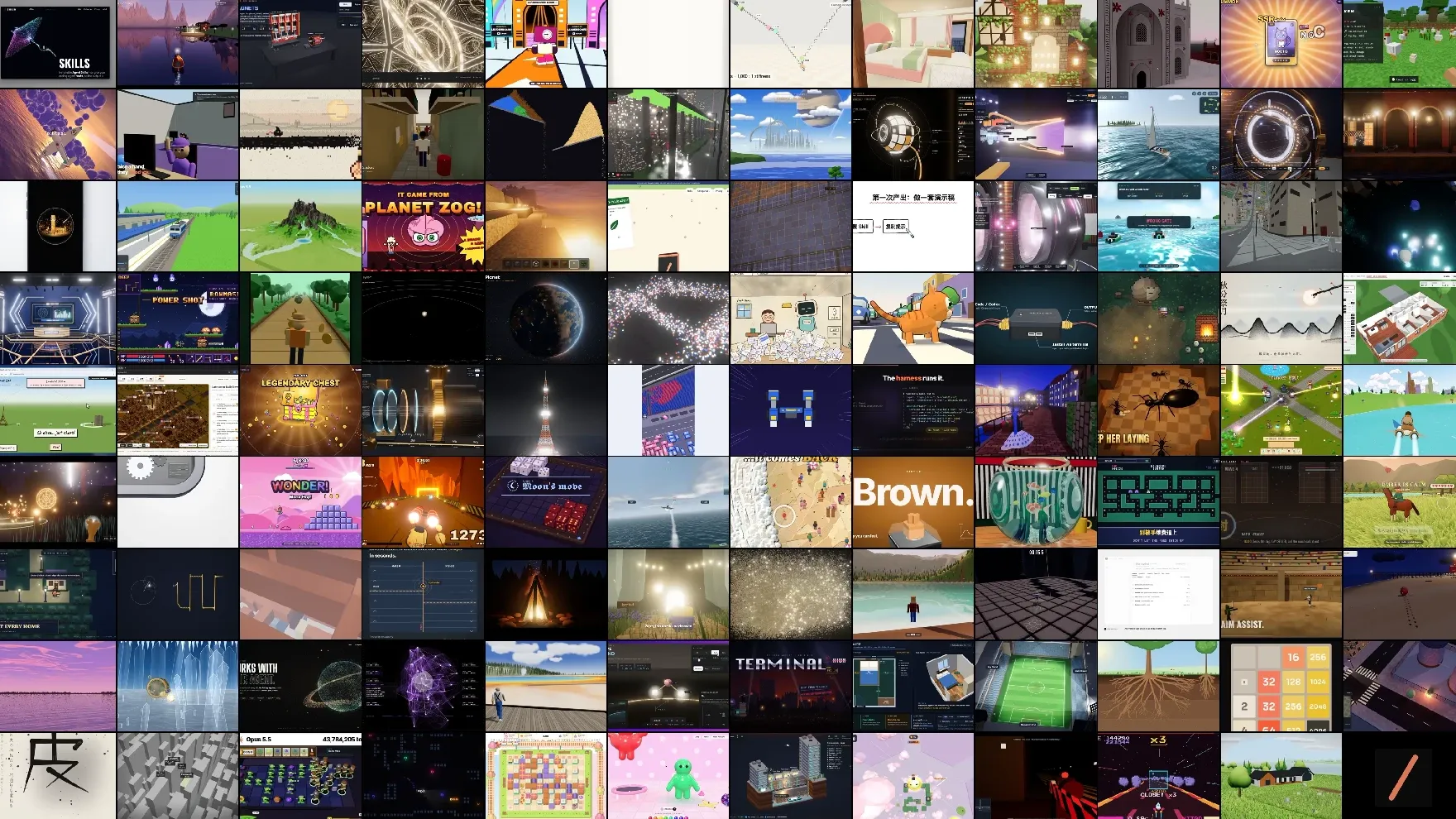
- Awesome Opus 5.5 Videos is an open-source GitHub collection of animations, motion graphics, 3D scenes, explainers, and interactive experiences created with Claude Opus 5.5.
- The repository documents 703 prompt entries, including 418 examples with live remakes available through Skillry, according to its October 2026 documentation.
- The collection covers four major categories: motion graphics, explainers, 3D scenes, and games or interactive experiences.
- Unlike conventional text-to-video generation, many examples use AI-generated HTML, JavaScript, SVG, Canvas, WebGL, Three.js, and animation code to produce their visuals.
- Users can inspect creator-shared prompts, find original posts, compare recreations, and experiment with their own implementations.
- The repository is free to browse, but reproducing an example may require additional assets, dependencies, model access, and multiple iterations.
What Is Awesome Opus 5.5 Videos?
Awesome Opus 5.5 Videos is an open-source collection maintained by Yihui, an independent developer known for building AI products and developer tools.
The repository collects creative coding demonstrations made with Claude Opus 5.5 and organizes the prompts, original creator references, technical tags, and available recreations into a searchable body of examples.
Its central idea is straightforward: a powerful coding model can create visual experiences by writing the software that renders them.
Instead of generating every frame through a traditional video diffusion pipeline, Claude can produce HTML, JavaScript, animation logic, shaders, or 3D scene code. That code is then executed in an appropriate environment to produce animated visuals.
This distinction matters because code-generated animations can offer properties that are valuable for professional work:
- Precise control over timing, easing, layout, and motion.
- Editable text, colors, shapes, and interface elements.
- Programmatic camera movements and procedural 3D scenes.
- Repeatable rendering when animation state is determined by time.
- Integration with existing web applications and development workflows.
- The possibility of converting browser animations into recorded video.
The repository is not itself a video-generation model, a standalone video editor, or a complete automated rendering platform. It is primarily a curated resource for discovering techniques, studying prompts, and experimenting with AI-generated animation code.
A companion gallery on Skillry provides visual browsing and side-by-side comparisons between original creator videos and recreations.
What Is Inside the Awesome Opus 5.5 Videos Collection?
The repository README reports 703 prompt entries, 418 live remakes, and a highlighted selection of 100 recreated examples.
At the October 2026 snapshot, the associated Skillry gallery organizes its 418 displayed videos into the following categories:
| Category | Videos | Typical applications |
|---|---|---|
| Motion graphics | 229 | Product launch videos, animated typography, logo reveals, and transitions |
| Explainers | 68 | Educational animations, technical demonstrations, and visual explanations |
| 3D scenes | 56 | Procedural environments, mechanical objects, shaders, and camera movements |
| Games and interactive | 65 | Playable prototypes, interactive interfaces, simulations, and visual experiments |
| Total | 418 | Examples with gallery recreations |
These numbers describe the displayed recreation gallery, not separate counts for every prompt stored in the repository.
The collection also includes links to original creator posts, technical implementation tags, and individual Markdown prompt files.
The repository's documented October 12 update added ten videos and an additional batch of 285 prompts. Because the collection is maintained over time, its totals may change after publication.
Why Claude Opus 5.5 Videos Are Different from Conventional AI Videos
The most important distinction is the underlying generation method.
A conventional text-to-video workflow typically asks a generative model to synthesize visual frames directly. Creative coding workflows instead ask a language model to write instructions that a rendering engine executes.
| Capability | Code-generated animation | Conventional AI video generation |
|---|---|---|
| Primary output | Executable animation code | Generated visual frames |
| Text and interface layout | Can remain programmatically editable | Usually embedded into rendered frames |
| Motion control | Can use explicit timing and mathematical functions | Often controlled through prompts and model-specific settings |
| 3D interaction | Possible through WebGL or Three.js | Usually requires separate reconstruction or editing |
| Repeatability | Can be deterministic when implemented correctly | Depends on model and generation settings |
| Photorealistic appearance | May require additional assets or advanced rendering | Often a primary capability of video models |
| Best fit | UI animation, explainers, visualizations, procedural effects | Cinematic footage, characters, complex natural motion |
Neither approach is universally superior. The choice depends on the required output.
For a landing-page animation with exact brand colors and editable text, code generation can be particularly useful. For a realistic human performance or naturalistic film sequence, a specialized video model may be more appropriate.
Hybrid workflows are also possible: AI-generated footage can become source material for a programmatic composition containing titles, motion graphics, transitions, and synchronized effects.
The Technologies Behind the Videos
Awesome Opus 5.5 Videos demonstrates several technical approaches to creating animation with AI-generated code.
1. HTML, CSS, and JavaScript
HTML and CSS provide document structure, typography, layout, and visual styling, while JavaScript controls timing, interaction, and animation state.
This approach works well for:
- Animated landing pages.
- Interface transitions and product walkthroughs.
- Kinetic typography.
- Responsive motion graphics.
- Interactive demonstrations.
For reusable marketing assets, a particularly effective approach is to separate content and visual parameters from the animation logic. Product names, colors, screenshots, and timing values can then be updated without rebuilding the entire scene.
2. Canvas and SVG
The HTML Canvas API provides a drawing surface for JavaScript-controlled visuals. It is useful for particle systems, abstract animations, custom charts, and frame-by-frame rendering.
SVG represents shapes and paths as vector elements, making it useful for diagrams, animated illustrations, and scalable interface graphics.
SVG is often easier to inspect and modify when the animation contains a relatively small number of meaningful objects. Canvas can be a better fit for rendering many dynamically updated visual elements.
3. GSAP and Timeline-Based Animation
GSAP is commonly used for sophisticated JavaScript animation sequencing.
It helps organize transitions, staggered movement, easing, and relationships between multiple animated elements.
For example, a product announcement might synchronize a headline reveal, a device mockup transition, several feature highlights, and a final call to action.
A structured timeline makes these relationships easier to maintain than unrelated timers distributed throughout an application.
4. Three.js, WebGL, and GLSL
Three.js provides a JavaScript framework for rendering interactive 3D graphics. WebGL exposes GPU-accelerated rendering capabilities, while GLSL shaders can implement lighting, materials, procedural surfaces, and visual effects.
The collection includes demonstrations involving mechanical objects, environments, interactive scenes, and animated 3D compositions.
These technologies are especially relevant when a project needs orbital cameras, animated geometry, depth, realistic-looking materials, or interactive inspection.
5. Remotion and Programmatic Video
Some creator examples also describe using Remotion to produce videos from React components and animation code.
This workflow is useful when the final deliverable must be a conventional video file rather than an interactive webpage.
A React-based composition can organize titles, scenes, transitions, and visual elements around an explicit timeline. Rendering can then convert the composition into a distributable video.
However, Remotion is not required for every example in the collection. The correct rendering pipeline depends on the original prompt and implementation.
Five Practical Use Cases for Awesome Opus 5.5 Videos
1. SaaS Product Launch Videos
Product launch videos are among the most commercially relevant applications.
A creator can use Claude Opus 5.5 to build an animation featuring product screenshots, UI transitions, feature demonstrations, and a branded ending.
The repository includes a SaaS launch-video prompt by @moritzkremb that requests a polished product announcement based on recognizable SaaS software.
The example illustrates how a relatively open-ended creative request can serve as a starting point. For production use, the prompt should be expanded with accurate product details, approved assets, duration, brand guidelines, and export requirements.
Best for: Product launches, feature announcements, startup presentations, and promotional content.
2. Short-Form Social Media Motion Graphics
Another repository example, a prompt by @melvynx, requests a short motion-design showcase associated with a website.
This highlights an important use case: converting brand identity or website content into animated promotional material.
A production-ready version should define aspect ratio, safe areas, typography, timing, and the visual hierarchy of the message.
Best for: Social announcements, brand reels, animated banners, and short product teasers.
3. Interactive Educational Explainers
The gallery contains examples such as interactive mechanical demonstrations, camera components, engine visualizations, and scientific explanations.
Programmatic 3D is valuable here because viewers can potentially rotate objects, inspect internal components, and interact with individual parts.
Educational accuracy still requires review. A visually convincing machine or anatomical model is not automatically a technically correct representation.
Best for: Technical education, interactive lessons, engineering explainers, and science demonstrations.
4. Browser Games and Interactive Prototypes
The collection also highlights playable experiments and game-like interactions built with browser technologies.
Claude-generated code can create prototypes involving animation loops, collision detection, input handling, particle effects, and 3D scenes.
These examples are useful for exploring mechanics before investing in a more complete game architecture.
Best for: Browser game prototypes, interactive landing pages, gameplay demonstrations, and visual experiments.
5. Procedural Visual Effects and Audio-Reactive Animation
The repository includes examples tagged with shaders, particles, Web Audio, and other rendering technologies.
Programmatic animation can connect sound amplitude, beat timing, or other measured inputs to visual behavior.
For reliable output, the input data should be analyzed and the resulting timing mapped explicitly to the animation rather than depending on inconsistent real-time callbacks during export.
Best for: Music visualizers, audio-reactive effects, animated backgrounds, and experimental motion design.
How to Use Awesome Opus 5.5 Videos
The repository is designed to let users discover an example, inspect its prompt, and attempt a recreation with a compatible AI coding workflow.
Step 1: Explore the Repository
Open the Awesome Opus 5.5 Videos GitHub repository.
The README contains highlighted examples grouped into motion graphics, explainers, 3D scenes, and interactive projects.
Each highlighted entry links to the original creator and, when available, the corresponding prompt file.
Users who prefer visual discovery can browse the Skillry Opus 5.5 gallery, which displays originals alongside recreations.
Step 2: Download the Prompt Collection
Clone the repository to inspect its prompt files locally:
git clone https://github.com/yihui-dev/awesome-opus5-5-videos.git
cd awesome-opus5-5-videos
The main resources include:
README.md: Project overview, selected examples, and usage instructions.prompts/: Individual Markdown files containing creator-shared prompts and attribution.data/videos.json: Structured metadata for the catalog.
The repository is primarily an example and prompt collection. Cloning it does not automatically produce the showcased videos.
Step 3: Inspect a Prompt
Open a Markdown file from the prompts/ directory and locate its Prompt section.
Before using it, identify:
- The intended output and duration.
- Required images, audio, or reference footage.
- Whether the prompt depends on project-specific files or tools.
- The requested rendering framework.
- Any missing information needed to reproduce the result.
- Whether the source prompt is complete.
Some entries contain only partial prompts or descriptions of a creator's original result. Those examples may be useful as inspiration but cannot necessarily reproduce the original output exactly.
Step 4: Recreate an Animation with Claude Code
The repository recommends submitting a selected prompt to Claude Opus 5.5 through a compatible environment, including Claude Code.
If Claude Code is installed and configured, it can be started from a project directory:
claudeThe selected creator prompt can then be supplied as reference material. An additional implementation brief should specify the expected deliverables.
For example:
Create a 15-second product launch animation.

Output:
- A self-contained HTML animation.
- A 1920x1080 landscape composition.
- A 30 FPS target for video export.
- Editable product name, colors, and text.

Visual direction:
- Minimal typography and controlled motion.
- A strong visual hook in the first two seconds.
- Three clearly separated feature moments.
- A recognizable branded final frame.

Technical requirements:
- Use JavaScript, Canvas, SVG, or Three.js as appropriate.
- Make animation state depend on elapsed time.
- Avoid unnecessary external dependencies.
- Keep text readable and inside safe margins.
- Explain how to preview the result locally.

Quality checks:
- Inspect frames at 0, 5, 10, and 14 seconds.
- Check for clipping, overlapping text, and animation jumps.
- Confirm that the ending is visually complete.
This is an original implementation template, not a verbatim prompt from the repository.
Its purpose is to convert a visual idea into a set of measurable requirements that an AI coding agent can implement and verify.
Step 5: Preview and Render
Once the generated project is available, preview it in a browser or the rendering environment selected by the implementation.
Check the animation before recording or exporting it.
For browser-based work, inspect the beginning, middle, and end of each sequence. A result that looks correct in a still screenshot may still contain timing errors, flickering, layout shifts, or broken transitions.
A deterministic animation architecture is especially valuable for automated rendering. If the visual state is calculated from a requested timestamp, individual frames can be reproduced consistently.
When the output is ready, use an appropriate browser-recording or video-rendering workflow to create an MP4 or another desired format.
How to Write Better Claude Opus 5.5 Animation Prompts
One of the most useful lessons from the collection is that visual quality depends on more than naming a style.
An effective animation prompt communicates the purpose, composition, motion, constraints, and expected technical output.
Specify the Visual Objective
Instead of requesting a beautiful animation, describe what the audience should understand or feel.
For example, a product launch animation might need to establish the brand, demonstrate a transformation, and end with a memorable visual identity.
Define Motion as a Sequence
Break the animation into distinct beats.
A 15-second composition might allocate its opening seconds to a visual hook, its middle to the main demonstration, and its ending to the brand reveal.
This produces a clearer structure than an unrestricted request for continuous movement.
Describe What Must Not Happen
Negative constraints can prevent recurring problems.
Examples include:
- Avoid unreadable or overlapping typography.
- Avoid abrupt changes in visual style.
- Do not introduce unapproved brand colors.
- Do not animate important elements outside the visible frame.
- Do not use copyrighted assets without permission.
- Avoid unnecessary libraries and external requests.
Request Verification, Not Just Implementation
Ask the coding agent to preview representative frames, detect problems, and revise the result.
For frame-based animation, verification should include timing boundaries, text legibility, aspect ratio, and continuity between scenes.
For looping animations, the final state must connect smoothly to the beginning. Matching only the visual position may be insufficient if movement direction or velocity changes abruptly.
Prefer Editable Parameters
Important values should be configurable:
- Duration and frame rate.
- Brand colors and typography.
- Text content.
- Camera positions.
- Object dimensions.
- Transition timing.
- Audio synchronization offsets.
This makes the generated result easier to adapt to another product or format.
GitHub Repository vs. Skillry Gallery: Which Should You Use?
The GitHub repository and its Skillry companion serve different purposes.
| Feature | GitHub repository | Skillry gallery |
|---|---|---|
| Primary purpose | Inspect prompts and metadata | Discover and compare video results |
| Creator attribution | Original creator links | Original creator links |
| Prompt access | Markdown files | Browser-based prompt access |
| Video comparison | Preview links and selected examples | Side-by-side original and remake presentation |
| Structured data | JSON catalog available | Visual browsing and category filtering |
| Best audience | Developers, researchers, and prompt collectors | Creators, designers, and visual learners |
Both resources provide access to creator-shared prompts. The Skillry gallery states that these shared prompts can be viewed and copied without an account.
Skillry also markets separate Premium Agent Skills. Those products should not be confused with access to the public Opus 5.5 prompt collection.
Can the Collection Be Used as a Dataset?
The repository contains structured metadata in data/videos.json.
Its records include fields such as:
slug: A stable identifier for an entry.authorandauthor_url: Creator identification and profile link.post_url: The original public post.category: The example's classification.tech_tags: Associated rendering technologies.prompt: The recorded prompt text, when available.prompt_partial: Whether the prompt is incomplete.has_remake: Whether a recreation is available.added: The date assigned to the catalog entry.
This structure makes the collection useful for technical exploration, categorization, and analysis of creative coding workflows.
For example, researchers could examine which rendering technologies are associated with different visual categories, or compare complete prompts against entries that contain only partial instructions.
However, the collection should not be treated as a controlled benchmark of Claude Opus 5.5.
The examples differ in complexity, available assets, prompt length, tooling, human intervention, and implementation constraints. A successful public demonstration does not establish how reliably a model would reproduce the same result across repeated attempts.
The dataset also contains creator-attributed material. Repository availability does not automatically grant unrestricted rights to reuse every original video, image, soundtrack, or prompt in a commercial product.
Common Problems and Limitations
A Prompt Does Not Reproduce the Original Video
Possible causes include missing reference files, a partial prompt, unavailable tools, different model settings, or undocumented iterations performed by the original creator.
Start by checking the original post and the prompt metadata. Reconstruct missing requirements explicitly before attempting another generation.
The Animation Looks Good but Exports Poorly
Browser playback and video rendering are different workloads.
Fonts may load late, CSS effects may render inconsistently, and animations driven by real-time timers can produce unexpected frames during automated capture.
Use deterministic timing where practical, wait for assets to load, and validate the exported file independently.
The 3D Scene Runs Slowly
High-resolution rendering, complex geometry, excessive particles, and expensive shaders can overload the GPU.
Reduce unnecessary geometry, inspect draw calls, constrain render resolution, and profile the actual browser environment.
Do not assume an impressive short demonstration will maintain the same performance on mobile hardware.
External Assets or API Credentials Are Required
Some source prompts reference local directories, external images, media files, APIs, or creator-specific development environments.
Treat downloaded prompts as untrusted instructions. Review them before allowing an AI agent to execute commands, inspect files, install packages, or access credentials.
Replace unavailable assets with properly licensed alternatives. Never copy another creator's private configuration or expose personal API keys to reproduce an example.
The Generated Design Is Visually Inconsistent
This often occurs when the prompt leaves typography, palette, composition, or visual hierarchy underspecified.
Provide a compact design system and require consistent application across scenes. Request a small number of carefully controlled visual transitions before introducing additional effects.
Commercial Reuse Is Unclear
The repository includes an MIT license, but its README separately attributes the original videos and prompts to their respective creators.
Developers should distinguish the repository's licensing terms from the rights associated with individual creative works. Original music, images, trademarks, character designs, and third-party assets may require separate permission.
Frequently Asked Questions
Is Awesome Opus 5.5 Videos free?
Yes. The public GitHub repository can be browsed and cloned, and the companion Skillry gallery provides access to shared prompts. Running the model or using external generation services may incur separate costs.
Does the repository include 703 downloadable videos?
No. The documented total refers to prompt entries. The README identifies 418 examples with live remakes, while the remaining entries should not be assumed to include equivalent downloadable or reproducible video assets.
Can Claude Opus 5.5 generate videos directly?
The examples primarily demonstrate code-based visual generation. Claude writes animation or rendering code, which a browser or other rendering tool executes. Producing a conventional video file may require an additional recording or export process.
Can the prompts be used with Claude Code?
Yes. The repository explicitly describes using its prompts with Claude Code or another suitable environment running Claude Opus 5.5. Results depend on the model configuration, environment, assets, and prompt completeness.
Are the animations suitable for commercial projects?
Some techniques and generated implementations may be reusable, but commercial rights must be assessed separately. The presence of a public prompt or preview does not establish ownership or permission for all underlying media and assets.
Can the examples be turned into interactive websites?
Many examples use web technologies, so interactive implementation is possible when the relevant source code and dependencies are available. A recorded video preview alone is not equivalent to a complete reusable website or application.
Does the collection prove that AI can replace motion designers?
No. It demonstrates the expanding role of coding agents in motion production. Art direction, factual accuracy, brand consistency, quality assurance, accessibility, and rights management remain important parts of professional delivery.
Conclusion
Awesome Opus 5.5 Videos is a valuable public resource for understanding how AI coding models can contribute to motion graphics, interactive 3D, explainers, and browser-based animation.
Its greatest value is not simply the number of examples. It is the connection between a visual result, its creator, the available prompt, and a recreation that can be inspected or compared.
For developers, the collection offers practical references for programmatic rendering and animation architecture. For designers and creators, it provides ideas for turning visual direction into executable workflows.
The most productive approach is to choose a relevant example, examine its constraints, recreate a small version, and refine the output through measurable visual checks.
Continue Reading
More articles connected to the same themes, protocols, and tools.

Referenced Tools
Browse entries that are adjacent to the topics covered in this article.