Webstudio
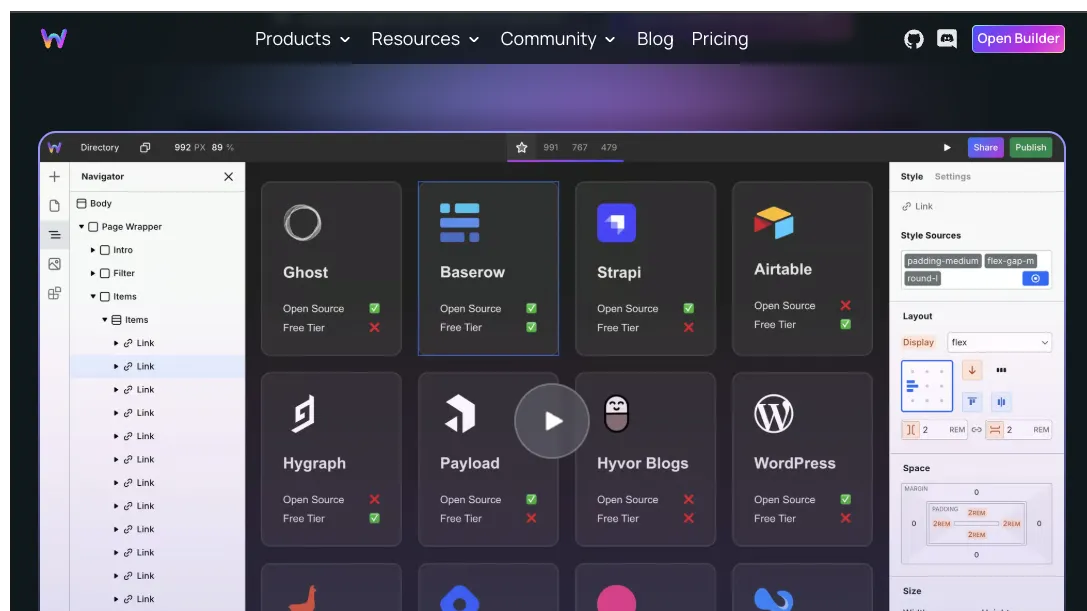
Webstudio is an open-source visual website builder and Webflow alternative for building fast, maintainable frontends with modern web standards. It is best for teams that want visual development, external CMS flexibility, self-hosting options, and more ownership than typical closed website builders.
Choose Webstudio when you want a visual website builder with open-source foundations, headless CMS flexibility, and export/self-hosting options; choose Webflow or Framer when you want a more polished closed SaaS workflow, and choose an AI coding tool when you need full application code generation.
Pricing Plans
Hobby
Free cloud plan with wstd.io subdomain, unlimited projects, unlimited pages, project sharing, and project export.
Pro
Adds custom domains, 100,000 monthly page views, unlimited form submissions, Content Mode, staging, backups, advanced sharing, and CMS integrations.
Team
Adds workspaces, member roles, and 5 included seats on top of Pro.
Additional Page Views
Available for Pro accounts, with overage protection for unexpected spikes.
Self-hosted Projects
Export and host projects on your own infrastructure; hosting, bandwidth, and platform costs are paid separately.
Core Features
1Visual Builder
- Browser-based visual website builder
- Modern HTML, CSS, and JavaScript control
- All CSS properties and CSS variables
- Custom breakpoints and responsive styling
2Dynamic Content
- Headless CMS integrations
- REST and GraphQL Resources
- Dynamic routing and CMS pages
- Bindings, collections, expressions, and dynamic sitemap support
3Ownership and Portability
- Open-source Builder under AGPL
- Static site download
- CLI export workflow
- Self-hosted project deployment options
4AI and Design Workflow
- Inception AI design exploration
- HTML and Tailwind output from AI-generated designs
- Paste from Webflow
- Paste Markdown and custom code support
Pros
- Open-source alternative to Webflow with stronger portability and self-hosting story.
- Connects visually to external CMSs instead of forcing a built-in CMS model.
- Good fit for fast, SEO-friendly marketing sites, directories, CMS frontends, and content-heavy pages.
- Supports static export and CLI export for teams that want more hosting control.
- Advanced CSS, variables, breakpoints, and Radix components make it appealing to technically minded designers.
Cons
- Not a full AI-native IDE or general-purpose software development environment.
- Steeper learning curve than simpler template-first website builders.
- Self-hosting the Builder in production is documented as difficult and not currently recommended.
- Built-in Webstudio AI was discontinued; current AI direction is the separate Inception design tool.
- Team and enterprise governance capabilities are lighter than mature enterprise website platforms.
Why Choose Webstudio?
Webstudio is best understood as a visual frontend builder for people who like Webflow’s speed but want more openness, portability, and control. It is not trying to be a full AI IDE or a full-stack app generator. Its strongest promise is narrower and more practical: build modern websites visually, connect them to external data, and avoid being fully locked into one closed publishing platform.
That positioning matters. Many website builders become convenient at the beginning but restrictive when a project grows. Webstudio’s open-source foundation, export workflow, CMS flexibility, and self-hosting story make it more appealing to technical designers, agencies, and developers who want a visual workflow without giving up all infrastructure choices.
The tradeoff is that Webstudio is more advanced than beginner-first site builders. It rewards users who understand layout, CSS, components, CMS models, routing, and data binding. For that audience, it can feel less like a template editor and more like a visual development environment for the frontend.
Core Workflow
A typical Webstudio workflow starts with visual layout and styling. You define pages, components, tokens, breakpoints, and responsive behavior in the Builder instead of writing every line by hand. The result is still grounded in web standards, so users with CSS knowledge can make more precise decisions than they usually can in simplified drag-and-drop builders.
The next layer is data. Webstudio does not force every content project into its own proprietary CMS. Instead, it can connect to external systems through Resources, GraphQL Resources, dynamic routes, bindings, collections, and expressions. This makes it useful for blogs, directories, landing page systems, documentation-style sites, and CMS-driven pages powered by tools such as WordPress, Notion, Airtable, Strapi, Directus, Sanity, or other APIs.
For publishing, teams can use Webstudio Cloud or export projects and host elsewhere. That portability is one of the main reasons to consider Webstudio over a more closed visual builder. The hosted path is simpler; the exported/self-hosted path gives more ownership and infrastructure control.
Use Cases
Webstudio fits marketing sites, agency projects, startup landing pages, directories, portfolios, content hubs, and frontends for headless CMS setups. It is especially useful when the team wants visual editing but does not want the CMS, hosting, and frontend layer to be inseparable.
For technical agencies, Webstudio can support a useful client workflow: developers or advanced builders define the structure, data connections, and reusable patterns, while clients or marketers work in a more constrained content-editing mode. This can reduce repetitive implementation work without handing clients a fragile custom codebase.
The AI-related workflow currently centers more on design exploration than full app generation. Inception can help users generate and explore web design directions as production-oriented HTML and Tailwind output. That makes it useful near the ideation and visual direction stage, but it should not be confused with a coding agent that edits a repository or a backend app builder that creates database-backed software.
Comparison to Alternatives
Compared with Webflow, Webstudio’s strongest differentiator is openness. Webflow is more mature as a commercial platform, has a larger ecosystem, and offers more enterprise polish. Webstudio is more attractive when self-hosting, open-source foundations, export, and external CMS flexibility matter more than ecosystem size.
Compared with Framer, Webstudio is less focused on ultra-fast visual landing-page production and more focused on web standards, CMS connections, and frontend ownership. Framer can be faster for polished one-off marketing pages. Webstudio is more interesting when a site needs structured content and a long-term portable architecture.
Compared with WordPress, Webstudio is not a full CMS replacement in the traditional sense. A better pattern is often using WordPress or another CMS as the backend and Webstudio as the visual frontend. This separates content management from presentation and can avoid some plugin-heavy WordPress frontend complexity.
Compared with Lovable, Bolt.new, or v0, Webstudio serves a different buyer. Those tools are closer to prompt-to-code or prompt-to-app workflows. Webstudio is better for visually designing and operating websites, while AI coding tools are better when the output needs to become a developer-owned application codebase.
Best Configuration
The best Webstudio setup starts with a clear content model. Before building many pages, decide which content belongs in an external CMS, which sections should become reusable components, which pages need dynamic routes, and which data should be fetched through REST or GraphQL.
For production sites, use Webstudio Cloud when speed and simplicity matter most. Consider export and self-hosting when the project has stronger ownership, compliance, cost, or infrastructure requirements. However, self-hosting the Builder itself is more complex than hosting exported projects, so teams should distinguish between self-hosting the published site and operating the entire Builder stack.
For AI-assisted design, use Inception as an exploration layer rather than the final source of truth. Generated HTML and Tailwind can accelerate creative direction, but the final Webstudio project should still be reviewed for accessibility, responsiveness, SEO metadata, performance, maintainability, and CMS structure.
Migration Notes
Migrating from Webflow is one of Webstudio’s most natural adoption paths because Webstudio supports paste-from-Webflow workflows. Even so, a serious migration should be treated as a rebuild and audit, not just a copy operation. Interactions, CMS structure, forms, SEO settings, custom code, redirects, and third-party integrations all need manual review.
Migrating from WordPress works best when WordPress becomes headless rather than being replaced immediately. Keep WordPress as the editorial backend, expose content through REST or GraphQL, then use Webstudio for the frontend experience. This can be a cleaner path than trying to move all editorial workflows at once.
Migrating from a custom frontend requires a stricter boundary. Webstudio is a strong choice for public-facing pages and CMS-driven experiences, but it is usually not the right place for complex authenticated dashboards, business logic, or backend-heavy product flows. Keep those in a traditional application stack and use Webstudio where visual iteration and content operations create the most leverage.
Best For
- Designers and developers who want an open-source Webflow alternative
- Marketing websites, landing pages, directories, and CMS frontends
- Teams that want to connect Notion, Airtable, WordPress, Strapi, Directus, Sanity, or other headless CMSs
- Projects that need strong SEO controls, fast static or edge delivery, and visual editing
- Technical agencies that want more portability than closed no-code builders
- Creators who want to export and host sites outside the vendor platform
Not Ideal For
- Users looking for a full AI code editor like Cursor or Windsurf
- Teams that need backend-heavy SaaS app development inside one platform
- Beginners who want the simplest drag-and-drop template builder
- Organizations requiring mature enterprise governance, SSO, procurement, and compliance features by default
- Projects that require a deeply integrated built-in ecommerce or database app builder
Privacy Notes
Webstudio states that it does not track users, uses anonymized analytics, and hosts data within Europe. Because Webstudio is open-source and supports exported/self-hosted projects, teams can choose more controlled hosting paths, but they should still review CMS integrations, form handling, third-party Resources, and any external APIs they connect.
Alternatives
Sources
Update History
- Jun 23, 2026: Created directory entry and verified current positioning, pricing, open-source license model, self-hosting notes, CMS workflow, Inception AI direction, and discontinued Webstudio AI status from official sources.
Related Tools
More listings in a similar part of the directory.






Webstudio Articles
Guides, comparisons, and launch notes connected to this listing.