On This Page8 sections
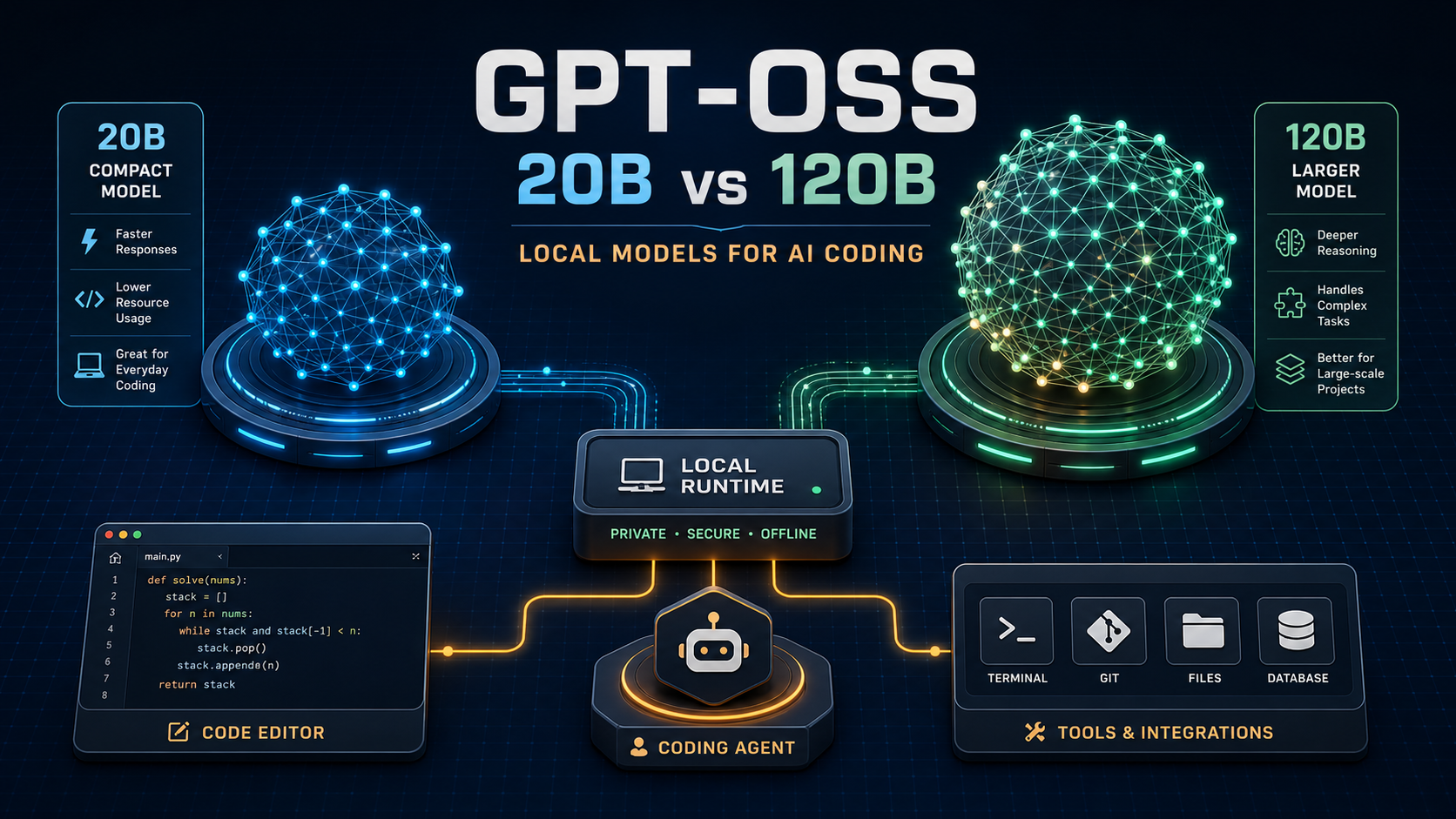
GPT-OSS is OpenAI's open-weight model family for developers who want to run, inspect, adapt, and deploy a reasoning model on infrastructure they control. The family has two sizes: gpt-oss-20b, the practical local and edge option, and gpt-oss-120b, the higher-capacity option for large-memory workstations and production servers.
This guide explains what those numbers mean, what hardware you actually need, how to run the models, and where GPT-OSS fits into AI coding and agent systems. If you already understand the models and want a curated implementation index, continue with Awesome GPT-OSS: tools, runtimes, guides and resources.
Short answer: Start with gpt-oss-20b if you want a model on a developer workstation, Apple Silicon Mac, or higher-end consumer GPU. Choose gpt-oss-120b when quality is more important than hardware cost and you have roughly 60 GB or more of GPU or unified memory. Both models support configurable reasoning, function calling, structured output, streaming, and fine-tuning.
GPT-OSS at a glance
| Model | Total parameters | Active parameters | Context window | Practical hardware starting point | Best fit |
|---|---|---|---|---|---|
| gpt-oss-20b | 21B | 3.6B | 131,072 tokens | About 16 GB VRAM or unified memory with the packaged MXFP4 model | Local development, private prototypes, specialized assistants, coding experiments |
| gpt-oss-120b | 117B | 5.1B | 131,072 tokens | About 60 GB VRAM or unified memory; a single H100-class system is an official target | Server inference, demanding reasoning tasks, larger agent workloads |
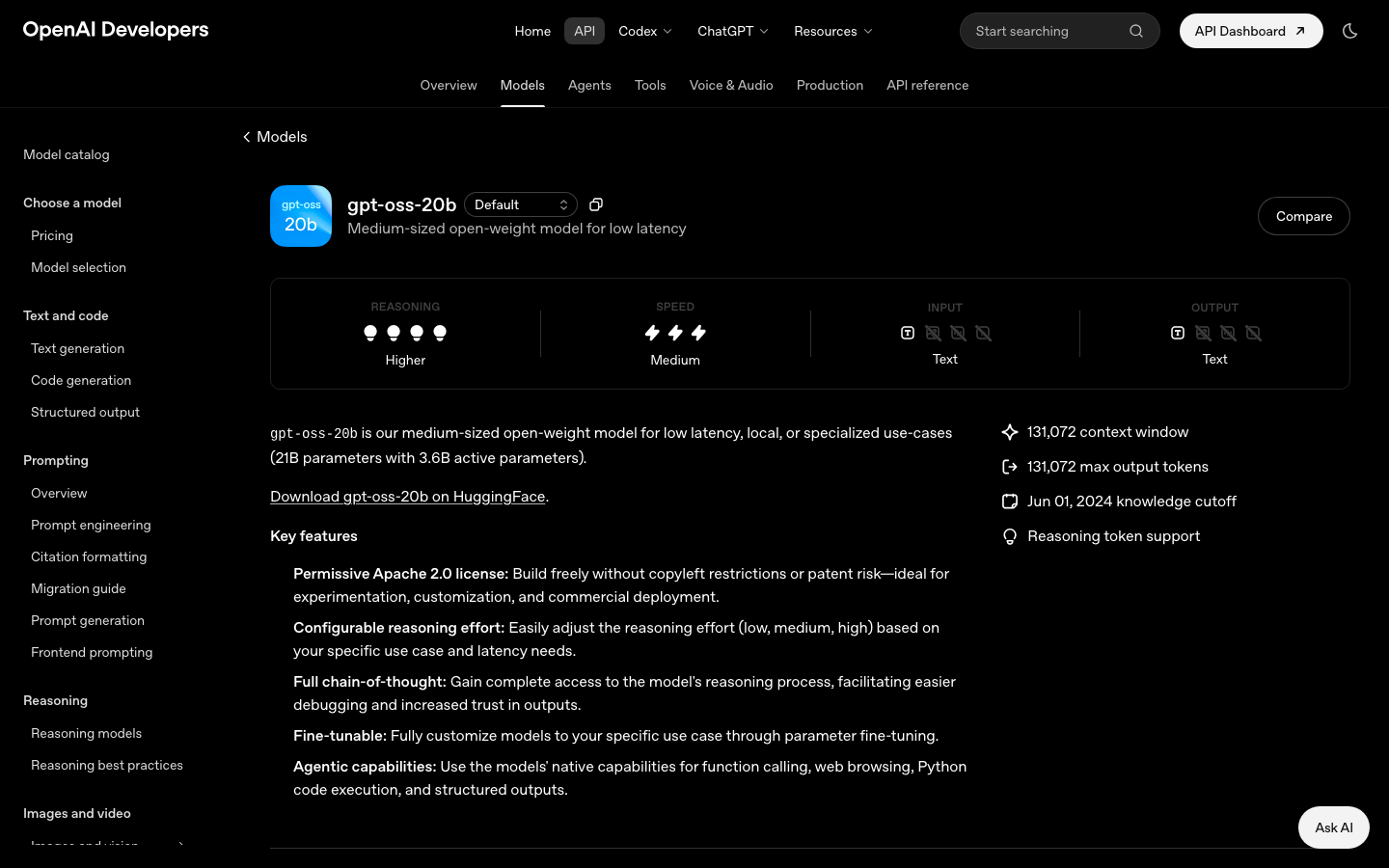
Both model pages list a June 1, 2024 knowledge cutoff and a maximum output length of 131,072 tokens. They are text-in/text-out models: image, audio, and video inputs are not supported by the weights themselves. See the official gpt-oss-20b model card and gpt-oss-120b model card for the current specifications.
What “open-weight” means
Open-weight means the trained parameters are downloadable. You can run the model through a compatible local runtime or your own serving stack, evaluate it behind your firewall, and fine-tune it for a specialized task. The GPT-OSS models are released under the permissive Apache 2.0 license.
That is different from calling a hosted model through a vendor API. With a hosted API, the provider operates the model and you send requests to its endpoint. With GPT-OSS, you are responsible for the inference runtime, capacity, access controls, logging, updates, and most operational decisions.
It is also worth being precise about privacy. Running weights on your own machine can keep prompts local, but “local model” does not automatically mean “nothing leaves the device.” A coding agent may still call web search, issue requests to remote MCP servers, send telemetry, or use cloud-hosted tools. Privacy is a property of the complete system, not just the model file.
Why 20B and 120B do not tell the whole performance story
The model names refer approximately to total parameters: 21 billion for gpt-oss-20b and 117 billion for gpt-oss-120b. The official pages also list a much smaller number of active parameters per token—3.6B and 5.1B respectively.
For deployment planning, the distinction matters:
- Total parameters largely influence how much storage and memory the complete model needs.
- Active parameters help explain why inference compute can be lower than a dense model with the same total size.
- Runtime, quantization, prompt length, batch size, and hardware bandwidth still have major effects on actual speed.
Do not translate active-parameter counts directly into a universal speed score. Measure the exact runtime, quantization, context length, and tool workflow you plan to use.
GPT-OSS hardware requirements
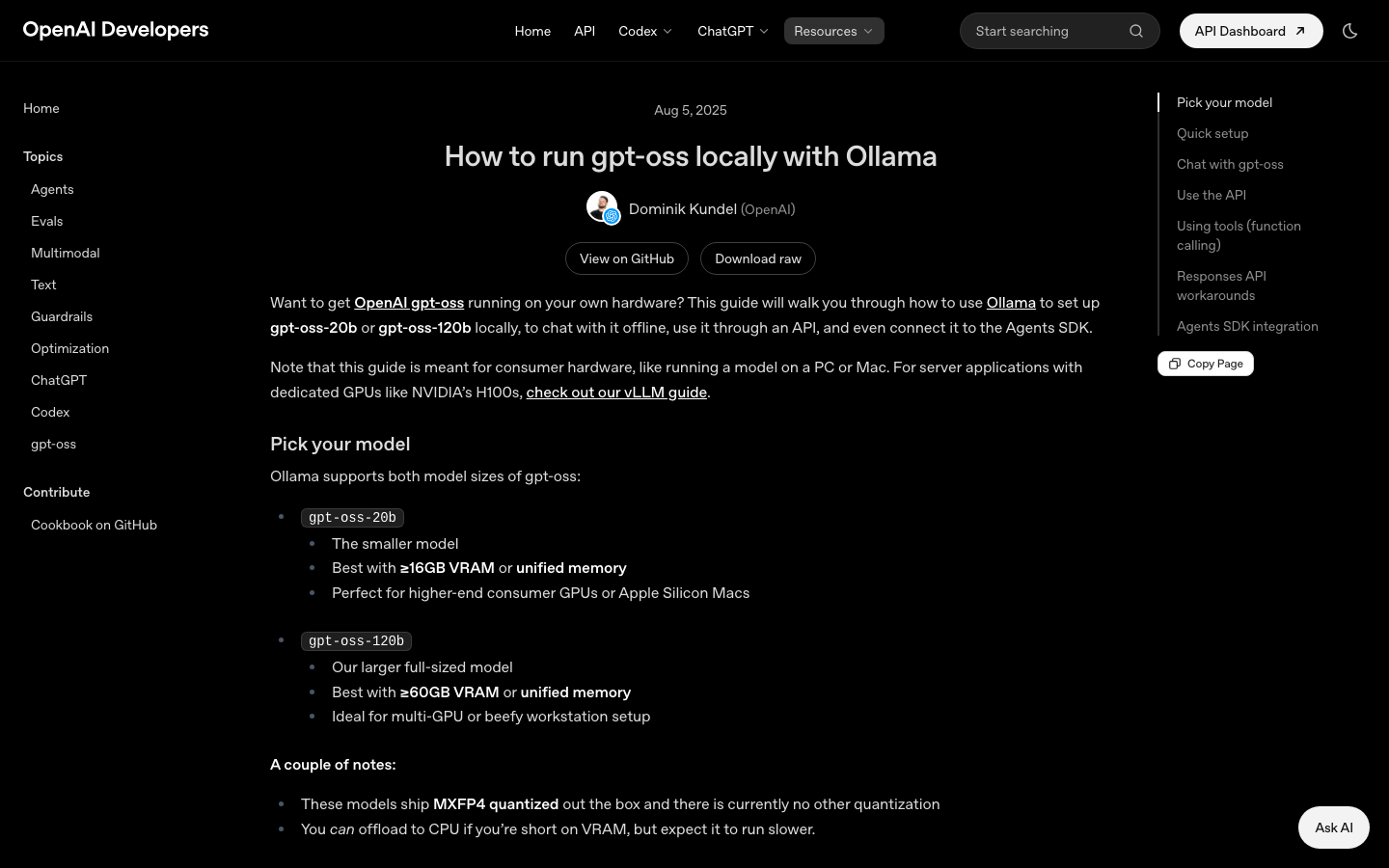
OpenAI's official Ollama guide gives a useful consumer-hardware rule of thumb:
- gpt-oss-20b: best with at least 16 GB of VRAM or unified memory.
- gpt-oss-120b: best with at least 60 GB of VRAM or unified memory.
The models distributed through that path use MXFP4 quantization. The official Transformers guide similarly estimates about 16 GB of VRAM for the 20B MXFP4 model and 60 GB or more for 120B. It also notes that MXFP4 acceleration depends on recent hardware support; loading gpt-oss-20b in BF16 can require roughly 48 GB.
Use the hardware numbers as a starting point, not a latency promise. Long contexts increase the key-value cache, concurrent users multiply memory pressure, and CPU offload may make an otherwise-loadable model much slower.
A practical decision matrix
| Your environment | Recommended first test | Why |
|---|---|---|
| Laptop or desktop with 16–32 GB unified memory | gpt-oss-20b through Ollama | Lowest-friction way to test local chat, tools, and code workflows |
| Consumer GPU with about 16–24 GB VRAM | gpt-oss-20b with a supported quantized runtime | Realistic local experimentation target |
| 48 GB workstation GPU | gpt-oss-20b, including higher-precision experiments | More room for long contexts, concurrency, and BF16 testing |
| 64 GB+ GPU or unified-memory system | Benchmark both models | gpt-oss-120b becomes practical, but 20B may still win on latency and throughput |
| H100-class inference server | gpt-oss-120b | Official model positioning includes single-H100 deployment |
| CPU-only machine | Begin with 20B and modest expectations | It may run with offload, but interactive coding-agent latency can be the limiting factor |
The fastest local setup: Ollama
Ollama is the shortest path for most developers because it manages the model package and exposes a local API. Install a current Ollama release, then pull and run one of the models:
ollama pull gpt-oss:20b
ollama run gpt-oss:20b
For the larger model:
ollama pull gpt-oss:120b
ollama run gpt-oss:120b
Ollama also exposes an OpenAI-compatible local endpoint. That lets an application or coding tool reuse a familiar SDK shape while sending traffic to your own machine:
from openai import OpenAI

client = OpenAI(
    base_url="http://localhost:11434/v1",
    api_key="ollama",
)

response = client.chat.completions.create(
    model="gpt-oss:20b",
    messages=[
        {"role": "developer", "content": "You are a careful coding assistant."},
        {"role": "user", "content": "Explain the failure path in this function."},
    ],
)

print(response.choices[0].message.content)
The exact model identifier and supported fields can vary by runtime release, so test the integration rather than assuming complete endpoint parity. The official Ollama setup guide also covers tool calling and connecting the local model to an agent stack.
A more configurable path: Transformers
Use Transformers when you need more control over loading, precision, generation settings, or fine-tuning. A basic pipeline looks like this:
from transformers import pipeline

generator = pipeline(
    "text-generation",
    model="openai/gpt-oss-20b",
    torch_dtype="auto",
    device_map="auto",
)

messages = [
    {"role": "user", "content": "Write tests for a JSON parser's error cases."}
]

result = generator(messages, max_new_tokens=512)
print(result[0]["generated_text"][-1])
The official Transformers guide also describes a local serving command that can expose OpenAI-compatible Responses and Chat Completions endpoints. For production, record the exact versions of Transformers, PyTorch, kernels, drivers, and model files; a reproducible stack is much easier to debug than “latest everything.”
Harmony: the format behind correct conversations and tools
GPT-OSS uses the Harmony response format to represent messages, roles, channels, tool calls, and reasoning-related output. If your runtime already supports GPT-OSS, it will usually handle Harmony for you. If you build a custom inference implementation, formatting is part of model correctness—not a cosmetic wrapper.
Harmony defines the familiar system, developer, user, assistant, and tool roles, plus channels such as analysis, commentary, and final. The key operational rule is to expose only the final answer to end users unless your application has a deliberate, safe reason to show something else.
Read the official Harmony format guide before writing a custom parser. OpenAI also publishes guidance for handling raw chain of thought. Do not treat private reasoning text as ordinary UI content, logs, or training data.
Can GPT-OSS browse the web or execute code?
The model can produce structured tool calls, but it does not independently open a browser, run Python, edit a repository, or query a database. The host application provides those capabilities.
A typical agent loop is:
- The application sends the conversation and available tool definitions.
- GPT-OSS decides whether to answer or request a tool.
- The host validates the requested arguments and applies permissions.
- The host executes the tool in a controlled environment.
- The tool result returns to the model for the next step.
- The application renders the final channel to the user.
This boundary is essential for security. Never let a model-generated shell command bypass confirmation, sandboxing, allowlists, or least-privilege credentials simply because the model is running locally.
Where GPT-OSS fits in AI IDEs and coding agents
AI IDEs separate naturally into several layers:
Editor or agent workspace
        ↓
Coding-agent harness
        ↓
Model endpoint
        ↓
Local runtime + GPT-OSS weights
        ↓
Repository, terminal, tests and external tools
GPT-OSS occupies the model layer. It can power explanation, code generation, planning, structured tool requests, and repository assistance, but the coding harness still owns file editing, terminal execution, context selection, approval prompts, checkpoints, and recovery.
That distinction explains why two products using the same model can feel very different. One may index the repository well, stream tool output, and recover from failed tests; another may stuff entire files into the prompt and expose unsafe commands. Model quality matters, but agent architecture matters too.
Good local AI coding use cases
- Reviewing proprietary code that should remain on controlled infrastructure.
- Building an internal assistant with a fixed tool set and audit trail.
- Running repeatable refactoring or test-generation experiments without per-token API billing.
- Fine-tuning a specialized code or domain workflow.
- Giving an AI IDE an offline or fallback model endpoint.
- Evaluating prompt and tool behavior against a model whose weights and runtime you can pin.
Where a hosted model may still be easier
- You need low setup effort and automatic scaling.
- Your workstation cannot hold the desired model and context.
- Workloads are intermittent, so owning idle GPU capacity is wasteful.
- You rely on hosted multimodal features not present in GPT-OSS.
- You need a managed service's compliance, uptime, and support commitments.
The practical answer is often hybrid: a local GPT-OSS endpoint for sensitive or routine tasks, with a separately governed hosted model for workloads that need different capabilities.
Reasoning effort, context, and latency
Both models expose configurable reasoning levels—low, medium, and high. Higher reasoning effort may help with complex planning or debugging, but it can also increase latency and generated tokens. Treat it as a per-task control rather than a permanent “quality” switch.
Likewise, a 131,072-token context window is a capacity limit, not an instruction to send every file. In coding systems, retrieval and context selection still matter. A focused prompt containing the relevant interface, failing test, implementation, and recent changes is usually more reliable and cheaper to process than an unfiltered repository dump.
Measure at least:
- time to first token;
- end-to-end task time, including tools;
- tokens generated before a valid tool call;
- peak GPU and system memory;
- success rate on your own repository tasks;
- recovery after a tool error;
- concurrency at acceptable latency.
Fine-tuning GPT-OSS
Open weights make parameter-level customization possible. Fine-tuning can help when prompts and retrieval are not enough—for example, a consistent internal output schema, a specialized domain vocabulary, or a repeatable tool-selection policy.
Before fine-tuning, build an evaluation set and establish a baseline. Otherwise, it is easy to train toward examples that look better while making general behavior worse. Keep training examples representative, separate validation data, and test tool behavior as well as prose quality.
OpenAI's GPT-OSS fine-tuning guide demonstrates a Transformers-based workflow. Follow the guide's current dependency and memory notes rather than copying an old environment blindly.
Production checklist
Before exposing a GPT-OSS service to users or agents, verify the complete system:
- Pin the model revision, tokenizer, runtime, drivers, and container image.
- Validate Harmony serialization and parsing with multi-turn and tool conversations.
- Keep analysis/reasoning channels out of normal user-facing responses and sensitive logs.
- Add authentication, rate limits, request size limits, timeouts, and cancellation.
- Sandbox code execution and require explicit authorization for destructive actions.
- Treat prompts, repository files, tool output, and generated code as untrusted input.
- Monitor latency, memory, queue depth, tool failures, and output truncation.
- Re-run a stable evaluation suite after model, prompt, runtime, or quantization changes.
- Define fallback behavior when the local endpoint is overloaded or unavailable.
- Review every external integration before making privacy claims.
OpenAI provides an implementation verification guide specifically for checking whether a GPT-OSS stack behaves correctly.
Which GPT-OSS model should you choose?
Choose gpt-oss-20b first if you are unsure. It has the broadest practical local-hardware fit, makes iteration faster, and is sufficient to validate your prompts, tool schema, permissions, UI, and evaluation harness. A well-engineered 20B system can be more useful than a poorly integrated 120B deployment.
Move to gpt-oss-120b when your evaluation shows a meaningful gain on the tasks that justify its memory, latency, and serving cost. Do not upgrade based only on parameter count. Compare both models on the same repository tasks, tool definitions, reasoning effort, and success criteria.
Frequently asked questions
Is GPT-OSS available through the OpenAI API?
GPT-OSS is presented as a downloadable open-weight family. The model catalog does not list normal hosted API pricing tiers for these entries. In practice, developers run the weights locally, self-host them, or use a compatible third-party host.
Is GPT-OSS an image or vision model?
No. The official model pages list text input and text output. A host can still attach OCR or image-analysis tools, but those are separate components.
Can gpt-oss-20b run on a Mac?
Yes, a compatible Apple Silicon Mac with sufficient unified memory is a target in the official Ollama guidance. Around 16 GB is the published starting recommendation for the packaged 20B model, but more memory gives the operating system and longer contexts additional headroom.
Does GPT-OSS work with OpenAI SDKs?
Many local runtimes expose an OpenAI-compatible endpoint, so existing SDK patterns can often be reused by changing the base URL and model name. Compatibility is implemented by the runtime, so test the specific endpoints, tool schema, streaming behavior, and error responses your application uses.
Is a local GPT-OSS coding agent fully offline?
Only if every dependency is local. Check model downloads, telemetry, web tools, package managers, MCP servers, source-control integrations, and crash reporting. The weights can run locally while the surrounding agent still uses the network.
The bottom line
GPT-OSS is most interesting not as a free replacement for every hosted model, but as a controllable model layer. It gives developers choices that closed hosted endpoints cannot: pin the weights, own the runtime, inspect the complete tool loop, fine-tune for a narrow workflow, and decide where data is processed.
For AI IDEs and coding agents, that control is valuable—but the model is only one layer. The quality of repository context, tool permissions, sandboxing, evaluation, and user experience will decide whether the final system is genuinely useful.
Next: use the Awesome GPT-OSS resource guide to choose an official setup path, implementation reference, fine-tuning workflow, and verification checklist.
Official references
- GPT-OSS topic hub
- gpt-oss-20b model page
- gpt-oss-120b model page
- Run GPT-OSS locally with Ollama
- Run GPT-OSS with Transformers
- OpenAI Harmony response format
- Verify a GPT-OSS implementation
Specifications and links checked on August 30, 2026. Runtime requirements and model integrations can change, so verify current official documentation before production deployment.
Continue Reading
More articles connected to the same themes, protocols, and tools.
OpenCode 2.0 Is Here: Code Mode, Background Agents, and a Major Rebuild of the Open-Source Coding Agent

Cloudflare Workers KV Instant Explained: 177× Faster Reads, Pricing, Limits, and Setup

Meta Muse Wonder Explained: Full vs Standard, Benchmarks, Pricing, API & Muse Code (2026)
Referenced Tools
Browse entries that are adjacent to the topics covered in this article.