
On This Page8 sections
Key Takeaways
- Cozy Creek is an AI-assisted 3D browser-world demonstration shared by developer Chetan Ankola, who credits GPT-6 Astra, Blender, and Three.js.
- The important innovation is the pipeline, not a magical one-shot prompt. AI agents can write Blender Python, generate assets, export GLB files, assemble a real-time scene, and refine the result through screenshots and code changes.
- The development process involved repeated iteration and reused components. Publicly discussed notes include work on water, cottage geometry, materials, camera behavior, lighting, and performance.
- A related build report recorded 317.37 million processed tokens and an approximately $97 standard-API-equivalent estimate. That screenshot is labeled Hiroshi's Island; it is not a verified Cozy Creek invoice or a comprehensive production budget.
- The most promising uses are compact interactive experiences—browser puzzles, mini-games, virtual locations, and product demonstrations—not an assumption that AI can instantly ship any complex 3D game.
What Is Cozy Creek?
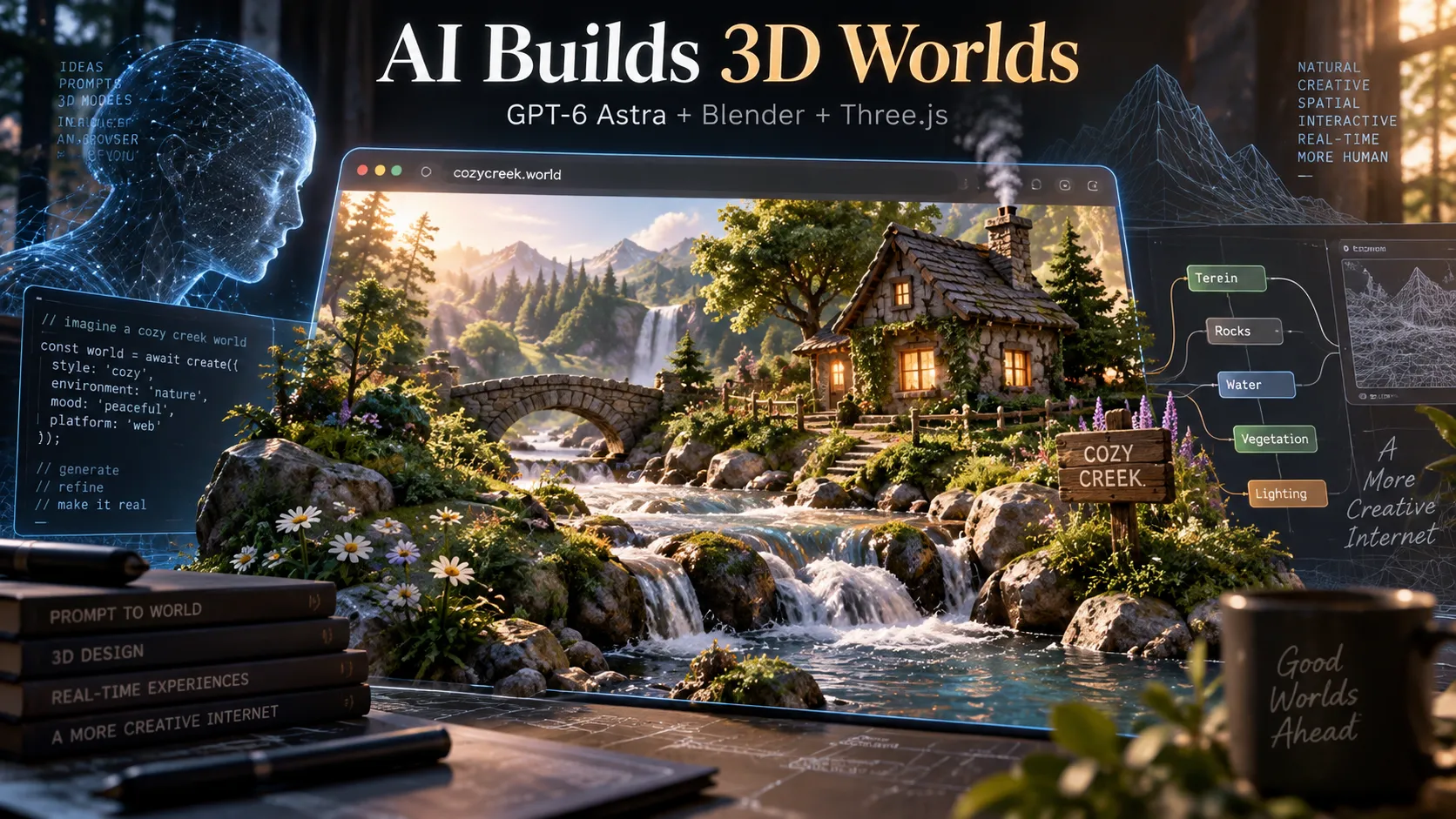
Cozy Creek is a 3D environment demonstrated by Chetan Ankola on X. The creator describes using GPT-6 Astra, Blender, and Three.js to produce a stylized, inviting landscape with a creek, rocks, vegetation, and a cottage.
The distinction from ordinary AI-generated video is significant. A Three.js scene is intended to be rendered by the browser in real time. Rather than playing a fixed sequence of frames, the application can potentially change its camera, lighting, object positions, and interaction state in response to the visitor.
This does not mean every such capability is implemented in Cozy Creek. The published showcase and associated development notes establish the creator's claims and some of the workflow, but they do not substitute for a publicly reproducible build, a complete source audit, or cross-device benchmarks.
The most defensible interpretation is that Cozy Creek demonstrates a compelling AI-assisted approach to building interactive web 3D—not a verified, fully finished commercial game.
Why the Demo Matters for AI Coding
Conventional 3D production spans modeling, texturing, lighting, asset optimization, application programming, and testing. A beautiful Blender render alone is not equivalent to a usable browser experience.
AI coding agents can connect those disciplines by generating executable scripts and application code. A developer describes the desired outcome; the agent breaks the work into assets, writes Blender scripts, exports compatible files, and edits the web renderer. The resulting artifacts remain editable and testable.
That is different from treating an image-generation model as a 3D game engine. The AI is orchestrating established tools. The quality of the final environment still depends on technical constraints, suitable references, successful executions, visual evaluation, and human judgment.
GPT-6 Astra + Blender + Three.js: The Technical Pipeline
| Component | Role in the workflow | Main constraint |
|---|---|---|
| GPT-6 Astra and supporting coding models | Plan tasks, generate and review code, diagnose failures | Model output needs execution and verification |
| Coding-agent environment | Run commands, inspect files, iterate on results | Tool permissions and environment setup |
Blender Python API (bpy) | Generate meshes, arrange objects, prepare materials | Artistic quality and procedural complexity |
| GLB / glTF | Carry browser-compatible geometry, textures, and animation | Not all Blender effects export identically |
| Three.js | Load assets, render them, run animation and controls | GPU budget, draw calls, compatibility |
| Browser testing | Inspect screenshots, frame times, and interactions | Devices and browsers produce different results |
Stage 1: Convert a visual idea into a scene specification
A strong prompt describes more than a cozy landscape. It defines the intended camera, the dimensions of the world, the required structures, the artistic style, and the difference between essential and decorative elements.
A practical prototype might specify a small creek, a cottage, a stone bridge, a handful of reusable tree types, and one controllable camera. These are illustrative planning choices, not confirmed dimensions of Cozy Creek.
Stage 2: Generate assets programmatically in Blender
The Blender Python API permits scripts to create and modify geometry, materials, lights, and scene hierarchies. AI agents can write those scripts and execute them without manually operating every modeling control.
A scripted approach is useful for repeated props such as rocks, grass clumps, flowers, and fence posts. Variations in size, rotation, color, and shape help reduce obvious repetition.
A headless Blender task can be executed with:
blender --background --python scripts/build_scene.pyThe script should keep generated assets separate, use predictable names, and produce reproducible output. Deterministic random seeds make before-and-after visual comparisons easier.
Stage 3: Export GLB assets
GLB packages glTF-compatible meshes, material information, textures, and certain animation data in a portable binary format. The Three.js GLTFLoader can import it directly.
However, unsupported Blender material nodes, custom procedural shaders, simulations, and rendering effects do not magically become equivalent Three.js effects. They may need texture baking, shader rewrites, or runtime replacements.
Stage 4: Assemble the scene in Three.js
The browser application handles camera projection, GPU rendering, lighting, animation, and input. It also needs asset-loading states, resize handling, performance safeguards, and error reporting.
A minimal project can start with Vite:
npm create vite@latest cozy-creek -- --template vanilla
cd cozy-creek
npm install
npm install three
npm run dev
The following snippet assumes Blender has exported an asset to public/assets/creek.glb. It creates a basic interactive viewer, not the final water, vegetation, or cinematic effects from the demonstration:
import * as THREE from 'three';
import { GLTFLoader } from 'three/addons/loaders/GLTFLoader.js';
import { OrbitControls } from 'three/addons/controls/OrbitControls.js';

const scene = new THREE.Scene();
scene.background = new THREE.Color(0xc9dfec);

const camera = new THREE.PerspectiveCamera(
  60, window.innerWidth / window.innerHeight, 0.1, 500
);
camera.position.set(8, 5, 10);

const renderer = new THREE.WebGLRenderer({ antialias: true });
renderer.setSize(window.innerWidth, window.innerHeight);
renderer.setPixelRatio(Math.min(window.devicePixelRatio, 2));
renderer.outputColorSpace = THREE.SRGBColorSpace;
document.body.appendChild(renderer.domElement);

const light = new THREE.DirectionalLight(0xffffff, 2.5);
light.position.set(5, 12, 8);
scene.add(light, new THREE.AmbientLight(0xffffff, 0.7));

const controls = new OrbitControls(camera, renderer.domElement);
controls.enableDamping = true;

new GLTFLoader().load(
  '/assets/creek.glb',
  gltf => scene.add(gltf.scene),
  undefined,
  error => console.error(error)
);

window.addEventListener('resize', () => {
  camera.aspect = window.innerWidth / window.innerHeight;
  camera.updateProjectionMatrix();
  renderer.setSize(window.innerWidth, window.innerHeight);
});

renderer.setAnimationLoop(() => {
  controls.update();
  renderer.render(scene, camera);
});
Stage 5: Implement water, lighting, and interaction separately
Water is a high-impact visual feature but also a source of technical complexity. A stream might combine scrolling normal maps, UV distortion, reflections, Fresnel effects, transparency, and shoreline geometry. Full fluid simulation is not necessary for many stylized scenes.
Similarly, appealing lighting may require environment maps, contact shadows, ambient occlusion, color grading, and careful material calibration. The level of sophistication should match the intended hardware.
Camera controls need collision handling and boundaries. A scene that looks correct from one fixed angle may reveal missing geometry, floating props, or inaccessible spaces when users explore freely.
What the Creator's Development Notes Reveal
A development-notes screenshot organizes 24 human instructions into 14 broad stages for the related work. The notes describe generating visual references, building and adjusting terrain, fixing architectural details, refining materials, improving the camera, and checking performance.
Importantly, the notes mention reusing a water system from an earlier Cala Blanca project. This indicates that at least one technically sophisticated component was not necessarily created from scratch during the showcased work.
The iteration pattern is more revealing than any isolated prompt: establish a running scene, take screenshots, identify visible mistakes, apply targeted changes, and test again.
A cottage can look convincing from a distance yet have faulty window recesses or inconsistent roof proportions. A creek can look beautiful in a still image but produce unstable frame times. Refining these defects is an essential part of production.
A screenshot is evidence of an image. A reproducible browser build is evidence of an interactive system. Evaluating AI development tools requires both.
What Did the Related Build Cost?
The developer also shared a usage-report screenshot titled Hiroshi's Island, covering activity around October 6–7, 2026. It provides a useful indication of iteration scale, but it must not be presented as the exact Cozy Creek cost.
| Reported metric | Value |
|---|---|
| Total processed tokens | 317.37 million |
| GPT-6.1 Sol | 286.99 million tokens |
| GPT-6 Astra | 30.38 million tokens |
| GPT-6.1 Sol requests | 1,815 |
| GPT-6 Astra requests | 207 |
| Combined requests | 2,022 |
| Cached-input share | Approximately 97.7% |
| Standard API-equivalent text-model estimate | Approximately $97 |
There are four reasons not to overinterpret these numbers.
First, the report is labeled with a different project name and may include related scene-building work. Second, an equivalent-rate estimate is not an actual invoice. Third, text-model usage does not include every possible image-generation, compute, or labor expense. Fourth, processed tokens can include large quantities of cached and repeatedly read context.
Approximately 90.4% of the reported tokens were attributed to Sol and 9.6% to Astra. Those shares indicate workload distribution, not the percentage of creative or technical value contributed by each model.
For a meaningful benchmark, record actual charged tokens by type, cache-hit rates, generation and compute expenses, developer hours, number of iterations, asset sizes, and runtime quality on target devices.
The Best Workflow for Reproducing Cozy Creek
The following sequence is safer and more economical than requesting an entire polished world at once.
- Choose a single visual reference. Define a specific camera composition, world boundary, color palette, and set of required assets.
- Build the smallest functioning viewer. Confirm that Three.js launches, loads one GLB file, and provides basic camera movement.
- Generate assets in independent groups. Separate landscape, architecture, vegetation, rocks, and decorations into reusable Blender scripts.
- Keep a fixed visual baseline. Capture screenshots from consistent camera positions and compare revisions against the reference.
- Improve major defects before adding detail. Fix scale, silhouette, composition, and lighting before investing in tiny decorative props.
- Add runtime effects incrementally. Build animated water and environmental motion with explicit frame-time limits.
- Measure performance on actual devices. Inspect GPU load, draw calls, texture memory, network size, loading time, and frame-time spikes.
- Publish a reproducible build. Preserve asset-generation scripts, lock dependencies, and document reused components and limitations.
The workflow aligns with the broader Reference → Assets → Assembly → Critique → Ship approach described in Matt Shumer's guide to building 3D worlds with Astra.
A Reusable Prompt for GPT-6 Astra and a Coding Agent
This is an original implementation template inspired by the demonstrated workflow, not a verbatim transcript of Chetan Ankola's prompts.
Build an interactive 3D browser environment using Blender and Three.js.

GOAL
Create a small, cozy creek world with a cottage, stones, trees,
flowers, flowing water, cinematic daylight, and ambient sounds.
Use the provided images as visual references.

REQUIRED STACK
- Blender Python API for generating and editing 3D assets.
- GLB/glTF for browser-ready asset exchange.
- Three.js with a modular JavaScript application.
- Browser screenshot capture and performance profiling.

WORKFLOW
1. Analyze the references and define scene scale and composition.
2. Create a minimal working Three.js viewer first.
3. Generate Blender assets through version-controlled Python scripts.
4. Export and validate individual GLB files.
5. Assemble the scene and implement camera controls.
6. Implement water, lighting, and environmental motion separately.
7. Capture repeatable screenshots and compare against references.
8. List and fix the most important visual or technical defects.
9. Recheck load failures, collisions, and asset compatibility.
10. Profile desktop and mobile performance and optimize bottlenecks.

DELIVERABLES
- Running browser application.
- Blender scripts and exported assets.
- Documented asset pipeline.
- Screenshots from fixed camera positions.
- Measured frame times and known limitations.

Do not claim that a feature works until it is executed and tested.
Explicitly disclose any reused scripts, shaders, or models.
A development agent needs access to the project files, Blender installation, terminal, and browser preview to carry out the requested loop. A prompt alone does not provide those capabilities.
Performance: What Makes or Breaks a Browser 3D World?
Aiming for 60 FPS implies an approximate frame budget of 16.7 milliseconds. At 30 FPS, the budget is about 33.3 milliseconds. These are general engineering targets, not measured Cozy Creek results.
| Bottleneck | Typical symptom | Practical response |
|---|---|---|
| Too many draw calls | Stutter in vegetation-heavy areas | Instance repeated rocks, grass, and props |
| Excessive geometry | Slow rendering on mobile GPUs | Reduce mesh complexity and introduce LOD |
| Oversized textures | Slow loading and memory pressure | Resize and compress compatible textures |
| Expensive transparency or reflections | Water disproportionately reduces FPS | Simplify passes and use stylized approximations |
| High shadow-map cost | Performance drops near multiple lights | Limit dynamic shadows and tune resolution |
| Exported material mismatch | Colors or roughness look wrong | Bake assets and verify the PBR pipeline |
| Camera collisions and clipping | Objects disappear or camera passes through walls | Test collision geometry and camera bounds |
The glTF Transform toolkit can help inspect and optimize GLB assets. The Three.js color-management guide explains why color-space handling matters for textures and final output.
Performance work should focus on measured bottlenecks, not indiscriminately lowering every graphics setting. The best result preserves features that most influence perceived visual quality.
Common Mistakes When Copying This Workflow
Treating an AI reference image as a runtime screenshot
A concept image can establish appearance but does not prove the browser renderer reproduces it. Publish separate reference images and actual in-browser captures.
Assuming Blender shaders export unchanged
Complex procedural materials and simulations often require baking or alternative runtime implementations. Check exported files independently of the original .blend project.
Rebuilding every asset after every change
Regenerating an entire scene increases cost and can introduce regressions. Stable, modular asset groups make revisions easier to audit.
Optimizing only for desktop
Mobile browsers have different GPU capabilities, thermal constraints, available memory, and input methods. Test loading and interaction on real phones, not just a desktop browser's responsive viewport.
Confusing a 3D demo with a game
A visual world can be an excellent prototype, but a complete game requires goals, feedback, progression, accessible controls, and an enjoyable interaction loop.
Is This Better Than Text-to-3D Generators?
These approaches solve different parts of the problem.
A text-to-3D model typically attempts to generate geometry or a 3D representation from a prompt or image. A Blender-plus-coding-agent workflow uses software automation to construct, edit, combine, and deploy scene elements.
The latter is well suited to predictable procedural assets, repeatable scene construction, and direct integration with application code. Dedicated 3D generation systems may be better suited to certain organic shapes or complex assets that are inefficient to describe as procedural geometry.
A hybrid strategy may be strongest: use specialized generators or licensed asset libraries where appropriate, then rely on Blender scripts and Three.js to standardize, optimize, and assemble the result.
Product Opportunities Beyond a Beautiful Demo
Daily 3D puzzles. Give visitors a small explorable environment with a new hidden-object challenge, spatial riddle, or clue each day. A repeatable objective provides a stronger reason to return than passive exploration.
Miniature browser escape rooms. Build short, replayable spaces around one clear puzzle mechanic. A focused world is easier to test and deliver than an open-ended adventure.
Interactive travel experiences. Stylized locations can integrate landmarks, descriptive content, navigation, and light gameplay. Accurate geographic or historic claims still require independent research.
AI scene builders. Let users describe a compact environment and share a rendered result. The difficult product requirements include queue management, asset quality control, moderation, export rights, and predictable compute costs.
3D performance benchmarks. Offer an attractive scene with adjustable quality settings and transparent FPS, frame-time, and hardware information. This makes visual complexity serve a specific utility.
Successful products need more than cinematic appeal. Discoverability, first-load speed, repeat visits, device coverage, and meaningful interactions are at least as important as the initial screenshot.
Frequently Asked Questions
Did GPT-6 Astra make Cozy Creek with one prompt?
The available development notes suggest a multi-step, iterative process, including reused components. They do not establish a one-prompt creation story.
Is Cozy Creek an AI-generated video?
The creator describes it as a Three.js browser experience, which is different from a fixed video. Independent verification of the full implementation would require a reproducible live build or source code.
Does this workflow require Blender MCP?
No. AI agents can use Blender's Python API and command-line mode directly. An MCP integration may improve tooling convenience but is not required for scripting and GLB export.
Can a GLB contain animated water?
GLB can contain supported mesh animations, but sophisticated interactive water effects often need separate browser shaders, runtime animation, and scene-specific rendering techniques.
Was Cozy Creek built for $97?
That is not established. The approximate $97 figure comes from a standard-API-equivalent estimate in a related, separately titled build report. It is not a verified complete invoice for Cozy Creek.
Can this pipeline produce a complete game?
It can support game creation, but mechanics, collisions, controls, progression, accessibility, runtime optimization, and testing still have to be implemented and validated.
Conclusion
Cozy Creek highlights an important direction in AI coding: language-model-powered agents can coordinate asset generation in Blender, application programming in Three.js, and visual feedback into one practical development loop.
The demonstration is compelling precisely because it connects AI assistance to established, inspectable production tools. Yet its related iteration logs and resource reports also show why claims of instant, effortless game generation should be treated carefully.
The best next step is to build a small, genuinely interactive scene, measure its actual production cost and browser performance, and turn the working pipeline into a repeatable process. That is the path from an impressive AI 3D showcase to a useful web product.
Continue Reading
More articles connected to the same themes, protocols, and tools.


Referenced Tools
Browse entries that are adjacent to the topics covered in this article.
