On This Page8 sections
Key Takeaways
- Antigravity 2.0 is no longer just an AI IDE. Google has repositioned it as an agent-first development environment for coordinating coding agents, subagents, browser tasks, terminal work, Git operations, artifacts, and recurring automation.
- Its launch was controversial, but many early reviews are now outdated. Google later restored or added terminal, Git, IDE integration, Remote Control, Custom Agents, and stronger planning workflows.
- The main differentiator is orchestration, not one model. Antigravity combines subagents, worktrees, artifacts, browser automation, MCP, Skills, Hooks, Custom Agents, and multi-model support.
- Real user feedback is mixed. Common praise centers on speed, frontend workflows, browser validation, model switching, and visibility. Common complaints involve quota use, loops, inconsistent edits, and resource consumption.
- The strongest workflow is often hybrid. Antigravity can handle research, planning, implementation, and browser validation while Codex, Claude Code, CI, or a human reviewer provides independent verification.
What Is Google Antigravity 2.0?
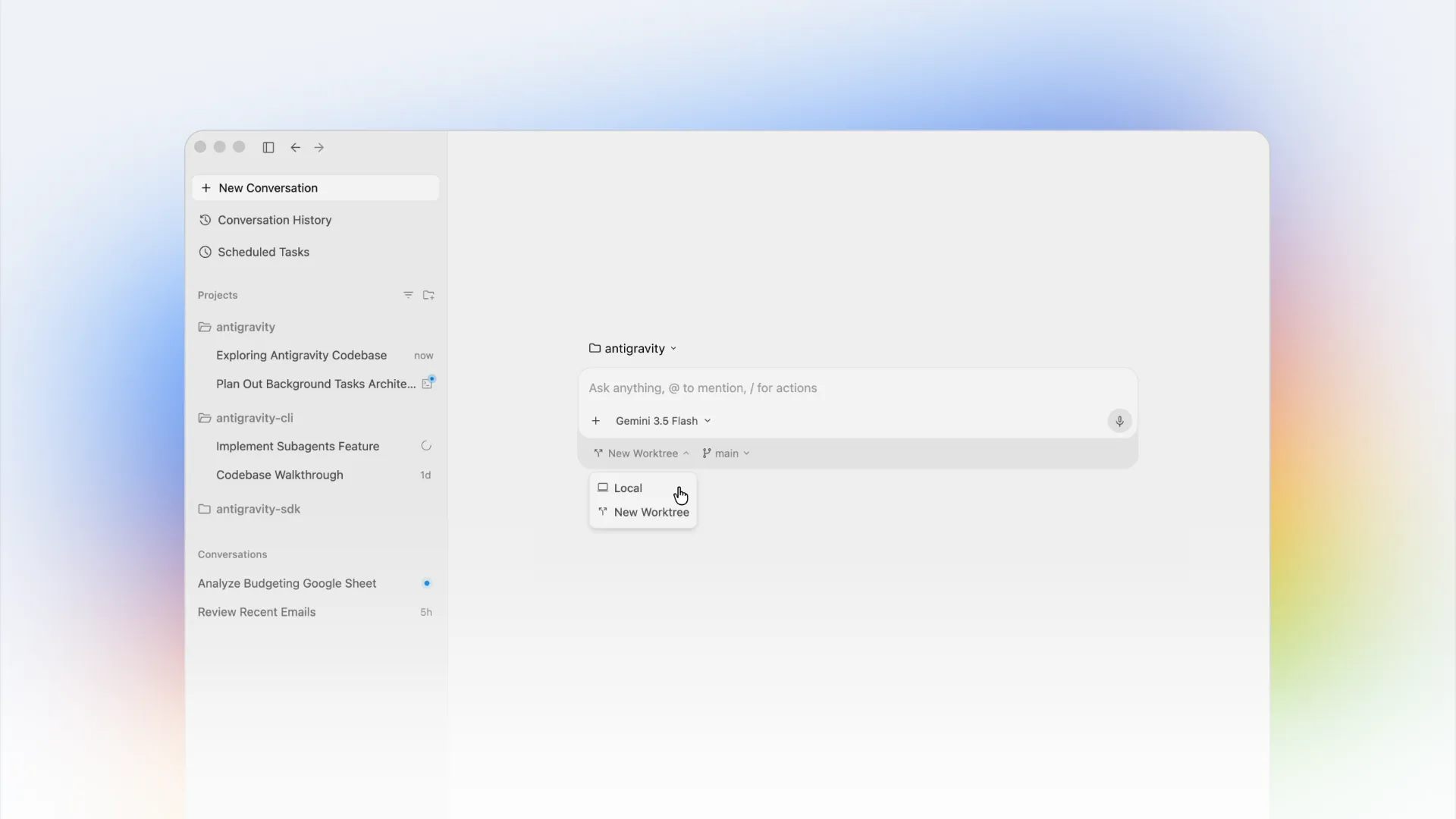
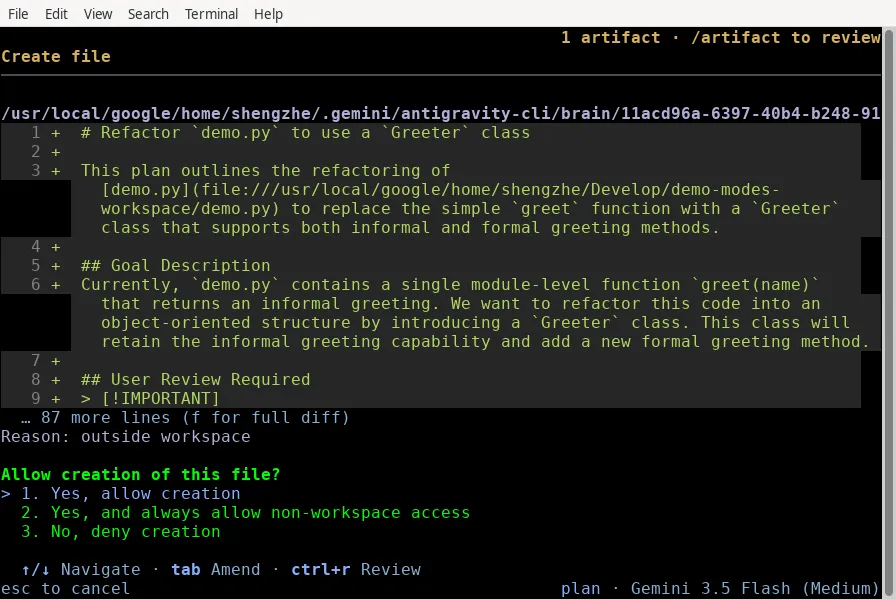
Google Antigravity 2.0 is a standalone, agent-first development application. Instead of making the code editor the center of the experience, it organizes work around projects, agents, tasks, artifacts, tools, and background execution.
Conceptually, the product looks more like this:
Developer
   |
   v
Antigravity 2.0
   |
   +-- Main agent
   +-- Research subagents
   +-- Browser subagents
   +-- Custom agents
   +-- Terminal
   +-- Git worktrees
   +-- MCP and skills
   +-- Artifacts
   +-- Scheduled tasks
That architecture separates Antigravity from editor-first tools. Cursor starts with the developer editing code and AI assisting. Antigravity increasingly starts with a goal and lets agents decide how to research, plan, edit, test, browse, and report back.
The result is closer to an agent command center than another VS Code-style editor.
Why Antigravity 2.0 Was Controversial at Launch
The initial 2.0 transition generated unusually strong criticism because existing users expected a better IDE but instead encountered a new agent-management experience.
Public discussions repeatedly complained about the disappearance of the familiar editor-centered workflow, terminal access, source control, extensions, and existing configuration. A widely discussed Reddit launch thread asking where the IDE had gone became one of the clearest examples of the backlash.
The criticism was valid, but it is now incomplete.
Google spent the following months adding migration flows, IDE integration, an embedded terminal, Git controls, extensions, improved project views, Custom Agents, Remote Control, and new planning controls. Anyone evaluating Antigravity today should therefore separate launch-era Antigravity 2.0 from the current product.
The Biggest Changes Since Launch
The current Antigravity 2.0 experience is substantially broader than the first release.
Important additions include:
- Embedded terminal for package managers, tests, scripts, and local services.
- Git-native controls for diffs, staging, unstaging, and commits.
- IDE extensions for major development environments.
- Custom Agents with reusable instructions and tool access.
- Remote Control for supervising long-running tasks away from the main machine.
- Scheduled Tasks for recurring engineering work.
- Browser automation for testing web applications.
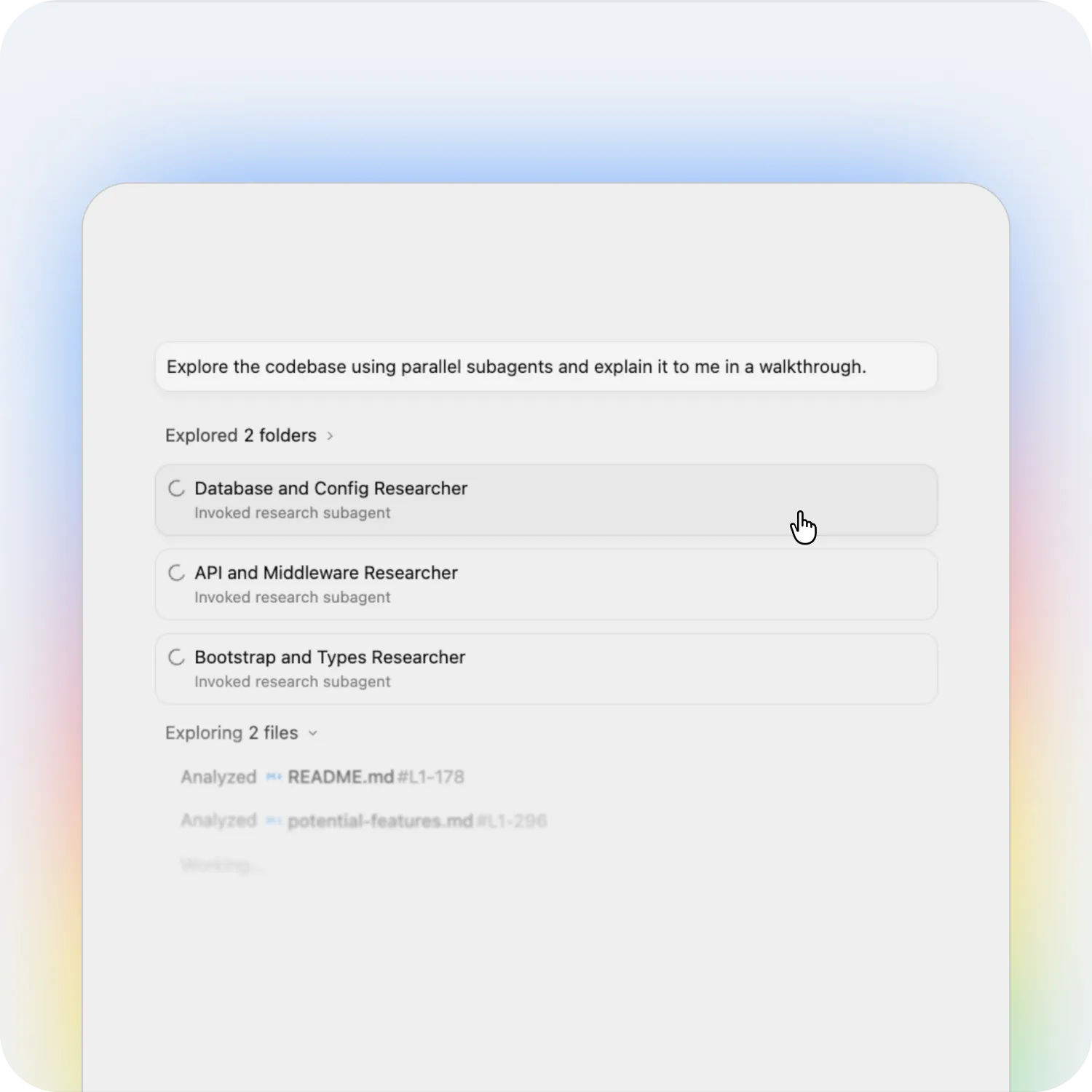
- Subagents for parallel research and implementation.
- Git worktrees for isolated concurrent changes.
- Artifacts for plans, walkthroughs, and review.
/boostfor heavier reasoning workflows./planfor explicit planning before code changes.
Google's strategy is now easier to understand: Antigravity 2.0 manages agents, while the CLI and IDE integrations provide other ways to interact with the same broader development workflow.
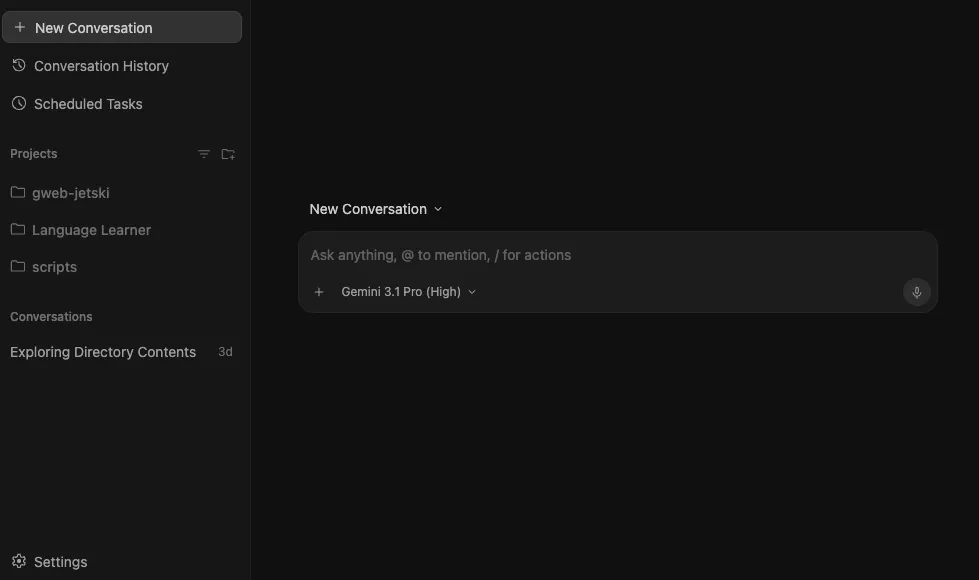
/plan Changes How Large Tasks Start
One of the most important recent additions is /plan.
A request can begin with:
/plan Refactor the authentication system to support OIDC.Instead of immediately editing files, the agent can first inspect the workspace, identify affected modules, study dependencies and call relationships, ask clarifying questions, and produce an Implementation Plan for review.
The workflow becomes:
Task
  |
Research
  |
Requirements clarification
  |
Implementation Plan
  |
Human review
  |
Execution
  |
Tests and verification
This is more useful than merely telling a model to think first. Planning becomes a distinct workflow state with a review checkpoint.
For authentication changes, database migrations, large refactors, and security-sensitive work, reviewing intent before reviewing a giant diff can prevent expensive mistakes.
Subagents and Git Worktrees
Antigravity's subagent system is one of its clearest differentiators.
A parent agent can divide work across separate agents instead of pushing the entire problem through one context window.
For example:
Main task: Replace legacy authentication

Agent A: map authentication flow
Agent B: inspect authorization checks
Agent C: audit test coverage
Agent D: research OIDC requirements
Those agents can work with separate context and, when appropriate, separate Git worktrees.
The upside is parallelism and specialization. The downside is coordination cost. Poorly scoped subagents can duplicate research, consume more quota, and produce conflicting recommendations.
A practical rule is to give each subagent a narrow, non-overlapping responsibility.
Browser Agent and Frontend Development
Browser integration is another area where Antigravity stands out.
A frontend task can become a closed loop:
Write code
  |
Run development server
  |
Open application
  |
Inspect browser behavior
  |
Modify implementation
  |
Retest
Community feedback frequently identifies frontend work as one of Antigravity's stronger use cases. The agent can move beyond code generation and inspect the actual result.
The trade-off is that autonomous browser use can become excessive. On small tasks, unnecessary browsing and repeated verification can increase latency and quota consumption.
Multi-Model Support Matters More Than It First Appears
Antigravity should not be evaluated only as a Gemini product.
Supported consumer configurations can expose models from multiple families, including Gemini, Claude, and GPT-OSS. The exact lineup can change, but the architectural point is more important: the harness is becoming more durable than the individual model.
The Antigravity layer includes:
- Projects.
- Permissions.
- Subagents.
- Browser tools.
- Terminal execution.
- Git worktrees.
- Artifacts.
- MCP.
- Skills.
- Hooks.
- Custom Agents.
- Review policies.
A developer can therefore use a fast model for routine implementation and switch to a stronger reasoning model for architecture, debugging, or review without abandoning the same project workflow.
What Real Users Like
Community discussions are anecdotal rather than controlled benchmarks, but several positive patterns appear repeatedly.
Fast Iteration
Users often praise Flash-class Gemini models when they work well. Fast generation combined with terminal and browser access can make Antigravity effective for prototypes, internal tools, frontend development, and side projects.
Better Visibility
The 2.0 interface exposes changed files, artifacts, background tasks, and subagents. This is valuable because autonomous systems become harder to trust when their work is hidden inside one long transcript.
Frontend Workflows
Developers frequently report good results on UI tasks because Antigravity can edit files, run the project, inspect the browser, and continue iterating.
Model Switching
Using different model families inside the same environment is useful when one model is better for implementation and another is better for difficult debugging or review.
Planning and Artifacts
Some users find Antigravity more useful when treated as a planning and orchestration layer rather than a total IDE replacement. That is an important shift in expectations.
What Real Users Dislike
The negative themes are just as consistent.
Quota Consumption
Quota remains one of the most common complaints. Real consumption can vary significantly depending on repository size, reasoning level, browser activity, retries, model choice, and the number of subagents.
A multi-agent repository audit and a simple code edit may both be called agent tasks, but their resource profiles are completely different.
Inconsistent Model Behavior
Recent Flash-model feedback is polarized. Some developers report excellent speed and coding quality. Others report repeated file reads, loops, context loss, slow analysis, or implementations that look complete but contain hidden mistakes.
It is important to separate model reliability from Antigravity harness reliability. A bad session can come from either layer.
Agents Sometimes Overwork the Problem
Autonomy can become inefficiency. Users have reported agents exploring irrelevant files, invoking browser workflows unnecessarily, repeating verification, or continuing after the productive part of the task is already complete.
Editing Reliability
A strong reasoning model is not enough if the editing harness modifies the wrong place or performs an unsafe restore. Production work still requires diff review and deterministic tests.
Resource Usage
Long-running graphical agent sessions can consume meaningful memory and CPU, especially when combined with browsers, local services, containers, and a separate IDE.
Antigravity 2.0 vs Codex
Antigravity and Codex increasingly overlap, but their strongest workflows remain different.
Antigravity is strongest at:
- Visual multi-agent orchestration.
- Browser-driven development.
- Reviewable artifacts.
- Scheduled work.
- Remote supervision.
- Multi-model workflows.
Codex is often preferred for:
- Direct repository changes.
- Focused implementation.
- Independent code review.
- A more straightforward coding-agent workflow.
A useful hybrid pattern is:
Antigravity
  |
Research + plan + implementation + browser validation
  |
Codex or another independent reviewer
  |
Tests + CI
Using a different model or harness for review reduces the risk of one system validating its own mistakes.
Antigravity 2.0 vs Claude Code
Claude Code remains strongly terminal-oriented and suits developers who prefer the model, shell, repository, and Git workflow to stay close together.
Antigravity becomes more attractive when the work benefits from:
- Visible parallel agents.
- Reviewable artifacts.
- Browser automation.
- Scheduled tasks.
- Remote monitoring.
- Model switching.
- Project-level orchestration.
The comparison is not simply Gemini versus Claude because Antigravity can itself expose Claude models on supported plans. The deeper comparison is terminal-first agent harness versus graphical orchestration layer.
Antigravity 2.0 vs Cursor
Cursor remains editor-first:
Cursor:
Developer -> Editor -> AI assistance

Antigravity:
Developer -> Agent -> tools -> code
For small edits, autocomplete, manual refactoring, and constant line-by-line control, Cursor's interaction model remains natural.
For tasks such as research this repository, produce a migration plan, implement the changes, run tests, inspect the frontend, and report back, Antigravity's architecture is better aligned with the request.
Best Use Cases for Antigravity 2.0
Antigravity is particularly well suited to work with enough scope to justify delegation:
- Repository exploration before touching unfamiliar code.
- Frontend development with browser validation.
- Large refactors using
/plan, worktrees, and subagents. - Testing projects that can be divided into clear responsibilities.
- Dependency modernization through reusable Custom Agents.
- Research-heavy engineering involving both code and web research.
- Long-running tasks that benefit from Remote Control.
- Recurring maintenance through Scheduled Tasks.
Where Extra Caution Is Required
Autonomous coding is not equivalent to verified engineering.
For authentication, payments, authorization, infrastructure, secrets, or database migrations:
- Use
/plan. - Review the proposed architecture.
- Inspect the final diff.
- Require tests.
- Keep rollback procedures explicit.
- Avoid irreversible production access.
- Use a second model or reviewer for critical changes.
The agent reporting done should never be the final verification step.
How to Get Better Results
Use /plan Before Large Changes
/plan Migrate authentication from custom JWT validation to OIDC.
Identify affected modules, compatibility risks, migration stages, tests, and rollback steps.
Do not modify production code until the plan is approved.
Give Subagents Narrow Roles
Avoid:
Have four agents investigate the project.Prefer:
Agent 1: map authentication.
Agent 2: inspect authorization.
Agent 3: audit tests.
Agent 4: research OIDC requirements.
Match the Model to the Task
Use faster models for routine implementation and UI iteration. Use stronger reasoning models for architecture, difficult debugging, and final review.
Keep Verification Independent
CI, unit tests, integration tests, static analysis, schema validation, and human review should remain independent of the agent that wrote the code.
Is Antigravity 2.0 Worth Using in 2026?
Antigravity 2.0 is significantly more capable than it was at launch.
The early backlash was understandable because Google abruptly moved users from an IDE-centered product toward an agent-centered application. But the current product now combines terminal access, Git tooling, IDE integration, subagents, Custom Agents, browser automation, worktrees, artifacts, /plan, Remote Control, Scheduled Tasks, and multiple model families.
Its weaknesses remain real. Quota usage can be difficult to predict, model quality can fluctuate, autonomous tool use can become inefficient, and community reports still describe loops, bad edits, and resource-heavy sessions.
The key question is therefore not whether Antigravity is the best code editor.
The more useful question is whether its agent orchestration layer can reduce the amount of manual coordination required for complex software work.
Conclusion
Google Antigravity 2.0 is evolving from an AI coding tool into an operating environment for software agents.
That direction explains both its strongest ideas and its roughest edges. Developers who mainly want autocomplete and precise manual editing may prefer an editor-first product. Developers who want to delegate research, planning, coding, browser testing, recurring maintenance, and parallel work to coordinated agents may find Antigravity considerably more ambitious.
The best way to evaluate it is with a real non-trivial repository task: start with /plan, inspect the artifact, delegate clearly scoped subagents, require tests, and compare the verified result with the same task completed through Codex, Claude Code, or an editor-first workflow.
Antigravity's long-term advantage will depend less on a single Gemini benchmark and more on whether Google can make the surrounding agent harness reliable, efficient, observable, and predictable.
Continue Reading
More articles connected to the same themes, protocols, and tools.
Referenced Tools
Browse entries that are adjacent to the topics covered in this article.