On This Page7 sections
Tap an outfit thumbnail and its cutout flies toward the center as the main character slips into a new look. The motion continues, and the next outfit change follows immediately. This style of AI fashion video turns an outfit showcase into a visual wardrobe selector.
This X post shared by Michael Guo points to a useful production tool: the open-source female-outfit-director Skill. It helps an agent turn the character, outfits, opening-frame layout, and transition rhythm into a production plan that can then be executed by image and video models. This guide breaks down the workflow and explains where Seedance 2.5 fits into it.
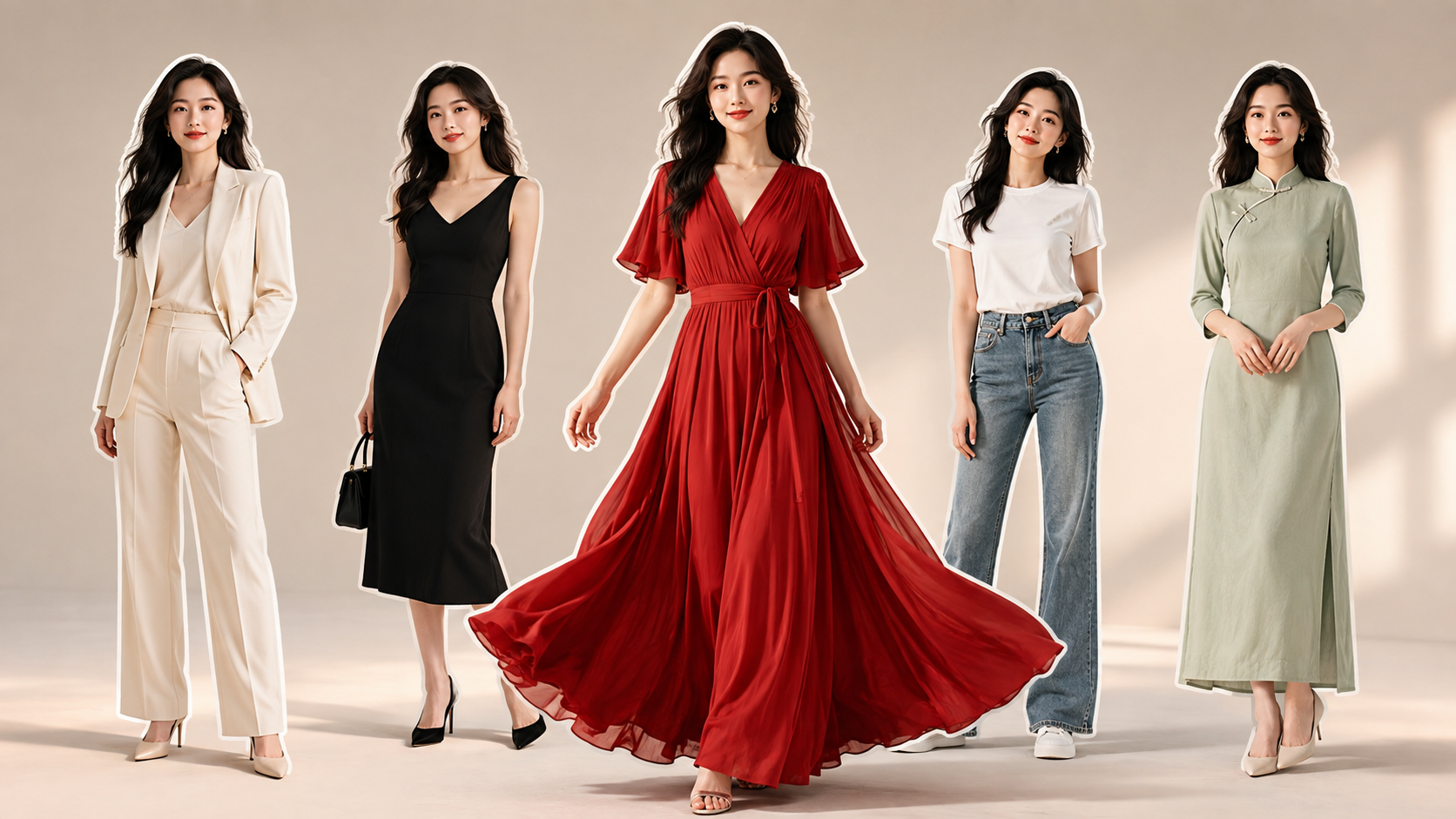
The cover and outfit collage in this article are original AI-generated illustrations of an adult woman created for this guide. They are not frames from the referenced video or test outputs from Seedance 2.5.
Start with the example: turn multiple outfits into one continuous performance
Video originally posted by 水木易 (@ohmuyi); Skill recommendation shared by Michael Guo (@Michaelzsguo). The example retains the original attribution and markings shown in the video. If the player does not load, use either X link above to watch it.
This roughly 14-second vertical video has three design choices worth studying. The central character remains the focus throughout, while smaller character cutouts around her preview the available looks. Each outfit change connects to the character's ongoing movement, giving the transformations a clear rhythm. As each look is selected, the surrounding cutouts gradually disappear, making the “choose one, wear one” sequence easy to follow.
An effect like this asks much more of a generation model than “create a beautiful woman.” The character must remain recognizably the same person, the outfits need clear visual differences, and the movement must flow naturally through every change.
The original post does not disclose its full prompt or the specific model used. It therefore does not prove that the example was made with Seedance 2.5 or directly produced by this Skill. The method below is a workflow for creating a similar video based on the open-source project.
What does the female-outfit-director Skill do?
The female-outfit-director project description presents it as a Chinese-language directing workflow for Codex and other Skills-compatible agents. Its main deliverables are coordinated image prompts and video scripts. The repository itself does not provide image or video generation services.
Here is where it fits into the production process:
| Stage | Decisions to make | Output |
|---|---|---|
| Character and outfit design | The same character's face, hair, body proportions, and individual looks | A clear set of creative constraints |
| Opening-frame design | Main-character scale, outfit-cutout positions, background, and lighting | An opening-frame prompt for an image model |
| Video direction | What gets tapped, how each transition works, when each change completes, and how movement continues | A timeline, video prompt, and negative constraints |
| Model execution | Opening frame, references, and script | Generated images and video to review and refine |
If you ask only for “five attractive outfits,” the model still has to guess when each look should appear, whether the cutouts should remain on screen, and whether the character should turn around. The Skill makes these easy-to-miss decisions explicit before generation, which also gives you specific elements to revise later.
By default, it returns five sections: confirmed parameters, an opening-frame image prompt, a segment-by-segment video timeline, a concise video prompt, and negative prompts or hard constraints. See the repository's SKILL.md for the complete structure.
Default setup: five looks and four outfit changes
The current repository defaults to a 9:16 vertical frame, an eight-second duration, a fixed camera, and a collage with one large main character plus four smaller character cutouts. The five looks include the initial outfit, so the video contains four actual changes. Audio defaults to click, fly-in, and transformation cue sound effects, without automatically adding background music.
These settings are starting points, and explicit user requirements take priority. You can extend the duration to 15 seconds, specify music and exact transformation times, or switch to a hanfu theme. The five-outfit plan in this article is also not a frame-by-frame recreation of the example above. See the project README for the defaults and customization options.
The key mechanism: use each outfit cutout once, then remove it
The Skill's default M1 mechanism works especially well for this interactive-wardrobe composition. According to its transition library, each transition should define three stages:
- Selection and departure. After the target small character is tapped, a full-body duplicate flies toward the center. The cutout at the original position is removed immediately, leaving that spot empty.
- Movement and alignment. The flying duplicate grows as it moves toward the center, gradually aligning its head, shoulders, waist, and pose with the main character.
- Transformation and cleanup. The outfit changes at the moment of alignment. The duplicate and its outline then disappear, leaving only the main character in the new outfit to continue the original movement.
The easiest instruction to omit is “remove the cutout from its original position immediately.” If the prompt says only that a small character flies over and changes the outfit, the model may leave the original cutout in place or show two overlapping characters in the center.
The object that moves is another important detail: it is a full-body character cutout, not an isolated garment or a rectangular outfit card. The prompt needs to distinguish these clearly.
The repository currently includes 12 transition mechanisms. For contemporary fashion, you can also try M8, a sticker page-turn, or M10, an action-on-the-beat transition. Hanfu looks with wide sleeves and flowing ribbons may suit M2, the sleeve-wipe transition. On a first attempt, fully define the cause, motion, and result of one mechanism so that any failure is easier to diagnose.
Visual plan: put all five outfits into one opening frame
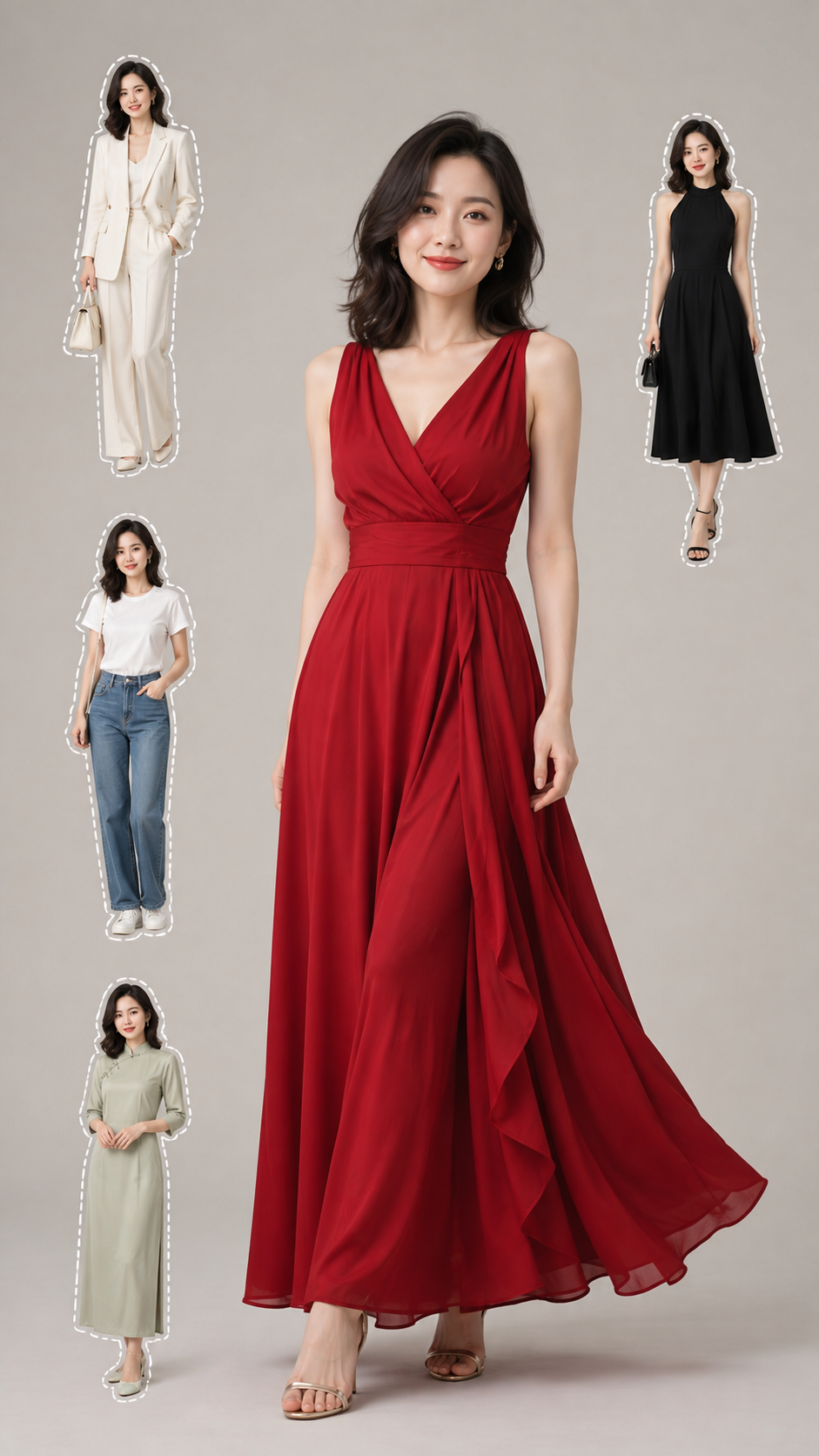
AI-generated 9:16 opening-frame concept: one central main character with four separate outfit cutouts. Before using it for video, check the face, accessories, and garment details in every version.
This image uses a flowing red dress as the initial look, with an ivory suit, a simple black dress, a white T-shirt with blue jeans, and a pale-green modern Chinese dress as the alternatives. Differences in color, silhouette, and fabric make every transformation visually distinct.
The opening frame serves as both a character reference and an outfit inventory. The main character must be prominent, while every smaller cutout still needs a readable clothing silhouette. A face that is too small, overlapping bodies, or five versions that already look like different people will make the video stage harder.
When reviewing the image, start with three checks: do all five faces match, are any arms fused with the torso, and are the skirts and trouser legs complete? Resolve as much as possible in the opening frame before moving to video generation.
What is Seedance 2.5, and which step should it handle?
Seedance 2.5 is an audio-video generation model from ByteDance. ByteDance's official Seed page describes support for clips up to 30 seconds, two video extensions, reference understanding, video editing, and professional creative controls. Source: official Seedance 2.5 overview.
Dreamina's official release notes add that a single video can accept up to 50 multimodal reference inputs, including images, video, audio, and text. Its editing features can also target a particular moment, character, or other element in a video. Source: Dreamina's Seedance 2.5 release notes.
Based on those official capabilities, the table below shows how Seedance 2.5 could contribute to this workflow. These are potential uses, not test conclusions about the example in this article.
| Capability | Possible use in an outfit-change workflow |
|---|---|
| Longer single-generation duration | Allocate time to an opening, several outfit changes, and a final-look reveal |
| Multimodal references | Provide separate references for character identity, clothing, movement, or sound |
| More detailed reference understanding | Describe the desired movement rhythm, camera work, and visual style more precisely |
| Targeted video editing | Continue refining a problematic time range or element after generation |
The division of labor is straightforward: the Skill turns the creative idea into an executable directing plan, while Seedance 2.5 generates the audio and video from those inputs. Before that stage, an image-generation tool is still needed to create the opening frame.
The 30-second duration and 50-reference count are maximum capabilities, not targets every outfit video should use. For a first attempt, start with a short duration and a small number of unambiguous references. The durations and editing options actually available to you depend on the platform and account interface you use.
From collage to video: a workflow you can follow
Step 1: have your agent read and use the Skill
Install the repository's skill/ directory in the location supported by your Skills-compatible agent. The project documents Windows, macOS/Linux, and ZIP installation methods in its installation and update guide. Its first-use tutorial explains the initial invocation and how to use reference images.
Once installed, give the agent a specific production brief. The following request is designed around the image in this article:
$female-outfit-director

Design a five-look urban-fashion outfit-change sequence featuring
an original adult Chinese woman. Appearance age: 26, natural makeup,
dark slightly wavy hair, and small gold earrings.
Keep the same face, hairstyle, accessories, and body proportions
across every look.

Initial look: a flowing red dress.
Four target looks:
1. Ivory-white suit and trousers;
2. Simple black dress;
3. White T-shirt and blue jeans;
4. Pale-green modern Chinese dress.

Opening frame: 9:16, light-gray studio, soft lighting.
Place one large main character in the center with four separate,
full-body character cutouts around her. Give the small characters
white dashed outlines; do not outline the central character.

Video: eight seconds, fixed front-facing camera, using the M1
consumable-sticker outfit-change mechanism.
Complete the four changes at approximately 1.25, 2.95, 4.40,
and 6.55 seconds.
After a tap, immediately remove the cutout from its original position.
A full-body duplicate flies in and scales up, aligns its head,
shoulders, waist, and movement with the main character, then changes
the outfit. The duplicate and outline disappear together.
Keep the main character gently swaying and making natural hand gestures.
Her movement should remain continuous before and after every change.
Leave enough time at the end to showcase the final outfit.

Do not add background music. Use only click, fly-in, and transformation
cue sound effects.
Return the confirmed parameters, opening-frame prompt, full timeline,
concise video prompt, and negative constraints.
Step 2: generate the opening frame, then lock the references
Send the Skill's opening-frame prompt to an image model. If you are using an existing character, provide a clear character reference and specify the features that must remain consistent.
Choose a usable version before moving to video. If you change an outfit or reposition a cutout, update the corresponding direction in the timeline as well. For example, if the denim look moves from the lower left to the middle left, its tap location and fly-in direction must change too.
Step 3: give Seedance 2.5 the opening frame and video script
In a video-generation interface that supports Seedance 2.5, provide the approved opening frame and paste in the concise video prompt produced by the Skill. When using multiple references, state the purpose of each one—for example, “use this image to lock the character and outfit layout” or “use this video only as a reference for movement rhythm.”
Do not assume that uploading a reference opening frame will automatically make the model change the outfits in the intended order. The transition mechanism, cutout-removal rule, character motion, and timing still need to be stated in the video prompt.
Step 4: review all four transitions against the timeline
The sample script below follows the Skill's default completion points. It describes the creative target, not a guarantee of frame-perfect model execution. See the video timeline rules for the source of the default timings.
| Time | Visual target | What to check |
|---|---|---|
| 0–1.25 sec | Show the red dress, then switch to the white suit | Did the first cutout leave its original position, and did the main character retain her identity? |
| 1.25–2.95 sec | Change from the suit to the black dress | Does the arm movement continue, and is the outfit fully replaced? |
| 2.95–4.40 sec | Change from the black dress to the denim casual look | Do the waist, trouser legs, and body proportions remain stable? |
| 4.40–6.55 sec | Change from denim to the pale-green modern Chinese dress | Does the final cutout disappear, and does the skirt move naturally? |
| 6.55–8 sec | Hold the final outfit and complete the closing movement | Is only the central character left, with enough time to show the final look? |
If you want music, give the Skill the actual beat or cue times so it can rebuild the sequence. Timestamps in a prompt can communicate the intended rhythm; for frame-accurate synchronization, check and fine-tune the result in an editor after generation.
Common problems: diagnose first, then revise the prompt
The face changes with the outfit. First check whether the character versions already differ in the opening frame, then reinforce the requirements for a consistent face, hairstyle, and apparent age. If the identity is inconsistent in the opening image, adding “do not change the face” alone is unlikely to fix the root cause.
Two characters or a double image appear in the center. State the end condition explicitly: after alignment and transformation, the flying duplicate and its outline disappear, leaving only one central character.
The surrounding cutouts never disappear. Add the exact departure timing for the cutout at its original position. In M1, it is removed as soon as the fly-in begins, so each completed change leaves one fewer selectable cutout.
The clothes look layered, or the motion suddenly resets. Say that the target outfit replaces the current outfit, and describe how the same gesture continues across the transformation. For early attempts, avoid large rotations and complex camera moves.
The pacing feels rushed. Give each outfit a little screen time. If you choose a longer clip, redistribute the transitions and ending instead of packing every change into the first half.
The appeal of an outfit-change video comes from the character, clothing, movement, and rhythm working together. Use female-outfit-director to plan those four elements before asking a generation model to execute them. When something goes wrong, you can then trace it to a specific opening-frame, motion, or transition instruction and improve the result one piece at a time.
Sources checked September 6, 2026. This article is based on the public example, the female-outfit-director repository, and official Seedance and Dreamina materials. Its illustrations are AI-generated concepts created for this guide, while the prompts and timeline are an instructional production plan.
Continue Reading
More articles connected to the same themes, protocols, and tools.

Referenced Tools
Browse entries that are adjacent to the topics covered in this article.