

On This Page8 sections
Key Takeaways
- A developer using the X account @shmily7 reported an unexpected $10,811.41 Cloudflare bill caused by a runaway Durable Objects alarm loop.
- The developer attributed the original faulty scheduling logic to OpenAI Codex, citing local coding-session records and Git history.
- The bug reportedly remained dormant for 23 days before a checkpoint refresh condition triggered the problematic execution path.
- Original screenshots shared on X include a Cloudflare billing payment page, an AI code-attribution report, and a Cloudflare Support response declining an initial billing credit.
- On October 8, 2026, the developer stated that the full amount had been paid, although the publicly shared payment screenshot does not independently confirm a completed transaction.
- Cloudflare personnel subsequently acknowledged the case and indicated that internal discussions were ongoing. A final refund outcome had not been publicly established as of October 8, 2026.
- Cloudflare budget alerts provide spending notifications but do not automatically terminate expensive workloads.
- The incident highlights a broader infrastructure risk: AI-generated background tasks can continue consuming billable resources even when an application has no active users.
What Happened? The $10,811 Cloudflare Billing Incident
On October 6, 2026, an independent developer operating the X account @shmily7 publicly reported receiving an unexpected Cloudflare bill of approximately $10,000.
According to the developer, the charges originated from an experimental project running Cloudflare Durable Objects. A scheduled alarm entered an uncontrolled execution loop, reportedly generating approximately six trillion reads and writes.
The project was described as an unused research application rather than a commercial service experiencing unusually high traffic.
That distinction makes the incident particularly important for independent developers. A serverless application can produce substantial infrastructure charges without attracting new users, processing customer payments, or generating meaningful revenue.
The developer initially blamed AI-assisted programming and later identified OpenAI Codex as the coding agent responsible for introducing the original problematic logic.
By October 8, the developer reported having paid $10,811.41 to avoid potential disruption to Cloudflare services.
Original Screenshot: The $10,811.41 Cloudflare Invoice

Figure 1. Original screenshot shared in the developer's X discussion. The Cloudflare payment interface displays an outstanding balance of $10,811.41 for an October 6, 2026 invoice. The screenshot shows the payment process and should not be mistaken for an independently verified successful payment receipt.
The screenshot provides evidence of the invoice amount, while the statement that payment was completed comes from the developer's subsequent public update.
The developer also announced an intention to migrate projects from Cloudflare to self-hosted VPS infrastructure and expressed dissatisfaction with the handling of the billing dispute.
Timeline: How the Cloudflare Billing Incident Unfolded
The publicly described sequence combines development history, the beginning of abnormal usage, and the subsequent billing dispute.
| Date | Event | Significance |
|---|---|---|
| August 31, 2026 | Codex reportedly generates and commits checkpoint scheduling code | Original problematic logic introduced |
| September 3, 2026 | A subsequent Claude-assisted change modifies checkpoint reuse behavior | Potential secondary contributor |
| September 23, 2026 | Checkpoint refresh conditions reportedly trigger the faulty execution path | Beginning of abnormal Durable Objects activity |
| October 6, 2026 | Developer publicly reports an approximately $10,000 bill | Incident becomes public |
| October 6, 2026 | Cloudflare Support declines an initial billing credit request | First documented support outcome |
| October 8, 2026 | Developer reports paying $10,811.41 | Full-payment statement published |
| October 8, 2026 | Cloudflare personnel indicate that internal discussions are ongoing | Final billing resolution remains uncertain |
The developer's later explanation identifies the problem as a delayed execution failure rather than a loop that had necessarily been running continuously since the original code was generated.
This is a crucial distinction. The reportedly dangerous code existed for weeks before a particular state and expiration condition activated it.
Cloudflare Support's Response: Why the Initial Refund Was Declined
One of the most important pieces of evidence is the original screenshot of a Cloudflare Support response shared by the developer.
The response identifies the invoice amount as $10,811.41 and attributes most of the charges to Durable Objects usage between September 23 and October 6, 2026.
Cloudflare Support explained that usage-based charges caused by customer application code were not considered a platform metering or infrastructure failure.
On that basis, the support response stated that the team could not issue a credit for the reported Durable Objects usage.
Original Screenshot: Cloudflare Support's Billing Decision
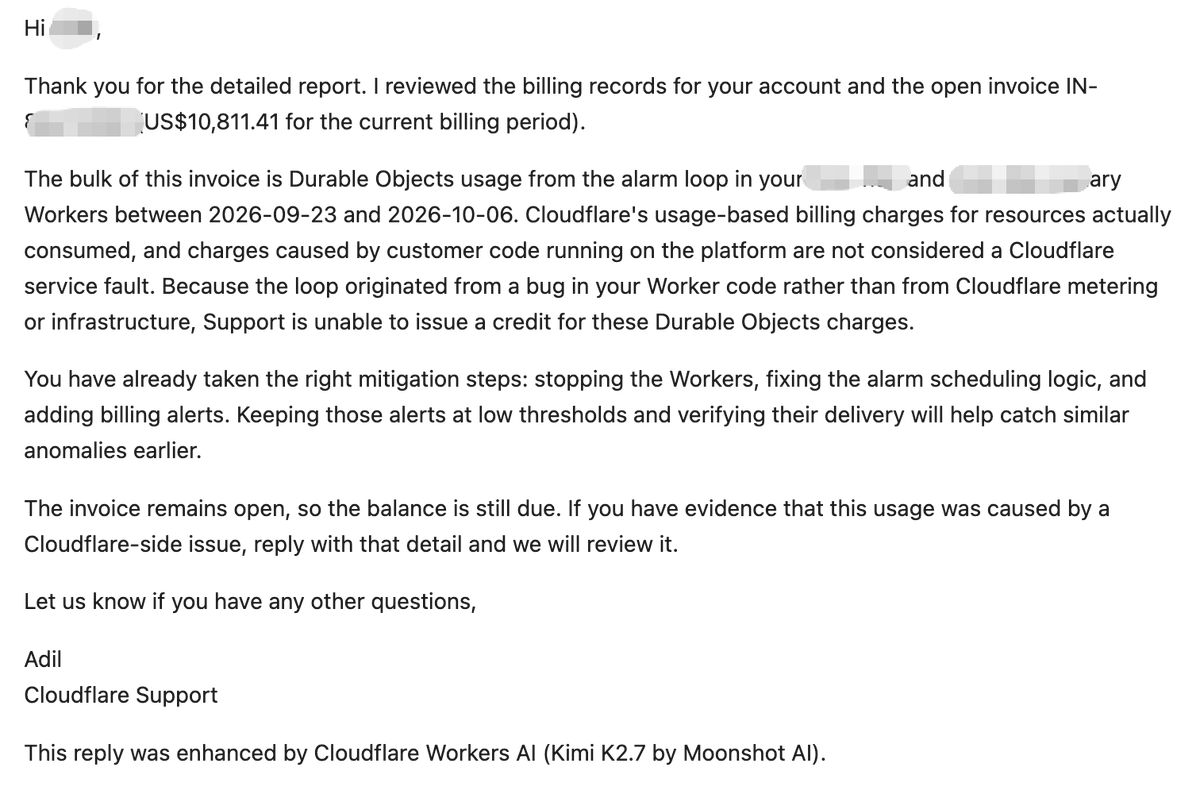
Figure 2. Original Cloudflare Support response shared in the developer's X thread. The message attributes the majority of the bill to a Durable Objects alarm loop and says Support cannot issue a credit because the usage originated from application code.
The screenshot also contains an unusual detail. At the bottom, the response states that it was enhanced by Cloudflare Workers AI using Kimi K2.7 from Moonshot AI.
This detail became part of the developer's public criticism of the support process, particularly the perceived repetition of automated responses.
However, the initial support decision should not be confused with the final outcome of the dispute.
Ashley Peacock, associated with Durable Objects at Cloudflare, subsequently acknowledged the case on X and indicated that internal discussions were underway.
The developer replied that payment had already been made to prevent service disruption and expressed willingness to share a positive resolution publicly if one occurred.
As of October 8, 2026, an initial billing credit had been declined, but a final refund or adjustment decision had not been publicly confirmed.
What Actually Caused the Bug? The Codex and Git History Evidence
The developer shared a screenshot of a technical investigation connecting the problematic code to local AI coding sessions and repository history.
Unlike general claims that AI coding caused the incident, this screenshot identifies particular code symbols, timestamps, models, and Git commits.
Original Screenshot: Codex Session and Bug Attribution
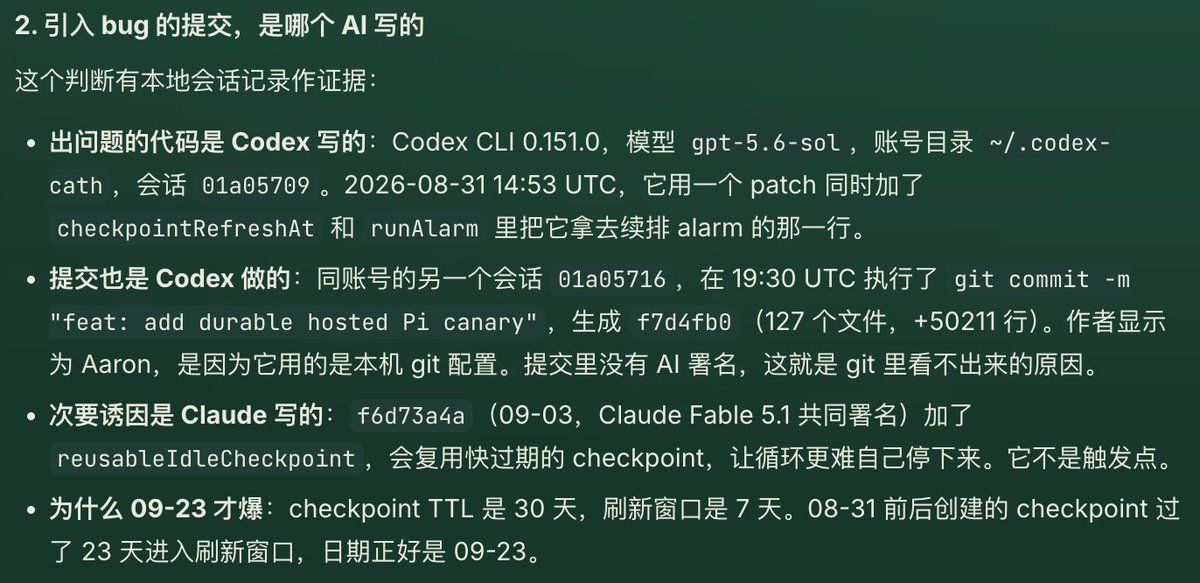
Figure 3. Original Chinese-language code-attribution screenshot shared in the developer's X discussion. The investigation attributes the initial alarm scheduling change to a Codex session and describes a subsequent Claude-assisted checkpoint modification. The underlying repository and session logs have not been independently audited.
The screenshot contains several technically significant details.
| Investigation detail | Reported finding |
|---|---|
| Coding tool | Codex CLI 0.151.0 |
| Original model | gpt-5.6-sol |
| Original coding session | August 31, 2026, at 14:53 UTC |
| Associated Git commit | f7d4fb0 |
| Commit size | 127 files, approximately 50,211 added lines |
| Relevant code symbols | checkpointRefreshAt and runAlarm |
| Subsequent modification | Commit f6d73a4a, attributed to Claude Fable 5.1 |
| Checkpoint lifetime | 30 days |
| Refresh window | Final seven days before expiration |
| Reported triggering date | September 23, 2026 |
These details are provided by the developer's investigation and should not be interpreted as an independently reproduced root-cause analysis.
Nevertheless, the reported sequence explains how a delayed background-processing failure could occur.
Why Did the Bug Trigger After 23 Days?
The investigation describes checkpoints with a 30-day time-to-live and a seven-day refresh window.
Under that design, a checkpoint created near August 31 would not become eligible for refresh immediately.
Instead, its refresh logic would activate roughly 23 days later, around September 23.
If that refresh operation contained incorrect alarm scheduling behavior, the application might appear healthy during its first three weeks and then begin executing repeatedly once a checkpoint entered the refresh window.
The investigation also identified a September 3 modification involving reusableIdleCheckpoint, which could reuse checkpoints nearing expiration.
According to the screenshot, this later modification was considered a secondary contributor because it could make the problematic lifecycle harder to terminate, rather than being the original source of the alarm scheduling defect.
The incident illustrates an important class of AI-generated software risk: time-dependent bugs that survive ordinary deployment checks and activate only after persistent state reaches a particular age.
Basic unit tests, successful compilation, and several days of normal production behavior are insufficient to rule out this kind of defect.
What Are Cloudflare Durable Objects?
Cloudflare Durable Objects are stateful serverless computing components that combine execution with persistent storage.
A conventional Cloudflare Worker is generally designed around request-driven execution. A Durable Object additionally provides a stable identity and coordinated access to application state.
Common applications include:
- Multiplayer games requiring synchronized state.
- Real-time chat rooms and WebSocket applications.
- Collaborative documents and shared editing sessions.
- AI agents maintaining persistent session information.
- Background task scheduling and retry systems.
- Reservation, queue, and inventory coordination.
Durable Objects simplify many infrastructure problems that otherwise require developers to manage dedicated application servers, databases, or message brokers.
However, the platform is metered. Depending on the workload, requests, compute duration, storage operations, and stored data can contribute to the bill.
An application with a low number of users may therefore still generate expensive usage if internal tasks execute too frequently.
How the Durable Objects Alarm API Can Create a Runaway Loop
The Durable Objects Alarms API enables an object to schedule future execution.
Its intended operation follows a simple sequence:
- Application code calls
setAlarm(). - Cloudflare persists the scheduled timestamp.
- When the alarm becomes due, Cloudflare wakes the object.
- The runtime invokes the object's
alarm()handler. - The handler performs work and may schedule another alarm.
This is useful for recurring maintenance, delayed processing, checkpoint refreshes, and retry workflows.
But there is an important operational property: an alarm can execute independently of incoming HTTP requests.
If the alarm handler repeatedly schedules itself without a valid termination condition, the application can continue consuming resources without receiving traffic.
Example of Unsafe Alarm Scheduling
The following example illustrates a potential recurring execution problem. It is not the original code from the reported incident.
import { DurableObject } from 'cloudflare:workers';

export class UnsafeScheduler extends DurableObject {
  async alarm() {
    // Billable storage work may occur here.
    await this.ctx.storage.get('checkpoint');

    // Dangerous: immediately schedule another alarm.
    await this.ctx.storage.setAlarm(Date.now());
  }
}
The problem is not simply that setAlarm() exists.
The problem is that the handler schedules another execution regardless of whether useful work remains.
Cloudflare documents that setting an alarm at or before the current time schedules it for execution in the immediate future.
An application can therefore form a repeated cycle of waking, reading or writing storage, and scheduling another wake-up.
Why Automatic Retry Limits Are Not Enough
Cloudflare automatically retries a failed alarm handler up to six times when the handler throws an uncaught exception.
That protection does not automatically stop a successful alarm handler from scheduling itself indefinitely.
There are two distinct mechanisms:
- Platform retries: Cloudflare repeats a failed alarm according to a bounded retry policy.
- Application rescheduling: Business logic voluntarily creates the next alarm, potentially without an effective execution limit.
A recurring job can remain operationally dangerous even when every individual handler invocation completes successfully.
How Could Six Trillion Operations Produce a $10,811 Bill?
Understanding the invoice requires distinguishing billable requests, compute duration, storage reads, and storage writes.
Cloudflare's published Durable Objects pricing for the relevant paid usage categories includes the following rates.
| Billing category | Monthly included usage | Overage rate |
|---|---|---|
| Durable Objects requests | 1 million | $0.15 per million |
| Compute duration | 400,000 GB-seconds | $12.50 per million GB-seconds |
| SQLite rows read | 25 billion | $0.001 per million rows |
| SQLite rows written | 50 million | $1.00 per million rows |
| SQLite storage | 5 GB-month | $0.20 per additional GB-month |
These figures provide pricing context, not a confirmed breakdown of the developer's invoice.
A particularly important difference is that billable SQLite row writes cost 1,000 times more per row than billable row reads under the listed overage rates.
However, large read volumes can still create significant costs.
The Economics of Six Trillion Row Reads
If six trillion operations were entirely billable SQLite row reads, the illustrative storage-read cost would be:
Total rows read:        6,000,000,000,000
Included rows:             25,000,000,000
Billable rows:         5,975,000,000,000
Rate per million rows:             $0.001
Estimated read cost:                $5,975
This is a simplified estimate using one monthly included allowance and the published rate.
It does not establish the actual usage distribution in the case.
If all six trillion operations were rows written instead, the theoretical write charges would approach $6 million after the included allowance.
Neither extreme reproduces the reported $10,811.41 invoice.
The exact amount requires a detailed breakdown of the affected namespaces, storage operations, compute duration, and other billable categories.
Why Database Queries Can Be More Expensive Than They Look
With SQLite-backed Durable Objects, billing is associated with rows read and written rather than only the number of SQL statements executed.
A query returning ten results might scan thousands of rows when the database lacks an appropriate index.
Similarly, repeated checkpoint updates can create substantial write activity even if the application performs very little useful work.
Cloudflare also documents storage-operation costs associated with alarm scheduling and the underlying storage APIs.
Therefore, the number of alarm executions alone is not enough to estimate the total bill.
Developers need visibility into both execution frequency and storage operations per execution.
Why Cloudflare Budget Alerts Do Not Guarantee a Spending Cap
Cloudflare offers account budget alerts for eligible pay-as-you-go accounts.
These alerts notify customers when usage-based spending crosses a configured threshold.
However, Cloudflare states that budget alerts do not automatically stop services or enforce a spending limit.
In July 2026, Cloudflare announced that eligible accounts without an existing alert would progressively receive a default $10 budget notification.
The associated usage information is processed on a periodic basis rather than providing an instantaneous shutdown mechanism.
Consequently, an application can accumulate additional charges before an alert is generated, delivered, or acted upon.
| Protection mechanism | Primary purpose | Limitation |
|---|---|---|
| Budget alert | Notify account owners about rising charges | Does not terminate billable execution |
| Alarm retry limit | Bound automatic retries following failures | Does not prevent successful self-rescheduling |
| Application execution quota | Limit repeated business operations | Must be implemented and enforced correctly |
| External monitoring | Detect abnormal usage trends | May operate with delayed metrics |
| Emergency kill switch | Disable further processing | Must remain functional during application failures |
The key difference is between detecting excessive spending and preventing additional spending.
Budget notifications are useful, but they should not be treated as financial circuit breakers.
How to Prevent Durable Objects Alarm Loops
The safest design combines scheduling limits, persistent execution quotas, bounded database work, idempotency, and independent monitoring.
1. Check Whether an Alarm Already Exists
Cloudflare specifically recommends checking existing alarm state before scheduling alarms during Durable Object initialization.
An object may be recreated after inactivity when a previously scheduled alarm becomes due.
Its constructor runs before the alarm handler, so blindly setting another alarm during initialization can interfere with the pending execution.
The scheduling code should therefore inspect getAlarm() before calling setAlarm() when the application requires only one pending task.
2. Add Minimum Intervals and Execution Limits
Recurring jobs should have explicit limits on how frequently they can execute.
A minimum delay prevents immediate repeated scheduling, while a persistent execution counter limits total executions over time.
The following example demonstrates basic safeguards:
import { DurableObject } from 'cloudflare:workers';

const MIN_DELAY_MS = 60_000;
const MAX_RUNS_PER_DAY = 300;

export class SafeScheduler extends DurableObject {
  async scheduleIfNeeded() {
    const storage = this.ctx.storage;

    if (await storage.get('paused')) return;
    if ((await storage.getAlarm()) !== null) return;

    await storage.setAlarm(Date.now() + MIN_DELAY_MS);
  }

  async alarm() {
    const storage = this.ctx.storage;

    if (await storage.get('paused')) return;

    const day = new Date().toISOString().slice(0, 10);
    const previous =
      (await storage.get<{ day: string; runs: number }>('usage'))
      ?? { day, runs: 0 };

    const runs = previous.day === day
      ? previous.runs
      : 0;

    if (runs >= MAX_RUNS_PER_DAY) {
      await storage.put('paused', true);
      return;
    }

    await storage.put('usage', {
      day,
      runs: runs + 1
    });

    const hasMoreWork = await this.processNextBatch();

    if (hasMoreWork) {
      await storage.setAlarm(Date.now() + MIN_DELAY_MS);
    }
  }

  async processNextBatch(): Promise<boolean> {
    // Replace with bounded, idempotent business logic.
    return false;
  }
}
This code is an illustrative defensive pattern, not a complete production implementation.
It prevents voluntary rescheduling after the per-object daily execution threshold is reached.
It also avoids scheduling another alarm when the application reports that no further work remains.
However, per-object execution limits do not automatically provide an account-wide cost cap.
If a system contains thousands of Durable Objects, aggregate usage may still become substantial.
A production application should additionally restrict the number of active objects, maximum work per invocation, and total jobs across the account.
3. Make Background Operations Idempotent
Durable Objects alarms use at-least-once execution semantics.
If processing fails and is retried, the same logical operation may execute again.
Applications should use durable job identifiers, completion markers, and appropriate transactional boundaries to prevent duplicate effects.
This is especially important for payment processing, external API calls, and persistent state updates.
4. Limit Database Work Per Invocation
Even a small number of alarms can become expensive if every execution performs an unbounded query.
Recommended safeguards include:
- Add indexes for frequently queried fields.
- Avoid full-table scans inside recurring maintenance jobs.
- Use pagination and bounded batch sizes.
- Measure rows read and written, not merely query counts.
- Avoid rewriting unchanged checkpoint metadata.
- Stop processing when the job's cost or operation budget is exhausted.
5. Provide an Emergency Kill Switch
Applications should support disabling background processing independently of the normal scheduling workflow.
A kill switch might use centrally controlled configuration, persistent object state, or an operational control plane.
For emergency recovery, deleteAlarm() can remove a pending alarm, although it does not cancel an alarm handler that is already executing.
Developers should test the shutdown mechanism before an incident occurs.
How to Test AI-Generated Scheduling Code
The reported 23-day delay highlights the importance of testing future state transitions.
Cloudflare provides a runDurableObjectAlarm() testing helper that allows developers to trigger scheduled alarms without waiting for real time to pass.
A thorough test suite should cover:
| Scenario | Expected behavior |
|---|---|
| No pending work | No recurring alarm is created |
| Existing alarm | Scheduling avoids unnecessary duplication |
| Job completes | Alarm processing terminates |
| Handler throws | Retry behavior is bounded and safe |
| Object restarts | Persistent execution limits remain effective |
| Daily quota reached | Further voluntary scheduling stops |
| Checkpoint approaches expiration | Refresh logic executes without cycling indefinitely |
| Many objects execute simultaneously | Aggregate operation quotas remain enforced |
| Emergency pause enabled | Expensive processing stops |
Developers should explicitly simulate delayed conditions around checkpoint expiration, refresh windows, and stale persisted state.
An application that works correctly on deployment day may fail when a state transition occurs weeks later.
How to Monitor Durable Objects Spending
Cloudflare provides Durable Objects metrics and analytics for investigating usage and performance.
The dashboard and GraphQL Analytics API can support custom monitoring systems.
Useful signals include:
- Alarm executions per object and namespace.
- Storage rows read and written.
- Compute duration and request activity.
- Sudden increases in background usage.
- Repeated execution without corresponding user activity.
- Cost changes relative to historical baselines.
- Unusually frequent checkpoint refresh operations.
One particularly valuable rule is detecting high billable activity in applications with almost no external traffic.
For example, if a test project normally performs only a few scheduled operations per hour, a sudden jump to thousands of executions deserves immediate investigation.
Monitoring should ideally trigger automated protective action through an independent control mechanism.
However, analytics data may arrive with a delay, so monitoring alone cannot guarantee an exact maximum bill.
What to Do When a Cloudflare Bill Suddenly Spikes
When unexpected charges appear, developers should prioritize stopping additional usage and preserving evidence.
Step 1: Identify the Expensive Service
Inspect Cloudflare Billing and Billable Usage to determine whether the increase originates from Durable Objects, Workers, D1, R2, or another product.
Step 2: Find the Responsible Namespace
Review Durable Objects metrics, recent deployments, and relevant logs to identify unusual execution patterns.
Step 3: Disable New Work
Stop creating additional jobs, disable the scheduling path, and activate the application's emergency pause mechanism.
Delete pending alarms where appropriate after understanding the application's state requirements.
Step 4: Preserve Evidence
Capture invoice details, usage metrics, deployment timestamps, Git commits, scheduling code, and relevant support correspondence.
Step 5: Request a Billing Review
Explain the timeline, affected service, suspected cause, mitigation steps, and financial impact.
A goodwill adjustment may be requested, but it should not be assumed or represented as guaranteed.
Step 6: Prevent Recurrence
Implement execution quotas, scheduled-task tests, cost monitoring, and independent shutdown controls before enabling the affected workload again.
Have Similar Cloudflare Billing Incidents Happened Before?
Several developers have publicly described unexpected Durable Objects bills associated with runaway tasks or excessive database operations.
| Publicly reported case | Amount | Reported cause | Reported outcome |
|---|---|---|---|
| shmily7, October 2026 | $10,811.41 | Durable Objects alarm loop | Payment reported; final adjustment not confirmed |
| Standard Agents, August 2026 | $8,846 | Two Durable Objects entering loops | Developer subsequently reported a bill adjustment |
| Jonathan Mann, October 2026 | $4,483.74 | Excessive Durable Objects reads | Cloudflare personnel engaged publicly |
The Standard Agents case is particularly relevant.
In August 2026, developer Justin Schroeder reported an $8,846 bill caused by two Durable Objects running uncontrolled loops.
On August 17, he stated that Cloudflare had adjusted the bill.
This demonstrates that account adjustments can occur after the initial incident, but it does not establish a universal refund policy.
Individual incidents also should not be used to estimate how frequently Cloudflare customers experience runaway billing. The published reports represent a self-selected group of unusual cases.
Cloudflare vs VPS: Is Self-Hosting Safer?
Following the billing incident, the developer announced plans to migrate projects away from Cloudflare toward VPS self-hosting.
This is a reasonable option for workloads that require long-running background processes and predictable resource allocation.
However, self-hosting introduces different operational responsibilities.
| Factor | Cloudflare Durable Objects | Self-hosted VPS |
|---|---|---|
| Scaling | Managed infrastructure | Developer-managed capacity |
| Compute billing | Metered usage | Usually fixed resource allocation |
| Storage operations | Potentially metered per operation | Usually included within provisioned resources |
| Background jobs | Alarm API | Cron, task queues, or workers |
| Maintenance | Managed platform | Developer responsibility |
| Failure consequences | Potential usage-based charges | Potential resource exhaustion and outages |
| Global distribution | Managed platform capabilities | Requires additional architecture |
A fixed-price VPS can reduce exposure to some forms of per-operation billing.
But it does not eliminate infinite loops. A runaway background process can still exhaust CPU, memory, disk capacity, or available network traffic.
A hybrid architecture may be more practical for smaller development teams:
- Use Cloudflare CDN and static hosting where appropriate.
- Keep predictable request-driven workloads on Workers when their pricing is suitable.
- Move long-running or potentially unbounded jobs to infrastructure with explicit resource budgets.
- Use queues, execution limits, and cost monitoring across both environments.
The best deployment model depends on workload behavior rather than a blanket assumption that serverless or VPS hosting is inherently safer.
A Reusable Codex and Claude Code Infrastructure Safety Prompt
AI coding agents should be instructed to review the financial behavior of generated infrastructure code, not just its functional correctness.
The following prompt can be used during code review:
Audit this repository for runaway execution,
unbounded background tasks, and unexpected
usage-based infrastructure costs.

Pay special attention to:
1. Durable Objects alarms and recurring jobs.
2. Retry loops and recursive scheduling.
3. Database queries that scan excessive rows.
4. Background jobs without active users.
5. TTL, expiration, and checkpoint refresh behavior.
6. Duplicate execution and idempotency failures.
7. Missing per-object and global execution quotas.
8. Emergency kill-switch availability.
9. Delayed bugs that may activate weeks later.
10. Worst-case billable operations and cost.

For each identified risk:
- Identify the exact files and functions.
- Explain how the failure could occur.
- Estimate potentially billable operations.
- Recommend concrete execution limits.
- Add tests for time-dependent edge cases.
- Explain the remaining risk after mitigation.

Do not assume a successful build or passing
unit tests prove operational safety.

Do not deploy or execute paid workloads.
This type of review should be applied to Codex, Claude Code, and other AI coding systems alike.
A coding agent can help identify dangerous loops, but independent tests and operational safeguards remain necessary.
Frequently Asked Questions
Can Cloudflare charge an application with no users?
Yes. Durable Objects alarms can execute without incoming user requests. A recurring background task can generate storage and compute usage even when an application has no active users.
Did Codex cause the $10,811 Cloudflare bill?
The developer publicly attributed the original faulty scheduling logic to Codex and shared an investigation screenshot containing model, session, and Git details. The complete underlying repository has not been independently audited, so the evidence supports a reported attribution rather than a fully reproduced technical verdict.
Why did the bug take 23 days to trigger?
The developer's investigation associated the delay with a 30-day checkpoint lifetime and a seven-day refresh window. The problematic scheduling path reportedly became active when checkpoints entered that refresh period.
Did Cloudflare refuse to refund the developer?
An original support screenshot shows an initial refusal to issue a credit for customer-code-generated Durable Objects charges. Cloudflare personnel subsequently indicated that internal discussions were ongoing. A final refund decision was not publicly confirmed as of October 8, 2026.
Does Cloudflare provide a hard spending cap for Durable Objects?
Cloudflare budget alerts do not automatically cap spending or disable billable activity. Developers must review product-specific limits and implement additional application-level cost safeguards.
Would using Claude Code instead of Codex prevent this incident?
Not necessarily. Both coding agents can generate scheduling and database logic requiring independent review. Execution budgets, bounded retries, testing, and monitoring are more reliable safeguards than choosing a coding tool solely on reputation.
Can the original screenshots be viewed independently?
Yes. The original image files are embedded directly in this article from X's pbs.twimg.com media host. Readers can also inspect the developer's original incident post and October 8 update for the surrounding discussion and subsequent developments.
AI Prompt: Check Your Cloudflare Project for Hidden Billing Risks
A $10,811 Cloudflare bill demonstrates why AI-generated code needs more than functional testing. Scheduled tasks, database operations, and retry loops can quietly accumulate charges even when an application has no active users.
The following prompt can help developers use ChatGPT, Codex, or Claude Code to identify potential infrastructure billing risks before deploying their applications.
Copy and paste this prompt into your AI coding assistant:
Act as a senior Cloudflare infrastructure engineer
and cloud cost optimization specialist.

Audit my project for hidden Cloudflare billing risks,
especially those that could result in unexpected
charges of hundreds or thousands of dollars.

Focus on:

1. Durable Objects alarm loops and recursive scheduling
2. Excessive D1 or Durable Objects database reads/writes
3. Infinite retries and background execution loops
4. Workers CPU usage and unexpected invocations
5. R2 storage and API operation costs
6. Tasks executing without active users
7. Delayed bugs triggered by TTL or expiration logic
8. Missing rate limits, quotas, and kill switches

For each issue, provide:
- Affected file and function
- Severity: Critical, High, Medium, or Low
- How the bug could trigger unexpected charges
- Estimated cost exposure with stated assumptions
- Recommended fix
- A test to verify the fix

Also analyze the worst-case scenario if the
application runs unattended for 24 hours.

Do not invent code or billing metrics.
Clearly identify anything that cannot be verified.

End with a standalone summary paragraph explaining
the project's overall financial risk and the
three most important preventive actions.

Here is my code or project repository:
[PASTE CODE OR REPOSITORY CONTEXT HERE]
Important: An AI-generated audit cannot guarantee that an application is free from billing risks. Developers should verify suggested fixes, inspect actual Cloudflare usage metrics, and implement independent execution limits before deploying changes to production.
Conclusion
The reported $10,811.41 Cloudflare bill illustrates the potential financial consequences of deploying AI-generated infrastructure code without adequate execution and cost safeguards.
The original screenshots add important context. They document the amount displayed in the billing interface, the developer's investigation into Codex-generated scheduling logic, and Cloudflare Support's initial refusal to provide a billing credit.
At the same time, the available public evidence has limits. The entire repository has not been independently reproduced, the payment screenshot is not a completed-payment receipt, and the final outcome of Cloudflare's internal review remains uncertain as of October 8, 2026.
The broader engineering lesson is clear: AI-generated code must be evaluated not only for correctness but also for worst-case operational and financial behavior.
For applications using Cloudflare Durable Objects, the most practical next step is to review every setAlarm() call, background retry, checkpoint refresh process, and database query that can execute without direct user activity.
Implement bounded execution, persistent quotas, idempotency checks, future-state testing, monitoring, and emergency shutdown controls before deploying metered workloads.
Developers can begin with Cloudflare's official Alarms API documentation, Durable Objects pricing, and budget alert documentation.
In the era of AI-assisted development, the critical infrastructure question is no longer simply whether generated code works. It is how much damage it can cause when an unexpected execution path goes wrong.
Continue Reading
More articles connected to the same themes, protocols, and tools.


Referenced Tools
Browse entries that are adjacent to the topics covered in this article.





