On This Page8 sections
Key Takeaways
- AI CCTV animal videos are a repeatable viral format, not just a one-off meme. Common variants include backyard CCTV, doorbell cameras, trail cams, indoor security footage, and night vision.
- The most convincing clips use a fixed camera, ordinary setting, believable animal movement, imperfect image quality, and one unexpected action.
- Structure prompts in this order: camera → location → animal → action → lighting → imperfections → audio → camera constraints.
- For real pets, image-to-video is usually better than pure text-to-video because it helps preserve fur patterns, face shape, size, and body proportions.
- Add timestamps, camera IDs, REC icons, and compression effects after generation instead of asking the video model to render changing text.
- Keep most clips between 5 and 10 seconds and build around one clear payoff.
What Is an AI CCTV Animal Video?
An AI CCTV animal video is a synthetic clip designed to look like an accidental recording from a security camera.
Typical ideas include:
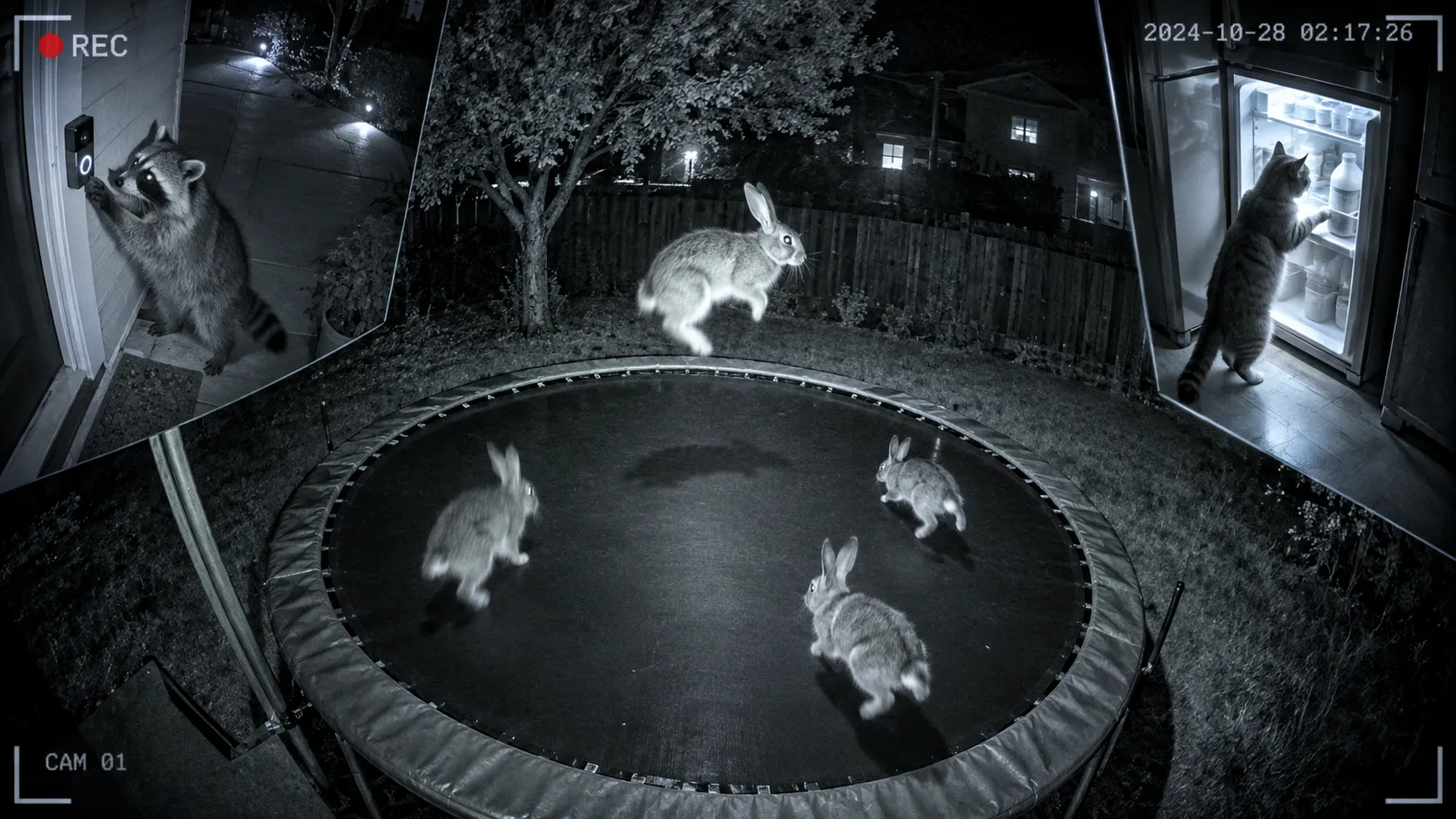
- A raccoon ringing a doorbell at 2:36 AM.
- Rabbits bouncing on a backyard trampoline.
- A cat opening a refrigerator at night.
- A bear investigating a delivery package.
- A deer staring into a trail camera.
- An owl landing directly in front of a night-vision camera.
The format works because it combines something ordinary with something unexpected. The camera looks boring and familiar, while the animal does something surprising enough to make viewers stop scrolling.
CCTV aesthetics also fit current AI video models unusually well. Grain, low light, compression artifacts, low frame rates, infrared lighting, and motion blur can hide small generation defects that would be obvious in polished cinematic footage.
The Core Prompt Formula
Use this structure:
Camera style + camera position + location + time + animal + action + reaction + lighting + image imperfections + audio + camera constraintsExample:
Fixed outdoor security camera mounted high in the corner of a suburban backyard at 3:14 AM. A raccoon slowly approaches a children's trampoline, climbs onto it, pauses, then begins bouncing awkwardly. Infrared night vision, monochrome image, wide fisheye lens, low frame rate, mild digital noise, compression artifacts, realistic animal movement and believable trampoline physics. Quiet nighttime ambience with distant insects. The camera remains completely fixed with no zoom, tracking, cuts or cinematic movement.The important detail is that the prompt starts with the recording device, not the animal.
The goal is not simply to generate an animal scene. The goal is to generate a scene that appears to have been captured by a security camera.
Step-by-Step Workflow
Step 1: Pick One Simple Event
A strong concept should usually fit in one sentence:
A raccoon rings a doorbell and waits like a delivery driver.Avoid stuffing too many events into one short clip.
For a 5-10 second video, a reliable structure is:
- Animal enters frame.
- Animal approaches an object.
- Unexpected action happens.
- Animal reacts or looks toward the camera.
- Clip ends.
Step 2: Choose the Camera Type
| Camera Style | Best For | Key Visual Cues |
|---|---|---|
| CCTV | Backyard, kitchen, garage | High corner angle, wide lens, low FPS |
| Doorbell Camera | Porch scenes | Fisheye lens, close subject, motion trigger |
| Night Vision | Strange nighttime behavior | Infrared monochrome, bright eyes, dark background |
| Trail Camera | Wildlife | Static forest framing, harsh IR light |
| Indoor Security Camera | Cats and dogs | Ceiling corner angle, wide room view |
The camera style should match the environment. A porch scene should feel like a doorbell camera, while a kitchen scene should feel like an indoor security camera.
Step 3: Build the Environment First
Instead of:
A cat steals chicken from a counter.Use:
Fixed indoor security camera mounted near the ceiling of a small residential kitchen at night. The refrigerator and kitchen counter are visible in the frame. A plate of roast chicken sits near the edge of the counter.Then add the cat and the action.
This gives the model a clearer spatial layout.
Step 4: Describe the Action in Sequence
Instead of:
A raccoon steals a package.Use:
A raccoon walks onto the porch, stops beside a cardboard package, sniffs it, grips one corner with its front paws, then slowly drags the package out of frame.Sequential verbs help the model understand the order of events.
Step 5: Add CCTV Imperfections
Useful terms include:
fixed security camerastatic camerawide-angle lensfisheye distortioninfrared night visionlow frame ratedigital sensor noisecompression artifactssubtle motion blurautomatic exposure adjustmentslight frame skipping
Do not overdo the damage. Modern home security cameras are often fairly clear.
Step 6: Generate Clean Footage First
Do not ask the model to create a perfect timestamp or camera interface.
Use this workflow:
AI video generation
    ↓
Clean CCTV-style footage
    ↓
Add timestamp and CAM ID
    ↓
Add subtle compression
    ↓
Add ambient audio
    ↓
Export for Shorts / TikTok / Reels
Changing digits are difficult for video models to keep consistent across frames, so post-production is more reliable.
Master AI CCTV Animal Prompt
A realistic fixed [CAMERA TYPE] recording from [CAMERA POSITION] overlooking [LOCATION] at [TIME].

A [ANIMAL] enters the frame from [DIRECTION]. It [FIRST ACTION], pauses naturally, then [MAIN UNEXPECTED ACTION]. Afterward, it briefly [REACTION] before leaving the frame.

The footage should look like authentic consumer security-camera video rather than a cinematic production: [LIGHTING STYLE], [LENS STYLE], low frame rate, mild digital sensor noise, subtle compression artifacts, realistic motion blur, imperfect exposure, natural animal anatomy and physically believable movement.

The camera never moves, pans, zooms, tracks, or changes angle. No cinematic lighting, no dramatic depth of field and no cuts.

Ambient audio: [SOUND DESCRIPTION].

Photorealistic, observational, accidental footage, mundane environment, believable scale and realistic physics.
Prompt 1: Raccoon Rings a Doorbell
Realistic smart doorbell camera footage recorded on a suburban front porch at 2:36 AM. Wide fisheye doorbell-camera perspective looking toward the porch steps and driveway.

A raccoon walks up the steps, approaches the front door, pauses beneath the doorbell, rises slightly onto its hind legs and presses the illuminated button with one paw. After hearing the chime, the raccoon freezes and stares directly into the camera.

Dim porch lighting, dark residential street in the background, slight fisheye distortion, mild compression, subtle sensor noise, realistic fur and physically accurate raccoon anatomy.

The camera remains completely fixed. No cinematic movement, no cuts and no dramatic lighting.

Audio: quiet nighttime ambience, distant insects, faint traffic and one realistic doorbell chime.
Prompt 2: Cat Opens the Refrigerator
Fixed indoor security-camera footage from the upper corner of a residential kitchen at 3:08 AM.

A house cat quietly walks into the kitchen, approaches the refrigerator and stands on its hind legs. The cat hooks one front paw around the slightly loose refrigerator door and pulls it open. Cold white light spills into the dark kitchen. The cat pauses, looks inside, then turns its head toward the camera.

Low-light consumer CCTV image, slight digital noise, moderate compression artifacts, subtle motion blur and realistic cat proportions.

The camera remains completely static with no zoom, tracking, cuts or cinematic composition.

Audio: refrigerator hum, quiet room tone and soft paw steps.
Prompt 3: Rabbits on a Trampoline
Fixed outdoor security-camera footage overlooking a suburban backyard at 3:21 AM. The camera is mounted high beneath the roofline and points toward a children's trampoline on the lawn.

Three wild rabbits enter the backyard. One rabbit hops onto the trampoline and a second follows. Their weight causes the trampoline surface to flex naturally. The rabbits make several small bounces while the third rabbit watches from the grass.

Infrared night vision, monochrome image, wide security-camera lens, low frame rate, mild grain, compressed CCTV quality, realistic rabbit anatomy and believable trampoline physics.

The camera remains absolutely fixed. No cuts, no cinematic movement and no artificial dramatic lighting.

Audio: quiet nighttime ambience, insects and soft trampoline springs.
Prompt 4: Bear Investigates a Package
Motion-activated porch security-camera footage at 4:42 AM. Static wide-angle camera mounted above the entrance of a rural home.

A medium-sized black bear walks onto the porch, notices a cardboard delivery box, approaches it cautiously and sniffs the top. The bear nudges the package with its nose, pushes it several inches across the porch and briefly looks toward the camera before walking away.

Dim porch lamp, deep darkness beyond the porch, slightly underexposed security footage, mild digital noise and realistic bear weight distribution.

The camera remains static with no zoom, pan, tracking or cuts.
Prompt 5: Owl in Night Vision
Infrared night-vision security-camera footage recorded from a fixed camera mounted beneath the roof of a rural shed at 1:53 AM.

The empty yard remains still for the first second. A large owl suddenly flies into frame and lands on a wooden railing close to the camera. The owl steadies itself, turns its head toward the lens and stares into the camera before blinking once.

Strong infrared eye reflection, monochrome night vision, bright foreground feathers, dark background, mild sensor noise, low frame rate and realistic wing physics.

The camera never moves. No cinematic zoom, tracking or slow motion.

Audio: faint wind, insects and wing beats during landing.
How to Use Your Own Pet Photo
Image-to-video is ideal when the viewer should recognize a specific cat or dog.
Recommended workflow:
Pet photo
    ↓
Prepare clean reference image
    ↓
Image-to-video generation
    ↓
CCTV styling
    ↓
Timestamp + overlay
    ↓
Ambient audio
    ↓
Vertical export
Use a reference image with:
- Clear fur markings.
- Minimal motion blur.
- Most or all of the body visible.
- A natural pose.
- Minimal obstruction.
- Good separation from the background.
Pet Image-to-Video Prompt
Preserve the exact identity, coat pattern, fur colors, facial markings, body proportions and size of the animal in the reference image.

Transform the scene into realistic fixed home-security-camera footage recorded in a backyard at night. The same pet walks into frame, notices a small trampoline, climbs onto it and makes two gentle bounces before looking toward the camera.

Infrared night vision, monochrome consumer CCTV quality, fixed high corner angle, wide lens, low frame rate, subtle digital noise, realistic anatomy and physically believable movement.

Do not change the pet's breed, markings, face, coat colors or body proportions. The camera remains completely static with no cuts or cinematic movement.
Negative Prompt and Constraint Ideas
If the model supports a negative prompt, use constraints such as:
No camera movement.
No cinematic depth of field.
No dramatic movie lighting.
No slow motion.
No morphing anatomy.
No extra limbs.
No duplicate animals unless specified.
No floating objects.
No impossible object penetration.
No generated text inside the scene.
No sudden location changes.
No cuts or transitions.
The most important instruction is often:
The security camera remains completely fixed for the entire clip.Add the CCTV Overlay After Generation
A simple overlay might include:
CAM 03
BACKYARD
03:17:48 AM
REC ●
Keep it subtle.
Useful choices include:
- Small monospaced text.
- Slightly reduced opacity.
- Timestamp in one corner.
- Camera label in another.
- Optional REC indicator.
Avoid giant fake CCTV graphics that cover the animal.
Best Aspect Ratio
For TikTok, Shorts and Reels, there are three practical options.
9:16 Native
Best for filling the phone screen, but slightly less authentic as traditional CCTV.
16:9 Cropped to Vertical
Keeps the security-camera feel but can cut off important action.
16:9 Footage Inside a 9:16 Canvas
Often the safest option. It preserves the CCTV framing while leaving room for a short social hook such as:
My security camera caught this at 3:17 AMHow Long Should the Video Be?
For one simple event, 5-10 seconds is usually enough.
A useful 8-second structure is:
0-2 sec: Animal enters
2-4 sec: Approaches object
4-7 sec: Unexpected action
7-8 sec: Reaction or look at camera
Short clips reduce the risk of anatomy drift, background changes and object inconsistency.
Common Mistakes
Making It Too Cinematic
Avoid terms such as cinematic, dramatic lighting, shallow depth of field and tracking shot.
The footage should look ordinary until something strange happens.
Asking for Too Many Actions
One unusual action is usually stronger than a complicated story.
Generating the Timestamp Inside the Video
Changing text often mutates between frames. Add timestamps afterward.
Ignoring Physics
Useful phrases include:
the trampoline surface bends under its weightthe box slides naturally across the floorthe refrigerator door rotates on its hingerealistic weight distributionthe animal's paws remain in contact with the ground
Making the Animal Too Human
A useful rule is:
Start with plausible animal behavior and add one surprising human-like action.
A Scalable Content Formula
One core action can generate many videos.
Example:
Animal presses a doorbell.Then change only one variable at a time.
Animal
- Raccoon
- Bear
- Cat
- Fox
- Deer
Location
- Suburban porch
- Cabin
- Apartment hallway
- Farmhouse
Time
- Afternoon
- Sunset
- Midnight
- Heavy rain
- Snowy night
Reaction
- Looks into camera
- Runs away
- Waits at the door
- Leaves an object
- Presses the button again
This makes it possible to produce many distinct concepts without making each individual prompt more complicated.
Practical Production Pipeline
1. Generate concept
2. Select animal
3. Select camera type
4. Build structured prompt
5. Generate 5-10 second video
6. Reject clips with anatomy or physics failures
7. Add timestamp and camera overlay
8. Add or clean ambient sound
9. Frame for 9:16
10. Add social caption
11. Export
12. Add required AI disclosure before publishing
The generation itself is only one part of the workflow. Selection and post-production are equally important.
Prompt Checklist
Before generating, confirm that the prompt explains:
- What camera recorded the scene?
- Where is the camera mounted?
- What location is visible?
- What time is it?
- Which animal appears?
- Where does it enter from?
- What does it do first?
- What is the unexpected action?
- How does it react afterward?
- What lighting is used?
- What imperfections make the camera believable?
- What physical interaction must remain realistic?
- What ambient sounds should be heard?
- Has camera movement been explicitly prohibited?
FAQ
What is the best prompt for an AI CCTV animal video?
The strongest prompts specify the camera type and position before describing the animal. Include the environment, time, sequential action, realistic physics, image imperfections, ambient audio and a clear instruction that the camera remain static.
Should timestamps be generated by the AI video model?
Usually not. Generate clean footage first and add timestamps during post-production.
Can a real pet photo be used?
Yes. Image-to-video is especially useful when preserving a real pet's identity. Explicitly tell the model to preserve coat pattern, facial markings, size and body proportions.
Why does night vision work so well?
Infrared footage naturally removes color information and introduces noise, extreme contrast and lower detail, which can make small generation defects less noticeable.
Should the security camera move?
Normally, no. A fixed viewpoint is one of the strongest visual signals that the footage came from CCTV, a doorbell camera or a trail camera.
How long should the clip be?
For a single event, approximately 5-10 seconds is a practical target.
Conclusion
AI CCTV animal videos work because they combine an ordinary recording format with an extraordinary event.
The best results come from disciplined scene construction rather than excessively complex prompts: a fixed camera, familiar location, one animal, one clear action, believable physics, imperfect security-camera quality and a short payoff.
Start with one of the prompts above, replace the animal and action, keep the camera static, generate several short variations and add timestamps or camera overlays only after generation.
For personalized content, use a clear pet photo as the image-to-video reference. For scalable production, turn the format into selectable variables such as animal + camera + location + action + time of day.
The idea can expand far beyond trampoline videos. Doorbell cameras, trail cams, kitchens, convenience stores, garages, farms, porches and backyards all provide recognizable visual languages for the next viral Animals Caught on Camera clip.
Continue Reading
More articles connected to the same themes, protocols, and tools.

EveryGen AI Video Generator Review 2026: Models, Pricing, Studio Workflow & the Everygen.ai Confusion

Migos AI Video Generator: How to Make the Viral Hotel Lobby AI Trend in 2026
Devara AI Video Explained: The Chuttamalle Deepfake Controversy, AI Tech, and What’s Actually Real
Referenced Tools
Browse entries that are adjacent to the topics covered in this article.